Get Started with Azure AD/Entra ID Sync with Qualys Administration Platform
To sync your Microsoft Azure Ad users with Qualys Administration application, you must use the Azure Ad Sync connector. Before you begin, understand what are Identity providers and the details of Azure AD sync.
Overview of Identity Providers
In enterprise environments, users are managed through Identity Providers (IdP). There are various Identity Providers (IdP) that creates, maintains, and manages user identity information and provides authentication services to applications. These IdPs act as a trusted third party, that allows users to log in to multiple service providers or applications using a single set of credentials (SSO).
Some of the common Identity providers include Okta, Google, Microsoft Active Directory.
Overview of Azure AD sync
Your organization's Microsoft Azure Active Directory (AD) Identity Provider synchronization with the Qualys Platform streamlines and automates the user management and ensures consistent access controls as changes occur in the directory. It syncs user and their associated roles from Azure AD to Qualys Administration application reducing manual effort.
Key Benefits
- Automated User Lifecycle Management: Automatically create, update, and deactivate Qualys users based on Azure AD data, eliminating manual administration.
- Accurate and Dynamic Role Assignment: Role mappings between Azure AD Groups and Qualys roles ensure users are assigned appropriate access levels aligned with their responsibilities.
- Reduced Administrative Overhead: Automated synchronization of users and roles reduces operational effort, saves time, and reduces the risk of human errors in access management.
- Enhanced Security and Compliance: Consistent and synchronized user data between Azure AD and Qualys help prevent unauthorized access, improve audit readiness, and enforce organizational security policies. Synchronization occurs automatically at configured intervals.
Azure AD Sync and SSO User Authentication Architecture
The following architecture illustrates how user authentication and lifecycle management are handled using Azure Active Directory (Azure AD) with SSO integration in the Qualys platform.
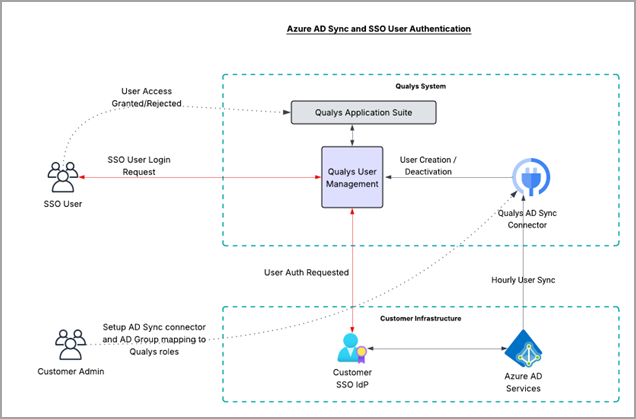
Key Components and Flow:
- SSO User Login:
- The user initiates login via Single Sign-On (SSO).
- The authentication request is routed to the Customer SSO Identity Provider (IdP).
- Authentication Validation:
- The Customer IdP validates the user credentials against Azure AD Services.
- Upon successful authentication, a response is sent back to the Qualys User Management system.
- Access Control:
- Qualys verifies the user and grants or rejects access to the Qualys Application based on user status and role mappings.
- User Provisioning via AD Sync:
- The Qualys AD Sync Connector integrates with Azure AD to synchronize user data.
- User creation, updates, and deactivation are managed automatically through periodic (hourly) synchronization.
- Role Mapping:
- Customer administrators configure AD group-to-Qualys role mappings.
- These mappings ensure users receive appropriate access levels based on their Azure AD group membership.
Quick Steps
Qualys Administration Configuration
Post AD Sync User Configuration