Peer to Peer Patch Distribution
What is P2P
Peer-to-Peer (P2P) patch distribution is a decentralized, distributed file-sharing mechanism for distributing patches. P2P uses content-addressing to locate and retrieve files based on their unique hashes.
The peer-to-peer sharing enables Cloud Agent hosts to share the required patch artifacts among themselves. This reduces reliance on the Content Delivery Network (CDN) to distributing files across all host assets.
HTTP and FTP use the location-based URLs to retrieve the system files. This method introduces latency and network traffic. The P2P uses a distributed file-sharing system. This enhances fault tolerance by providing continuous access to the files even if some access nodes are unavailable.
This feature has limited availability. Contact the Technical Account Manager or Qualys Support to activate this feature. In the current implementation, the feature is planned only for Windows assets. It will be available in Cloud Agent user interface once the Windows Cloud Agent 6.5 is released.
Benefits of P2P
The P2P patch distribution offers the following benefits:
- Bandwidth Optimization: This method employs peer-to-peer sharing for patch artifact distribution. This prevents duplicate artifact downloads from the CDN and reduces bandwidth consumption.
- Optimized File Downloads: The patch artifact files are split into multiple chunks, enabling parallel downloads from multiple peers. The parallel patch artifact download increases the download speed.
- Secured Data Retrieval: Every artifact file and chunk is identified by a unique cryptographic Content Identifier (CID). This ensures that only the untampered content is downloaded and shared.
- Decentralized Distribution: This feature is not dependent on a single server for patch artifact distribution. This reduces the download failure as the host assets can download the required patches from multiple peers available in the network.
- Automatic Peer Discovery: Peer host assets automatically discover each other in the same Local Area Network (LAN). This increase facilitates faster data sharing and improves efficiency.
- Prevent Duplicate Downloads: Identical files and chunks are downloaded only once for the network. This prevents duplicate file downloads and optimizes the memory usage required to store the downloaded artifacts.
How P2P Works
The following is the high-level workflow of P2P:
- Activate the P2P for Cloud Agent.
- It splits the patch artifacts into smaller chunks and assigns them a unique CID.
- P2P downloads patch artifacts in chunks and marks them available for sharing with other peers.
- When the peers call for an already downloaded artifact, the available artifact is shared among the peers in the same LAN.
How to Enable P2P
The following are the steps to enable P2P for your assets:
- In the Cloud Agent user interface, navigate to Configuration > Configuration Profiles tab.
- Create a new profile or edit an existing profile.
- In the Configuration Profile workflow, go to the Peer to Peer (P2P) section.
- Switch the Peer to Peer toggle to ON.
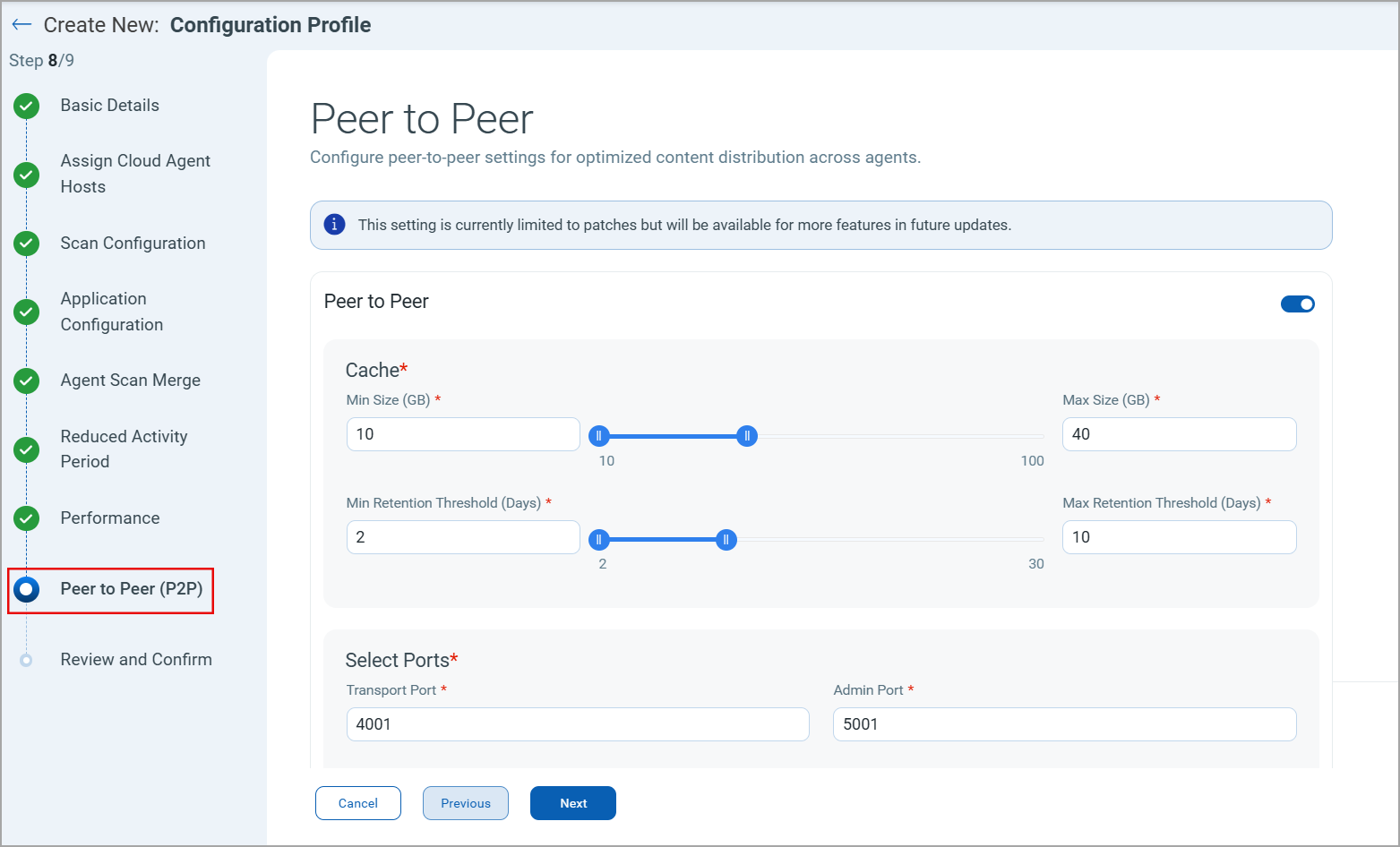
- Configure the following settings for peer-to-peer patch distribution:
Cache: Specify the parameters for storing the downloaded patch artifacts. The minimum and maximum size defines the space available for downloaded patches. The Retention Threshold defines the number of days the patches are stored.
Select Ports: You need to specify the two ports for downloading and distributing patches. The Admin Port and Transport port.