Prevent Scans During Group Policy Execution
You can configure Cloud Agent to prevent Vulnerability Management (VM) and Policy Audit (PA) scans during group policy execution. To facilitate this new feature, we have updated Cloud Agent to monitor group policy events.
This helps verify the group policy execution status and adds the configured scan delay to avoid scanning during group policy execution. This ensures that only the latest relevant data is collected and prevents the collection of incorrect or outdated data.
This feature has limited availability. Contact the Technical Account Manager or Qualys Support to activate this feature. In the current implementation, the feature is planned only for Windows assets. It will be available in Cloud Agent user interface once the Windows Cloud Agent 6.6 is released.
How to Prevent Scans During Group Policy Execution
To prevent scans during group policy execution, you must add a scan delay. The following are the steps to enable this option:
- In the Cloud Agent user interface, navigate to Configuration > Configuration Profile tab. To prevent scanning during group policy execution, you can configure a scan either while creating a new configuration profile or while editing an existing profile.
- Click New Profile to specify scan delay for a new configuration profile.
- In the Scan Configuration Window, switch the Avoid Scanning During Group Policy Updates toggle to ON. It displays the option to specify the scan delay for VM or PA scans.
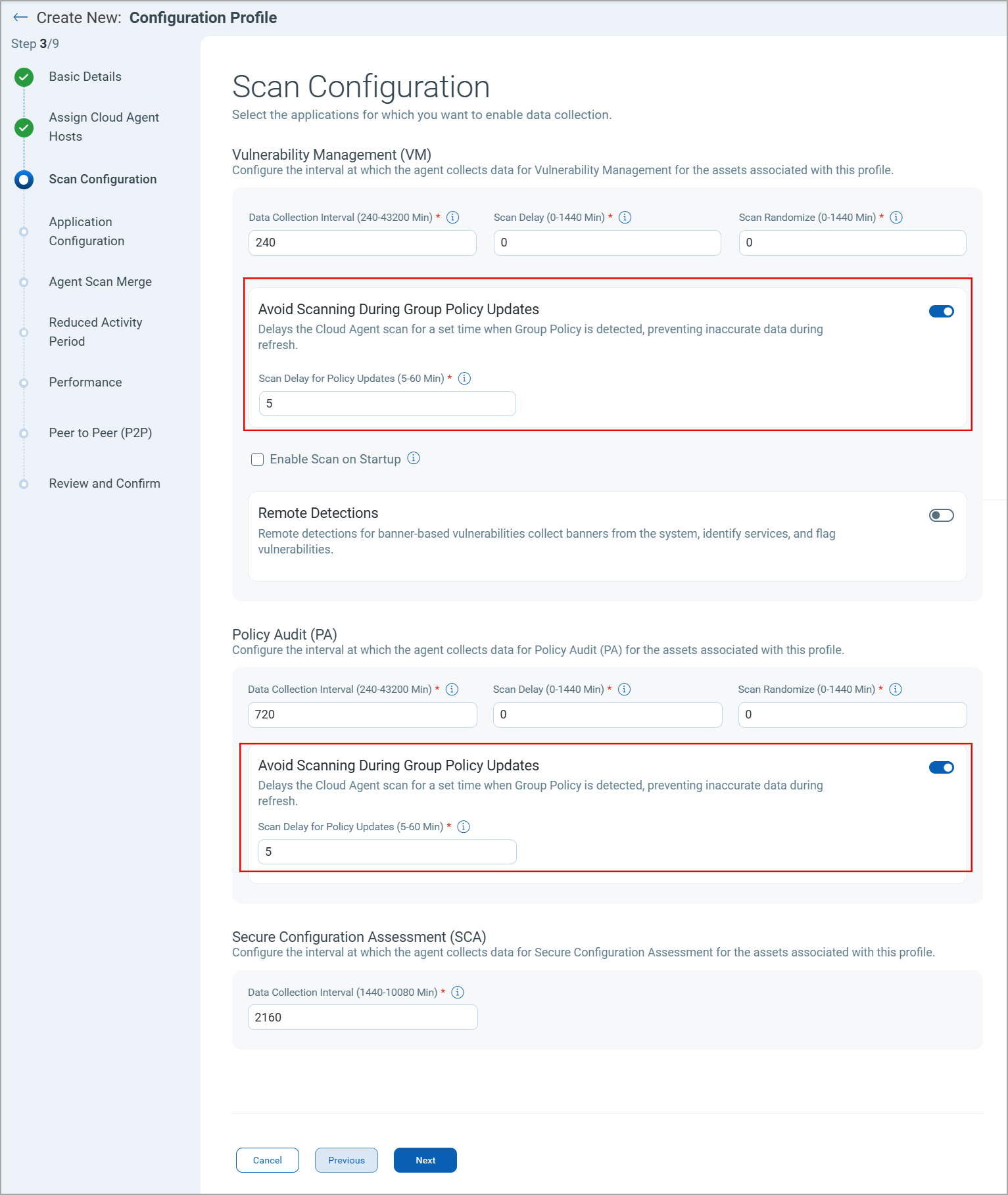
- In the Scan Delay for Policy Update field, specify the time in minutes. If Cloud Agent detects a group policy event before launching the VM or PA scan, the scheduled scan is delayed by the specified time.
By default, Cloud Agent does not add any scan delay to scheduled VM and PA scans when a group policy event is detected.
What is Total Scan Delay for Group Policy Execution
When you configure scan delay for normal VM or PA scans and group policy execution, the scheduled scan is delayed by the cumulative time delay. For example, you specified a time delay of 60 minutes for VM scans and 20 minutes for group policy events, then the VM scan is delayed by 80 minutes if Cloud Agent detects a group policy event before executing the scan.
If Cloud Agent does not detect any group policy event before launching the scan, the scan is delayed by the time specified for normal scans. In our example, the scan is delayed by 60 minutes if no group policy event is detected.