Cloud Agent Health Check Tool
The Cloud Agent Local Health Check tool assesses the Health of the Qualys Agent on the specific host. The tool is available with the Cloud Agent setup on macOS platform. The tool runs independently and requires no parameters.
The QualysAgentHealthCheck.exe is located in the /Applications/QualysCloudAgent.app/Contents/MacOS/ directory.
Command to run Cloud Agent Health Check Tool
/Applications/QualysCloudAgent.app/Contents/MacOS/qualys-healthcheckYou can also use the optional runPatch parameter in Cloud Agent Health check command to run the patch management checks. Refer to Patch Management Checks for Cloud Agent Health Status to learn more.
The Cloud Agent Health Check tool is available with the Cloud Agent for macOS Intel 6.4 and macOS Apple Silicon 6.5.
Agent Health Status Evaluation
The tool assesses the overall health status of the Cloud Agent based on installation status, communication health, and application functionality. The applications assessed for health status are Vulnerability Management (VM), Policy Compliance (PC), Security Configuration Assessment (SCA), and Patch Management (PM).
- Agent communication health is evaluated based on proxy settings and connection to Qualys Server endpoints.
- The health of the scan-based applications is evaluated based on the scan interval, upload interval, and last scan/last upload time.
- For Patch Management health, the tool initiates the patch download from specified URLs and verifies the file hash. If a patch fails to download, patch health is flagged as bad; however, if the patch is successfully downloaded but fails verification, it does not impact Patch Management health. Instead, an entry is recorded in the error section of the JSON to indicate the failed patch verification.
Agent Health Check Tool Behavior
- To evaluate patch management health, a binary is downloaded from the patch vendor’s website to verify connectivity.
- Running the Cloud Agent Health Check Tool creates a directory to store the results of the health check. The directory location depends on the user who runs the tool—for example, if executed by an administrator, it may be created at:
/Applications/QualysCloudAgent.app/Contents/MacOS/
Agent Health Status Report
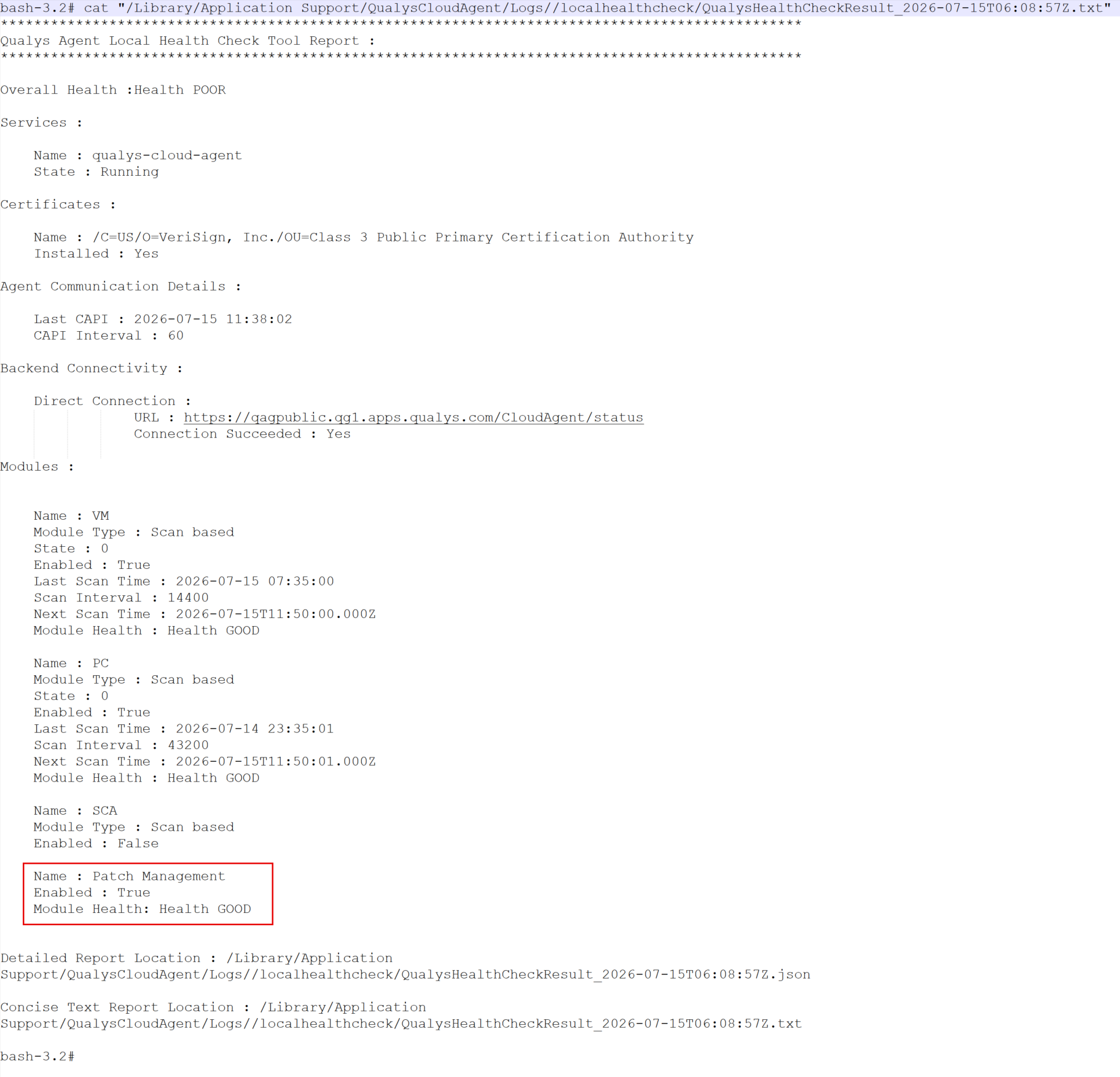
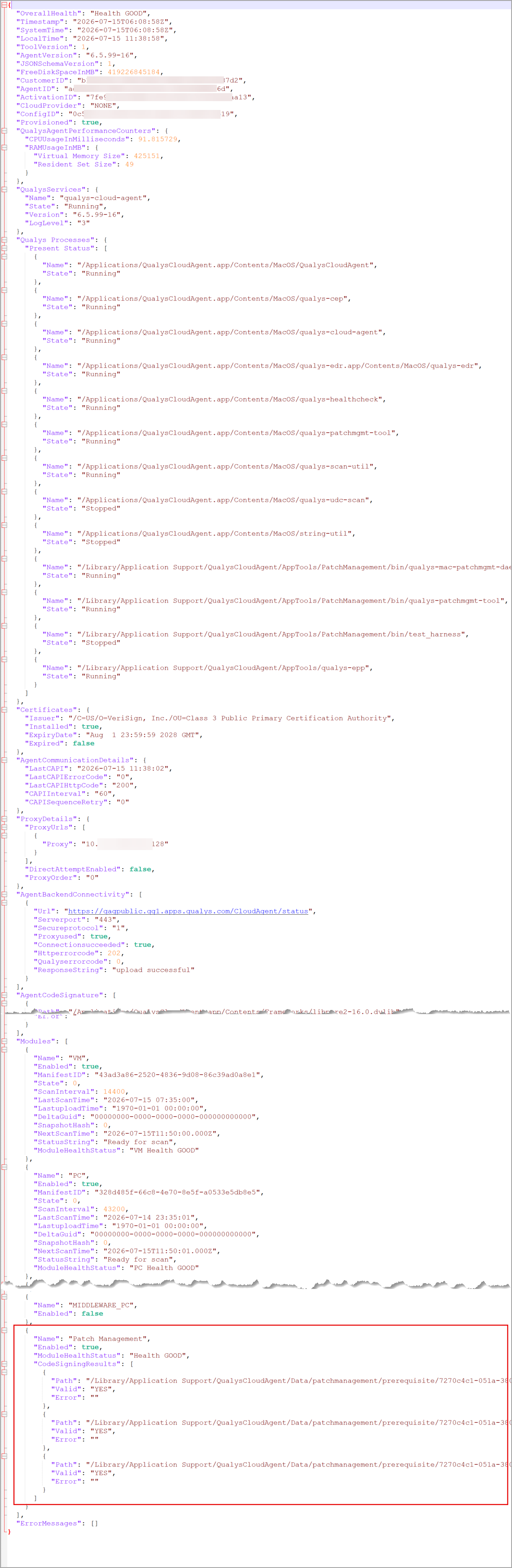
The Agent Health Status tool provides a console output, a user-friendly text summary, and a detailed JSON report. The text report and the JSON report are generated in the HealthCheck directory, located in the same directory where the tool is executed.
Health Status and Descriptions
The following table presents the health status and description.
| Cloud Agent Health Status | Description |
|---|---|
| Good | Agent Health is Good. |
| Bad | The Agent is facing some communication issues, the Agent Service is down, or none of the applications are functioning properly. |
| Poor | Some applications of the Qualys Agent are functioning correctly. |
| Not Installed | Qualys Agent is not installed on the asset. |
| Not Provisioned | Qualys Agent is installed but not provisioned. |
| Tool Error | The Agent Health Status tool encountered a critical error while determining Agent Health. |
Example of text report:
Example of JSON report:
Patch Management Checks for Cloud Agent Health Status
Use the following command to evaluate the Patch Management (PM) checks for Cloud Agent. Provide the runPatch parameter in the Cloud Agent Health Check Tool execution command.
/Applications/QualysCloudAgent.app/Contents/MacOS/qualys-healthcheck runPatchWith this command, the following PM checks are performed on Cloud Agents:
| PM Check | Description |
|---|---|
| Installed Query Check | Check installed packages on the system |
| Available Query Check | Check available packages on the system |
| History Query Check | Detailed information on Cloud Agent's patch management activities. |
| Update Query Check | Check available packages on a machine with only updated information. |
| Repolist Query Check | Check all the repositories configured on the system, along with the number of packages available in each repository. |
| Repolist Expiry Check | Check the repositories with verbose details containing repository names and expiration status. |
Reflect Network Connectivity Failure in Cloud Agent Health Check Report
The Cloud Agent Health Check tool now detects Cloud Agent connectivity with the Qualys Cloud Platform — direct connectivity and connectivity using a proxy.
The following table presents possible connectivity scenarios and corresponding Cloud Agent health status.
| Cloud Agent Health Status | Description |
|---|---|
| GOOD | The direct connection attempt to the Cloud Platform is enabled, and both proxy and direct connection (without proxy) with the Cloud Platform are successful. |
| BAD | The direct connection attempt to Cloud Platform is enabled, and both the proxy and the direct connection fail. |
Reduced Proxy Connection Attempts for Cloud Agent Health Check
With this release, the Cloud Agent now makes a single attempt to connect to each configured proxy server while launching the Cloud Agent Health Check Tool, as opposed to the previous three attempts. This decrease in retry attempts enables the Cloud Agent to swiftly move to the next configured proxy, thereby ensuring a faster connection to the Qualys Cloud Platform.