On-demand Scan
You can launch on-demand scan in addition to the defined interval scans. You can launch the scan immediately without waiting for the next interval scan. By default, you can launch 15000 on-demand scans per day.
Users with the Launch On-Demand Scan permission can run the on-demand scans.
Steps to run on-demand scan
- From the application selector, select Cloud Agent.
- Go to Agent Management > Agents.
- Select the Cloud Agent and in the Quick Actions menu click Agent Operations > On Demand Scan option.
- In the On Demand Scan window, provide the following details.
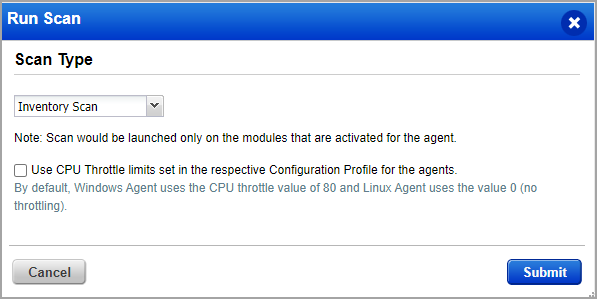
- Select preferred Scan Type from available options. Currently, the following scans can be launched through the Cloud Agent application:
- Inventory scan
- Vulnerability scan
- Policy Audit scan
- UDC scan
- SCA scan
- Deep Scan
- Use Configured CPU Throttle Limit: Select this checkbox to specify the CPU limit for on-demand scan, same as configured in the respective configuration profile.
- Email Notification: Enable this option and enter Email IDs to receive on-demand scan alerts.
By default, Cloud Agent for Windows uses a throttle value of 80. Cloud Agent for Linux uses a value of 0 (no throttling). If you want to use the values in the configuration profile, select the Use CPU Throttle limits set in the respective Configuration Profile for agents check box.
- Select preferred Scan Type from available options. Currently, the following scans can be launched through the Cloud Agent application:
- Click Submit to send on-demand scan request.
- To track scan progress, navigate to Agent Management > Requests tab. The Requests tab currently tracks the status only for the Vulnerability on-demand scans. To know more about Requests tab, refer to Track Requests in Cloud Agent.
This feature is supported only on Windows, Linux, and Linux_Ubuntu platforms and will be available only when the Windows and Linux agent binaries with on-demand scan support will be available. For the supported platform and Windows agent version, refer to Features by Agent Version section in the Cloud Agent Platform Availability Matrix.
Additional Resource
You can check out the tutorial for On-demand Scan.