Peer to Peer Distribution
What is Peer-to-Peer Distribution
Peer-to-Peer patch distribution is a decentralized, distributed file-sharing mechanism for distributing patches. Peer-to-Peer Distribution uses content-addressing to locate and retrieve files based on their unique hashes.
The peer-to-peer sharing enables Cloud Agent hosts to share the required patch artifacts among themselves. This reduces reliance on the Content Delivery Network (CDN) to distributing files across all host assets.
HTTP and FTP use the location-based URLs to retrieve the system files. This method introduces latency and network traffic. The Peer-to-Peer Distribution uses a distributed file-sharing system. This enhances fault tolerance by providing continuous access to the files even if some access nodes are unavailable.
This feature has limited availability. Contact the Technical Account Manager or Qualys Support to activate this feature. In the current implementation, the feature is planned only for Windows assets. It will be available in Cloud Agent user interface once the Windows Cloud Agent 6.5 is released.
Benefits of Peer-to-Peer Distribution
The Peer-to-Peer Distribution offers the following benefits:
- Bandwidth Optimization: This method employs peer-to-peer sharing for patch artifact distribution. This prevents duplicate artifact downloads from the CDN and reduces bandwidth consumption.
- Optimized File Downloads: The patch artifact files are split into multiple chunks, enabling parallel downloads from multiple peers. The parallel patch artifact download increases the download speed.
- Secured Data Retrieval: Every artifact file and chunk is identified by a unique cryptographic Content Identifier (CID). This ensures that only the untampered content is downloaded and shared.
- Decentralized Distribution: This feature is not dependent on a single server for patch artifact distribution. This reduces the download failure as the host assets can download the required patches from multiple peers available in the network.
- Automatic Peer Discovery: Peer host assets automatically discover each other in the same Local Area Network (LAN). This increase facilitates faster data sharing and improves efficiency.
- Prevent Duplicate Downloads: Identical files and chunks are downloaded only once for the network. This prevents duplicate file downloads and optimizes the memory usage required to store the downloaded artifacts.
How Peer-to-Peer Distribution Works
The following is the high-level workflow of Peer-to-Peer Distribution:
- Activate the Peer-to-Peer Distribution for Cloud Agent.
- It splits the patch artifacts into smaller chunks and assigns them a unique CID.
- Peer-to-Peer Distribution downloads patch artifacts in chunks and marks them available for sharing with other peers.
- When the peers call for an already downloaded artifact, the available artifact is shared among the peers in the same LAN.
How to Enable Peer-to-Peer Distribution
The following are the steps to enable Peer-to-Peer Distribution for your assets:
- In the Cloud Agent user interface, navigate to Configuration > Configuration Profiles tab.
- Create a new profile or edit an existing profile.
- In the Configuration Profile workflow, go to the Peer-to-Peer Distribution section.
- Enable the Enable Peer to Peer Distribution toggle.
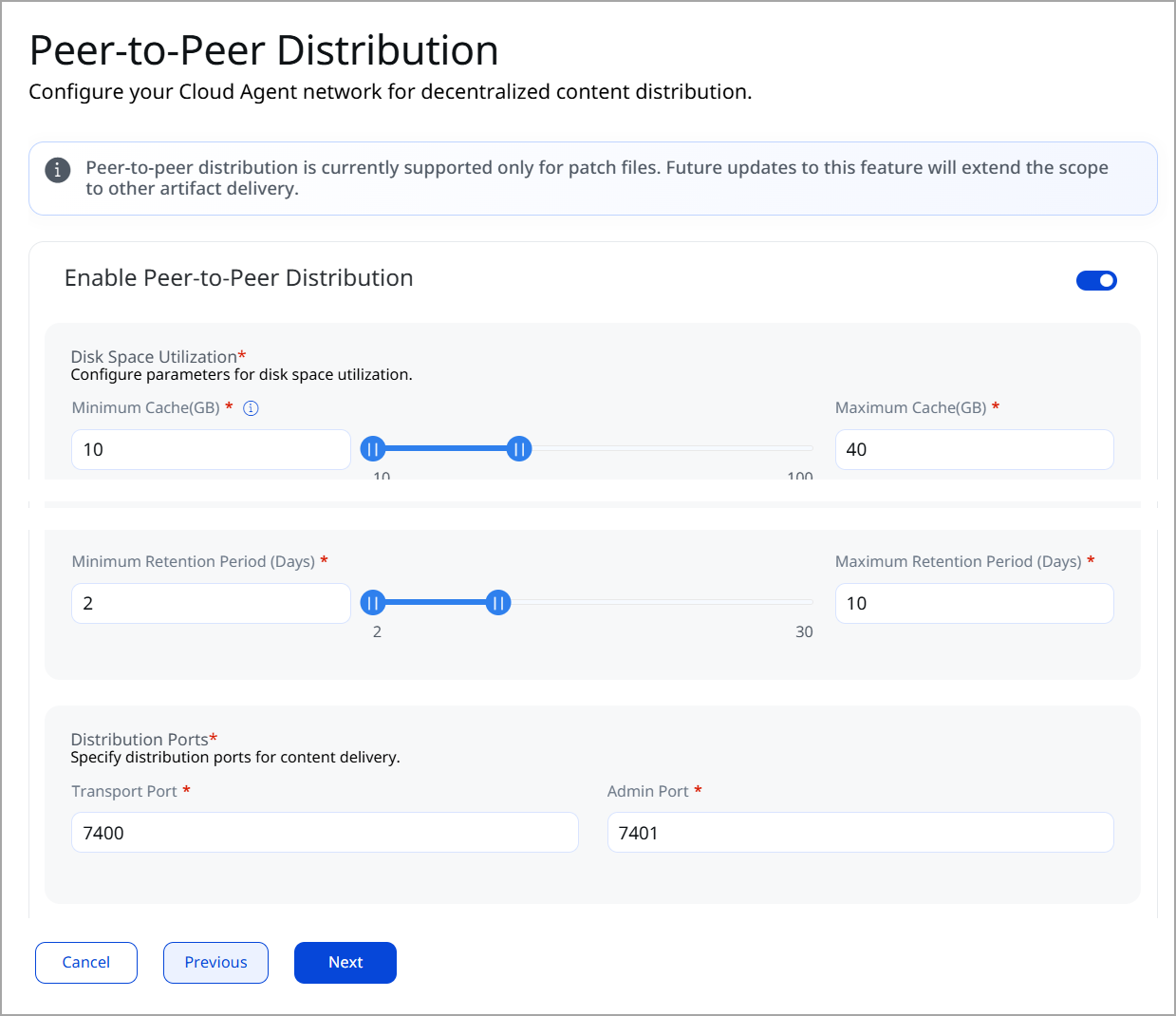
- Configure the following settings for peer-to-peer patch distribution:
Cache: Specify the parameters for storing the downloaded patch artifacts. The minimum and maximum sizes define the space available for downloaded patches. The Retention Threshold specifies the number of days for which patches are stored.
Cache Range: 10-100 GB
Time Range: 2-30 Days
minCacheSizeGB: Specify the minimum space required on C Drive for Peer-to-Peer Distribution cache operations. Peer-to-Peer Distribution caches patch artifacts only if the available disk space is equal to or greater than the specified value.
Default value: 10 GB
maxCacheSizeGB: Specify the maximum space on C Drive for Peer-to-Peer Distribution cache operations. If the Peer-to-Peer Distribution cache is more than the specified value, Cloud Agent deletes the oldest files to store the new files.
Default value: 40 GB
minRetentionDays: Specify the minimum time in days to retain the cache file. The cache files are cleaned up after this time if no disk space is available.
Default value: 2 Days
maxRetentionDays: Specify the maximum number of days to retain the cache file. The cache file is automatically deleted when the specified time threshold is exceeded.
Default value: 10 Days
Select Ports: You need to specify the two ports for downloading and distributing patches. The Admin Port and Transport port.
transportPort: This port is used for content distribution among the peers. This port must be accessible to all the peers for proper content distribution.
Default Transport Port: 7400
adminPort: This port is used for local administrative and control operations. This port needs no external access and is exclusively used only for peer-to-peer distribution.
Default Admin Port: 7401