Qualys Cloud Agent Application Release 2.6
February 03, 2026
With this release of Cloud Agent Application, we are introducing the following new features and enhancements.
Enhanced Manifest Version Control Profile
We have updated the Manifest Version Control (MVC) profile to support the different Qualys application manifests. Earlier, you could only use the Vulnerability Management manifests in the MVC profiles.
The key benefit of manifest version control is to specify the manifest version being used on Cloud Agent host. By controlling the manifest version, you can verify the new manifests in test environment. After successfully verifying new manifests, you can use them on critical assets.
We have added the manifest version control support to the following Qualys applications:
- Policy Audit/Policy Compliance (PA/PC)
- Secure Configuration Assessment (SCA)
- User Defined Controls (PC UDC)
- Policy Audit for Middleware
- Inventory (CyberSecurity Asset Management and Global AssetView)
- Auto Discovery
Adding new applications to manifest version control has enhanced the scope of this feature. This will facilitate the proper analysis of newly released manifests and the selection of the most suitable manifest to use on critical assets.
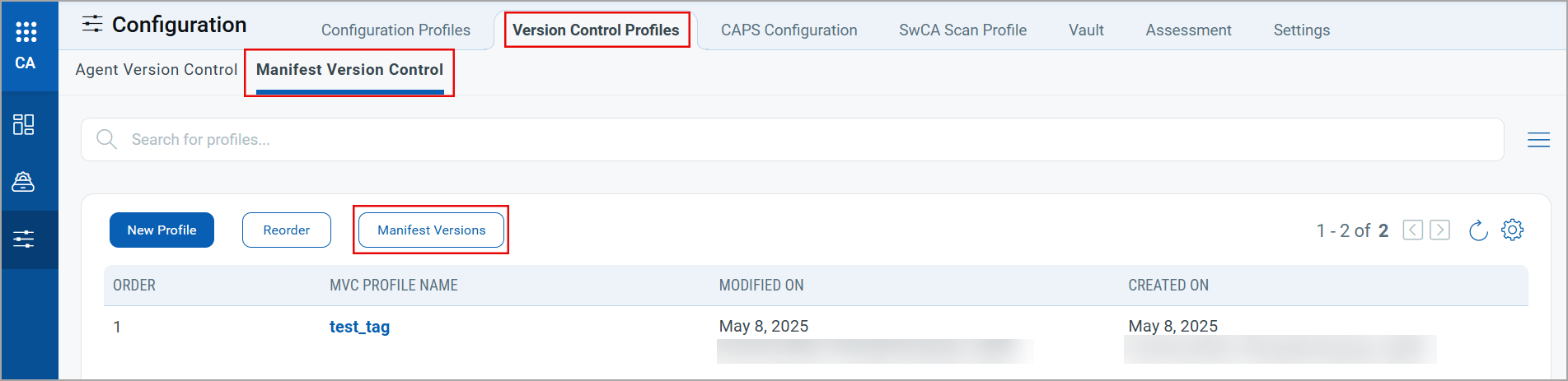
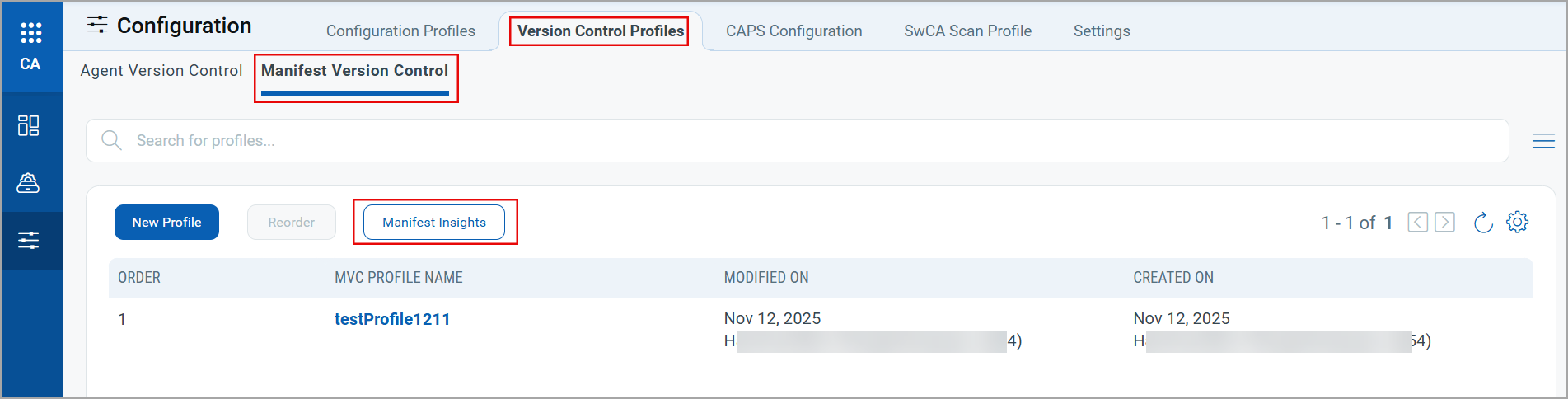
We have also updated the Manifest Versions option to Manifest Insights. The manifest insights display the manifest version details, including versions, delta, QID, and change log.
| Existing Manifest Details Option | New Manifest Details Option |
|---|---|
 |
 |
Benefits for the User
- Provides controlled, predictable updates across multiple manifest types, not just vulnerability data.
- Reduces risk from untested changes affecting policy audit results, inventory classification, or compliance findings.
- Improves consistency of results across environments and supports audit and change-control requirements.
Impact on the User Environment
- Fewer unexpected changes to scan results, asset inventory, or compliance posture.
- Enables staged rollout and rapid rollback, limiting the impact if issues occur.
- Aligns Qualys updates with existing operational and governance processes.
Use Cases
- Staging new policy audit or compliance checks before production rollout.
- Preventing sudden changes in asset inventory or classification.
- Canary deployments of new discovery or assessment logic in sensitive or regulated environments.
- Supporting formal change management and audit documentation.
New Search Tokens
We are introducing the following new token for the Activation Keys tab in Cloud Agent application.
| Token Name | Description |
|---|---|
| qualys.agent.activationKey.uuid | Use this search token to find activation keys with Cloud Agent UUID.
Syntax: Example: Search for an activation key with the given UUID. |
Updated QQL Tokens
To standardize the use of search tokens across Qualys platforms, we have updated the following tokens for the activation key.
| Updated Token Name | Existing Token Name | Description |
|---|---|---|
| qualys.agent.activationKey.id | activationKey.id | Use the numeric values to search the activation keys based on their IDs. You can get the activation key ID using the Search Activation Key API ( /qps/rest/1.0/search/ca/ agentactkey/). Syntax: qualys.agent.activationKey.id:<activation_key_id>Examples: Search activation key that matches the specified activation key ID. qualys.agent.activationKey.id:123456789
|
| qualys.agent.activationKey.title | activationKey.title | Use the text values to search the activation keys based on their title. Syntax: qualys.agent.activationKey.title:<Key_Title>Examples: Search activation key that matches the specified title. qualys.agent.activationKey.title:test_title_123
|
| qualys.agent.activationKey.type | activationKey.type | Select the key type to search for unlimited and limited activation keys. Valid values: COUNT_LIMITED, TIME_LIMITED, COUNT_TIME_LIMITED, UNLIMITED. Syntax: qualys.agent.activationKey.type:<Key_Type>Examples Search the time-limited activation key. qualys.agent.activationKey.type:TIME_LIMITED
|
| qualys.agent.activationKey.status | activationKey.status | Select the key status to search the activation keys based on their status. Valid values: ACTIVE, INACTIVE. Syntax- qualys.agent.activationKey.status:<Key_Status>Examples: Search all the activation keys that have the ACTIVE status. qualys.agent.activationKey.status:ACTIVE
|
| qualys.agent.activationKey.isDisabled | activationKey.isDisabled | Select a Boolean value, true | false, to search the disabled activation keys. Syntax: qualys.agent.activationKey.isDisabled:true|falseExamples: Search all the disabled activation keys. qualys.agent.activationKey.isDisabled:true
|
| qualys.agent.activationKey.purchasedDate | activationKey.purchasedDate | Select a value from the available options to search the activation keys based on purchase dates. Valid values: Last 7 days, Last 15 days, Last 30 days. Syntax: qualys.agent.activationKey.purchasedDate:<Purchase_Date>Examples: Search the activation keys purchased in the last 15 days. qualys.agent.activationKey.purchasedDate:Last 15 days
|
| qualys.agent.activationKey.expiryDate | activationKey.expiryDate | Select a value from the available options to search activation keys based on expiry dates. Valid values: Last 7 days, Last 15 days, Last 30 days, Last 60 days. Syntax: qualys.agent.activationKey.expiryDate:<Expiry_Date>Examples: Search activation keys expired in the last 15 days. qualys.agent.activationKey.expiryDate:Last 15 days
|
Issues Addressed
The following new and important issues are fixed in this release.
| Component/Category | Description |
|---|---|
| Agent Version Control | The Agent Version Control Profile displayed incorrect Cloud Agent versions after changing the platform type. We fixed this issue by implementing a solution to display the Cloud Agent versions specific to the selected platform. |
| Application Configuration | The Endpoint Detection and Response (EDR) with an expired license was not getting deactivated for Cloud Agents. We fixed this issue with suitable code changes to deactivate the EDR application if its license has expired. |
Known Issues, Limitations, and Workarounds
There are no known issues for this release.