Custom Assessment and Remediation Release 2.8
February 09, 2026
Improved Filtering of Asset Jobs
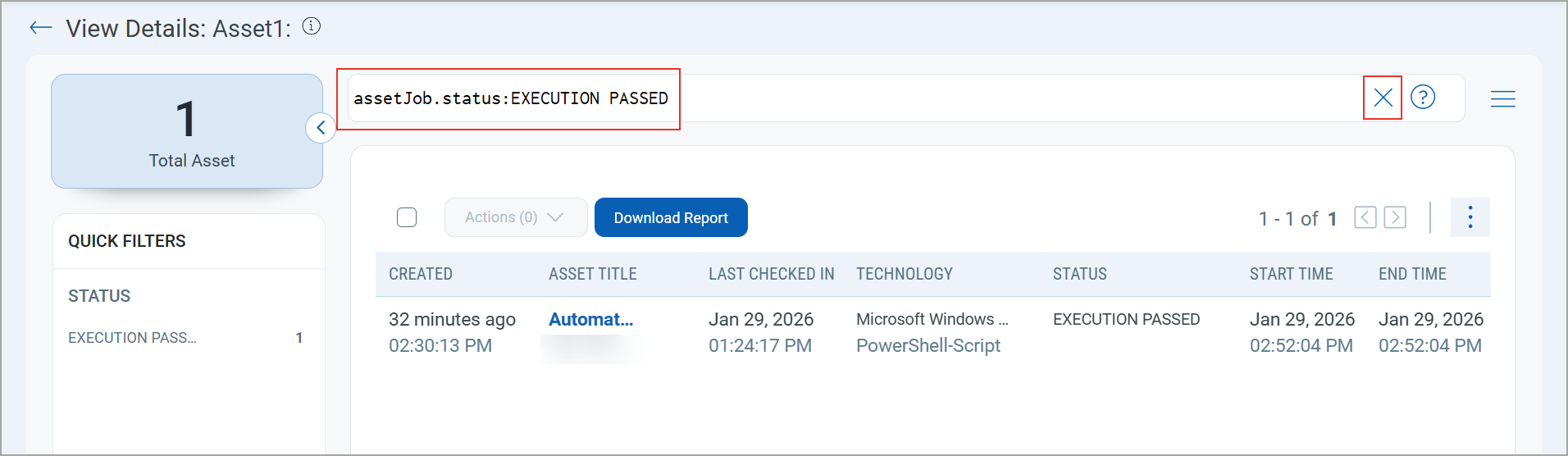
The Execution Passed asset jobs are now displayed by default on the job's View Details page. This helps you to quickly review successful asset jobs without manually applying filters.
This improvement applies to both Scripts and Software Package jobs. Select a job to open the View Details page, where successful asset jobs are automatically filtered by the following query:
assetJob.status:EXECUTION PASSED |
You can click  on the search bar to remove the query and view all asset jobs.
Updated QQL Tokens
The following QQL token names are updated to align with the Token Standardization introduced in Custom Assessment and Remediation Release 2.6.1:
| Old Token Name | New Token name |
|---|---|
| agent.uuid | qualys.agent.uuid |
| agent.platform | qualys.agent.platform |
| asset.id | compute.id |
| asset.agentId | compute.agentId |
| asset.name | compute.name |
| asset.address | compute.address |
| asset.interface.address | compute.interface.address |
New QQL Tokens
The following table provides the new QQL tokens added in this release:
| Token | Tab | Description |
|---|---|---|
| scriptLibrary.mitigationScript.cveId | Library | Use this token to search mitigation scripts in the scripts Library by CVE ID.
Example: |
| scriptLibrary.mitigationScript.qid | Library | Use this token to search mitigation scripts in the scripts Library by QID.
Example: |
| scriptLibrary.customScript.cveId | Library | Use this token to search custom scripts in the scripts Library by CVE ID.
Example: |
| scriptLibrary.customScript.qid | Library | Use this token to search custom scripts in the scripts Library by QID.
Example: |