Certificate View Release 4.7
November 12, 2025
Support for Post-Quantum Cryptography (PQC)
With this release, we are extending support for PQC to provide quantum-resilient security and protection of sensitive data. Quantum computing technology is evolving, and it poses a major threat to traditional cryptographic systems. It can break current encryption algorithms like RSA and ECC, which threatens the confidentiality and integrity of all digital communications and sensitive data.
Post-quantum cryptography (PQC) refers to cryptographic algorithms specifically designed to remain protected against potential attacks by quantum computers. By leveraging complex mathematical problems that quantum computers struggle to solve, PQC extends the security of the confidential data.
Prerequisite
You must include QID 38994 in your Option profile for PQC support. The QID 38994 reports whether the server supports the PQC key exchange algorithm.
PQC Support Visibility on Monitored Tab and Assets Tab
You can view the PQC support information on the Monitored sub tab under the Certificates Tab. Here, you can view the status of the PQC support for the listed certificates.
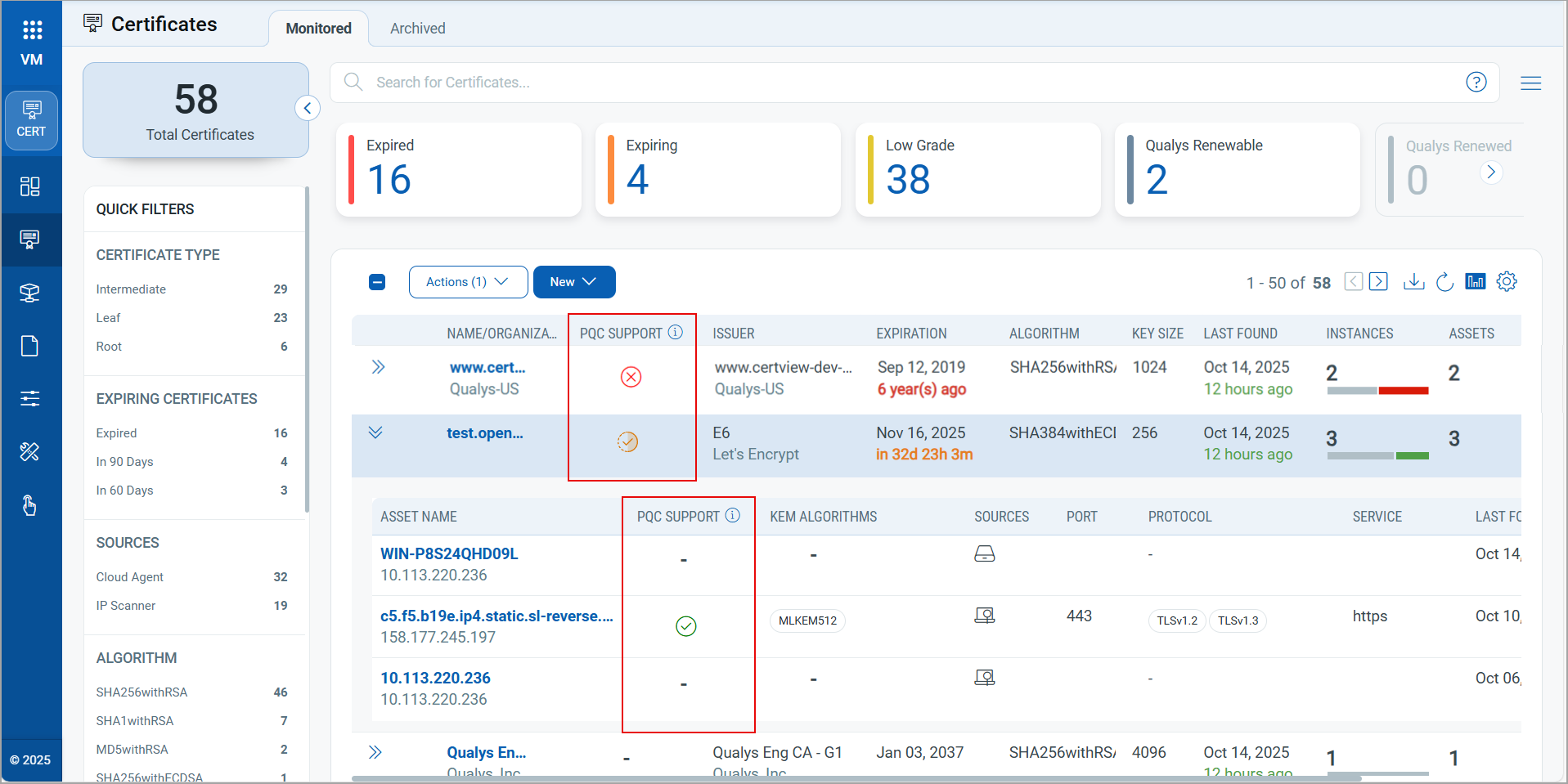
The listed certificates indicate the statutes, specifying whether they are PQC-supported, unsupported, partially supported, not applicable, or support available for zero instances. With this, you can ensure the security of the enlisted certificates data.
The above example displays the PQC-supported algorithms in the Monitored tab for demonstration. You can also find the PQC-supported algorithms in the Assets tab.
New Tokens for PQC Support
We have introduced two new tokens for PQC support.
For Certificates Tab
|
Token |
Description |
|---|---|
|
asset.instance.(pqcSupport |
Use the token value as true or false to find if the instances Example Show certificates that have PQC-supported instances |
| asset.instance:(pqcSupportedAlgorithm:) |
Use a text value ##### to find the certificates with the specified Example Show certificates that have instances supporting the PQC algorithm |
For Assets Tab
|
Token |
Description |
|---|---|
|
asset.instance.(pqcSupport |
Use the token value as true or false to find if the instances have PQC support Example Show assets that have PQC-supported instances
|
| asset.instance:(pqcSupportedAlgorithm:) |
Use a text value ##### to find the assets that have instances with the specified PQC supported algorithm. Example Show the assets that have instances supporting the PQC algorithm
|
For Hosts Instances
To view Host Instances, navigate to Certificates tab > Monitored tab. Click View Details from the Quick Actions menu of the selected certificate.
|
Token |
Description |
|---|---|
| asset.instance.pqcSupport |
Use the token value as true or false to find if the instances have PQC support Example Show assets that have PQC-supported instances
|
| asset.instance.pqcSupportedAlgorithm |
Use a text value ##### to find the assets that have instances with the specified PQC supported algorithm. Example Show the assets that have instances supporting the PQC algorithm
|
Implementation of QQL Token Standardization
We have now implemented Qualys Query Language (QQL) token standardization across all Qualys applications. As part of this enhancement, Certificate View tokens are updated with new token names that follow a standard and consistent nomenclature.
The new token format follows the syntax: <entity>.<attribute>. For example, in the new token, asset.instance, asset is the entity, and instance is the attribute.
- Standardized Token Naming: The sensor, asset, and operating system tokens now follow the standardized naming convention. The tokens common to all Qualys applications have also been updated.
- Search Bar Updates: Only the new tokens are displayed in the auto-suggestion in the search bars within the UI. However, if you type the old token name manually, the QQL query still works. The old tokens will not be visible in the auto-suggestions on the UI.
- Backward Compatibility: The existing Dashboard widgets and Saved Search Queries will continue to support the old tokens in edit mode.
- Improved Interoperability: The standardized tokens make it easier to copy and reuse the search query from one application to another, eliminating the need to remember multiple token names for different applications and similar searches.
Updated Tokens
We have updated the token names in the Certificate View user interface.
Assets Tab TokensAssets Tab Tokens
|
Old Token Name |
New Token Name |
|---|---|
|
target |
externalSite.target |
|
lastScanDate |
externalSite.lastScanDate |
|
lastScanStatus |
externalSite.lastScanStatus |
|
resolvedIps |
externalSite.resolvedIp |
|
asset:(lastFound |
asset:(lastFoundDate |
|
asset:(tags.name |
asset:(tag.name |
|
asset:(assetInterface.address |
asset:(interface.address |
|
asset:(assetInterface.hostname |
asset:(interface.hostname |
|
certificate:(approved |
certificate:(isApproved |
|
certificate:(lastFound |
certificate:(lastFoundDate |
|
certificate:(validFrom |
certificate:(validFromDate |
|
certificate:(validTo |
certificate:(validToDate |
|
instance:( |
asset.instance:( |
|
instance:(sslProtocols |
asset.instance:(sslProtocol: |
|
certificate:(certhash |
certificate:(hash |
Certificates Tab TokenCertificates Tab Token
|
Old Tokens |
New Tokens |
|---|---|
|
asset:(lastFound |
asset:(lastFoundDate |
|
asset:(tags.name |
asset:(tag.name |
|
asset:(assetInterface.address |
asset:(interface.address |
|
asset:(assetInterface.hostname |
asset:(interface.hostname |
|
certificate:(approved |
certificate:(isApproved |
|
certificate:(lastFound |
certificate:(lastFoundDate |
|
certificate:(validFrom |
certificate:(validFromDate |
|
certificate:(validTo |
certificate:(validToDate |
|
instance:( |
asset.instance:( |
|
instance:(sslProtocols |
asset.instance:(sslProtocol: |
|
certificate:(certhash |
certificate:(hash |
Bulk Job deployment DetailsBulk Job deployment Details
|
Old Tokens |
New Tokens |
|---|---|
|
jobName |
job.name |
|
createDate |
job.createdDate |
|
updateDate |
job.updatedDate |
|
type |
job.type |
|
status |
job.status |
|
os |
job.platform |
Job Details Tokens
| Old Tokens | New Tokens |
|---|---|
| assetName | asset.name |
| status | asset.status |
Configuration Tab TokensConfiguration Tab Tokens
|
Old Tokens |
New Tokens |
|---|---|
|
name |
certificateAuthority.name |
|
type |
certificateAuthority.type |
|
mode |
certificateAuthority.mode |
|
authorities |
certificate.authority |
|
name |
template.name |
Improved Asset List UI to Show Instance Data for Certificates
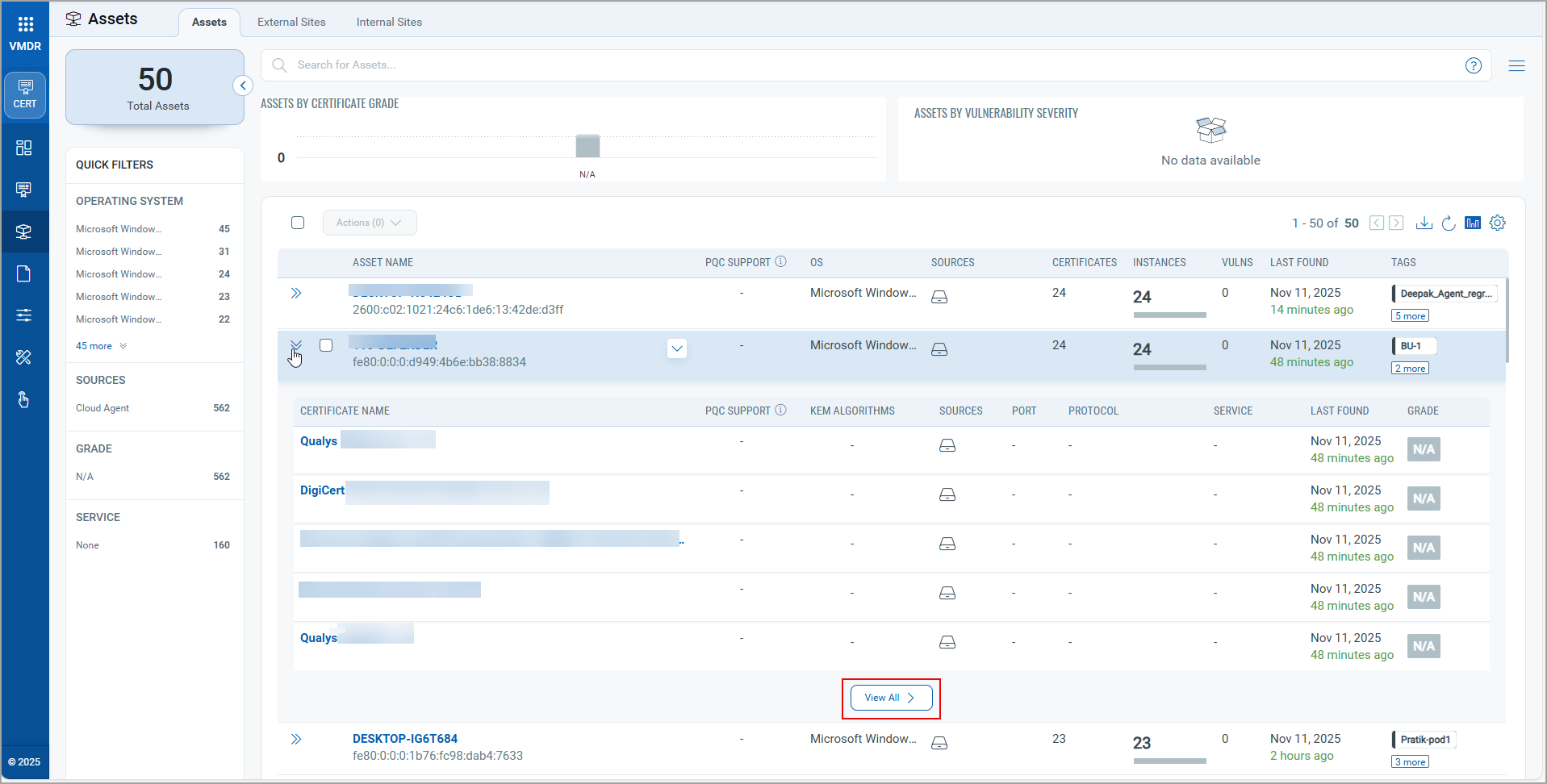
With this release, we have improved the user experience by making it easier to view certificate details linked to an asset. Now, you can view associated certificates at a glance by clicking  present in front of list. If an asset has more than five associated certificates, you can click View All to navigate to the Certificates Instances tab and access the complete details.
API Features and Enhancements
We have introduced a new version of the List Certview Certificates (v2.3) API to support filtering and retrieving through Post-Quantum Cryptography (PQC) by using the filter instance.PQCSupport filter and PQC supported algorithms. This filter allows filtering the certificates based on the PQC support status. For more information, refer to Certificate View Release 4.7 API release notes.
Issue Addressed
The following reported and notable customer issue is fixed in this release:
| Category/Component | Description |
|---|---|
| UD Dashboard | Resolved an issue in the UD dashboard where certificates with a None value in the issuer.organization field were not displayed in user-created table widgets. The widget now shows all certificates as expected. |