ServiceNow Configuration Compliance Integration with Qualys TotalCloud CSPM
The Qualys Cloud Security Posture Management (CSPM) integration ensures that cloud resources comply with configuration standards by fetching and analyzing data such as policies, controls, connectors, evaluations, and resources. It helps detect misconfigurations in the cloud infrastructure and automates the remediation process to address them. By leveraging this integration, they can maintain compliance with industry security standards, adhere to best practices, and enhance the overall security posture of their cloud environment.
Benefits
-
Multi-cloud Support: Support all major public cloud providers, such as AWS, Azure, GCP, and OCI, for importing assessment data.
-
Automatic Sync: All policy and control evaluations from TotalCloud CSPM are automatically synced with ServiceNow CC for its analysis.
-
Cloud Configuration Management: The solution enables filtering by metadata, such as cloud account, region, and resource tags, to effectively manage and remediate cloud-specific configuration issues.
-
Automated Remediation: Access remediation recommendations, automatically create remediation tasks, and assign them to corresponding workflows. Remediation target rules define deadlines, ensuring timely resolution. Exceptions can be requested for non-critical failures, and follow-up scans confirm fixes.
-
Enhanced Reporting: Leverage the out-of-the-box dashboard for visibility into misconfigurations with detailed reports, including failed test results filtered by risk rating, technology, and category. The dashboard also tracks remediation tasks by state and risk level, providing actionable insights for security teams
Prerequisites
- Access to an active Qualys Subscription with TotalCloud activated in either trial or paid license.
- Deployment of the cloud connectors in Qualys and enabling of CSPM capability. Read more.
- Installation of required ServiceNow plugins.
- Vulnerability Response (23.0.6), and Configure Compliance (15.0.0)
- To install these plugins:
-
Log in to your instance using system admin credentials.
-
Navigate to “System Definition” and then to “Plugins” within your instance.
-
Search and install the plugins mentioned above.
-
Qualys CSPM Application Installation
To install the Qualys CSPM Integration Application from the ServiceNow store, do the following steps:
Only users with the System administrator (Admin) role can install the application from the ServiceNow Store.
- Visit https://store.servicenow.com.
- Search for the “Qualys CSPM Integration” in the search bar.
- Select the Qualys CSPM Integration plugin.
- Click Get, then enter your ServiceNow account credentials.
- After successful addition, open the instance, then navigate to Applications → All Available Applications → All.
- Use the filter and search bar to locate the application.
- Click Install next to the application listing.
For configuration instructions, including required permissions and roles, and API requests, refer to the ServiceNow - Qualys CSPM Installation Guide.
Qualys CSPM Integrations
Do not delete any of the integrations. Removing them will require reinstalling the Qualys CSPM application.
This configuration requires you to enter the Connection Name, Connection Type, Base URL, Username, and Password to retrieve data from the Qualys TotalCloud Platform.
Role required: x_qual5_conf_comp.qualys_cspm_admin
Steps:
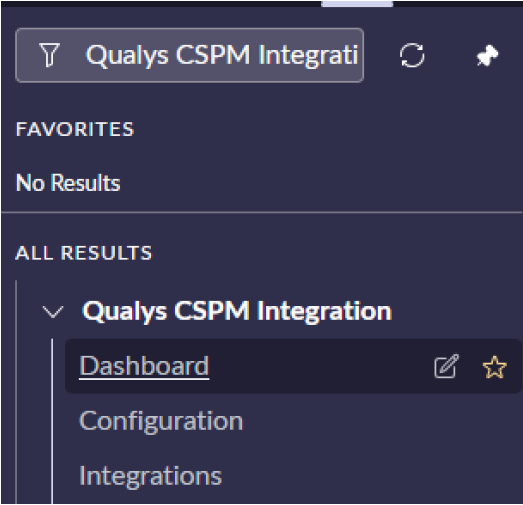
- Navigate to the “Qualys CSPM Integration” Application Menu, then click Configurations.
- Enter Connection Name, Connection Type, Base URL, Username, and Password, and then click on “Test and Save Connection”.
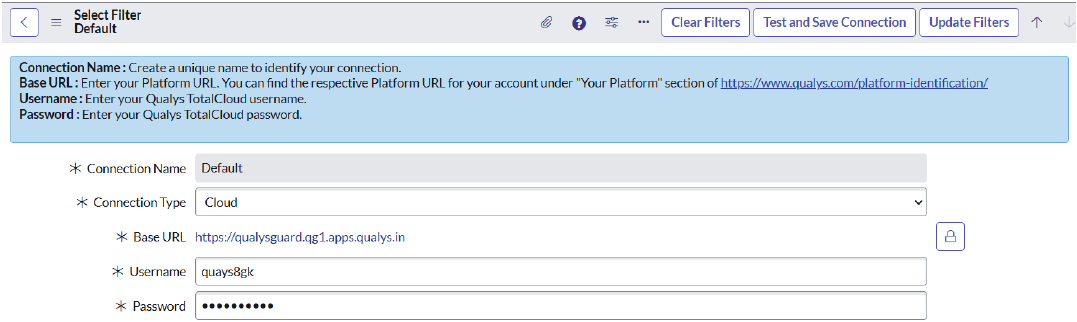
Field Description Connection Name Create a unique name to identify your connection. Connection Type Choose your connection type - Cloud or On-Prem Base URL Enter your Platform URL. You can find the respective Platform URL for your account under the "Your Platform" section of https://www.qualys.com/platform-identification Username Enter your Qualys TotalCloud username. Password Enter your Qualys TotalCloud password - Validation of the provided credentials would be performed. On successful authentication, the configuration would be saved, otherwise, an appropriate error message would be shown.
Qualys CSPM Policy IntegrationQualys CSPM Policy Integration
This integration will fetch all policies from the Qualys TotalCloud platform. Ensure the integration is active before execution.
Role required: sn_vul.configure_integrations
Steps:
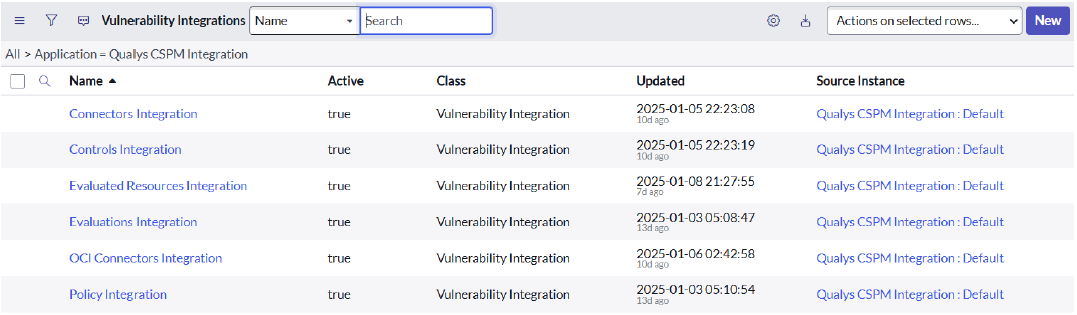
- Navigate to the “Qualys CSPM Integration” Application Menu, then click Integrations.
- Select the “Policy Integration” from the list view..
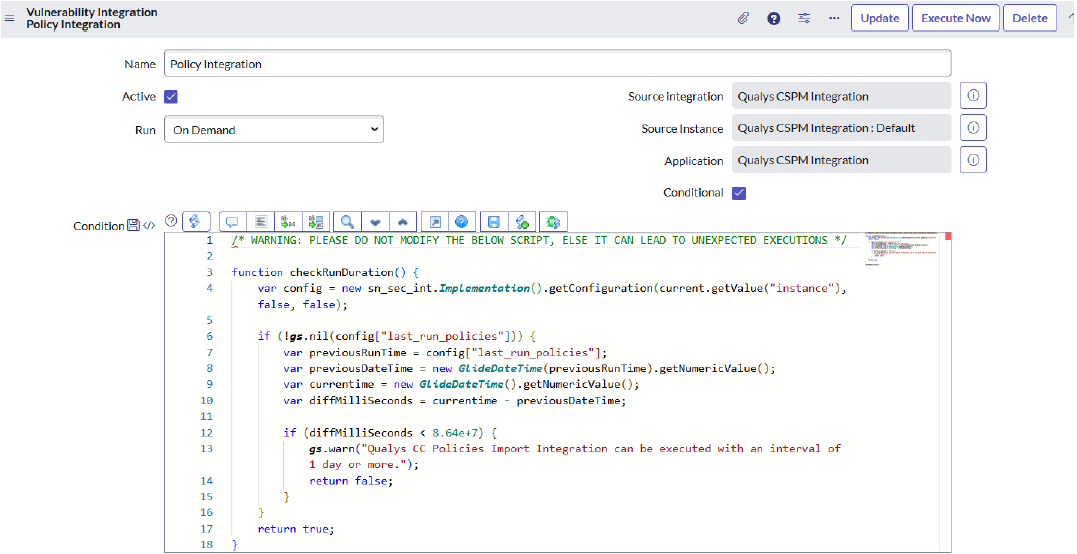
- Click Execute Now if the Integration needs to run immediately, or configure it as a scheduled job based on its requirements to pull data daily, periodically, or monthly. You can also configure it for a custom date and time.
- This will create an Integration Run in the related list. When clicked, a form view will open, showing all integration processes. For each completed integration process execution, the data will be ingested into the Policy (
sn_vulc_policy) table.
- All the execution details can be seen in the Configuration Items tab:
- New CIs: Number of Policy records created on the ServiceNow side.
- Ignored CIs: Number of Policy records that did not change during the run on the ServiceNow side.
- Existing CIs: Number of Policies whose data is updated during the run on the ServiceNow side.
- Imported CIs: Total of New CIs, Ignored CIs, and Existing CIs.
- When this integration runs, all policies are fetched on the ServiceNow side.
- The “condition” field should not be modified, as it can cause unexpected behavior during integration.
- This integration can be executed with a minimum interval of 1 day.
Qualys CSPM Control IntegrationQualys CSPM Control Integration
The Integration will be used to fetch all the controls from the Qualys TotalCloud platform. Ensure the integration is active before execution.
Role required: sn_vul.configure_integrations
Steps:
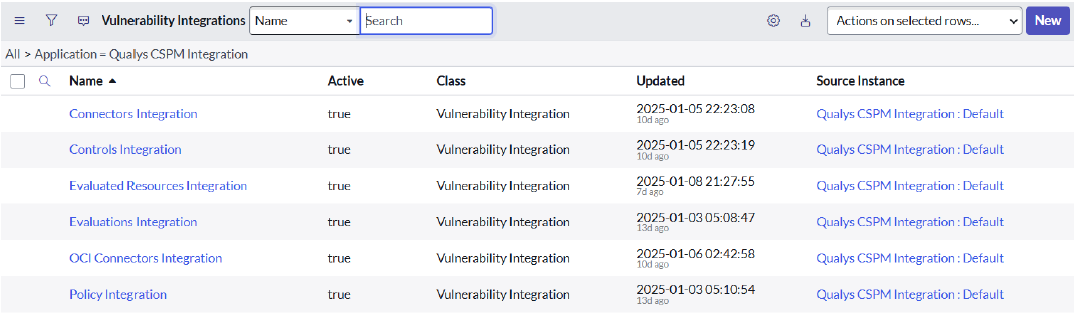
- Navigate to the “Qualys CSPM Integration” Application Menu, then click Integrations.
- Select the “Controls Integration” from the list view.
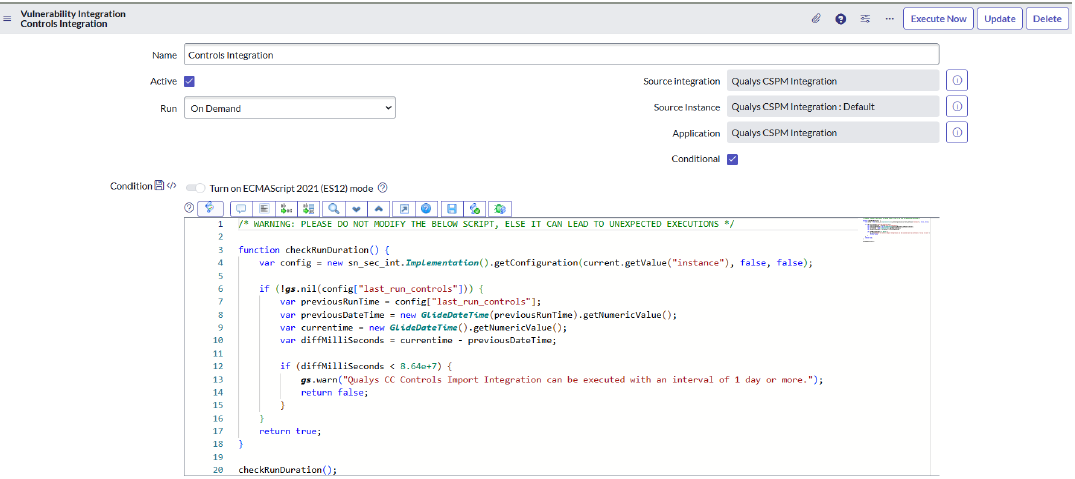
- Click Execute Now if the Integration needs to run immediately, or configure it as a scheduled job based on its requirements to pull data daily, periodically, or monthly. You can also configure it for a custom date and time.
- This will create an Integration Run in the related list. When clicked, a form view will open, showing all integration processes. For each completed integration process execution, the data will be ingested into the Controls (
sn_vulc_test) table.
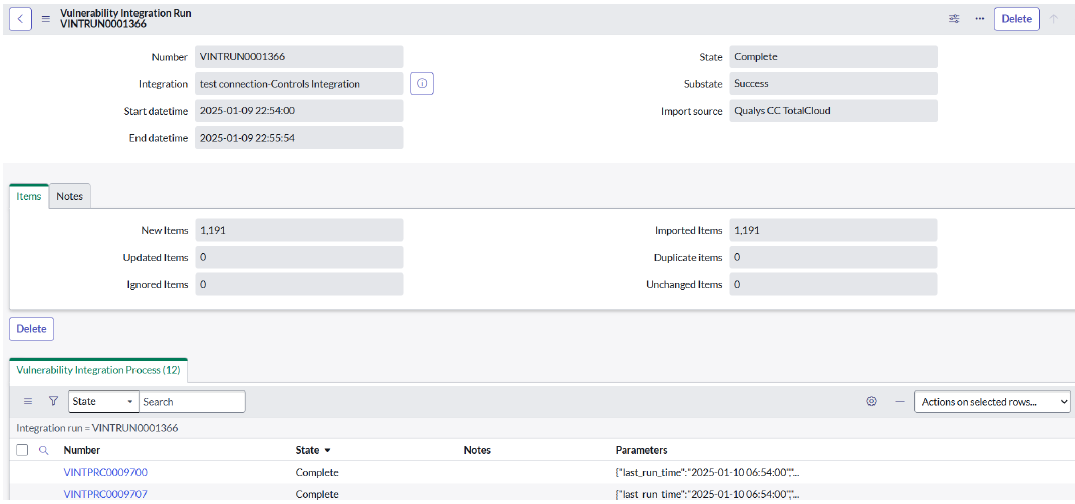
- All the execution details can be seen in the Configuration Items tab:
- New CIs: Number of control records created on the ServiceNow side.
- Ignored CIs: Number of control records that did not change during the run on the ServiceNow side.
- Existing CIs: Number of controls whose data is updated in the run on the ServiceNow side.
- Imported CIs: Total of New CIs, Ignored CIs, and Existing CIs.
- When this integration runs, all controls are fetched on the ServiceNow side.
- The “condition” field should not be modified, as it can cause unexpected behavior during integration.
- This integration can be executed with a minimum interval of 1 day.
Qualys CSPM Connectors IntegrationQualys CSPM Connectors Integration
This Integration will fetch all the connectors for AWS, AZURE, GCP from the Qualys TotalCloud platform. Ensure the integration is active before execution.
Role required: sn_vul.configure_integrations
Steps:
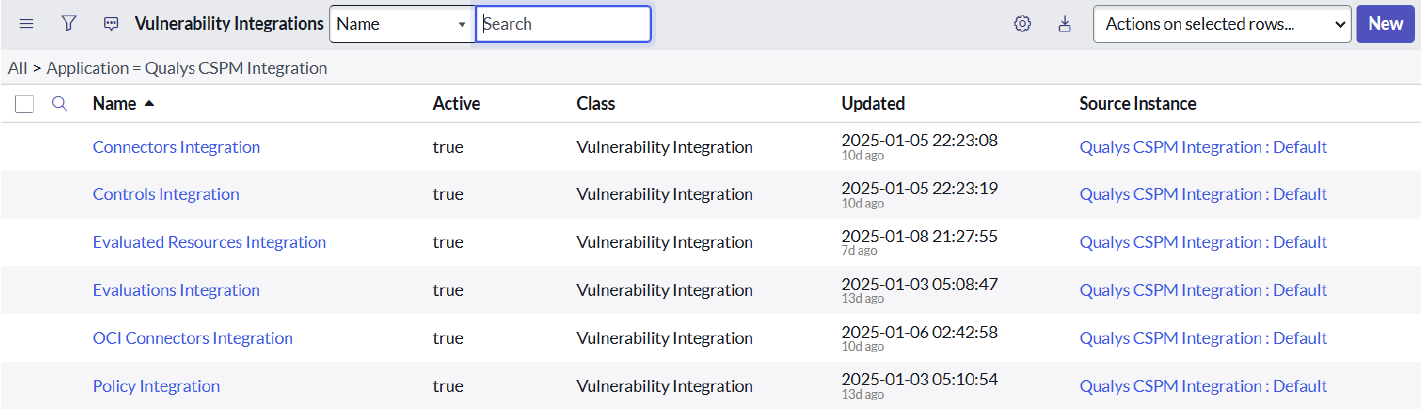
- Navigate to the “Qualys CSPM Integration” Application Menu, then click Integrations.
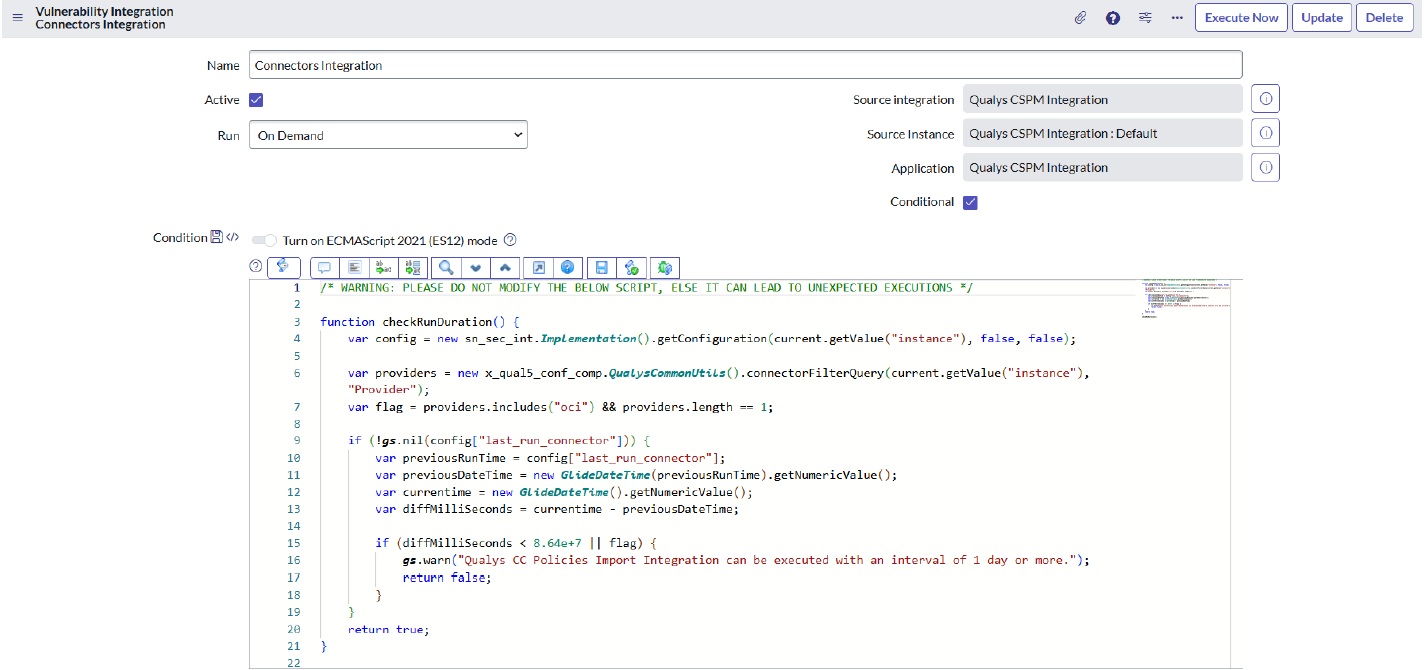
- Select the “Connectors Integration” from the list view.
- Click Execute Now if the Integration needs to run immediately or configure it as a scheduled job based on its requirements to pull data daily, periodically, or monthly. You can also configure it for a custom date and time.
- This will create an Integration Run in the related list. When clicked, a form view will open, showing all integration processes. For each completed integration process execution, the data will be ingested into the Connectors (
x_qual5_conf_comp_connectors) table.
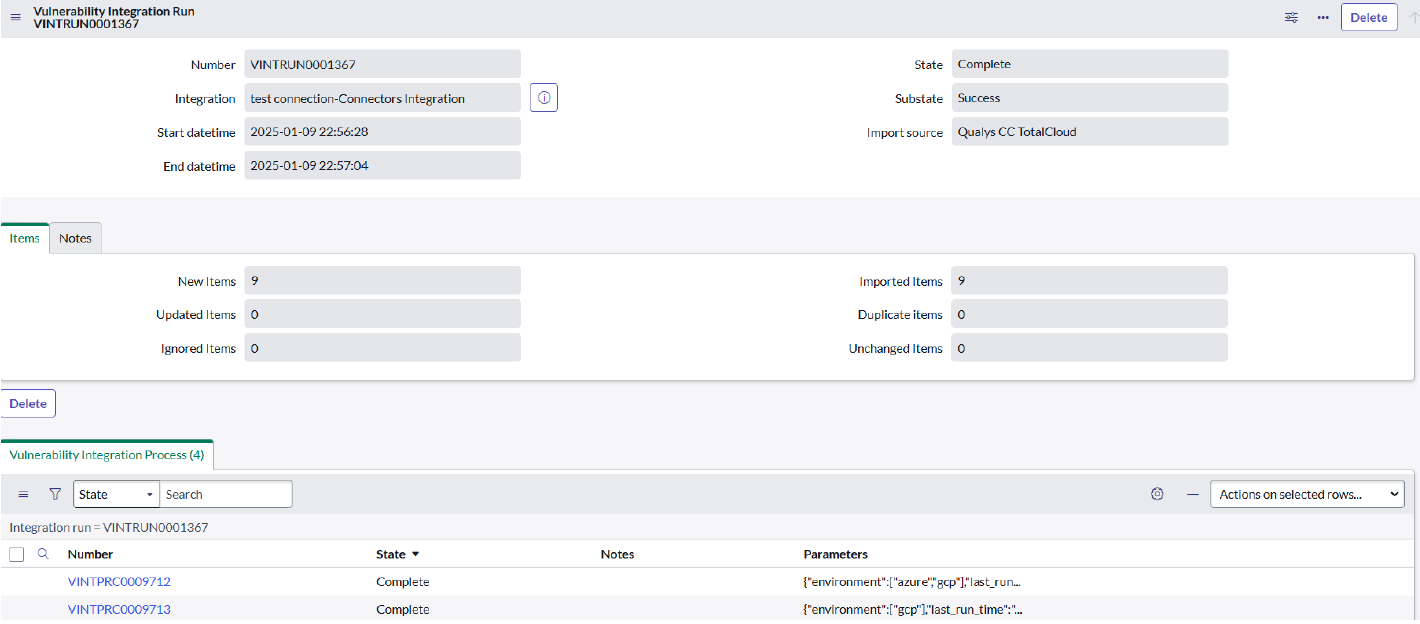
- All the execution details can be seen in the Configuration Items tab:
- New CIs: Number of connector records created on the ServiceNow side.
- Ignored CIs: Number of connector records that did not change during the run on the ServiceNow side.
- Existing CIs: Number of connectors whose data is updated in the run on the ServiceNow side.
- Imported CIs: Total of New CIs, Ignored CIs, and Existing CIs.
- When this integration runs, all connectors are fetched on the ServiceNow side.
- The “condition” field should not be modified, as it can cause unexpected behavior during integration.
- This integration can be executed with a minimum interval of 1 day.
- The Connector details will be used to fetch the evaluation details.
Qualys CSPM OCI Connector IntegrationQualys CSPM OCI Connector Integration
The Integration will be used to fetch all the connectors for OCI from the Qualys TotalCloud platform. Ensure the integration is active before execution.
Role required: sn_vul.configure_integrations
Steps:
- Navigate to the “Qualys CSPM Integration” Application Menu, then click Integrations.
- Select the “OCI Connectors Integration” from the list view.
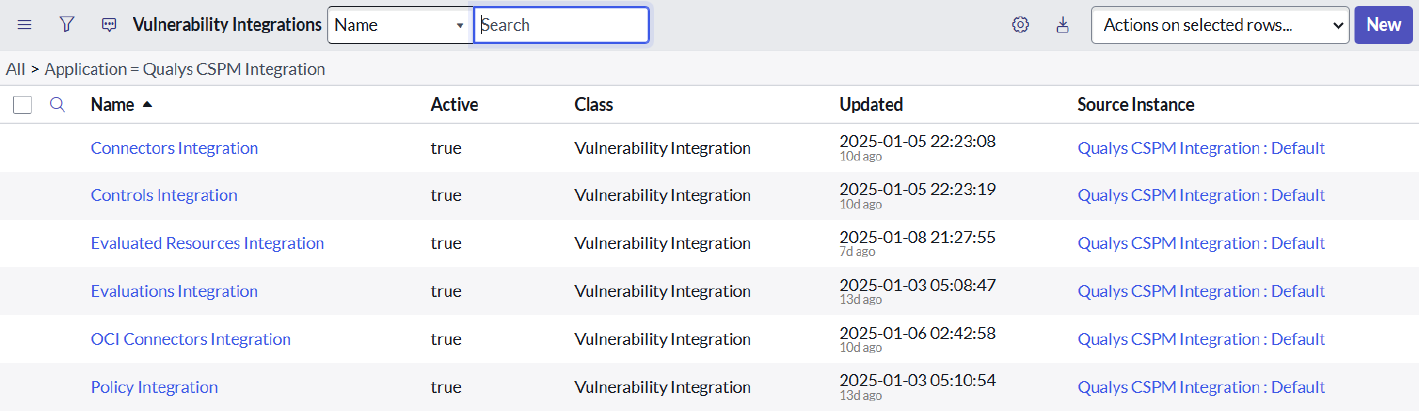
- Click Execute Now if the Integration needs to run immediately, or configure it as a scheduled job based on its requirements to pull data daily, periodically, monthly. You can also configure it for a custom date and time.
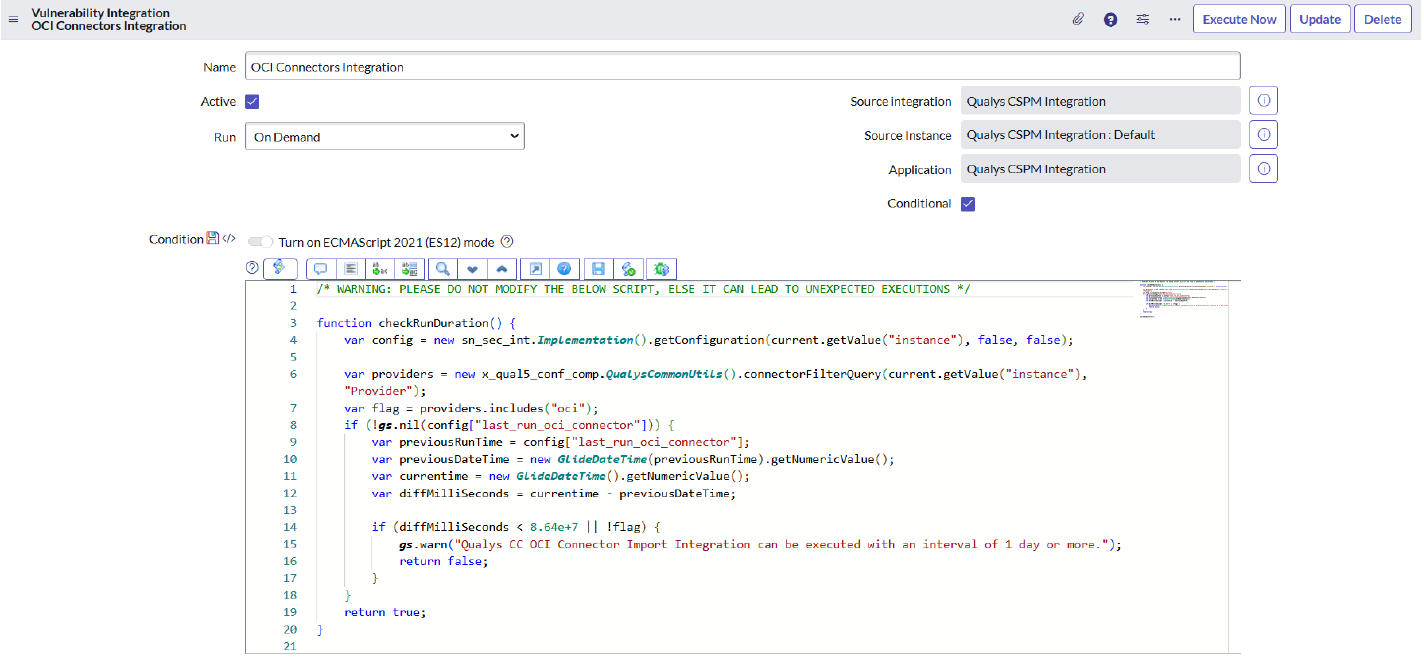
- This will create an Integration Run in the related list. When clicked, a form view will open, showing all integration processes. For each completed integration process execution, the data will be ingested into the Connectors (
x_qual5_conf_comp_connectors) table.
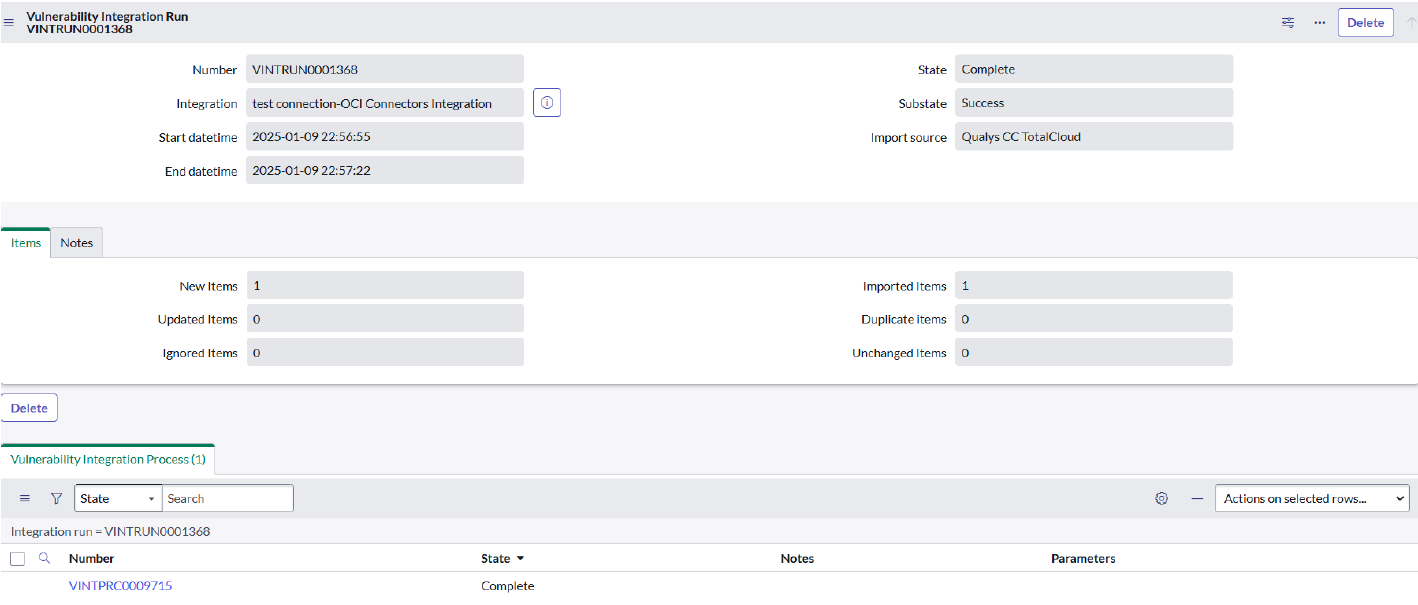
- All the execution details can be seen in the Configuration Items tab:
- New CIs: Number of OCI Connectors records created on ServiceNow side.
- Ignored CIs: Number of OCI Connectors records that did not change during the run on the ServiceNow side.
- Existing CIs: Number of OCI Connectors whose data is updated in the run on the ServiceNow side.
- Imported CIs: Total of New CIs, Ignored CIs and Existing CIs.
- When this integration runs, all OCI Connectors are fetched on the ServiceNow side.
- The “condition” field should not be modified, as it can cause unexpected behavior during integration.
- This integration can be executed with a minimum interval of 1 day.
- The OCI Connector details will be used to fetch the evaluation details.
Qualys CSPM Evaluations IntegrationQualys CSPM Evaluations Integration
The Integration will be used to fetch all the evaluations from the Qualys TotalCloud platform. Ensure the integration is active before execution.
Role required: sn_vul.configure_integrations
Steps:
- Navigate to the “Qualys CSPM Integration” Application Menu, then click Integrations.
- Select the “Evaluations Integration” from the list view.
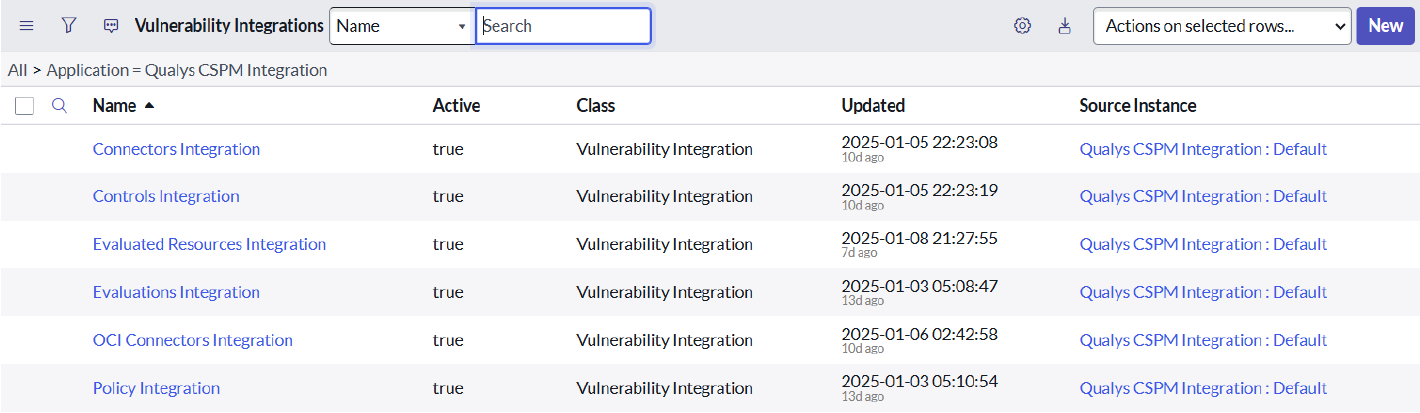
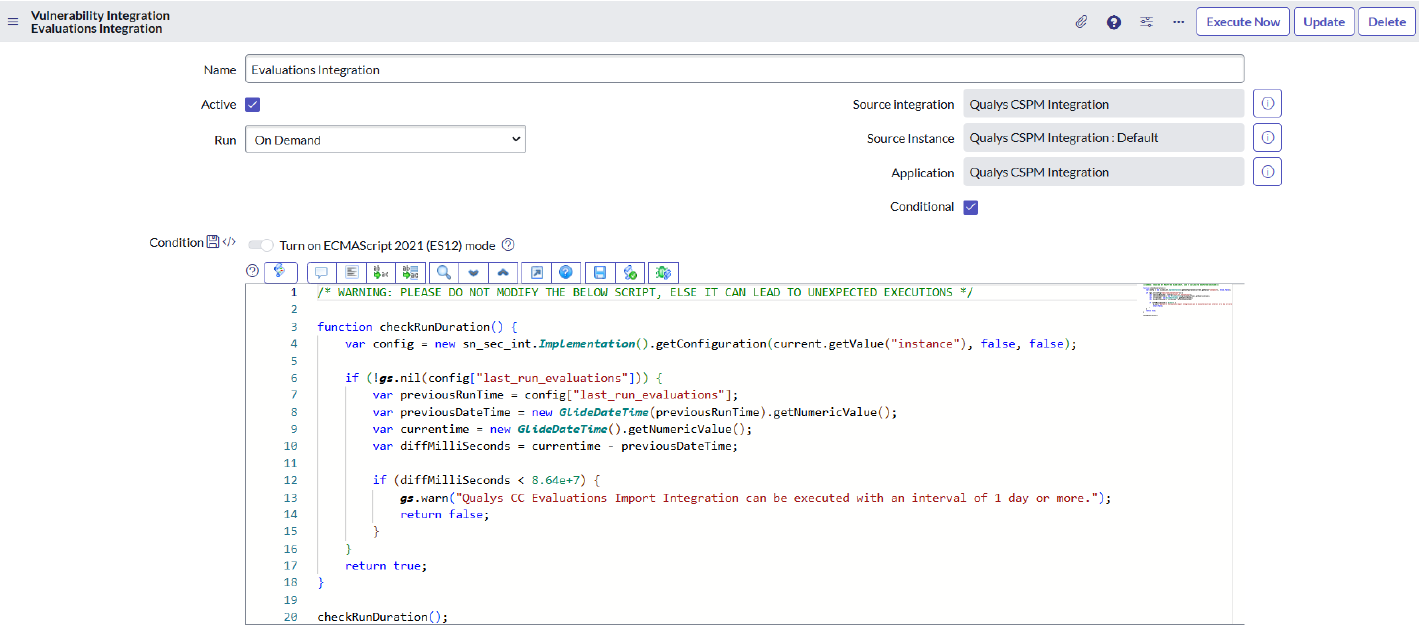
- Click Execute Now if the Integration needs to run immediately, or configure it as a scheduled job based on its requirements to pull data daily, periodically, or monthly. You can also configure it for a custom date and time.
- This will create an Integration Run in the related list. When clicked, a form view will open, showing all integration processes. For each completed integration process execution, the data will be ingested into the Evaluations (
x_qual5_conf_comp_evaluations_data) table.
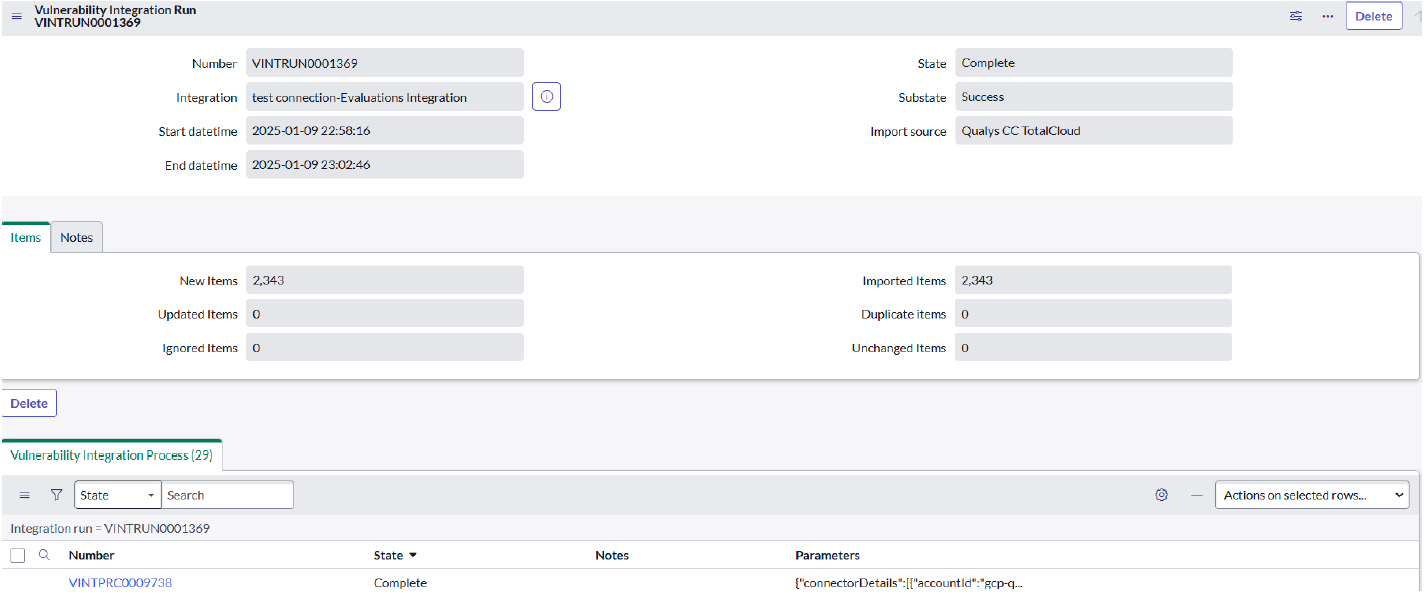
- All the execution details can be seen in the Configuration Items tab:
- New CIs: Number of evaluation records created on ServiceNow side.
- Ignored CIs: Number of evaluation records that did not change during the run on the ServiceNow side.
- Existing CIs: Number of evaluation whose data is updated in the run on the ServiceNow side.
- Imported CIs: Total of New CIs, Ignored CIs and Existing CIs.
- When this integration runs, all evaluations are fetched on the ServiceNow side.
- The “condition” field should not be modified, as it can cause unexpected behavior during integration.
- This integration can be executed with a minimum interval of 1 day.
- The Evaluation details will be used to fetch resource details.
Qualys CSPM Evaluated Resources IntegrationQualys CSPM Evaluated Resources Integration
The Integration will be used to fetch all the evaluated resources from the Qualys TotalCloud platform. Ensure the integration is active before execution.
Role required: sn_vul.configure_integrations
Steps:
- Navigate to the “Qualys CSPM Integration” Application Menu, then click Integrations.
- Select the “Evaluated Resources Integration” from the list view.
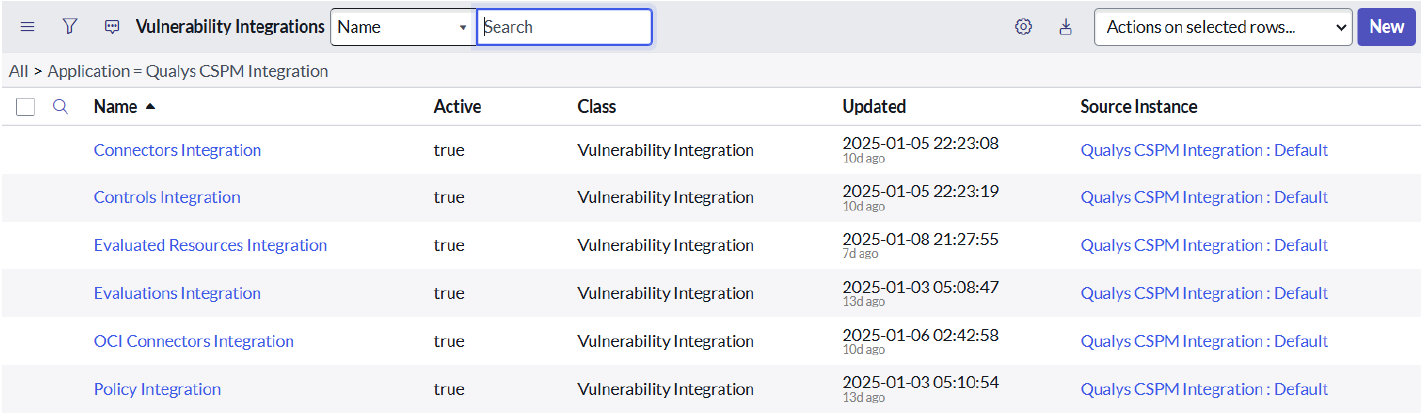
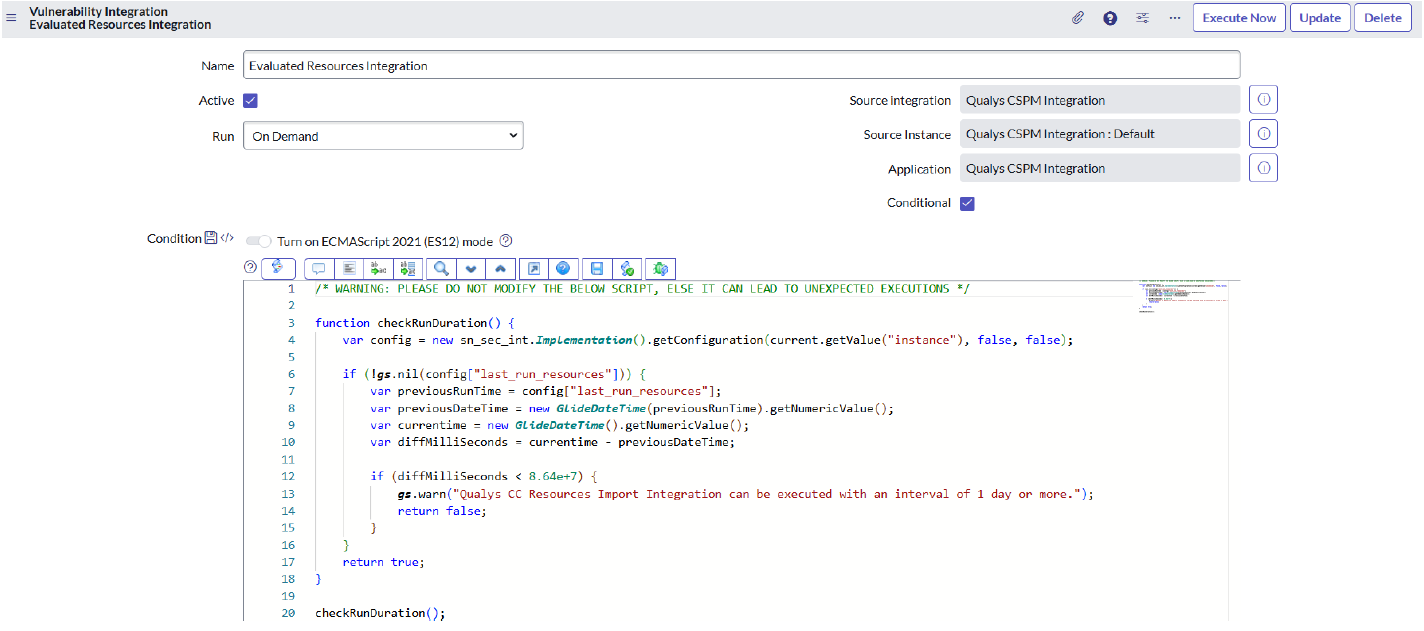
- Click Execute Now if the Integration needs to run immediately, or configure it as a scheduled job based on its requirements to pull data daily, periodically, or monthly. You can also configure it for a custom date and time.
- This will create an Integration Run in the related list. When clicked, a form view will open, showing all integration processes. For each completed integration process execution, the data will be ingested into the Evaluated Resources (
sn_vulc_result) table.
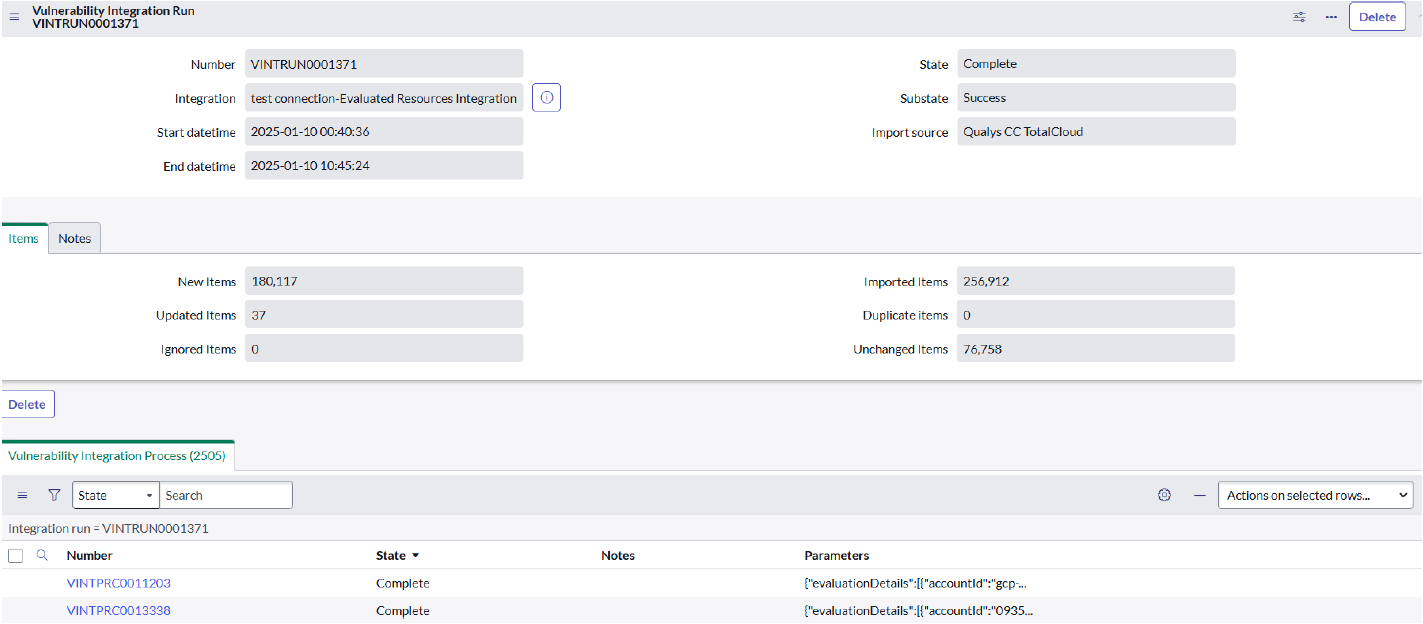
- All the execution details can be seen in the Configuration Items tab:
- New CIs: Number of resource records created on ServiceNow side.
- Ignored CIs: Number of resource records that did not change during the run on the ServiceNow side.
- Existing CIs: Number of resource whose data is updated in the run on the ServiceNow side.
- Imported CIs: Total of New CIs, Ignored CIs and Existing CIs.
- When this integration runs, all evaluations are fetched on the ServiceNow side.
- The “condition” field should not be modified, as it can cause unexpected behavior during integration.
- This integration can be executed with a minimum interval of 1 day.
- The Evaluation details will be used to fetch resource details.
Test the Qualys CSPM Integration Configuration
- You must enter the Base URL, Username, and Password to get the data from the Qualys TotalCloud Platform.
- These details will be validated through the backend script.
- When you save the credentials, an authentication process will be initiated where the provided credentials will be validated.
- Based on the validation, an appropriate message will be displayed to the user whether the connection is saved or not.
- If there is an error in validating the credentials, then an error message will be displayed, and users have to update with the correct set of credentials.
Qualys CSPM dashboard Integration Dashboard
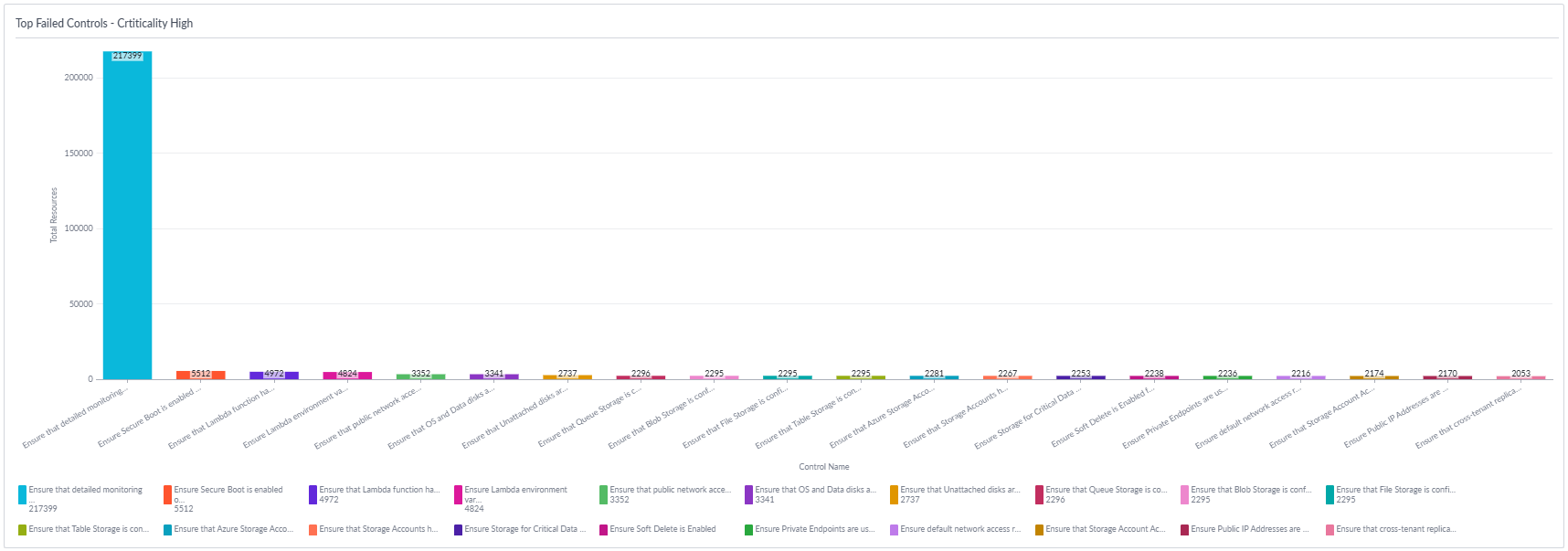
The CSPM Dashboard gives you a quick, visual summary of your cloud security posture after integrating CSPM with ServiceNow. It shows key insights such as:
- The number of connected cloud accounts
- Number of accounts with high‑risk or failed controls
- Overall compliance state of your environment
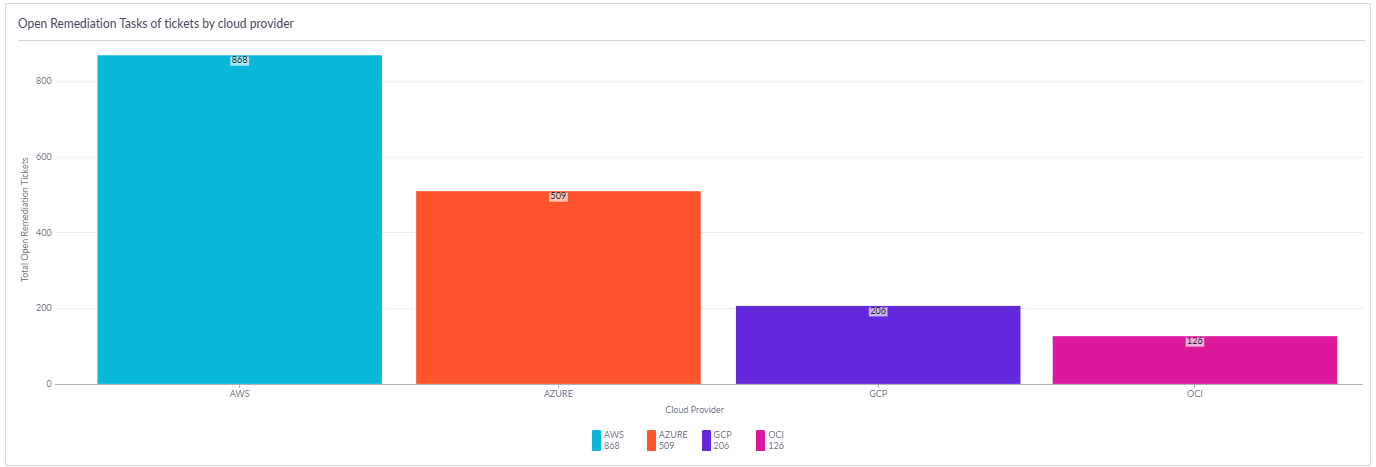
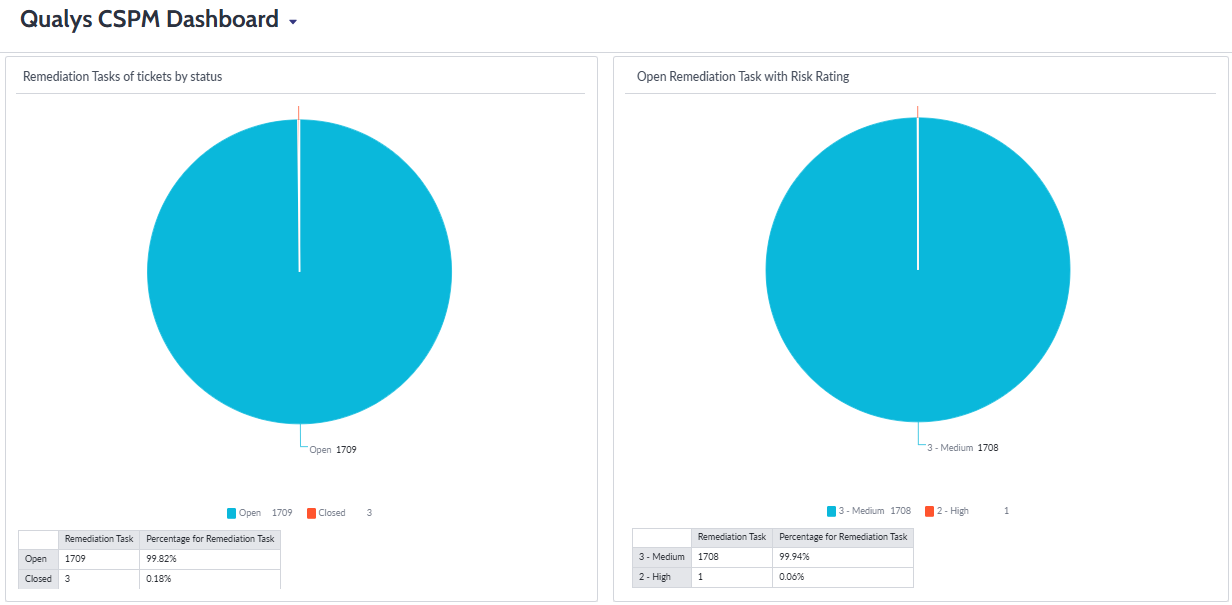
- Status of remediation task tickets. Example:
Status of remediation task tickets by cloud provider
Status of remediation task tickets by status, or risk rating
How to access Qualys CSPM DashboardHow to access Qualys CSPM Dashboard
Once you install the CSPM Integration from the ServiceNow Store and log in using your TotalCloud account credentials, you can reach the dashboard by following these steps:
- Open the ServiceNow navigation panel.
- Search for “CSPM Integration”.
- Click Dashboard under the CSPM section.
- The CSPM Dashboard will load and display your security data.
Qualys CSPM Integration Support and Troubleshooting
For Support and Troubleshooting, Tips and Tricks, refer to the ServiceNow - Qualys CSPM Installation Guide.