CSPM Connectors
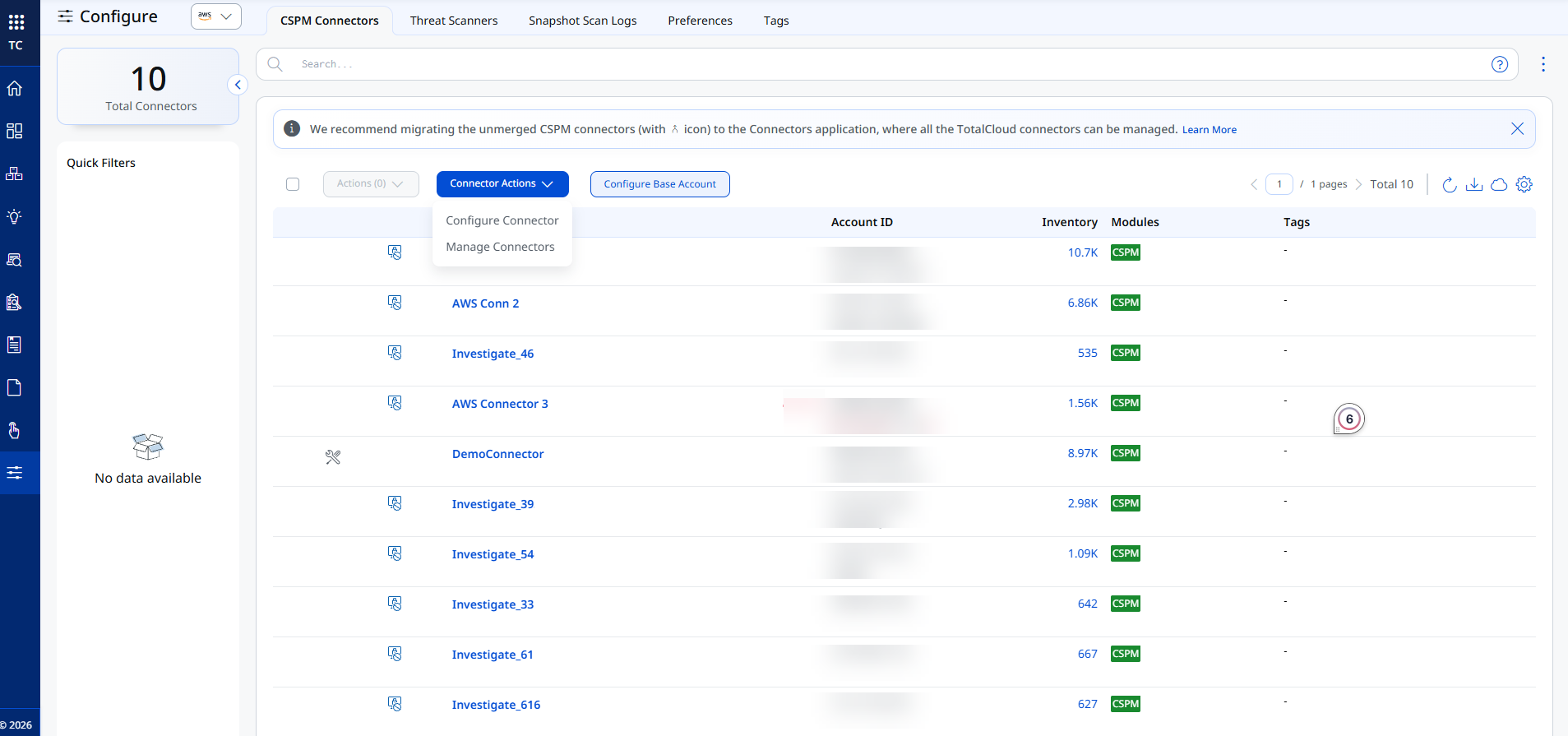
Go to TotalCloud > Configure > CSPM Connectors to view, manage, and configure all the connectors set up for your cloud environment. Use the cloud provider drop-down at the top to switch between AWS, Azure, GCP, and OCI connectors.
Total Connectors
The counter at the top left shows the total number of connectors configured for the selected cloud provider.
Quick Filters
Use Quick Filters to narrow the connector list down to a saved or predefined subset of connectors, without writing a search query.
Managing Connectors
Select one or more connectors and use the following actions:
- Connector Actions > Configure Connector: Opens the selected connector so you can update its configuration.
- Connector Actions > Manage Connectors: Lets you perform bulk operations, such as assigning tags, activating or deactivating, and merging connectors.
- Configure Base Account: Sets up a base account that other connectors of the same cloud provider can use, instead of using a Qualys-hosted account.
A banner at the top of the page flags unmerged CSPM connectors and recommends migrating them to the Connectors application, where all your TotalCloud connectors can be managed from a single place. Click Learn More in the banner for details.
Connector List Columns
| Column | Description |
|---|---|
| Connector Name | The name of the connector. Click it to open the connector's details. |
| Account ID | The cloud account, subscription, or project ID associated with the connector. |
| Inventory | The number of resources discovered by the connector. Click the count to view the connector's resources in Inventory. |
| Modules | The TotalCloud modules enabled for the connector, such as CSPM. |
| Tags | The tags assigned to the connector, used to control access and organize connectors. |
Search for Connectors
Use the search bar to filter the connector list using QQL. Looking for help with writing your query? Refer to Search for CSPM Connectors.
Related Topics
- Configure an AWS Connector
- Configure an Azure Connector
- Configure a GCP Connector
- Configure an OCI Connector