Code - GitHub Apps
The Code tab provides centralized visibility into all Infrastructure as Code (IaC) files scanned via the GitHub Actions connector. This page helps you track, manage, and investigate IaC assets across repositories, improving traceability and security posture.
Qualys enhances the IaC scan integration with GitHub Apps to close visibility gaps and offer a comprehensive inventory of scanned IaC code.
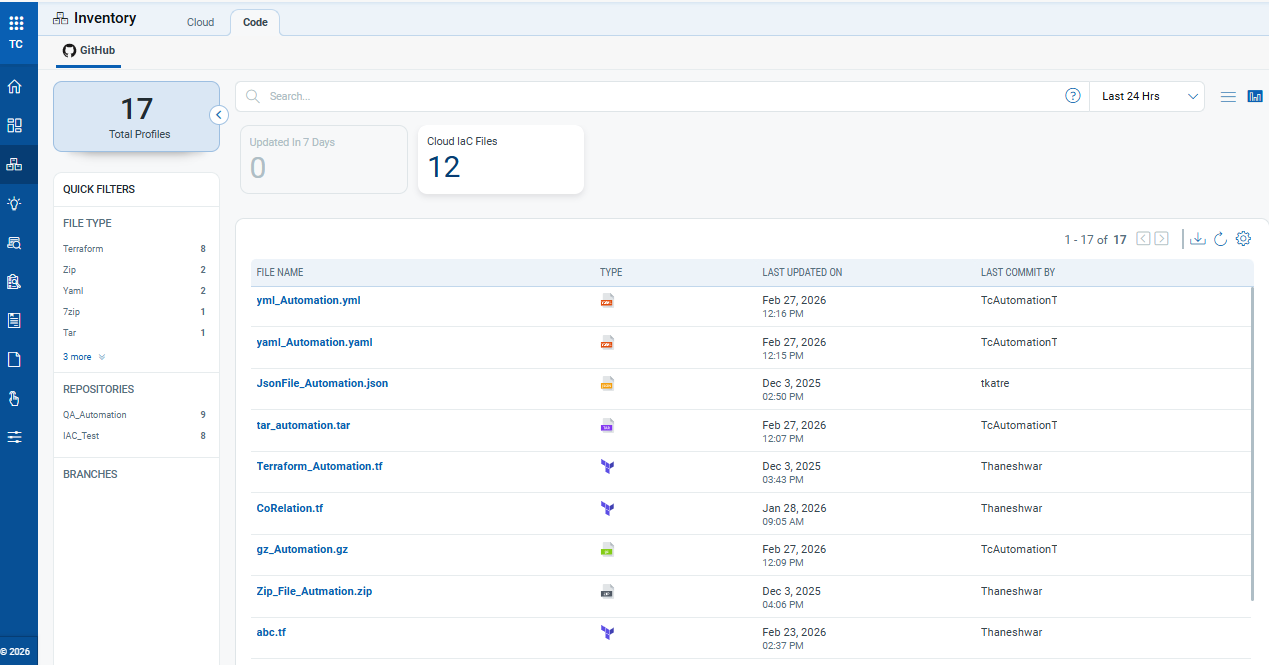
The Code inventory lists all IaC files detected and scanned through GitHub Actions, along with key metadata for quick assessment.
For each IaC file, you can view:
- File Name: Displays the name of the IaC file as it exists in the source repository. Selecting the file name allows you to open the file’s detailed view for further investigation.
- File Type: Indicates the type of IaC file based on its extension (for example, Terraform, YAML, JSON, ZIP, TAR, 7z, gz, YML, Template). This helps you quickly identify the format and tooling associated with the file.
- Last Updated On: Shows the date and time when the file was last modified in the repository. This helps determine how recent the changes are and identify recently updated IaC assets.
- Last Committed By: Displays the user or service account that last committed changes to the file. This information is useful for ownership tracking and follow-up during investigations.
Selecting any file opens a new window to give more details about the file, such as:
- Summary: In addition to basic details, the summary page provides extra information such as the File Path and GitHub repository details, including the Repository name, Branch, and Source.
- Controls Evaluated: This page displays the controls used to evaluate the selected file. It includes the result for each control (Pass or Fail) and its associated criticality level.
The summary page offers additional details for each GitHub file, including:
- File Path: Shows the complete directory path of the file within the repository. This helps locate the file quickly in the source code structure.
- Repository and Branch Name: Indicates the GitHub repository and branch where the file resides. This is useful when the same file exists across multiple branches or repositories.
- Scan ID: A unique identifier assigned to the scan in which the file was evaluated. This ID can be used for troubleshooting, auditing, or correlation with scan logs.
- Scan Name: Displays the name of the scan job that evaluated the file. This helps identify the purpose or configuration of the scan, especially when multiple scans are executed.
- Scan Date: Shows the date and time when the scan was executed for the selected file. This helps validate the freshness of the scan results and determine if a rescan is required.