Aqua Security Connector
Aqua Security is a cloud-native security platform purpose-built for protecting containerized and cloud workloads across modern infrastructure. The Aqua Security CSPM connector integrates with Qualys Enterprise TruRisk Management via scheduled API calls to ingest cloud asset inventory, vulnerability findings, and misconfiguration data from across cloud environments, giving security teams a consolidated view of their cloud risk posture within ETM. It eliminates the manual effort of correlating Aqua findings with broader enterprise risk data by normalizing and enriching ingested assets through TruRisk scoring, enabling more informed prioritization and remediation decisions. Security teams managing cloud-native workloads gain unified visibility across cloud providers without duplicating effort across disconnected security tools.
Connector Details
The following table provides a comprehensive overview of what the Aqua Security Connector supports.
|
Vendor |
Aqua |
|
Product Name |
Aqua Security |
|
Connector Category |
Cloud Security |
|
Asset Types Supported |
Cloud Resources |
|
Findings Support |
Yes |
|
Supported Version & Type |
SaaS (Latest) |
|
Integration Method |
API Integration (REST) |
|
Direction |
Unidirectional (Aqua Security to Qualys) |
|
Incremental Sync (Delta) |
Not Supported |
|
Import of Installed Software |
Not Supported |
|
Import of Source Tags |
Supported |
|
Filters/Filter Query |
Not Supported |
Supportability MatrixSupportability Matrix
| Asset Class | Finding Type | AWS | Azure | GCP | OCI |
|---|---|---|---|---|---|
| Compute | Resource Type | EC2 Instance | Azure Virtual Machine | Compute Engine VM | OCI Compute Instance |
| Inventory | ✓ | ✓ | ✓ | — | |
| Vulnerabilities | ✓ | ✓ | ✓ | — | |
| Misconfigurations | — | — | — | — | |
| Serverless | Resource Type | AWS Lambda Function | Azure Function App | GCP Cloud Functions | OCI Functions |
| Inventory | ✓ | ✓ | ✓ | — | |
| Vulnerabilities | ✓ | ✓ | ✓ | — | |
| Misconfigurations | — | — | — | — | |
| Container Image | Resource Type | Amazon ECR (Container Image) |
Azure Container Registry (ACR Image) |
Google Artifact Registry (Container Image) |
OCI Container Registry (OCIR Image) |
| Inventory | ✓ | ✓ | ✓ | — | |
| Vulnerabilities | ✓ | ✓ | ✓ | — | |
| Misconfigurations | — | — | — | — | |
| Container Instance | Resource Type | Amazon ECS Task / AWS Fargate Container |
Azure Container Instance (ACI) |
GKE Pod / Cloud Run Container |
OCI Container Instances |
| Inventory | ✓ | ✓ | ✓ | — | |
| Vulnerabilities | ✓ | ✓ | ✓ | — | |
| Misconfigurations | — | — | — | — |
"—" entries indicate the asset class/finding type combination is not yet available for this connector. NA indicates that CNAPP vendor is currently not supporting this asset class/finding type combination.
Configure the Connector
The connector wizard steps you through three screens: Profile & Connectivity, Scope & Schedule, and Review & Confirm.
Before You Begin - AuthenticationBefore You Begin - Authentication
Before configuring the connector in Qualys ETM, you must create the required objects in the Aqua Security platform. An Administrator-level account is required to complete these steps.
The setup involves four tasks performed in Aqua:
- Create a Permission Set with View-only access for the Aqua Hub, CSPM, and Workload Protection modules.
- Create a Role, attach the permission set to it, and set the Application Scope to Global.
- Generate an API Key, then configure its permissions and associate it with the role.
- Copy the API Key and Secret to a secure location immediately after generation.
Important: The API Key Secret is displayed only once at the time of creation. Copy it to a secure location before closing the window. It cannot be retrieved again.
Steps to Create a Permission Set, Role, and API Key
Create a Permission Set
- Log in to the Aqua Security platform.
- From the top-left menu, select Account Management.
- From the left navigation menu, select Permission Sets, then select Add Permission Set.
- Enter a name for the permission set.
- In each of the Aqua Hub, CSPM, and Workload Protection sections:
- Set the toggle to Module is Enabled.
- Select Set all as > View.
- Select Confirm, then select Save.
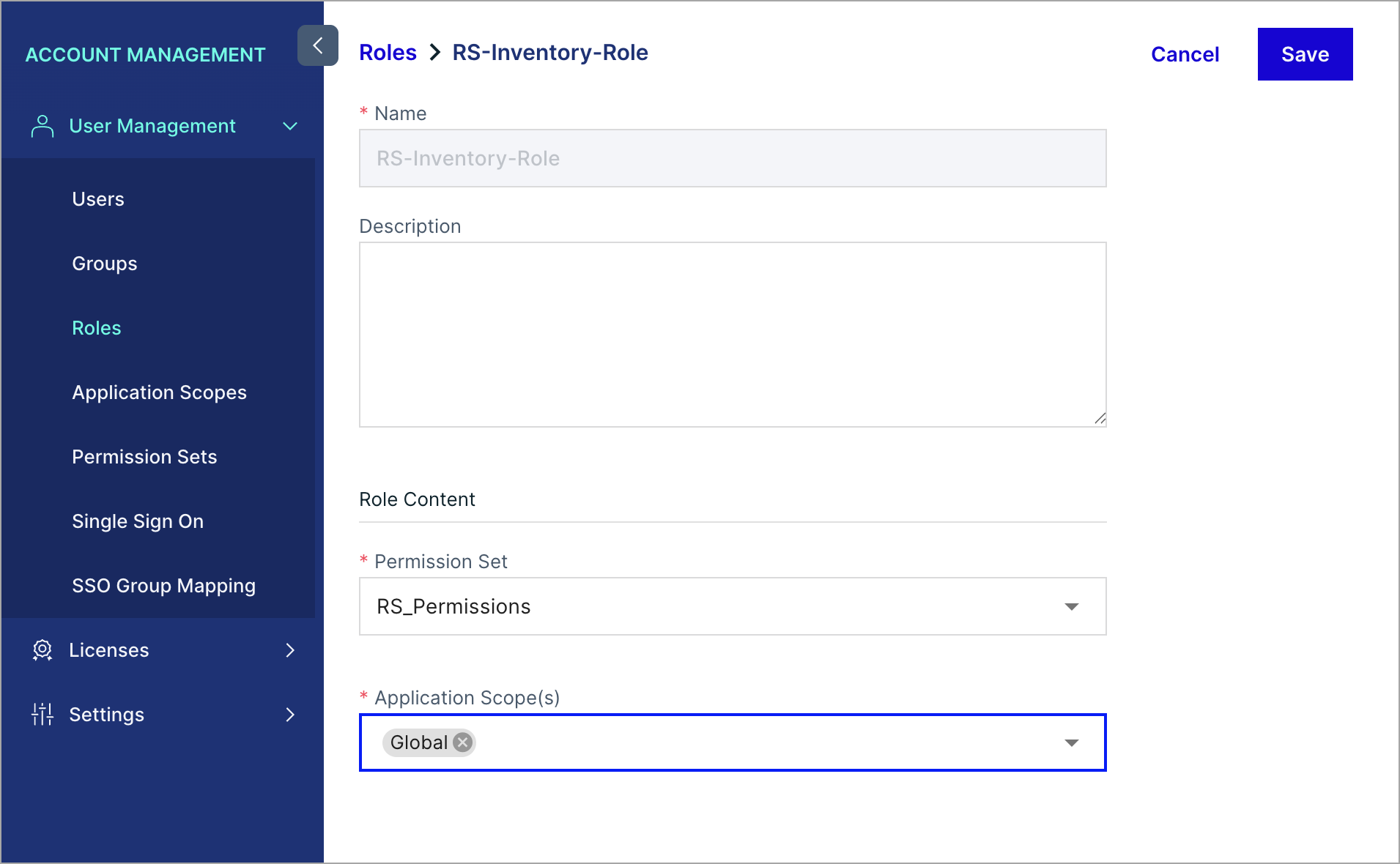
Create a Role
- From the top-left menu, select Account Management.
- From the left navigation menu, select Roles, then select Add Role.
- Enter a name for the role.
- For Permission Set, select the permission set you created.
- For Application Scope(s), select Global.
- Select Save.
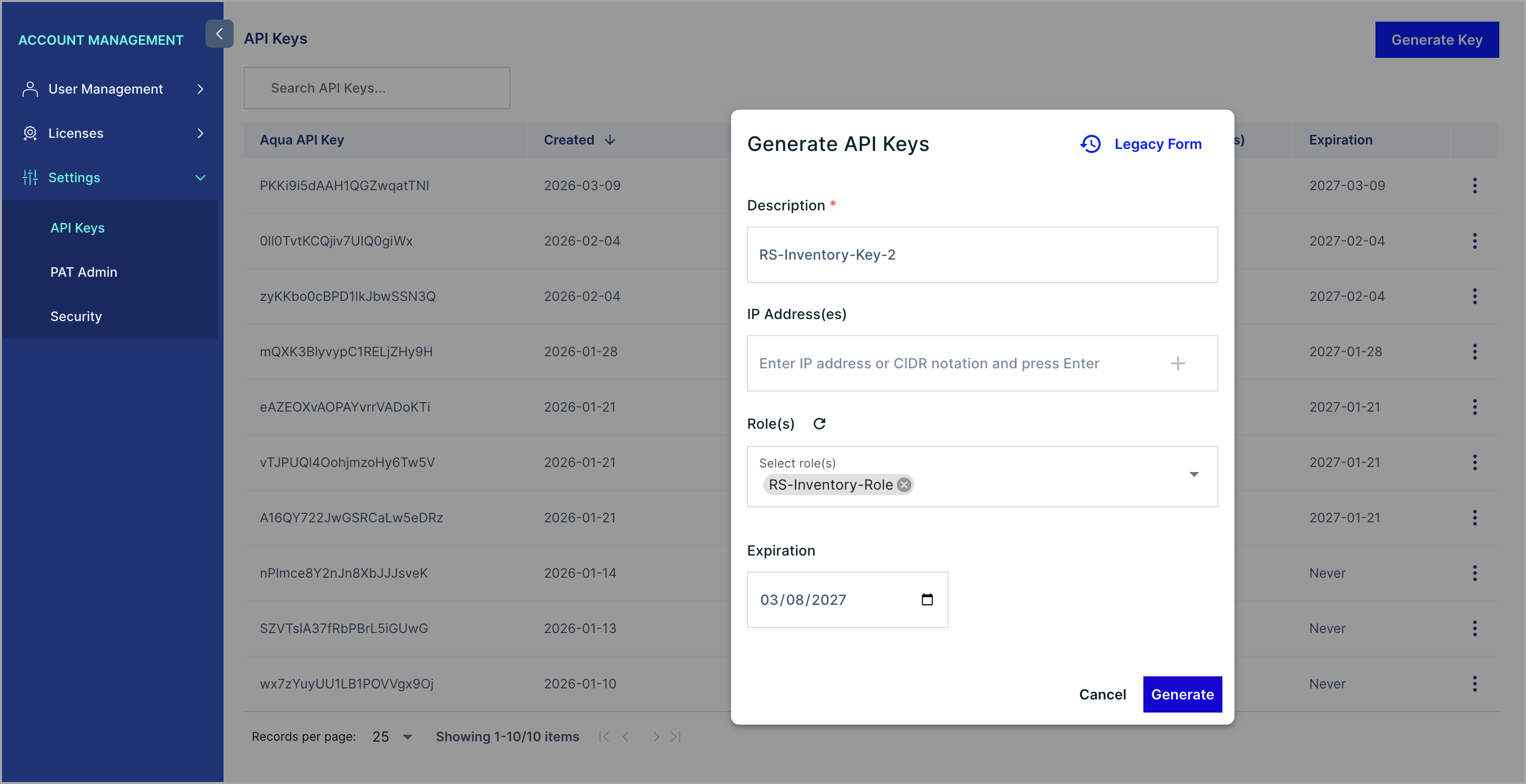
Generate an API Key
- From the top-left menu, select Account Management.
- From the left navigation menu, select Settings > API Keys.
- Select Generate Key.
- Enter a description for the new API key and select Create.
- Copy the API Key and Secret values to a secure location immediately. These values cannot be viewed again after the window is closed.
Configure API Key Permissions
- On the API Keys page, select the vertical ellipsis for the API key you created and select Edit.
- Clear the Enable global admin permission toggle.
- Select the roles:assign and tokens:readwrite permissions.
- From the role dropdown, select the role you created.
- Select Save.
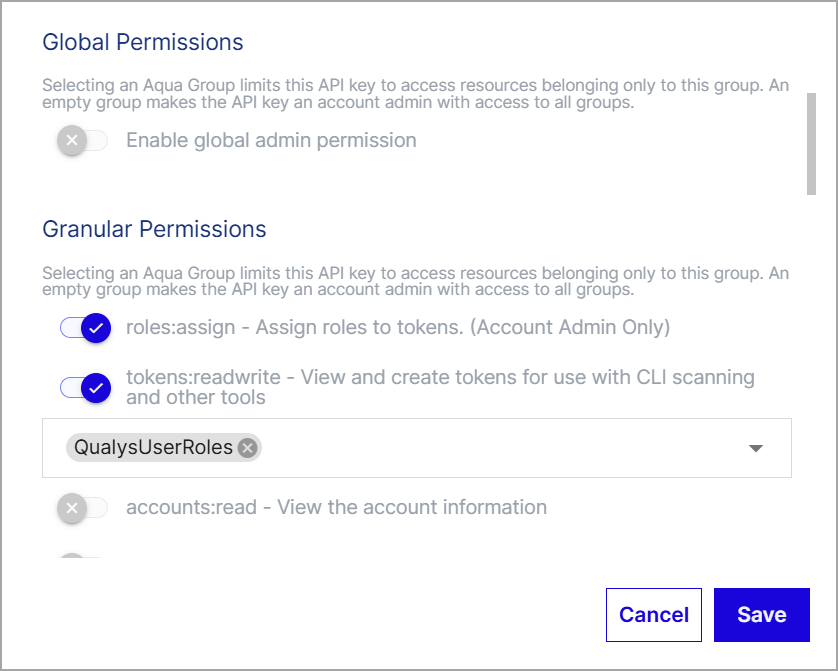
Note: Qualys recommends using a dedicated service account in Aqua for connector authentication. This isolates the connector's access and simplifies key rotation.
Permissions Required
The Aqua API Key used by the connector must have the following permissions configured, with global admin permission disabled:
roles:assigntokens:readwrite
The API Key must be associated with a role that has a permission set granting View access to the following Aqua modules:
- Aqua Hub
- CSPM
- Workload Protection
Scope and Data Access
The connector retrieves asset inventory and vulnerability findings from Aqua across Compute, Serverless, Container Image, and Container Instance asset types, spanning AWS, Azure, and GCP. Filters and filter queries are not supported; all data within the Aqua account scope is retrieved. The data flow is unidirectional, from Aqua Security to Qualys ETM. Import of installed software is not supported. Source tag import is supported.
Key Rotation
When rotating credentials, generate a new API Key in Aqua under Account Management > Settings > API Keys. Configure the new key with the same permissions and role association as the original. Then update the connector configuration in Qualys ETM with the new API Key and Secret via the Edit Connector option.
Create a Profile & ConnectionCreate a Profile & Connection
This step collects the connector name, description, and authentication credentials.
- Log in to Qualys ETM.
- Navigate to Connectors > Integration and locate the Aqua Security connector tile.
- Select Configure (or Manage from the ellipsis menu if already added).
- Complete the Connector Details and Authentication Details fields described in the tables below.
- Select Test Connection to validate the credentials before proceeding.
- Select Next to advance to Step 2.
Note: If the connector tile already shows a Manage option, you have already added this connector. Select Manage to edit the existing configuration rather than creating a duplicate.
Connector Details
|
Field |
Description |
|
Name |
A unique display name for this connector instance. |
|
Description |
An optional description to identify the purpose or environment of this connector. |
Authentication Details
|
Field |
Type |
Description |
|
Domain URL |
String |
The base URL of your Aqua Security cloud tenant. Examples: |
|
API Key |
String |
The API Key generated in the Aqua Security platform under Account Management > Settings > API Keys. |
|
API Secret |
Encrypted String |
The Secret associated with the API Key. This value is shown only once at key creation time and must be stored securely. |
Important: The API Secret cannot be retrieved from Aqua after the creation window is closed. If the Secret was not saved, generate a new API Key and update the connector accordingly.
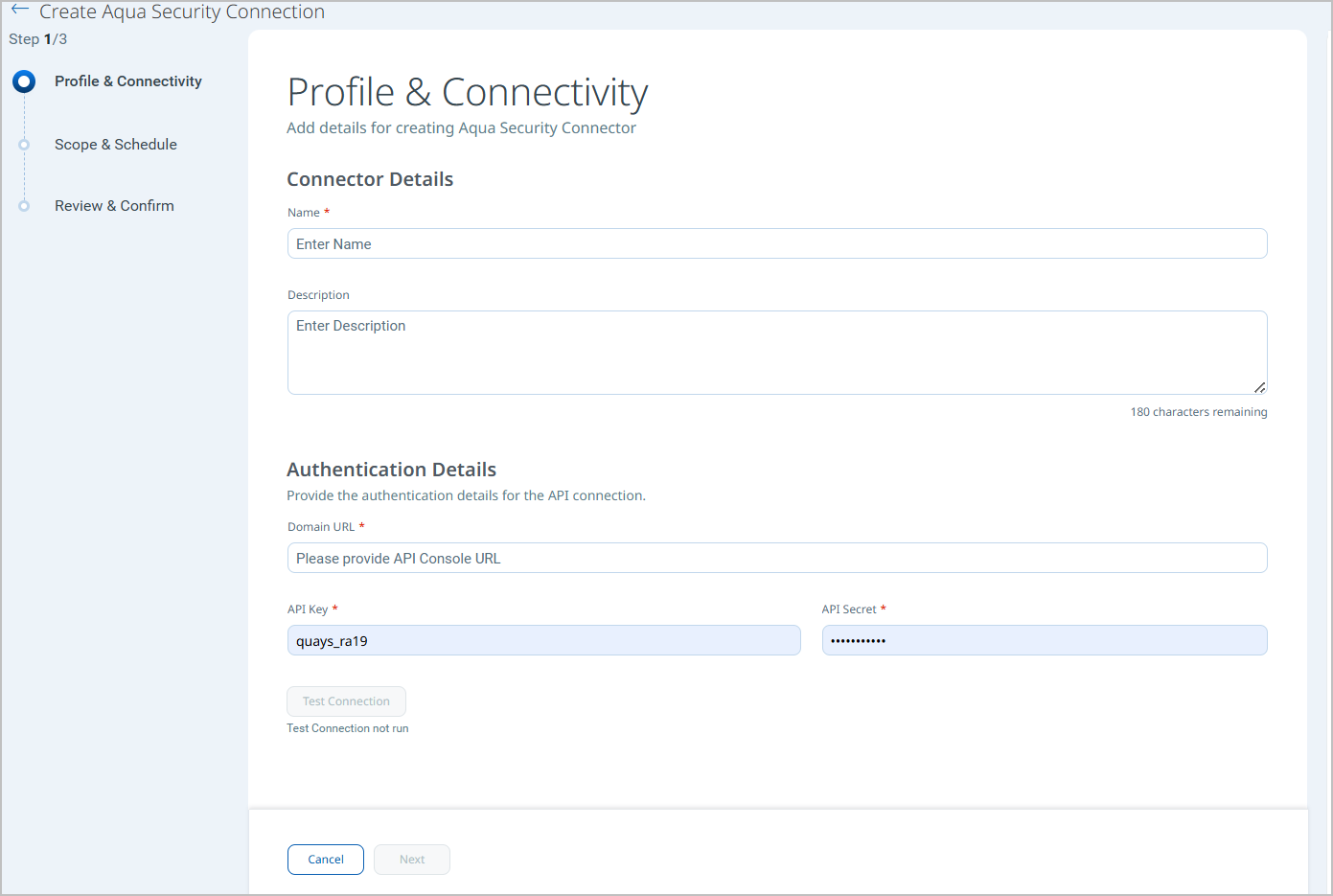
Test Connection runs the following checks against the supplied credentials:
- Network Reachability — Verifies that the connector endpoint is reachable over HTTPS (port 443).
- TLS Handshake — Confirms that a secure TLS connection can be established with the remote endpoint.
- Authentication Credential Check — Validates the configured credentials against the source system's authentication endpoint.
- Authorization Scope Check — Confirms that the provided credentials have the required permissions to access the configured data scope.
- Data Fetch — Verifies that data can be successfully retrieved from the source system using the configured connection.
All five checks must pass before the connector can be saved. If any check fails, refer to the Troubleshooting section for resolution steps.
Set the Scope & ScheduleSet the Scope & Schedule
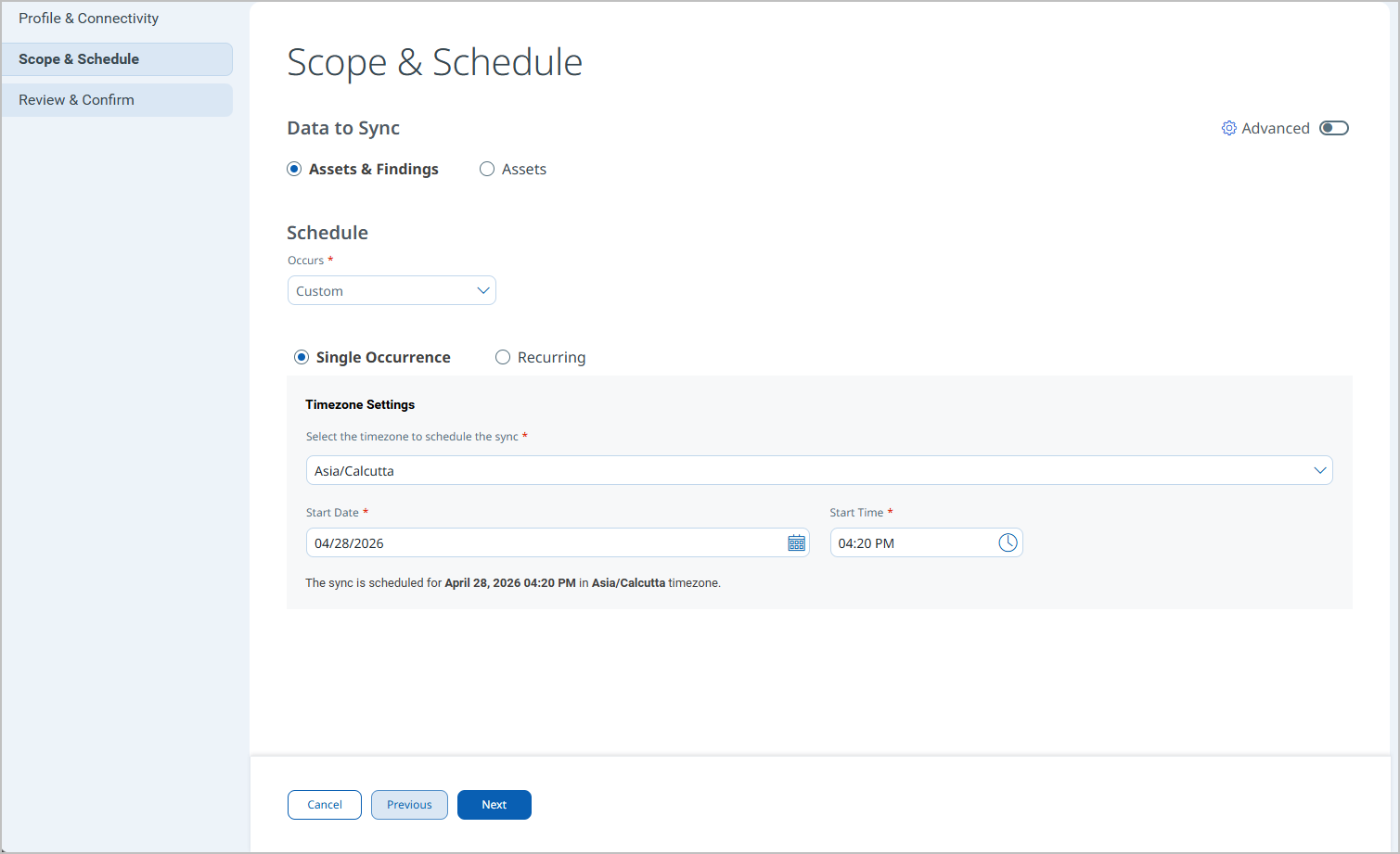
This step controls which asset types are ingested and when the connector executes.
- Under Data to Sync, select the asset types you want the connector to ingest:
- Compute (AWS, Azure, GCP)
- Serverless Functions (AWS Lambda, Azure App Service, GCP Cloud Run)
- Container Images
- Container Instances (AWS, Azure, GCP)
- Select the Findings types to include alongside each asset class.
- Configure the execution Schedule:
- Single Occurrence – runs once at the specified date and time.
- Recurring – runs on the configured interval with defined start and end dates.
- Select Next to advance to Step 3.
Note: Schedule times are interpreted in UTC. Plan accordingly for your local timezone. Delta synchronization is not supported; every scheduled run performs a full data pull from Aqua.
Review your changes and select Save to create the connector. The connector transitions to Registered state immediately after saving.
Note: After saving, advanced settings (Filters, Transform Map) can be configured from the connector's detail view. Changes to advanced settings take effect on the next scheduled run. Remember to save any changes made in the Advanced Settings tabs.
Advanced Settings
Advanced settings are available after the connector is created. Access them from the connector detail view in Connectors > Integration.
Filters Tab
Filters are not supported for the Aqua Security Connector. The Filters tab is present in the connector configuration interface; however, the connector does not currently support filter queries. All asset and findings data within the Aqua account scope is retrieved on each run.
Transform Map Tab
The Transform Map tab displays the active transformation maps applied during data ingestion. Default transform maps are provided for each Aqua asset class and finding type. You can create new maps or clone existing ones to customize field transformations. The active maps for this connector are listed in the Transformation Maps section.
Note: After modifying a transform map, select Save in the Advanced Settings view. Changes take effect on the next connector execution.
How the Connection Works
The Aqua Security CNAPP Connector centralizes cloud-native asset inventory and security findings from Aqua's CNAPP platform into Qualys ETM, enabling security teams to correlate and analyze cloud workloads within a unified risk management platform. By normalizing asset metadata and vulnerability findings from Aqua, it provides consistent visibility across hybrid and multi-cloud environments. Qualys ETM processes incoming data by de-duplicating redundant entries, normalizing data formats, enriching findings with additional context, and calculating risk scores using TruRisk.
On schedule or on demand, the Aqua Security Connector retrieves the selected asset classes and associated vulnerability findings from Aqua via REST API and imports them into the Qualys ETM Unified Asset Inventory. Each execution performs a full data pull; incremental or delta synchronization is not supported. Only High and Critical CVEs are fetched due to the high volume of vulnerability data generated by Aqua's per-package vulnerability model.
Each connector run retrieves asset records and associated vulnerability findings from Aqua. Supported asset types include:
- Compute instances (AWS, Azure, GCP)
- Serverless Functions (AWS Lambda, Azure App Service, GCP Cloud Run)
- Container Images (cloud and non-cloud registries)
- Container Instances (AWS, Azure, GCP)
Import of installed software is not supported. Source tag import is supported. Delta synchronization is not supported; each scheduled execution performs a full sync.
Connector States
A successfully configured connector transitions through the following states:
- Registered – The connector has been created and registered to fetch data from Aqua Security.
- Scheduled – The connector is queued to execute at the configured time.
- Processing – The connector is actively fetching asset and findings data from Aqua.
- Processed – Asset data has been successfully fetched and imported. Findings processing may continue in the background.
Note: The first connector run may take up to 2 hours to complete, depending on the volume of assets and findings in your Aqua account. The Processed state confirms the connector is operational, but findings import – particularly for large datasets – may require additional time to complete after the state updates.
Viewing Assets and Findings in ETM
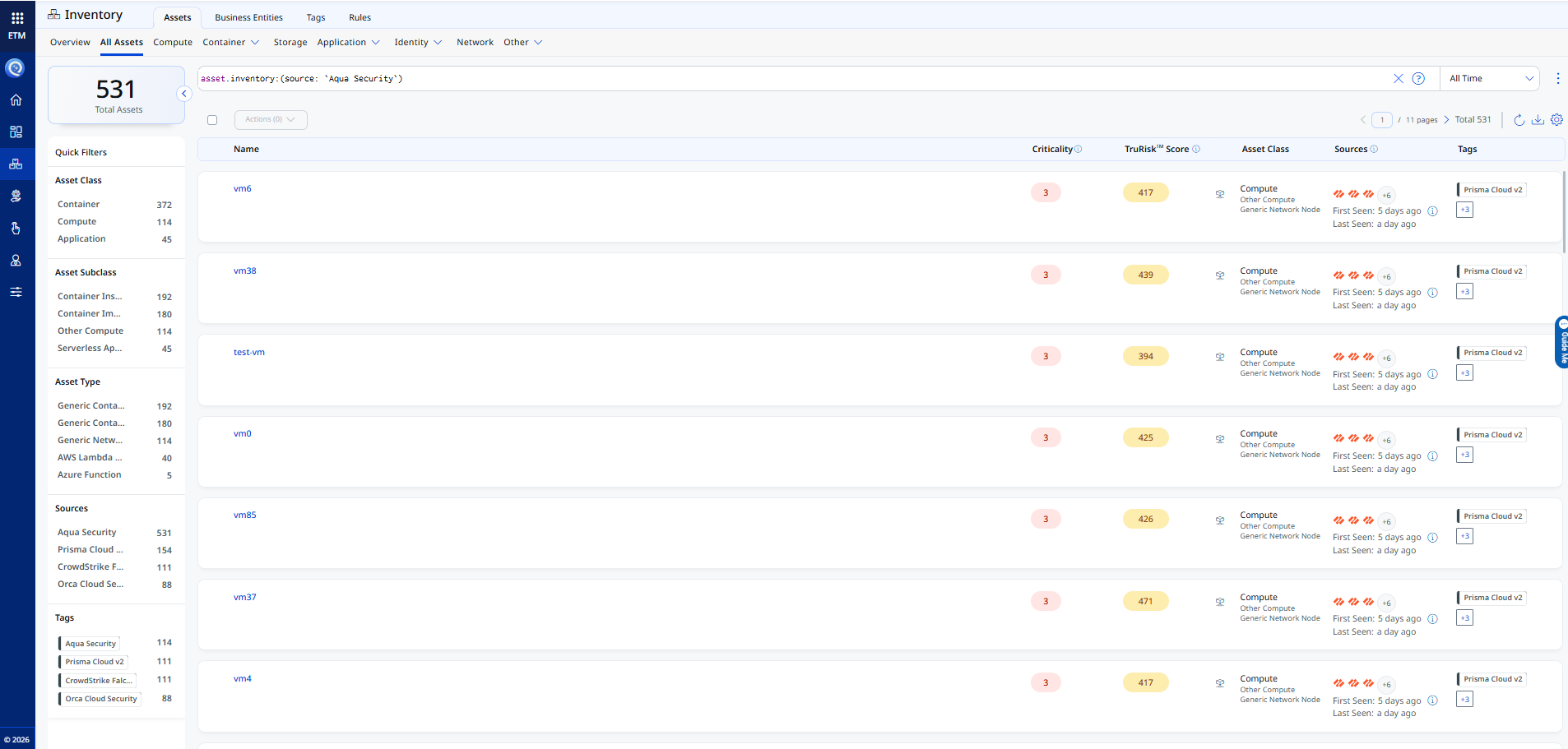
After a successful connector run, Aqua Security assets and findings are available in Qualys ETM.
Assets: Navigate to Inventory > Assets > All Assets. Use the following filter to scope results to Aqua Security assets:
inventory:(source:"Aqua Security")
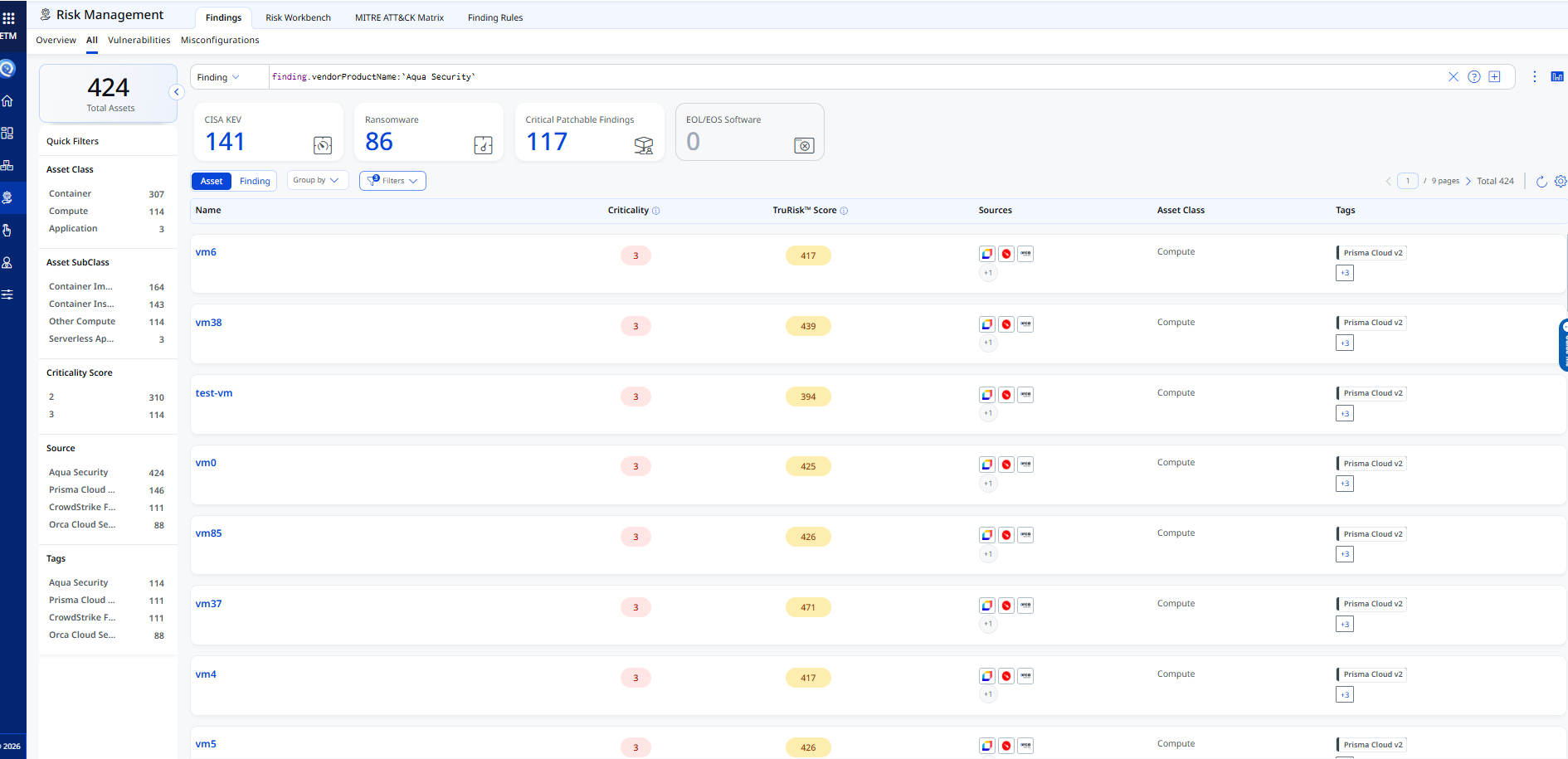
Findings: Navigate to Risk Management > Findings > Vulnerability. Use the following filter:
findings.vendorProductname:"Aqua Security"
Troubleshooting
|
Authentication failure on connector run |
Verify the Domain URL, API Key, and API Secret entered in Qualys ETM are correct. Confirm the API Key has not been revoked in Aqua. Verify that the |
|
No assets imported after first run |
The connector transitions through Registered, Scheduled, Processing, and Processed states. The entire process may take up to 2 hours to complete. Verify the API Key's associated role has View access to the Aqua Hub, CSPM, and Workload Protection modules, and that assets exist within the Aqua account. |
|
Connection test fails |
Verify the Domain URL matches your Aqua cloud tenant and is accessible from the Qualys cloud over HTTPS. Confirm the API Key and Secret are correctly entered in the connector configuration. |
|
Container image data not ingested |
Confirm the API Key's permission set includes View access to the Workload Protection module. Verify that container image data exists in the Aqua account and that the Container Image asset type is selected in the connector profile (Step 2: Scope & Schedule). |
Additional Information
API Reference
The connector uses the following Aqua Security REST API endpoints to authenticate and retrieve asset and vulnerability data:
|
API Function |
Endpoint |
Notes |
|
Authentication |
|
Returns a bearer token using the API Key and Secret |
|
Fetch VM Assets |
|
Returns compute assets for AWS, Azure, and GCP |
|
Fetch Container Images |
|
Cloud-agnostic; covers all registries |
|
Fetch Container Instances |
|
Returns running container instances |
|
Fetch Serverless Functions |
|
Returns Lambda, App Service, and Cloud Run functions |
|
Fetch Image Vulnerabilities |
|
Vulnerability findings for container images |
|
Fetch Serverless Vulnerabilities |
|
Vulnerability findings for serverless functions |
|
Fetch Container Vulnerabilities |
|
Vulnerability findings for container instances |
|
Fetch VM Vulnerabilities |
|
Filtered by |
Transformation Maps
Default transform maps are provided for each Aqua asset class and finding type. Fields marked (Required) must be present for the asset or finding record to be accepted by ETM. You can clone or create custom maps in the connector's Transform Map tab.
Compute – AWS EC2 InstanceCompute – AWS EC2 Instance
|
# |
Source Field |
Target Field |
|
1 |
|
asset.assetDetail.name |
|
2 |
|
asset.assetDetail.externalTags[].key |
|
3 |
|
asset.assetDetail.externalTags[].value |
|
4 |
|
asset.assetHeader.externalAssetId (Required) |
|
5 |
|
asset.assetHeader.vendorAssetId |
|
6 |
|
asset.assetDetail.sourceCreatedAt |
|
7 |
|
asset.assetDetail.sourceUpdatedAt |
|
8 |
|
asset.assetDetail.cloudInfo.region |
|
9 |
|
asset.assetDetail.cloudInfo.accountId |
|
10 |
|
asset.assetDetail.cloudInfo.provider |
|
11 |
|
asset.assetDetail.computeAssetClass.cloudInstance.vpcId |
|
12 |
|
asset.assetDetail.computeAssetClass.cloudInstance.imageId |
|
13 |
|
asset.assetDetail.computeAssetClass.services[].name |
|
14 |
|
asset.assetDetail.operatingSystem.name |
|
15 |
|
asset.assetDetail.operatingSystem.osCatalog.name |
|
16 |
|
asset.assetDetail.hostname |
|
17 |
|
asset.assetDetail.network[].ipv4Addresses[] |
|
18 |
|
asset.assetDetail.network[].publicIpv4Addresses[] |
|
19 |
|
asset.assetDetail.hostIdentity.hostname |
|
20 |
|
findingGroup.findings[].asset.externalAssetId |
|
21 |
|
findingGroup.findings[].findingType.vulnerability.cweIds[] |
|
22 |
|
findingGroup.findings[].product.name |
|
23 |
|
findingGroup.findings[].product.cpeName |
|
24 |
|
findingGroup.findings[].product.version |
|
25 |
|
findingGroup.findings[].name |
|
26 |
|
findingGroup.findings[].externalFindingId (Required) |
|
27 |
|
findingGroup.findings[].description |
|
28 |
|
findingGroup.findings[].severity |
|
29 |
|
findingGroup.findings[].firstFoundOn |
|
30 |
|
findingGroup.findings[].lastFoundOn |
|
31 |
|
findingGroup.findings[].findingType.vulnerability.cveId |
|
32 |
|
findingGroup.findings[].findingURL |
|
33 |
|
findingGroup.findings[].findingDetectionURL |
|
34 |
FUNCTION_PICKER (DEFAULT_VALUE) |
asset.assetHeader.assetTypeName |
Compute – Azure VM InstanceCompute – Azure VM Instance
|
# |
Source Field |
Target Field |
|
1 |
|
asset.assetDetail.name |
|
2 |
|
asset.assetDetail.externalTags[].key |
|
3 |
|
asset.assetDetail.externalTags[].value |
|
4 |
|
asset.assetHeader.externalAssetId (Required) |
|
5 |
|
asset.assetHeader.vendorAssetId |
|
6 |
|
asset.assetDetail.sourceCreatedAt |
|
7 |
|
asset.assetDetail.sourceUpdatedAt |
|
8 |
|
asset.assetDetail.cloudInfo.region |
|
9 |
|
asset.assetDetail.cloudInfo.accountId |
|
10 |
|
asset.assetDetail.cloudInfo.provider |
|
11 |
|
asset.assetDetail.computeAssetClass.cloudInstance.vpcId |
|
12 |
|
asset.assetDetail.computeAssetClass.cloudInstance.imageId |
|
13 |
|
asset.assetDetail.computeAssetClass.services[].name |
|
14 |
|
asset.assetDetail.operatingSystem.name |
|
15 |
|
asset.assetDetail.operatingSystem.osCatalog.name |
|
16 |
|
asset.assetDetail.hostname |
|
17 |
|
asset.assetDetail.network[].ipv4Addresses[] |
|
18 |
|
asset.assetDetail.network[].publicIpv4Addresses[] |
|
19 |
|
asset.assetDetail.hostIdentity.hostname |
|
20 |
|
findingGroup.findings[].asset.externalAssetId |
|
21 |
|
findingGroup.findings[].findingType.vulnerability.cweIds[] |
|
22 |
|
findingGroup.findings[].product.name |
|
23 |
|
findingGroup.findings[].product.cpeName |
|
24 |
|
findingGroup.findings[].product.version |
|
25 |
|
findingGroup.findings[].name |
|
26 |
|
findingGroup.findings[].externalFindingId (Required) |
|
27 |
|
findingGroup.findings[].description |
|
28 |
|
findingGroup.findings[].severity |
|
29 |
|
findingGroup.findings[].firstFoundOn |
|
30 |
|
findingGroup.findings[].lastFoundOn |
|
31 |
|
findingGroup.findings[].findingType.vulnerability.cveId |
|
32 |
|
findingGroup.findings[].findingURL |
|
33 |
|
findingGroup.findings[].findingDetectionURL |
|
34 |
FUNCTION_PICKER (DEFAULT_VALUE) |
asset.assetHeader.assetTypeName |
Compute – GCP VM InstanceCompute – GCP VM Instance
|
# |
Source Field |
Target Field |
|
1 |
|
asset.assetDetail.name |
|
2 |
|
asset.assetDetail.externalTags[].key |
|
3 |
|
asset.assetDetail.externalTags[].value |
|
4 |
|
asset.assetHeader.externalAssetId (Required) |
|
5 |
|
asset.assetHeader.vendorAssetId |
|
6 |
|
asset.assetDetail.sourceCreatedAt |
|
7 |
|
asset.assetDetail.sourceUpdatedAt |
|
8 |
|
asset.assetDetail.cloudInfo.region |
|
9 |
|
asset.assetDetail.cloudInfo.accountId |
|
10 |
|
asset.assetDetail.cloudInfo.provider |
|
11 |
|
asset.assetDetail.computeAssetClass.cloudInstance.vpcId |
|
12 |
|
asset.assetDetail.computeAssetClass.cloudInstance.imageId |
|
13 |
|
asset.assetDetail.computeAssetClass.services[].name |
|
14 |
|
asset.assetDetail.operatingSystem.name |
|
15 |
|
asset.assetDetail.operatingSystem.osCatalog.name |
|
16 |
|
asset.assetDetail.hostname |
|
17 |
|
asset.assetDetail.network[].ipv4Addresses[] |
|
18 |
|
asset.assetDetail.network[].publicIpv4Addresses[] |
|
19 |
|
asset.assetDetail.hostIdentity.hostname |
|
20 |
|
findingGroup.findings[].asset.externalAssetId |
|
21 |
|
findingGroup.findings[].findingType.vulnerability.cweIds[] |
|
22 |
|
findingGroup.findings[].product.name |
|
23 |
|
findingGroup.findings[].product.cpeName |
|
24 |
|
findingGroup.findings[].product.version |
|
25 |
|
findingGroup.findings[].name |
|
26 |
|
findingGroup.findings[].externalFindingId (Required) |
|
27 |
|
findingGroup.findings[].description |
|
28 |
|
findingGroup.findings[].severity |
|
29 |
|
findingGroup.findings[].firstFoundOn |
|
30 |
|
findingGroup.findings[].lastFoundOn |
|
31 |
|
findingGroup.findings[].findingType.vulnerability.cveId |
|
32 |
|
findingGroup.findings[].findingURL |
|
33 |
|
findingGroup.findings[].findingDetectionURL |
|
34 |
FUNCTION_PICKER (DEFAULT_VALUE) |
asset.assetHeader.assetTypeName |
Container ImageContainer Image
|
# |
Source Field |
Target Field |
|
1 |
|
asset.assetDetail.name |
|
2 |
|
asset.assetDetail.externalTags[].key |
|
3 |
|
asset.assetDetail.externalTags[].value |
|
4 |
|
asset.assetDetail.sourceCreatedAt |
|
5 |
|
asset.assetDetail.sourceUpdatedAt |
|
6 |
|
asset.assetDetail.containerImageAssetClass.name |
|
7 |
|
asset.assetDetail.containerImageAssetClass.tag |
|
8 |
|
asset.assetDetail.containerImageAssetClass.registry |
|
9 |
|
asset.assetDetail.containerImageAssetClass.repository |
|
10 |
|
asset.assetDetail.containerImageAssetClass.digest |
|
11 |
|
asset.assetHeader.externalAssetId (Required) |
|
12 |
|
asset.assetHeader.vendorAssetId |
|
13 |
|
asset.assetDetail.containerImageAssetClass.architecture |
|
14 |
FUNCTION_PICKER (CONCAT |
asset.assetDetail.operatingSystem.name |
|
15 |
FUNCTION_PICKER (CONCAT |
asset.assetDetail.operatingSystem.osCatalog.name |
|
16 |
|
asset.assetDetail.operatingSystem.version |
|
17 |
|
asset.assetDetail.operatingSystem.osCatalog.version |
|
18 |
|
asset.assetDetail.containerImageAssetClass.sizeInBytes |
|
19 |
FUNCTION_PICKER (DEFAULT_VALUE) |
asset.assetHeader.assetTypeName |
Container Image – VulnerabilityContainer Image – Vulnerability
|
# |
Source Field |
Target Field |
|
1 |
|
asset.assetHeader.externalAssetId (Required) |
|
2 |
|
asset.assetHeader.vendorAssetId |
|
3 |
|
asset.assetDetail.name |
|
4 |
|
findingGroup.findings[].findingType.vulnerability.cweIds[] |
|
5 |
|
findingGroup.findings[].product.name |
|
6 |
|
findingGroup.findings[].product.cpeName |
|
7 |
|
findingGroup.findings[].product.version |
|
8 |
|
findingGroup.findings[].name |
|
9 |
|
findingGroup.findings[].externalFindingId (Required) |
|
10 |
|
findingGroup.findings[].description |
|
11 |
|
findingGroup.findings[].severity |
|
12 |
|
findingGroup.findings[].firstFoundOn |
|
13 |
|
findingGroup.findings[].lastFoundOn |
|
14 |
|
findingGroup.findings[].findingType.vulnerability.cveId |
|
15 |
|
findingGroup.findings[].findingURL |
|
16 |
|
findingGroup.findings[].findingDetectionURL |
|
17 |
FUNCTION_PICKER (DEFAULT_VALUE) |
asset.assetHeader.assetTypeName |
Container Instance – AWSContainer Instance – AWS
|
# |
Source Field |
Target Field |
|
1 |
|
asset.assetDetail.containerInstanceAssetClass.image.digest |
|
2 |
|
asset.assetHeader.vendorAssetId |
|
3 |
|
asset.assetDetail.containerInstanceAssetClass.id |
|
4 |
|
asset.assetDetail.name |
|
5 |
|
asset.assetHeader.externalAssetId (Required) |
|
6 |
|
asset.assetDetail.sourceCreatedAt |
|
7 |
|
asset.assetDetail.sourceUpdatedAt |
|
8 |
|
asset.assetDetail.containerInstanceAssetClass.image.tag |
|
9 |
|
asset.assetDetail.containerInstanceAssetClass.image.registry |
|
10 |
|
asset.assetDetail.containerInstanceAssetClass.image.repository |
|
11 |
FUNCTION_PICKER (DEFAULT_VALUE) |
asset.assetHeader.assetTypeName |
Container Instance – AzureContainer Instance – Azure
|
# |
Source Field |
Target Field |
|
1 |
|
asset.assetDetail.containerInstanceAssetClass.image.digest |
|
2 |
|
asset.assetHeader.vendorAssetId |
|
3 |
|
asset.assetDetail.containerInstanceAssetClass.id |
|
4 |
|
asset.assetDetail.name |
|
5 |
|
asset.assetHeader.externalAssetId (Required) |
|
6 |
|
asset.assetDetail.sourceCreatedAt |
|
7 |
|
asset.assetDetail.sourceUpdatedAt |
|
8 |
|
asset.assetDetail.containerInstanceAssetClass.image.tag |
|
9 |
|
asset.assetDetail.containerInstanceAssetClass.image.registry |
|
10 |
|
asset.assetDetail.containerInstanceAssetClass.image.repository |
|
11 |
FUNCTION_PICKER (DEFAULT_VALUE) |
asset.assetHeader.assetTypeName |
Container Instance – GCPContainer Instance – GCP
|
# |
Source Field |
Target Field |
|
1 |
|
asset.assetDetail.containerInstanceAssetClass.image.digest |
|
2 |
|
asset.assetHeader.vendorAssetId |
|
3 |
|
asset.assetDetail.containerInstanceAssetClass.id |
|
4 |
|
asset.assetDetail.name |
|
5 |
|
asset.assetHeader.externalAssetId (Required) |
|
6 |
|
asset.assetDetail.sourceCreatedAt |
|
7 |
|
asset.assetDetail.sourceUpdatedAt |
|
8 |
|
asset.assetDetail.containerInstanceAssetClass.image.tag |
|
9 |
|
asset.assetDetail.containerInstanceAssetClass.image.registry |
|
10 |
|
asset.assetDetail.containerInstanceAssetClass.image.repository |
|
11 |
FUNCTION_PICKER (DEFAULT_VALUE) |
asset.assetHeader.assetTypeName |
Container Instance – VulnerabilityContainer Instance – Vulnerability
|
# |
Source Field |
Target Field |
|
1 |
|
asset.assetHeader.externalAssetId (Required) |
|
2 |
|
asset.assetHeader.vendorAssetId |
|
3 |
|
asset.assetDetail.name |
|
4 |
|
findingGroup.findings[].product.name |
|
5 |
|
findingGroup.findings[].product.cpeName |
|
6 |
|
findingGroup.findings[].product.version |
|
7 |
|
findingGroup.findings[].name |
|
8 |
|
findingGroup.findings[].externalFindingId (Required) |
|
9 |
|
findingGroup.findings[].severity |
|
10 |
|
findingGroup.findings[].firstFoundOn |
|
11 |
|
findingGroup.findings[].lastFoundOn |
|
12 |
|
findingGroup.findings[].findingType.vulnerability.cveId |
|
13 |
|
findingGroup.findings[].findingURL |
|
14 |
|
findingGroup.findings[].findingDetectionURL |
|
15 |
FUNCTION_PICKER (DEFAULT_VALUE) |
asset.assetHeader.assetTypeName |
Serverless – AWS Lambda FunctionServerless – AWS Lambda Function
|
# |
Source Field |
Target Field |
|
1 |
|
asset.assetDetail.name |
|
2 |
|
asset.assetDetail.externalTags[].key |
|
3 |
|
asset.assetDetail.externalTags[].value |
|
4 |
|
asset.assetHeader.externalAssetId (Required) |
|
5 |
|
asset.assetHeader.vendorAssetId |
|
6 |
|
asset.assetDetail.cloudInfo.provider |
|
7 |
|
asset.assetDetail.serverlessAssetClass.functionName |
|
8 |
FUNCTION_PICKER (CONCAT |
asset.assetDetail.serverlessAssetClass.runtime |
|
9 |
|
asset.assetDetail.sourceCreatedAt |
|
10 |
|
asset.assetDetail.sourceUpdatedAt |
|
11 |
FUNCTION_PICKER (DEFAULT_VALUE) |
asset.assetHeader.assetTypeName |
Serverless – Azure App ServiceServerless – Azure App Service
|
# |
Source Field |
Target Field |
|
1 |
|
asset.assetDetail.name |
|
2 |
|
asset.assetDetail.externalTags[].key |
|
3 |
|
asset.assetDetail.externalTags[].value |
|
4 |
|
asset.assetHeader.externalAssetId (Required) |
|
5 |
|
asset.assetHeader.vendorAssetId |
|
6 |
|
asset.assetDetail.cloudInfo.provider |
|
7 |
|
asset.assetDetail.serverlessAssetClass.functionName |
|
8 |
FUNCTION_PICKER (CONCAT |
asset.assetDetail.serverlessAssetClass.runtime |
|
9 |
|
asset.assetDetail.sourceCreatedAt |
|
10 |
|
asset.assetDetail.sourceUpdatedAt |
|
11 |
FUNCTION_PICKER (DEFAULT_VALUE) |
asset.assetHeader.assetTypeName |
Serverless – GCP Cloud RunServerless – GCP Cloud Run
|
# |
Source Field |
Target Field |
|
1 |
|
asset.assetDetail.name |
|
2 |
|
asset.assetDetail.externalTags[].key |
|
3 |
|
asset.assetDetail.externalTags[].value |
|
4 |
|
asset.assetHeader.externalAssetId (Required) |
|
5 |
|
asset.assetHeader.vendorAssetId |
|
6 |
|
asset.assetDetail.cloudInfo.provider |
|
7 |
|
asset.assetDetail.serverlessAssetClass.functionName |
|
8 |
FUNCTION_PICKER (CONCAT |
asset.assetDetail.serverlessAssetClass.runtime |
|
9 |
|
asset.assetDetail.sourceCreatedAt |
|
10 |
|
asset.assetDetail.sourceUpdatedAt |
|
11 |
FUNCTION_PICKER (DEFAULT_VALUE) |
asset.assetHeader.assetTypeName |
Serverless – VulnerabilityServerless – Vulnerability
|
# |
Source Field |
Target Field |
|
1 |
|
asset.assetHeader.externalAssetId (Required) |
|
2 |
|
asset.assetHeader.vendorAssetId |
|
3 |
|
asset.assetDetail.name |
|
4 |
|
findingGroup.findings[].findingType.vulnerability.cweIds[] |
|
5 |
|
findingGroup.findings[].product.name |
|
6 |
|
findingGroup.findings[].product.cpeName |
|
7 |
|
findingGroup.findings[].product.version |
|
8 |
|
findingGroup.findings[].name |
|
9 |
|
findingGroup.findings[].externalFindingId (Required) |
|
10 |
|
findingGroup.findings[].description |
|
11 |
|
findingGroup.findings[].severity |
|
12 |
|
findingGroup.findings[].firstFoundOn |
|
13 |
|
findingGroup.findings[].lastFoundOn |
|
14 |
|
findingGroup.findings[].findingType.vulnerability.cveId |
|
15 |
|
findingGroup.findings[].findingURL |
|
16 |
|
findingGroup.findings[].findingDetectionURL |
|
17 |
|
asset.assetHeader.assetTypeName |