AWS Inspector V2 Connector
The Amazon Inspector API Connector bridges AWS Inspector and Qualys ETM to consolidate vulnerability findings from your cloud infrastructure into a centralized risk management platform. By automatically pulling EC2 instances, ECR container images, and Serverless Lambda functions and their vulnerabilities, and deduplicating data through normalizing data formats and enriching findings with additional context, security teams gain unified visibility into their AWS security posture rather than managing assessments across separate tools. The connector calculates risk scores using TruRisk and enables faster remediation by combining cloud vulnerabilities with on-premises findings in one system. This integration transforms AWS vulnerability discovery from an isolated assessment into an actionable component of enterprise-wide threat and risk management.
Important: This connector supports Amazon Inspector V2 only. Amazon Inspector Classic is not supported. AWS China regions and AWS GovCloud regions are not supported.
Connector Details
| Vendor | Amazon Web Services (AWS) |
| Product Name | AWS Inspector V2 |
| Category | Vulnerability Management, CSPM |
| Works With | ETM, CSAM |
| Connector Type | ROC Connector |
| Supported Assets | Compute (EC2 Instances), Serverless (Lambda functions), Container Image (ECR container images), Repository (ECR repositories) |
| Findings Support | Supported |
| Version | 1.0.0 |
| Supported Version & Type | SaaS (Latest) — Amazon Inspector V2 only |
| Integration Type | AWS SDK (v2.42.4) |
| Authentication Type | IAM Role Assumption via AWS STS (Basic Auth) |
| Direction | Unidirectional (AWS Inspector V2 → Qualys) |
| Incremental Sync (Delta) | Supported for Vulnerability Findings (ListFindings API); Not Supported for Assets |
| Import of Installed Software | Not Supported |
| Import of Source Tags | Not Supported |
| Filters / Filter Query | Not Supported |
| Multi-Account (Organization Level) | Not Supported |
| Supported AWS Regions | Standard AWS commercial regions only. AWS China and AWS GovCloud not supported. |
Configure the Connector
The configuration wizard consists of three steps. A valid connection test is required before you can proceed.
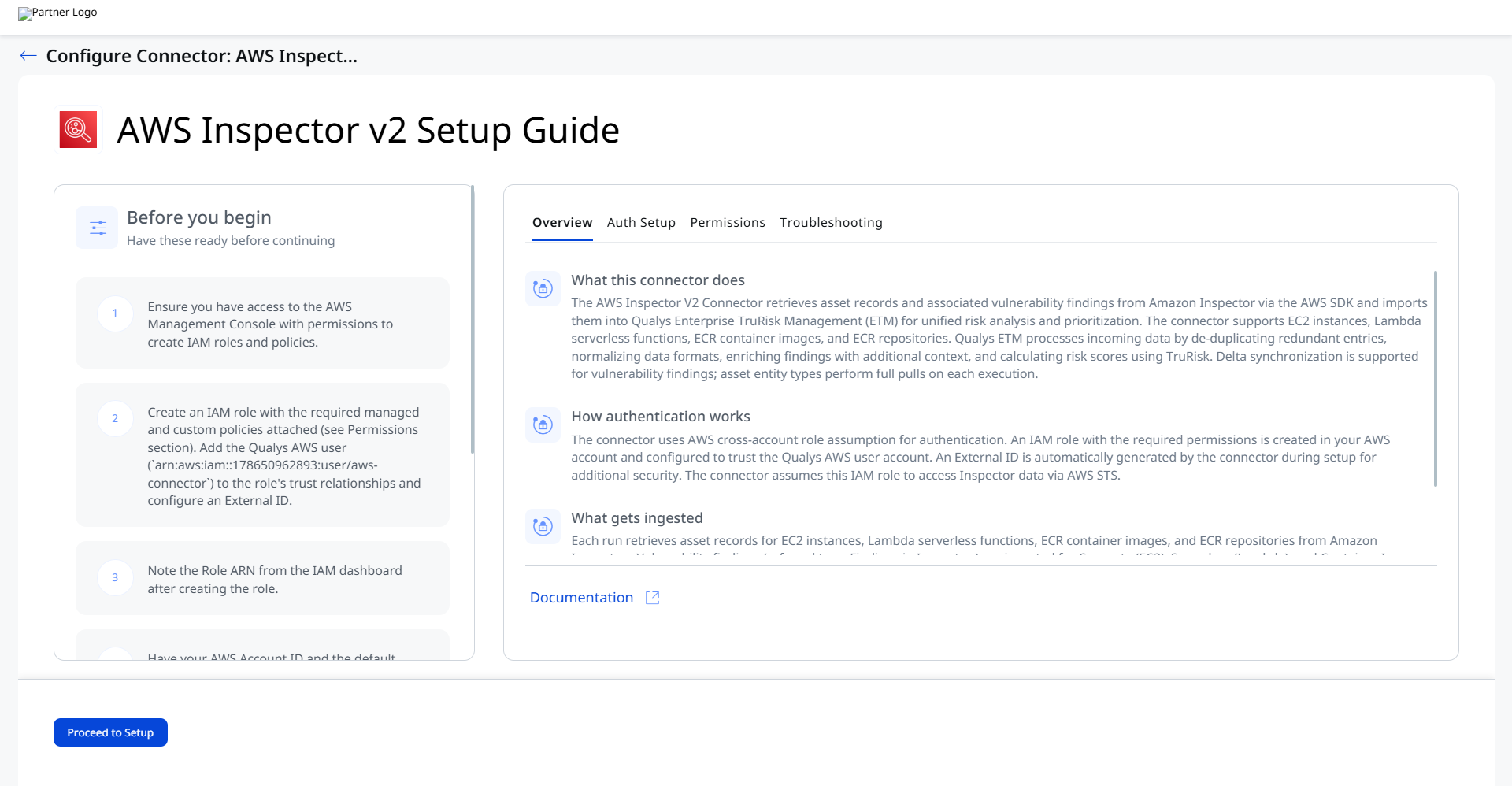
Before You Begin - AuthenticationBefore You Begin - Authentication
Have the following ready before starting the connector configuration in Qualys ETM:
- Ensure you have access to the AWS Management Console with permissions to create IAM roles and policies.
- Create an IAM role with the required managed and custom policies attached (see Permissions Required below). Add the Qualys AWS user (
arn:aws:iam::178650962893:user/aws-connector) to the role's trust relationships and configure an External ID. - Note the Role ARN from the IAM dashboard after creating the role.
- Have your AWS Account ID and the default AWS region where Amazon Inspector is enabled.
How Authentication Works
The connector uses AWS cross-account role assumption for authentication. An IAM role with the required permissions is created in your AWS account and configured to trust the Qualys AWS user account. An External ID is automatically generated by the connector during setup in Qualys ETM for additional security. The connector assumes this IAM role to access Inspector data via AWS STS (AssumeRole).
Create an IAM Role for the Connector
- Log in to the AWS Management Console as an administrator.
- Navigate to Identity and Access Management (IAM).
- From the IAM dashboard, click Roles, then click Create role.
- Select AWS account as the trusted entity type and click Next.
- Attach the required permissions policies based on the asset types you intend to ingest. See the Permissions Required section below for the full policy list.
- Provide a name and description for the role, then click Create role.
- On the Roles page, open the new role and copy the ARN value. This is the Role ARN you will enter in Qualys ETM.
Note: If you do not have permissions to create IAM roles, contact your AWS administrator. Refer to AWS documentation on creating IAM roles for details.
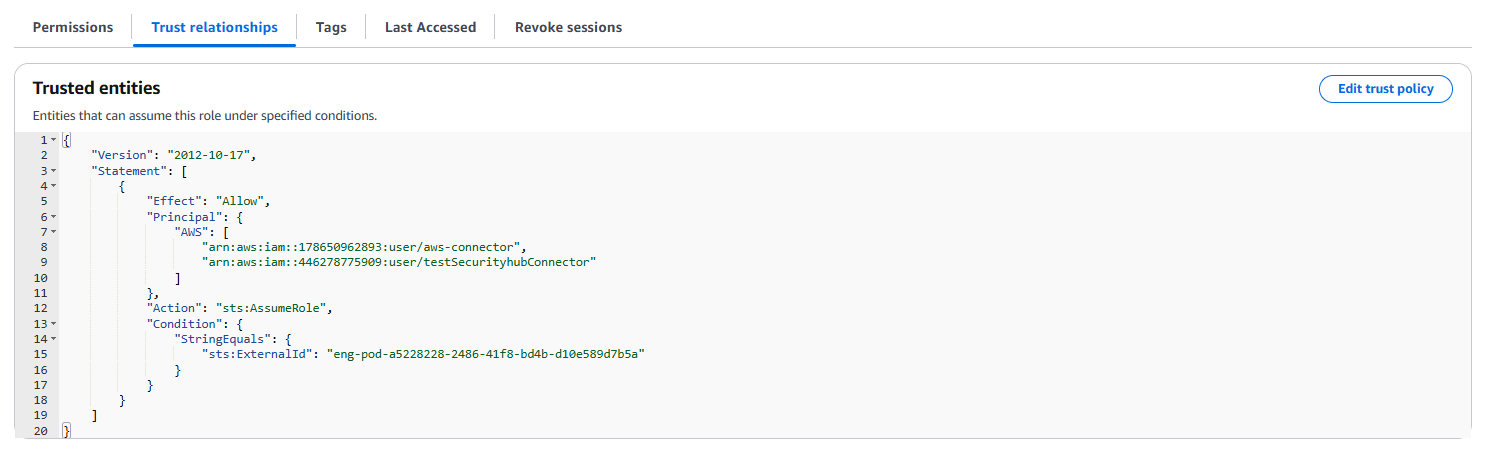
Configure Trust Relationships
After creating the role, navigate to its Trust relationships tab and click Edit trust policy. Add the Qualys AWS user as a trusted principal and include the External ID condition:
- Qualys AWS User ARN:
arn:aws:iam::178650962893:user/aws-connector - External ID: Automatically generated by the connector during setup in Qualys ETM. Enter this value in the trust policy condition after the connector is created.
Permissions Required
Attach the following policies to the IAM role based on the asset types you intend to ingest.
| Asset Type | Policy Name | Policy Type | Notes |
|---|---|---|---|
| EC2 Instance | AmazonEC2ReadOnlyAccess |
AWS Managed | Attach the standard AWS managed policy. |
| Lambda Serverless Function | AwsLambdaCustomReadAccess |
Customer Inline | Create a custom inline policy with Lambda read permissions including lambda:ListFunctions, lambda:GetFunction, and related read actions. View Lambda policy JSONView Lambda policy JSON
|
| ECR Repository & Container Image | AwsEcrCustomReadAccess |
Customer Inline | Create a custom inline policy with ECR read permissions including ecr:DescribeRepositories, ecr:DescribeImages, and related read actions. View ECR policy JSONView ECR policy JSON
Note: If ECR data is not returned with the above permissions, create an additional custom policy named
|
| Vulnerability Findings | AmazonInspector2ReadOnlyAccess |
AWS Managed | Attach the standard AWS managed policy to enable reading Inspector findings. |
Scope and Data Access
The connector supports four asset entity types with different ingestion capabilities:
- Compute (EC2 instances) — max page size 1,000. Asset and Vulnerability.
- Serverless (Lambda functions) — max page size 50 per AWS SDK limitation. Asset and Vulnerability.
- Container Image (ECR container images) — max page size 1,000. Asset and Vulnerability.
- Repository (ECR repositories) — max page size 1,000. Asset only.
Note: The ListFunctions API is limited to 50 results per call by AWS SDK. The connector handles pagination automatically to retrieve all Lambda functions.
Create a Profile & ConnectionCreate a Profile & Connection
This step establishes the connector's identity and authenticates it with your AWS account via IAM role assumption.
- Log in to Qualys ETM.
- Navigate to Connectors > Integration.
- Locate the AWS Inspector V2 Connector on the Connector Marketplace and click Add. This is a one-time task.
Note: If the connector is already added, navigate to My Connectors, search for the AWS Inspector V2 connector, and click Manage Connections.
- From the connector tile, click Manage Connections.
- Click Create Connection. The Setup Guide opens with the Before You Begin checklist and four reference tabs: Overview, Auth Setup, Permissions, and Troubleshooting. Review these before continuing.
- Click Proceed to Setup.
- On the Profile & Connectivity page, complete the following fields:
Connector Details
Field Description Name (required) A unique display name for this connector connection. Description An optional description of the connection's purpose. Authentication Details
Provide the following IAM role credentials to authenticate the connector with your AWS account.
Field Type Description Base Account ID String Your AWS account ID. This is the Qualys-provided base account used for cross-account role assumption. Example: 178650962893External ID (required) String The External ID automatically generated by the connector during setup. Enter this value in your IAM role's trust policy condition. Example: pod01339712824644Role ARN (required) String The Amazon Resource Name (ARN) of the IAM role the connector assumes when accessing AWS services. The role must have the required permissions and trust relationships configured. Example: arn:aws:iam::860454016470:role/qint-assume-role3Region (required) String The AWS region where Amazon Inspector is actively enabled. Example: US East (Ohio)/us-east-2. Refer to AWS Inspector supported regions.
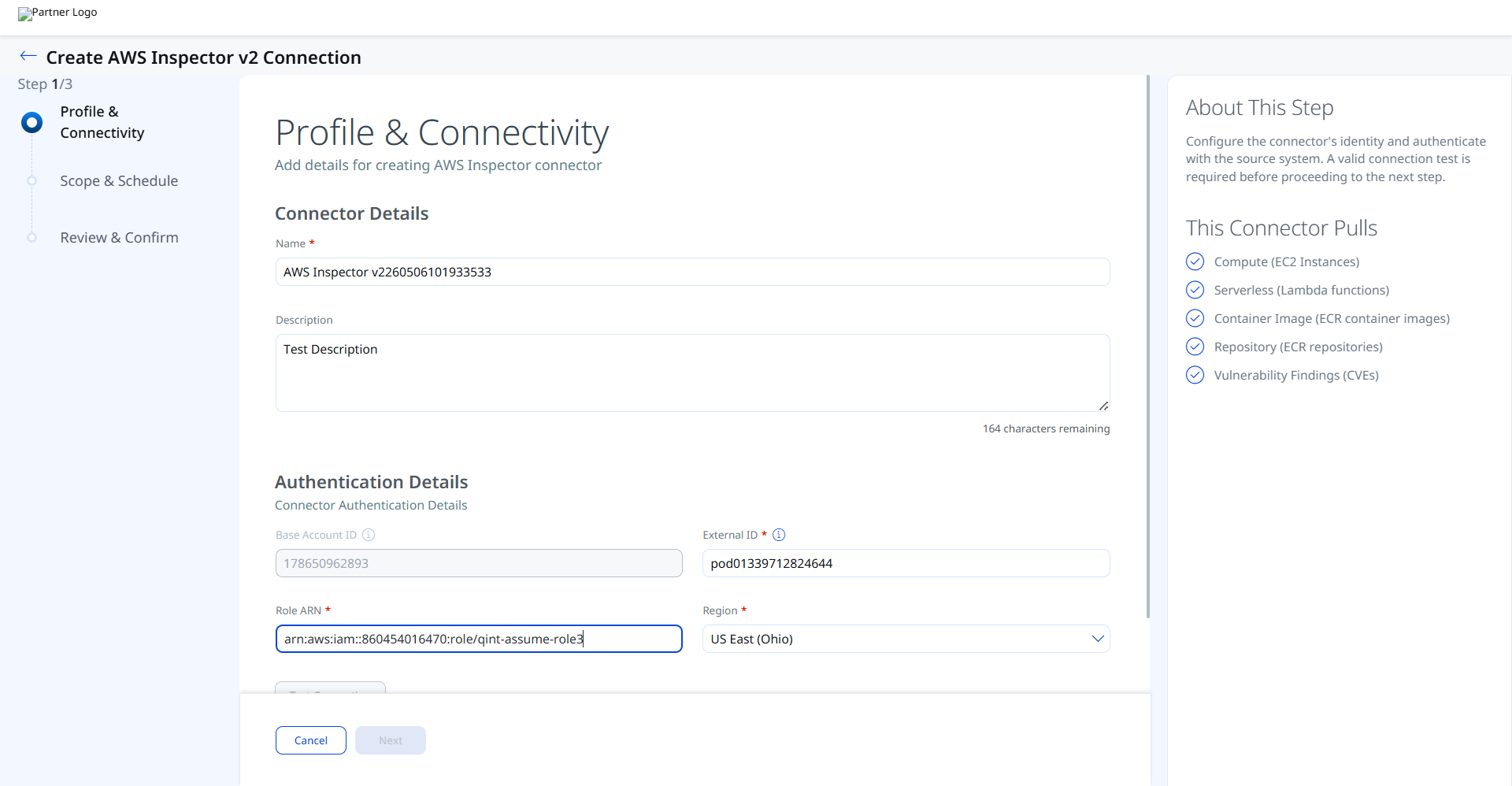
- Click Test Connection. A modal appears showing the status of five sequential checks:
- Network Reachability — Verifies AWS STS and Inspector endpoints are reachable.
- TLS Handshake — Confirms a secure connection can be established.
- Authentication Credential Check — Validates the Role ARN and External ID via STS AssumeRole.
- Authorization Scope Check — Confirms the IAM role has the required permissions for the target asset types.
- Data Fetch — Verifies that asset and finding data can be retrieved from the AWS Inspector API.
All five checks must pass before you can proceed. See the Troubleshooting section if any check fails.
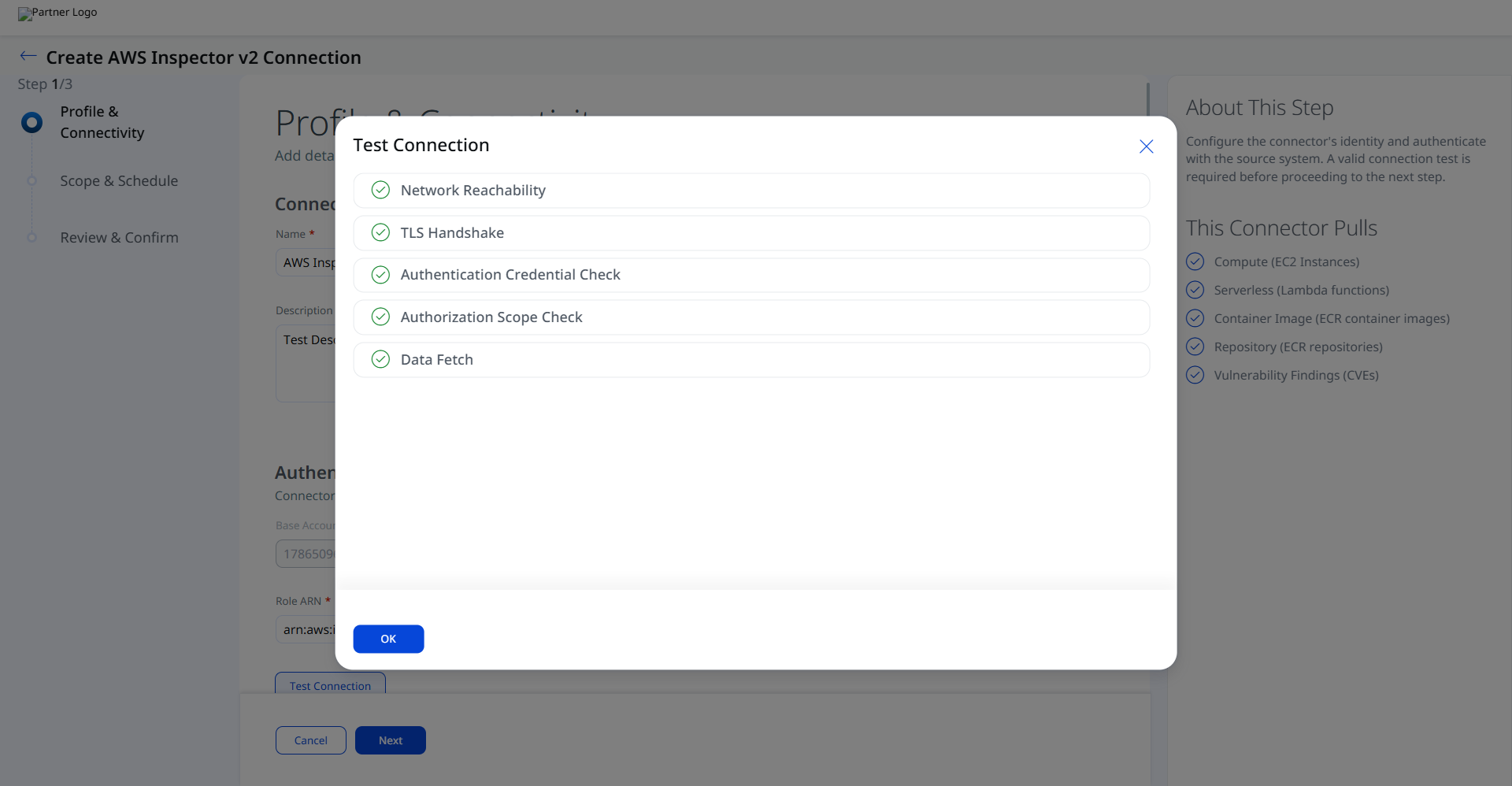
- Click OK to dismiss the modal, then click Next.
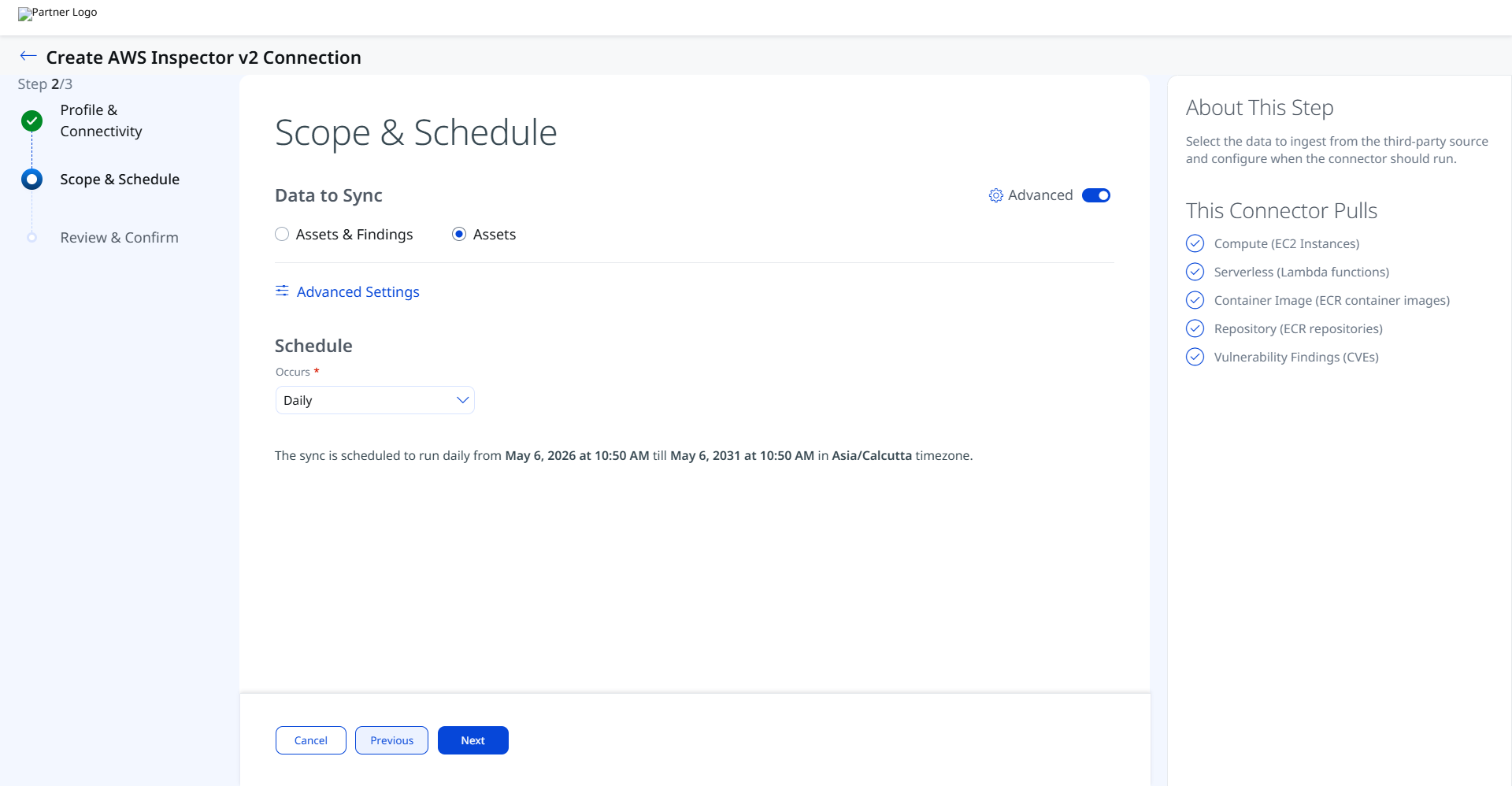
Set the Scope & ScheduleSet the Scope & Schedule
This step defines what data is ingested and when the connector runs.
- Data to Sync — Select one of the following:
- Assets & Findings — Ingests both asset records and associated CVE-based vulnerability findings.
- Assets — Ingests asset records only, without vulnerability findings.
- Advanced Settings (optional) — Click Advanced Settings to restrict which asset types are ingested or to view the active transform map. See Advanced Settings below.
- Schedule — Select an execution frequency from the Occurs dropdown (for example, Daily). The system displays the calculated start date, end date, and timezone.
Note: The timezone is determined by your Qualys account settings. The connector runs from the configured start date for a default period of 5 years.
- Click Next. Review and confirm the changes.
- Click Create.
Advanced Settings
Enabling the Advanced toggle on the Scope & Schedule page or clicking the Advanced Settings link opens a panel with two tabs: Filters and Transform Map.
Filters Tab
The Filters tab provides chip-based selection of asset types. The following asset types are selectable:
- Compute — EC2 instances
- Container Image — ECR container images
- Serverless — Lambda functions
All supported types are selected by default. Remove chips to restrict ingestion to specific asset types. A separate Findings dropdown is also available to limit which finding types are ingested when Assets & Findings is selected.
Note: Click Save after making changes in the Advanced Settings panel. Closing without saving discards any modifications.
Transform Map Tab
The Transform Map tab displays the active transformation maps applied during connector execution. Default transform maps are provided for each asset type and applied automatically. See Transformation Maps for full field-level mapping details.
How the Connection Works
On each scheduled or on-demand run, the AWS Inspector V2 connector authenticates to AWS via STS AssumeRole using the configured Role ARN and External ID, then calls the AWS Inspector V2 and EC2 APIs to retrieve assets and findings. Data is mapped through the active transform map and imported into ETM. Each run retrieves:
- Assets (Host Asset Records) — EC2 instances, Lambda serverless functions, ECR container images, and ECR repositories.
- Vulnerability Findings (CVEs) — Package and code vulnerability findings from Amazon Inspector for supported asset types, including CVE identifiers, severity, patch and exploit availability, and remediation references.
Connector States
- Registered — Connection created; data fetch has not yet begun.
- Scheduled — Queued for the next scheduled execution.
- Processing — Assets and findings are actively being fetched.
- Processed — Assets imported; findings may continue processing in the background.
Note: The entire ingestion process may take up to 2 hours to complete on the first run. Verify the connector has reached the Processed state in ETM before checking for assets and findings.
Viewing Assets and Findings in ETM
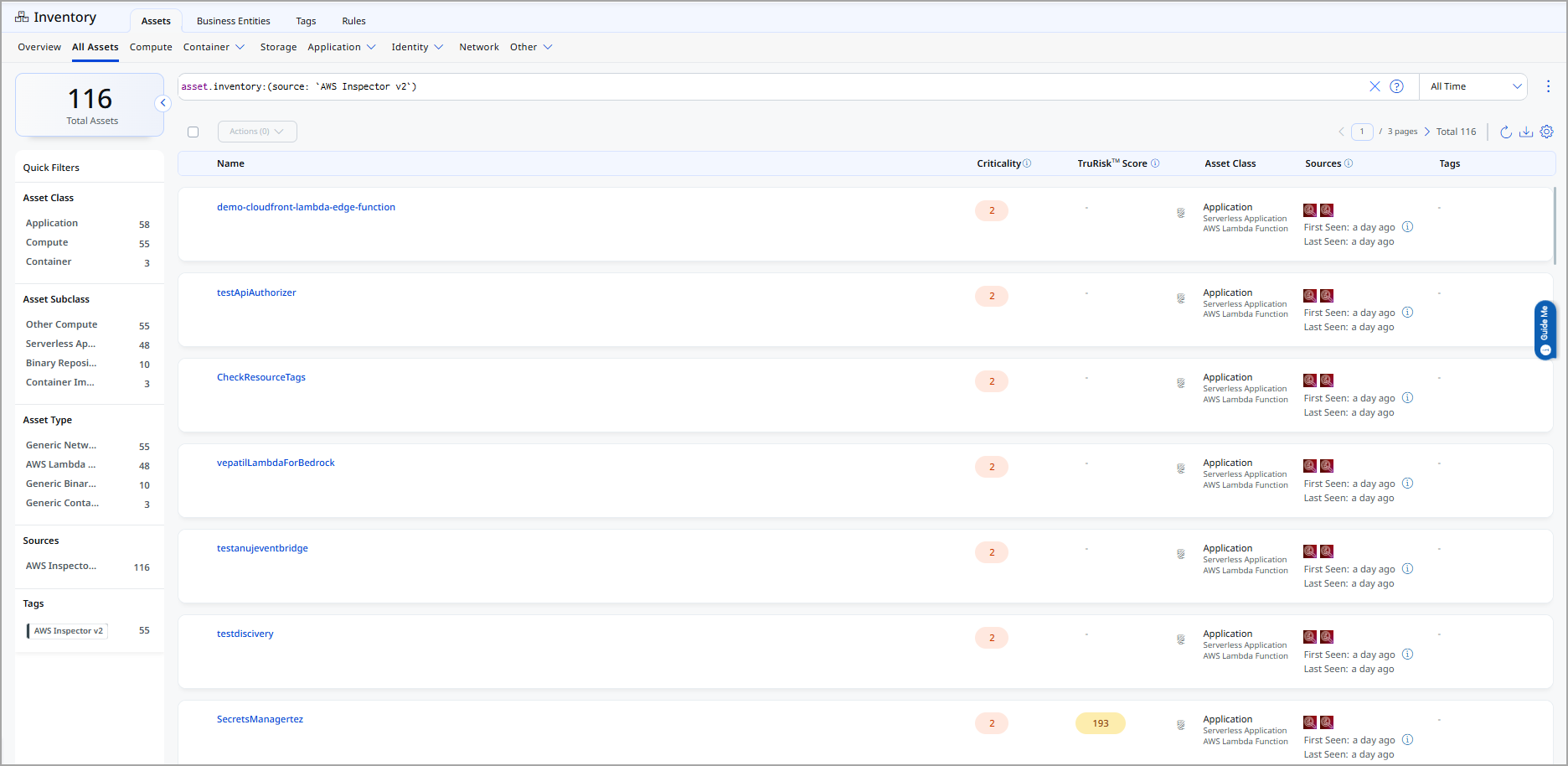
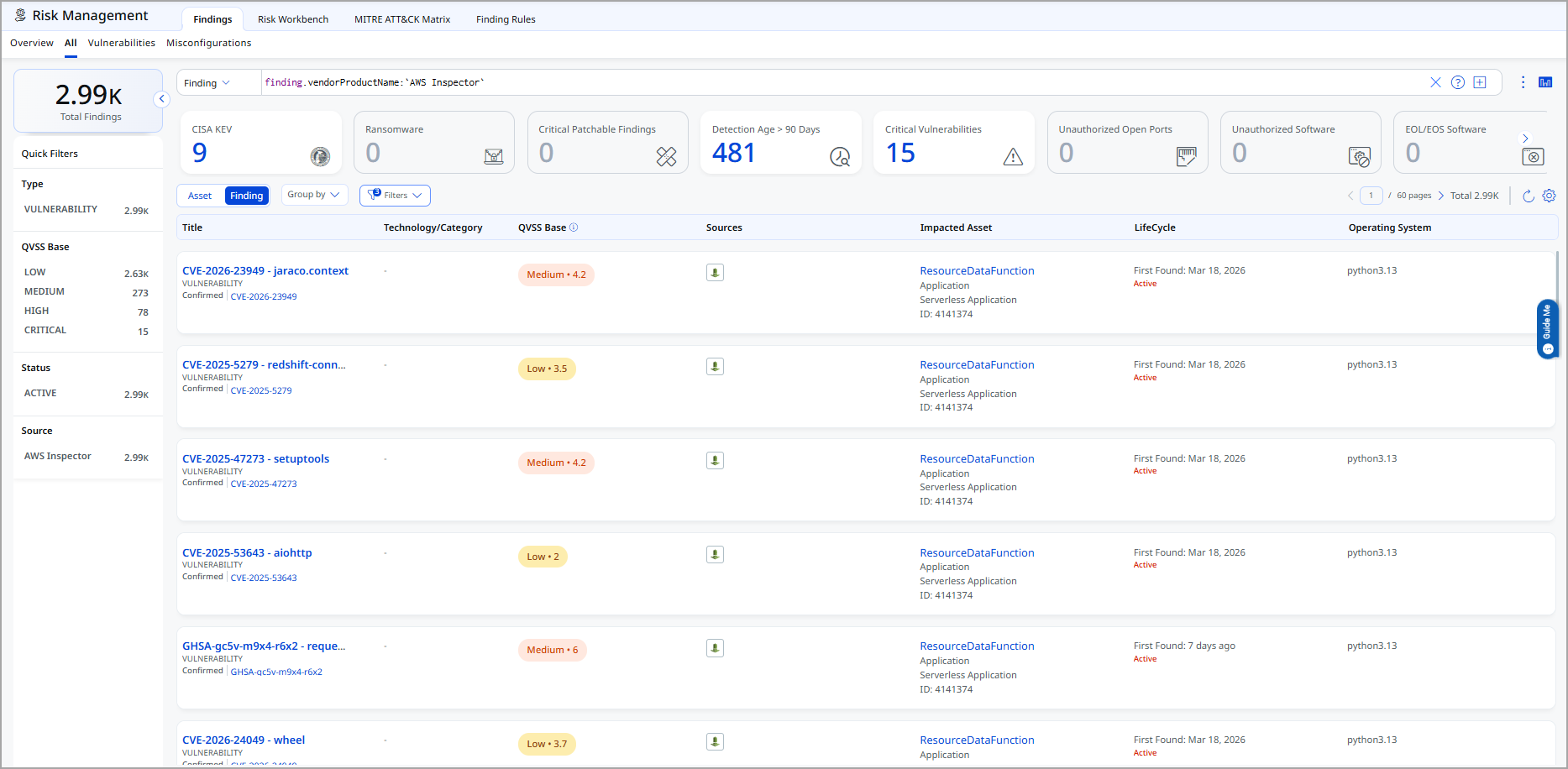
After ingestion, AWS Inspector V2 assets and findings are available in ETM.
- Assets: Navigate to Enterprise TruRisk Management > Inventory > Assets > Host.
Filter with:tags.name:"AWS Inspector"
- Findings (Vulnerabilities): Navigate to Enterprise TruRisk Management > Risk Management > Findings > Vulnerability.
Filter with:finding.vendorProductName:"Amazon Inspector"
Troubleshooting
| Issue | Resolution |
|---|---|
| Authentication failure on connector run | Verify the Role ARN and Base Account ID entered in Qualys ETM are correct. Confirm the IAM role's trust policy includes the Qualys AWS user (arn:aws:iam::178650962893:user/aws-connector) as a trusted principal with the correct External ID condition. Verify the required permission policies are attached to the role. |
| Connection test fails | Verify the Default Region is set to the AWS region where Amazon Inspector is actively enabled. Confirm the IAM role exists and has not been deleted or modified since the connector was configured. Check that AWS STS (Security Token Service) is enabled in the target region. |
| No assets imported after first run | The connector transitions through Registered, Scheduled, Processing, and Processed states. The entire process may take up to 2 hours. Verify that Amazon Inspector (not Classic) is enabled in your AWS account and has active scanned resources in the specified region. Check the connector state in Qualys ETM to confirm it has reached the Processed state. |
| ECR container image data not returned | If ECR data is not fetched with the AwsEcrCustomReadAccess policy, create an additional custom inline policy named AwsEcsCustomReadAccess with ECS read permissions and attach it to the same IAM role. See the Permissions Required section for the full ECS policy JSON. |
| Lambda functions not fully ingested | The ListFunctions API is limited to 50 results per call by the AWS SDK. The connector handles pagination automatically. If functions appear missing, confirm that Amazon Inspector is enabled for Lambda in the specified region and that the AwsLambdaCustomReadAccess inline policy is correctly attached. |
Additional Information
API Reference
The AWS Inspector V2 connector uses the AWS SDK version 2.42.4 rather than direct REST APIs. The following SDK operations are called during each execution:
| Entity Type | API / Operation | Max Page Size | Delta | Default Filter |
|---|---|---|---|---|
| Compute (EC2 Instances) | DescribeInstances |
1,000 | No | None |
| Serverless (Lambda) | ListFunctions |
50 | No | None |
| Repository (ECR Repository) | DescribeRepositories |
1,000 | No | None |
| Container Images (ECR) | DescribeImages |
1,000 | No | None |
| Vulnerabilities (Findings) | ListFindings |
100 | Yes | AWS_EC2_INSTANCE, AWS_ECR_CONTAINER_IMAGE, AWS_ECR_REPOSITORY, AWS_LAMBDA_FUNCTION |
Data Model
The connector supports the following object-to-data-model relationships:
| Asset Type | Data Model |
|---|---|
| Compute (EC2 Instance) | Asset and Vulnerability |
| Serverless (Lambda Function) | Asset and Vulnerability |
| Container Image (ECR) | Asset and Vulnerability |
| Repository (ECR) | Asset only |
Transformation Maps
Default transform maps are provided for each asset type and applied automatically during connector execution. The following maps document how AWS Inspector V2 source fields map to Qualys ETM target fields.
Asset Transformation Mapping
AWS EC2 Instance — Asset TransformationAWS EC2 Instance — Asset Transformation
| Source Field | Target Field |
|---|---|
instanceArnValue |
asset.assetHeader.externalAssetId (Required) |
instanceArnValue |
asset.assetHeader.vendorAssetId |
| CONSTANT: "aws-ec2-instance" | asset.assetHeader.assetTypeName |
| LOOKUP: state.name | asset.assetHeader.status |
instanceId |
asset.assetDetail.name |
launchTime |
asset.assetDetail.sourceCreatedAt |
architecture |
asset.assetDetail.processor.name |
cpuOptions.coreCount |
asset.assetDetail.processor.numberOfCpu |
cpuOptions.coreCount |
asset.assetDetail.processor.coresPerSocket |
cpuOptions.threadsPerCore |
asset.assetDetail.processor.threadsPerCore |
platformDetails |
asset.assetDetail.operatingSystem.name |
platform |
asset.assetDetail.operatingSystem.publisher |
hypervisor |
asset.assetDetail.hardware.model |
instanceType |
asset.assetDetail.hardware.manufacturer |
placement.availabilityZone |
asset.assetDetail.cloudInfo.availabilityZone |
| CONSTANT: "AWS" | asset.assetDetail.cloudInfo.provider |
tags[].key |
asset.assetDetail.externalTags[].key |
tags[].value |
asset.assetDetail.externalTags[].value |
instanceArnValue |
asset.assetDetail.computeAssetClass.cloudInstance.id |
imageId |
asset.assetDetail.computeAssetClass.cloudInstance.imageId |
state.name |
asset.assetDetail.computeAssetClass.cloudInstance.state |
instanceType |
asset.assetDetail.computeAssetClass.cloudInstance.type |
instanceId |
asset.assetDetail.computeAssetClass.cloudInstance.hostname |
privateIpAddress |
asset.assetDetail.computeAssetClass.cloudInstance.privateIpv4Address |
publicIpAddress |
asset.assetDetail.computeAssetClass.cloudInstance.publicIpv4Address |
ipv6Address |
asset.assetDetail.computeAssetClass.cloudInstance.publicIpv6Address |
vpcId |
asset.assetDetail.computeAssetClass.cloudInstance.vpcId |
subnetId |
asset.assetDetail.computeAssetClass.cloudInstance.subnetId |
launchTime |
asset.assetDetail.computeAssetClass.cloudInstance.launchTime |
blockDeviceMappings[].ebs.volumeId |
asset.assetDetail.computeAssetClass.storage[].id |
blockDeviceMappings[].deviceName |
asset.assetDetail.computeAssetClass.storage[].name |
rootDeviceType |
asset.assetDetail.computeAssetClass.storage[].type |
launchTime |
asset.assetDetail.computeAssetClass.lastBoot |
networkInterfaces[].macAddress |
asset.assetDetail.network[].macAddress |
networkInterfaces[].privateDnsName |
asset.assetDetail.network[].privateDnsName |
networkInterfaces[].association.publicDnsName |
asset.assetDetail.network[].publicDnsName |
networkInterfaces[].privateIpAddress |
asset.assetDetail.network[].ipv4Addresses[] |
networkInterfaces[].association.publicIp |
asset.assetDetail.network[].publicIpv4Addresses[] |
networkInterfaces[].interfaceType |
asset.assetDetail.network[].type |
networkInterfaces[].association.carrierIp |
asset.assetDetail.network[].addresses[] |
instanceId |
asset.assetDetail.hostIdentity.hostname |
networkInterfaces[].privateDnsName |
asset.assetDetail.network[].hostname |
| Source Field | Target Field |
|---|---|
functionArn |
asset.assetHeader.externalAssetId (Required) |
functionArn |
asset.assetHeader.vendorAssetId |
| CONSTANT: "aws-lambda-function" | asset.assetHeader.assetTypeName |
| CONSTANT: "AWS" | asset.assetDetail.cloudInfo.provider |
| LOOKUP: state | asset.assetHeader.status |
| LOOKUP: packageType | asset.assetDetail.serverlessAssetClass.type |
functionName |
asset.assetDetail.name |
| DATE_FORMAT: lastModified | asset.assetDetail.sourceUpdatedAt |
runtime |
asset.assetDetail.operatingSystem.name |
functionName |
asset.assetDetail.serverlessAssetClass.functionName |
handler |
asset.assetDetail.serverlessAssetClass.handler |
runtime |
asset.assetDetail.serverlessAssetClass.runtime |
codeSize |
asset.assetDetail.serverlessAssetClass.codeSizeInBytes |
environment.variables |
asset.assetDetail.serverlessAssetClass.environmentVariables |
memorySizeInBytes |
asset.assetDetail.serverlessAssetClass.memoryInBytes |
awsAccountId |
asset.assetDetail.cloudInfo.accountId |
functionRegion |
asset.assetDetail.cloudInfo.region |
AWS ECR Repository — Asset TransformationAWS ECR Repository — Asset Transformation
| Source Field | Target Field |
|---|---|
repositoryArn |
asset.assetHeader.externalAssetId (Required) |
repositoryArn |
asset.assetHeader.vendorAssetId |
| CONSTANT: "binary-repository" | asset.assetHeader.assetTypeName |
| CONSTANT: "ACTIVE" | asset.assetHeader.status |
| CONSTANT: "BINARY" | asset.assetDetail.repositoryAssetClass.type |
repositoryName |
asset.assetDetail.name |
createdAt |
asset.assetDetail.sourceCreatedAt |
repositoryUri |
asset.assetDetail.repositoryAssetClass.repoUrl |
| CONSTANT: "PACKAGE" | asset.assetDetail.repositoryAssetClass.kind |
| CONSTANT: "PRIVATE" | asset.assetDetail.repositoryAssetClass.visibility |
| CONSTANT: "AWS" | asset.assetDetail.cloudInfo.provider |
awsAccountId |
asset.assetDetail.cloudInfo.accountId |
repositoryRegion |
asset.assetDetail.cloudInfo.region |
AWS ECR Container Image — Asset TransformationAWS ECR Container Image — Asset Transformation
| Source Field | Target Field |
|---|---|
imageDigest |
asset.assetHeader.externalAssetId (Required) |
imageDigest |
asset.assetHeader.vendorAssetId |
| CONSTANT: "container-image" | asset.assetHeader.assetTypeName |
| LOOKUP: imageStatus | asset.assetHeader.status |
| CONSTANT: "AWS" | asset.assetDetail.cloudInfo.provider |
repositoryName |
asset.assetDetail.containerImageAssetClass.repository |
imageSizeInBytes |
asset.assetDetail.containerImageAssetClass.sizeInBytes |
imageDigest |
asset.assetDetail.containerImageAssetClass.digest |
imageTagsString |
asset.assetDetail.containerImageAssetClass.tag |
| CONSTANT: "IMAGE_DIGEST" | asset.assetDetail.containerImageAssetClass.digestType |
imageDigest |
asset.assetDetail.containerImageAssetClass.imageDigest |
imageName |
asset.assetDetail.name |
imageName |
asset.assetDetail.containerImageAssetClass.name |
imagePushedAt |
asset.assetDetail.untypedAttributes |
imageTags |
asset.assetDetail.untypedAttributes |
imageStatus |
asset.assetDetail.typedAttributes |
Vulnerability Transformation Mapping
The following vulnerability transform maps share a common finding field mapping pattern. Asset header fields differ per entity type.
AWS EC2 Instance — Vulnerability TransformationAWS EC2 Instance — Vulnerability Transformation
| Source Field | Target Field |
|---|---|
resources.0.instanceArnValue |
asset.assetHeader.externalAssetId (Required) |
resources.0.instanceArnValue |
asset.assetHeader.vendorAssetId |
| CONSTANT: "aws-ec2-instance" | asset.assetHeader.assetTypeName |
| CONSTANT: "ACTIVE" | asset.assetHeader.status |
resources.0.id |
asset.assetDetail.name |
| CONSTANT: "AWS" | asset.assetDetail.cloudInfo.provider |
resources.0.region |
asset.assetDetail.cloudInfo.region |
resources.0.details.awsEc2Instance.ipV4Addresses[] |
asset.assetDetail.network[].ipv4Addresses[] |
resources.0.details.awsEc2Instance.ipV6Addresses[] |
asset.assetDetail.network[].ipv6Addresses[] |
resources.0.details.awsEc2Instance.imageId |
asset.assetDetail.computeAssetClass.cloudInstance.imageId |
resources.0.details.awsEc2Instance.type |
asset.assetDetail.computeAssetClass.cloudInstance.type |
resources.0.instanceArnValue |
asset.assetDetail.computeAssetClass.cloudInstance.id |
resources.0.id |
asset.assetDetail.computeAssetClass.cloudInstance.hostname |
resources.0.details.awsEc2Instance.vpcId |
asset.assetDetail.computeAssetClass.cloudInstance.vpcId |
resources.0.details.awsEc2Instance.subnetId |
asset.assetDetail.computeAssetClass.cloudInstance.subnetId |
resources.0.details.awsEc2Instance.launchedAt |
asset.assetDetail.computeAssetClass.cloudInstance.launchTime |
resources.0.details.awsEc2Instance.launchedAt |
asset.assetDetail.computeAssetClass.lastBoot |
resources.0.details.awsEc2Instance.ipV4Addresses.0 |
asset.assetDetail.computeAssetClass.cloudInstance.privateIpv4Address |
resources.0.details.awsEc2Instance.ipV6Addresses.0 |
asset.assetDetail.computeAssetClass.cloudInstance.privateIpv6Address |
resources.0.id |
asset.assetDetail.hostIdentity.hostname |
title |
findingGroup.findings[].name |
description |
findingGroup.findings[].description |
findingArn |
findingGroup.findings[].externalFindingId (Required) |
| LOOKUP: status | findingGroup.findings[].findingStatus |
| LOOKUP: severity | findingGroup.findings[].severity |
remediation.recommendation.text |
findingGroup.findings[].solutionRecommendation |
packageVulnerabilityDetails.referenceUrls[] |
findingGroup.findings[].references[] |
firstObservedAt |
findingGroup.findings[].firstFoundOn |
lastObservedAt |
findingGroup.findings[].lastFoundOn |
findingArn |
findingGroup.findings[].findingType.vulnerability.vendorId |
packageVulnerabilityDetails.vulnerabilityId |
findingGroup.findings[].findingType.vulnerability.cveId |
codeVulnerabilityDetails.cwes[] |
findingGroup.findings[].findingType.vulnerability.cweIds[] |
fixAvailable |
findingGroup.findings[].findingType.vulnerability.isPatchAvailable |
exploitAvailable |
findingGroup.findings[].findingType.vulnerability.isExploitAvailable |
inspectorScore |
findingGroup.findings[].sourceRiskScore |
severity |
findingGroup.findings[].sourceSeverity |
awsInspectorFindingUrl |
findingGroup.findings[].findingURL |
findingDetectionUrl |
findingGroup.findings[].findingDetectionURL |
| Source Field | Target Field |
|---|---|
resources.0.id |
asset.assetHeader.externalAssetId (Required) |
resources.0.id |
asset.assetHeader.vendorAssetId |
| CONSTANT: "aws-lambda-function" | asset.assetHeader.assetTypeName |
| CONSTANT: "ACTIVE" | asset.assetHeader.status |
| CONSTANT: "AWS" | asset.assetDetail.cloudInfo.provider |
resources.0.region |
asset.assetDetail.cloudInfo.region |
resources.0.details.awsLambdaFunction.functionName |
asset.assetDetail.name |
resources.0.details.awsLambdaFunction.functionName |
asset.assetDetail.serverlessAssetClass.functionName |
resources.0.details.awsLambdaFunction.runtime |
asset.assetDetail.serverlessAssetClass.runtime |
| LOOKUP: packageType | asset.assetDetail.serverlessAssetClass.type |
title |
findingGroup.findings[].name |
description |
findingGroup.findings[].description |
findingArn |
findingGroup.findings[].externalFindingId (Required) |
| LOOKUP: status | findingGroup.findings[].findingStatus |
| LOOKUP: severity | findingGroup.findings[].severity |
remediation.recommendation.text |
findingGroup.findings[].solutionRecommendation |
packageVulnerabilityDetails.referenceUrls[] |
findingGroup.findings[].references[] |
firstObservedAt |
findingGroup.findings[].firstFoundOn |
lastObservedAt |
findingGroup.findings[].lastFoundOn |
findingArn |
findingGroup.findings[].findingType.vulnerability.vendorId |
packageVulnerabilityDetails.vulnerabilityId |
findingGroup.findings[].findingType.vulnerability.cveId |
codeVulnerabilityDetails.cwes[] |
findingGroup.findings[].findingType.vulnerability.cweIds[] |
fixAvailable |
findingGroup.findings[].findingType.vulnerability.isPatchAvailable |
exploitAvailable |
findingGroup.findings[].findingType.vulnerability.isExploitAvailable |
inspectorScore |
findingGroup.findings[].sourceRiskScore |
severity |
findingGroup.findings[].sourceSeverity |
awsInspectorFindingUrl |
findingGroup.findings[].findingURL |
findingDetectionUrl |
findingGroup.findings[].findingDetectionURL |
| Source Field | Target Field |
|---|---|
resources.0.details.awsEcrContainerImage.imageHash |
asset.assetHeader.externalAssetId (Required) |
resources.0.details.awsEcrContainerImage.imageHash |
asset.assetHeader.vendorAssetId |
| CONSTANT: "container-image" | asset.assetHeader.assetTypeName |
| CONSTANT: "ACTIVE" | asset.assetHeader.status |
| CONSTANT: "AWS" | asset.assetDetail.cloudInfo.provider |
resources.0.region |
asset.assetDetail.cloudInfo.region |
resources.0.details.awsEcrContainerImage.repositoryName |
asset.assetDetail.containerImageAssetClass.repository |
resources.0.details.awsEcrContainerImage.imageHash |
asset.assetDetail.containerImageAssetClass.digest |
resources.0.details.awsEcrContainerImage.imageTagsString |
asset.assetDetail.containerImageAssetClass.tag |
| CONSTANT: "IMAGE_DIGEST" | asset.assetDetail.containerImageAssetClass.digestType |
resources.0.details.awsEcrContainerImage.imageHash |
asset.assetDetail.containerImageAssetClass.imageDigest |
resources.0.details.awsEcrContainerImage.architecture |
asset.assetDetail.containerImageAssetClass.architecture |
resources.0.details.awsEcrContainerImage.imageName |
asset.assetDetail.name |
resources.0.details.awsEcrContainerImage.imageName |
asset.assetDetail.containerImageAssetClass.name |
resources.0.details.awsEcrContainerImage.pushedAt |
asset.assetDetail.untypedAttributes |
resources.0.details.awsEcrContainerImage.imageTags |
asset.assetDetail.untypedAttributes |
title |
findingGroup.findings[].name |
description |
findingGroup.findings[].description |
findingArn |
findingGroup.findings[].externalFindingId (Required) |
| LOOKUP: status | findingGroup.findings[].findingStatus |
| LOOKUP: severity | findingGroup.findings[].severity |
remediation.recommendation.text |
findingGroup.findings[].solutionRecommendation |
packageVulnerabilityDetails.referenceUrls[] |
findingGroup.findings[].references[] |
firstObservedAt |
findingGroup.findings[].firstFoundOn |
lastObservedAt |
findingGroup.findings[].lastFoundOn |
findingArn |
findingGroup.findings[].findingType.vulnerability.vendorId |
packageVulnerabilityDetails.vulnerabilityId |
findingGroup.findings[].findingType.vulnerability.cveId |
codeVulnerabilityDetails.cwes[] |
findingGroup.findings[].findingType.vulnerability.cweIds[] |
fixAvailable |
findingGroup.findings[].findingType.vulnerability.isPatchAvailable |
exploitAvailable |
findingGroup.findings[].findingType.vulnerability.isExploitAvailable |
inspectorScore |
findingGroup.findings[].sourceRiskScore |
severity |
findingGroup.findings[].sourceSeverity |
awsInspectorFindingUrl |
findingGroup.findings[].findingURL |
findingDetectionUrl |
findingGroup.findings[].findingDetectionURL |
Assumptions and Limitations
- This connector supports Amazon Inspector V2 only. Inspector Classic is not supported.
- AWS China regions and AWS GovCloud regions are not supported.
- Organization-level multi-account setup is not supported in the current implementation.
- The
ListFunctionsAPI supports a maximum of 50 functions per call; the connector paginates automatically. - Delta synchronization is supported only for the
ListFindingsAPI (vulnerability ingestion). Asset ingestion performs a full pull on each run. - For ECR scanning, AWS Inspector V2 can only scan container images stored in private ECR registries. Public registries are not supported. See AWS documentation on ECR scanning.