Claroty xDome Connector
Claroty xDome is an OT/IoT security platform that provides deep visibility into industrial and connected device environments and identifies cyber risks across operational networks.
ETM ingests host assets and associated vulnerability findings from Claroty xDome to correlate OT exposures with broader enterprise risk and prioritize remediation.
Connector Details
High-level capabilities and supported features of the Claroty xDome connector.
| Vendor | Claroty |
| Product Name | Claroty xDome |
| Category | OT/IoT Security |
| Supported Assets | Devices |
| Findings Support | Yes |
| Supported Version & Type | SaaS (Latest) |
| Integration Type | API Integration (REST) |
| Direction | Unidirectional (Claroty to Qualys) |
| Delta Support | Not Supported |
| Import of Installed Software | Not Supported |
| Import of Source Tags | Not Supported |
| Filter Support | Yes |
| Version | 1.0.0 |
Configure the Connector
The connector is configured in three steps within Qualys ETM: Profile & Connectivity, Scope & Schedule, and Review & Confirm.
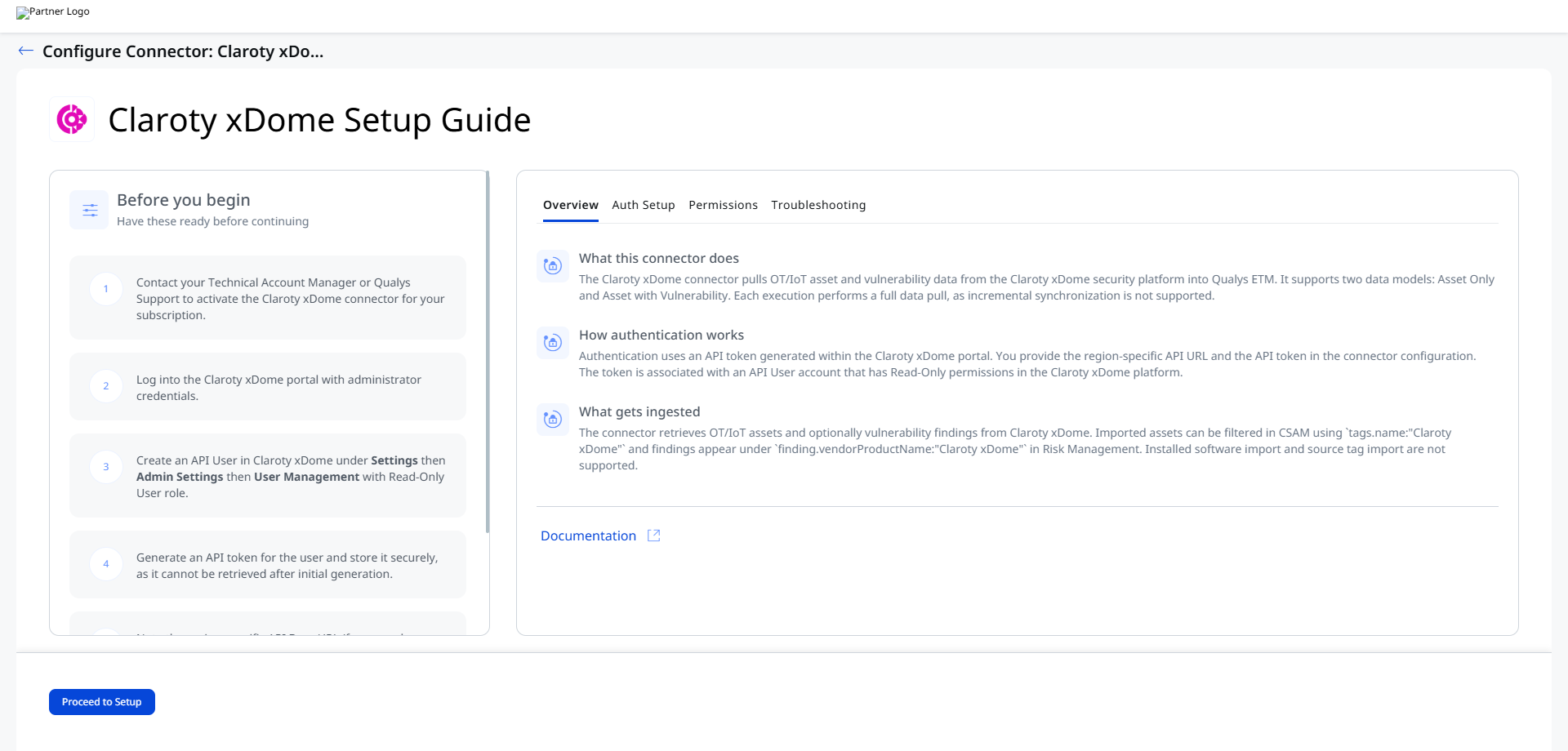
Before You Begin - AuthenticationBefore You Begin - Authentication
Complete the following prerequisites before configuring the connector in Qualys ETM.
Create an API User and Generate an API Token in Claroty xDome
To generate an API Token in Claroty xDome:
- Log in to the Claroty xDome portal as an Administrator.
- Navigate to Settings > Admin Settings.
- Go to User Management and click Add User.
- Select User Type: API User.
- Enter a unique User Name (different from your portal login).
- Click Edit Site Permissions.
- Select required sites (or choose Select All).
- Select Role: Read-Only User.
- (Optional) Enable Include Future Sites.
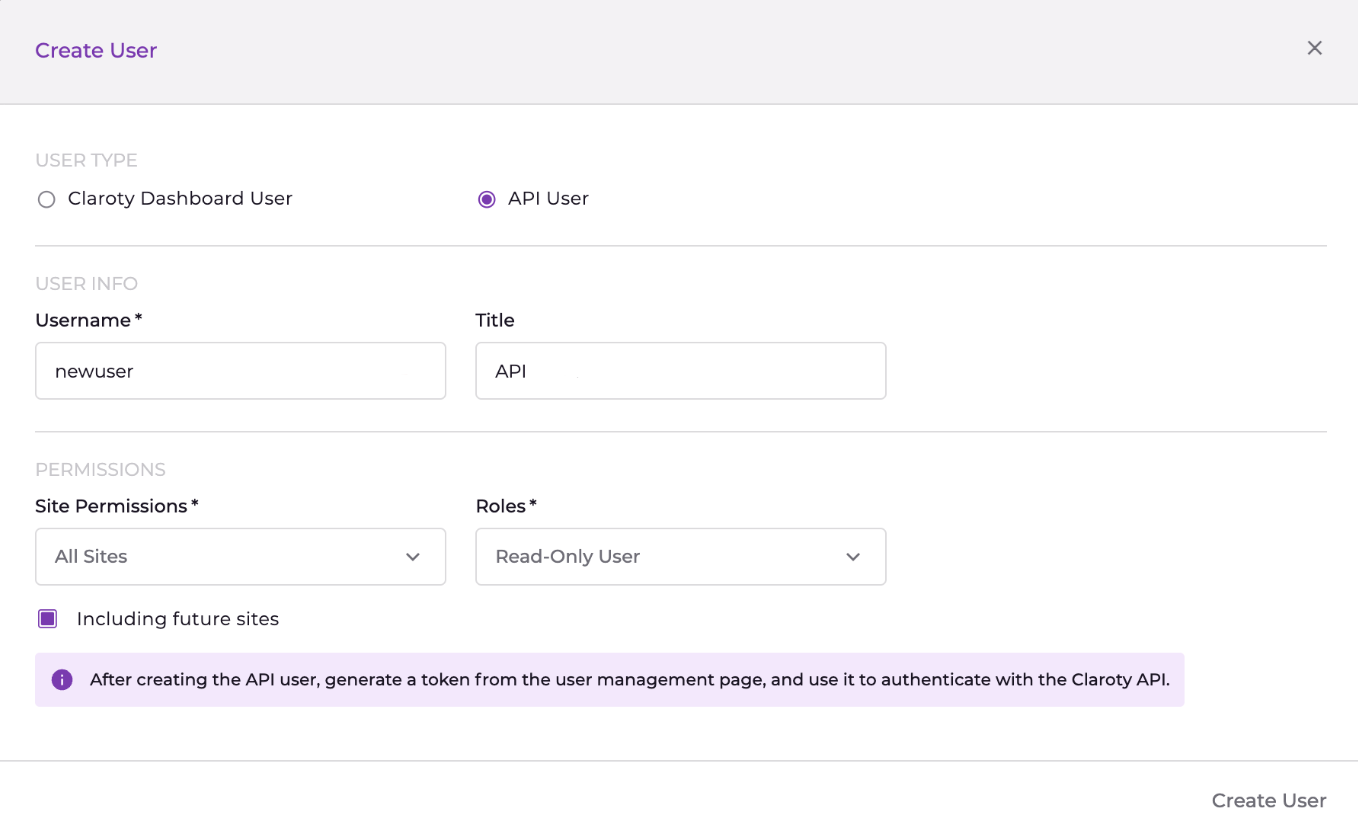
- Click Create User.
- Click Generate Token.

- Select token expiration and click Generate.
- Copy and securely store the generated token (it cannot be viewed again).
If you do not have permission to create API users, contact your Claroty xDome administrator.
Authentication Details
Provide the following credentials when configuring the connector:
| Name | Key | Type | Description |
|---|---|---|---|
| API URL | api_url |
String | Claroty API base URL (region specific). Example: https://api.medigate.io |
| API Token | api_token |
Encrypted String | Generated API Token |
Permissions Required
The API User in Claroty xDome requires the Read-Only User role. Site permissions determine which assets and vulnerabilities are accessible to the connector. Administrator credentials are needed only for creating the API User and generating the token.
Scope and Data Access
Data retrieval scope is determined by the site permissions assigned to the API User. You can select all sites or specific ones. The connector supports two data models: Asset Only and Asset with Vulnerability. Optional filters include device category, dashboard URL, and retired devices. The Preserve Findings Missing in Latest Sync setting controls whether findings absent from the latest pull are retained or removed.
Key Rotation
API tokens in Claroty xDome have configurable expiration periods. Before the token expires, create a new API User or generate a new token. Update the Qualys connector configuration with the new API URL and token. Verify the connector reaches the Processed state after the next execution.
Create a Profile & ConnectionCreate a Profile & Connection
Configure the connector's identity and authenticate with the Claroty xDome source system. A valid connection test is required before proceeding to the next step.
- Log in to Qualys ETM.
- Navigate to Connectors > Integration.
- Select Claroty xDome Connector and click Manage.
- Provide a Name and Description.
- Enter API URL, Finding Dashboard URL, and API Token.
Preserve Findings Missing in Latest Sync:
If selected, findings absent in the latest run retain their previous status. If not selected, missing findings are automatically marked as Fixed. This behavior is determined at connection creation time.
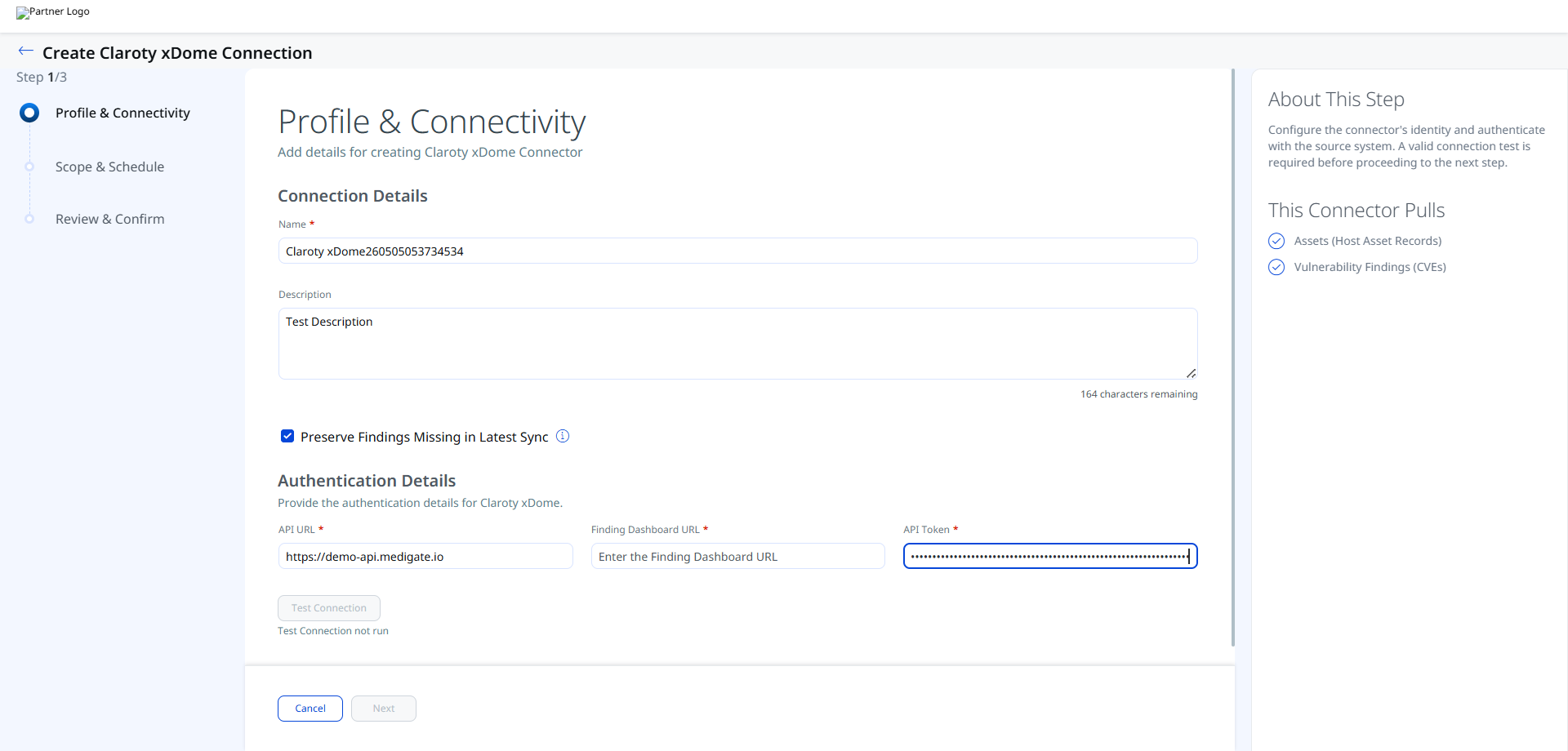
Authentication Details
Provide the authentication details for Claroty xDome.
| Field | Type | Description |
|---|---|---|
| API URL | String | Region-specific Claroty xDome API base URL. Example: https://demo-api.medigate.io |
| Finding Dashboard URL | String | The dashboard URL from the Claroty xDome portal used for user login and finding deep-links. |
| API Token | Encrypted String | The API token generated for the Read-Only API User in Claroty xDome. Stored encrypted. |
Important: The API token cannot be retrieved after you click Test Connection and proceed. Ensure you have copied and stored it securely before saving the connector configuration.
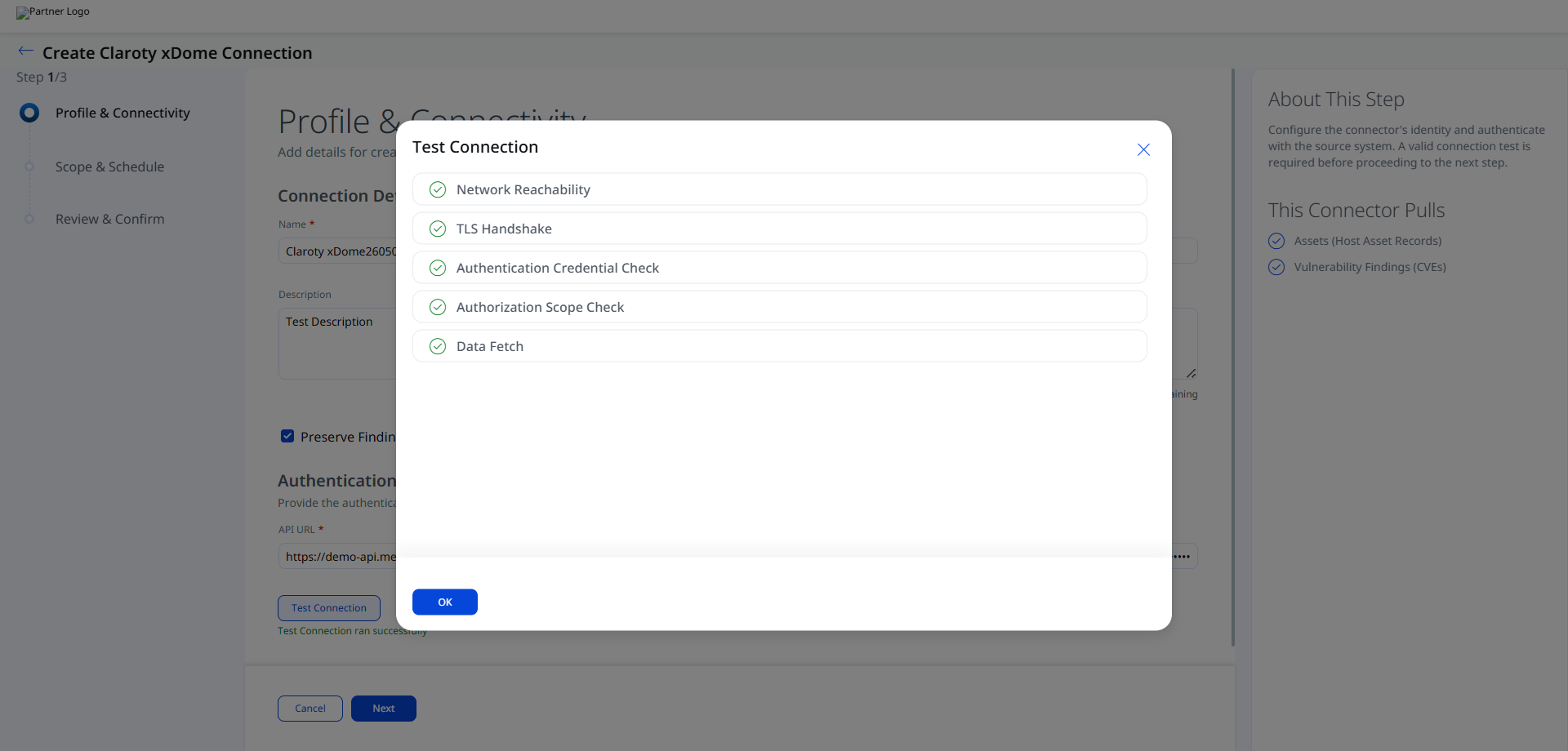
After entering the authentication details, click Test Connection. The following checks are performed:
- Network Reachability
- TLS Handshake
- Authentication Credential Check
- Authorization Scope Check
- Data Fetch
All five checks must pass before you can proceed to Step 2. If a check fails, review the Troubleshooting section for resolution guidance.
Set the Scope & ScheduleSet the Scope & Schedule
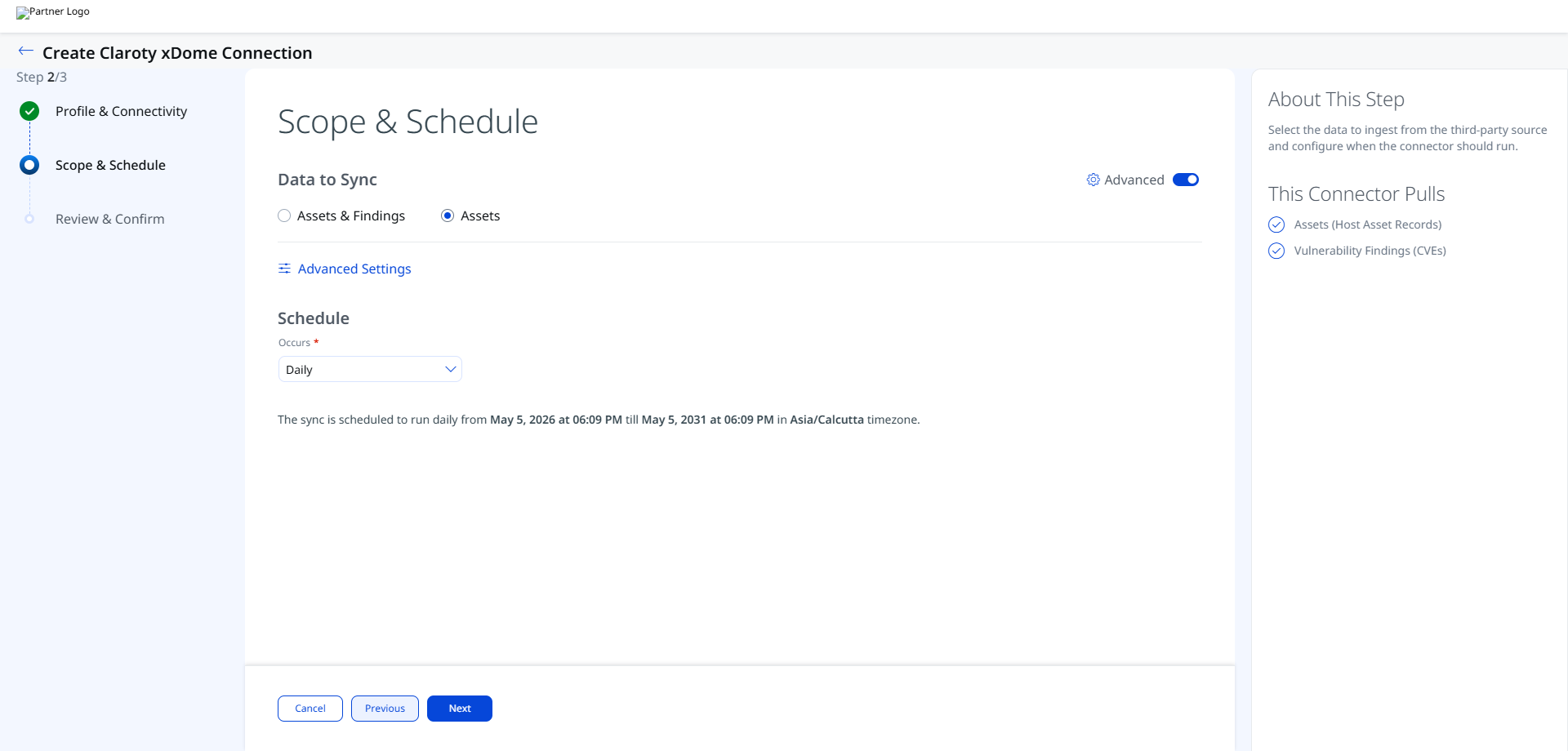
Select the data to ingest from Claroty xDome and configure when the connector should run.
Data to Sync – Choose one of the following options:
- Assets & Findings – Pulls both Host Asset Records and Vulnerability Findings (CVEs).
- Assets – Pulls Host Asset Records only.
Schedule – Set the Occurs field to the desired sync frequency (for example, Daily). The sync will run from the configured start date and time for up to five years.
Note: The schedule uses the timezone detected from your browser session (for example, Asia/Calcutta). The sync is scheduled for a fixed five-year window from the start date and time you configure.
Click Advanced Settings on this step to open the Advanced Settings panel where you can configure Filters, review Transform Maps, and set Risk Severity Mapping.
Remember to click Save within the Advanced Settings panel before closing it to preserve any changes.
Click Next and review your changes. Once done, save the connection.
Advanced Settings
Advanced Settings are accessible from the Step 2: Scope & Schedule screen via the Advanced Settings link. The panel contains three tabs: Filters, Transform Map, and Risk Severity Mapping.
Note: Click Save in the Advanced Settings panel to apply any changes before closing the panel.
Filters Tab
The Filters tab uses a chip selector to control which devices are ingested.
Device Category – Select one or more device categories to include. All four categories are selected by default:
- IoT – Internet of Things devices
- IT – Traditional IT devices
- Medical – Medical/clinical devices
- OT – Operational Technology devices
Remove a chip by clicking the × next to its label. Use the × at the far right of the field to clear all selections.
Retired Devices Only – Select this checkbox to restrict the sync to retired devices only. When cleared (default), all active devices matching the selected categories are ingested.
Transform Map Tab
The Transform Map tab lists the active transformation maps used to map Claroty xDome source fields to Qualys ETM target fields. The following maps are active for this connector:
- Claroty xDome Asset Map
- Claroty xDome Host Asset Transformation Map
These maps are read-only in this view.
These maps are read-only in this view. See the Transformation Maps section for the full field mappings.
Risk Severity Mapping Tab
Note: Qualys automatically updates scores for CVE-based vulnerabilities available in the Qualys Cloud Threat Database. This severity mapping applies only to non-CVE findings where Claroty xDome provides a numeric severity score.
Map Claroty xDome severity values to Qualys Detection Score (QDS) using the following default table. You may edit the Expected Source Value and QDS Score fields to adjust the mapping.
| Expected Source Value | Severity | QDS Score (Range 1–100) |
|---|---|---|
| 1 | 1 | 20 |
| 2 | 2 | 40 |
| 3 | 3 | 60 |
| 4 | 4 | 80 |
| 5 | 5 | 100 |
Default Severity – The severity value applied when the source severity value is unavailable or not matched. Default: 2.
How the Connection Works
The Claroty xDome connector pulls OT/IoT asset and vulnerability data from the Claroty xDome security platform into Qualys ETM. It supports two data models: Asset Only and Asset with Vulnerability. Each execution performs a full data pull, as incremental synchronization is not supported.
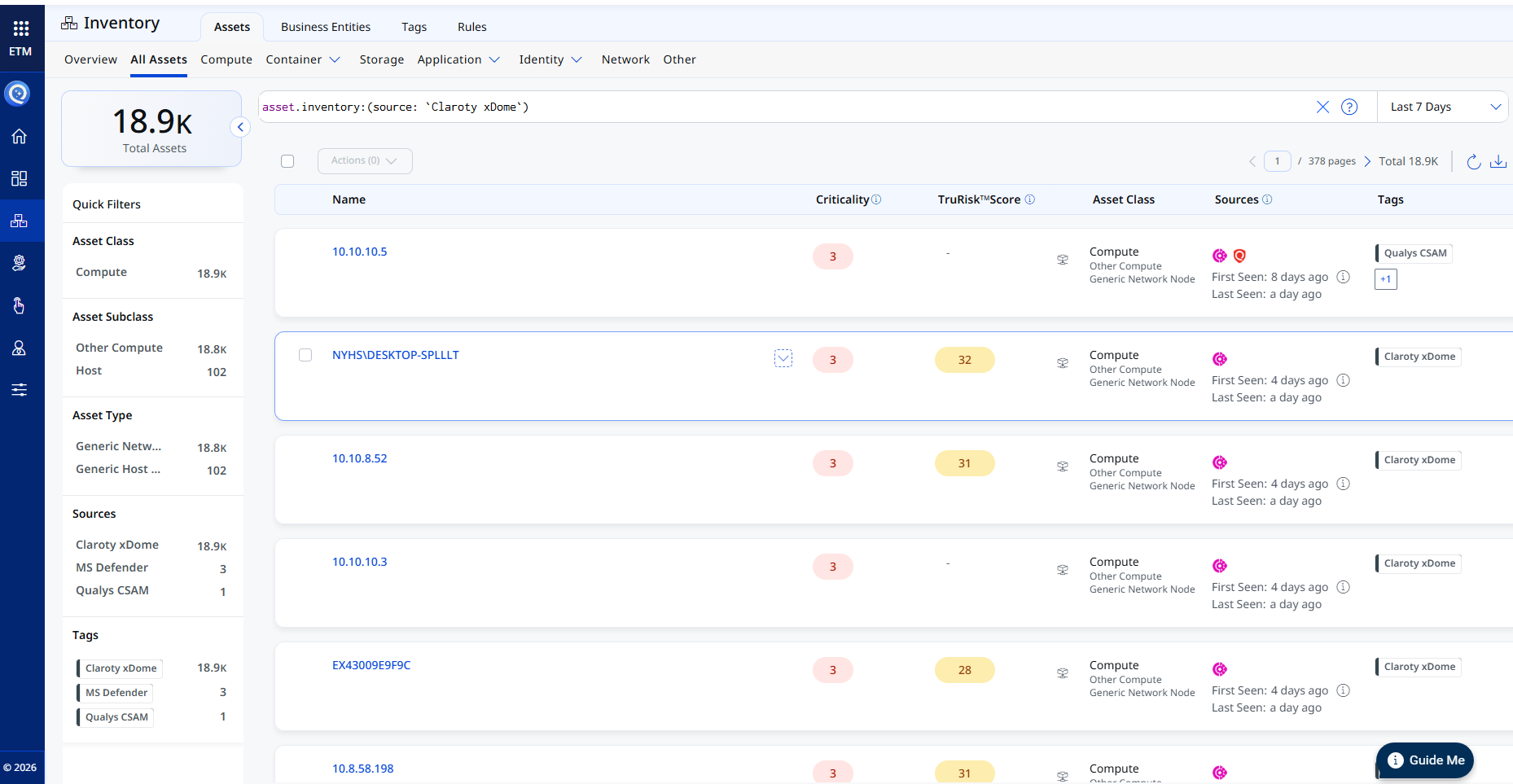
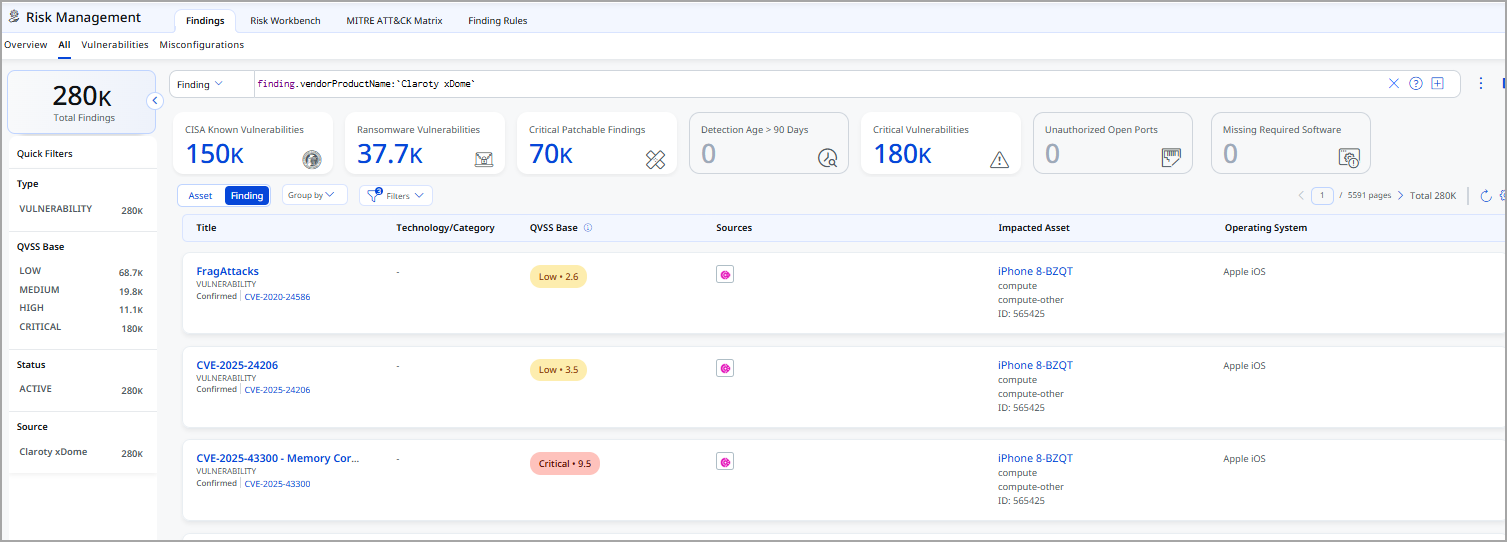
The connector retrieves OT/IoT assets and optionally vulnerability findings from Claroty xDome. Imported assets can be filtered in CSAM using tags.name:"Claroty xDome" and findings appear under finding.vendorProductName:"Claroty xDome" in Risk Management. Installed software import and source tag import are not supported.
Connector States
A connector instance passes through the following states during its lifecycle:
| Registered | The connector has been created and is awaiting its first scheduled execution. |
| Scheduled | The connector is queued and waiting for execution at the next scheduled time. |
| Processing | The connector is actively fetching data from Claroty xDome and importing it into ETM. |
| Processed | The most recent execution completed successfully. Assets and findings are available in ETM. |
| Errored | The most recent execution failed. Review the connector logs and the Troubleshooting section for resolution guidance. |
Note: The first execution after connector creation may take up to 2 hours to complete, depending on the volume of assets and findings in your Claroty xDome environment. The connector state will show Processing during this time.
Note: When the connector reaches the Processed state, assets are immediately available. Findings may continue processing for a short period after the state changes to Processed.
Viewing Assets and Findings in ETM
After synchronization completes, use the following filters to locate ingested data in Qualys ETM.
Assets – Navigate to Enterprise TruRisk Management > Inventory and apply the filter:
inventory:(source:"Claroty")
Findings – Navigate to Risk Management > Findings and apply the filter:
findings.vendorProductname:"Claroty xDome"
Troubleshooting
| Full sync takes too long | Every execution performs a full data pull, as incremental synchronization is not supported. Processing time depends on the volume of assets and findings. The import process may take up to 2 hours to complete. |
| Token cannot be retrieved | API tokens are only displayed once during generation. If the token is lost, create a new API User or generate a new token for the existing user. Update the Qualys connector configuration with the new token. |
| Assets not appearing with correct tags | After processing, filter assets in CSAM Host inventory using tags.name:"Claroty xDome". Filter findings using finding.vendorProductName:"Claroty xDome" in Risk Management. If assets are missing, verify the API User's site permissions include the sites containing the target devices. |
Additional Information
API Reference
The connector uses the following Claroty xDome REST API endpoints:
| Function | Endpoint | Method |
|---|---|---|
| Fetch Devices (Assets) | https://<region>.medigate.io/api/v1/devices/ |
GET |
| Fetch Vulnerabilities | https://<region>.medigate.io/api/v1/device_vulnerability_relations/ |
GET |
Transformation Maps
The connector ships with two default transformation maps. Expand each map below to view the full source-to-target field mapping.
Claroty xDome Asset MapClaroty xDome Asset Map
| Source Field (Claroty xDome) | Target Field (Qualys ETM) |
|---|---|
device_name |
hostName |
site_name |
assignedLocation.name |
hw_version |
biosInfo.biosDescription |
manufacturer |
biosInfo.manufacturer |
model |
biosInfo.biosVersion |
first_seen_list |
created (Required) |
last_seen_list |
modified |
device_uid |
externalId |
ipv4_list |
networkInterfaces[].address[].address |
mac_list |
networkInterfaces[].macAddress |
windows_last_seen_hostname |
netBiosName |
os_name |
operatingSystem.name |
os_category |
operatingSystem.publisher |
os_version |
operatingSystem.version |
serial_number |
serialNumber |
device_category |
customConnectorAttributes.& |
device_type |
customConnectorAttributes.& |
device_subcategory |
customConnectorAttributes.& |
machine_type |
customConnectorAttributes.& |
mobility |
customConnectorAttributes.& |
risk_score_points |
customConnectorAttributes.& |
risk_score |
customConnectorAttributes.& |
Claroty xDome Host Asset Transformation MapClaroty xDome Host Asset Transformation Map
| Source Field (Claroty xDome) | Target Field (Qualys ETM) |
|---|---|
devices_vulnerabilities[].vulnerability_id |
finding[].externalFindingId (Required) |
devices_vulnerabilities[].vulnerability_name |
finding[].name |
devices_vulnerabilities[].vulnerability_description |
finding[].description |
devices_vulnerabilities[].references[] |
finding[].references[] |
devices_vulnerabilities[].findingUrl |
finding[].findingURL |
devices_vulnerabilities[].findingDetectionURL |
finding[].findingDetectionURL |
devices_vulnerabilities[].vulnerability_adjusted_vulnerability_score |
finding[].riskScore |
devices_vulnerabilities[].vulnerability_adjusted_vulnerability_score |
finding[].sourceRiskScore |
devices_vulnerabilities[].vulnerability_adjusted_vulnerability_score_level |
finding[].severity (LOOKUP) |
vulnerability_relevance |
finding[].confidenceString |
devices_vulnerabilities[].device_vulnerability_detection_date |
finding[].firstFoundOn (DATE_FORMAT) |
devices_vulnerabilities[].vulnerability_last_updated |
finding[].lastFoundOn (DATE_FORMAT) |
devices_vulnerabilities[].device_vulnerability_resolution_date |
finding[].lastFixedOn (DATE_FORMAT) |
devices_vulnerabilities[].vulnerability_manufacturer_remediation_info.0 |
finding[].remediation.remediationStrategy |
devices_vulnerabilities[].vulnerability_cve_id |
finding[].findingType.vulnerability.cveId |
devices_vulnerabilities[].vulnerability_relevance |
finding[].typeDetected |
devices_vulnerabilities[].vulnerability_cvss_v3_exploitability_subscore |
finding[].findingType.vulnerability.cvss.cvss3Temporal |
devices_vulnerabilities[].vulnerability_cvss_v2_exploitability_subscore |
finding[].findingType.vulnerability.cvss.cvss2Temporal |
devices_vulnerabilities[].vulnerability_cvss_v2_score |
finding[].findingType.vulnerability.cvss.cvss2Base |
devices_vulnerabilities[].vulnerability_cvss_v3_score |
finding[].findingType.vulnerability.cvss.cvss3Base |
devices_vulnerabilities[].vulnerability_is_known_exploited |
finding[].findingType.vulnerability.isExploitAvailable |
Severity Lookup Mapping (used for finding[].severity LOOKUP):
| Claroty Severity Level | Qualys Severity |
|---|---|
| MEDIUM | 3 |
| HIGH | 4 |
| CRITICAL | 5 |