Cortex XDR Connector
The Cortex XDR Connector ingests endpoint asset and vulnerability data from Palo Alto Networks Cortex XDR into Qualys Enterprise TruRisk Management (ETM). This integration enables security teams to correlate endpoint vulnerabilities with other enterprise findings, improving visibility and prioritization across the attack surface.
Connector Details
| Vendor | Palo Alto Networks |
| Product | Cortex XDR |
| Connector Category | Endpoint Security |
| Asset Types Supported | Host Assets (Compute) |
| Finding Support | Yes |
| Version | 1.0.0 |
| Integration Type | API Integration (REST) |
| Direction | Unidirectional (Cortex XDR to Qualys) |
| Incremental Sync (Delta) |
Not Supported |
|
Import of Installed Software |
Not Supported |
|
Import of Source Tags |
Not Supported |
|
Filters / Filter Query |
Not Supported |
Configure the Connector
The connector wizard guides you through three steps: Profile & Connectivity, Scope & Schedule, and Review & Confirm. A successful connection test is required before proceeding past Step 1.
Before You Begin - AuthenticationBefore You Begin - Authentication
Complete the following prerequisites before configuring the connector in Qualys ETM:
- Ensure you have admin-level access to your Palo Alto Cortex XDR console to create API keys.
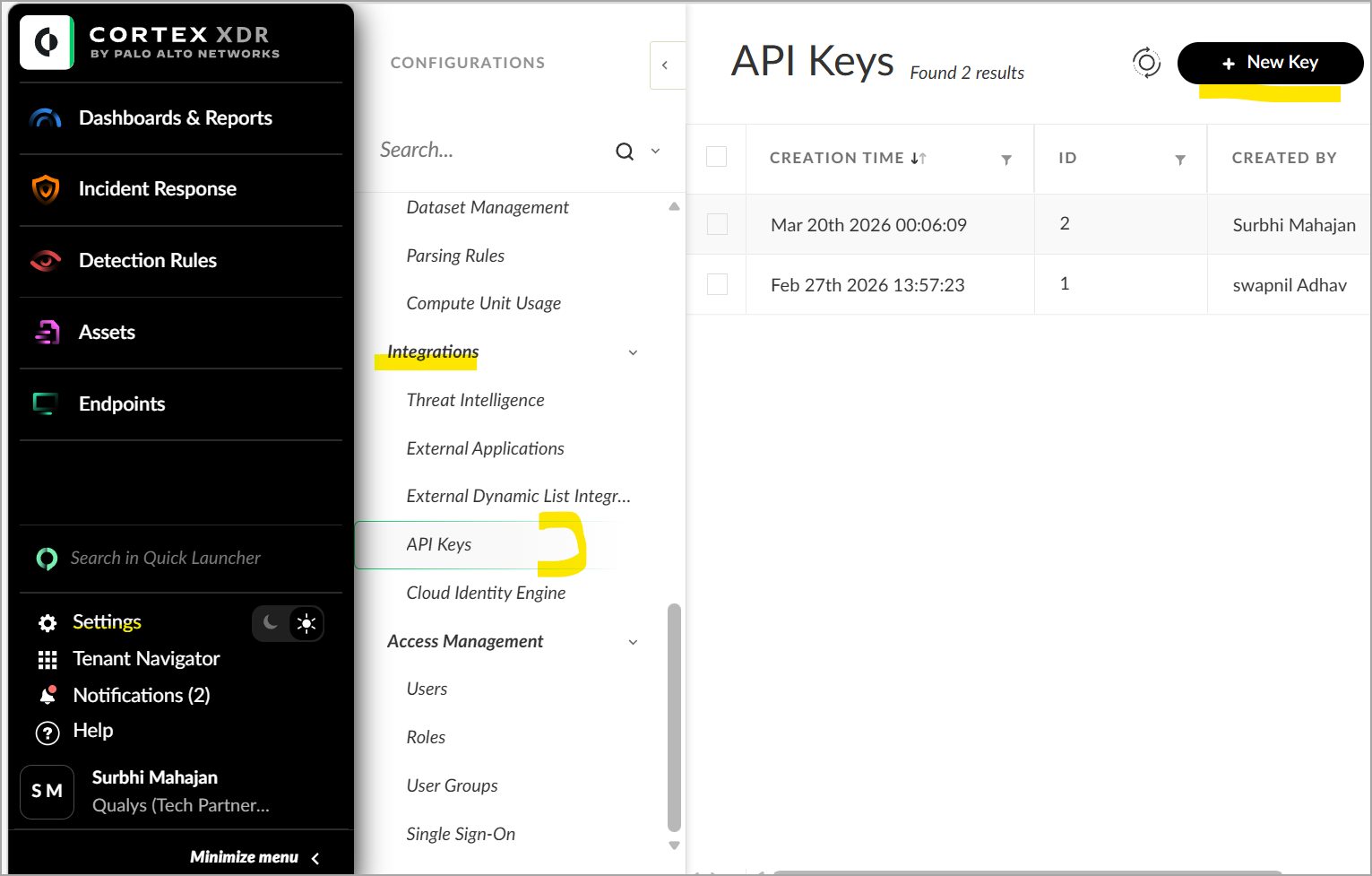
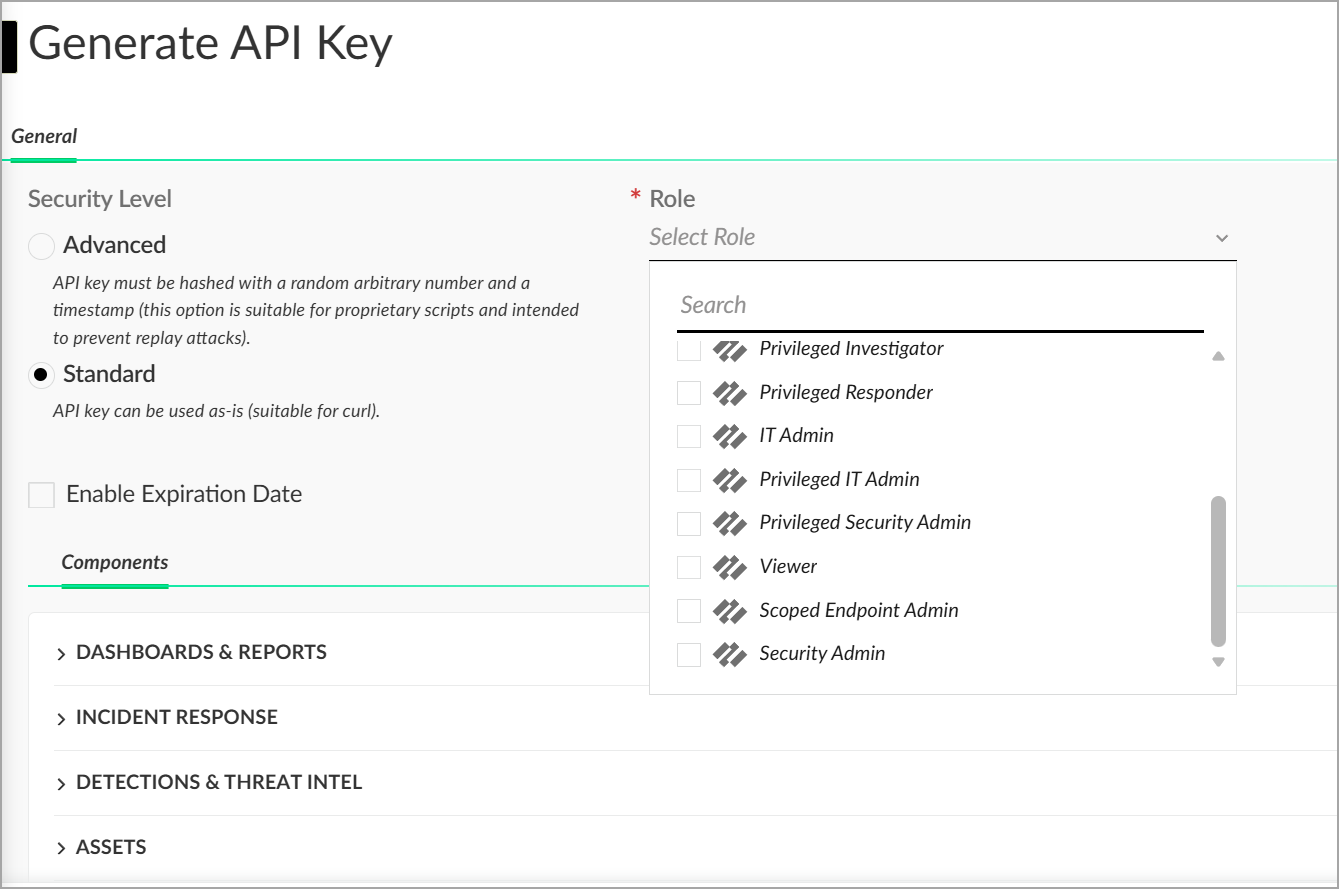
- Generate a Standard API key in Cortex XDR. Navigate to Settings > Configurations > Integrations > API Keys and click New Key. Select Standard as the security level and assign the Viewer role. Copy and save the API key immediately, as it cannot be viewed again.
- Note the API Key ID from the API Keys table and your FQDN (right-click your API key entry and select View Examples to find the hostname).
- Confirm network connectivity: the Qualys cloud must be able to reach your Cortex XDR API endpoint over HTTPS (port 443).
Generating an API Key in Cortex XDR
- Log in to your Cortex XDR console with admin credentials.
- Navigate to Settings > Configurations > Integrations > API Keys and click New Key.
- Select Standard as the security level and assign the Viewer role from the available roles.
- Optionally, configure an expiration date for the key.
- Click Generate and copy the API key immediately, as it will not be viewable after you close the dialog.
Important: The API key is displayed only once at the time of generation. Copy and store it securely before closing the dialog. If you lose the key, you must generate a new one.
Refer to the Cortex XDR API documentation to learn more about creating the API Keys. Make sure the API key is assigned the Viewer role with Standard security level.
Reference - Cortex XDR API Overview
Finding the API Key ID and FQDN
In the API Keys table, locate the ID column and note the numeric value corresponding to your key. To find your FQDN, right-click your API key entry and select View Examples. The hostname follows the format api-<customer>.xdr.us.paloaltonetworks.com. The FQDN value varies based on your deployment region.
Entering Credentials in Qualys ETM
During connector setup in Qualys ETM, enter the Base URL (in the format https://api-<fqdn>), the API Token, and the API Key ID in the authentication fields on the Profile & Connectivity screen.
Permissions Required
The API key used for this connector must meet the following requirements:
- API key role must be Viewer (read-only access).
- Security level must be Standard (not Advanced).
Scope and Data Access
The connector queries the Cortex XDR /public_api/v1/endpoints/get_endpoint endpoint to retrieve endpoint inventory. Custom filtering and filter queries are not supported for this connector. Import of installed software and source tags is not supported.
Key Rotation
When rotating the API key in Cortex XDR, generate a new Standard key with the Viewer role under Settings > Configurations > Integrations > API Keys. Update the credential in Qualys ETM using the Edit Connector option with the new API Token and API Key ID. The previous key is not automatically revoked when a new key is created; revoke the old key manually in the Cortex XDR console after confirming the connector works with the new key.
Create a Profile & ConnectionCreate a Profile & Connection
Configure the connector's identity and authenticate with the Cortex XDR source system.

Connector Details
| Field | Type | Description |
| Name | String | A unique display name for this connector instance (e.g., coretxtest). Required. |
| Description | String | Optional free-text description of the connector. Maximum 180 characters. |
Authentication Details
Provide the authentication details for the Cortex XDR platform.
| Field | Type | Description |
| Base URL | String | The base URL of your Cortex XDR API endpoint. Format: https://api-<fqdn>. Example: https://api-cortex-xdr-qualys-tenant2.xdr.us.paloaltonetworks.com |
| API Key | Encrypted String | The API Token generated in the Cortex XDR console. The value is masked after entry. Required. |
| API Key ID | String | The numeric ID associated with the API key, found in the ID column of the API Keys table in Cortex XDR. Example: 2. Required. |
After entering all authentication details, click Test Connection to validate connectivity before proceeding. The following checks are performed:
- Network Reachability
- TLS Handshake
- Authentication Credential Check
- Authorization Scope Check
- Data Fetch
Note: All five checks must pass before you can advance to Step 2. If the connection test fails, refer to the Troubleshooting section for resolution steps.
Set the Scope & ScheduleSet the Scope & Schedule
Select the data to sync and configure when the connector should run.
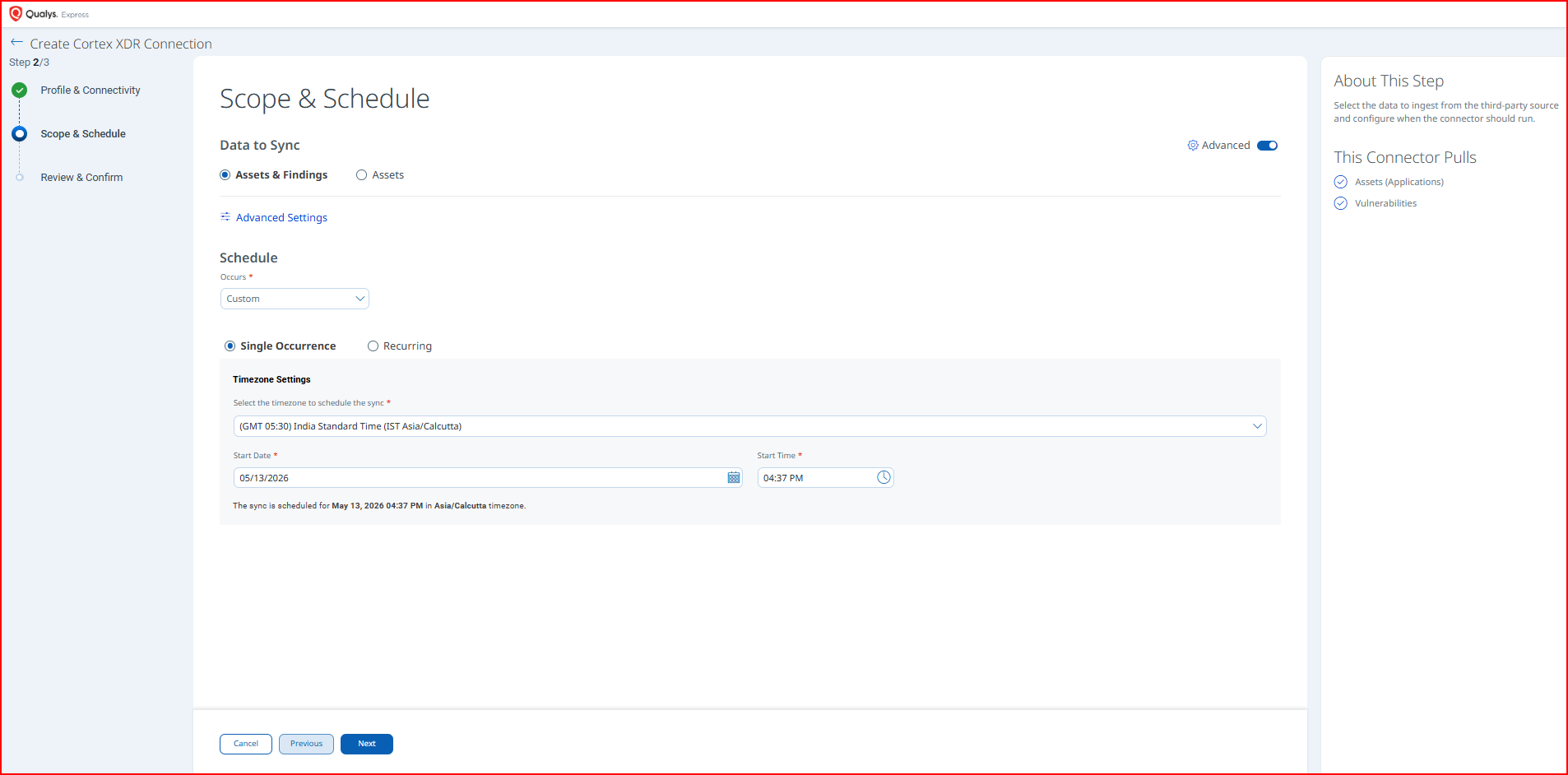
Data to Sync options:
- Assets & Findings – imports both endpoint asset records (Applications) and vulnerability findings. This is the default selection.
- Assets – imports endpoint asset records only, without vulnerability findings.
This connector pulls Assets (Applications) and Vulnerabilities from Cortex XDR.
To access optional data mapping settings, click Advanced Settings. See the Advanced Settings section for details.
Schedule – configure when the connector runs:
- Set Occurs to Custom or Daily (or other available intervals) from the dropdown.
- Select Single Occurrence to run the connector once at a specified date and time.
- Select Recurring to run the connector on a repeating schedule.
- Under Timezone Settings, select the timezone for scheduling (e.g.,
(GMT 05:30) India Standard Time (IST Asia/Calcutta)). - Set the Start Date and Start Time for the sync.
Note: All schedule times are interpreted in the timezone you select. Confirm the displayed confirmation message (e.g., "The sync is scheduled for May 13, 2026 04:37 PM in Asia/Calcutta timezone") before advancing.
Review all configuration settings before creating the connector. No changes can be made on this screen; use Previous to go back and edit.
Click Create to save and activate the connector, or Previous to return and make changes.
Advanced Settings
Advanced Settings are accessible from the Scope & Schedule step by clicking Advanced Settings. This panel displays data mapping information and is optional.
Note: Click Save in the Advanced Settings panel before closing it to preserve any changes. Closing without saving will discard modifications.
Filters Tab
The Filters tab is present in the connector configuration interface. However, the Cortex XDR connector does not currently support filter queries. Custom filtering against the Cortex XDR endpoint inventory is not supported. All available endpoint records are retrieved on each sync run.
Transform Map Tab
The Transform Map tab displays the active data transformation maps configured for this connector.
The following transform map is active for the Cortex XDR connector:
- Cortex XDR Vulnerability Transform Map – Active
Transform maps define how source fields from Cortex XDR are mapped to target fields in the Qualys ETM data model. Refer to the Transformation Maps section for full field-level details.
How the Connection Works
The Cortex XDR Connector retrieves endpoint asset records from Palo Alto Networks Cortex XDR via its REST API and imports them into Qualys ETM for unified risk analysis and prioritization. Qualys ETM processes the incoming data by de-duplicating redundant entries, normalizing data formats, enriching findings with additional context, and calculating risk scores using TruRisk. The connector operates in unidirectional mode, pulling asset data from Cortex XDR into Qualys on a configurable schedule.
Each run retrieves endpoint asset records from Cortex XDR, including fields such as endpoint ID, endpoint name, operating system details, domain, endpoint type, first seen date, IP addresses (IPv4 and IPv6), MAC address, and OS version. Delta (incremental) synchronization is not supported; each scheduled execution performs a full sync with a batch size of 100 records per request.
Connector States
After the connector is created and saved, it progresses through the following states visible in the Connectors list:
| Registered | The connector has been saved and is awaiting its first scheduled run. |
| Scheduled | The connector run has been queued and is waiting for processing resources to become available. |
| Processing | The connector is actively fetching data from Cortex XDR and ingesting records into Qualys ETM. |
| Processed | The connector run completed successfully. Assets and findings are available in ETM. |
| Errored | The connector run encountered an error. Review the error details and refer to the Troubleshooting section. |
Note: The first run of a connector may take up to two hours to fully process, depending on the volume of data in your Cortex XDR environment. The connector status may show Processed while findings are still being indexed in ETM.
Viewing Assets and Findings in ETM
Once the connector reaches the Processed state, assets and findings are available in Qualys ETM.
Assets: Navigate to Inventory and apply the following filter query:
inventory:(source:"Palo Alto Networks")
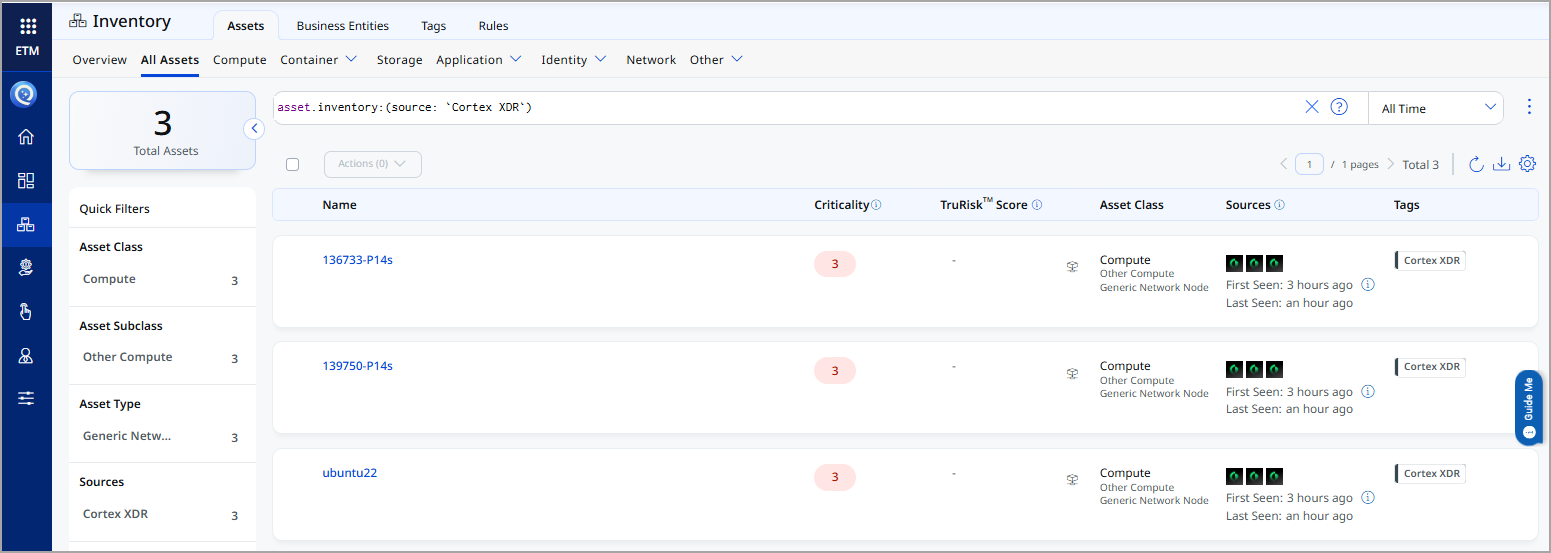
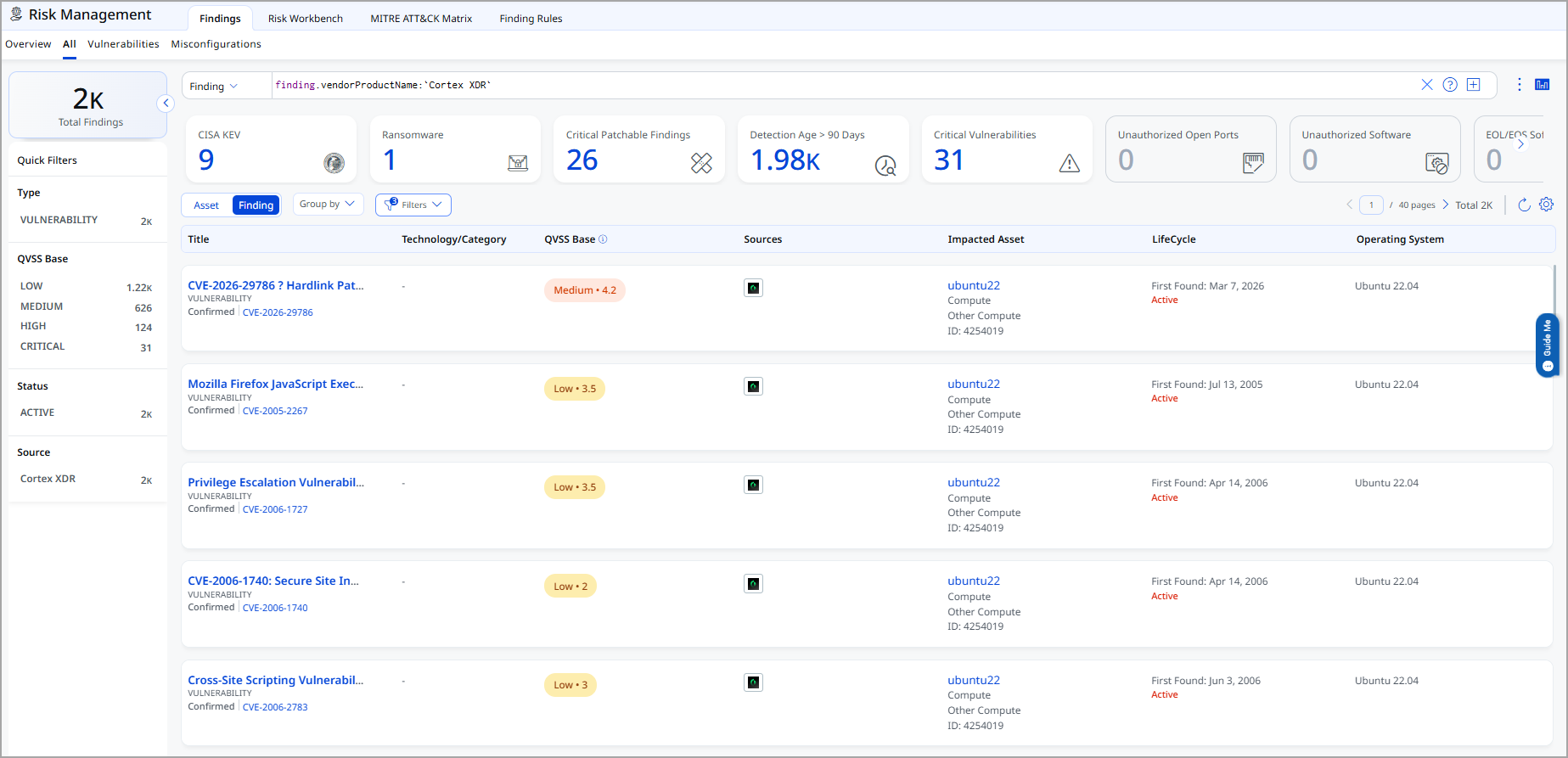
Findings: Navigate to Risk Management and apply the following filter query:
findings.vendorProductname:"Cortex XDR"
Troubleshooting
| Authentication failure on connector run | Verify the Base URL, API Token, and API Key ID values entered in Qualys ETM are correct. Confirm the API key uses the Standard security level (not Advanced) and has the Viewer role assigned. Check whether the API key has expired if an expiration date was configured. |
| Connection test fails | Verify the Base URL is in the correct format (https://api-<fqdn>) and includes the protocol prefix. Confirm the FQDN matches your Cortex XDR deployment region. Ensure Qualys cloud can reach the Cortex XDR API endpoint over HTTPS (port 443). |
| No assets imported after first run | Processing time depends on data volume and may take time to fully import assets. Verify the API key has the Viewer role and can access the endpoints API. Check the connector state in Qualys ETM to confirm it has reached the Processed state. |
| Connector not available in the integrations list | The Cortex XDR connector is available on demand. Contact your Technical Account Manager or Qualys Support to enable the connector for your subscription before attempting to configure it. |
Additional Information
API Reference
The connector uses the following Cortex XDR REST API endpoint:
| Endpoint | /public_api/v1/endpoints/get_endpoint |
| Method | POST |
| Purpose | Retrieve endpoint inventory records |
| Batch Size | 100 records per request |
For full Cortex XDR API documentation, refer to the Cortex XDR API Overview.
Transformation Maps
The Cortex XDR connector includes the following default transformation maps. These maps define how source fields from Cortex XDR are mapped to target fields in the Qualys ETM data model. Maps can be viewed in the Advanced Settings panel during connector configuration.
Cortex XDR Asset Transform MapCortex XDR Asset Transform Map
| Source Field (Cortex XDR) | Target Field (Qualys ETM) |
endpoint_id |
externalAssetId (Required) |
endpoint_name |
hostName (Required) |
operating_system |
operatingSystem.name |
os_version |
operatingSystem.version |
domain |
domain |
endpoint_type |
type |
first_seen |
firstFoundDate |
allIPs |
networkInterfaces[].ipv4Address |
ipv6 |
networkInterfaces[].ipv6Address |
mac_address[] |
networkInterfaces[].macAddress |
tags.server_tags |
temp_q_customAttributes.serverTags |
tags.endpoint_tags |
temp_q_customAttributes.endPointTags |
Cortex XDR Vulnerability Transform MapCortex XDR Vulnerability Transform Map
| Source Field (Cortex XDR) | Target Field (Qualys ETM) |
endpoint_id |
externalAssetId (Required) |
endpoint_name |
hostName (Required) |
operating_system |
operatingSystem.name |
os_version |
operatingSystem.version |
domain |
domain |
endpoint_type |
type |
first_seen |
firstFoundDate |
allIPs |
networkInterfaces[].ipAddress |
ip |
networkInterfaces[].ipv4Address |
ipv6 |
networkInterfaces[].ipv6Address |
mac_address[] |
networkInterfaces[].macAddress |
tags.server_tags |
temp_q_customAttributes.serverTags |
tags.endpoint_tags |
temp_q_customAttributes.endPointTags |
cves[].name |
finding[].externalFindingId (Required) |
cves[].name |
finding[].findingType.vulnerability.cveId |
cves[].severity |
finding[].severity |
cves[].description |
finding[].description |
cves[].publication_date |
finding[].firstFoundOn |
cves[].severity_score |
finding[].sourceRiskScore |
cves[].severity |
finding[].sourceSeverity |
cves[].name |
finding[].name |
cloud_provider |
asset.assetDetail.cloudInfo.provider |