Cortex Cloud by Palo Alto Networks Connector
The Cortex Cloud Connector bridges Palo Alto Networks' cloud security platform with Qualys' risk management system, enabling organizations to ingest cloud asset and vulnerability data from Cortex Cloud into Qualys Enterprise TruRisk Management for unified visibility. Security teams gain centralized insight into compute, serverless, and container image assets across cloud environments without manual data correlation.
By automating the continuous ingestion of vulnerability findings through scheduled syncs, the connector reduces the operational burden of managing fragmented security tools and accelerates risk assessment across hybrid cloud infrastructure. This integration empowers teams to make faster remediation decisions by consolidating cloud-native threats into their existing enterprise risk management workflows.
Connector Details
High-level overview of the Cortex Cloud connector capabilities.
| Vendor | Palo Alto Networks |
| Product Name | Cortex Cloud |
| Connector Category | Asset |
| Supported Assets | Compute, Serverless, Container Image |
| Finding Types Supported | Yes |
| Version | 1.0.0 |
| Integration Type | API Integration (REST) |
| Direction | Unidirectional (Cortex Cloud to Qualys) |
| Incremental Sync (Delta) | Supported |
Supportability Matrix
| Asset Class | Finding Type | AWS | Azure | GCP | OCI |
|---|---|---|---|---|---|
| Compute | Resource Type | EC2 Instance | Azure Virtual Machine | Compute Engine VM | OCI Compute Instance |
| Inventory | ✓ | ✓ | ✓ | ✓ | |
| Vulnerabilities | ✓ | ✓ | ✓ | ✓ | |
| Misconfigurations | ✓ | ✓ | ✓ | ✓ | |
| Serverless | Resource Type | AWS Lambda Function | Azure Function App | GCP Cloud Functions | OCI Functions |
| Inventory | ✓ | — | ✓ | ✓ | |
| Vulnerabilities | ✓ | — | ✓ | ✓ | |
| Misconfigurations | ✓ | — | ✓ | ✓ | |
| Container Image | Resource Type | Amazon ECR (Container Image) |
Azure Container Registry (ACR Image) |
Google Artifact Registry (Container Image) |
OCI Container Registry (OCIR Image) |
| Inventory | ✓ | ✓ | ✓ | ✓ | |
| Vulnerabilities | ✓ | ✓ | ✓ | ✓ | |
| Misconfigurations | ✓ | ✓ | ✓ | ✓ | |
| Container Instance | Resource Type | Amazon ECS Task / AWS Fargate Container |
Azure Container Instance (ACI) |
GKE Pod / Cloud Run Container |
OCI Container Instances |
| Inventory | — | — | — | — | |
| Vulnerabilities | — | — | — | — | |
| Misconfigurations | — | — | — | — | |
| Identity - User | Resource Type | AWS - IAM User | Azure - User | GCP - User | OCI - IAM User |
| Inventory | ✓ | — | — | ✓ | |
| Vulnerabilities | NA | NA | NA | NA | |
| Misconfigurations | ✓ | ✓ | — | ✓ | |
| Identity - Role | Resource Type | AWS - IAM Role | Azure - Role Definition | GCP - Role | OCI - Role |
| Inventory | ✓ | ✓ | ✓ | — | |
| Vulnerabilities | NA | NA | NA | NA | |
| Misconfigurations | ✓ | ✓ | ✓ | — | |
| Identity - Group | Resource Type | AWS - IAM Group | Azure - Group | GCP - Group | OCI - IAM Group |
| Inventory | ✓ | — | — | ✓ | |
| Vulnerabilities | NA | NA | NA | NA | |
| Misconfigurations | ✓ | — | — | ✓ |
"—" entries indicate the asset class/finding type combination is not yet available for that cloud provider. NA indicates that CNAPP vendor is currently not supporting this asset class/finding type combination.
Configure the Connector
The connector wizard consists of three steps: Profile & Connectivity, Scope & Schedule, and Review & Confirm. A valid connection test is required to proceed to next steps.
Before You Begin - AuthenticationBefore You Begin - Authentication
Before configuring the connector, complete the following prerequisite steps in the Cortex Cloud console and Qualys ETM.
Generating API Credentials in Cortex Cloud
- Ensure you have access to the Cortex Cloud console with permissions to generate API credentials.
- Log in to the Cortex Cloud console. Navigate to Configurations > Integrations > API Keys and generate API credentials to obtain an API ID and API Key.
- Select the Advanced API Key type for enhanced security. The Advanced key uses a nonce, timestamp, and hashing mechanism to prevent replay attacks.
- Copy and store the credentials securely. The API Key is only shown once at generation time.
- Note your Cortex Cloud pod Base URL (Domain Name). For example:
cortex-cloud-qualys-tenant2.xdr.us.paloaltonetworks.com - Contact your Technical Account Manager (TAM) or Qualys Support to activate the connector for your subscription.
Note: During connector setup, navigate to Connectors > Integration, locate the Cortex Cloud Connector, and click Manage. Enter the Domain Name (Base URL), API ID, API Key, and API Key Type in the authentication fields.
Permissions Required
The API credentials used by the connector must be assigned the Viewer role with the scope set to All for Assets and All for Cases/Issues.
Scope and Data Access
The connector queries the following Cortex Cloud API endpoints:
| Function | Endpoint |
| Assets | /public_api/v1 assets endpoint |
| Vulnerabilities | /public_api/v1/issue/search vulnerabilities endpoint |
Default transformation maps are applied automatically to the ingested data.
Required permission configuration:
- Role: Viewer
- Scope – Assets: All
- Scope – Cases / Issues: All
Key Rotation
When rotating API credentials, generate new credentials in the Cortex Cloud console. Update the API ID and API Key in Qualys ETM via the Edit Connector option. The connector will use the new credentials on the next scheduled run.
Create a Profile & ConnectionCreate a Profile & Connection
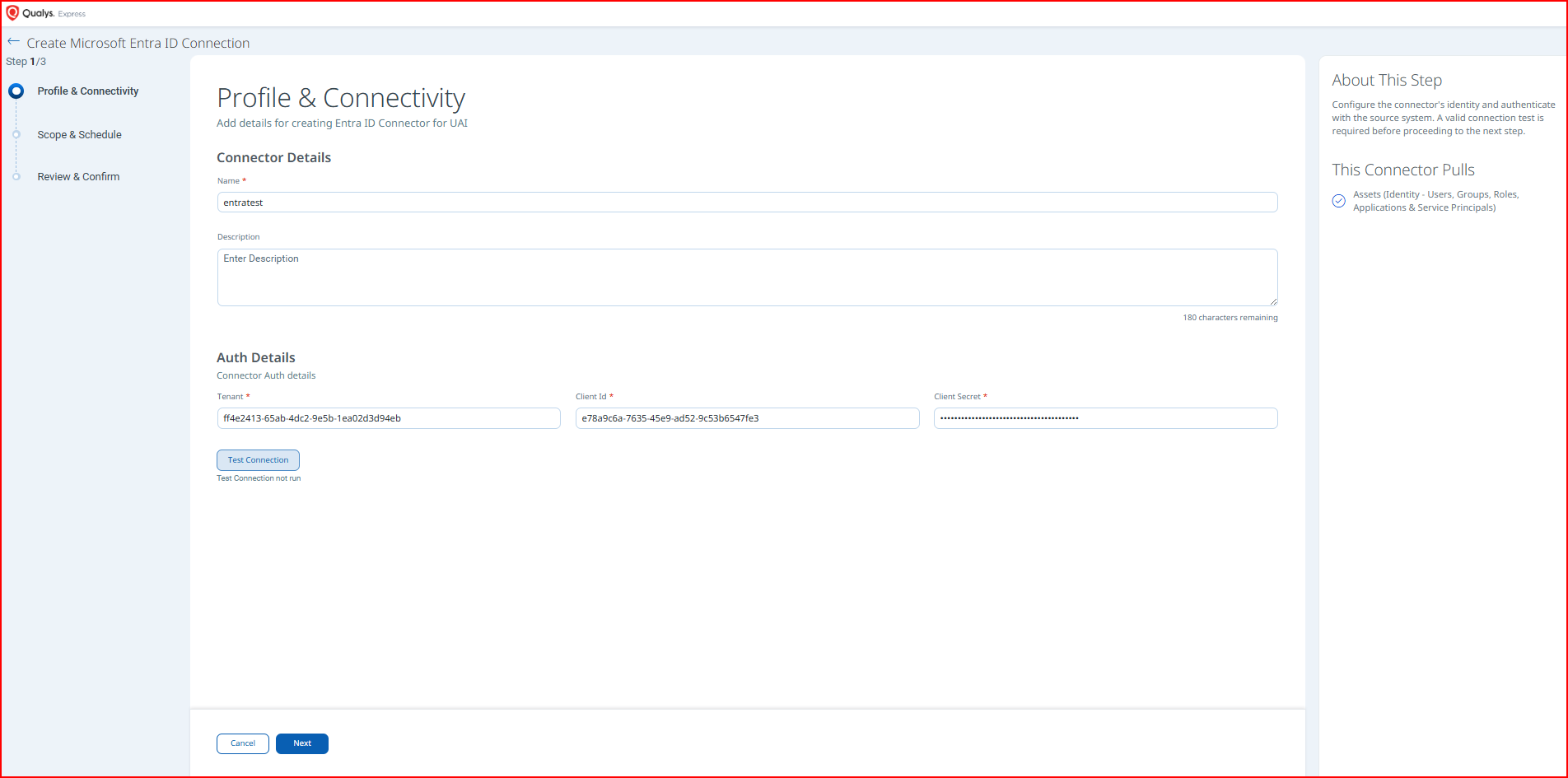
Configure the connector's identity and authenticate with the Cortex Cloud source system.
Connector Details
| Field | Type | Description |
| Name | String | A unique display name for this connector instance. Required. (Example: cotexcloudtest) |
| Description | String | Optional free-text description of the connector (maximum 180 characters). |
Authentication Details
Provide the following values in the Authentication Details section of the Profile & Connectivity form.
| Field | Type | Description |
| Domain | String | Base URL of the Cortex Cloud pod. (Example: cortex-cloud-qualys-tenant2.xdr.us.paloaltonetworks.com) |
| API Key Security Level | String | Select the API Key type: Standard or Advanced. Advanced is recommended as it prevents replay attacks using a nonce and timestamp mechanism. |
| API Key | Encrypted String | The API Key generated in the Cortex Cloud console. This value is masked after entry. |
| API Key Id | String | The numeric API Key ID associated with the generated API Key. (Example: 1) |
After entering all authentication details, click Test Connection. The following checks are performed:
- Network Reachability
- TLS Handshake
- Authentication Credential Check
- Authorization Scope Check
- Data Fetch
All checks must pass before you can proceed to Step 2. If a check fails, verify the Domain Name, API ID, API Key, and API Key Type entered in Qualys ETM are correct, and confirm the credentials have not been revoked or expired.
Set the Scope & ScheduleSet the Scope & Schedule
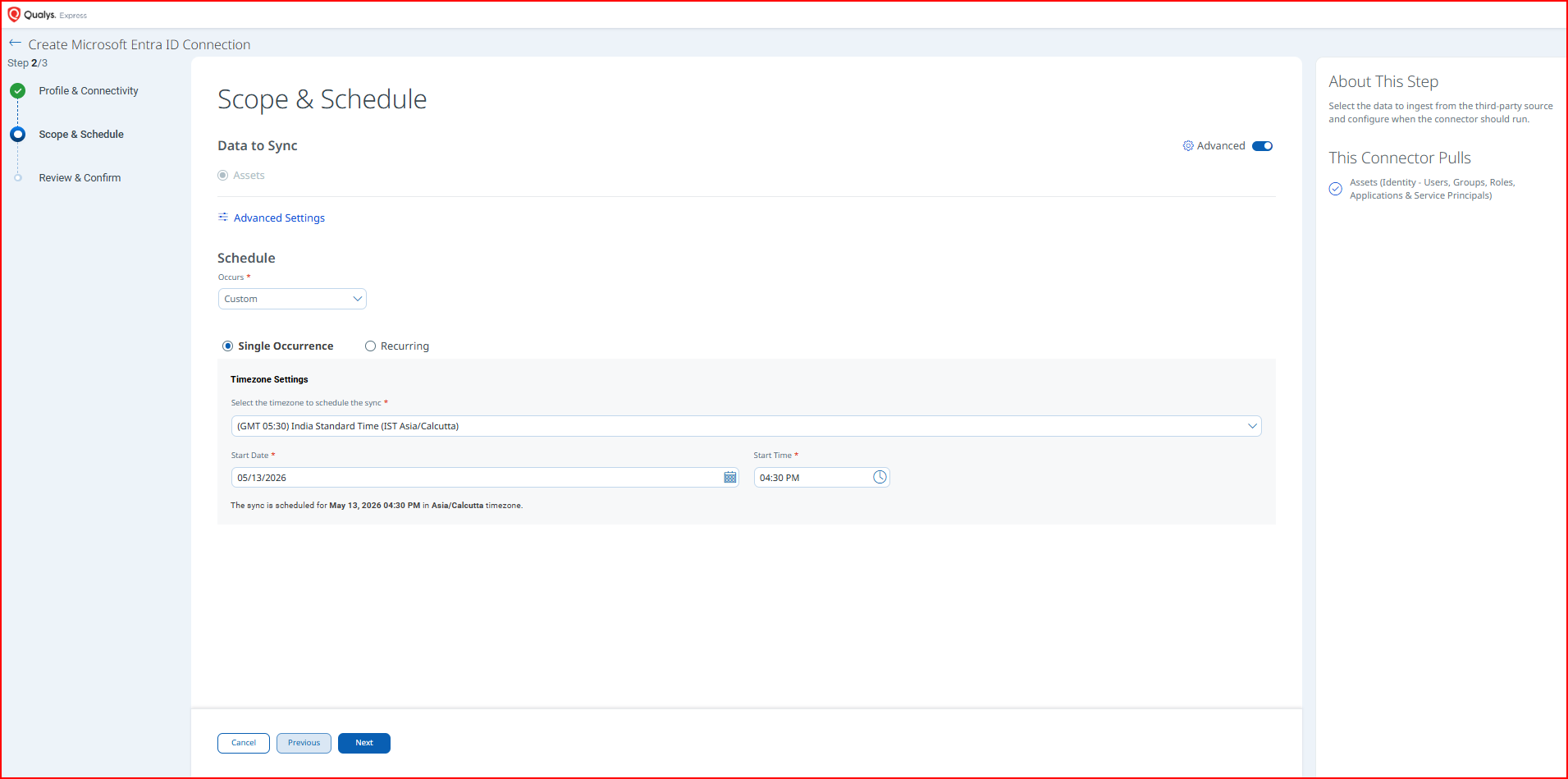
Select the data to ingest from Cortex Cloud and configure when the connector should run.
Data to Sync – Select one of the following options:
- Assets & Findings – Syncs both asset records and associated vulnerability and misconfiguration findings (default selection).
- Assets – Syncs asset records only, without findings data.
Click Advanced Settings to configure filters and review transformation maps. See the Advanced Settings section for details.
Schedule – Occurs: Set the schedule frequency using the Occurs dropdown. Options include Custom (with Single Occurrence or Recurring sub-options) and Daily.
- Single Occurrence: Configure a one-time run by selecting a timezone, start date, and start time.
- Recurring: Configure a repeating sync with start and end date/time.
Note: All schedule times are stored and displayed in the timezone you select. Ensure you select the correct timezone before saving, as this cannot be changed without editing the connector. The connector uses your local timezone for scheduling (for example, Asia/Calcutta).
Review your complete connector configuration before creating the connector.
Click Create to activate the connector, or Previous to return and make changes.
Advanced Settings
Advanced Settings are accessible from the Scope & Schedule step by clicking the Advanced Settings link. This panel contains optional configuration for filters and transformation map review.
Note: Click Save in the Advanced Settings panel to preserve any changes before closing the panel.
Filters Tab
The Filters tab uses a chip selector to control which asset types and finding types are synced. All chips are selected by default.
Asset Types – Select one or more of the following asset type chips to include in the sync:
- Group
- Serverless
- Container Image
- Compute
- User
- Role
Findings – Select one or more of the following finding type chips to include (available when Assets & Findings is selected as the Data to Sync option):
- Vulnerability
- Misconfiguration
Require Manual Sync – When checked, the connector will not run automatically on schedule. A manual trigger is required for each sync. This checkbox is unchecked by default.
Transform Map Tab
The Transform Map tab displays the active transformation map applied during data ingestion. The default transformation map is applied automatically. Refer to the Transformation Maps section for complete field-level mapping details.
How the Connection Works
The Cortex Cloud Connector executes on schedule (or on-demand) based on the configured profile. On each run, the connector authenticates with the Cortex Cloud REST API using the configured API ID, API Key, and API Key Type, retrieves cloud asset and vulnerability records, applies the default transformation maps, and imports the processed data into Qualys ETM.
- Assets and vulnerability findings are fetched from Cortex Cloud APIs (
/public_api/v1and/public_api/v1/issue/search). - Recurring executions perform an incremental (delta) pull to retrieve only changed or new records.
- Data is transformed using the default Cortex Cloud transformation maps.
- Transformed data is imported and enriched in Qualys ETM with TruRisk scoring.
Connector States
A successfully configured connector transitions through the following states:
- Registered: The connector is successfully created and registered to fetch data from Cortex Cloud.
- Scheduled: The connector is scheduled to execute a connection with the vendor at the configured time.
- Processing: A connection is executing and the connector is actively fetching asset and findings data from Cortex Cloud.
- Processed: The connector has successfully fetched the assets and is completing the import of findings into Qualys ETM.
Note: The Processed state indicates that the connector is successfully configured and the asset import is complete. The import of associated findings may still be in progress. The complete process may take up to 2 hours to finish on the first run.
Viewing Assets and Findings in ETM
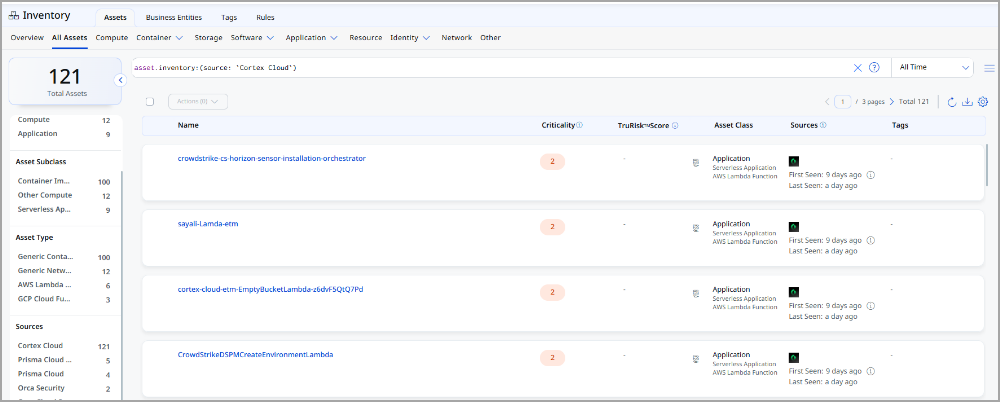
Navigate to Enterprise TruRisk Management > Inventory > Assets and apply the following filter to view assets imported from Cortex Cloud:
inventory:(source:"Cortex Cloud")
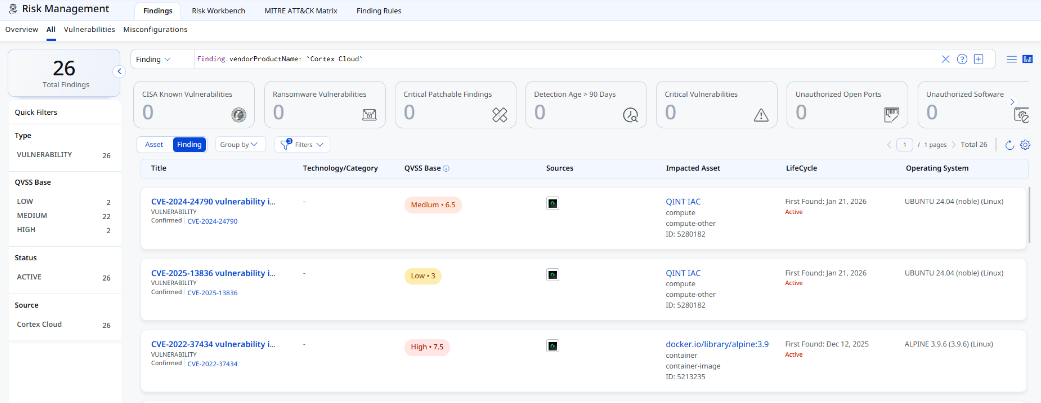
Navigate to Risk Management > Findings > Vulnerability and apply the following filter to view vulnerability findings:
findings.vendorProductname:"Cortex Cloud"
Troubleshooting
| Issue | Resolution |
|---|---|
| Authentication failure on connector run | Verify the Domain Name, API ID, API Key, and API Key Type entered in Qualys ETM are correct. Confirm the credentials have not been revoked or expired. |
| No assets imported after first run | The complete process may take up to 2 hours. Verify the API credentials have the Viewer role with the required scope. Check the connector state in Qualys ETM. |
| Connector not available in the integrations list | The connector requires activation. Contact your TAM or Qualys Support to activate it for your subscription. |
Additional Information
API Reference
The connector uses the following Cortex Cloud REST API endpoints:
| Function | Endpoint |
| Assets | /public_api/v1 |
| Vulnerabilities / Issues | /public_api/v1/issue/search |
Transformation Maps
The following tables show the Cortex Cloud to Qualys field mappings for each supported cloud asset type. All maps are applied automatically via the default transformation map.
AWS EC2 InstanceAWS EC2 Instance
|
Source Field |
Target Field |
|---|---|
xdm.asset.type.id |
asset.assetDetail.computeAssetClass.services[].name |
xdm.asset.name |
asset.assetDetail.name |
tags[].key |
asset.assetDetail.externalTags[].key |
tags[].value |
asset.assetDetail.externalTags[].value |
externalAssetId |
asset.assetHeader.externalAssetId (Required) |
xdm.asset.id |
asset.assetHeader.vendorAssetId |
xdm.asset.cloud.region |
asset.assetDetail.cloudInfo.region |
xdm.asset.realm |
asset.assetDetail.cloudInfo.accountId |
xdm.asset.provider |
asset.assetDetail.cloudInfo.provider |
xdm.cloud.vpc_id |
asset.assetDetail.computeAssetClass.cloudInstance.vpcId |
xdm.cloud.zone |
asset.assetDetail.cloudInfo.availabilityZone |
xdm.host.image |
asset.assetDetail.computeAssetClass.cloudInstance.imageId |
xdm.host.ipv4_addresses |
asset.assetDetail.computeAssetClass.cloudInstance.privateIpv4Address |
xdm.host.ipv4_public_addresses |
asset.assetDetail.computeAssetClass.cloudInstance.publicIpv4Address |
FUNCTION_PICKER |
asset.assetDetail.operatingSystem.name |
FUNCTION_PICKER |
asset.assetDetail.operatingSystem.osCatalog.name |
xdm.host.os_distribution |
asset.assetDetail.operatingSystem.publisher |
xdm.host.os_distribution |
asset.assetDetail.operatingSystem.osCatalog.publisher |
xdm.host.os_family |
asset.assetDetail.operatingSystem.osCatalog.productFamily |
FUNCTION_PICKER |
asset.assetHeader.status |
xdm.asset.name |
asset.assetDetail.hostname |
xdm.host.ipv4_public_addresses |
asset.assetDetail.network[].ipv4Addresses[] |
xdm.asset.name |
asset.assetDetail.hostIdentity.hostname |
xdm.asset.first_observed |
asset.assetDetail.sourceCreatedAt |
xdm.asset.last_observed |
asset.assetDetail.sourceUpdatedAt |
findings[].misconfigPolicyDescription |
findingGroup.findings[].findingType.misconfiguration.policy.description |
findings[].misconfigPolicyTitle |
findingGroup.findings[].findingType.misconfiguration.policy.title |
findings[].misconfigPolicyCategory |
findingGroup.findings[].findingType.misconfiguration.policy.type |
findings[].misconfigRuleName |
findingGroup.findings[].findingType.misconfiguration.rule.ruleName |
Azure Virtual MachineAzure Virtual Machine
|
Source Field |
Target Field |
|---|---|
xdm.asset.type.id |
asset.assetDetail.computeAssetClass.services[].name |
xdm.asset.name |
asset.assetDetail.name |
tags[].key |
asset.assetDetail.externalTags[].key |
tags[].value |
asset.assetDetail.externalTags[].value |
externalAssetId |
asset.assetHeader.externalAssetId (Required) |
xdm.asset.id |
asset.assetHeader.vendorAssetId |
xdm.asset.cloud.region |
asset.assetDetail.cloudInfo.region |
xdm.asset.realm |
asset.assetDetail.cloudInfo.accountId |
xdm.asset.provider |
asset.assetDetail.cloudInfo.provider |
FUNCTION_PICKER |
asset.assetDetail.operatingSystem.name |
FUNCTION_PICKER |
asset.assetDetail.operatingSystem.osCatalog.name |
xdm.host.os_distribution |
asset.assetDetail.operatingSystem.publisher |
xdm.asset.name |
asset.assetDetail.hostname |
xdm.asset.name |
asset.assetDetail.hostIdentity.hostname |
xdm.host.os_distribution |
asset.assetDetail.operatingSystem.osCatalog.publisher |
xdm.host.os_family |
asset.assetDetail.operatingSystem.osCatalog.productFamily |
xdm.asset.first_observed |
asset.assetDetail.sourceCreatedAt |
xdm.asset.last_observed |
asset.assetDetail.sourceUpdatedAt |
findings[].externalAssetId |
findingGroup.findings[].asset.externalAssetId |
FUNCTION_PICKER |
findingGroup.findings[].findingType.vulnerability.cveId |
findings[].name |
findingGroup.findings[].name |
findings[].external_id |
findingGroup.findings[].externalFindingId |
findings[].category |
findingGroup.findings[].category |
findings[].description |
findingGroup.findings[].description |
FUNCTION_PICKER |
findingGroup.findings[].severity |
findings[].remediation |
findingGroup.findings[].remediation.remediationStrategy |
findings[].detection.method |
findingGroup.findings[].detectionMethod |
findings[]._insert_time |
findingGroup.findings[].firstFoundOn |
findings[].last_update_timestamp |
findingGroup.findings[].lastFoundOn |
FUNCTION_PICKER |
findingGroup.findings[].findingStatus |
findings[].misconfigPolicyDescription |
findingGroup.findings[].findingType.misconfiguration.policy.description |
findings[].misconfigPolicyTitle |
findingGroup.findings[].findingType.misconfiguration.policy.title |
findings[].misconfigPolicyCategory |
findingGroup.findings[].findingType.misconfiguration.policy.type |
findings[].misconfigRuleName |
findingGroup.findings[].findingType.misconfiguration.rule.ruleName |
GCP Virtual MachinesGCP Virtual Machines
|
Source Field |
Target Field |
|---|---|
xdm.asset.type.id |
asset.assetDetail.computeAssetClass.services[].name |
xdm.asset.name |
asset.assetDetail.name |
tags[].key |
asset.assetDetail.externalTags[].key |
tags[].value |
asset.assetDetail.externalTags[].value |
externalAssetId |
asset.assetHeader.externalAssetId (Required) |
xdm.asset.id |
asset.assetHeader.vendorAssetId |
xdm.asset.cloud.region |
asset.assetDetail.cloudInfo.region |
xdm.asset.realm |
asset.assetDetail.cloudInfo.accountId |
xdm.asset.name |
asset.assetDetail.hostname |
xdm.host.ipv4_public_addresses |
asset.assetDetail.network[].ipv4Addresses[] |
xdm.asset.name |
asset.assetDetail.hostIdentity.hostname |
xdm.asset.provider |
asset.assetDetail.cloudInfo.provider |
xdm.cloud.zone |
asset.assetDetail.cloudInfo.availabilityZone |
xdm.host.image |
asset.assetDetail.computeAssetClass.cloudInstance.imageId |
xdm.host.ipv4_addresses |
asset.assetDetail.computeAssetClass.cloudInstance.privateIpv4Address |
xdm.host.ipv4_public_addresses |
asset.assetDetail.computeAssetClass.cloudInstance.publicIpv4Address |
FUNCTION_PICKER |
asset.assetDetail.operatingSystem.name |
FUNCTION_PICKER |
asset.assetDetail.operatingSystem.osCatalog.name |
xdm.host.os_distribution |
asset.assetDetail.operatingSystem.publisher |
xdm.host.os_distribution |
asset.assetDetail.operatingSystem.osCatalog.publisher |
xdm.host.os_family |
asset.assetDetail.operatingSystem.osCatalog.productFamily |
FUNCTION_PICKER |
asset.assetHeader.status |
findings[].externalAssetId |
findingGroup.findings[].asset.externalAssetId |
FUNCTION_PICKER |
findingGroup.findings[].findingType.vulnerability.cveId |
findings[].name |
findingGroup.findings[].name |
findings[].external_id |
findingGroup.findings[].externalFindingId |
findings[].category |
findingGroup.findings[].category |
findings[].description |
findingGroup.findings[].description |
FUNCTION_PICKER |
findingGroup.findings[].severity |
findings[].remediation |
findingGroup.findings[].remediation.remediationStrategy |
findings[].detection.method |
findingGroup.findings[].detectionMethod |
findings[]._insert_time |
findingGroup.findings[].firstFoundOn |
findings[].last_update_timestamp |
findingGroup.findings[].lastFoundOn |
FUNCTION_PICKER |
findingGroup.findings[].findingStatus |
findings[].misconfigPolicyDescription |
findingGroup.findings[].findingType.misconfiguration.policy.description |
findings[].misconfigPolicyTitle |
findingGroup.findings[].findingType.misconfiguration.policy.title |
findings[].misconfigPolicyCategory |
findingGroup.findings[].findingType.misconfiguration.policy.type |
findings[].misconfigRuleName |
findingGroup.findings[].findingType.misconfiguration.rule.ruleName |
Container ImageContainer Image
|
Source Field |
Target Field |
|---|---|
xdm.asset.name |
asset.assetDetail.name |
xdm.asset.realm |
asset.assetDetail.cloudInfo.accountId |
xdm.asset.cloud.region |
asset.assetDetail.cloudInfo.region |
tags[].key |
asset.assetDetail.externalTags[].key |
tags[].value |
asset.assetDetail.externalTags[].value |
xdm.asset.first_observed |
asset.assetDetail.sourceCreatedAt |
xdm.asset.last_observed |
asset.assetDetail.sourceUpdatedAt |
xdm.asset.id |
asset.assetDetail.containerImageAssetClass.name |
imageTag |
asset.assetDetail.containerImageAssetClass.tag |
imageRegistry |
asset.assetDetail.containerImageAssetClass.registry |
imageRepository |
asset.assetDetail.containerImageAssetClass.repository |
xdm.asset.provider |
asset.assetDetail.cloudInfo.provider |
xdm.image.digest |
asset.assetDetail.containerImageAssetClass.digest |
externalAssetId |
asset.assetHeader.externalAssetId (Required) |
xdm.asset.id |
asset.assetHeader.vendorAssetId |
xdm.image.architecture |
asset.assetDetail.containerImageAssetClass.architecture |
FUNCTION_PICKER |
asset.assetDetail.operatingSystem.name |
FUNCTION_PICKER |
asset.assetDetail.operatingSystem.osCatalog.name |
xdm.image.os_distribution |
asset.assetDetail.operatingSystem.publisher |
xdm.image.os_release |
asset.assetDetail.operatingSystem.version |
xdm.image.os_distribution |
asset.assetDetail.operatingSystem.osCatalog.publisher |
xdm.image.os_release |
asset.assetDetail.operatingSystem.osCatalog.version |
xdm.image.os_family |
asset.assetDetail.operatingSystem.osCatalog.productFamily |
xdm.image.size |
asset.assetDetail.containerImageAssetClass.sizeInBytes |
xdm.image.layers[].identifier |
asset.assetDetail.containerImageAssetClass.layers[].digest |
xdm.image.layers[].instruction |
asset.assetDetail.containerImageAssetClass.layers[].command |
xdm.image.layers[].size |
asset.assetDetail.containerImageAssetClass.layers[].sizeInBytes |
findings[].externalAssetId |
findingGroup.findings[].asset.externalAssetId |
FUNCTION_PICKER |
findingGroup.findings[].findingType.vulnerability.cveId |
findings[].name |
findingGroup.findings[].name |
findings[].external_id |
findingGroup.findings[].externalFindingId |
findings[].category |
findingGroup.findings[].category |
findings[].description |
findingGroup.findings[].description |
FUNCTION_PICKER |
findingGroup.findings[].severity |
findings[].remediation |
findingGroup.findings[].remediation.remediationStrategy |
findings[].detection.method |
findingGroup.findings[].detectionMethod |
findings[]._insert_time |
findingGroup.findings[].firstFoundOn |
findings[].last_update_timestamp |
findingGroup.findings[].lastFoundOn |
FUNCTION_PICKER |
findingGroup.findings[].findingStatus |
findings[].misconfigPolicyDescription |
findingGroup.findings[].findingType.misconfiguration.policy.description |
findings[].misconfigPolicyTitle |
findingGroup.findings[].findingType.misconfiguration.policy.title |
findings[].misconfigPolicyCategory |
findingGroup.findings[].findingType.misconfiguration.policy.type |
findings[].misconfigRuleName |
findingGroup.findings[].findingType.misconfiguration.rule.ruleName |
Serverless – AWS Lambda FunctionServerless – AWS Lambda Function
|
Source Field |
Target Field |
|---|---|
xdm.asset.type.id |
asset.assetDetail.serverlessAssetClass.serviceName |
xdm.asset.name |
asset.assetDetail.name |
tags[].key |
asset.assetDetail.externalTags[].key |
tags[].value |
asset.assetDetail.externalTags[].value |
externalAssetId |
asset.assetHeader.externalAssetId (Required) |
xdm.asset.id |
asset.assetHeader.vendorAssetId |
xdm.asset.cloud.region |
asset.assetDetail.cloudInfo.region |
xdm.asset.realm |
asset.assetDetail.cloudInfo.accountId |
xdm.asset.provider |
asset.assetDetail.cloudInfo.provider |
xdm.cloud.function.name |
asset.assetDetail.serverlessAssetClass.functionName |
xdm.cloud.function.runtime |
asset.assetDetail.serverlessAssetClass.runtime |
xdm.asset.first_observed |
asset.assetDetail.sourceCreatedAt |
xdm.asset.last_observed |
asset.assetDetail.sourceUpdatedAt |
findings[].externalAssetId |
findingGroup.findings[].asset.externalAssetId |
SPLIT(findings[].name, " ", "0") |
findingGroup.findings[].findingType.vulnerability.cveId |
findings[].name |
findingGroup.findings[].name |
findings[].external_id |
findingGroup.findings[].externalFindingId |
findings[].category |
findingGroup.findings[].category |
findings[].description |
findingGroup.findings[].description |
LOOKUP(findings[].severity, severity_mapping, "2") |
findingGroup.findings[].severity |
findings[].remediation |
findingGroup.findings[].remediation.remediationStrategy |
findings[].detection.method |
findingGroup.findings[].detectionMethod |
findings[]._insert_time |
findingGroup.findings[].firstFoundOn |
findings[].last_update_timestamp |
findingGroup.findings[].lastFoundOn |
LOOKUP(findings[].status.progress, status_mapping, "ACTIVE") |
findingGroup.findings[].findingStatus |
findings[].misconfigPolicyDescription |
findingGroup.findings[].findingType.misconfiguration.policy.description |
findings[].misconfigPolicyTitle |
findingGroup.findings[].findingType.misconfiguration.policy.title |
findings[].misconfigPolicyCategory |
findingGroup.findings[].findingType.misconfiguration.policy.type |
findings[].misconfigRuleName |
findingGroup.findings[].findingType.misconfiguration.rule.ruleName |
Serverless – GCP Cloud RunServerless – GCP Cloud Run
|
Source Field |
Target Field |
|---|---|
xdm.asset.type.id |
asset.assetDetail.serverlessAssetClass.serviceName |
xdm.asset.name |
asset.assetDetail.serverlessAssetClass.functionName |
xdm.asset.name |
asset.assetDetail.name |
tags[].key |
asset.assetDetail.externalTags[].key |
tags[].value |
asset.assetDetail.externalTags[].value |
externalAssetId |
asset.assetHeader.externalAssetId (Required) |
xdm.asset.id |
asset.assetHeader.vendorAssetId |
xdm.asset.cloud.region |
asset.assetDetail.cloudInfo.region |
xdm.asset.realm |
asset.assetDetail.cloudInfo.accountId |
xdm.asset.provider |
asset.assetDetail.cloudInfo.provider |
xdm.asset.first_observed |
asset.assetDetail.sourceCreatedAt |
xdm.asset.last_observed |
asset.assetDetail.sourceUpdatedAt |
findings[].externalAssetId |
findingGroup.findings[].asset.externalAssetId |
SPLIT(findings[].name, " ", "0") |
findingGroup.findings[].findingType.vulnerability.cveId |
findings[].name |
findingGroup.findings[].name |
findings[].external_id |
findingGroup.findings[].externalFindingId |
findings[].category |
findingGroup.findings[].category |
findings[].description |
findingGroup.findings[].description |
LOOKUP(findings[].severity, severity_mapping, "2") |
findingGroup.findings[].severity |
findings[].remediation |
findingGroup.findings[].remediation.remediationStrategy |
findings[].detection.method |
findingGroup.findings[].detectionMethod |
findings[]._insert_time |
findingGroup.findings[].firstFoundOn |
findings[].last_update_timestamp |
findingGroup.findings[].lastFoundOn |
LOOKUP(findings[].status.progress, status_mapping, "ACTIVE") |
findingGroup.findings[].findingStatus |
findings[].misconfigPolicyDescription |
findingGroup.findings[].findingType.misconfiguration.policy.description |
findings[].misconfigPolicyTitle |
findingGroup.findings[].findingType.misconfiguration.policy.title |
findings[].misconfigPolicyCategory |
findingGroup.findings[].findingType.misconfiguration.policy.type |
findings[].misconfigRuleName |
findingGroup.findings[].findingType.misconfiguration.rule.ruleName |