CrowdStrike Falcon Cloud Security Connector
The CrowdStrike Falcon Cloud Security Connector ingests cloud asset and vulnerability data from CrowdStrike Falcon Cloud Security (CWP) into Qualys Enterprise TruRisk Management (ETM). This enables centralized visibility of cloud workloads and security risks within the ETM platform for improved risk analysis and prioritization.
Connector Details
The following table summarizes the capabilities and technical attributes of the CrowdStrike Falcon Cloud Security Connector.
| Vendor | CrowdStrike |
| Product Name | CrowdStrike Falcon Cloud Security |
| Category | CSPM, CWPP |
| Works With | CSAM, ETM |
| Connector Type | ROC Connector |
| Supported Assets | Role, User, Group, Container Instance, Compute, Container Image, Serverless |
| Findings Support | Yes |
| Version | 1.0.0 |
| Supported Version & Type | SaaS (Latest) |
| Integration Type | API Integration (REST) |
| Authentication Type | OAuth 2.0 (Client Credentials) |
| Direction | Unidirectional (CrowdStrike → Qualys) |
| Incremental Sync (Delta) | Not Supported |
| Import of Installed Software | Not Supported |
| Import of Source Tags | Not Supported |
| Filters / Filter Query | Supported (Asset Type chip selector; Findings dropdown) |
Supportability Matrix
| Asset Class | Finding Type | AWS | Azure | GCP | OCI |
|---|---|---|---|---|---|
| Compute | Resource Type | EC2 Instance | Azure Virtual Machine | Compute Engine VM | OCI Compute Instance |
| Inventory | ✓ | ✓ | ✓ | ✓ | |
| Vulnerabilities | ✓ | ✓ | ✓ | ✓ | |
| Misconfigurations | ✓ | ✓ | ✓ | ✓ | |
| Serverless | Resource Type | AWS Lambda Function | Azure Function App | GCP Cloud Functions | OCI Functions |
| Inventory | ✓ | ✓ | ✓ | ✓ | |
| Vulnerabilities | — | — | — | — | |
| Misconfigurations | ✓ | ✓ | ✓ | ✓ | |
| Container Image | Resource Type | Amazon ECR (Container Image) |
Azure Container Registry (ACR Image) |
Google Artifact Registry (Container Image) |
OCI Container Registry (OCIR Image) |
| Inventory | ✓ | ✓ | ✓ | ✓ | |
| Vulnerabilities | ✓ | ✓ | ✓ | ✓ | |
| Misconfigurations | — | — | — | — | |
| Container Instance | Resource Type | Amazon ECS Task / AWS Fargate Container |
Azure Container Instance (ACI) |
GKE Pod / Cloud Run Container |
OCI Container Instances |
| Inventory | ✓ | ✓ | ✓ | ✓ | |
| Vulnerabilities | ✓ | ✓ | ✓ | ✓ | |
| Misconfigurations | — | — | — | — | |
| Identity - User | Resource Type | AWS - IAM User | Azure - User | GCP - User | OCI - IAM User |
| Inventory | ✓ | ✓ | ✓ | ✓ | |
| Vulnerabilities | — | — | — | — | |
| Misconfigurations | ✓ | ✓ | ✓ | ✓ | |
| Identity - Role | Resource Type | AWS - IAM Role | Azure - Role Definition | GCP - Role | OCI - Role |
| Inventory | ✓ | ✓ | ✓ | — | |
| Vulnerabilities | — | — | — | — | |
| Misconfigurations | ✓ | ✓ | ✓ | — | |
| Identity - Group | Resource Type | AWS - IAM Group | Azure - Group | GCP - Group | OCI - IAM Group |
| Inventory | ✓ | ✓ | — | ✓ | |
| Vulnerabilities | — | — | — | — | |
| Misconfigurations | ✓ | ✓ | — | ✓ |
"—" entries indicate the asset class/finding type combination is not yet available for that cloud provider. NA indicates that CNAPP vendor is currently not supporting this asset class/finding type combination.
Configure the Connector
The connector is configured in three steps within the Qualys ETM interface. Navigate to the CrowdStrike Falcon Cloud Security connector and click Create Connection to begin.
Prerequisites
Prerequisites, API client creation, and required permissions.
Create a Profile and Connection
Name the connection and authenticate with the source system.
Set the Scope and Schedule
Choose the data to ingest and how often the connector runs.
Before You Begin
Before configuring the connector in Qualys ETM, complete the following prerequisite steps in the CrowdStrike Falcon console.
- Ensure you have administrator access to the CrowdStrike Falcon console with permissions to create API clients.
- Create an API client in the CrowdStrike Falcon console with the required read scopes for CSPM data. Navigate to Support and Resources, then API Clients and Keys, and click Add new API client.
- Record the Client ID, Client Secret, and your CrowdStrike cloud environment base URL (for example,
https://api.us-2.crowdstrike.com). - Confirm network connectivity: Qualys cloud must be able to reach your CrowdStrike API endpoint over HTTPS (port 443).
Creating an API Client in CrowdStrike Falcon
- Access the API Clients page. Log in to the CrowdStrike Falcon console as an administrator. Click the menu icon in the upper left corner, navigate to Support and Resources, then select API Clients and Keys.
- Create an API client. Click Add new API client under the OAuth2 API Clients section. Provide a name and description for the API client. Under the permission settings, assign read access to the scopes required for cloud security posture data. Click Add to create the client.
- Copy the credentials. After clicking Add, a confirmation dialog displays the Client ID and Secret. Copy both values immediately.
Important: The Client Secret is displayed only once. It cannot be retrieved after you close this dialog. Store both credentials securely before proceeding.
- Identify your base URL. The base URL corresponds to your CrowdStrike cloud environment region. Examples include
https://api.us-1.crowdstrike.com,https://api.us-2.crowdstrike.com, andhttps://api.eu-1.crowdstrike.com. Enter this value as the API Endpoint URL field in the Qualys ETM connector configuration, along with the Client ID and Client Secret.
Permissions Required
The API client must have read permissions for cloud security posture management data.
| Scope | Permission |
|---|---|
| Cloud Security API Assets | Read |
| Cloud Security API Detections | Read |
| Falcon Container Image | Read |
| Detections | Read |
| Hosts | Read |
| Vulnerabilities | Read |
Scope and Data Access
The connector retrieves cloud asset and misconfiguration data from cloud environments registered in CrowdStrike Falcon Cloud Security. The data flow is unidirectional, from CrowdStrike to Qualys ETM. No data is written back to CrowdStrike.
Key Rotation
CrowdStrike API clients do not have a built-in expiration, but you can revoke and recreate them at any time from the Falcon console under API Clients and Keys. When rotating credentials, complete the following steps:
- Create a new API client in the CrowdStrike Falcon console with the same required scopes.
- Update the Qualys ETM connector configuration with the new Client ID and Client Secret.
- Verify the connector reaches the Processed state after the next run.
- Delete the old API client after confirming the new credentials work correctly.
Create a Profile and Connection
Configure the connector's identity and authenticate with the source system. A valid connection test is required before proceeding to the next step.
Connector Details
| Name | A unique display name for this connection (required). Example: CrowdStrike Falcon Cloud Security260505023915515 |
| Description | An optional description of the connection's purpose. Maximum 164 characters. |
Authentication Details
Provide the authentication details for the API connection. The connector uses OAuth 2.0 with Client Credentials.
| Field | Type | Description |
|---|---|---|
| API Endpoint URL | String | The base URL of your CrowdStrike cloud environment. Example: https://api.us-2.crowdstrike.com |
| Client Id | String | The OAuth 2.0 Client ID generated from the CrowdStrike Falcon console. |
| Client Secret | Encrypted String | The OAuth 2.0 Client Secret generated at API client creation. Displayed masked after entry. |
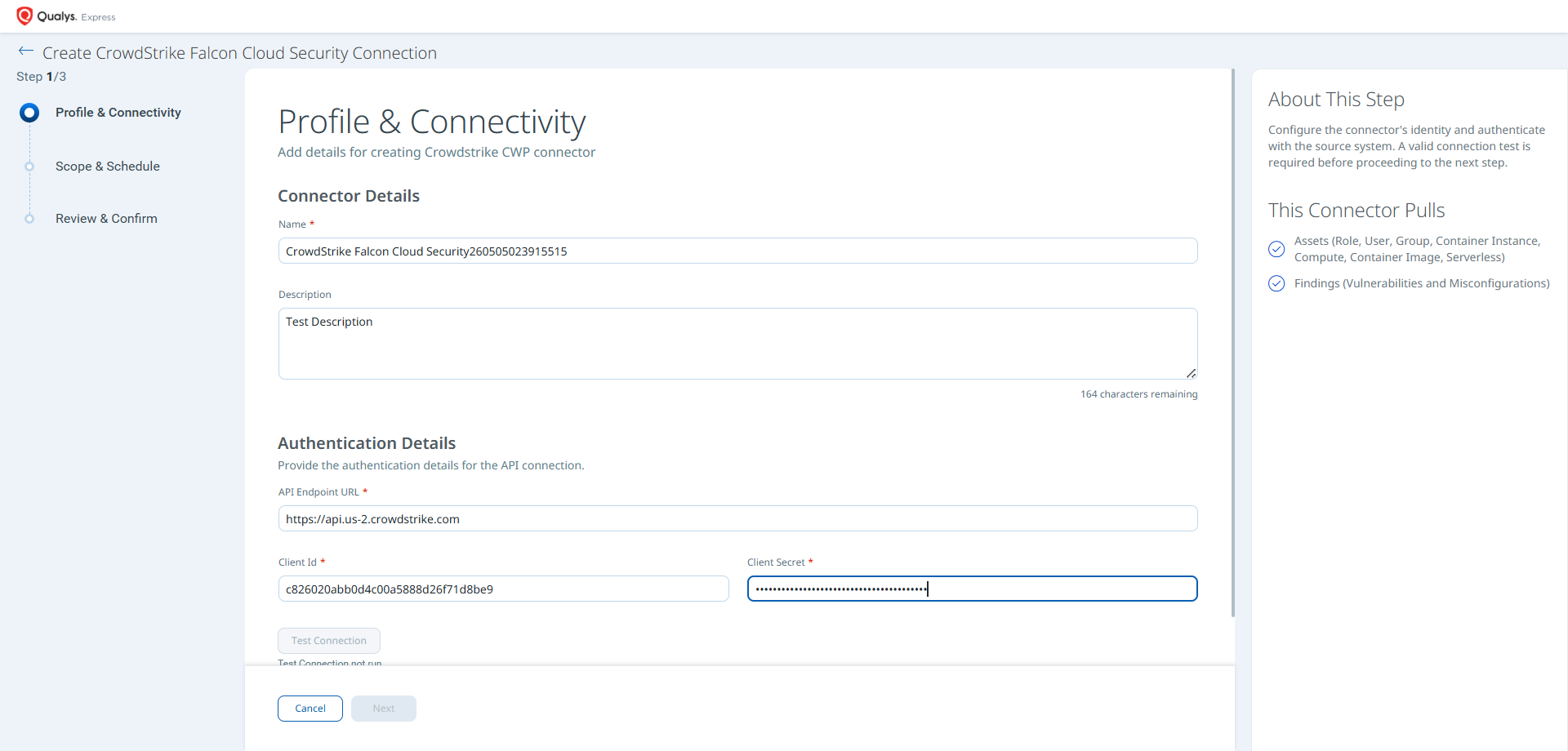
The Client Secret is shown only once during API client creation in the CrowdStrike console. If you did not record it, you must create a new API client and update this field with the new credentials.
After entering all credentials, click Test Connection to validate connectivity. The test runs the following checks:
- Network Reachability — Verifies that the connector endpoint is reachable over HTTPS (port 443).
- TLS Handshake — Confirms that a secure TLS connection can be established with the remote endpoint.
- Authentication Credential Check — Validates the configured credentials against the source system's authentication endpoint.
- Authorization Scope Check — Confirms that the provided credentials have the required permissions to access the configured data scope.
- Data Fetch — Verifies that data can be successfully retrieved from the source system using the configured connection.
If the connection test fails, verify that the API Endpoint URL matches your CrowdStrike cloud environment region, that the Client ID and Client Secret are entered correctly, and that the Qualys cloud can reach the CrowdStrike API endpoint over HTTPS (port 443). See the Troubleshooting section for additional guidance.
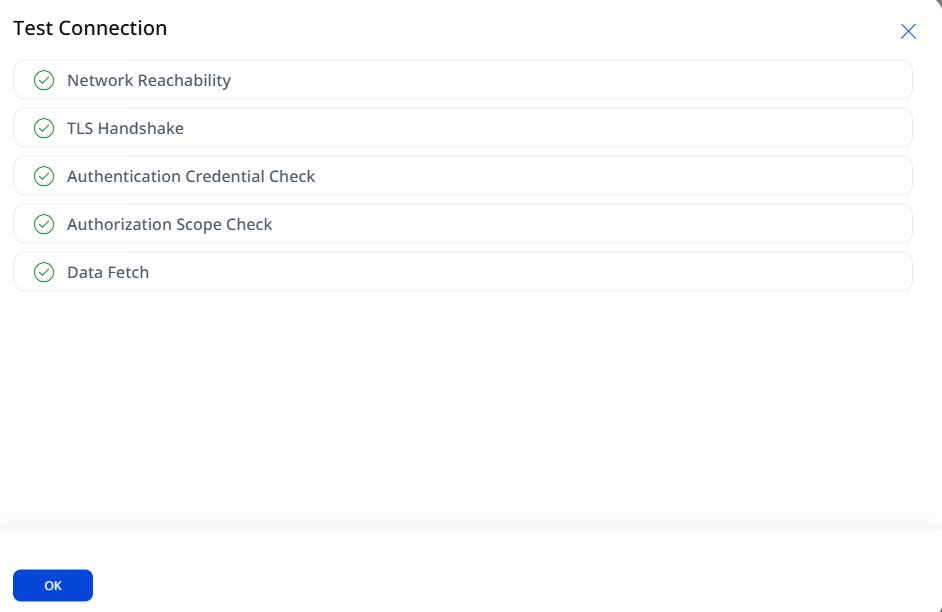
Click Next to proceed to Step 2 once the connection test passes successfully.
Set the Scope and Schedule
Select the data to ingest from CrowdStrike and configure when the connector should run.
Data to Sync Select one of the following options:
- Assets & Findings – Ingests both asset records and associated vulnerability or misconfiguration findings.
- Assets – Ingests asset records only, without findings.
Click Advanced Settings to open the Advanced Settings panel and configure filters and data mapping options. See Advanced Settings for details.
Schedule – Set how frequently the connector runs using the Occurs dropdown. The default is Daily. The system automatically calculates the sync window from the current date and time for a period of 5 years.
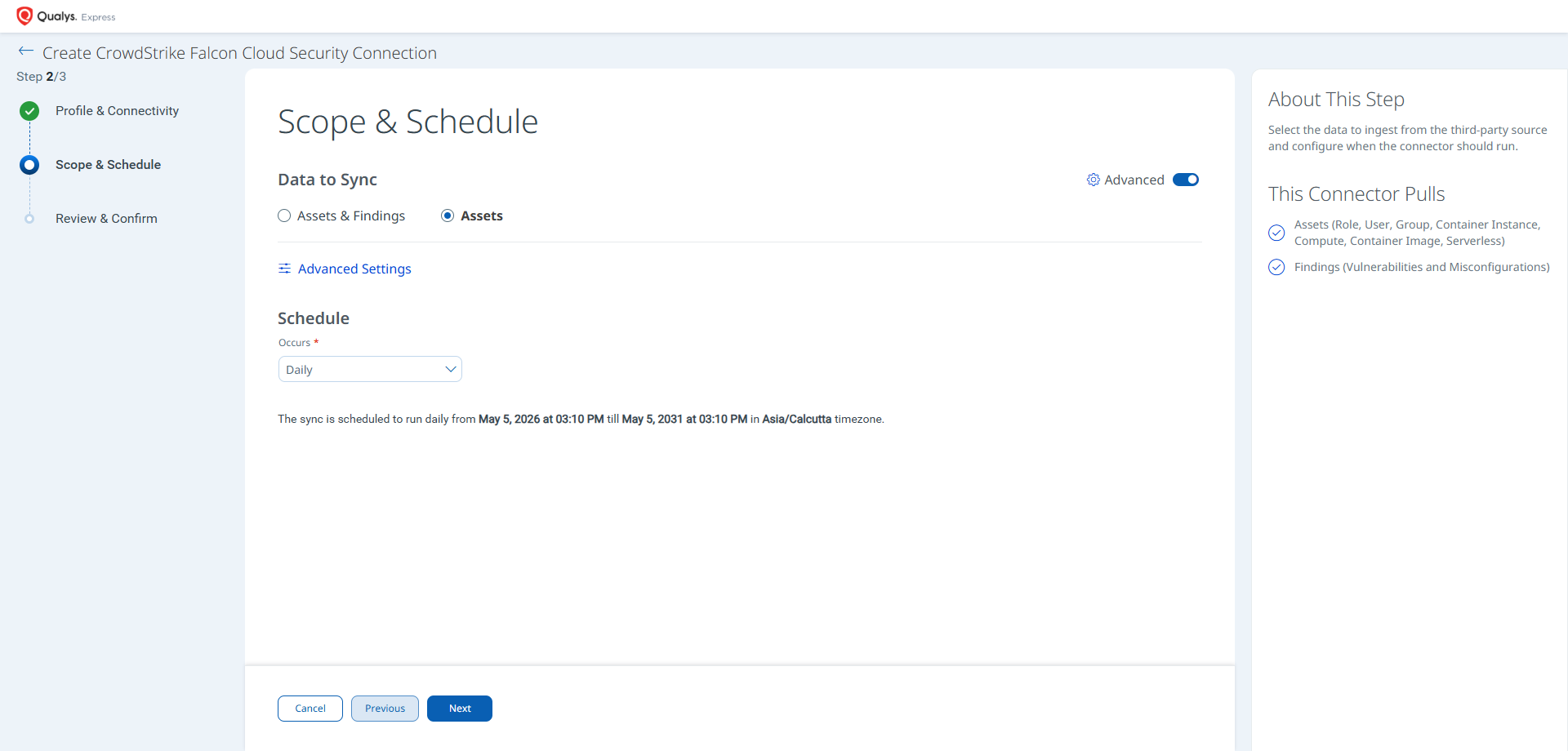
The schedule uses the timezone of the ETM instance at the time of configuration (for example, Asia/Calcutta). Scheduled runs are active for a 5-year duration from the start date. To renew, create a new connection or update the schedule before expiry.
Advanced Settings
Advanced Settings are available from the Scope & Schedule step by clicking Advanced Settings. The panel contains two tabs: Filters and Transform Map.
Click Save in the Advanced Settings panel to preserve any changes before closing the panel.
Filters
The Filters tab uses a chip selector to control which asset types and findings are ingested. All available types are selected by default.
Asset Types – The following asset type chips are available for selection. Remove a chip to exclude that asset type from ingestion:
- Group
- Container Image
- Role
- User
- Compute
- Container Instance
- Serverless
Findings – A dropdown selector is available to choose which finding types to include. Use Select option(s) to choose one or more finding categories. If no selection is made, findings are not filtered by type.
Transform Map
The Transform Map tab displays the active transformation maps applied during connector execution. The default maps convert CrowdStrike Falcon Cloud Security data into the Qualys ETM data model. The active map name for this connector is CrowdStrike Falcon Cloud Security.
Default transformation maps are applied automatically. You may clone or modify these maps in ETM if customization is required. See Transformation Maps in the Additional Information section for the full field mapping reference.
How the Connection Works
Each connector run retrieves cloud asset records and associated misconfiguration or vulnerability findings from CrowdStrike Falcon Cloud Security. The connector ingests data from cloud environments monitored by CrowdStrike, covering resources across AWS, Azure, and GCP.
The following asset types are ingested:
- Compute – Virtual machine instances (AWS EC2, Azure VM, GCP VM)
- Serverless – Function-as-a-service resources (AWS Lambda, Azure Functions, GCP Functions)
- Container Image – Container images assessed by CrowdStrike
- Container Instance – Running container workloads
- Role, User, and Group – Identity and access management entities
Findings ingested include Vulnerabilities (CVE-based) and Misconfigurations (CSPM detections).
Connector States
After creation, the connection progresses through the following states visible in the Connections list:
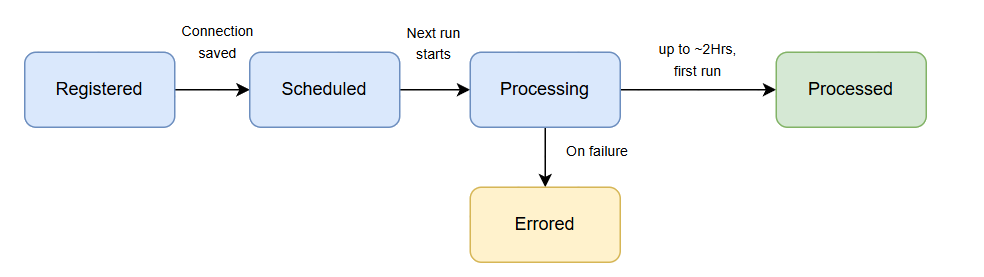
- Registered – The connection has been created successfully and is awaiting its first scheduled run.
- Scheduled – The connector is queued for execution at the next scheduled time.
- Processing – Data is actively being fetched from CrowdStrike and processed by ETM.
- Processed – Data ingestion has completed. Assets and findings are available in ETM.
- Errored – The connector encountered an error during the last run. Review the Logs tab and consult the Troubleshooting section.
The initial data import may take up to 2 hours to complete depending on the volume of cloud assets and findings in your CrowdStrike environment. If no data appears after this period, verify that the API client has read access to CSPM data and that cloud accounts are registered in CrowdStrike Falcon Cloud Security.
A connector in the Processed state indicates that asset ingestion is complete. Findings associated with those assets may continue to be indexed for a short period after the state changes to Processed.
Viewing Assets and Findings in ETM
After ingestion completes, view the imported data in Qualys ETM using the following navigation paths and filters.
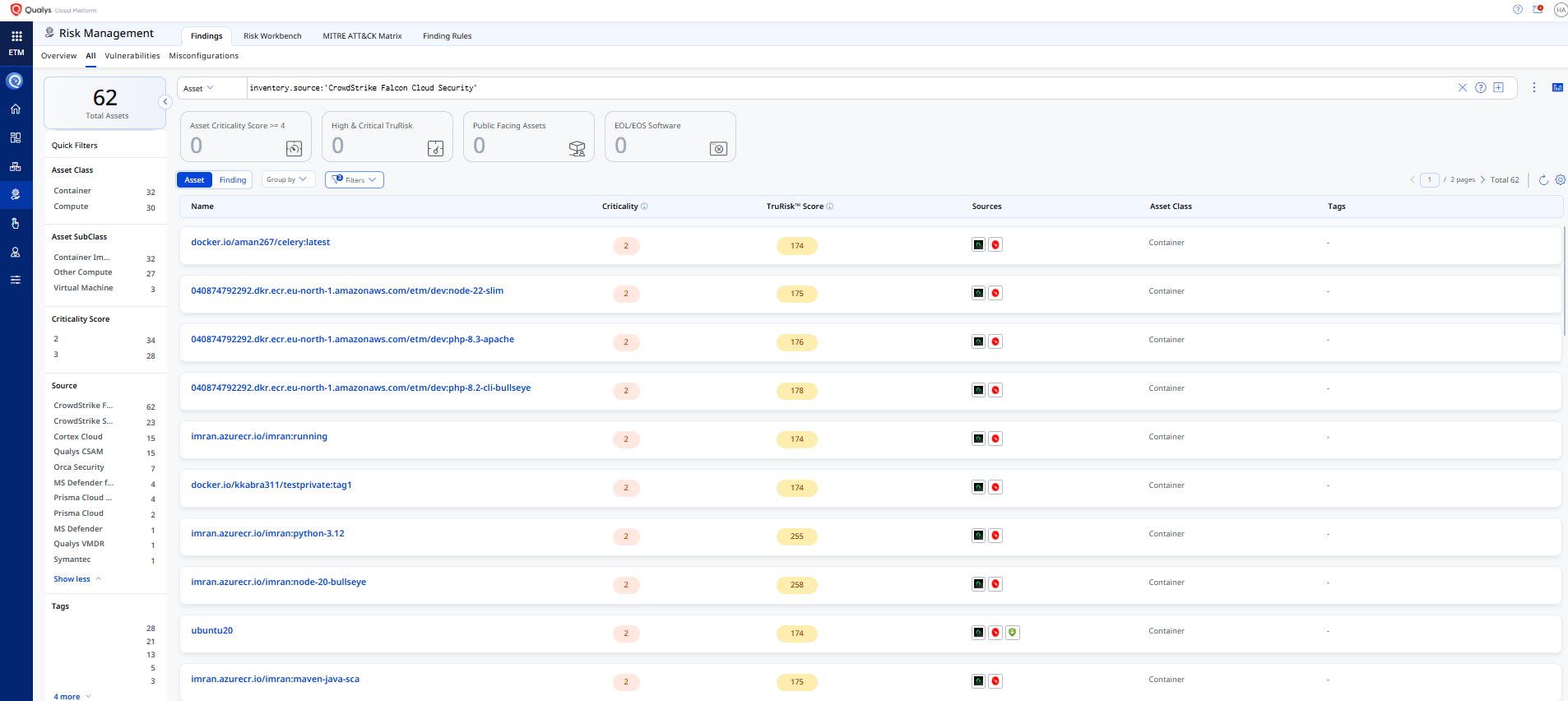
Assets
Navigate to Enterprise TruRisk Management > Inventory > Assets > All Assets and apply the filter:
inventory:(source:"CrowdStrike Falcon Cloud Security")
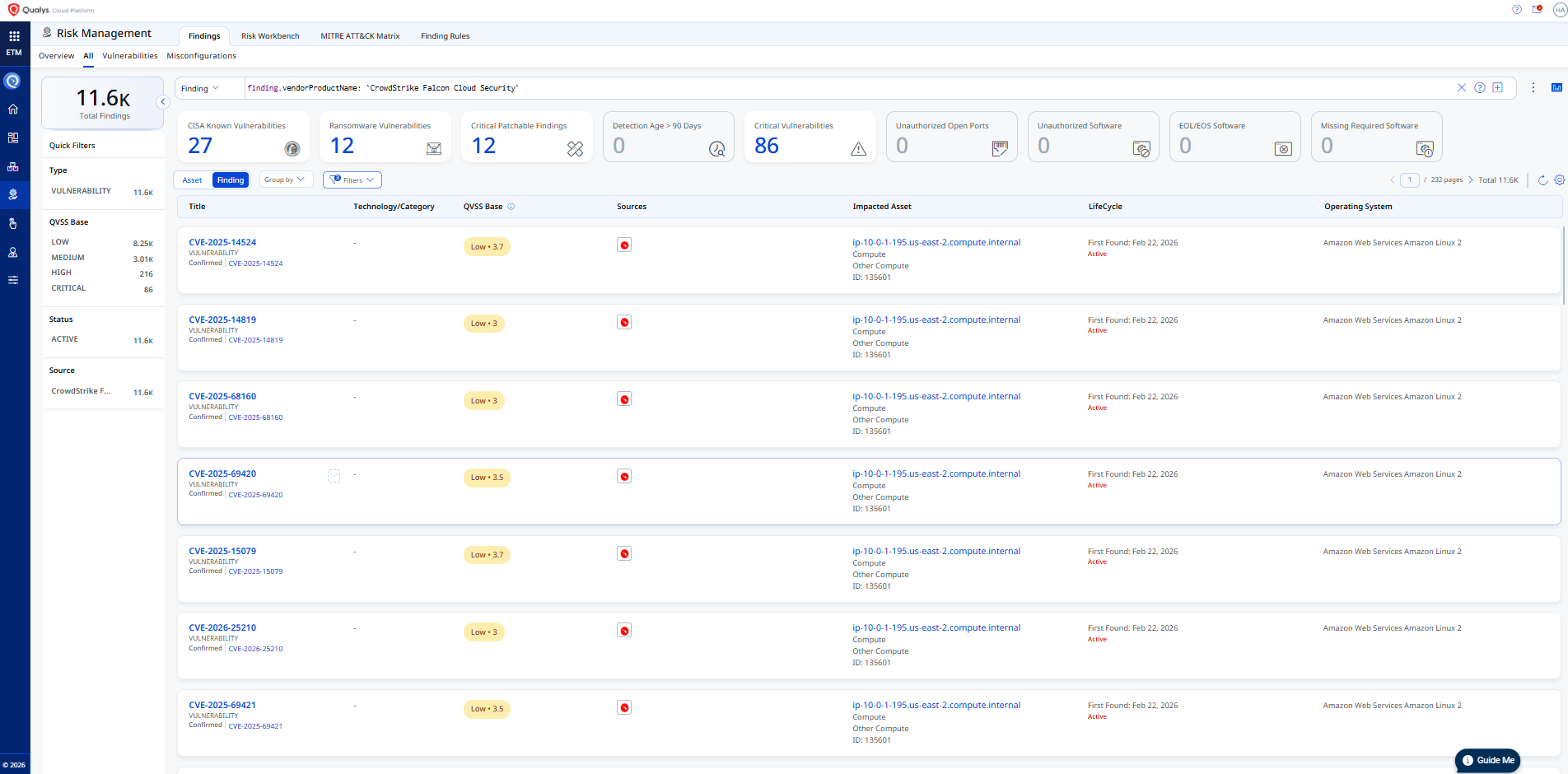
Findings
Navigate to Enterprise TruRisk Management > Risk Management > Findings > Vulnerability and apply the filter:
findings.vendorProductname:"CrowdStrike Falcon Cloud Security"
Troubleshooting
| Issue | Resolution |
|---|---|
| 401 Unauthorized | The Client ID or Client Secret is invalid, or the API client has been revoked. Verify the credentials in the CrowdStrike Falcon console under API Clients and Keys. Generate a new API client if needed and update the connector configuration with the new credentials. |
| 403 Forbidden | The API client does not have the required read scopes. Verify the API client permissions in the CrowdStrike Falcon console and confirm that the required CSPM read scopes are assigned. |
| Connection test fails | Verify that the base URL matches your CrowdStrike cloud environment region. Confirm that the Qualys cloud can reach the CrowdStrike API endpoint over HTTPS (port 443). Check that the Client ID and Client Secret are entered correctly in the connector configuration. |
| No assets imported after first run | A successfully configured connector progresses through Registered, Scheduled, Processing, and Processed states. The full import process may take up to 2 hours to complete. If no data appears after this period, verify that the API client has read access to CSPM data and that cloud accounts are registered in CrowdStrike Falcon Cloud Security. |
Additional Information
API Reference
The following API endpoints are called during connector execution.
| Name | Filter / Condition | Endpoint |
|---|---|---|
| Auth API | N/A | https://api.<domain>.crowdstrike.com/oauth2/token |
| Fetch Vulnerabilities API | Finding Type: Vulnerabilities | /spotlight/queries/vulnerabilities/v1/spotlight/entities/vulnerabilities/v2/container-security/combined/images/detail/v1
|
| Fetch Devices associated with Vulnerabilities | /devices/queries/devices/v1 |
|
| Fetch Assets/Resources API | Asset type: Hosts | /cloud-security-assets/queries/resources/v1/cloud-security-assets/entities/resources/v1
|
| Fetch Containers | Asset type: Containers | /container-security/combined/containers/v1 |
| Asset type: Container Images | /image-assessment/entities/reports/v2 |
Transformation Maps
The following default transformation maps convert CrowdStrike Falcon Cloud Security source fields to the Qualys ETM data model. Maps are applied automatically during connector execution. Required target fields are marked (Required).
Compute
AWS EC2 InstanceAWS EC2 Instance
| Source Field | Target Field |
|---|---|
cloud_provider |
asset.assetDetail.cloudInfo.provider |
id |
asset.assetHeader.vendorAssetId (Required) |
creation_time |
asset.assetDetail.sourceCreatedAt |
account_id |
asset.assetDetail.cloudInfo.accountId |
account_name |
asset.assetDetail.cloudInfo.accountName |
updated_at |
asset.assetDetail.sourceUpdatedAt |
resource_type_name |
asset.assetDetail.computeAssetClass.services[].name |
resource_name |
asset.assetDetail.name |
resource_id |
asset.assetDetail.hostIdentity.hostname |
resource_url |
asset.assetDetail.cloudInfo.providerUrl |
resource_id |
asset.assetHeader.externalAssetId |
region |
asset.assetDetail.cloudInfo.region |
zone |
asset.assetDetail.cloudInfo.availabilityZone |
cloud_context.host.state |
asset.assetDetail.computeAssetClass.cloudInstance.state |
externalTags |
asset.assetDetail.externalTags |
configuration.architecture |
asset.assetDetail.computeAssetClass.gpu[].architecture |
configuration.vpcId |
asset.assetDetail.computeAssetClass.cloudInstance.vpcId |
configuration.privateDnsName |
asset.assetDetail.network[0].privateDnsName |
configuration.privateDnsName |
asset.assetDetail.network[0].publicDnsName |
configuration.privateIpAddress |
asset.assetDetail.network[0].ipv4Addresses[0] |
configuration.networkInterfaces[0].macAddress |
asset.assetDetail.computeAssetClass.cloudInstance.macAddress |
configuration.networkInterfaces[].macAddress |
asset.assetDetail.network[].macAddress |
configuration.instanceType |
asset.assetDetail.computeAssetClass.cloudInstance.type |
cloud_context.instance_id |
asset.assetDetail.computeAssetClass.cloudInstance.id |
configuration.subnetId |
asset.assetDetail.computeAssetClass.cloudInstance.subnetId |
configuration.imageId |
asset.assetDetail.computeAssetClass.cloudInstance.imageId |
configuration.blockDeviceMappings[0].ebs.volumeId |
asset.assetDetail.typedAttributes.& |
arn |
asset.assetDetail.typedAttributes.& |
cloud_context.host.platform_name |
asset.assetDetail.operatingSystem.name |
configuration.networkInterfaces[0].networkInterfaceId |
asset.assetDetail.computeAssetClass.cloudInstance.networkInterfaceId |
cloud_context.instance_state |
asset.assetHeader.status |
Azure VM InstanceAzure VM Instance
| Source Field | Target Field |
|---|---|
cloud_provider |
asset.assetDetail.cloudInfo.provider |
id |
asset.assetHeader.vendorAssetId (Required) |
creation_time |
asset.assetDetail.sourceCreatedAt |
account_id |
asset.assetDetail.cloudInfo.accountId |
account_name |
asset.assetDetail.cloudInfo.accountName |
tenant_id |
asset.assetDetail.cloudInfo.tenantId |
updated_at |
asset.assetDetail.sourceUpdatedAt |
resource_type_name |
asset.assetDetail.computeAssetClass.services[].name |
resource_name |
asset.assetDetail.name |
resource_url |
asset.assetDetail.cloudInfo.providerUrl |
resource_id |
asset.assetHeader.externalAssetId |
region |
asset.assetDetail.cloudInfo.region |
resource_group |
asset.assetDetail.computeAssetClass.cloudInstance.resourceGroupName |
cloud_context.host.state |
asset.assetDetail.computeAssetClass.cloudInstance.state |
externalTags |
asset.assetDetail.externalTags |
configuration.properties.networkProfile.networkInterfaces[0].id |
asset.assetDetail.computeAssetClass.cloudInstance.networkInterfaceId |
configuration.properties.osProfile.computerName |
asset.assetDetail.computeAssetClass.cloudInstance.hostName |
configuration.properties.extended.instanceView.osName |
asset.assetDetail.operatingSystem.name |
configuration.properties.extended.instanceView.osVersion |
asset.assetDetail.operatingSystem.version |
configuration.properties.osProfile.computerName |
asset.assetDetail.hostIdentity.hostname |
configuration.properties.vmId |
asset.assetDetail.computeAssetClass.cloudInstance.id |
configuration.properties.storageProfile.osDisk.managedDisk.storageAccountType |
asset.assetDetail.computeAssetClass.storage[0].type |
configuration.properties.storageProfile.osDisk.managedDisk.id |
asset.assetDetail.computeAssetClass.cloudInstance.imageId |
cloud_context.insights.details.publicIpAddress.context.interfaces[0].public_ip |
asset.assetDetail.network[0].publicIpv4Addresses[0] |
cloud_context.instance_state |
asset.assetHeader.status |
| Source Field | Target Field |
|---|---|
cloud_provider |
asset.assetDetail.cloudInfo.provider |
id |
asset.assetHeader.vendorAssetId (Required) |
creation_time |
asset.assetDetail.sourceCreatedAt |
project_id |
asset.assetDetail.cloudInfo.accountId |
account_name |
asset.assetDetail.cloudInfo.accountName |
updated_at |
asset.assetDetail.sourceUpdatedAt |
resource_type_name |
asset.assetDetail.computeAssetClass.services[].name |
configuration.name |
asset.assetDetail.name |
resource_url |
asset.assetDetail.cloudInfo.providerUrl |
resource_id |
asset.assetHeader.externalAssetId |
resource_id |
asset.assetDetail.hostIdentity.hostname |
cloud_context.legacy_resource_id |
asset.assetDetail.computeAssetClass.cloudInstance.id |
region |
asset.assetDetail.cloudInfo.region |
cloud_context.host.state |
asset.assetDetail.computeAssetClass.cloudInstance.state |
externalTags |
asset.assetDetail.externalTags |
configuration.networkInterfaces[0].subnetwork |
asset.assetDetail.computeAssetClass.cloudInstance.networkInterfaceId |
configuration.networkInterfaces[0].networkIP |
asset.assetDetail.network[0].ipv4Addresses[0] |
cloud_context.instance_state |
asset.assetHeader.status |
OCI VM InstanceOCI VM Instance
| Source Field | Target Field |
|---|---|
cloud_provider |
asset.assetDetail.cloudInfo.provider |
id |
asset.assetHeader.vendorAssetId (Required) |
creation_time |
asset.assetDetail.sourceCreatedAt |
account_id |
asset.assetDetail.cloudInfo.accountId |
updated_at |
asset.assetDetail.sourceUpdatedAt |
resource_type_name |
asset.assetDetail.computeAssetClass.services[].name |
resource_url |
asset.assetDetail.cloudInfo.providerUrl |
resource_id |
asset.assetHeader.externalAssetId |
region |
asset.assetDetail.cloudInfo.region |
cloud_context.instance_state |
asset.assetDetail.computeAssetClass.cloudInstance.state |
externalTags |
asset.assetDetail.externalTags |
configuration.shape |
asset.assetDetail.computeAssetClass.cloudInstance.type |
configuration.imageId |
asset.assetDetail.computeAssetClass.cloudInstance.imageId |
configuration.displayName |
asset.assetDetail.name |
cloud_context.instance_state |
asset.assetHeader.status |
resource_id |
asset.assetDetail.hostIdentity.hostname |
CONSTANT: "oci-compute-instance" |
asset.assetHeader.assetTypeName |
Container Image
Container ImageContainer Image
| Source Field | Target Field |
|---|---|
name |
asset.assetDetail.name |
id |
asset.assetHeader.vendorAssetId (Required) |
type |
asset.assetHeader.assetTypeName |
asset_unique_id |
asset.assetDetail.typedAttributes.& |
data.ImageName.value |
asset.assetDetail.containerImageAssetClass.name |
data.CloudAccount.id |
asset.assetDetail.cloudInfo.accountId |
data.CloudAccount.name |
asset.assetDetail.cloudInfo.accountName |
data.ImageName.value |
asset.assetDetail.containerImageAssetClass.imageTagReferences[].name |
data.RepositoryName.value |
asset.assetDetail.containerImageAssetClass.repository |
data.RepositoryName.value |
asset.assetDetail.containerImageAssetClass.imageTagReferences[].repository |
data.ImageDigest.value |
asset.assetDetail.containerImageAssetClass.digest |
data.ImageSize.value |
asset.assetDetail.containerImageAssetClass.sizeInBytes |
data.ImageSize.value |
asset.assetDetail.containerImageAssetClass.layers[].sizeInBytes |
data.RepositoryUri.value |
asset.assetDetail.containerImageAssetClass.registry |
data.ImageTags.value |
asset.assetDetail.containerImageAssetClass.tag |
data.RepositoryUri.value |
asset.assetDetail.containerImageAssetClass.imageTagReferences[].registry |
data.ImageTags.value |
asset.assetDetail.containerImageAssetClass.imageTagReferences[].tag |
data.ImageDigest.value |
asset.assetDetail.containerImageAssetClass.layers[].digest |
data.AssetUniqueId.value |
asset.assetHeader.externalAssetId |
data.ConsoleUrlLink.value |
asset.assetDetail.cloudInfo.providerUrl |
data.FirstSeen.value (DATE_FORMAT) |
asset.assetDetail.sourceCreatedAt |
data.LastSeen.value (DATE_FORMAT) |
asset.assetDetail.sourceUpdatedAt |
vulnerabilities[].data.Inventory.name |
findingGroup.findings[].asset.assetName |
vulnerabilities[].data.Inventory.asset_unique_id |
findingGroup.findings[].asset.externalAssetId |
vulnerabilities[].data.CVE.data.PublicName.value |
findingGroup.findings[].name |
vulnerabilities[].data.CVE.data.Id.value |
findingGroup.findings[].externalFindingId |
vulnerabilities[].data.SourceLink.value |
findingGroup.findings[].findingURL |
vulnerabilities[].data.FirstSeen.value (DATE_FORMAT) |
findingGroup.findings[].firstFoundOn |
vulnerabilities[].data.CVE.data.LastModifiedDate.value (DATE_FORMAT) |
findingGroup.findings[].lastFoundOn |
vulnerabilities[].data.data.FirstSeen.value (DATE_FORMAT) |
findingGroup.findings[].ingestedOn |
vulnerabilities[].data.CveId.value (FUNCTION_PICKER REGEX_MATCH_RETURN) |
findingGroup.findings[].findingType.vulnerability.cveId |
vulnerabilities[].data.HasExploit.value |
findingGroup.findings[].findingType.vulnerability.isExploitAvailable |
vulnerabilities[].data.Description.value |
findingGroup.findings[].description |
vulnerabilities[].data.PatchAvailable.value (FUNCTION_PICKER LOOKUP) |
findingGroup.findings[].findingType.vulnerability.isPatchAvailable |
vulnerabilities[].data.CvssVector.value |
findingGroup.findings[].cvss.vector |
vulnerabilities[].data.CvssSeverity.value (FUNCTION_PICKER LOOKUP) |
findingGroup.findings[].severity |
vulnerabilities[].data.CvssScore.value |
findingGroup.findings[].riskScore |
Container Instance
| Source Field | Target Field |
|---|---|
name |
asset.assetDetail.name |
id |
asset.assetHeader.vendorAssetId (Required) |
asset_unique_id |
asset.assetDetail.typedAttributes.asset_unique_id |
data.AssetUniqueId.value |
asset.assetHeader.externalAssetId |
data.ConsoleUrlLink.value |
asset.assetDetail.cloudInfo.providerUrl |
data.cloudAccount.id |
asset.assetDetail.cloudInfo.accountId |
data.CloudAccount.name |
asset.assetDetail.cloudInfo.accountName |
data.Arn.value |
asset.assetDetail.containerInstanceAssetClass.id |
data.Status.value |
asset.assetDetail.containerInstanceAssetClass.status |
data.ImageName.value |
asset.assetDetail.containerInstanceAssetClass.Image.name |
data.FirstSeen.value (DATE_FORMAT) |
asset.assetDetail.sourceCreatedAt |
data.LastSeen.value (DATE_FORMAT) |
asset.assetDetail.sourceUpdatedAt |
vulnerabilities[].data.Inventory.name |
findingGroup.findings[].asset.assetName |
vulnerabilities[].data.Inventory.asset_unique_id |
findingGroup.findings[].asset.externalAssetId |
vulnerabilities[].data.CVE.data.PublicName.value |
findingGroup.findings[].name |
vulnerabilities[].data.CVE.data.Id.value |
findingGroup.findings[].externalFindingId |
vulnerabilities[].data.SourceLink.value |
findingGroup.findings[].findingURL |
vulnerabilities[].data.FirstSeen.value (DATE_FORMAT) |
findingGroup.findings[].firstFoundOn |
vulnerabilities[].data.CVE.data.LastModifiedDate.value (DATE_FORMAT) |
findingGroup.findings[].lastFoundOn |
vulnerabilities[].data.CveId.value (FUNCTION_PICKER REGEX_MATCH_RETURN) |
findingGroup.findings[].findingType.vulnerability.cveId |
vulnerabilities[].data.HasExploit.value |
findingGroup.findings[].findingType.vulnerability.isExploitAvailable |
vulnerabilities[].data.Description.value |
findingGroup.findings[].description |
vulnerabilities[].data.PatchAvailable.value (FUNCTION_PICKER LOOKUP) |
findingGroup.findings[].findingType.vulnerability.isPatchAvailable |
vulnerabilities[].data.CvssVector.value |
findingGroup.findings[].cvss.vector |
vulnerabilities[].data.CvssSeverity.value (FUNCTION_PICKER LOOKUP) |
findingGroup.findings[].severity |
vulnerabilities[].data.CvssScore.value |
findingGroup.findings[].riskScore |
vulnerabilities[].data.SourceLink.value |
findingGroup.findings[].findingDetectionURL |
| Source Field | Target Field |
|---|---|
name |
asset.assetDetail.name |
id |
asset.assetHeader.vendorAssetId (Required) |
asset_unique_id |
asset.assetDetail.typedAttributes.asset_unique_id |
data.AssetUniqueId.value |
asset.assetDetail.containerInstanceAssetClass.id |
data.CloudAccount.id |
asset.assetDetail.cloudInfo.accountId |
data.CloudAccount.name |
asset.assetDetail.cloudInfo.accountName |
data.Status.value |
asset.assetDetail.containerInstanceAssetClass.status |
data.Name.value |
asset.assetDetail.containerInstanceAssetClass.host.name |
data.PrivateClusterConfig.value.privateEndpoint |
asset.assetDetail.containerInstanceAssetClass.host.ipAddress |
data.ImageName.value |
asset.assetDetail.containerInstanceAssetClass.Image.name |
data.AssetUniqueId.value |
asset.assetHeader.externalAssetId |
data.ConsoleUrlLink.value |
asset.assetDetail.cloudInfo.providerUrl |
data.FirstSeen.value (DATE_FORMAT) |
asset.assetDetail.sourceCreatedAt |
data.LastSeen.value (DATE_FORMAT) |
asset.assetDetail.sourceUpdatedAt |
vulnerabilities[].data.Inventory.name |
findingGroup.findings[].asset.assetName |
vulnerabilities[].data.Inventory.asset_unique_id |
findingGroup.findings[].asset.externalAssetId |
vulnerabilities[].data.CVE.data.PublicName.value |
findingGroup.findings[].name |
vulnerabilities[].data.CVE.data.Id.value |
findingGroup.findings[].externalFindingId |
vulnerabilities[].data.SourceLink.value |
findingGroup.findings[].findingURL |
vulnerabilities[].data.FirstSeen.value (DATE_FORMAT) |
findingGroup.findings[].firstFoundOn |
vulnerabilities[].data.CVE.data.LastModifiedDate.value (DATE_FORMAT) |
findingGroup.findings[].lastFoundOn |
vulnerabilities[].data.CveId.value |
findingGroup.findings[].findingType.vulnerability.cveId |
vulnerabilities[].data.HasExploit.value |
findingGroup.findings[].findingType.vulnerability.isExploitAvailable |
vulnerabilities[].data.Description.value |
findingGroup.findings[].description |
vulnerabilities[].data.PatchAvailable.value (FUNCTION_PICKER LOOKUP) |
findingGroup.findings[].findingType.vulnerability.isPatchAvailable |
vulnerabilities[].data.CvssVector.value |
findingGroup.findings[].cvss.vector |
vulnerabilities[].data.CvssSeverity.value (FUNCTION_PICKER LOOKUP) |
findingGroup.findings[].severity |
vulnerabilities[].data.CvssScore.value |
findingGroup.findings[].riskScore |
vulnerabilities[].data.SourceLink.value |
findingGroup.findings[].findingDetectionURL |
Serverless
AWS Lambda FunctionAWS Lambda Function
| Source Field | Target Field |
|---|---|
resource_type_name |
asset.assetDetail.serverlessAssetClass.serviceName |
id |
asset.assetHeader.vendorAssetId (Required) |
arn |
asset.assetDetail.name |
arn |
asset.assetHeader.externalAssetId |
first_seen |
asset.assetDetail.sourceCreatedAt |
region |
asset.assetDetail.cloudInfo.region |
account_id |
asset.assetDetail.cloudInfo.accountId |
account_name |
asset.assetDetail.cloudInfo.accountName |
updated_at |
asset.assetDetail.sourceUpdatedAt |
cloud_provider |
asset.assetDetail.cloudInfo.provider |
resource_url |
asset.assetDetail.cloudInfo.providerUrl |
externalTags |
asset.assetDetail.externalTags |
configuration.functionName |
asset.assetDetail.serverlessAssetClass.functionName |
configuration.runtime |
asset.assetDetail.serverlessAssetClass.runtime |
configuration.state |
asset.assetHeader.status |
| Source Field | Target Field |
|---|---|
resource_type_name |
asset.assetDetail.serverlessAssetClass.serviceName |
id |
asset.assetHeader.vendorAssetId (Required) |
resource_name |
asset.assetDetail.name |
resource_id |
asset.assetHeader.externalAssetId |
first_seen |
asset.assetDetail.sourceCreatedAt |
region |
asset.assetDetail.cloudInfo.region |
subscription_id |
asset.assetDetail.cloudInfo.accountId |
account_name |
asset.assetDetail.cloudInfo.accountName |
tenant_id |
asset.assetDetail.cloudInfo.tenantId |
updated_at |
asset.assetDetail.sourceUpdatedAt |
cloud_provider |
asset.assetDetail.cloudInfo.provider |
resource_url |
asset.assetDetail.cloudInfo.providerUrl |
externalTags |
asset.assetDetail.externalTags |
configuration.name |
asset.assetDetail.serverlessAssetClass.functionName |
configuration.state |
asset.assetHeader.status |
| Source Field | Target Field |
|---|---|
resource_type_name |
asset.assetDetail.serverlessAssetClass.serviceName |
id |
asset.assetHeader.vendorAssetId (Required) |
resource_id |
asset.assetDetail.name |
resource_id |
asset.assetHeader.externalAssetId |
first_seen |
asset.assetDetail.sourceCreatedAt |
region |
asset.assetDetail.cloudInfo.region |
project_id |
asset.assetDetail.cloudInfo.accountId |
account_name |
asset.assetDetail.cloudInfo.accountName |
updated_at |
asset.assetDetail.sourceUpdatedAt |
cloud_provider |
asset.assetDetail.cloudInfo.provider |
externalTags |
asset.assetDetail.externalTags |
configuration.name |
asset.assetDetail.serverlessAssetClass.functionName |
configuration.status.url |
asset.assetDetail.serverlessAssetClass.functionURL |
Vulnerability – Compute AWS EC2
Vulnerability Compute AWS EC2Vulnerability Compute AWS EC2
| Source Field | Target Field |
|---|---|
cve.id |
findingGroup.findings[].findingType.vulnerability.cveId |
vulnerability_id |
findingGroup.findings[].name |
created_timestamp |
findingGroup.findings[].firstFoundOn |
updated_timestamp |
findingGroup.findings[].lastFoundOn |
status |
findingGroup.findings[].findingStatus |
confidence |
findingGroup.findings[].typeDetected |
cve.severity |
findingGroup.findings[].severity |
cve.types[0] |
findingGroup.findings[].category |
cve.cwes[] |
findingGroup.findings[].findingType.vulnerability.cweIds[] |
cve.description |
findingGroup.findings[].description |
cve.references[] |
findingGroup.findings[].references[] |
closed_timestamp |
findingGroup.findings[].lastFixedOn |
apps[].product_name_normalized |
findingGroup.findings[].product.name |
apps[].product_name_version |
findingGroup.findings[].product.version |
apps[].vendor_normalized |
findingGroup.findings[].product.vendor |
host_info.instance_id |
asset.assetHeader.externalAssetId |
id |
findingGroup.findings[].externalFindingId |
id |
asset.assetHeader.vendorAssetId (Required) |
resource_name |
asset.assetDetail.name |
resource_id |
asset.assetDetail.hostIdentity.hostname |
id |
findingGroup.findings[].id |
Frequently Asked Questions
Why is my connector stuck in Processing?
The initial data import may take up to 2 hours to complete, depending on the volume of cloud assets and findings in your CrowdStrike environment. If it has been longer than that, open the Logs tab and review the Message column for the specific failure.
Can I sync only some asset types?
Yes. In the Scope & Schedule step, click Advanced Settings and open the Filters tab. Remove the chip for any asset type you do not want to ingest: Group, Container Image, Role, User, Compute, Container Instance, or Serverless. All types are selected by default. Click Save before closing the panel.
Does this Connector write back to Crowdstrike ?
No. The data flow is unidirectional, from CrowdStrike to Qualys ETM. No data is written back to CrowdStrike.
How do I rotate my CrowdStrike API credentails?
Create a new API client in the CrowdStrike Falcon console with the same required scopes, update the connector configuration with the new Client ID and Client Secret, verify the connector reaches the Processed state after the next run, then delete the old API client.
Where do I see Crowdstrike data in ETM ?
Assets — go to Enterprise TruRisk Management > Inventory > Assets > All Assets and apply the filter inventory:(source:"CrowdStrike Falcon Cloud Security")
Findings — go to Enterprise TruRisk Management > Risk Management > Findings > Vulnerability and apply the filter findings.vendorProductname:"CrowdStrike Falcon Cloud Security"