Generic API Webhook Connector for ETM
The Webhook Connector empowers Qualys technology partners to ingest asset and finding data from external platforms into Qualys ETM. This connector is designed for scenarios where asset and findings (vulnerability, misconfiguration) data is collected outside of Qualys and must be programmatically synchronized into Qualys for centralized visibility, correlation, and risk assessment.
Using the Webhook Connector, you can:
- Push asset inventory and findings data from third-party tools into Qualys
- Maintain ownership of data collection while leveraging Qualys analytics
- View ingested assets in the Qualys Unified Asset Inventory
The integration is driven by API calls and requires customers or partners to build and manage their own ingestion scripts.
Prerequisites
Before creating and using a Webhook Connector, ensure the following requirements are met.
Subscriptions
- CyberSecurity Asset Management (CSAM)
- Enterprise TruRisk Management (ETM)
Access Requirements
- Valid Qualys user account
- API access enabled for the account
Technical Requirements
- Ability to develop and run scripts (examples in this document use Python)
- Network access to Qualys API endpoints
- Familiarity with REST APIs, JSON payloads, and authentication mechanisms
Register Vendor Integration Name
Contact the Qualys partner team or the Qualys Development team SPOC and register the ‘Name’ for your integration in the Qualys Connector List.
This integration name will be required by the Vendor when building the integration and by a mutual customer when using it.
Creating a Webhook Connector
To ingest data in Qualys ETM using the Webhook Connector, you must first create a connector in the Qualys user interface.
Steps to Create the Connector
- Log in to the Qualys platform.
- Navigate to the Connector module and search for the Generic API connector.
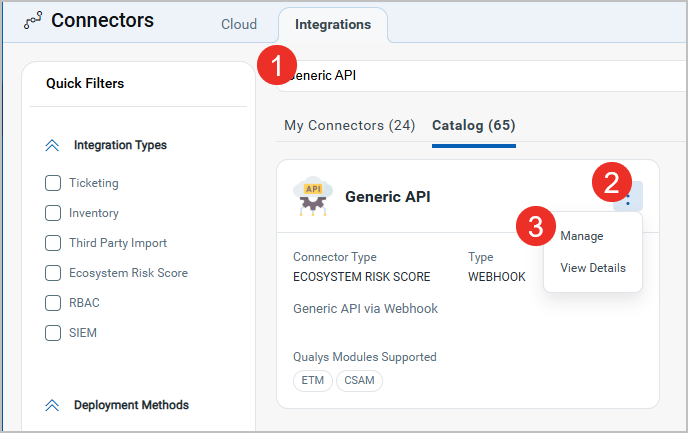
- Click Manage from the three-dot menu to navigate to its page.
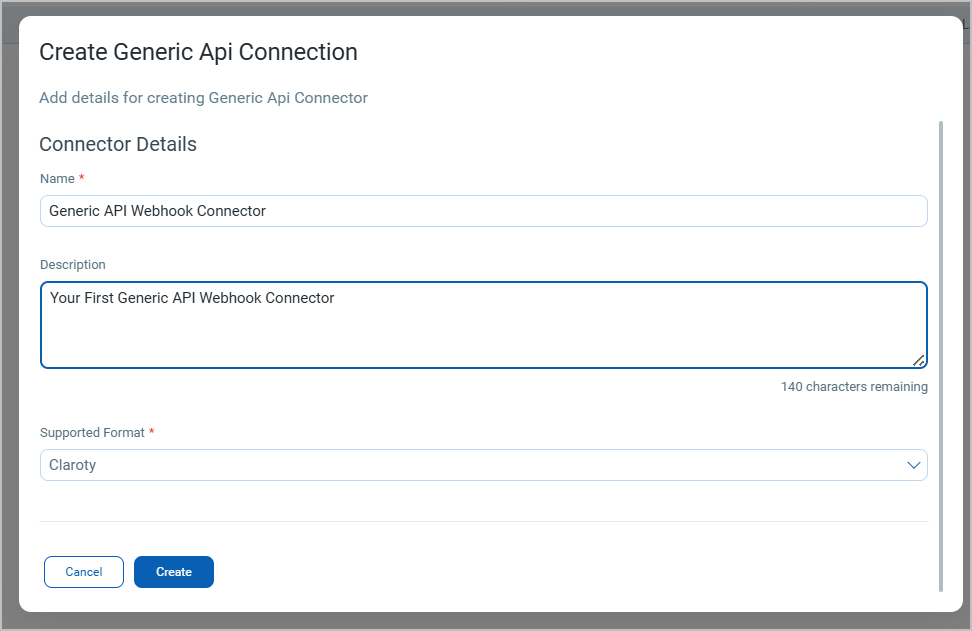
- Create a new connector and select the supported format. You can find the previously registered integration name in the dropdown (refer to Register Vendor Integration Name).
- Complete the connector configuration and save it.
Connector UUID
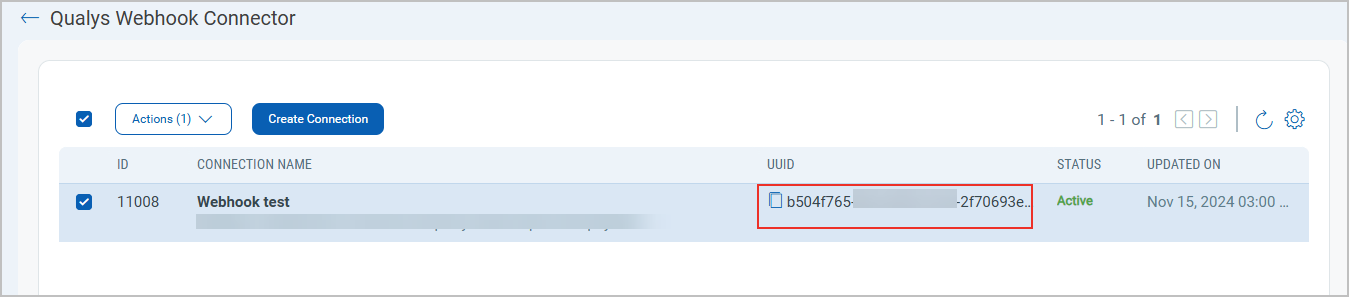
- Once the connector is created, Qualys automatically generates a Connector UUID.
- This UUID uniquely identifies the connector instance.
- You must include this UUID in all subsequent API calls that push asset data.
- Copy and securely store the UUID for future use.
Create the Webhook Connector Payload
You must create a script or wrapper that converts your raw asset data to Qualy data and parses the transformed values into Qualys. You can follow the high-level steps described below to implement the same for your system.
Webhook Connector API Endpoints
The Webhook Connector integration uses the following Qualys API endpoints:
- Authentication Endpoint
Used to obtain a JWT access token. Learn More. - Third Party Asset Import Endpoint
Used to push transformed asset data into Qualys ETM. Learn More.
These endpoints are hosted under the Qualys platform gateway URL. All asset ingestion requests must be authenticated and authorized.
Example,
# ============================================================
# CONFIGURATION
# ============================================================
QUALYS_PLATFORM = "https://gateway.qg1.apps.qualys.com"
AUTH_URL = f"{QUALYS_PLATFORM}/auth"
ASSET_SYNC_URL = f"{QUALYS_PLATFORM}/rest/2.0/am/connector/asset/data/sync"
USERNAME = "value1"
PASSWORD = "passwordValue"
CONNECTOR_UUID = "da4b8361-2327-4bf1-af7d-2ce775bc9882"
JSON_HEADERS = {
    "Content-Type": "application/json"
}
Authentication and Authorization
Supported Authentication Methods
The Webhook Connector supports:
- Basic authentication
- OAuth-based authentication
Both methods return a JWT access token that must be included in API requests.
Authentication Flow
- Submit credentials to the Qualys authentication endpoint.
- Receive an access token in the response.
- Include the token as a Bearer token in the Authorization header for all subsequent requests.
Token Usage
- Tokens are time-bound.
- Expired tokens must be regenerated.
- Tokens should be handled securely and never hard-coded in production systems.
Example,
# AUTHENTICATION
# ============================================================
def get_qualys_token(username: str, password: str) -> str:
    """
    Authenticate with Qualys and return JWT token
    """
    payload = {
        "username": username,
        "password": password,
        "token": "true"
    }
    response = requests.post(
        AUTH_URL,
        data=payload,
        headers={"Content-Type": "application/x-www-form-urlencoded"}
    )
    response.raise_for_status()
    return response.json()["access_token"]
Prepare Source (Raw) Asset Data
The Webhook Connector does not collect data directly. Instead, you must provide raw asset data from your source systems.
Typical Raw Asset Attributes
Raw asset data may include:
- Hostname
- IP address
- Operating system
- Hardware information (for example, memory)
- Installed software
- Vulnerability or finding data (for example, CVEs)
This data reflects how assets are represented in the source platform and must be transformed before ingestion. You can refer to the data accepted in the Third Party Import API to understand what raw data is accepted.
# ============================================================
# SAMPLE RAW DATA (SOURCE SYSTEM)
# ============================================================
RAW_ASSET_SAMPLE = {
    "hostname": "AssetNameTest",
    "ip": "100.63.255.250",
    "os": "Windows 7",
    "memory_mb": 8192,
    "software": [
        {"name": "Python", "version": "3"},
        {"name": "Apache", "version": "2.2.19"}
    ],
    "vulnerabilities": [
        {
            "cve": "CVE-2008-5161",
            "severity": 2,
            "port": 22,
            "protocol": "TCP"
        }
    ]
}
Transform Asset Data for Qualys
Why Data Transformation Is Required
Qualys CSAM expects asset data in a defined schema. Raw data from third-party platforms must be converted into this schema before submission.
Identity Attributes
Identity attributes uniquely identify an asset and help Qualys correlate data:
- Source-native key
- IP address
- Hardware UUID
- NetBIOS name (if applicable)
Core Attributes
Core attributes describe the asset itself:
- Operating system
- Network address
- Hostname
- Hardware details
- Installed software
- Network ports
Findings
Findings represent security issues associated with the asset:
- CVE identifiers
- Severity levels
- Port and protocol
- Finding status and type
Each raw asset must be transformed into a Qualys-compatible structure before it is included in the payload.
# ============================================================
# TRANSFORMATION LAYER
# ============================================================
def transform_to_qualys_asset(raw: Dict[str, Any]) -> Dict[str, Any]:
    """
    Transform raw source asset into Qualys-supported schema
    """
    asset_uuid = str(uuid.uuid4())
    return {
        "identityAttributes": {
            "qualysAssetId": None,
            "sourceNativeKey": asset_uuid,
            "netBiosName": raw["hostname"],
            "ipAddress": [raw["ip"]],
            "hardwareUuid": asset_uuid
        },
        "coreAttributes": {
            "operatingSystem": raw["os"],
            "address": raw["ip"],
            "netBiosName": raw["hostname"],
            "isContainer": False,
            "biosInfo": {
                "totalMemory": raw.get("memory_mb", 0)
            },
            "softwares": [
                {
                    "name": s["name"],
                    "version": s.get("version"),
                    "isSystemApp": False,
                    "isEnterpriseApp": False
                } for s in raw.get("software", [])
            ],
            "ports": [
                {
                    "port": v["port"],
                    "protocol": v["protocol"]
                } for v in raw.get("vulnerabilities", [])
            ]
        },
        "findings": [
            {
                "id": v["cve"],
                "name": v["cve"],
                "category": "VULNERABILITY",
                "severity": v["severity"],
                "port": v["port"],
                "protocol": v["protocol"],
                "findingStatus": "ACTIVE",
                "findingType": {
                    "vulnerability": {
                        "cveId": v["cve"]
                    }
                }
            } for v in raw.get("vulnerabilities", [])
        ]
    }
Build the Connector Payload
After transforming assets, you must package them into a connector payload.
Connector Metadata
The payload metadata includes:
- A unique request ID
- Total number of assets in the request
- Source identifier
- Connector UUID
Asset Data
- Each transformed asset is included in the asset data section.
- Multiple assets can be sent in a single request, subject to rate limits.
# ============================================================
# PAYLOAD BUILDER
# ============================================================
def build_qualys_payload(assets: List[Dict[str, Any]]) -> Dict[str, Any]:
    """
    Build final Qualys connector payload
    """
    return {
        "connectorMetaData": {
            "requestId": str(uuid.uuid4()),
            "assetCount": len(assets),
            "source": "WEBHOOK",
            "connectorUuid": CONNECTOR_UUID
        },
        "assetData": assets
    }
Handling API Rate Limits
Rate Limiting Behavior
Qualys enforces API rate limits to ensure platform stability. If limits are exceeded:
- The API returns HTTP status code 429 (Too Many Requests)
- Response headers indicate how long to wait before retrying
Recommended Handling Strategy
- Detect rate-limit responses
- Pause requests for the duration specified in the response headers
- Resume submission after the wait period
- Implement proactive throttling for large data volumes
Following these practices ensures reliable ingestion and prevents request failures.
# ============================================================
# RATE-LIMIT AWARE POST
# ============================================================
def post_with_rate_limit(
    url: str,
    headers: Dict[str, str],
    payload: Dict[str, Any]
) -> Dict[str, Any]:
    """
    POST request with Qualys rate-limit handling
    """
    while True:
        response = requests.post(url, headers=headers, json=payload)
        # Rate limit exceeded
        if response.status_code == 429:
            wait_time = int(response.headers.get("X-RateLimit-ToWait-Sec", 60))
            print(f"[RATE LIMIT] Waiting {wait_time}s...")
            time.sleep(wait_time)
            continue
        # Proactive throttling
        remaining = response.headers.get("X-RateLimit-Remaining")
        if remaining is not None and int(remaining) == 0:
            wait_time = int(response.headers.get("X-RateLimit-ToWait-Sec", 60))
            print(f"[THROTTLE] No remaining calls. Waiting {wait_time}s...")
            time.sleep(wait_time)
        response.raise_for_status()
        return response.json()
Pushing Asset and Findings Data to Qualys
End-to-End Ingestion Flow
A typical ingestion workflow includes:
- Authenticating with Qualys
- Transforming raw asset data
- Building the connector payload
- Submitting the payload to the asset sync endpoint
- Handling rate limits and errors
Error Handling
Your integration should handle:
- Authentication failures
- Invalid or expired tokens
- Schema validation errors
- Rate-limit responses
- Network or service interruptions
# ============================================================
# PUSH TO QUALYS
# ============================================================
def push_assets_to_qualys(raw_assets: List[Dict[str, Any]]) -> Dict[str, Any]:
    """
    Full ingestion pipeline
    """
    token = get_qualys_token(USERNAME, PASSWORD)
    headers = {
        **JSON_HEADERS,
        "Authorization": f"Bearer {token}"
    }
    transformed_assets = [
        transform_to_qualys_asset(asset)
        for asset in raw_assets
    ]
    payload = build_qualys_payload(transformed_assets)
    response = post_with_rate_limit(
        ASSET_SYNC_URL,
        headers,
        payload
    )
    print("[SUCCESS] Assets pushed to Qualys")
    return respons
Verify Ingested Data
After a successful submission:
- Assets appear in the Qualys Unified Asset Inventory
- Data is associated with the connector that submitted it
- You can review:
- Asset attributes
- Installed software
- Vulnerabilities and findings
If the data does not appear as expected, review logs, payload structure, and API responses.