GitHub Advanced Security - Code Security
The GitHub Advanced Security connector bridges application security findings from code repositories into Qualys Enterprise TruRisk Management, enabling security teams to correlate vulnerabilities discovered through static analysis and dependency scanning with their broader risk management programs.
By automatically ingesting Code Scanning (CodeQL) and Dependabot alerts, the connector consolidates traditionally siloed AppSec data into a unified platform for risk prioritization and remediation tracking. This unified visibility is particularly valuable for organizations managing multiple repositories, as it allows security teams to assess code-level risks in context with other enterprise vulnerabilities rather than managing them in isolated tools.
Connector Details
Here is a comprehensive overview of what the GitHub Advanced Security - Code Security Connector supports.
| Vendor | GitHub |
| Product Name | GitHub Code Security |
| Connector Category | Application Security |
| Supported Assets | Code Repository |
| Findings Support | Supported |
| Supported Version & Type | SaaS (Latest) |
| Integration Method | API Integration (REST) |
| Direction | Unidirectional (GitHub to Qualys) |
| Incremental Sync (Delta) | Not Supported |
| Import of Installed Software | Not Supported |
| Import of Source Tags | Not Supported |
| Filters / Filter Query | Not Supported |
| Connector Version | 1.0.0 |
Connection Settings
User Roles and Permissions
The connector uses a GitHub App for authentication. The GitHub App must be granted permissions to retrieve Code Scanning alerts and Dependabot alerts from selected repositories.
Authentication Details
Provide the following credentials in the connector configuration screen:
| Name | Type | Description |
|---|---|---|
| App ID | Numeric | GitHub App ID |
| PEM File | File | GitHub App private key (.pem) |
Generate GitHub App ID and Private Key
- Create a GitHub App
- Navigate to Organiztion or Profile > Settings > Developer settings > GitHub Apps
- Click New GitHub App
- Provide a unique App name and Homepage URL
- Copy the App ID
- Open the App’s settings page
- Locate and copy the App ID
- Generate the private key
- Scroll to Private keys
- Click Generate a private key
- Download and securely store the
.pemfile
GitHub App Permissions
Setting Up GitHub App Permissions
- Open the GitHub App, navigate to
- Settings > Developer Settings > GitHub Apps > (select your app)
- Navigate to Permissions & events
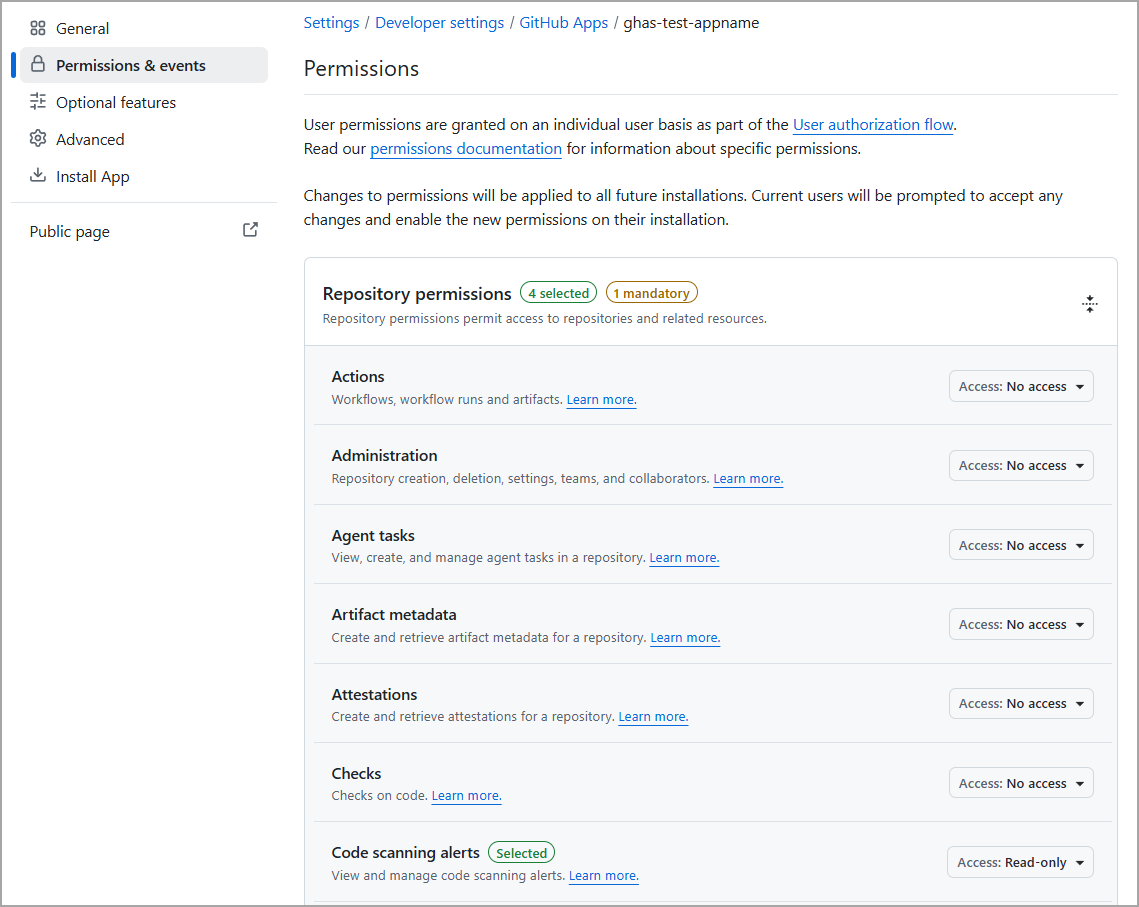
- Enable required permissions for Repository permissions, set the following permissions
- Metadata - Read-only
- Dependabot alerts - Read-only
- Code scanning alerts - Read-only
- Contents - Read-only
- For this integration, repository-level permissions are used to retrieve Repositories, Code Scanning alerts, and Dependabot alerts. The scope of data collected by the connector is determined by the repositories that the GitHub App has access to.
- Save changes
Limiting Repository Scope for a GitHub App
Repository access is the primary way to limit the scope of data imported through the GitHub API. To update the repositories accessible to the GitHub App:
- Click your profile icon in the top-right corner.
- Select Settings.
- Scroll down the left navigation pane and click Developer settings.
- Select GitHub Apps.
- Create a new GitHub App or click Edit for an existing GitHub App.
- Click Install App.
- Locate the GitHub App installation for the desired organization and click Install if the app has not yet been installed. If the app is already installed, click Settings (gear) icon next to the installation.
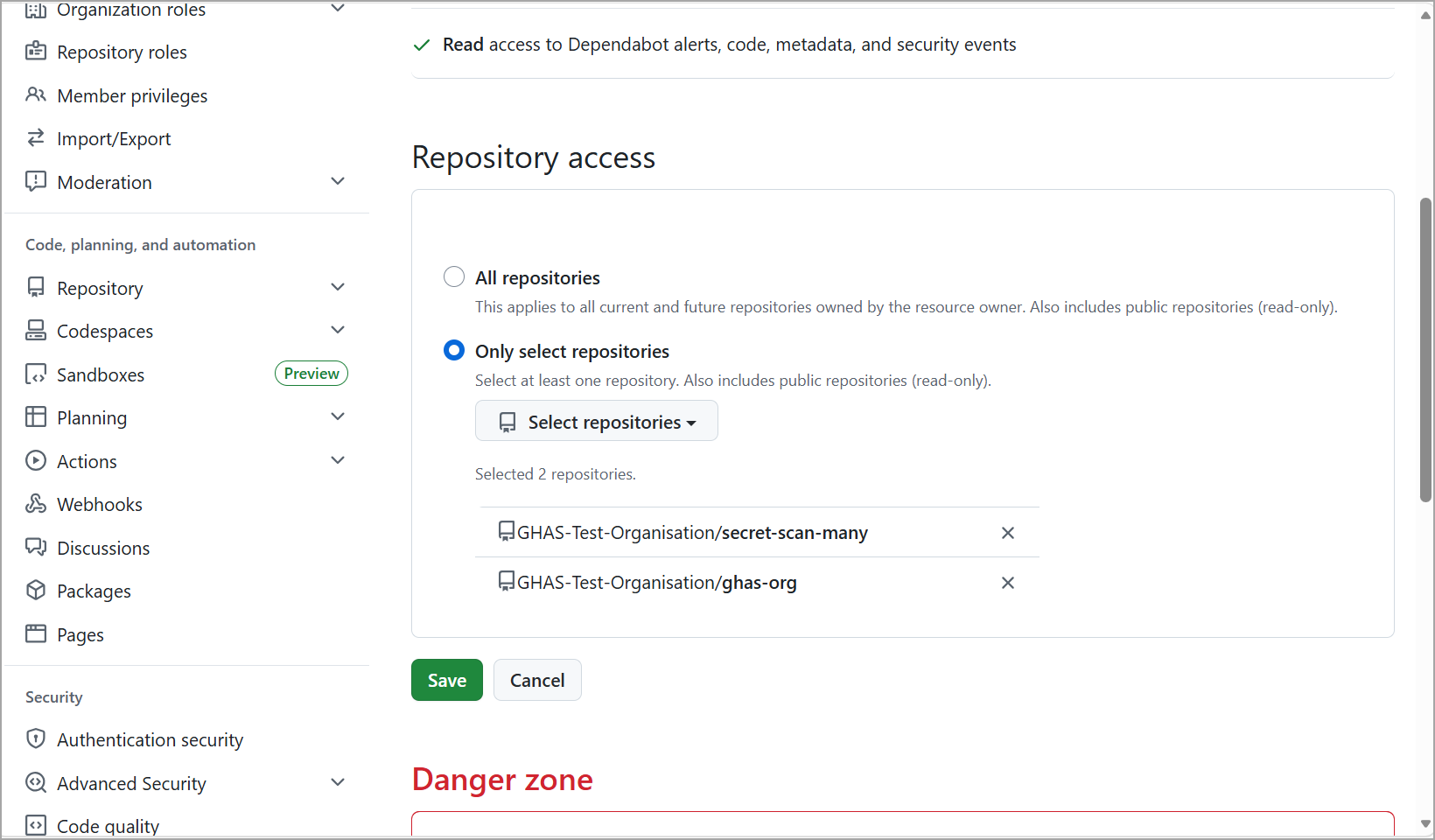
- Under Repository access, select either:
- All repositories, or
- Only select repositories
- If Only select repositories is chosen, click Select repositories and choose the repositories you want the GitHub App to access.
- Click Save or Update installation to apply the changes.
Enabling Security Features on the Repository
Navigate to repository on GitHub and click the Security and quality tab.

Ensure Dependabot alerts and Code scanning alerts are selected.
Connector Configuration
Basic Details
- Log in to Qualys ETM
- Navigate to Connectors > Integration
- Locate GitHub Advanced Security - Code Security and click Manage
- Provide a connector Name and Description
- Enter the App ID and upload the PEM private key
Profiles
Profiles control the execution and scope of the connector.
- Create a new profile
- Select supported Asset Types and Findings
- Configure a Schedule (single or recurring)
- Activate the profile
How Does the Connection Work?
On a scheduled basis or on demand, the connector performs a full data pull from GitHub, retrieving repository metadata, Code Scanning alerts, and Dependabot alerts. The data is imported into ETM for correlation and risk analysis.
Connector States
- Registered – Connector is created
- Scheduled – Execution is scheduled
- Processing – Data is being fetched
- Processed – Assets are imported; findings may still be processing
Viewing Assets and Findings in ETM
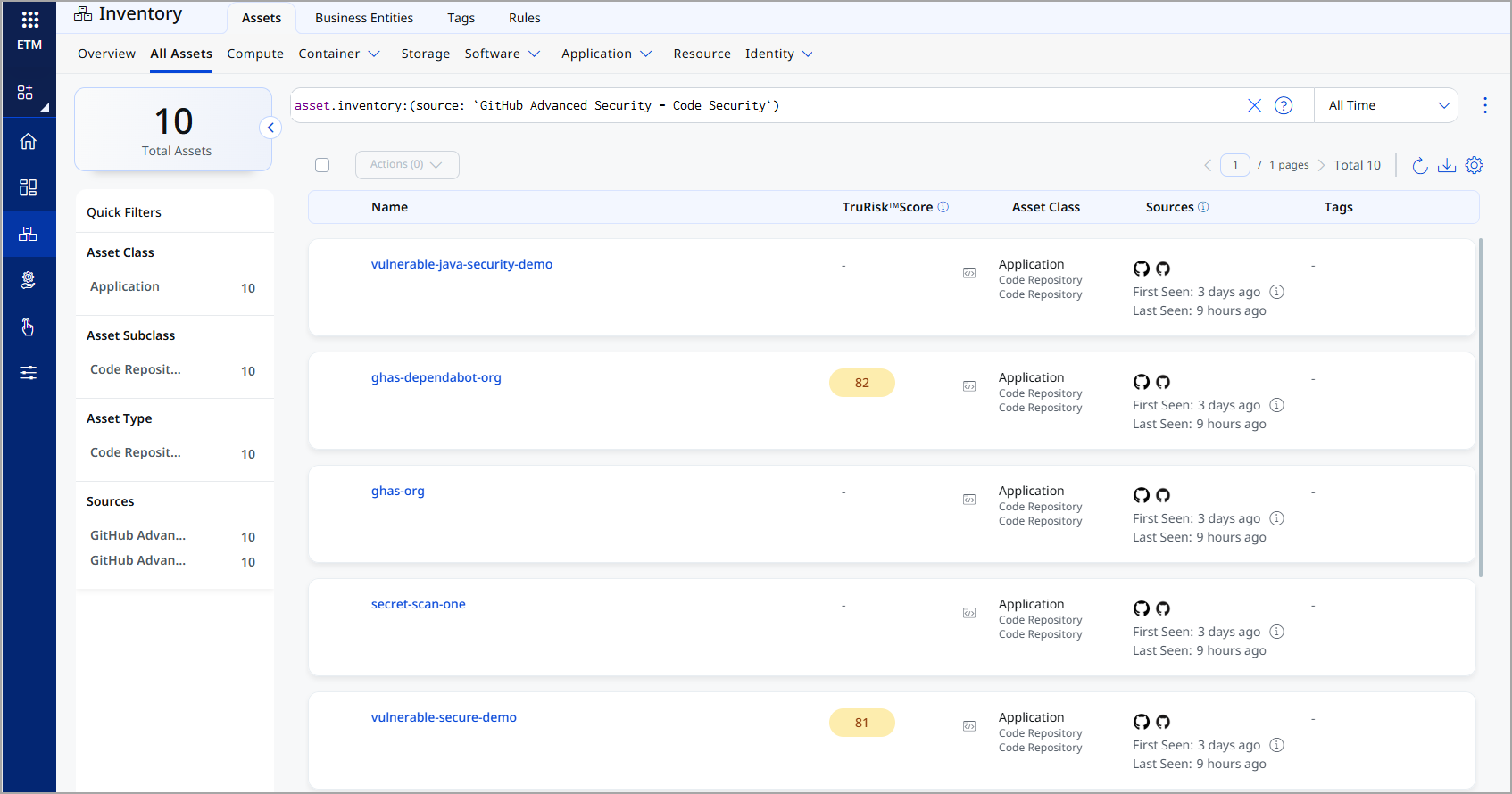
Assets: Enterprise TruRisk Management > Inventory > Assets > All Assets
Filter: asset.inventory:(source:"GitHub Advanced Security - Code Security")
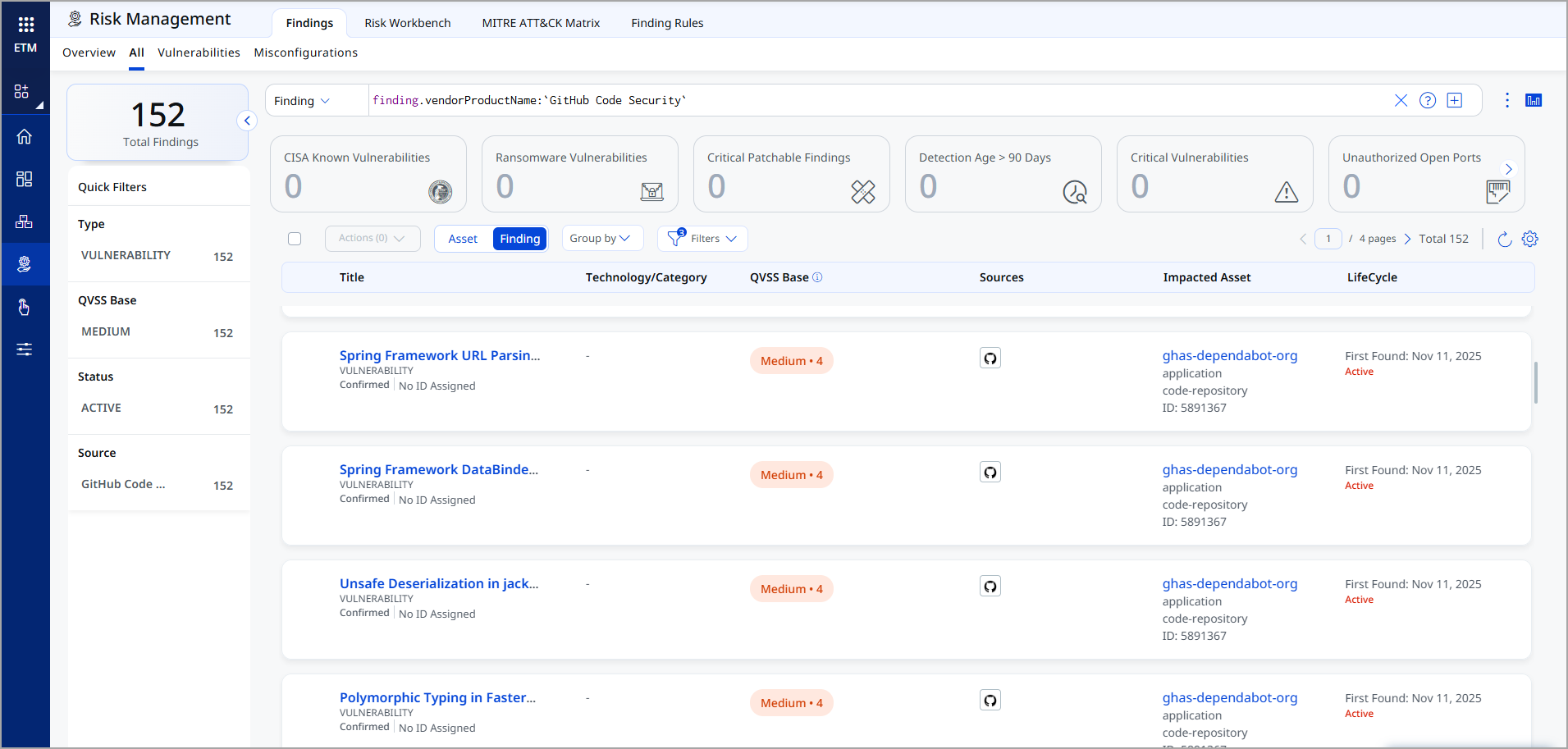
Findings: Enterprise TruRisk Management > Risk Management > Findings > Vulnerability
Filter: finding.vendorProductName:"GitHub Code Security"
Transformation Map
At runtime, the connector fetches the default transformation maps for the Code Repository asset class from the database, one map for the Dependabot (SCA) dataset, and one map for the Code Scanning (SAST) dataset. The connector applies them as part of the connector profile execution, to perform data transformation.
Code Repository – Code Scanning Alerts (SAST) – Transformation Map
| Source Field | Target Field |
|---|---|
|
html_url |
externalAssetId |
|
html_url |
assetDetail.repositoryAssetClass.repoUrl |
|
id |
vendorAssetId |
|
name |
assetDetail.name |
|
visibility |
assetDetail.repositoryAssetClass.visibility |
|
git_url |
assetDetail.typedAttributes.githubSecretGitUrl |
|
ssh_url |
assetDetail.typedAttributes.githubSecretSshUrl |
|
owner.login |
assetDetail.repositoryAssetClass.owner |
|
created_at |
assetDetail.sourceCreatedAt |
|
updated_at |
assetDetail.sourceUpdatedAt |
|
codeScanningAlerts[].number |
findings[].externalFindingId |
|
codeScanningAlerts[].rule.id |
findings[].description |
|
codeScanningAlerts[].rule.description |
solutionRecommendation |
|
codeScanningAlerts[].rule.name |
cweId |
|
codeScanningAlerts[].rule.full_description |
vulnerability.owaspTop10Ids[].name |
|
codeScanningAlerts[].rule.help |
findingURL |
|
codeScanningAlerts[].tool.name |
detectionMethod |
|
codeScanningAlerts[].html_url |
findings[].findingURL |
|
codeScanningAlerts[].resolved_at |
findings[].lastFixedOn |
|
codeScanningAlerts[].created_at |
findings[].firstFoundOn |
|
codeScanningAlerts[].updated_at |
findings[].lastFoundOn |
|
codeScanningAlerts[].repo_html_url |
findings[].findingDetectionURL |
|
codeScanningAlerts[].default_branch |
findings[].findingDetectionURL |
|
codeScanningAlerts[].most_recent_instance.location.path |
findings[].findingDetectionURL |
|
codeScanningAlerts[].most_recent_instance.location.start_line |
findings[].findingDetectionURL |
|
codeScanningAlerts[].most_recent_instance.location.end_line |
findings[].findingDetectionURL |
|
codeScanningAlerts[].state |
findings[].findingStatus |
|
codeScanningAlerts[].rule.security_severity_level |
findings[].severity |
|
codeScanningAlerts[].rule.tags[0] |
findings[].findingType.vulnerability.cweId |
Code Repository – Dependabot Alerts (SCA) – Transformation Map
| Source Field | Target Field |
|---|---|
| html_url | externalAssetId |
| html_url | assetDetail.repositoryAssetClass.repoUrl |
| id | vendorAssetId |
| name | assetDetail.name |
| visibility | assetDetail.repositoryAssetClass.visibility |
| git_url | assetDetail.typedAttributes. githubSecretGitUrl |
| ssh_url | assetDetail.typedAttributes. githubSecretSshUrl |
| owner.login | assetDetail.repositoryAssetClass.owner |
| created_at | assetDetail.sourceCreatedAt |
| updated_at | assetDetail.sourceUpdatedAt |
| dependabotAlerts[].number | findings[].externalFindingId |
| dependabotAlerts[].dependency.package.ecosystem | findings[].product.vendor |
| dependabotAlerts[].security_advisory.description | findings[].description |
| dependabotAlerts[].security_advisory. cvss_severities.cvss_v3.vector_string |
findings[].findingType. vulnerability.cvss.vector |
| dependabotAlerts[].security_advisory. cvss_severities.cvss_v3.score |
findings[].findingType. vulnerability.cvss.cvss3Base |
| dependabotAlerts[].security_advisory. epss.percentage |
findings[].findingType. vulnerability.exploitCodeMaturity |
| dependabotAlerts[].security_vulnerability. first_patched_version.identifier |
findings[].solutionRecommendation |
| dependabotAlerts[].security_vulnerability. vulnerable_version_range |
findings[].product.version |
| dependabotAlerts[].dismissed_by.login | findings[].remediations[].remediationBy |
| dependabotAlerts[].dismissed_reason | findings[].mitigation.mitigationStrategy |
| dependabotAlerts[].security_advisory. references[].url |
findings[].references[] |
| dependabotAlerts[].security_advisory. cwes[0].cwe_id |
findings[].findingType.vulnerability.cweIds |
| dependabotAlerts[].fixed_at | findings[].lastFixedOn |
| dependabotAlerts[].created_at | findings[].firstFoundOn |
| dependabotAlerts[].updated_at | findings[].lastFoundOn |
| dependabotAlerts[].html_url | findings[].findingURL |
| dependabotAlerts[]. security_advisory.summary |
findings[].name |
| dependabotAlerts[].state | findings[].findingStatus |
| dependabotAlerts[]. security_vulnerability.severity |
findings[].severity |