Microsoft Entra ID Connector
The Microsoft Entra ID connector imports cloud identity data from Microsoft Entra ID into Qualys CSAM/ETM. It retrieves Users, Groups, and Roles as identity assets, maintaining synchronization through a combination of full and delta pull cycles. By synchronizing identity assets into ETM/CSAM, security teams gain visibility into who has access to which resources and can correlate identity information with other security asset data. This unified view supports access control risk identification, principle-of-least-privilege enforcement, and faster response to identity-related threats in hybrid and cloud-native environments.
Connector Details
| Vendor | Microsoft |
| Product Name | Microsoft Entra ID |
| Category | IAM |
| Works With | Qualys CSAM / ETM / ETM Identity (ISPM) |
| Connector Type | Cloud |
| Supported Assets | Users, Groups, Roles, Applications, Service Principals, Tenant (Identity) |
| Findings Support | Not Supported |
| Version | 1.0.0 |
| Integration Type | Cloud |
| Authentication Type | OAuth 2.0 (Client Credentials – Microsoft Graph API) |
| Direction | Unidirectional (Microsoft Entra ID → Qualys) |
| Incremental Sync (Delta) | Supported (Users and Groups; Roles always use full pull) |
| Import of Installed Software | Not Supported |
| Import of Source Tags | Not Supported |
| Filters / Filter Query | Asset Type chip selector (Identities Only) |
Configure the Connector
The connector is configured in three steps: Profile & Connectivity, Scope & Schedule, and Review & Confirm.
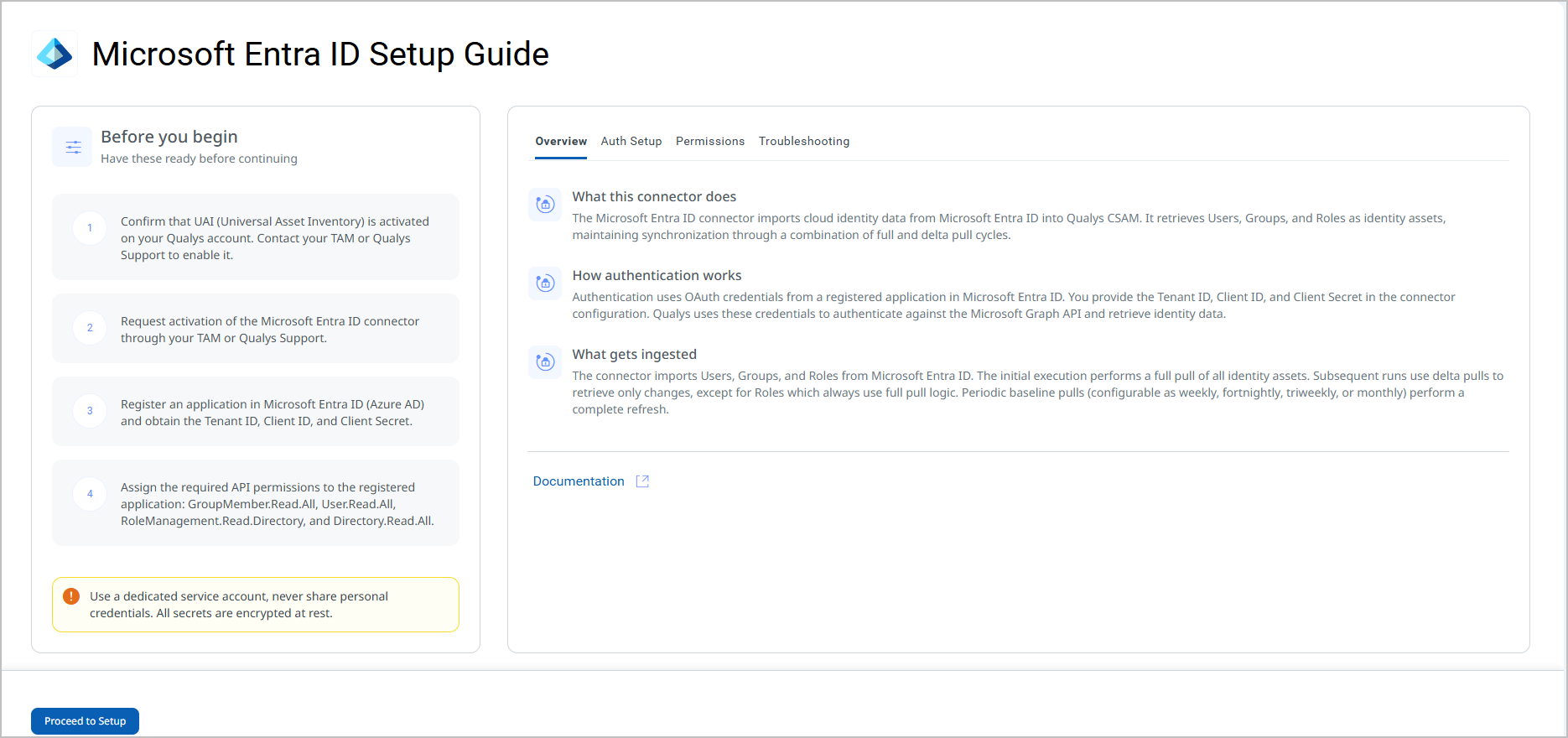
Before You Begin - AuthenticationBefore You Begin - Authentication
Complete the following prerequisites before configuring the connector.
Activating the Connector
- Request activation of the Microsoft Entra ID connector through your TAM or Qualys Support.
- Register an application in Microsoft Entra ID (Azure AD) and obtain the Tenant ID, Client ID, and Client Secret:
- Sign in to the Azure portal (
https://portal.azure.com). - Navigate to Azure Active Directory > App registrations > New registration.
- Provide a name for the application and select the appropriate supported account type.
- Click Register. Note the Application (client) ID and Directory (tenant) ID displayed on the Overview page.
- Navigate to Certificates & secrets > Client secrets > New client secret.
- Add a description and set an expiry period, then click Add.
- Copy the Value of the secret immediately. This value is shown only once.
Important: The Client Secret value is displayed only at the time of creation. Copy it immediately and store it securely. You cannot retrieve it after navigating away from this page.
- Sign in to the Azure portal (
- Assign the required API permissions to the registered application (see Permissions Required below).
Note: If a suitable application registration already exists in your Azure AD tenant, you can use it instead of creating a new one. Ensure it has all required permissions listed below.
Permissions Required
The registered application must be granted the following Microsoft Graph API application permissions. An Azure AD administrator must grant admin consent for these permissions.
Important: Admin consent is required for all permissions listed below. Without admin consent, the connector will fail the Authorization Scope Check during Test Connection.
| Entity | Required Permission(s) |
|---|---|
| Groups | GroupMember.Read.All, Directory.Read.All |
| Users | User.Read.All, User.Read, AuditLog.Read.All |
| Roles | RoleManagement.Read.Directory, Directory.Read.All, RoleEligibilitySchedule.Read.Directory |
| Applications | Directory.Read.All |
| Service Principals | Directory.Read.All |
| Tenant | Directory.Read.All, Policy.Read.All |
Scope and Data Access
The permissions above are application-level permissions (not delegated), meaning the connector authenticates as the registered application rather than as a specific user. The connector queries the following Microsoft Graph API endpoints:
| Entity | API Endpoint(s) |
|---|---|
| Authorization | https://login.microsoftonline.com/{tenant_id}/oauth2/token |
| Users | https://graph.microsoft.com/v1.0/usershttps://graph.microsoft.com/v1.0/users/{{user_id}}/appRoleAssignmentshttps://graph.microsoft.com/v1.0/users/{{user_id}}/memberOf
|
| Groups | https://graph.microsoft.com/v1.0/groupshttps://graph.microsoft.com/v1.0/groups/{{group_id}}/appRoleAssignmentshttps://graph.microsoft.com/v1.0/groups/{{group_id}}/memberof
|
| Roles | https://graph.microsoft.com/v1.0/roleManagement/directory/roleDefinitions |
| Applications | https://graph.microsoft.com/v1.0/applications |
| Service Principals | https://graph.microsoft.com/v1.0/servicePrincipals/https://graph.microsoft.com/v1.0/servicePrincipals/${spId}/appRoleAssignedTohttps://graph.microsoft.com/v1.0/servicePrincipals/${spId}/appRoleAssignments
|
| Tenant | https://graph.microsoft.com/v1.0/organization |
Key Rotation
Client Secrets in Azure AD have a defined expiry period set at creation. When the Client Secret expires, the connector will fail authentication and stop syncing data. To prevent disruption:
- Monitor the expiry date of the Client Secret in Azure AD.
- Generate a new Client Secret before the existing one expires.
- Update the Client Secret field in the connector's Profile & Connectivity settings with the new value.
- Run Test Connection to confirm the new credentials are valid.
Important: Once a Client Secret expires, all connector runs will fail. Update the secret in the connector configuration as soon as a new one is generated.
Create a Profile & ConnectionCreate a Profile & Connection
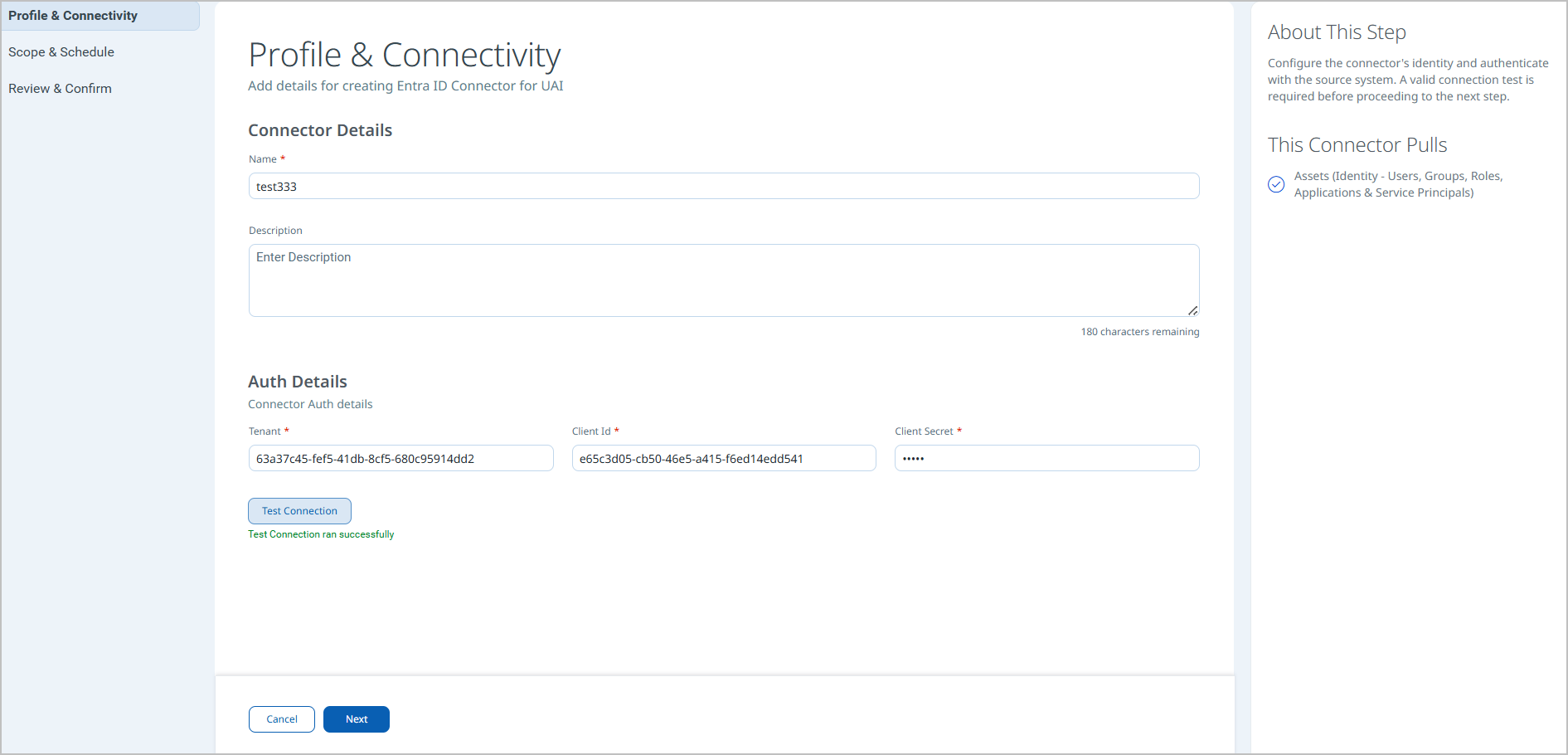
Configure the connector's identity and authenticate with Microsoft Entra ID. A valid Test Connection result is required before proceeding to the next step.
Connector Details
| Name | A unique display name for this connector instance. Example: test333 |
| Description | Optional. A free-text description of the connector (maximum 180 characters). |
Authentication Details
| Field | Type | Description |
|---|---|---|
| Tenant | String | The Directory (tenant) ID of your Azure AD tenant. |
| Client Id | String | The Application (client) ID of the registered Azure AD application. |
| Client Secret | Encrypted String | The client secret value generated for the registered application. Stored encrypted at rest.
Important: The Client Secret is shown only once in Azure AD at the time of creation. Copy and store it securely before saving the application registration. |
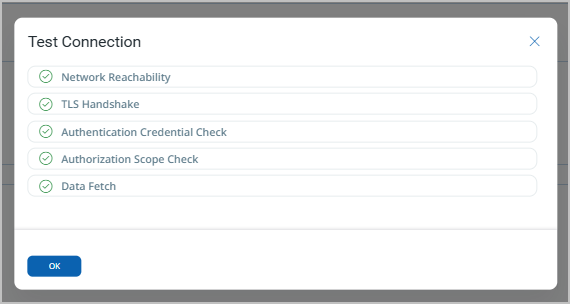
After entering credentials, click Test Connection to validate connectivity. The test performs the following checks:
- Network Reachability — Verifies that the connector endpoint is reachable over HTTPS (port 443).
- TLS Handshake — Confirms that a secure TLS connection can be established with the remote endpoint.
- Authentication Credential Check — Validates the configured credentials against the source system's authentication endpoint.
- Authorization Scope Check — Confirms that the provided credentials have the required permissions to access the configured data scope.
- Data Fetch — Verifies that data can be successfully retrieved from the source system using the configured connection.
All five checks must pass before you can proceed. If the test passes, a confirmation message is displayed beneath the button. Click Next to continue.
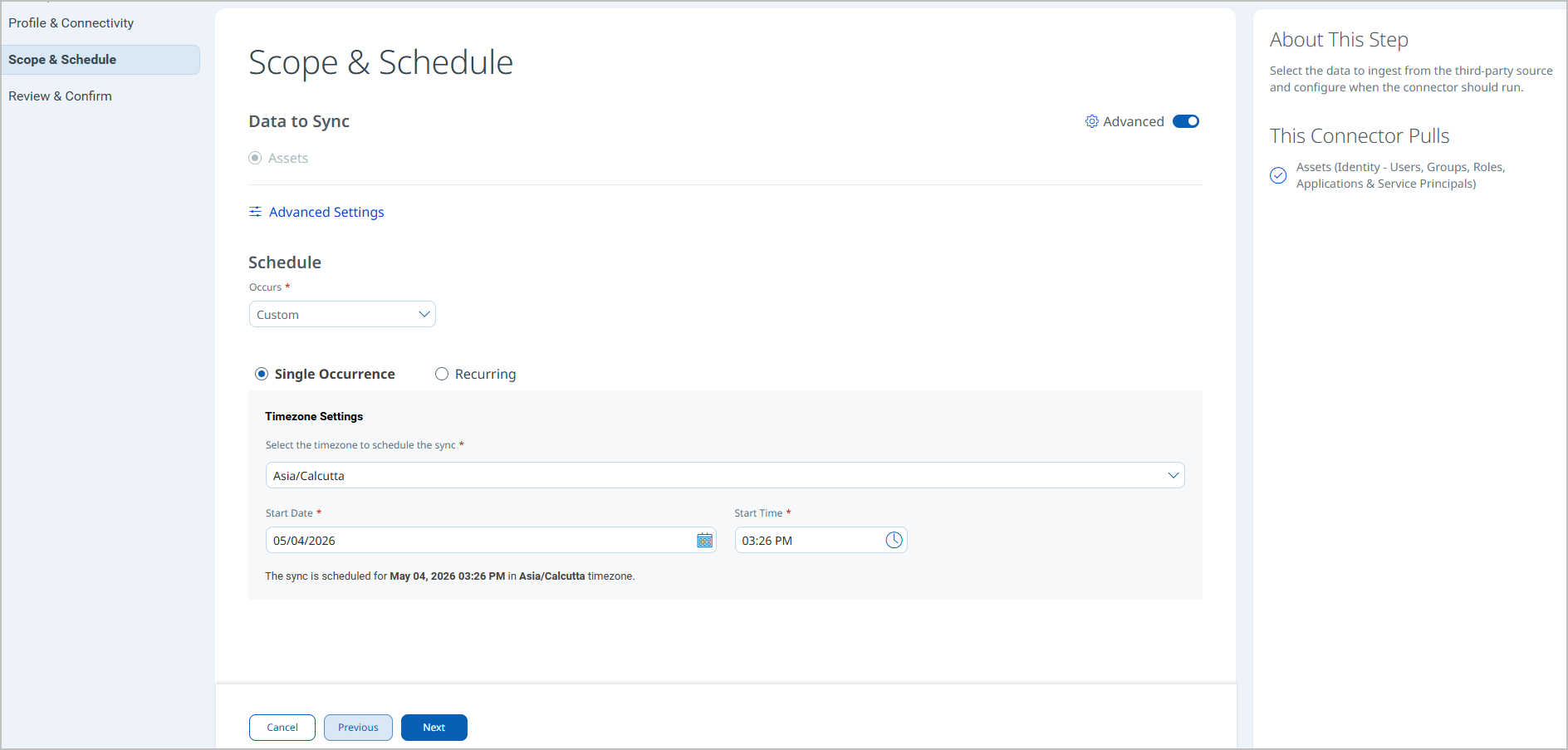
Set the Scope & ScheduleSet the Scope & Schedule
Select the data to ingest and configure when the connector should run.
Data to Sync: Assets is the only available option and is selected by default. Asset type scope (Identities Only vs. Identities with Security Posture) is configured in Advanced Settings accessible from this step.
Schedule – Occurs: Select Custom to define a schedule. The following options are available:
- Single Occurrence – Run the connector once at a specified date and time.
- Recurring – Run the connector on a repeating interval with a defined start and end date/time.
Timezone Settings: Select the timezone for scheduling the sync. The connector confirms the scheduled time in the selected timezone before you proceed.
Note: Schedule times are tied to the timezone selected at configuration. If your team spans multiple timezones, choose a timezone that reflects your operational standard. The schedule confirmation message (for example, The sync is scheduled for May 04, 2026 03:26 PM in Asia/Calcutta timezone) displays the resolved date and time before you click Next.
Baseline Schedule: Configured in Advanced Settings. Defines how frequently a full pull is performed in addition to delta syncs. Options: Weekly, Fortnightly, Triweekly, Monthly.
Click Next to proceed to Review & Confirm.
Review all connector settings before creating the connector. Verify the connector name, authentication type, asset scope, and schedule. Click Create to save and activate the connector.
Note: After clicking Create, the connector is registered and will run at the scheduled time. The initial run performs a full pull and may take up to two hours to complete depending on the size of your Entra ID tenant.
Advanced Settings
Advanced Settings are accessible from the Scope & Schedule step via the Advanced Settings link. These settings control baseline scheduling, asset type scope, and data mapping. Click Save after making any changes.
Note: Remember to save changes in Advanced Settings before navigating away, or your changes will be lost.
Filters Tab
The Filters tab provides chip-selector controls to configure what the connector ingests.
Baseline Schedule – Defines the frequency of full (baseline) pull cycles in addition to delta syncs. Select one of the following values from the drop-down:
- Weekly
- Fortnightly
- Triweekly
- Monthly
Retain Previously Ingested Delta – When checked, previously ingested delta data is retained between sync cycles. This option is unchecked by default.
Asset Types (required) – A chip selector that defines which identity object types are ingested. The default selection is Identities Only, which imports Users, Groups, and Roles.
- Identities Only – Imports Users, Groups, and Roles into CSAM/ETM Inventory.
- Identities with Security Posture – Imports Users, Groups, Roles, Applications, Service Principals, and Tenant objects. Select this option to enable ISPM-related features in ETM Identity.
Require Manual Sync – When checked, the connector does not run on the configured schedule and must be triggered manually. This option is unchecked by default.
Transform Map Tab
The Transform Map tab displays the active transformation maps applied when ingested data is converted into Qualys asset records. The active maps for this connector are listed in the Transformation Maps section below. No configuration is required on this tab.
How the Connection Works
The Microsoft Entra ID connector imports Users, Groups, and Roles from Microsoft Entra ID. The initial execution performs a full pull of all identity assets. Subsequent runs use delta pulls to retrieve only changes, except for Roles which always use full pull logic. Periodic baseline pulls (configurable as weekly, fortnightly, triweekly, or monthly) perform a complete refresh of all identity data.
When the Identities with Security Posture asset type is selected, the connector additionally retrieves Applications, Service Principals, and Tenant objects to support ISPM-related features in ETM Identity.
Delta Pull behavior by object type:
- Users and Groups – Only changed records are retrieved on delta runs.
- Roles – Always retrieved in full on every run (no delta support for Roles).
In addition to delta pulls, baseline (full) pulls run at the frequency configured in the Baseline Schedule setting (Weekly, Fortnightly, Triweekly, or Monthly), until the configured schedule end time is reached. This ensures that large-scale directory changes are periodically reconciled.
Connector States
A successfully configured connector moves through the following states:
- Registered – The connector has been created and registered to fetch data from Microsoft Entra ID.
- Scheduled – The connector is queued and waiting to execute at the configured schedule time.
- Processing – A connection has been initiated and the connector is actively fetching identity data.
- Processed – The connector has successfully fetched asset data. Identity asset import into inventory continues in the background after this state is reached.
- Partially Processed – The connector fetched some data but could not retrieve all records due to missing permissions or errors on specific objects. Check the Logs tab for details.
Note: When the connector first reaches the Processed state, identity assets may still be in the process of being imported into the inventory. Allow up to two hours for the initial full pull to complete and all assets to appear in ETM.
Viewing Assets and Findings in ETM
View in CSAM/ETMView in CSAM/ETM
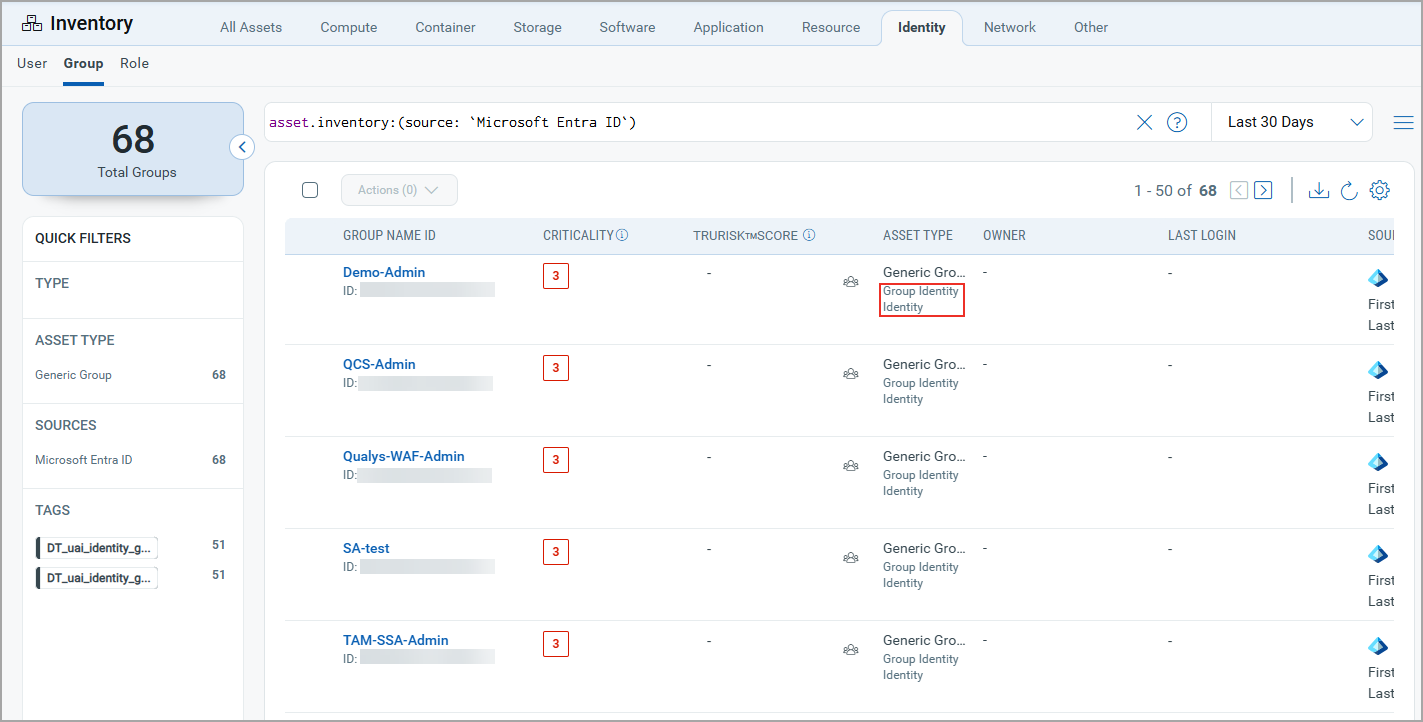
- Navigate to CSAM/ETM > Inventory.
- Go to Identity > Group / User / Role Identity to view imported Entra ID identity assets.
- To filter assets by source, use the inventory search filter:
inventory:(source:"Microsoft")
View in ETM Identity (ISPM)View in ETM Identity (ISPM)
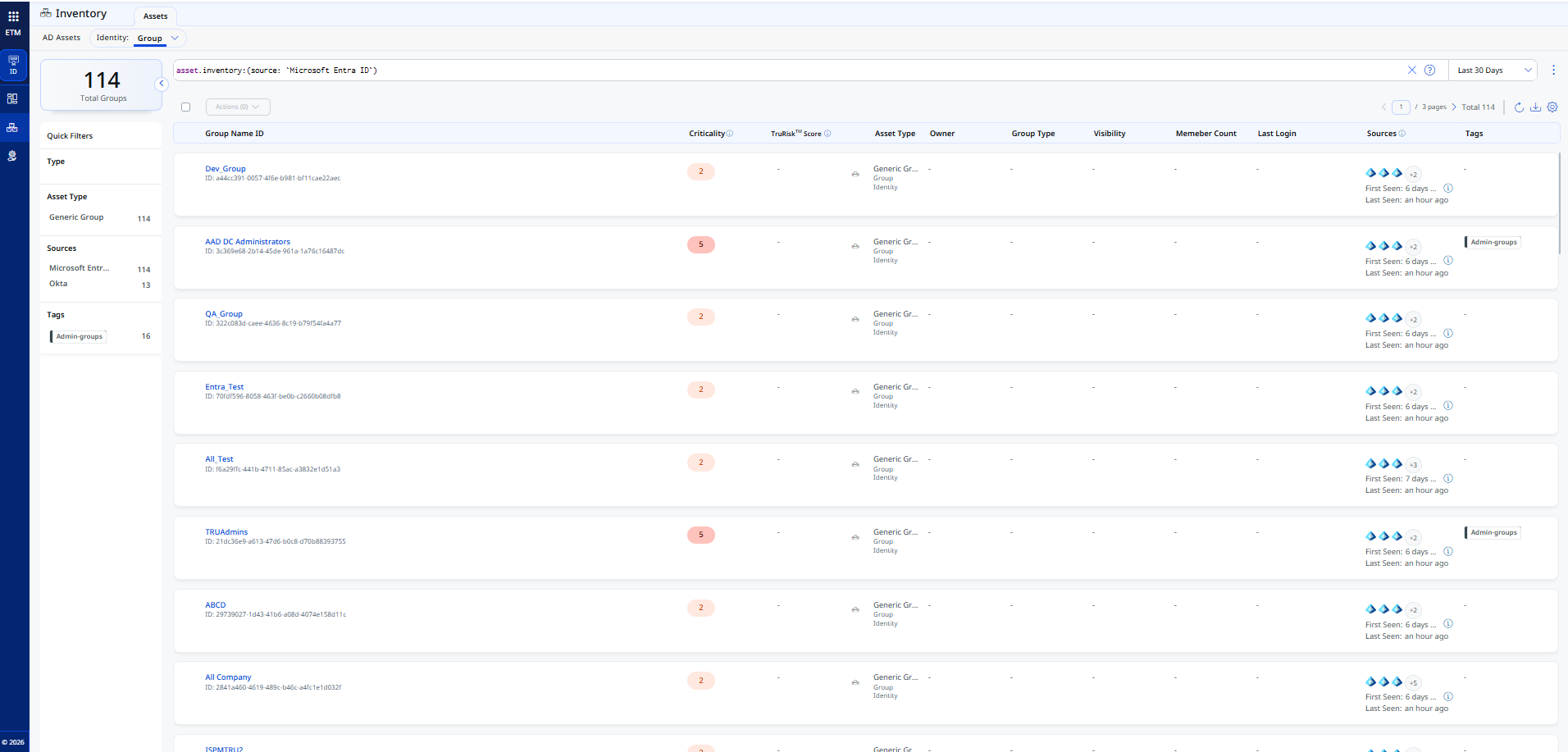
- Navigate to ETM Identity > Inventory.
- Go to Identity > Group / User / Role Identity to view imported identity assets including Applications, Service Principals, and Tenant when Identities with Security Posture is selected.
- To filter assets by source, use the inventory search filter:
inventory:(source:"Microsoft")
Troubleshooting
| Issue | Resolution |
|---|---|
| Test Connection fails – Authentication Credential Check | Verify that the Tenant ID, Client ID, and Client Secret values entered match those of your registered Azure AD application exactly. Ensure the Client Secret has not expired. Generate a new secret if needed and update the connector. |
| Test Connection fails – Authorization Scope Check | Confirm that all required API permissions (GroupMember.Read.All, User.Read.All, RoleManagement.Read.Directory, Directory.Read.All) have been granted and that an Azure AD administrator has provided admin consent. |
| Test Connection fails – Network Reachability | Confirm that outbound HTTPS traffic to login.microsoftonline.com and graph.microsoft.com is not blocked by a firewall or proxy in your environment. |
| Connector is in Partially Processed state | One or more identity object types could not be retrieved. Open the Logs tab for the connector and review the error details. Typically caused by missing or unconsented API permissions for a specific object type (e.g., Applications or Service Principals). |
| Assets not appearing in ETM after connector reaches Processed state | Asset import continues in the background after the connector reaches Processed state. Allow up to two hours for all assets to appear in the inventory, especially after the initial full pull. |
| Roles not reflecting recent changes after a delta sync | This is expected behavior. Roles do not support delta pull logic and are always retrieved in full on every sync run. Changes will appear after the next scheduled connector execution. |
| Client Secret expired – connector failing to authenticate | Generate a new Client Secret in Azure AD under Certificates & secrets. Update the Client Secret field in the connector's Profile & Connectivity settings and run Test Connection to confirm the new credentials are valid. |
Additional Information
API Reference
The connector queries the Microsoft Graph API v1.0. The following endpoints are used:
| Entity | Endpoint |
|---|---|
| Authorization | https://login.microsoftonline.com/{tenant_id}/oauth2/token |
| Users – List | https://graph.microsoft.com/v1.0/users |
| Users – App Role Assignments | https://graph.microsoft.com/v1.0/users/{{user_id}}/appRoleAssignments |
| Users – Member Of | https://graph.microsoft.com/v1.0/users/{{user_id}}/memberOf |
| Groups – List | https://graph.microsoft.com/v1.0/groups |
| Groups – App Role Assignments | https://graph.microsoft.com/v1.0/groups/{{group_id}}/appRoleAssignments |
| Groups – Member Of | https://graph.microsoft.com/v1.0/groups/{{group_id}}/memberof |
| Roles | https://graph.microsoft.com/v1.0/roleManagement/directory/roleDefinitions |
| Applications | https://graph.microsoft.com/v1.0/applications |
| Tenant | https://graph.microsoft.com/v1.0/organization |
| Service Principals – List | https://graph.microsoft.com/v1.0/servicePrincipals/ |
| Service Principals – AppRoleAssignedTo | https://graph.microsoft.com/v1.0/servicePrincipals/${spId}/appRoleAssignedTo |
| Service Principals – AppRoleAssignments | https://graph.microsoft.com/v1.0/servicePrincipals/${spId}/appRoleAssignments |
Transformation Maps
The following transformation maps define how source fields from Microsoft Entra ID are mapped to Qualys asset schema fields. These maps are read-only and applied automatically during data ingestion.
Groups – Transformation MapGroups – Transformation Map
Transformation map used while transforming source Groups data.
| Source Field | Target Field |
|---|---|
id |
asset.assetHeader.externalAssetId (Required) |
id |
asset.assetHeader.vendorAssetId (Required) |
displayName |
asset.assetDetail.name |
id |
asset.assetDetail.groupAssetClass.id |
displayName |
asset.assetDetail.groupAssetClass.name |
displayName |
asset.assetDetail.groupAssetClass.displayName |
visibility |
asset.assetDetail.groupAssetClass.visibility |
description |
asset.assetDetail.groupAssetClass.description |
appRoleAssignments.value[].id |
asset.assetDetail.groupAssetClass.permissions[].id |
appRoleAssignments.value[].principalDisplayName |
asset.assetDetail.groupAssetClass.permissions[].name |
appRoleAssignments.value[].resourceDisplayName |
asset.assetDetail.groupAssetClass.permissions[].resource |
memberOf.value[].id |
asset.assetRelations[].assetHeader.externalAssetId |
memberOf.value[].id |
asset.assetRelations[].assetHeader.vendorAssetId |
memberOf.value[].displayName |
asset.assetRelations[].assetDetail.name |
memberOf.value[].id |
asset.assetRelations[].assetDetail.roleAssetClass.id |
memberOf.value[].description |
asset.assetRelations[].assetDetail.roleAssetClass.description |
memberOf.value[].displayName |
asset.assetRelations[].assetDetail.roleAssetClass.displayName |
memberOf.value[].displayName |
asset.assetRelations[].assetDetail.roleAssetClass.name |
securityIdentifier |
asset.assetDetail.typedAttributes.entraGroupSecurityIdentifier |
securityEnabled |
asset.assetDetail.untypedAttributes.entraGroupSecurityEnabled |
Users – Transformation MapUsers – Transformation Map
Transformation map used while transforming source Users data.
| Source Field | Target Field |
|---|---|
userPrincipalName |
asset.assetHeader.externalAssetId (Required) |
id |
asset.assetHeader.vendorAssetId (Required) |
FUNCTION_PICKER (accountEnabled) |
asset.assetHeader.status
ACTIVE if true INACTIVE if false UNKNOWN if field is not present |
id |
asset.assetDetail.userAssetClass.id |
displayName |
asset.assetDetail.userAssetClass.name |
displayName |
asset.assetDetail.name |
FUNCTION_PICKER (LOOKUP on accountEnabled) |
asset.assetDetail.userAssetClass.status
ACTIVE if true INACTIVE if false UNKNOWN if field is not present |
mail |
asset.assetDetail.userAssetClass.email |
givenName |
asset.assetDetail.userAssetClass.firstName |
surname |
asset.assetDetail.userAssetClass.lastName |
displayName |
asset.assetDetail.userAssetClass.displayName |
mobilePhone |
asset.assetDetail.userAssetClass.phone |
jobTitle |
asset.assetDetail.userAssetClass.jobTitle |
lastPasswordChangeDateTime |
asset.assetDetail.userAssetClass.passwordLastChangedAt |
streetAddress |
asset.assetDetail.userAssetClass.currentAddress.streetAddress |
state |
asset.assetDetail.userAssetClass.currentAddress.state |
city |
asset.assetDetail.userAssetClass.currentAddress.city |
country |
asset.assetDetail.userAssetClass.currentAddress.country |
postalCode |
asset.assetDetail.userAssetClass.currentAddress.isoCode |
appRoleAssignments.value[].id |
asset.assetDetail.userAssetClass.permissions[].id |
appRoleAssignments.value[].principalDisplayName |
asset.assetDetail.userAssetClass.permissions[].name |
appRoleAssignments.value[].resourceDisplayName |
asset.assetDetail.userAssetClass.permissions[].resource |
memberOf.value[].id |
asset.assetRelations[].assetHeader.externalAssetId |
memberOf.value[].id |
asset.assetRelations[].assetHeader.vendorAssetId |
memberOf.value[].uniqueName |
asset.assetRelations[].assetHeader.name |
memberOf.value[].id |
asset.assetRelations[].assetDetail.groupAssetClass.id |
memberOf.value[].uniqueName |
asset.assetRelations[].assetDetail.groupAssetClass.name |
memberOf.value[].displayName |
asset.assetRelations[].assetDetail.groupAssetClass.displayName |
memberOf.value[].visibility |
asset.assetRelations[].assetDetail.groupAssetClass.visibility |
memberOf.value[].description |
asset.assetRelations[].assetDetail.groupAssetClass.description |
accountEnabled |
asset.assetDetail.untypedAttributes.entraUserAccountEnabled |
department |
asset.assetDetail.typedAttributes.entraUserDepartment |
Roles – Transformation MapRoles – Transformation Map
Transformation map used while transforming source Roles data.
| Source Field | Target Field |
|---|---|
id |
asset.assetHeader.externalAssetId (Required) |
id |
asset.assetHeader.vendorAssetId (Required) |
FUNCTION_PICKER (LOOKUP on accountEnabled) |
asset.assetHeader.status
ACTIVE if true UNKNOWN if false or field is not present |
displayName |
asset.assetDetail.name |
id |
asset.assetDetail.roleAssetClass.id |
displayName |
asset.assetDetail.roleAssetClass.name |
displayName |
asset.assetDetail.roleAssetClass.displayName |
description |
asset.assetDetail.roleAssetClass.description |
resourceScopes |
asset.assetDetail.roleAssetClass.resourceScopes |
templateId |
asset.assetDetail.typedAttributes.entraRoleTemplateId |
Additional Transformation Maps for ETM Identity (ISPM)
Tenant – Transformation MapTenant – Transformation Map
Transformation map used while transforming source Tenant data.
| Source Field | Target Field |
|---|---|
* |
thirdPartyObject.content.& |
Applications – Transformation MapApplications – Transformation Map
Transformation map used while transforming source Applications data.
| Source Field | Target Field |
|---|---|
* |
thirdPartyObject.content.& |
Service Principal – Transformation MapService Principal – Transformation Map
Transformation map used while transforming source Service Principal data.
| Source Field | Target Field |
|---|---|
* |
thirdPartyObject.content.& |