Microsoft Active Directory (ISPM)
The Microsoft Active Directory Connector automatically pulls user and group identity data from on-premises Active Directory systems into Qualys ETM's Identity Security Posture Management (ISPM), eliminating manual identity asset tracking and enabling centralized visibility into directory-based identities. For security teams managing hybrid environments, this integration surfaces identity assets alongside other risk data in a unified platform, allowing better visibility into who has access and when credentials were last changed.
By maintaining synchronized identity records through delta support, organizations can continuously monitor their identity infrastructure and correlate access patterns with other security findings. This capability matters because identity remains a critical attack surface, and teams need accurate, up-to-date visibility of users and groups to enforce least privilege and detect unauthorized access.
Connector Details
High-level details for the Microsoft Active Directory connector.
| Vendor | Microsoft |
| Product Name | Active Directory |
| Category | Assets (Code Repo) |
| Findings Support | NA |
| Supported Assets | Groups and Users Identity |
| Version | 1.0.0 |
| Integration Type | On-Prem |
| Direction | Unidirectional (AD to Qualys) |
| Delta Support | Supported |
Connection Settings
User Roles and Permissions
The following permissions are required for the Active Directory service account:
| Entity Type | Permission |
|---|---|
| Users Assets | Read Property (ADS_RIGHT_DS_READ_PROP) |
| Groups Assets | Read Property (ADS_RIGHT_DS_READ_PROP) |
Authentication Details
The connector supports both LDAP and LDAPS authentication.
LDAP
| Name | Key | Type | Description |
|---|---|---|---|
| Host | host | String | IP or hostname for LDAP connection
10.113.198.221 |
| Port | port | Integer | Default: 389 |
| Base DN | bindDn | String | Bind DN used for authentication |
| Password | password | Encrypted | Password for the bind DN |
LDAPS
| Name | Key | Type | Description |
|---|---|---|---|
| Host | host | String | IP or hostname for LDAPS connection
10.113.198.221 |
| Port | port | Integer | Default: 636 |
| Base DN | bindDn | String | Bind DN used for authentication |
| Password | password | Encrypted | Password for the bind DN |
| Certificate | certificate | .cer | Required for LDAPS authentication |
Connector Configuration
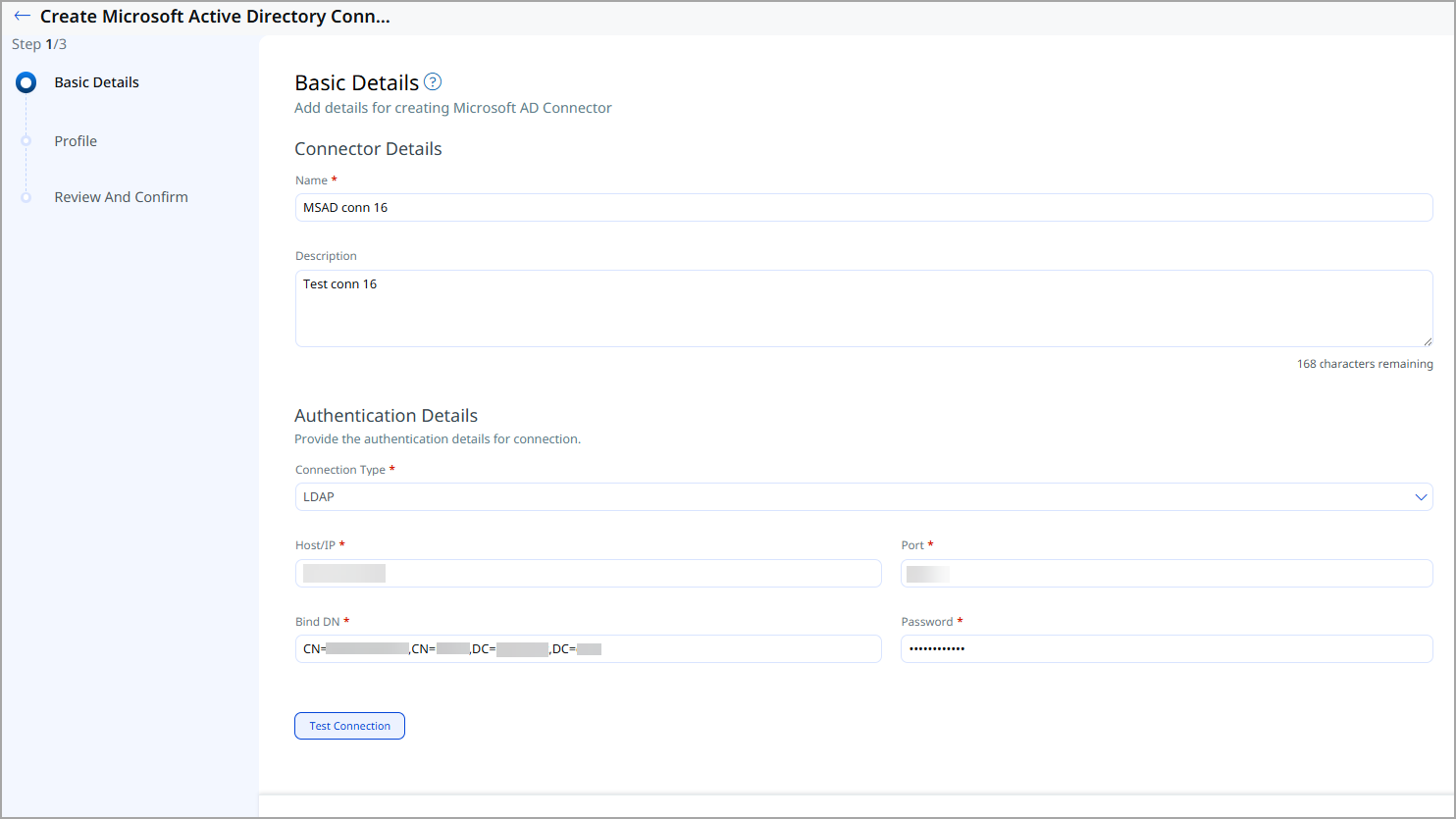
Basic Details
- Navigate to Connectors > Integration.
- Locate Microsoft Active Directory Connector and click Manage.
- Provide the connector name and description.
- Enter authentication details (Host, port, base DN, Password)
Profile
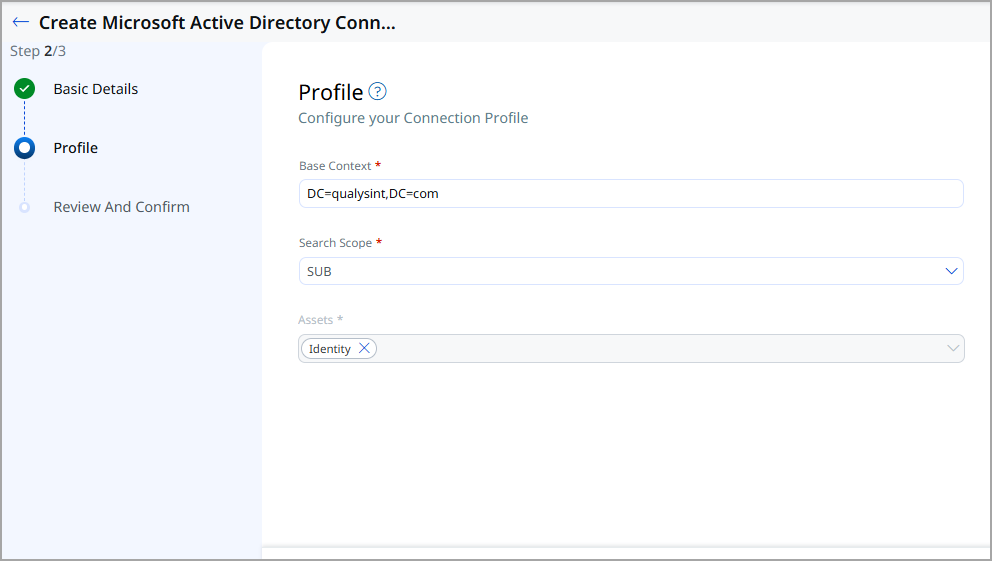
Profiles define the directory search behavior. Provide the following:
- Base Context – Root DN for the directory search
- Search Scope – Scope of LDAP search
- Assets – Identities Only (for identity data only), Identity with security posture (for ISPM objects data).
Review and Confirm
Review the configuration and click Create to register the connector.
Prepare ENV File
| Configuration type | env parameter | Parameter Details |
|---|---|---|
| Connector Configuration | connector.api.url=https://<POD-GATEWAY-URL> | Gateway / POD details |
| qualys.customerUuid=<CUSTOMER_UUID>
qualys.connectionUuid=<CONNECTION_UUID> qualys.profileUuid=<PROFILE_UUID> |
Qualys Account Details | |
| authentication.type=BASIC | Authentication Details
Supported values: BASIC | OAUTH |
|
| qualys.user.username=<QUALYS_USERNAME>
qualys.user.password=<QUALYS_PASSWORD> |
For BASIC authentication | |
| oauth.client.id=<OAUTH_CLIENT_ID>
oauth.client.secret=<OAUTH_CLIENT_SECRET> oauth.token.url=<OAUTH_TOKEN_URL> |
For OAUTH authentication (use only if authentication.type=OAUTH) | |
| Scheduler Configuration | service.cron-expression=*/10 * * * * | Cron expression (example: every 10 minutes) |
| Proxy Configuration (VM based) | proxy.enabled=true
proxy.host=<PROXY_HOST> proxy.port=<PROXY_PORT> |
|
| Thread Pool Configuration | thread-pool.size=10 |
Sample ENV File
You can find the contents of the sample environment file below.
connector.api.url=https://<qualys_gateway_url>qualys.com
qualys.customerUuid=35664649-xxxx-xxxx-xxxx-0e54079e1ee9
qualys.connectionUuid=6ec6ac85-xxxx-xxxx-xxxx-558f378caa2b
qualys.profileUuid=a4ab0242-xxxx-xxxx-xxxx-f62c67a56093
qualys.user.username=xxxxx
qualys.user.password=xxxxx
qualys.OAuthClientLevel=
qualys.clientId=b49fe503-xxxx-xxxx-xxxx-9dd35bfed24f
qualys.clientSecret=BQLcmgxp8y2HXlXeJGCIGkyaBNmBV8rm
service.cron-expression=0 0/10 * * * *
service.http.proxy.enabled=true
service.http.proxy.host=10.xxx.xxx.221
service.http.proxy.scheme=http
service.http.proxy.port=8080
service.child-thread-pool=25
Run the Docker Container
Using the prepared env file and the Docker image for the execution engine, bring up the Docker container on the VM we want to run.
Example
docker run --name pod43-ldap --env-file adconfig43-ldap.env 761fd8a56482Sample Code
docker run --env-file /root/ad_connector1_.env art-hq.intranet.qualys.com:5001/qualys/onprem-execution-engine:3.2.0-5How Does a Connection Work?
The connector’s execution schedule is configured using the cron expression defined in the Docker environment file. Authentication details required for LDAP or LDAPS connection are provided on the Basic Details page, while directory search parameters, such as the Base Context and Search Scope for Active Directory are configured on the Profile page.
Once the scheduled cron job triggers the execution, the connector retrieves the source data, applies the required transformation logic, and sends the processed data to the downstream system.
Connector States
A successfully configured connector goes through 4 states.
- Registered - The connector is successfully created and registered to fetch data from the vendor.
- Scheduled - The connector is scheduled to execute a connection with the vendor.
- Processing - A connection is executed and the connector is fetching the asset and findings data.
- Processed - The connector has successfully fetched the assets; it may still be under process of fetching the findings. Wait for some more time for the connector to fetch the findings completely.
The Processed state indicates that the Connector is successfully configured but it is under the process of importing all your assets. This process may take some time.
Viewing Assets in ETM
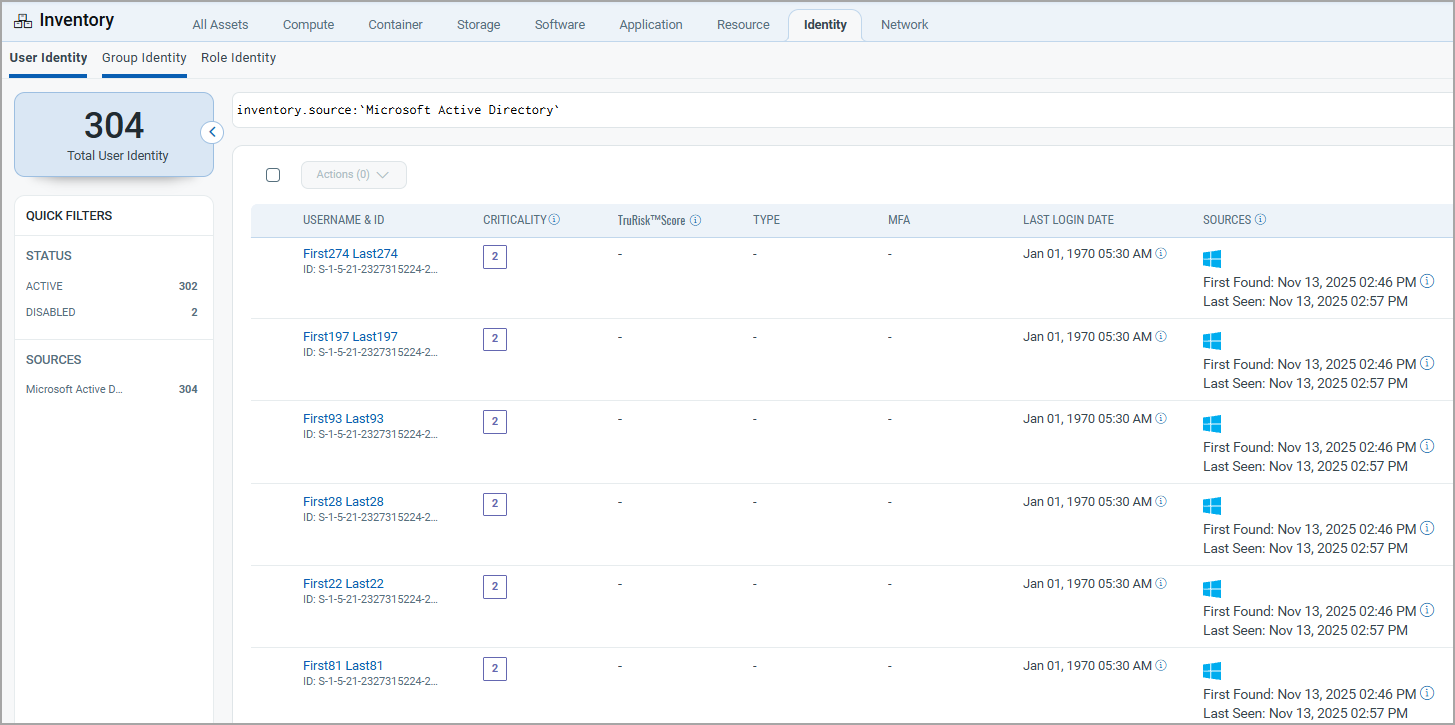
Navigate to Enterprise TruRisk Management > Inventory.
- Users: Inventory > Identity > User
- Groups: Inventory > Identity > Group
- Role: Inventory > Identity > Role
Use the filter: inventory.source: ('Microsoft Active Directory')
Mapping Details
Users – Transformation Map
| Source Field | Target Field |
|---|---|
| objectSid | asset.assetHeader.externalAssetId |
| objectGUID | asset.assetHeader.vendorAssetId |
| objectSid | asset.assetDetail.userAssetClass.id |
| name | asset.assetDetail.userAssetClass.name |
| name | asset.assetDetail.name |
| asset.assetDetail.userAssetClass.email | |
| givenName | asset.assetDetail.userAssetClass.firstName |
| sn | asset.assetDetail.userAssetClass.lastName |
| displayName | asset.assetDetail.userAssetClass.displayName |
| mobile | asset.assetDetail.userAssetClass.phone |
| title | asset.assetDetail.userAssetClass.jobTitle |
| whenCreated | asset.assetDetail.userAssetClass.activationDate |
| lastLogon | asset.assetDetail.userAssetClass.lastSuccessfulLoginAt |
| pwdLastSet | asset.assetDetail.userAssetClass.passwordLastChangedAt |
| accountExpires | asset.assetDetail.userAssetClass.accountExpirationAt |
| badPwdCount | asset.assetDetail.userAssetClass.failedPasswordAttemptCount |
| badPasswordTime | asset.assetDetail.userAssetClass.lastFailedPasswordAttemptAt |
| city | asset.assetDetail.userAssetClass.currentAddress.city |
| Country | asset.assetDetail.userAssetClass.currentAddress.country |
| streetAddress | asset.assetDetail.userAssetClass.currentAddress.streetAddress |
| State | asset.assetDetail.userAssetClass.currentAddress.state |
| FUNCTION_PICKER | asset.assetDetail.userAssetClass.status |
Groups – Transformation Map
| Source Field | Target Field |
|---|---|
| objectSid | asset.assetHeader.externalAssetId |
| objectGUID | asset.assetHeader.vendorAssetId |
| objectSid | asset.assetDetail.groupAssetClass.id |
| name | asset.assetDetail.groupAssetClass.name |
| name | asset.assetDetail.name |
| displayName | asset.assetDetail.groupAssetClass.displayName |
| description | asset.assetDetail.groupAssetClass.description |
| groupType | asset.assetDetail.groupAssetClass.type |
| FUNCTION_PICKER
(based on groupType[1] lookup) |
asset.assetDetail.groupAssetClass.visibility |
Functional Limitations of the AD Connector
The current AD Connector does not support script-based data collection (e.g., PowerShell). The connector is designed for lightweight, secure LDAP-based data synchronization and does not perform advanced analysis requiring script execution. The connector does not support rules related to certificate terms and GPOs.