NowSecure Connector
The NowSecure Connector retrieves mobile application asset records and associated vulnerability findings from the NowSecure Platform API and imports them into Qualys ETM for unified risk analysis and prioritization. Qualys ETM processes the incoming data by de-duplicating redundant entries, normalizing data formats, enriching findings with additional context, and calculating risk scores using TruRisk.
By automatically syncing mobile application security assessments into a centralized platform, security teams gain unified visibility into the risk posture of their mobile app portfolio without manual data aggregation. This integration eliminates data silos between mobile application security testing and vulnerability management, allowing practitioners to correlate assessment findings and prioritize remediation efforts more effectively.
Connector Details
The following table provides a comprehensive overview of what the NowSecure Connector supports.
| Vendor | NowSecure |
| Product Name | NowSecure |
| Category | Mobile Security |
| Works With | Qualys ETM |
| Connector Type | ROC Connector |
| Supported Assets | Mobile Application Records |
| Findings Support | Supported |
| Version | 1.0.0 |
| Supported Version & Type | SaaS (Latest) |
| Integration Type | API Integration (REST) |
| Authentication Type | Bearer Token (API Key) |
| Direction | Unidirectional (NowSecure to Qualys) |
| Incremental Sync (Delta) | Not Supported |
| Import of Installed Software | Not Supported |
| Import of Source Tags | Not Supported |
Configure the Connector
The connector setup wizard guides you through three steps: Profile & Connectivity, Scope & Schedule, and Review & Confirm. A successful connection test is required to proceed to the next step.
Before You Begin - AuthenticationBefore You Begin - Authentication
Before configuring the connector in Qualys ETM, ensure you have the following ready:
- Ensure you have access to the NowSecure Platform with permissions to create API bearer tokens.
- Generate an API Bearer Token from the NowSecure Platform UI. Navigate to the token management section (Admin > API Tokens) and create a new token. Copy and save the token immediately, as it may not be viewable again.
- Confirm network connectivity: Qualys cloud must be able to reach the NowSecure API endpoint (
https://api.nowsecure.com) over HTTPS (port 443).
Generating an API Bearer Token in NowSecure
Follow these steps to create the API Bearer Token that the connector uses to authenticate.
- Log in to the NowSecure Platform at
https://app.nowsecure.comwith your credentials. - Navigate to the API token management section (for example, Admin > Tokens).
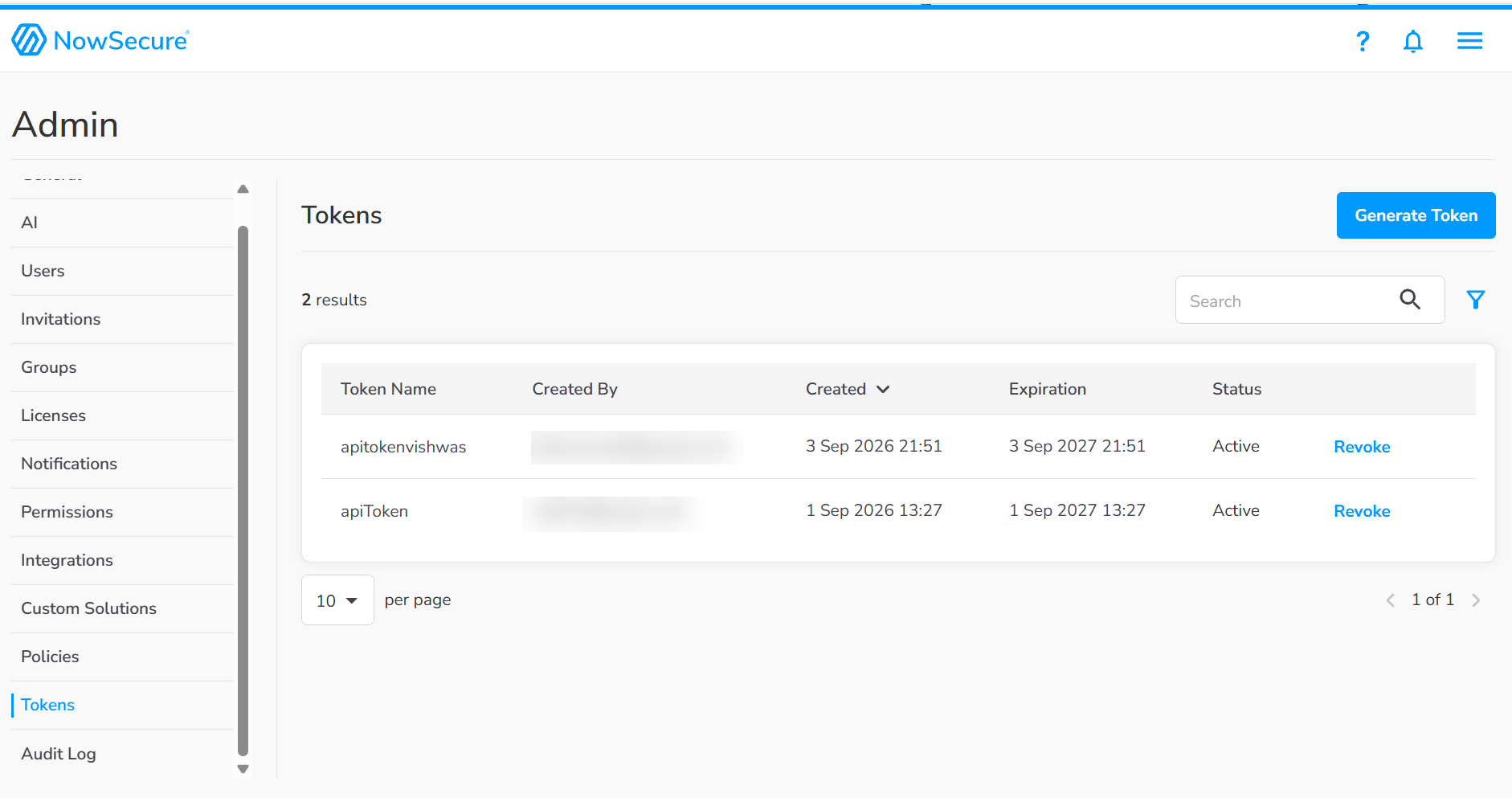
- Click Generate Token. Provide a descriptive name for the token (for example,
Qualys ETM Connector). - Mention the days after you want the token to expire. The default token expiration is 365 days.
- Click Generate Token. The platform displays the API Bearer Token.
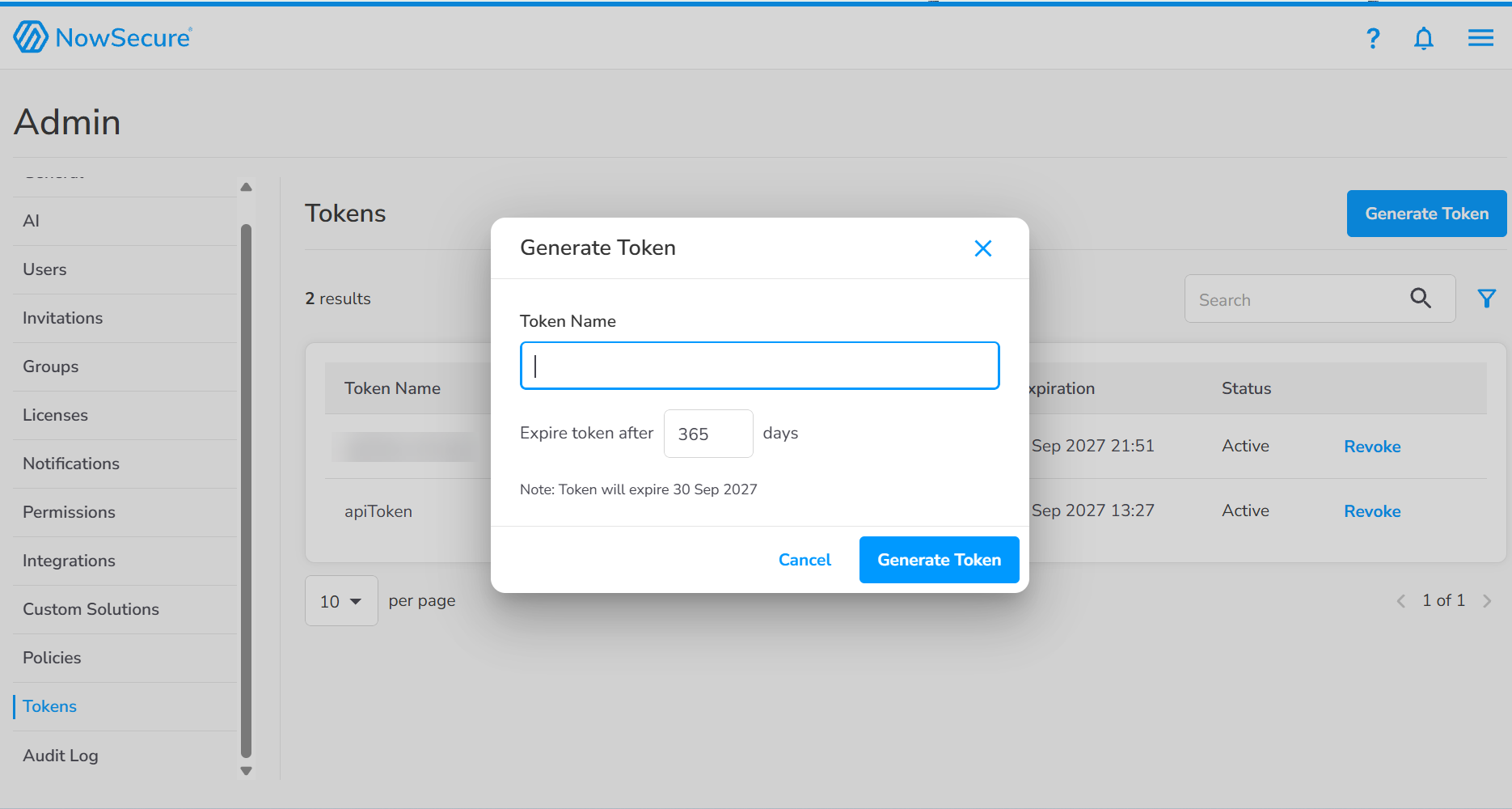
- Copy and save the token immediately. For security reasons, the token value may not be displayed again.
One-Time Visibility: The API Bearer Token may be shown only once after creation. Copy and store it securely (for example, in a secrets manager) before closing the token creation screen. If lost, you must revoke the token and create a new one, then update the Qualys ETM connector configuration.
Scope and Data Access
The connector calls the NowSecure Risk Intelligence List Apps API to retrieve the list of mobile applications and their risk metadata. For each application, the connector identifies the assessmentRef from the List Apps response and calls the Assessment Data API to retrieve detailed vulnerability findings. Assessment Data results are not paginated; all findings for a given assessmentRef are returned in a single response.
Token Management
If the API Bearer Token is lost or compromised, revoke it in the NowSecure Platform and generate a new token. After generating the new token, update the credential in Qualys ETM using the Edit Connector option. Use separate tokens for different environments (development, staging, production) and store tokens in a secure secrets manager.
Create a Profile & ConnectionCreate a Profile & Connection
This step configures the connector identity and authenticates with the NowSecure Platform API.
- Log in to Qualys ETM and navigate to Connectors > Integration.
- Locate the NowSecure Connector on the Connector Marketplace and click Add. This is a one-time task.
If the connector is already added, navigate to My Connectors, search for the NowSecure connector, and click Manage Connections. - Click Manage Connections from the connector tile.
- Click Create Connection. The Setup Guide opens, displaying the Before You Begin checklist alongside four reference tabs: Overview, Auth Setup, Permissions, and Troubleshooting. Review these before proceeding.
- Click Proceed to Setup.
- On the Profile & Connectivity page, complete the following fields:
Connector Details
Field Type Description Name (required) String A unique display name for this connector. Example: NowSecure ConnectorDescription String Optional free-text description of this connection (up to 164 characters). Preserve Findings Missing in Latest Sync - When enabled, findings not returned in the latest sync will remain open and unchanged. Authentication Details
Enter the credentials generated from the NowSecure Platform.
Field Type Description Base URL (required) String The NowSecure Platform API base URL. Fixed value: https://api.nowsecure.comAPI Bearer Token (required) Encrypted String The API Bearer Token generated in the NowSecure Platform. This value is masked after entry and stored securely by Qualys ETM. The connector uses this token as a Bearer token in the
Authorizationheader for all subsequent NowSecure Platform API calls.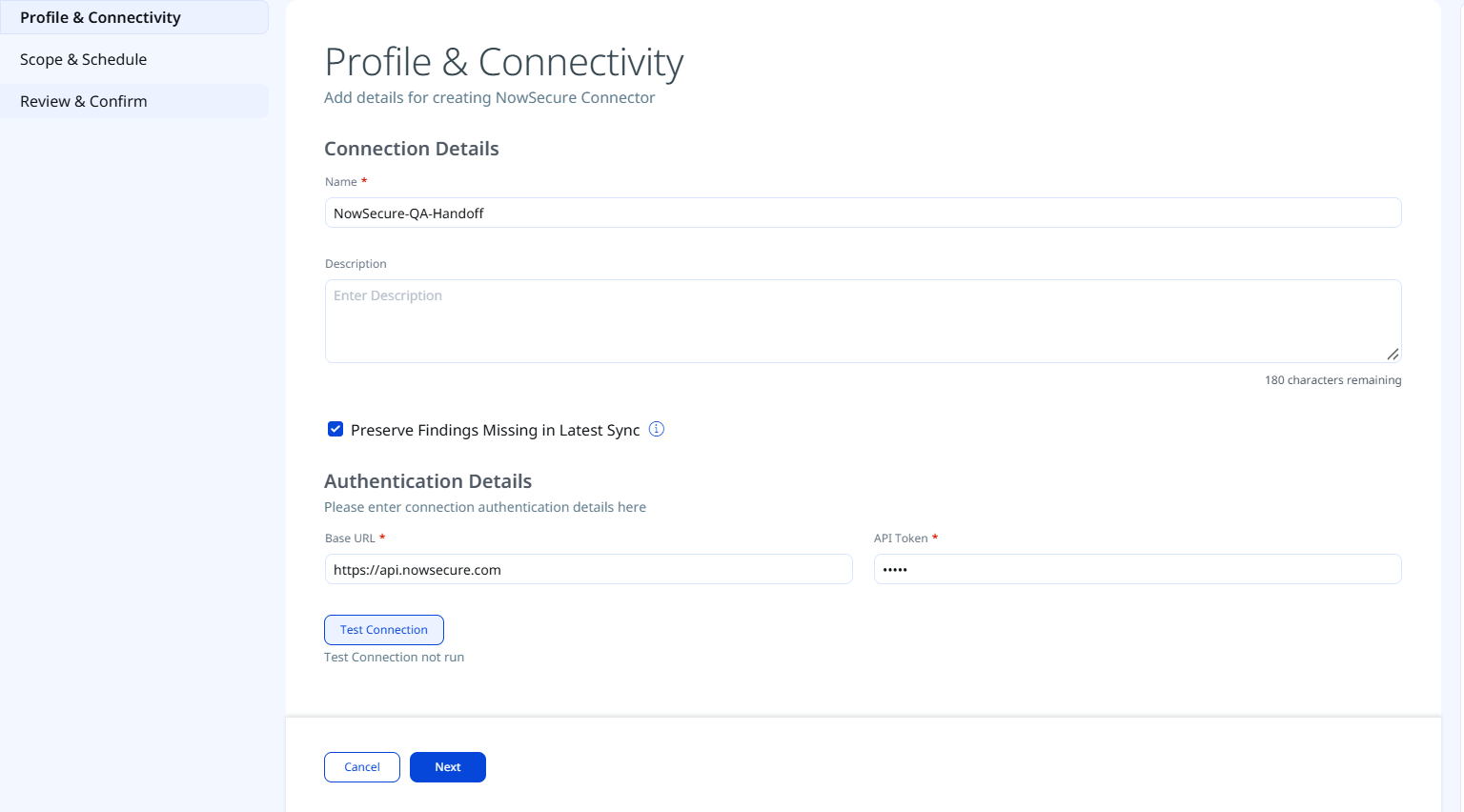
- Click Test Connection. A modal appears showing the status of five sequential checks:
- Network Reachability — Verifies that the connector endpoint is reachable over HTTPS (port 443).
- TLS Handshake — Confirms that a secure TLS connection can be established with the remote endpoint.
- Authentication Credential Check — Validates the API Bearer Token against the NowSecure API authentication endpoint.
- Authorization Scope Check — Confirms that the provided token has the required permissions to access Risk Intelligence Apps and Assessment Data.
- Data Fetch — Verifies that data can be successfully retrieved from the NowSecure Platform API.
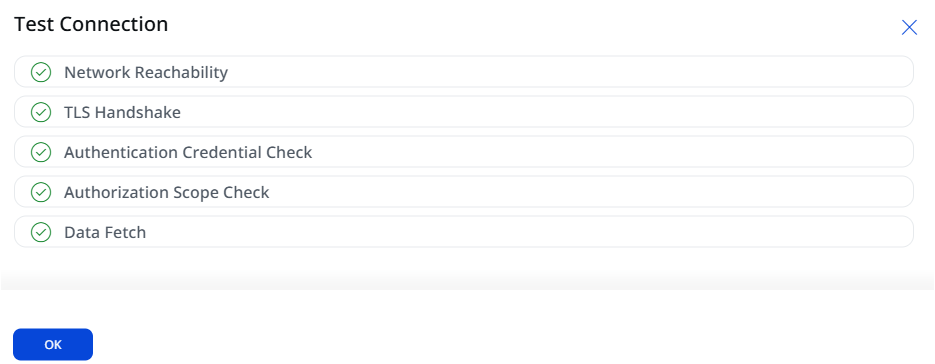
All five checks must pass before you can proceed to Step 2. If any check fails, refer to the Troubleshooting section for resolution steps.
- Click OK and then click Next.
Set the Scope & ScheduleSet the Scope & Schedule
Select the NowSecure data to ingest and configure the connector schedule. This step determines the data that will be ingested and specifies when the connector runs.
- Data to Sync - Select one of the following options:
- Assets & Findings (default) - Syncs both mobile application asset records and associated vulnerability findings (assessment data) from the NowSecure Platform.
- Assets - Syncs mobile application asset records only, without detailed assessment findings.
- Schedule - Set the Occurs field to define how frequently the connector runs. The default is Daily.
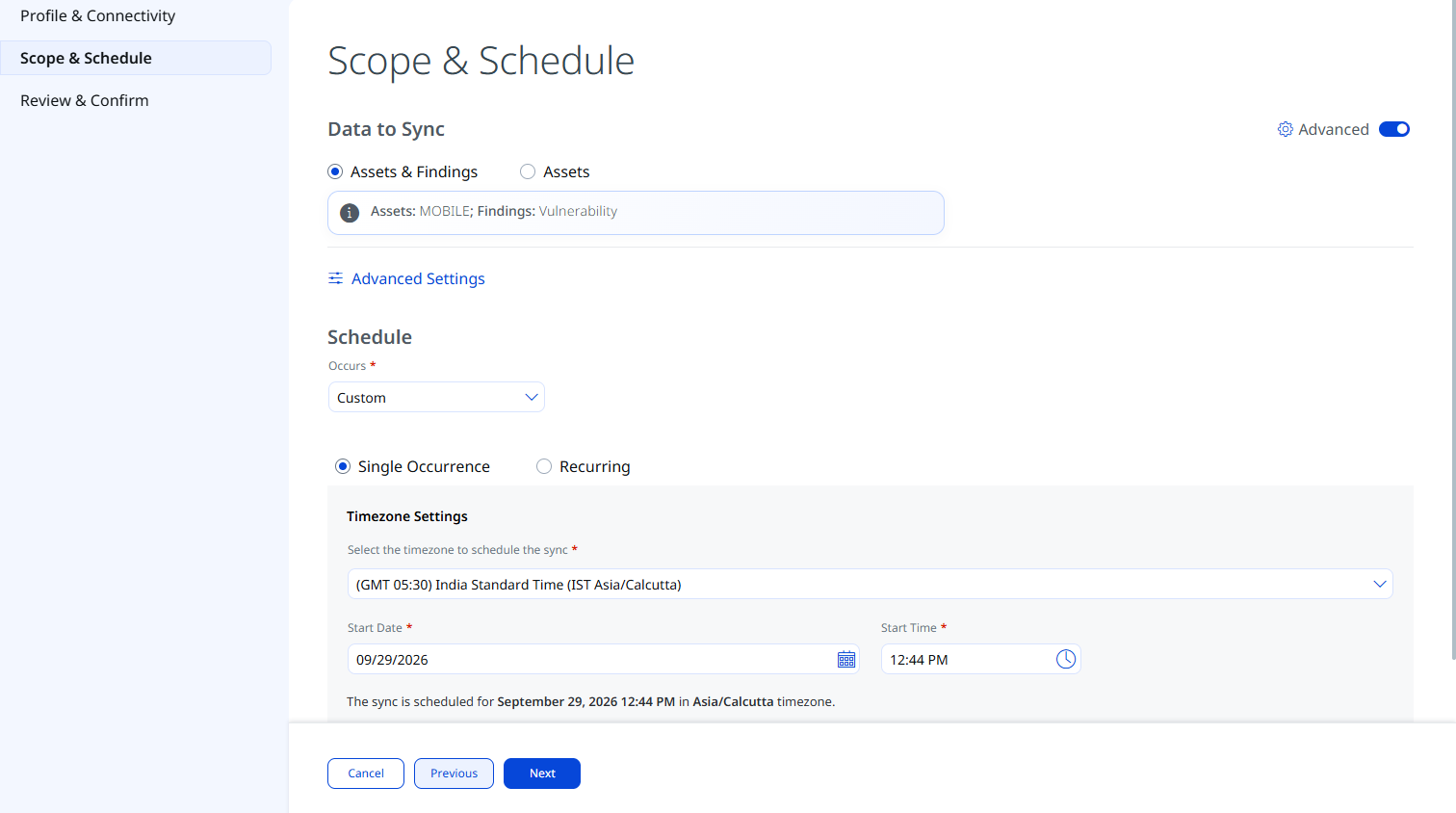
The schedule runs in your configured timezone for 5 years from the start date and time you confirm in this step.
- Advanced Settings (optional) — Select Advanced Settings to optionally configure Filters, Transform Map, and Risk Severity Mapping. For details, see Advanced Settings.
- Click Next.
Advanced Settings
Selecting Advanced Settings on the Scope & Schedule page opens a panel with three tabs: Filters, Transform Map, and Risk Severity Mapping.
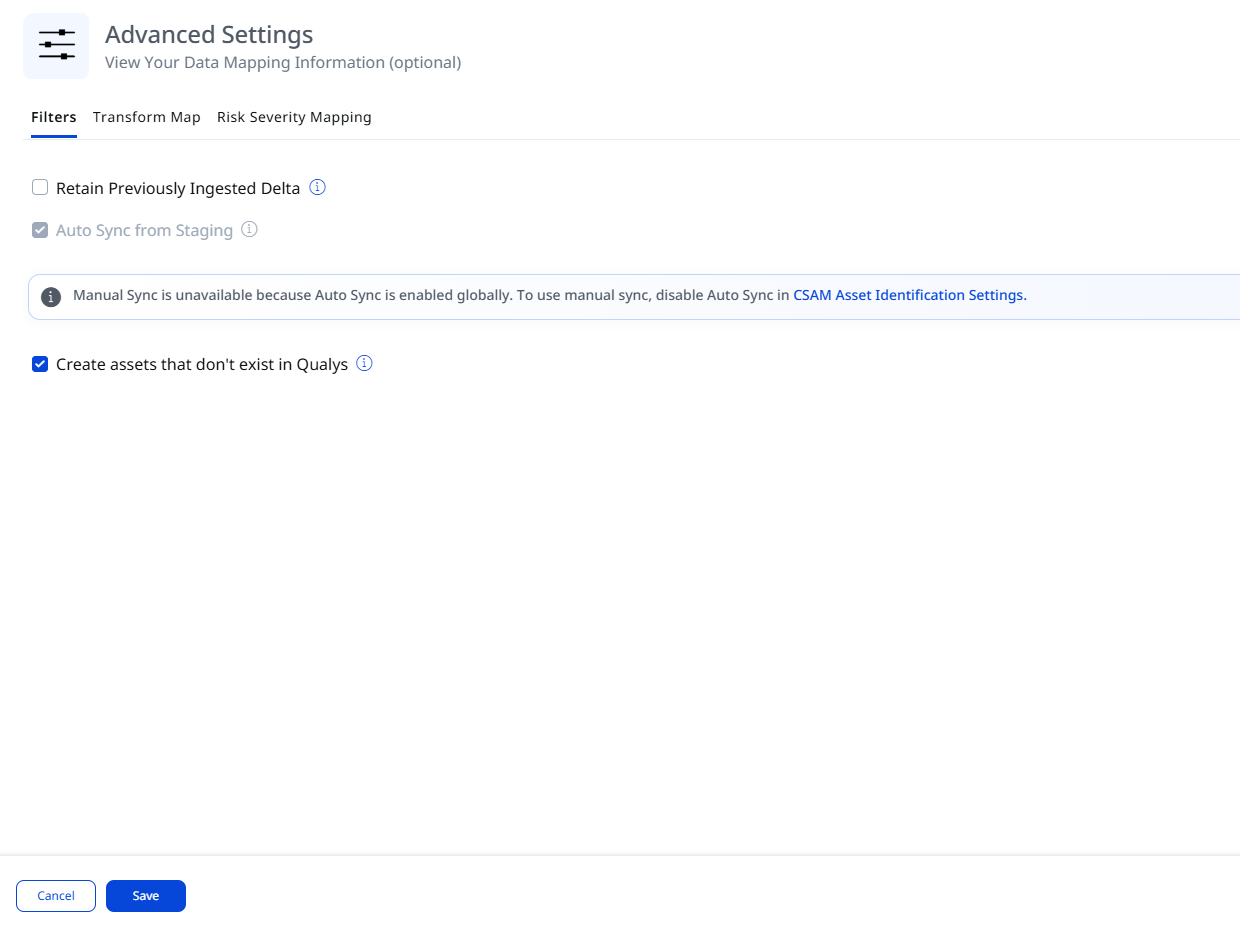
Filters
| Filter | Options | Description |
|---|---|---|
| Retain Previously Ingested Data | - | Available only when editing an existing connection. Select to continue incremental retrieval. If cleared, the next scheduled run performs a full synchronization. |
| Create assets that do not exist in Qualys | - | If enabled, the connector ingests mobile application records that are not already created or do not exist in Qualys. |
Transform Map
The Transform Map tab lists the active transformation maps applied to data ingested by this connector.
Transformation maps define how source fields from the NowSecure Platform are translated into Qualys ETM target fields. For field-level mapping details, see Transformation Maps under Additional Information.
Risk Severity Mapping
The Risk Severity Mapping tab defines how NowSecure severity values are translated into Qualys severity levels and QDS scores for findings that are not scored automatically by the Qualys Cloud Threat Database.
Qualys automatically updates scores for CVE-based vulnerabilities available in the Qualys Cloud Threat Database. The severity mapping below applies only to findings that are not CVE-based or are not present in the Qualys Cloud Threat Database.
| Expected Source Value | Severity | QDS Score (Range 1–100) |
|---|---|---|
| 1 (Low) | 1 | 20 |
| 2 (Medium) | 2 | 40 |
| 3 (High) | 3 | 60 |
| 4 (Critical) | 4 | 80 |
| 5 | 5 | 100 |
The default Severity is 2. This value is applied when the severity value from NowSecure is unavailable for a given finding.
Review and ConfirmReview and Confirm
Review all configured settings before creating the connection, and then click Create. 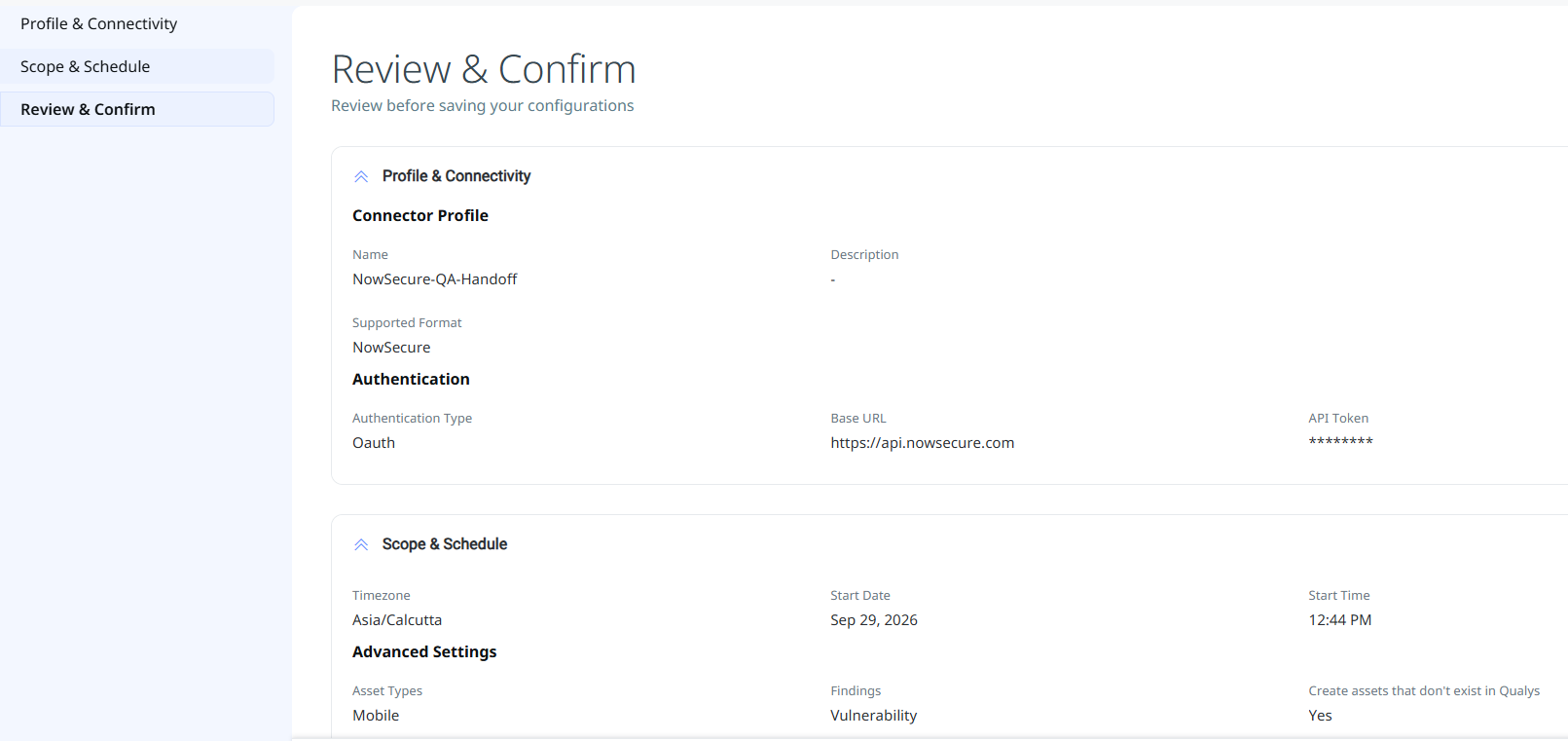
The connection is created and immediately transitions to the Registered state.
How the Connection Works
The NowSecure Connector performs a full synchronization on each run. It pulls two categories of data from the NowSecure Platform API into Qualys ETM using the following two-step flow:
- List Apps (Risk Intelligence) — The connector calls the NowSecure List Apps API (
GET /v2/risk-intelligence/apps) using the configured API Bearer Token. Results are paginated using thepageSizeandpageNumberquery parameters. The connector iterates through all pages until the full application portfolio is retrieved. Each app record includes the app title, platform, application ID, package name, build version, risk score, risk rating, risk category, and per-category risk scores (AI, Authentication, Cryptography, Malware, Privacy, and so on). The connector also extracts theassessmentReffor each app from this response. - Assessment Data (Risk Intelligence) — For each app, the connector uses the
assessmentReffrom Step 1 to call the Assessment Data API (GET /v2/risk-intelligence/assessment/{assessmentRef}). This returns the detailed vulnerability findings for that app's latest assessment, including check ID, title, description, severity, CVSS score, analysis type (static/dynamic), affected status, business impact, categories, and regulatory mappings. This API does not support pagination; all findings for anassessmentRefare returned in a single response.
After transformation, the connector sends the enriched data to the Data Forwarder, which buffers the results until a defined size threshold is reached. Once the buffer is full, the data is pushed to Kafka for ingestion into Qualys ETM.
Connector States
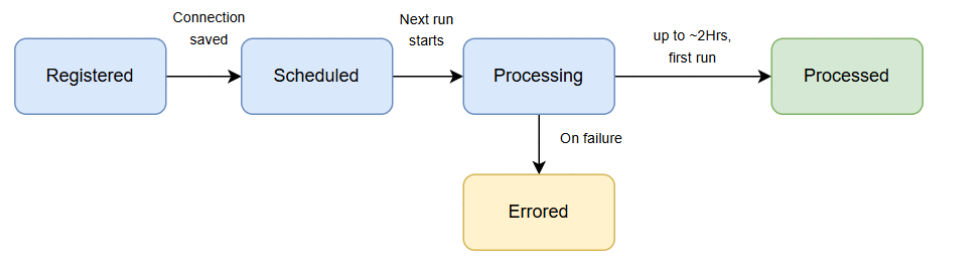
After creating a connection, the connector transitions through the following states:
| State | Description |
|---|---|
| Registered | The connection has been created and is waiting to be picked up for its first scheduled run. |
| Scheduled | The connector is scheduled to execute a connection with the NowSecure Platform. |
| Processing | A connection is executing. The connector is actively fetching app records from the List Apps API and retrieving assessment findings for each app. |
| Processed | The connector has successfully fetched app records. Findings may still be processing. Wait for the connector to complete findings import before expecting all data to appear in ETM. |
| Errored | The connector encountered an error during the last run. Check the connection logs and refer to the Troubleshooting section. |
First-Run Processing Time: The first-run process, including both app record and findings import, may take additional time depending on the size of your mobile app portfolio and the number of assessments. The Processed state indicates that app records have been imported successfully, but findings import may still be in progress. Allow additional time before assuming findings are missing.
Troubleshooting
The following table describes common issues and their resolutions for the NowSecure Connector.
| Issue | Resolution |
|---|---|
| Authentication failure on connector run | Verify the API Bearer Token entered in Qualys ETM is correct and has not expired or been revoked. If the token was regenerated in the NowSecure Platform, update the value in the Qualys ETM connector configuration using the Edit Connector option. |
| Connection test fails | Verify the URL is complete and includes the protocol (https://api.nowsecure.com). Confirm Qualys cloud can reach the NowSecure API endpoint over HTTPS (port 443). Check that the API Bearer Token is still active in the NowSecure Platform. |
| No assets imported after first run | The connector transitions through Registered → Scheduled → Processing → Processed states. Verify the API Bearer Token has Read permissions for Risk Intelligence Apps. Confirm the connector has reached the Processed state in Qualys ETM. |
| Vulnerability findings not appearing | Confirm the API Bearer Token has Read permissions for Assessment Data in the NowSecure Platform. Verify the connector was configured with Assets & Findings selected as the Data to Sync option. Check that the connector has completed processing; app records may appear before findings import finishes. |
| Partial data - some apps missing findings | Ensure each app has a valid assessmentRef available in the List Apps API response. Apps without a completed assessment in NowSecure do not have associated findings. Review the connector logs for individual assessment fetch errors. |
Additional Information
API Reference
The following APIs are executed during each NowSecure connector run. Authentication uses a Bearer Token in the Authorization header for all requests.
|
Name |
Parameters / Filters |
Endpoint |
|---|---|---|
|
List Apps API |
Method: GET
Paginated - iterate until empty response
|
|
|
Assessment Data API |
Method: GET
No pagination - single response per
|
|
Transformation Maps
The following transformation map defines how NowSecure Platform source fields are mapped to Qualys ETM target fields. The NowSecure Risk Intelligence Assessment Map is fetched from the database and utilized during the execution of the connector profile to perform data transformation.
Mobile Application Asset Field MappingMobile Application Asset Field Mapping
You can view the source-to-target field mappings for mobile application assets in the Transform Map tab of the Advanced Settings panel in Qualys ETM.
| Source Attribute Label | Target Attribute Label |
|---|---|
| Package Name | externalAssetId (Required) |
| Application ID | vendorAssetId (Required) |
| Created At | assetCreatedAtDate |
| Updated At | assetLastUpdatedDate |
| Title | Name |
| Package Name | Package Name |
| Build Version | Build Number |
| Platform | Platform |
Assessment Finding Field MappingAssessment Finding Field Mapping
You can view the source-to-target field mappings for assessment findings in the Transform Map tab of the Advanced Settings panel in Qualys ETM.
| Source Attribute Label | Target Attribute Label |
|---|---|
| finding Title | findingName (Required) |
| Check ID | externalFindingId (Required) |
| Severity | findingSeverity (Required) |
| Description | findingDescription |
| Business Impact | Impact |
| assessmentRef | correlationId (Required) |