Okta Connector
The Okta Connector retrieves user identity data, group memberships, and security events from Okta via its REST API and imports them into Qualys Enterprise TruRisk Management (ETM) for unified identity risk analysis. Qualys ETM processes the incoming data by de-duplicating redundant entries, normalizing data formats, enriching identity context, and calculating risk scores using TruRisk. By synchronizing identity assets into the Unified Asset Inventory, security teams gain visibility into who has access to what resources and can correlate identity information with other security asset data. The connector supports incremental (delta) pulls for efficient updates after the initial full synchronization.
Connector Details
The following table summarizes the capabilities and configuration characteristics of the Okta Connector.
|
Vendor |
Okta |
|
Product Name |
Okta |
|
Category |
Identity & Access Management |
|
Works With |
Qualys Enterprise TruRisk Management (ETM) |
|
Connector Type |
Third-Party Integration |
|
Supported Assets |
Identity (Users, Groups, Roles & Applications) |
|
Findings Support |
No |
|
Version |
v1.0.0 |
|
Supported Version & Type |
Okta REST API v1 |
|
Integration Type |
API Integration (REST) |
|
Authentication Type |
API Token (SSWS) |
|
Direction |
Unidirectional (Okta → Qualys) |
|
Incremental Sync (Delta) |
Supported |
|
Import of Installed Software |
Not Supported |
|
Import of Source Tags |
Not Supported |
|
Filters / Filter Query |
Asset Type chip selector (Identities Only; Identities with Security Posture) |
Configure the Connector
The connector is configured in three steps: Profile & Connectivity, Scope & Schedule, and Review & Confirm. A valid Test Connection is required before you can proceed from Step 1.
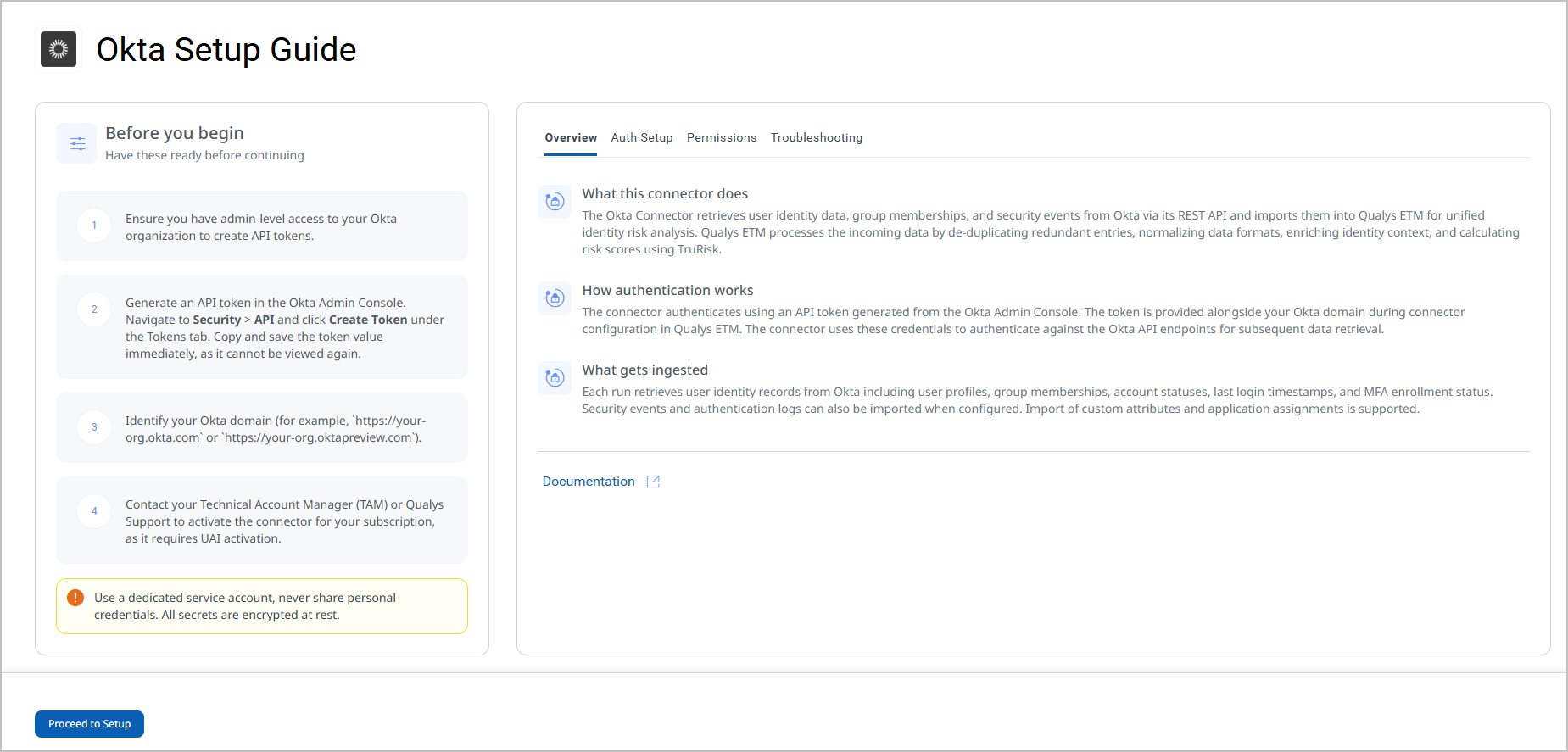
Before You Begin - AuthenticationBefore You Begin - Authentication
Complete the following prerequisites before configuring the connector in Qualys ETM
Note: Use a dedicated service account to generate the API token. Never share personal credentials. All secrets are encrypted at rest.
Generate an Okta API Token
- Ensure you have admin-level access to your Okta organization to create API tokens.
- Log in to the Okta Admin Console.
- Navigate to Security > API and click the Tokens tab.
- Click Create Token and provide a descriptive name for the token.
- Copy and save the token value immediately – it cannot be viewed again after the dialog is closed.
- Identify your Okta domain (for example,
https://your-org.okta.comorhttps://your-org.oktapreview.com). This is the API URL you will enter in the connector configuration.
Important: The API token value is displayed only once at creation time. Store it in a secure credential vault immediately. If lost, you must revoke the token and generate a new one.
Permissions Required
The admin account used to generate the API token must have the following permissions assigned via a custom role in Okta. To configure roles, go to Security > Admin > Roles in the Okta Admin Console, then assign the role to the API token owner.
Note: OAuth-based authentication is not supported for this connector. Only SSWS API tokens are accepted.
|
Entity |
Required Permission |
Description |
|---|---|---|
|
Users |
|
Read user profiles and credentials (all users or scoped to groups). |
|
Groups |
|
Read groups and group members (all or specific groups). |
|
Policies |
|
View policies. Requires Okta release 2025.05.0 or later. |
|
Applications |
|
Read applications and their members (all, type-specific, or a single app). |
|
Custom Roles |
|
View roles, resources, and role assignments. |
Scope and Data Access
The connector queries the following Okta REST API endpoints to retrieve identity asset data:
|
API Function |
Endpoint |
|---|---|
|
List Users |
|
|
List Groups |
|
|
List Custom Roles |
|
|
List Applications |
|
|
List Policies |
|
Key Rotation
Okta API tokens do not expire automatically but should be rotated periodically as part of your organization's credential hygiene policy. To rotate the token:
- Generate a new token in the Okta Admin Console under Security > API > Tokens.
- Copy the new token value immediately.
- In Qualys ETM, edit the connector and update the API Token field with the new value.
- Revoke the old token in the Okta Admin Console.
- Run a Test Connection to confirm the updated credentials are valid.
Create a Profile & ConnectionCreate a Profile & Connection
Configure the connector identity and authenticate with the Okta source system.
- Log in to Qualys ETM.
- Go to Connectors > Integrations and locate the Okta connector tile.
- Click Configure (or Manage from the ellipsis menu for an existing connector) to open the setup wizard.
- On the Okta Setup Guide screen, review the prerequisites and then click Proceed to Setup.
- Complete the Connector Details and Authentication Details fields as described in the tables below.
- Click Test Connection to validate credentials before proceeding.
- Click Next to advance to Step 2.
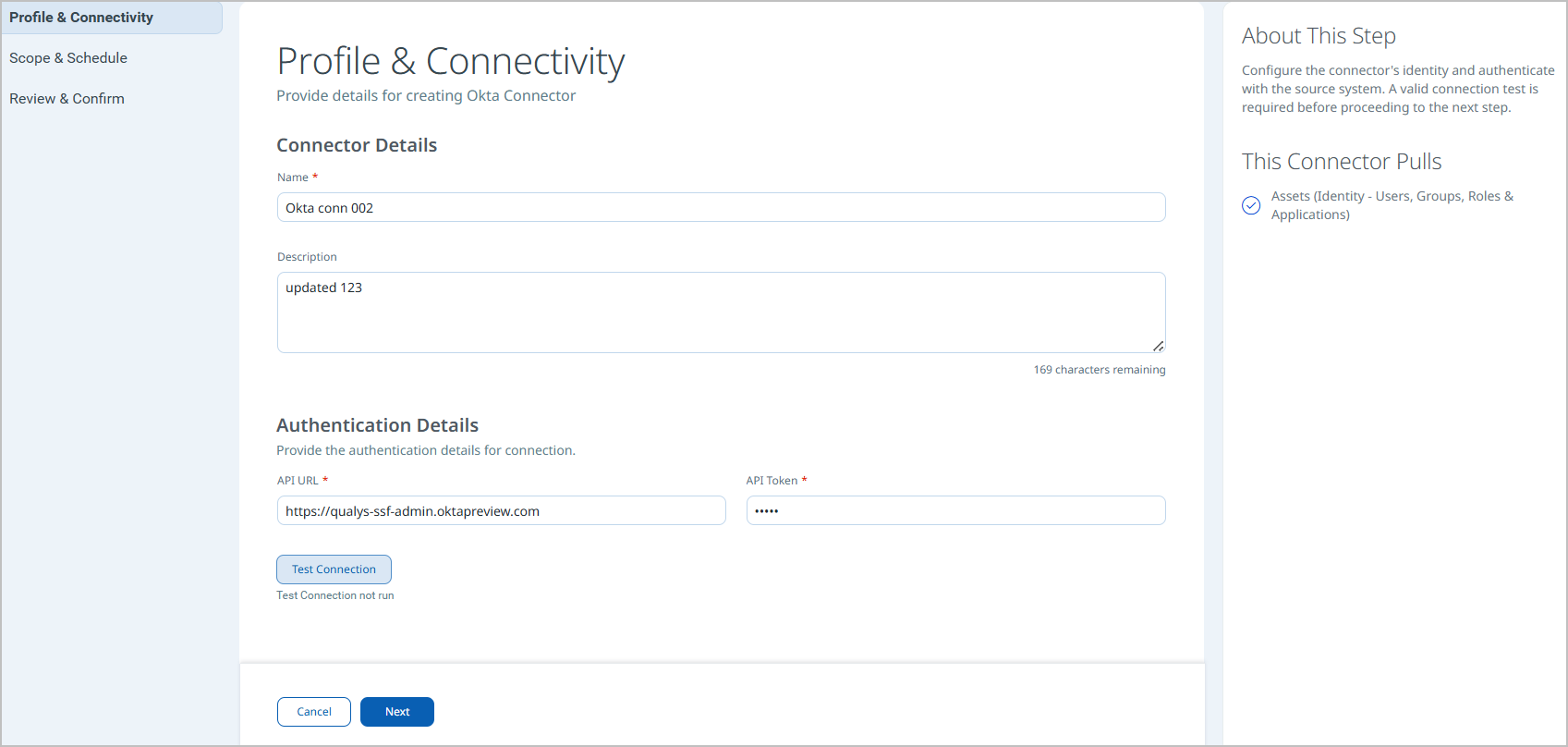
Connector Details
|
Name |
A unique display name for this connector instance (for example, |
|
Description |
An optional description to identify the purpose or scope of this connector. |
Authentication Details
|
Field |
Type |
Description |
|---|---|---|
|
API URL |
String |
The base URL of your Okta organization (for example, |
|
API Token |
Encrypted String |
The SSWS API token generated in the Okta Admin Console. Used to authorize all API requests. This value is stored encrypted. |
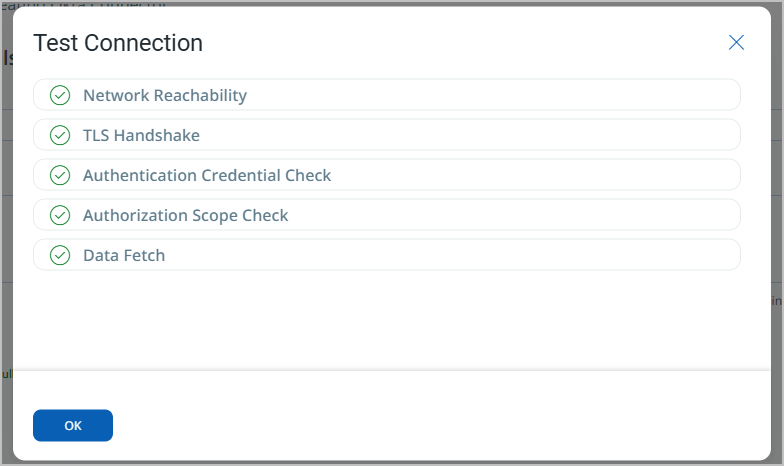
After entering credentials, click Test Connection. The following checks are performed:
- Network Reachability — Verifies the API endpoint is reachable.
- TLS Handshake — Confirms a secure connection can be established.
- Authentication Credential Check — Validates the Client ID, Client Secret, and Token URL.
- Authorization Scope Check — Confirms the service account has the required permissions.
- Data Fetch — Verifies that data can be retrieved from the Okta API.
All five checks must pass before you can advance to Step 2. If any check fails, refer to the Troubleshooting section for resolution steps.
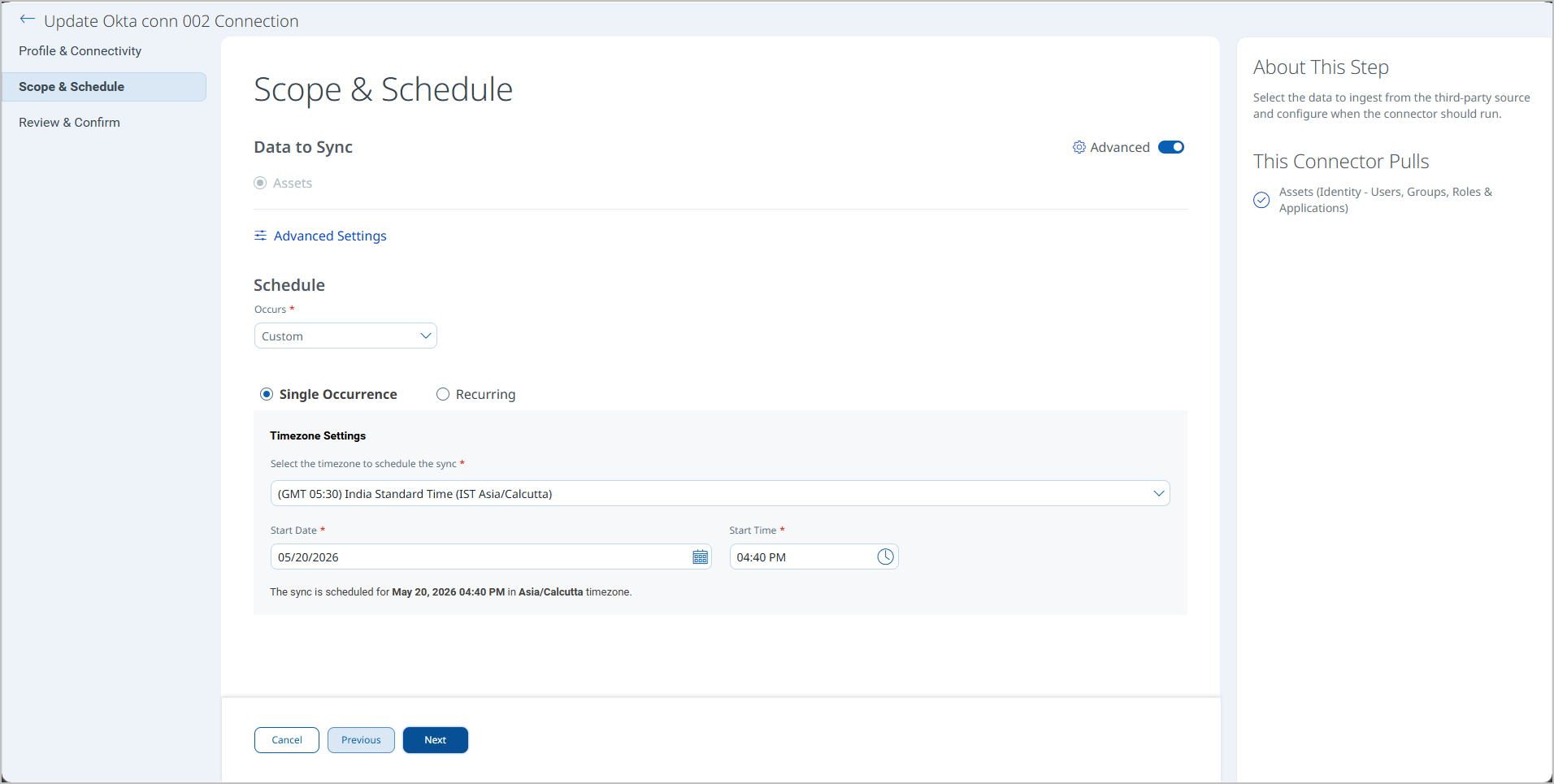
Set the Scope & ScheduleSet the Scope & Schedule
Select the data to ingest from Okta and configure when the connector should run.
- Under Data to Sync, confirm Assets is selected. This connector pulls: Assets (Identity – Users, Groups, Roles & Applications).
- Optionally click Advanced Settings to configure filters and review transform maps. See Advanced Settings for details.
- Under Schedule, set the Occurs frequency:
- Select Daily for an automatic daily sync (the sync runs from midnight in the configured timezone).
- Select Custom to configure a Single Occurrence or Recurring schedule. Specify the Timezone Settings, Start Date, and Start Time.
- Click Next to proceed to Step 3.
Note: Schedule times are evaluated in the timezone you select. Verify the correct timezone is selected to avoid unexpected sync timing.
Review all connector settings before saving.
- Verify the Connector Details (name, description), Authentication Details (API URL, authentication type), and Schedule are correct.
- Click Save (or Finish) to create the connector. The connector transitions to the Registered state and will run at the next scheduled time.
Advanced Settings
Advanced Settings are accessible from the Scope & Schedule step. Click the Advanced Settings link to open the panel. After making changes, click Save to apply.
Note: Changes to Advanced Settings take effect on the next connector run. Remember to click Save in the Advanced Settings panel before clicking Next on the Scope & Schedule step.
Filters Tab
The Filters tab uses a chip selector to control which Okta asset types are ingested. The following asset type chips are available:
- Identities Only – Imports user identity records without security posture data.
- Identities with Security Posture – Imports user identity records together with associated security posture information.
Both chips are selected by default. Deselect a chip to exclude that asset type from the sync. At least one chip must remain selected.
The Require Manual Sync checkbox, when enabled, disables automatic scheduled execution and requires each sync to be triggered manually from the connector detail page.
Transform Map Tab
The Transform Map tab displays the active out-of-the-box data mapping configurations for this connector. The following maps are provided:
- Okta Policies Map
- Okta Role Map
- Okta Application Map
- Okta Custom Roles Map
- Okta Groups Map
- Okta Users Map
- Okta User Map
- Okta Group Map
Detailed field-level mappings for each map are documented in the Transformation Maps section below.
How the Connection Works
The Okta Connector retrieves user identity data, group memberships, and security events from Okta and imports them into Qualys ETM. Each run retrieves user identity records from Okta including user profiles, group memberships, account statuses, last login timestamps, and MFA enrollment status. Security events and authentication logs can also be imported when configured. Import of custom attributes and application assignments is supported.
The Okta Connector executes on schedule or on demand based on the configured schedule. On first execution, a full pull of all configured Okta asset types is performed. On subsequent executions, only delta changes are fetched, reducing import volume and processing time.
The connector fetches data from Okta via REST API, applies the configured transform maps, and imports identity assets into ETM.
Connector States
A successfully configured connector transitions through the following states:
- Registered – The connector is created and registered to fetch data from Okta.
- Scheduled – The connector is queued and scheduled for execution at the next configured time.
- Processing – A connection is active and the connector is actively retrieving asset data from Okta.
- Processed – The connector has completed data retrieval and import into ETM.
Note: The full import process, including asset correlation and TruRisk scoring, may take up to 2 hours to complete after a connector first reaches the Processed state, depending on the volume of identity data in the Okta organization.
Note: When the connector is in the Processed state, findings enrichment and relationship linking may still be in progress. Allow the full processing window before concluding that data is missing.
Viewing Assets and Findings in ETM
After a successful run, Okta identity assets appear in ETM's Unified Asset Inventory.
Assets: Go to Inventory > Assets and filter using:
inventory:(source:"Okta")
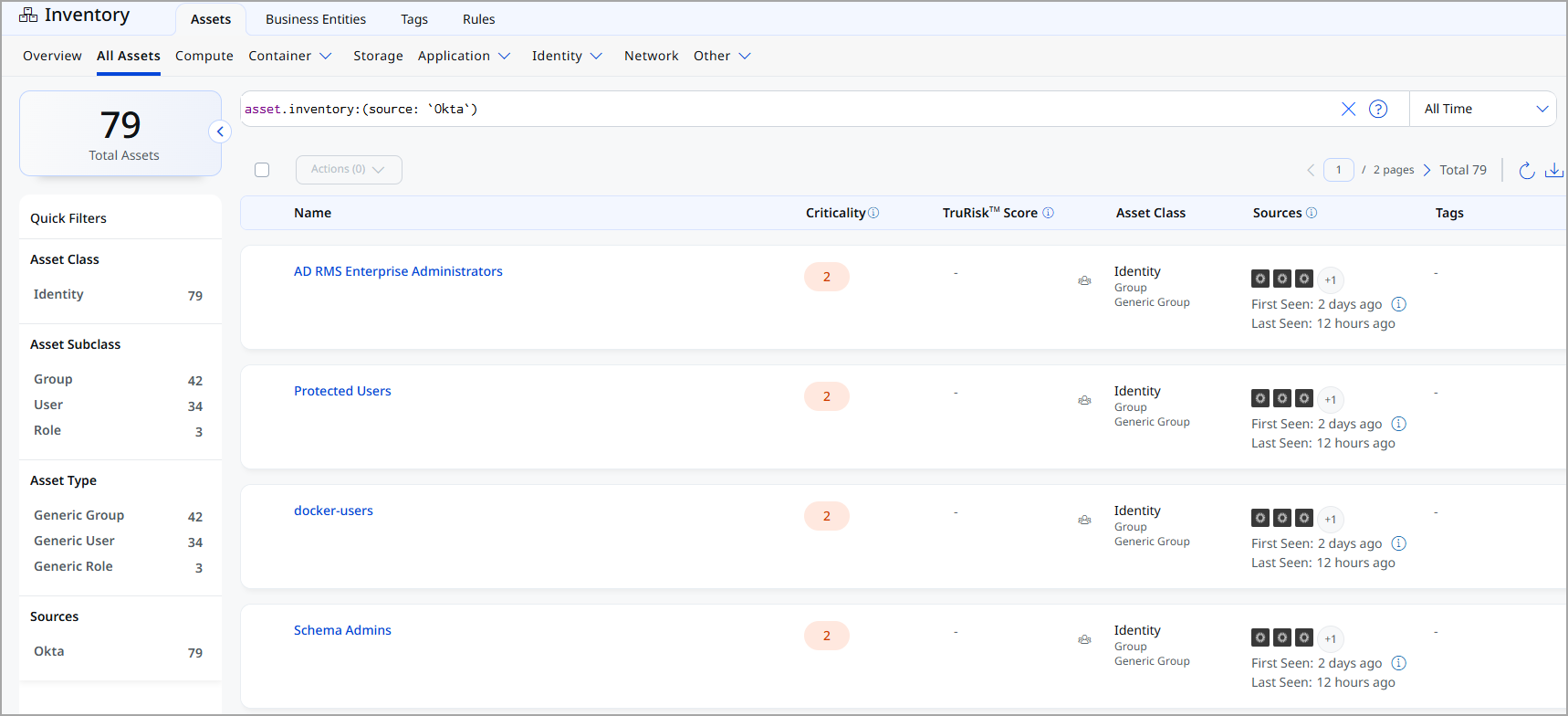
Note: The Okta Connector does not import vulnerability findings. The Findings view is not applicable for this connector.
Troubleshooting
Use the following table to diagnose and resolve common issues with the Okta Connector.
|
Issue |
Resolution |
|---|---|
|
Network Reachability check fails |
Verify that the API URL is correctly formatted (for example, |
|
TLS Handshake check fails |
Ensure that the Okta domain uses a valid, publicly trusted TLS certificate. Verify that no TLS inspection appliance is stripping or replacing the certificate in transit. |
|
Authentication Credential Check fails |
Confirm that the API Token entered is correct and has not been revoked in the Okta Admin Console. Regenerate the token if necessary and update the connector configuration. |
|
Authorization Scope Check fails |
Verify that the Okta account associated with the API token has been assigned a custom role with all required permissions: |
|
Data Fetch check fails |
Confirm the API token owner has read access to users, groups, and applications in the Okta organization. Check that the Okta tenant is active and not in a suspended or locked state. |
|
Connector remains in Processing state |
Large Okta organizations with many users and groups may take up to 2 hours for an initial full sync. If the connector remains in Processing beyond 2 hours, contact Qualys Support. |
|
Assets do not appear in ETM after Processed state |
Allow up to 2 hours for full asset correlation to complete. Verify the inventory filter uses |
|
Activation error on connector creation |
Contact your TAM or Qualys Support to activate the connector for your subsuption. |
Additional Information
API Reference
The connector uses the following Okta REST API endpoints to retrieve identity asset data:
|
API Function |
Endpoint |
|---|---|
|
List Users API |
|
|
List Groups API |
|
|
List Custom Role API |
|
|
List of Applications |
|
|
List of Policies |
|
Transformation Maps
The Okta Connector ships with the following out-of-the-box transformation maps. Each map defines how source fields from the Okta API response are mapped to target fields in the Qualys ETM data model. Fields marked (Required) must be present for the asset record to be created successfully.
|
Source Field |
Target Field |
|---|---|
|
id |
asset.assetHeader.externalAssetId (Required) |
|
id |
asset.assetHeader.vendorAssetId |
|
label |
asset.assetDetail.name |
|
id |
asset.assetDetail.roleAssetClass.id |
|
label |
asset.assetDetail.roleAssetClass.name |
|
label |
asset.assetDetail.roleAssetClass.displayName |
|
description |
asset.assetDetail.roleAssetClass.description |
|
permissions[].label |
asset.assetDetail.roleAssetClass.permissions[].id |
|
permissions[].label |
asset.assetDetail.roleAssetClass.permissions[].name |
|
created |
asset.assetDetail.sourceCreatedAt |
|
lastUpdated |
asset.assetDetail.sourceUpdatedAt |
|
permissions[].label |
asset.assetDetail.untypedAttributes.oktaRolePermissionLabels[] |
|
isCloneable |
asset.assetDetail.untypedAttributes.oktaRoleIsCloneable |
Okta Users Map / Okta User MapOkta Users Map / Okta User Map
|
Source Field |
Target Field |
|---|---|
|
profile.login |
asset.assetHeader.externalAssetId (Required) |
|
id |
asset.assetHeader.vendorAssetId |
|
FUNCTION_PICKER |
asset.assetHeader.status |
|
id |
asset.assetDetail.userAssetClass.id |
|
FUNCTION_PICKER |
asset.assetDetail.userAssetClass.name |
|
FUNCTION_PICKER |
asset.assetDetail.name |
|
FUNCTION_PICKER |
asset.assetDetail.userAssetClass.status |
|
profile.email |
asset.assetDetail.userAssetClass.email |
|
profile.firstName |
asset.assetDetail.userAssetClass.firstName |
|
profile.lastName |
asset.assetDetail.userAssetClass.lastName |
|
FUNCTION_PICKER |
asset.assetDetail.userAssetClass.displayName |
|
activated |
asset.assetDetail.userAssetClass.activationDate |
|
lastLogin |
asset.assetDetail.userAssetClass.lastSuccessfulLoginAt |
|
passwordChanged |
asset.assetDetail.userAssetClass.passwordLastChangedAt |
|
FUNCTION_PICKER |
asset.assetDetail.userAssetClass.type |
|
created |
asset.assetDetail.sourceCreatedAt |
|
lastUpdated |
asset.assetDetail.sourceUpdatedAt |
|
memberOf[].id |
asset.assetRelations[].assetHeader.externalAssetId |
|
memberOf[].id |
asset.assetRelations[].assetHeader.vendorAssetId |
|
userEnrolledFactors[].factorType |
asset.assetDetail.untypedAttributes.oktaUserFactorTypes[] |
|
statusChanged |
asset.assetDetail.typedAttributes.oktaUserStatusChanged |
|
userRoleAssignments[].type |
asset.assetDetail.untypedAttributes.oktaUserRoleTypes[] |
|
userRoleAssignments[].assignmentType |
asset.assetDetail.untypedAttributes.oktaUserRoleAssignmentTypes[] |
|
profile.secondEmail |
asset.assetDetail.typedAttributes.oktaUserSecondEmail |
|
userEnrolledFactors[].provider |
asset.assetDetail.untypedAttributes.oktaUserEnrolledFactorsProviders[] |
|
type.id |
asset.assetDetail.typedAttributes.oktaUserTypeId |
Okta Groups Map / Okta Group MapOkta Groups Map / Okta Group Map
|
Source Field |
Target Field |
|---|---|
|
SCRIPT_BASE_FUNCTION |
asset.assetHeader.externalAssetId (Required) |
|
id |
asset.assetHeader.vendorAssetId |
|
profile.name |
asset.assetDetail.name |
|
created |
asset.assetDetail.sourceCreatedAt |
|
lastUpdated |
asset.assetDetail.sourceUpdatedAt |
|
id |
asset.assetDetail.groupAssetClass.id |
|
profile.name |
asset.assetDetail.groupAssetClass.name |
|
profile.name |
asset.assetDetail.groupAssetClass.displayName |
|
type |
asset.assetDetail.groupAssetClass.type |
|
profile.description |
asset.assetDetail.groupAssetClass.description |
|
hasRole[].id |
asset.assetRelations[].assetHeader.externalAssetId |
|
hasRole[].id |
asset.assetRelations[].assetHeader.vendorAssetId |
|
FUNCTION_PICKER |
asset.assetRelations[].assetHeader.status |
|
hasRole[].label |
asset.assetRelations[].assetDetail.name |
|
hasRole[].id |
asset.assetRelations[].assetDetail.roleAssetClass.id |
|
hasRole[].label |
asset.assetRelations[].assetDetail.roleAssetClass.name |
|
hasRole[].label |
asset.assetRelations[].assetDetail.roleAssetClass.displayName |
|
hasRole[].label |
asset.assetRelations[].assetDetail.roleAssetClass.description |
|
FUNCTION_PICKER |
asset.assetRelations[].assetDetail.roleAssetClass.type |
|
FUNCTION_PICKER |
asset.assetRelations[].assetDetail.roleAssetClass.scope |
|
hasRole[].created |
asset.assetRelations[].assetDetail.sourceCreatedAt |
|
hasRole[].lastUpdated |
asset.assetRelations[].assetDetail.sourceUpdatedAt |
|
FUNCTION_PICKER |
asset.assetRelations[].relationshipStatus |
|
profile.groupType |
asset.assetDetail.typedAttributes.oktaGroupProfileGroupType |
|
profile.samAccountName |
asset.assetDetail.typedAttributes.oktaGroupProfileSamAccountName |
|
lastMembershipUpdated |
asset.assetDetail.typedAttributes.oktaGroupLastMembershipUpdated |
|
profile.groupScope |
asset.assetDetail.typedAttributes.oktaGroupProfileGroupScope |
|
profile.dn |
asset.assetDetail.typedAttributes.oktaGroupProfileDN |
|
objectClass |
asset.assetDetail.untypedAttributes.oktaGroupObjectClass |
|
profile.windowsDomainQualifiedName |
asset.assetDetail.typedAttributes.oktaGroupProfileWindowsDomainQualifiedName |
Okta Policies MapOkta Policies Map
|
Source Field |
Target Field |
|---|---|
|
* |
thirdPartyObject.content.& |
Okta Application MapOkta Application Map
|
Source Field |
Target Field |
|---|---|
|
* |
thirdPartyObject.content.& |
Okta Custom Roles MapOkta Custom Roles Map
|
Source Field |
Target Field |
|---|---|
|
id |
asset.assetHeader.externalAssetId (Required) |
|
id |
asset.assetHeader.vendorAssetId |
|
label |
asset.assetDetail.name |
|
label |
asset.assetDetail.roleAssetClass.name |
|
description |
asset.assetDetail.roleAssetClass.description |
|
created |
asset.assetDetail.sourceCreatedAt |
|
lastUpdated |
asset.assetDetail.sourceUpdatedAt |