Snyk Open Source (SCA) Connector
The Snyk SCA Connector bridges software composition analysis findings from Snyk into Qualys Enterprise TruRisk Management (ETM), enabling security teams to achieve centralized risk visibility and prioritization using TruRisk Insights across their code repositories and applications. By automatically importing vulnerability data alongside asset information, organizations gain a unified view of their software supply chain risks rather than managing security findings in isolated tools.
This integration supports delta data pulls on configurable schedules, allowing teams to maintain current vulnerability posture without manual data synchronization. For practitioners juggling multiple security platforms, the connector eliminates the friction of context-switching between systems while enabling faster risk-based decision making through consolidated visibility.
Connector Details
High-level details for the Snyk Open Source (SCA) connector.
| Vendor | Snyk |
| Product Name | Snyk SCA |
| Category | Application Security |
| Findings Support | Supported |
| Supported Assets | Code Repository |
| Version | 1.0.0 |
| Integration Type | API Integration (REST) |
| Direction | Unidirectional (Snyk to Qualys) |
| Delta Support | Supported |
Configure the Connector
Follow the steps below to set up the Snyk Open Source (SCA) connector in Qualys ETM.
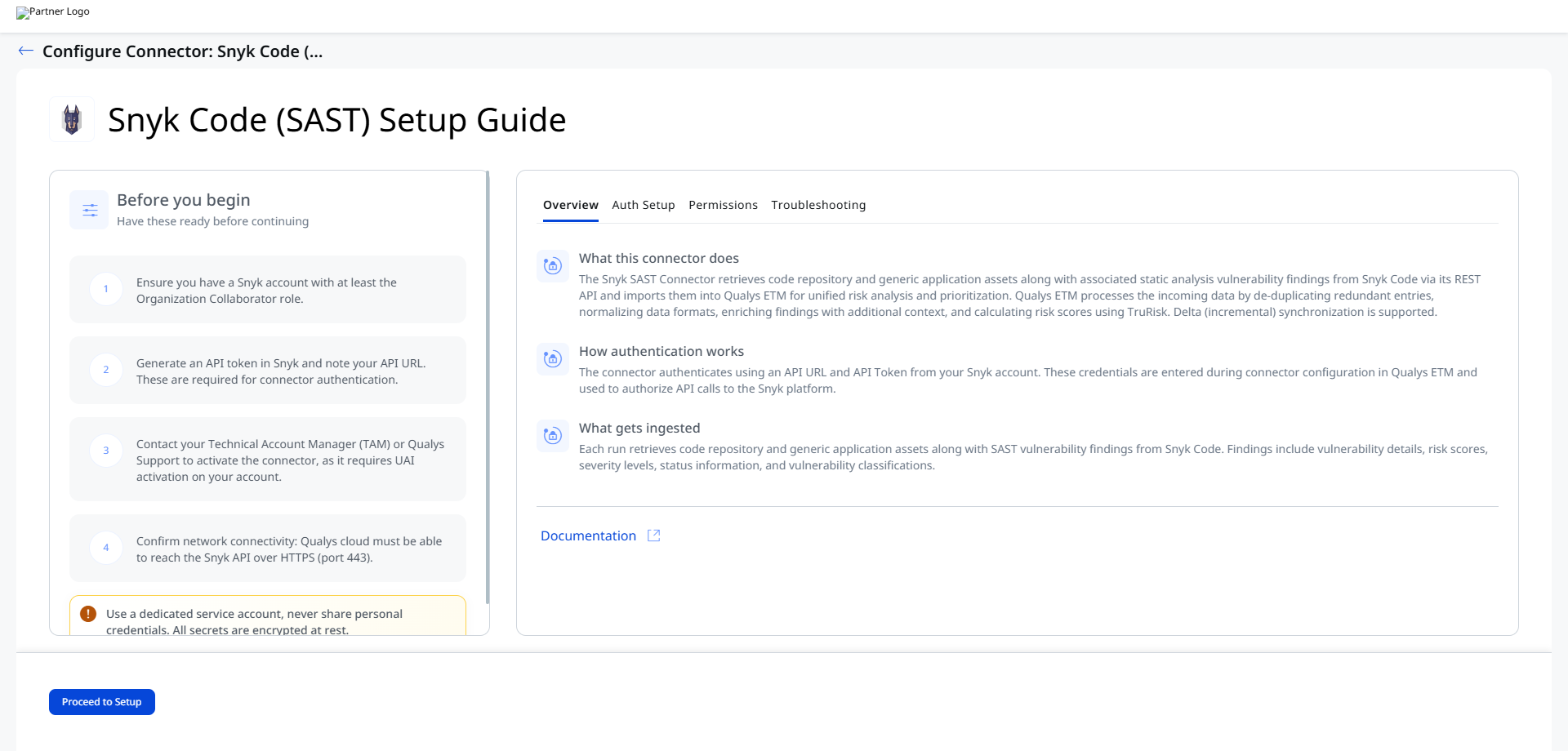
Before You Begin - AuthenticateBefore You Begin - Authenticate
Complete the following prerequisites before configuring the connector in Qualys ETM.
Obtaining API Credentials from Snyk
- Ensure you have a Snyk account with at least the Organization Collaborator role assigned.
- Log in to your Snyk account and navigate to Account Settings.
- Locate the API Token section and generate or copy your API token.
Important: Store the API token securely immediately after generation. If you lose access to it, you must generate a new token and update the connector credentials.
- Note your Snyk API URL. This URL varies based on your Snyk deployment region (for example,
https://api.us.snyk.iofor the US region).
Permissions Required
The Snyk account used for authentication must have the following minimum permissions:
| Entity Type | Required Permission |
|---|---|
| Code Repository | Organization Collaborator |
| Generic Application | Organization Collaborator |
Scope and Data Access
The connector retrieves SCA findings from Snyk Open Source. Custom filtering is not documented for this connector. The connector performs a full data pull on each scheduled execution, importing all assets and associated vulnerability findings visible to the authenticated account.
Key Rotation
When rotating the API token, generate a new token in your Snyk account settings. Update the credential in Qualys ETM by navigating to the connector and selecting the Edit Connector option, then enter the new API Token in the Authentication Details fields.
Create a Profile & ConnectionCreate a Profile & Connection
- Log in to Qualys ETM.
- Navigate to Connectors > Integration.
- Locate the Snyk SCA Connector and click Manage.
Note: If the connector does not appear in the integrations list, the activation has not yet been completed on your account. Contact your TAM or Qualys Support.
- Click Proceed to Setup.
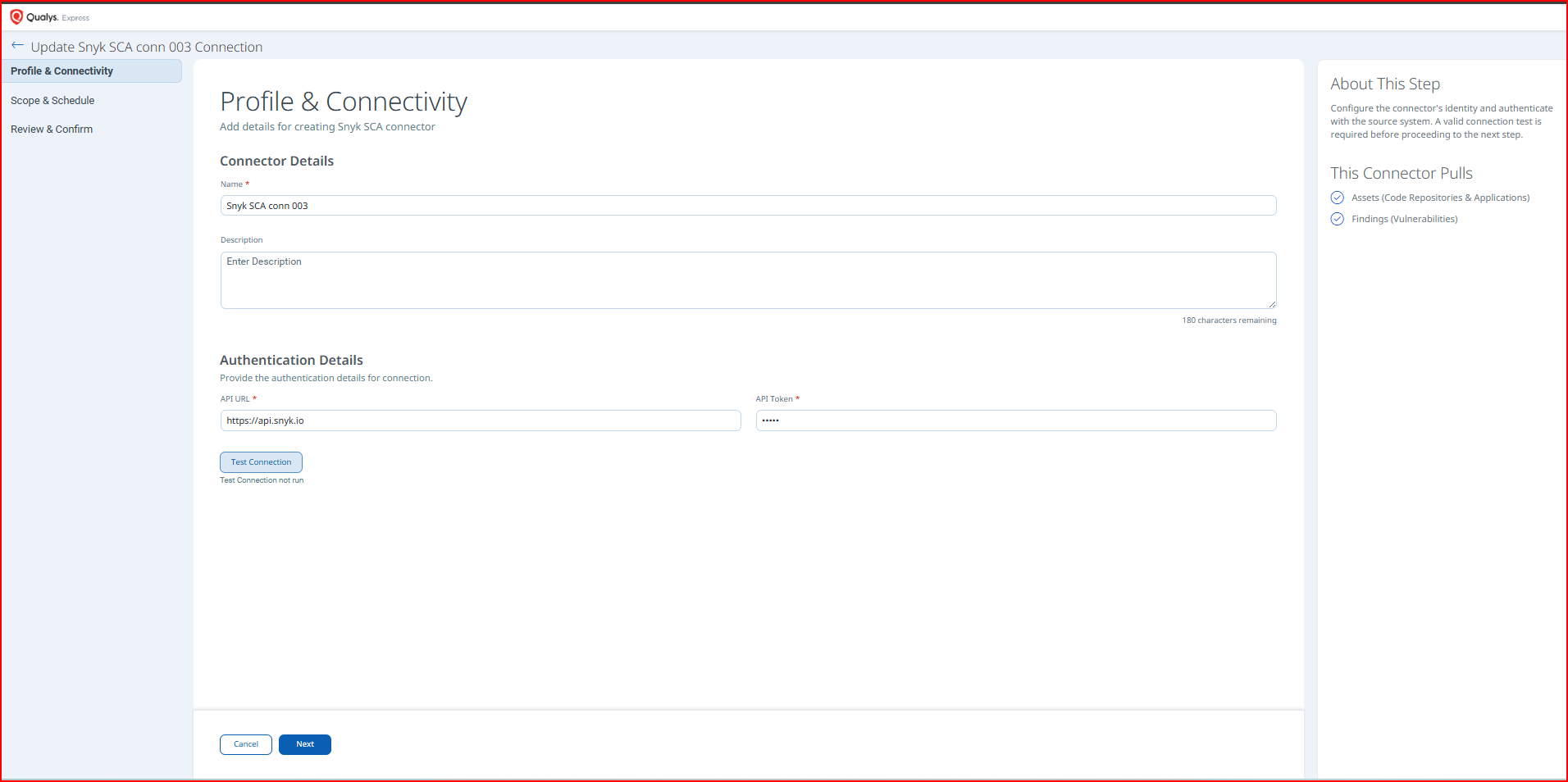
- Provide the connector details and authentication credentials as described below.
Connector Details
| Field | Description |
|---|---|
| Name | A unique display name for this connector instance. |
| Description | An optional description of the connector's purpose or scope. |
Authentication Details
| Field | Type | Description |
|---|---|---|
| API URL | String | The base API URL for your Snyk account. Varies by deployment region; for example, https://api.us.snyk.io. |
| API Token | Encrypted String | The API token generated from your Snyk account settings, used to authenticate all API requests. |
Important: The API Token is stored as an encrypted credential in Qualys ETM. If the token expires or is regenerated in Snyk, you must update this field via the Edit Connector option to avoid authentication failures.
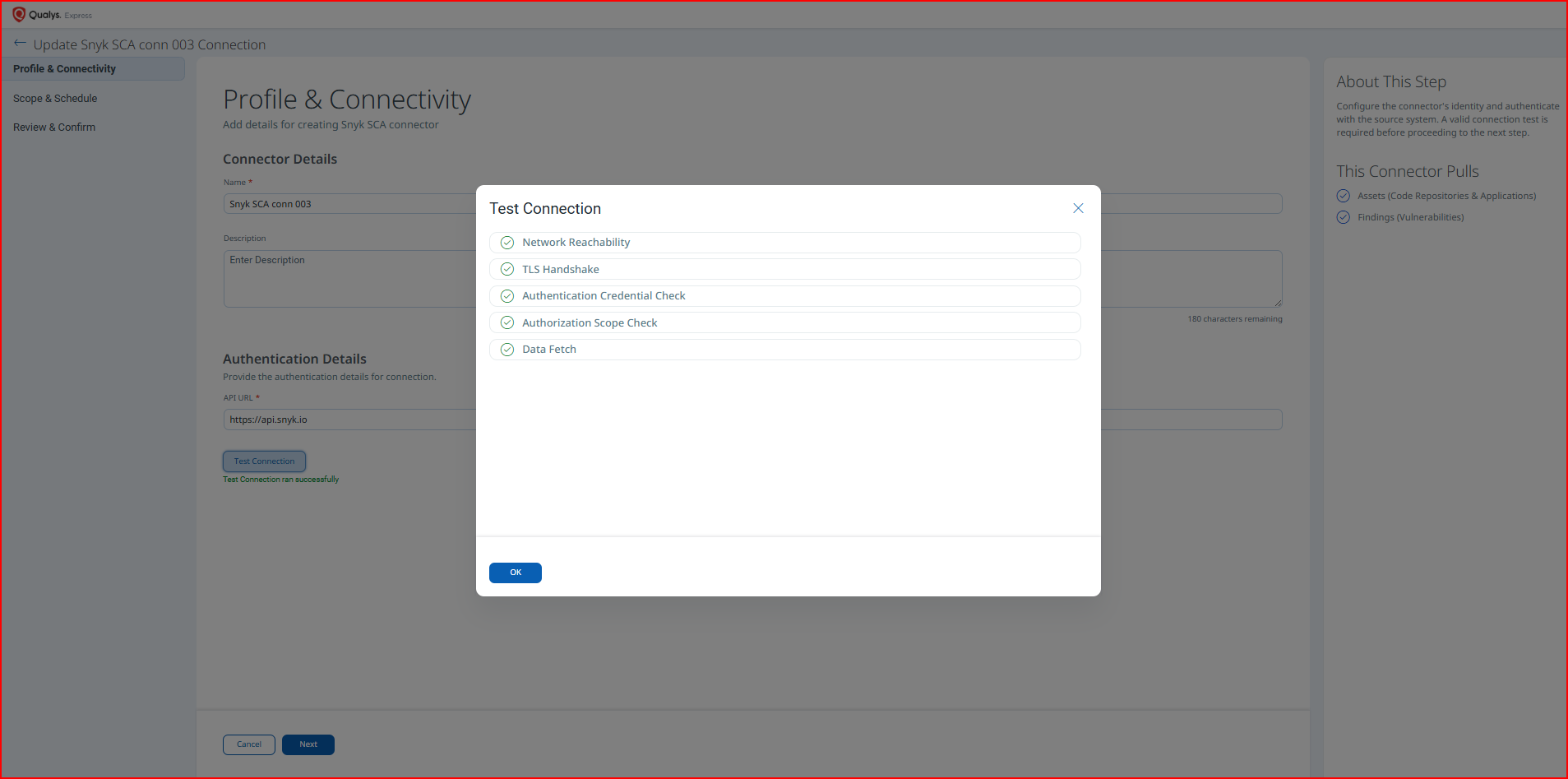
Test Connection validates the following checks before allowing you to proceed:
- Network Reachability — Verifies the API endpoint is reachable.
- TLS Handshake — Confirms a secure connection can be established.
- Authentication Credential Check — Validates the Client ID, Client Secret, and Token URL.
- Authorization Scope Check — Confirms the service account has the required permissions.
- Data Fetch — Verifies that data can be retrieved from the Snyk Code API.
If the Authentication Credential Check fails, verify that the API URL and API Token entered in Qualys ETM are correct, and confirm the Snyk account has the Organization Collaborator role.
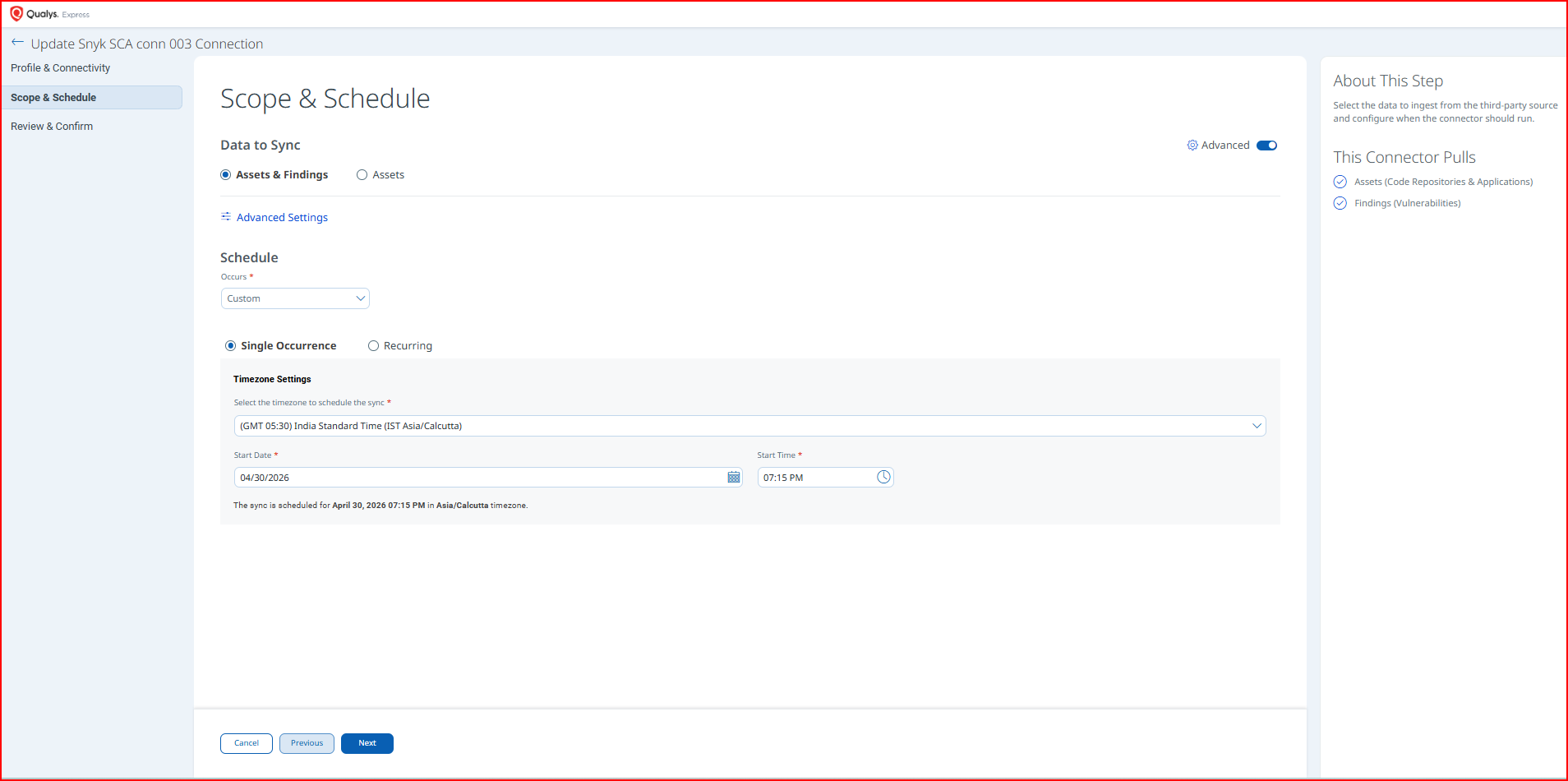
Set the Scope & ScheduleSet the Scope & Schedule
- Select the Asset Type to sync:
- Code Repository
- Generic Application.
- Configure the Schedule:
- Occurs - Set to Daily, Weekly, or Monthly.
- Single Occurrence – runs once at the specified date and time.
- Recurring – runs on a repeating schedule; set the start date, end date, and recurrence interval.
- Click Next to proceed to the review step.
Note: After creation, the connector transitions to the Registered state. The first full data pull may take up to 2 hours depending on the volume of assets and findings in your Snyk account.
Advanced Settings
Note: After modifying any Advanced Settings, click Save to apply the changes before navigating away.
Filters Tab
The Filters tab is present in the connector configuration interface; however, custom filter queries are not currently supported for the Snyk Open Source (SCA) connector. The connector performs a full data pull of all assets and findings accessible to the authenticated Snyk account on each scheduled execution.
Transform Map Tab
The Transform Map tab displays the active transformation maps applied when ingesting data from Snyk into Qualys ETM. Two transformation maps are active for this connector:
- Code Repo – maps Snyk project data for Code Repository asset types
- Generic Application – maps Snyk project data for Generic Application asset types
Code Repo - Transformation MapCode Repo - Transformation Map
| Source Field | Target Field |
|---|---|
| SCRIPT_BASE_FUNCTION | asset.assetHeader.externalAssetId |
| FUNCTION_PICKER | asset.assetHeader.status |
| id | asset.assetHeader.vendorAssetId |
| attributes.created | asset.assetDetail.sourceCreatedAt |
| attributes.created | asset.assetDetail.sourceUpdatedAt |
| attributes.name | asset.assetDetail.name |
| attributes.tags[].key | asset.assetDetail.externalTags[].key |
| attributes.tags[].value | asset.assetDetail.externalTags[].value |
| FUNCTION_PICKER | asset.assetDetail.repositoryAssetClass.type |
| relationships.target.data.attributes.url | asset.assetDetail.repositoryAssetClass.repoUrl |
| relationships.target.data.meta.integration_data.owner | asset.assetDetail.repositoryAssetClass.owner |
| attributes.business_criticality.0 | asset.assetDetail.businessInfo.businessCriticality |
| attributes.settings.recurring_tests.frequency | asset.assetDetail.typedAttributes.snykSCASettingsRecurringFrequency |
| issues[].attributes.title | findingGroup.findings[].name |
| issues[].attributes.title | findingGroup.findings[].description |
| issues[].id | findingGroup.findings[].externalFindingId |
| FUNCTION_PICKER | findingGroup.findings[].severity |
| FUNCTION_PICKER | findingGroup.findings[].findingStatus |
| issues[].attributes.created_at | findingGroup.findings[].firstFoundOn |
| issues[].attributes.updated_at | findingGroup.findings[].lastFoundOn |
| issues[].attributes.classes.0.id | findingGroup.findings[].findingType.vulnerability.cweId |
| issues[].attributes.exploit_details.sources[] | findingGroup.findings[].findingType.vulnerability.exploitedByList[] |
| issues[].attributes.ignored | findingGroup.findings[].riskAcceptance.ignored |
| issues[].attributes.snykScaCveId | findingGroup.findings[].findingType.vulnerability.cveId |
| attributes.target_reference | asset.assetDetail.typedAttributes.snykSCATargetReference |
| org.id | asset.assetDetail.typedAttributes.snykSCAOrganizationId |
| org.attributes.name | asset.assetDetail.typedAttributes.snykSCAOrganizationName |
| org.attributes.group_id | asset.assetDetail.typedAttributes.snykSCAGroupId |
| org.attributes.updated_at | asset.assetDetail.typedAttributes.snykSCAOrgUpdatedAt |
| org.attributes.created_at | asset.assetDetail.typedAttributes.snykSCAOrgCreatedAt |
| attributes.target_file | asset.assetDetail.typedAttributes.snykSCATargetFile |
| attributes.type | asset.assetDetail.typedAttributes.snykSCAType |
| issues[].findingDetectionUrl | findingGroup.findings[].findingDetectionURL |
| issues[].findingUrl | findingGroup.findings[].findingURL |
Generic Application – Transformation MapGeneric Application – Transformation Map
| Source Field | Target Field |
|---|---|
| attributes.name | asset.assetDetail.genericApplicationAssetClass.name |
| id | asset.assetHeader.externalAssetId |
| FUNCTION_PICKER | asset.assetHeader.status |
| id | asset.assetHeader.vendorAssetId |
| attributes.created | asset.assetDetail.sourceCreatedAt |
| attributes.created | asset.assetDetail.sourceUpdatedAt |
| attributes.name | asset.assetDetail.name |
| attributes.tags[].key | asset.assetDetail.externalTags[].key |
| attributes.tags[].value | asset.assetDetail.externalTags[].value |
| attributes.business_criticality.0 | asset.assetDetail.businessInfo.businessCriticality |
| attributes.settings.recurring_tests.frequency | asset.assetDetail.typedAttributes.snykSCASettingsRecurringFrequency |
| issues[].attributes.title | findingGroup.findings[].name |
| issues[].attributes.title | findingGroup.findings[].description |
| issues[].id | findingGroup.findings[].externalFindingId |
| FUNCTION_PICKER | findingGroup.findings[].severity |
| FUNCTION_PICKER | findingGroup.findings[].findingStatus |
| issues[].attributes.created_at | findingGroup.findings[].firstFoundOn |
| issues[].attributes.updated_at | findingGroup.findings[].lastFoundOn |
| issues[].attributes.classes.0.id | findingGroup.findings[].findingType.vulnerability.cweId |
| issues[].attributes.exploit_details.sources[] | findingGroup.findings[].findingType.vulnerability.exploitedByList[] |
| issues[].attributes.ignored | findingGroup.findings[].riskAcceptance.ignored |
| issues[].attributes.snykScaCveId | findingGroup.findings[].findingType.vulnerability.cveId |
| attributes.target_reference | asset.assetDetail.typedAttributes.snykSCATargetReference |
| org.id | asset.assetDetail.typedAttributes.snykSCAOrganizationId |
| org.attributes.name | asset.assetDetail.typedAttributes.snykSCAOrganizationName |
| org.attributes.group_id | asset.assetDetail.typedAttributes.snykSCAGroupId |
| org.attributes.updated_at | asset.assetDetail.typedAttributes.snykSCAOrgUpdatedAt |
| org.attributes.created_at | asset.assetDetail.typedAttributes.snykSCAOrgCreatedAt |
| attributes.target_file | asset.assetDetail.typedAttributes.snykSCATargetFile |
| attributes.type | asset.assetDetail.typedAttributes.snykSCAType |
| issues[].findingDetectionUrl | findingGroup.findings[].findingDetectionURL |
| issues[].findingUrl | findingGroup.findings[].findingURL |
How the Connection Works
The Snyk SCA Connector retrieves code repository and generic application assets along with associated software composition analysis vulnerability findings from Snyk Open Source via its REST API, and imports them into Qualys ETM for unified risk analysis and prioritization. Qualys ETM processes the incoming data by de-duplicating redundant entries, normalizing data formats, enriching findings with additional context, and calculating risk scores using TruRisk.
Connector States
A successfully configured connector transitions through the following states:
- Registered – Connector created and registered in Qualys ETM.
- Scheduled – Execution has been scheduled; awaiting the configured run time.
- Processing – Data ingestion is actively in progress.
- Processed – Assets have been imported; findings ingestion may still be in progress.
Note: The complete ingestion process – including both asset import and findings processing – may take up to 2 hours depending on data volume. The connector may display the Processed state while findings are still being ingested in the background.
Viewing Assets and Findings in ETM
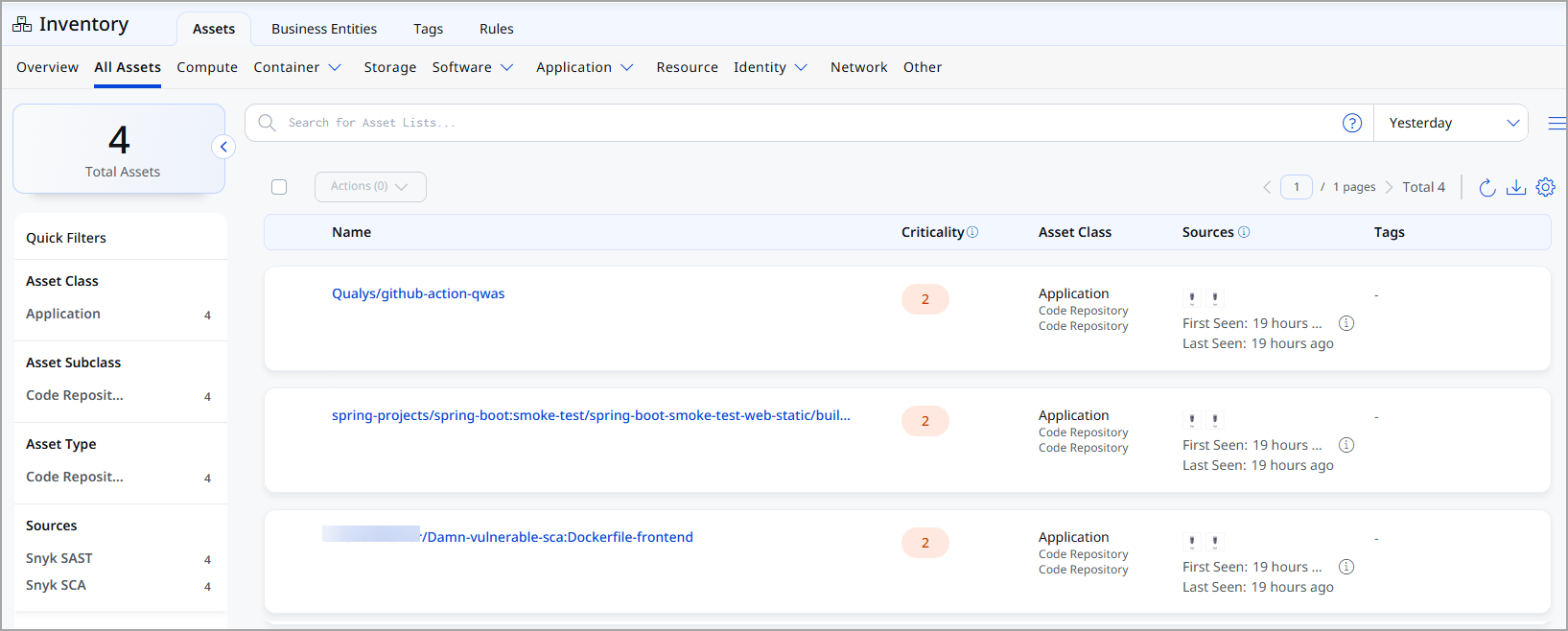
After a successful connector run, navigate to the following locations in Qualys ETM to view the imported data.
Assets – Navigate to Enterprise TruRisk Management > Inventory and apply the filter:
inventory:(source:"Snyk")
Troubleshooting
| Issue | Resolution |
|---|---|
| Authentication failure on connector run | Verify the API URL and API Token entered in Qualys ETM are correct. Confirm the Snyk account has the Organization Collaborator role. If the token has been regenerated in Snyk, update the credential via the Edit Connector option. |
| No findings imported after first run | The connector transitions through Registered, Scheduled, Processing, and Processed states. The complete import process may take up to 2 hours depending on data volume. Findings processing may continue after asset import completes. Wait for the full 2-hour window before investigating further. |
| Connector not available in the integrations list | The connector requires activation on your Qualys account. Contact your TAM or Qualys Support to activate it. |
Additional Information
API Reference
The connector uses the following Snyk REST API endpoints to retrieve data.
| Name | Endpoint |
|---|---|
| List Orgs API | https://api.us.snyk.io/rest/orgs?version=2025-11-10 |
| Get Project Per Org API | https://api.us.snyk.io/rest/orgs/<id>/projects?version=2025-11-10 |
| Get Issues Per Project API | https://api.us.snyk.io/rest/orgs/<id>/issues?version=2025-11-18&type=package_vulnerability&scan_item.type=project&scan_item.id=<id> |
Note: The base API URL (for example, https://api.us.snyk.io) varies by Snyk deployment region. Replace it with the API URL from your Snyk account settings.