Container Runtime Sensor

Qualys Container Runtime Sensor (CRS) provides eBPF-based runtime protection for containerized workloads. CRS observes workload activity as applications execute, adding runtime context to the vulnerability, workload, Kubernetes, and cloud risk information available in the Qualys Enterprise TruRisk™ Platform.

By observing process, file, network, DNS, and software activity inside running workloads, CRS helps security teams understand what is actually happening in production — not simply what exists inside a container image.

Runtime telemetry is used across Qualys Container Security and TotalCloud to help prioritize vulnerabilities based on runtime evidence, detect active threats and anomalous behavior, monitor file integrity and workload drift, investigate suspicious activity, and enforce runtime security policies.

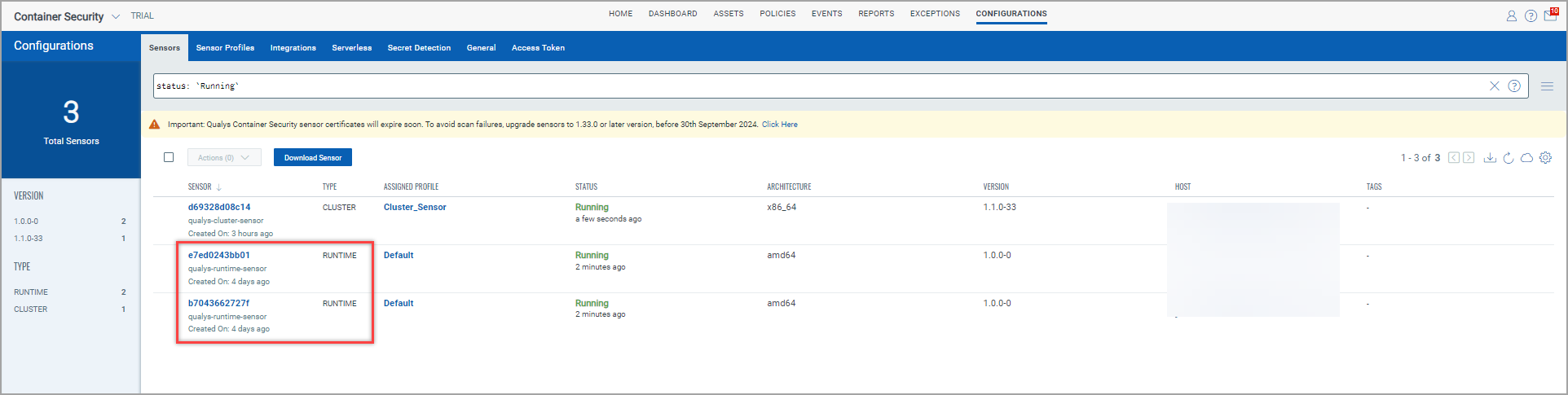
All your Runtime Sensors are visible under Container Security > Configurations > Sensors.
What the Container Runtime Sensor Provides?

Runtime Vulnerability Reachability and Prioritization

Traditional container scanning identifies vulnerabilities in packages contained within an image. However, not every vulnerable package in an image is actively used by the application.

CRS adds runtime evidence by identifying packages actively loaded in memory within running containers. Qualys correlates this information with vulnerability findings so security teams can distinguish vulnerabilities associated with software actively in use from vulnerabilities that are simply present in the image.

This runtime reachability context helps you:

  • Focus remediation on vulnerabilities that matter most in production.
  • Reduce noise from vulnerable packages that are present but not actively used.
  • Combine runtime usage with TruRisk™ , threat intelligence, exposure, and workload context for risk-based prioritization.
  • Trace runtime risk back to the affected container image for remediation.

Runtime evidence complements, rather than replaces, comprehensive image and registry vulnerability scanning.

Runtime Threat Detection and Response

CRS continuously observes workload behavior at runtime and provides telemetry for detecting suspicious and malicious activity inside containers.

Runtime detections can identify behaviors associated with threats such as container escape attempts, privilege escalation, cryptomining, malicious process execution, and suspicious network communications.

Qualys correlates process, file, network, DNS, container, and Kubernetes context to help security teams understand not only that suspicious activity occurred, but where it occurred and which workload was affected.

Runtime policies can also be used to enforce security controls. Depending on the configured policy, CRS can audit activity or terminate processes that violate defined runtime policies.

Runtime detections are available in the Investigate experience in Qualys Container Security for security operations and incident investigation workflows.

File Integrity Monitoring and Runtime Drift

Containers are intended to be immutable, making unexpected filesystem changes an important signal of compromise or operational drift.

CRS provides real-time visibility into file activity within running workloads and supports monitoring of security-sensitive files and directories.

File activity can include operations such as file creation, read, open, write, delete, rename, link creation, permission changes, ownership changes, and truncation depending on the configured policy and sensor version.

You can use runtime policies to establish the file activity that should be monitored and identify changes that fall outside expected workload behavior.

CRS integrates with Qualys File Integrity Monitoring (FIM), allowing container file events to participate in broader enterprise FIM and compliance workflows.

Behavioral Runtime Visibility

CRS provides visibility into how workloads actually behave after deployment. Runtime telemetry includes the following activity types:

Activity Description
Processes Monitor process launches, terminations, binary attributes, and process behavior to identify unexpected or unauthorized execution.
Files Monitor changes and access to sensitive files and directories to identify workload drift, tampering, or malicious modification.
Network Observe inbound and outbound network activity from running containers to identify unexpected connections, malicious communications, or workload behavior that deviates from policy.
DNS Use DNS activity as additional workload context when investigating runtime activity and potential threats.

Runtime policies and process allowlists can be used to define expected workload behavior and reduce unnecessary event volume while preserving security-relevant activity.

AI Workload Protection

AI applications increasingly run on the same Kubernetes and container infrastructure protected by CRS. These workloads introduce additional runtime risks because AI models and agents can access sensitive data, execute tools, interact with external services, and dynamically perform actions based on model decisions.

CRS provides kernel-level visibility into the underlying behavior of containerized AI workloads and complements Qualys TotalAI by adding runtime evidence to AI workload security.

Runtime telemetry can help security teams understand:

  • What processes an AI workload or agent executes.
  • Which files and sensitive resources the workload accesses or modifies.
  • Which external systems or services the workload communicates with.
  • Whether unexpected processes, network connections, or workload changes occur after deployment.
  • Whether vulnerable software supporting an AI workload is actively being used in production.

When correlated with AI asset, model, agent, Kubernetes, cloud, vulnerability, and business context in the Qualys Enterprise TruRisk™ Platform, this provides a unified approach to protecting both traditional cloud-native applications and emerging AI workloads from code through runtime.

How CRS Fits into Qualys Kubernetes and Container Security?

Runtime protection is one layer of the overall container security lifecycle:

  • Container and registry scanning identify vulnerabilities, software, secrets, malware, and compliance issues before and after deployment.
  • The Qualys Cluster Sensor provides Kubernetes inventory, Kubernetes Security Posture Management (KSPM), and workload context used for exposure analysis and attack paths.
  • The Container Runtime Sensor adds continuous execution context from inside running workloads.

Together, these capabilities connect:

Code and Images > Kubernetes and Cloud Context > Runtime Behavior > Risk Prioritization > Detection and Response

This allows security teams to move beyond asking "Is this workload vulnerable?" to answering "Is the vulnerable software actually being used, is the workload exposed, and is suspicious activity occurring right now?"

How CRS Works?

CRS uses eBPF to observe security-relevant activity from supported container workloads without requiring instrumentation inside individual application containers.

The sensor collects runtime telemetry and associates it with container and Kubernetes workload context. Events are normalized using the Open Cybersecurity Schema Framework (OCSF) and sent to the Qualys Enterprise TruRisk™ Platform.

Qualys uses this runtime evidence across vulnerability prioritization, runtime events, File Integrity Monitoring, threat detection, investigation, and workload protection workflows.

For detailed compatibility information, including supported operating systems, Kubernetes distributions, container runtimes, kernel versions, and CPU architectures, refer to the CRS Interoperability Matrix.

Getting Started

Deploying CRS consists of the following steps:

  1. Review prerequisites and supported environments.
  2. Obtain the CRS image.
  3. Install the Container Runtime Sensor.
  4. Configure the required runtime policies and process allowlist.
  5. Verify sensor connectivity and runtime telemetry.
  6. Review runtime events, vulnerability runtime context, and threat detections in the Qualys Enterprise TruRisk™ Platform.

For more information, refer to View Runtime Events and the Qualys Container Runtime Sensor Online Help.