TruRisk™ Insights & Attack Path
Qualys TruRisk™ Insights provides toxic combinations of remediation-worthy risk that combine different security factors including exploitable vulnerabilities, asset exposure, business criticality, secrets, malware, and more. These toxic combinations are also mapped to attack paths that security teams can act on for remediation purposes.
Key Pre-Requisites
- Attack Paths Are Supported For
- Kubernetes & OpenShift containers only including Amazon EKS, Azure AKS, Google GKE/GKE Autopilot, Red Hat OpenShift, and any Self-Managed Kubernetes Cluster
- Registry Scanned Images
- Risk Factors come from a combination of different insights that may come from different sensors
- You need to enable Qualys TotalCloud with the following permissions
- CLOUDVIEW.UI.ACCESS
- CLOUDVIEW.ACCESS
- CLOUDVIEW.API.READONLY
- CLOUDVIEW.API.ACCESS
Contributing Risk Factors Supported
The following table lists the risk factors supported and the scan/sensor that is required. For containers, Qualys combines risk factors from sensors as well as registry scans from the associated image of that container.
| Risk Factor | Sensor Required |
|---|---|
| Internet Exposure | Cluster Sensor |
| Excessive Permissions | Cluster Sensor |
| EOL/EOS Software | Registry Scan |
| AI Software | Registry Scan |
| Secrets | Registry Scan |
| Malware | Registry Scan |
| MCP Server/AI Model File Detection | General Sensor |
Example Use Case
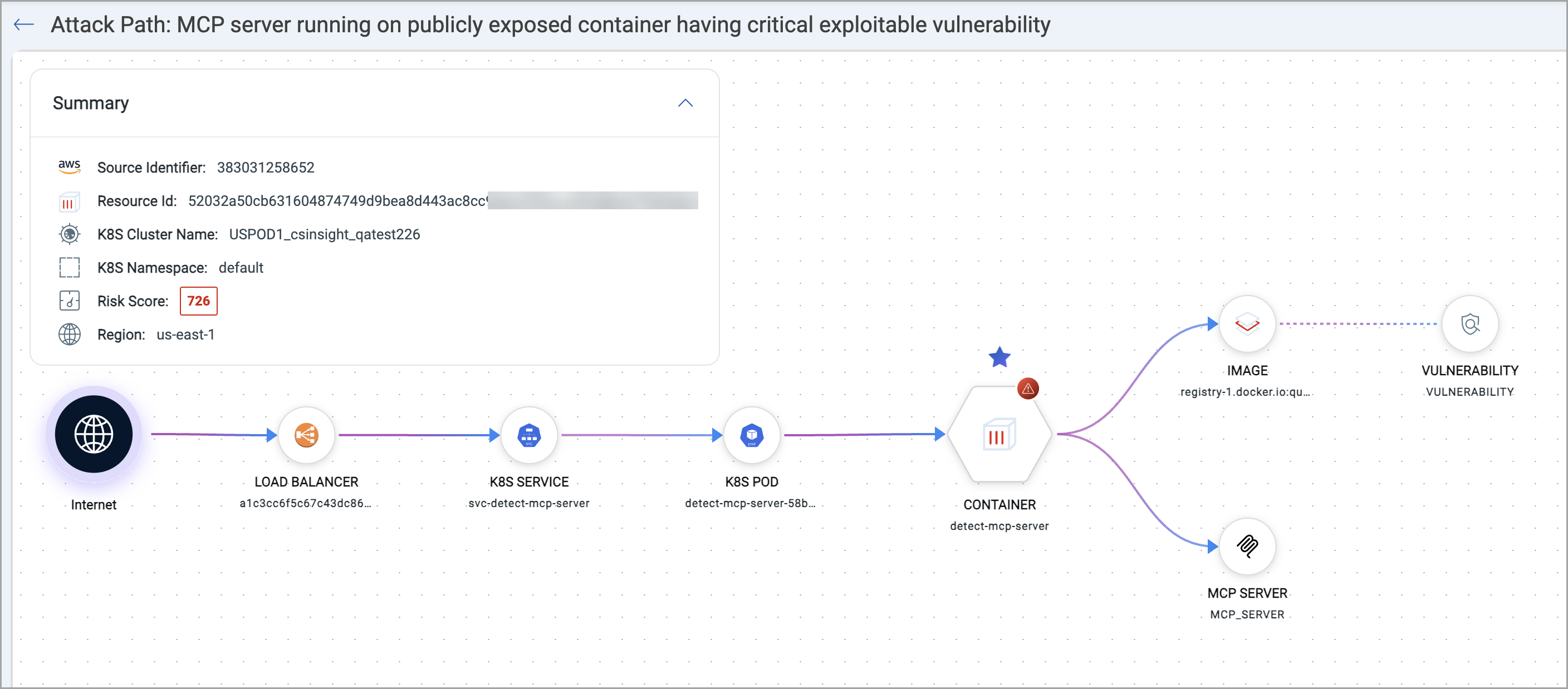
Let’s say there is a publicly exposed container with root privilege and excessive permissions. TruRisk™ Insights highlights this as a critical insight. Since this insight is supported with Attack Path visualization, you can view the downstream resources that could be affected, allowing an analyst to:
- Assess the full exposure chain
- Identify the most effective remediation step
- Implement changes directly from the visualization
Viewing Insights
When clicking on the Insights Tab you can see a list of each Insight and the count of resources (containers or images) found for each risk combination. Insights can be filtered based on severity criteria as well as registry, cluster, etc.
Viewing Details Of An Insight And Attack Path
Upon clicking an insight, security teams can view the details of the insight including Contributing Risk Factors, Overview Summary, Mitigation Steps and more. Security teams can also see the list of containers affected.
Dashboards For Insights
You can use the TruRisk™ Insight widget type to show Insights/Attack Paths for Containers.
- On the Dashboard tab, click the Add Widget button. The widget library is displayed.
- Search for TruRisk™ Insights. Click Customize.
- You can update the Widget Name from TruRisk Insights to a desired name. Optionally, you can check the 'Show description on widget' if you want to display the widget description.
- This widget by default supports all insights coming from TotalCloud as well. To filter the insights from containers, in the QQL enter insight.title:"container" or insight.title:"image"