Container Security Release 1.41
December 02, 2025 (updated on December 22, 2025)
Data Retention Service for Registry Schedules
Previously, Qualys Container Security allowed deletion of images and containers present in your account after a certain interval. With this release, an option to delete registry schedules is added to the Data Retention Policy page. Registry schedules older than the specified retention period with a status as 'FINISHED', 'CANCELLED', or 'FAILED' will be automatically deleted based on their last updated date.
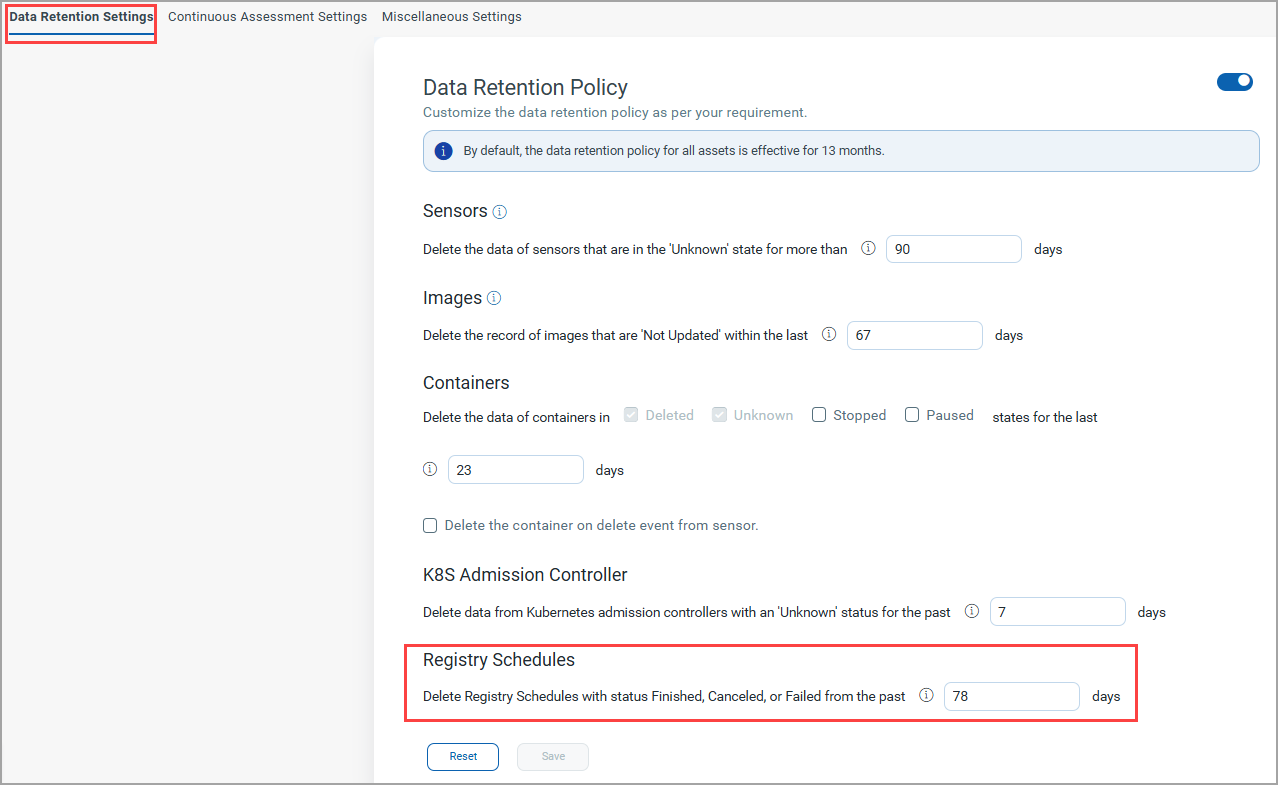
With this release, if the Data Retention Policy is disabled, the default Data retention period for Sensors, Images, and K8S Admission Controllers is 13 months (390 days). Whereas, Containers and Registry Schedules will have a data retention period of 30 days and 90 days, respectively.
The retention periods of Registry Schedules are as stated below.
| Asset | Retention Period |
|---|---|
|
|
|
| - Sensors - Images - K8S Admission Controller |
Min. period - 7 days Max. period - 365 days |
| Containers | Min. period - 7 days Max. period - 30 days |
| Registry Schedules | For Active subscriptions Min. period - 7 days Max. period - 90 days For Expired subscriptions Max. period - 30 days |
|
|
|
| - Sensors - Images - K8S Admission Controller |
390 days (default) |
| Containers | 30 days (default) |
| Registry Schedules | 90 days (default) |
Enhancements in Registry Scan
Previously, Registry Scanning provided limited image details, making it difficult to understand what was being scanned, which images were processed, and where issues occurred during a scan.
With this release, Qualys Container Security has improved Registry Scan Job visibility to address the following challenges:
- Enhanced Scan Status Overview
You can now see the total number of images associated with each Scan Job, along with a clear breakdown of scans in progress and completed scans. - Image to Sensor Traceability
Each scanned image can now be traced back to the specific sensor (UUID) that performed the scan. This makes it easier to retrieve logs or results generated by that particular sensor for troubleshooting or audit purposes.
This enhancement provides greater transparency, faster issue resolution, and improved operational confidence in your registry scanning workflows.
As a part of Registry Scan enhancements, the Scan Jobs tab (Assets > Registries > View Details) is renamed to Schedules. Since the Scan Jobs page represents information about Registry Scan schedules, the more suitable name 'Schedules' is given to the page. Also, the Pending Image column is removed from the Schedules (previously known as, Scan Jobs) page as a new Image Details page is enhanced.
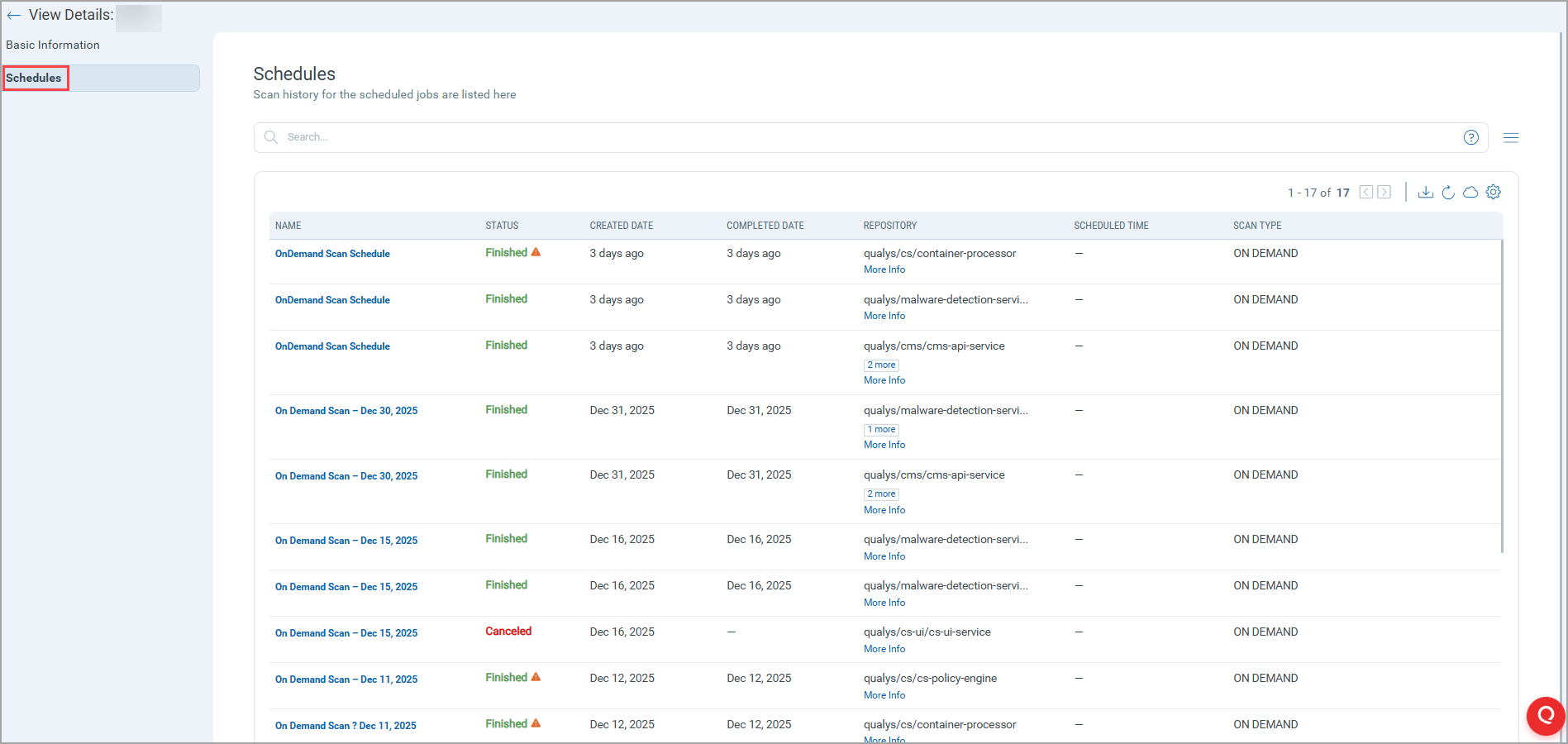
Furthermore, the Executions tab is introduced to provide more details of each schedule. This tab shows a list of all executions applicable to the selected schedule. Each execution shows details such as its creation time and listing end time, Sensor ID of the sensor that has done the listing, any errors that have occured, and so on. This tab also provides the status of the images associated with the scan job.
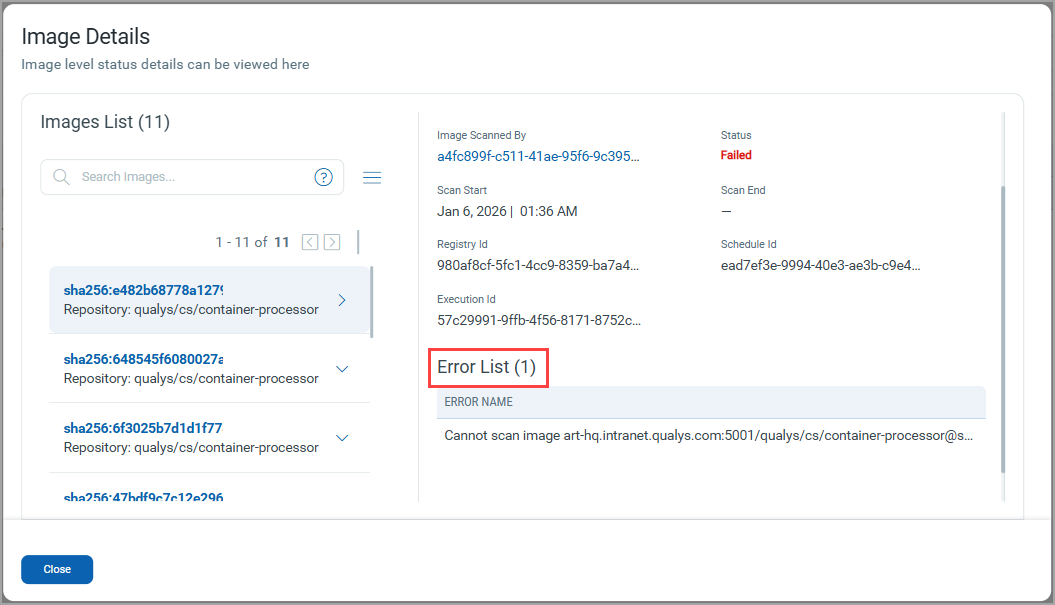
Numbers located under IMAGE STATUS are clickable. You can click on an image number to see details of the images with that status. The Image Details page also shows the list of errors associated with it.
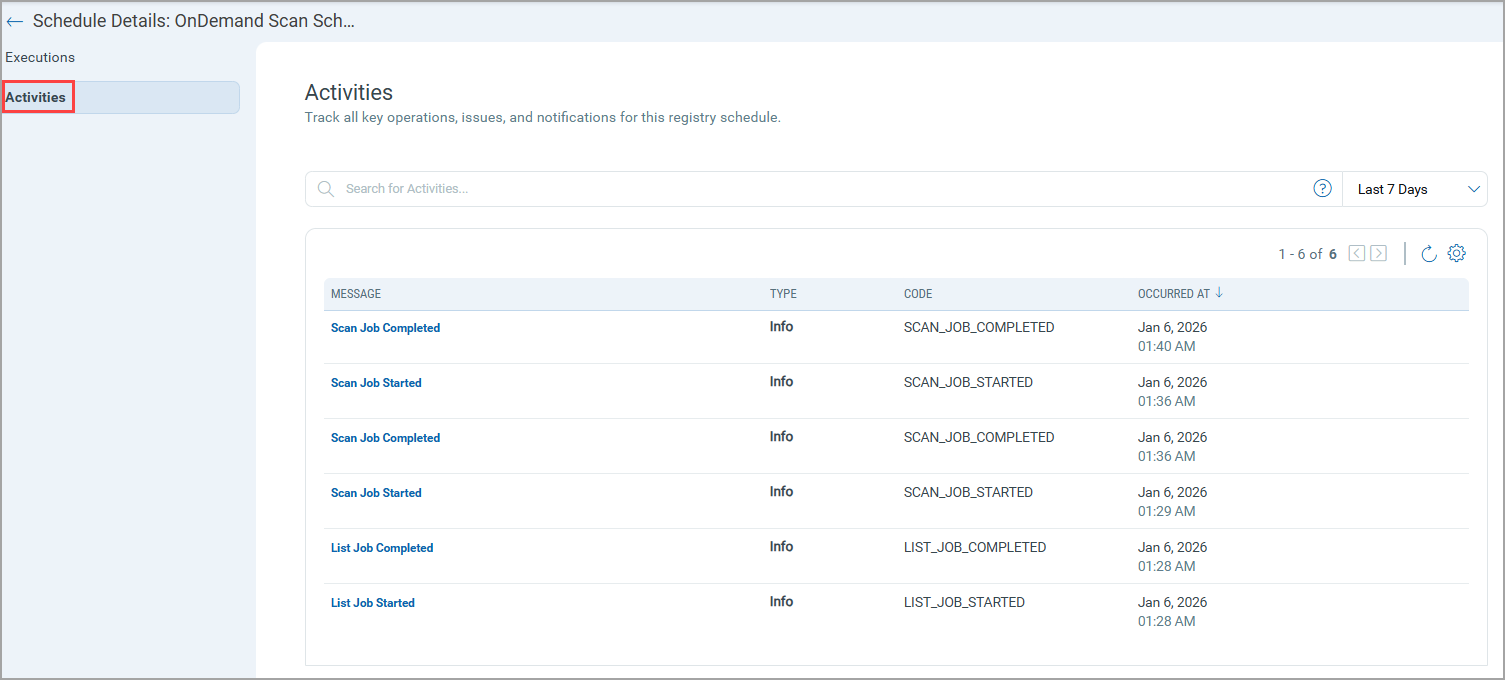
The Activities tab, present in Schedule Details, provides information about key operations, issues, and notifications of the selected schedule.
Continuous Assessment Configuration
Earlier, Qualys Container Security offered 'Continuous Assessment of Images' feature by default and you were allowed to disable it by contacting Qualys TAMs. With this release, we are providing the ability to enable or disable this feature through the Qualys Enterprise TruRisk™ Platform. To support this, the Continuous Assessment Settings tab is introduced under the General tab.
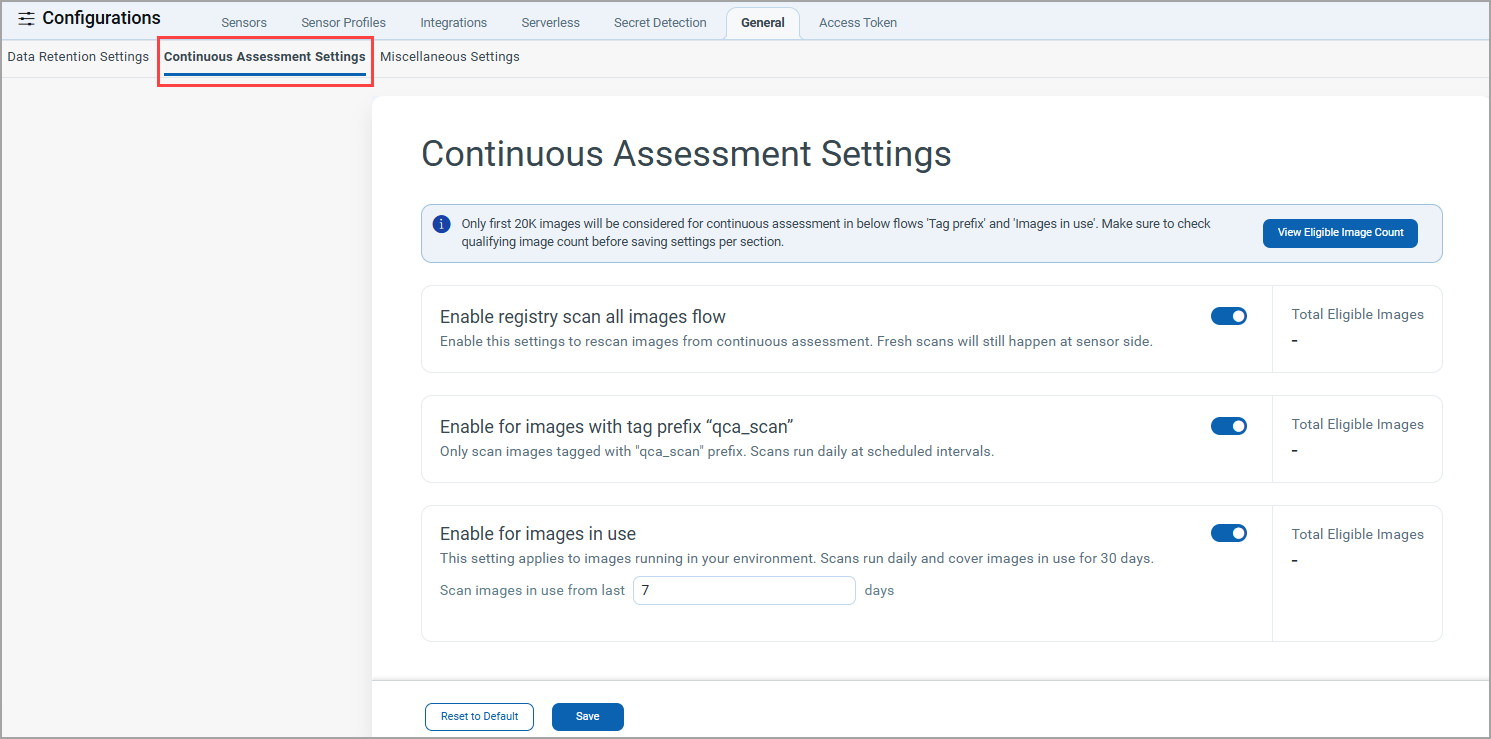
Static and Dynamic Scan Vulnerabilities Merge
Previously, Qualys Container Security used to override existing Static scan results if a Dynamic scan was run later. With this release, both Static and Dynamic Scan data are preserved.
This enhancement introduces a unified approach to vulnerability propagation between static scans and dynamic scans, providing greater flexibility and control for you. The feature ensures that vulnerability data is consistently propagated based on configurable flags at both the customer level and sensor profile level.
Pending Image column is removed from Schedules page.
Upcoming Container Security QQL Standardization
Qualys is implementing standardization of the Qualys Query Language (QQL) across all its modules. As a part of this enhancement, both common and Qualys Container Security (K8s Container Security)-specific QQL tokens are getting updated with new token names that follow a standard, consistent nomenclature.
The standardized CS QQL tokens will be available to you in the upcoming Container Security 1.42 release.
The new token format (token name) will follow this syntax: entity.attribute[.subattribute…]
Below are some examples showing you new names of the existing CS QQL tokens.
| Existing Token | Standardized Token (CS 1.42 onwards) |
| created | asset.createdDate |
| containers | container.cluster.k8s.pod.container |
| status | container.cluster.k8s.pod.status |
| resourcePostures.dateEvaluated | container.k8s.resourcePostures.evaluatedDate |
For any queries, you can reach out to Qualys Support.
Issue Addressed
The following issue has been fixed in this release.
| Category | Issue |
|---|---|
|
Policy Engine |
In some cases, policy evaluation of admission review requests was happening, but the rule outcome was not shown under Events > Cluster Admission > Image Security. |