Container Security Release 1.44
June 30, 2026
AWS Lambda Function Scanning for Vulnerabilities & SCA
With Container Security 1.44.0, Qualys introduces scanning for AWS Lambda functions, enabling continuous security assessment of serverless workloads without manual intervention.
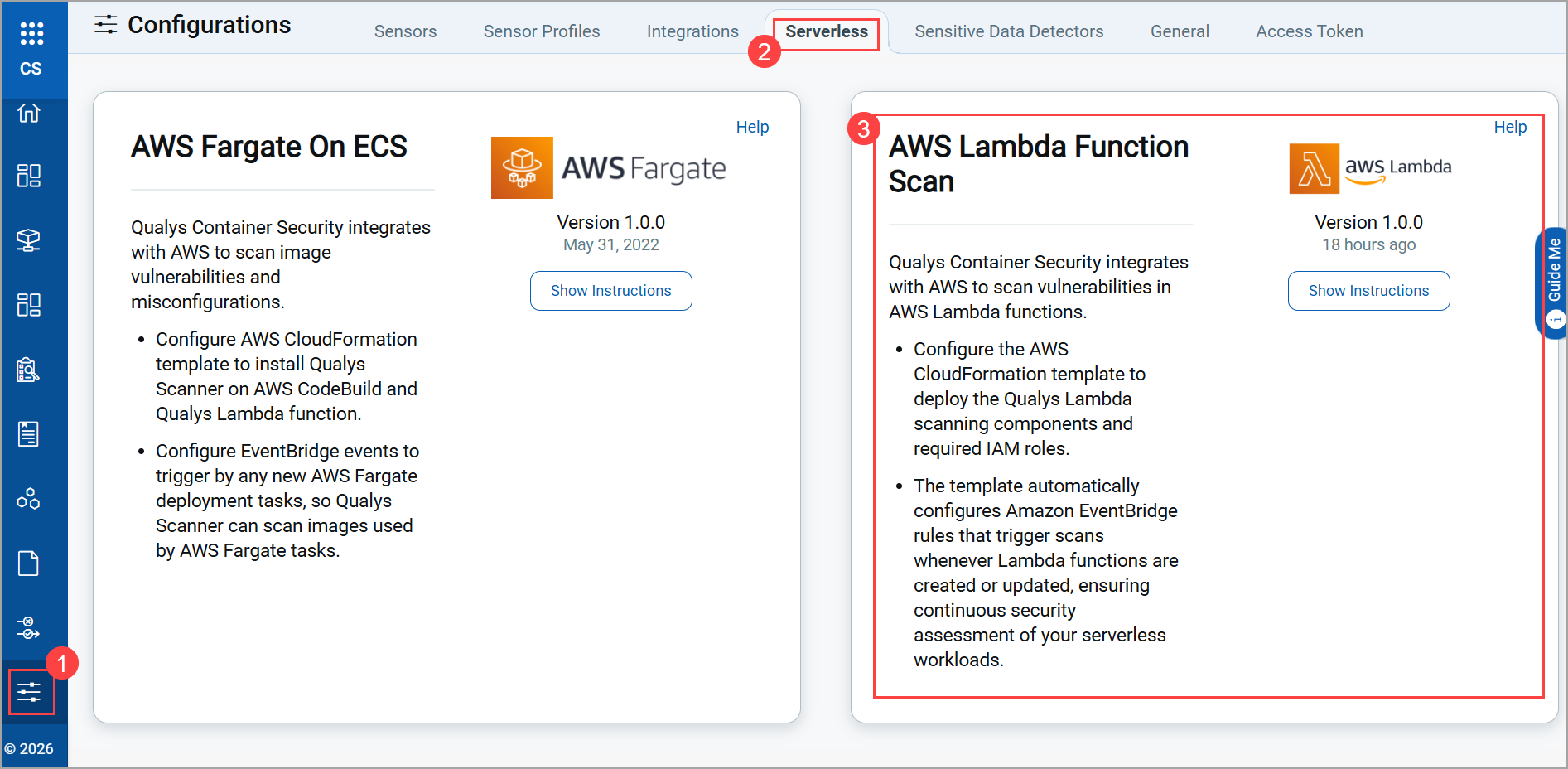
Qualys Enterprise TruRisk™ Platform > Container Security > Configuration > Serverless
Key Benefits
This enhancement offers the following benefits.
- Continuous security for serverless workloads with automated scanning
- Real-time visibility into newly created and updated Lambda functions
- Scalable coverage across accounts and regions
- Reduced operational overhead with event-driven automation
Key Highlights
Below are the important highlights of this feature.
- Automatic Discovery and Initial Scanning
Lambda functions are automatically discovered and scanned during deployment, ensuring immediate visibility into existing serverless assets. - Event-Driven Runtime Scanning
New and updated Lambda functions are automatically scanned based on runtime events, ensuring scan results remain up to date as functions evolve. - Cross-Account and Multi-Region Support
Supports scanning across multiple AWS accounts and regions, providing centralized visibility for distributed serverless environments. - Efficient Scan Management
Built-in mechanisms prevent duplicate scans and ensure reliable processing of scan events.
Deployment Overview
To use this feature, you must deploy the provided CloudFormation templates in your AWS environment. It supports both same-account and cross-account configurations. It is designed for minimal configuration with no manual steps required after setup.
Reporting Behavior
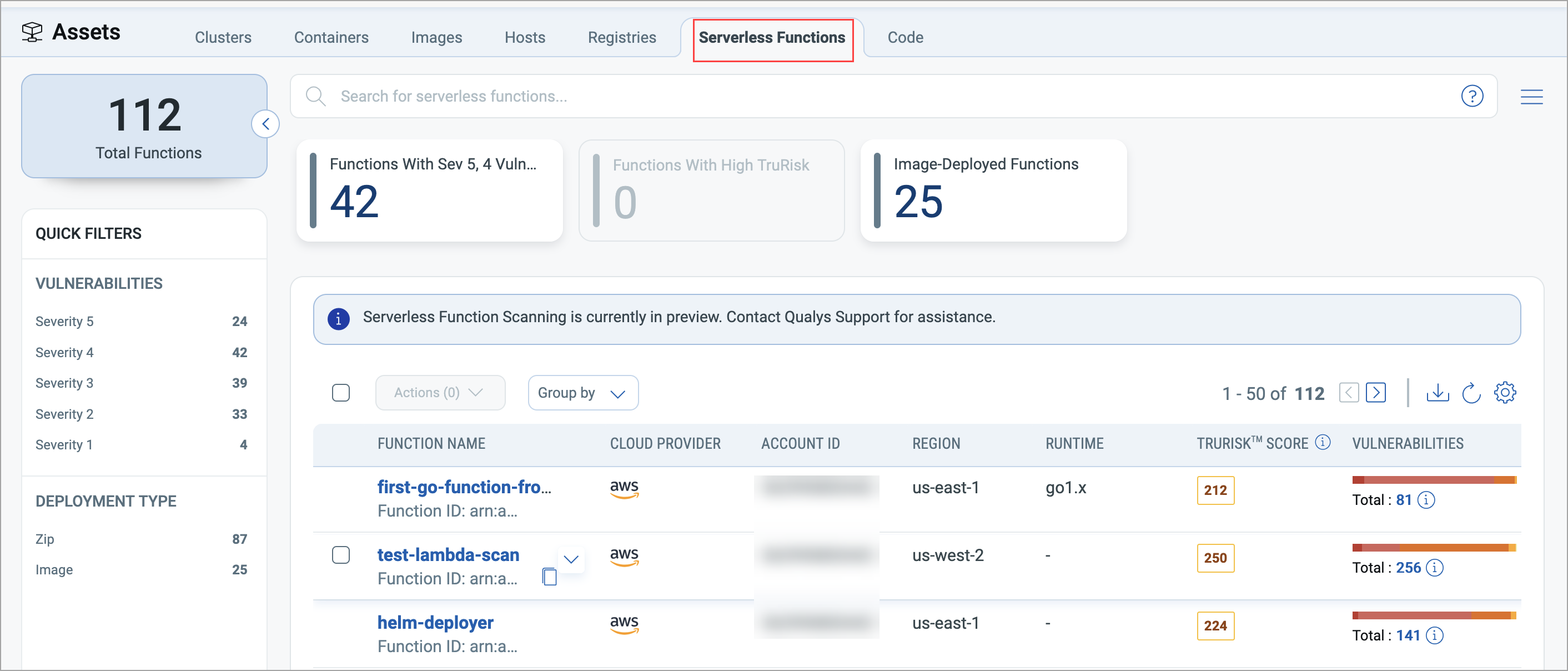
Lambda functions are reported upon creation and initial discovery. Scan results are automatically submitted to the Qualys Enterprise TruRisk™ Platform > Container Security > Assets > Serverless Functions, providing visibility into vulnerabilities and risks associated with serverless workloads.
Code Repository Scanning
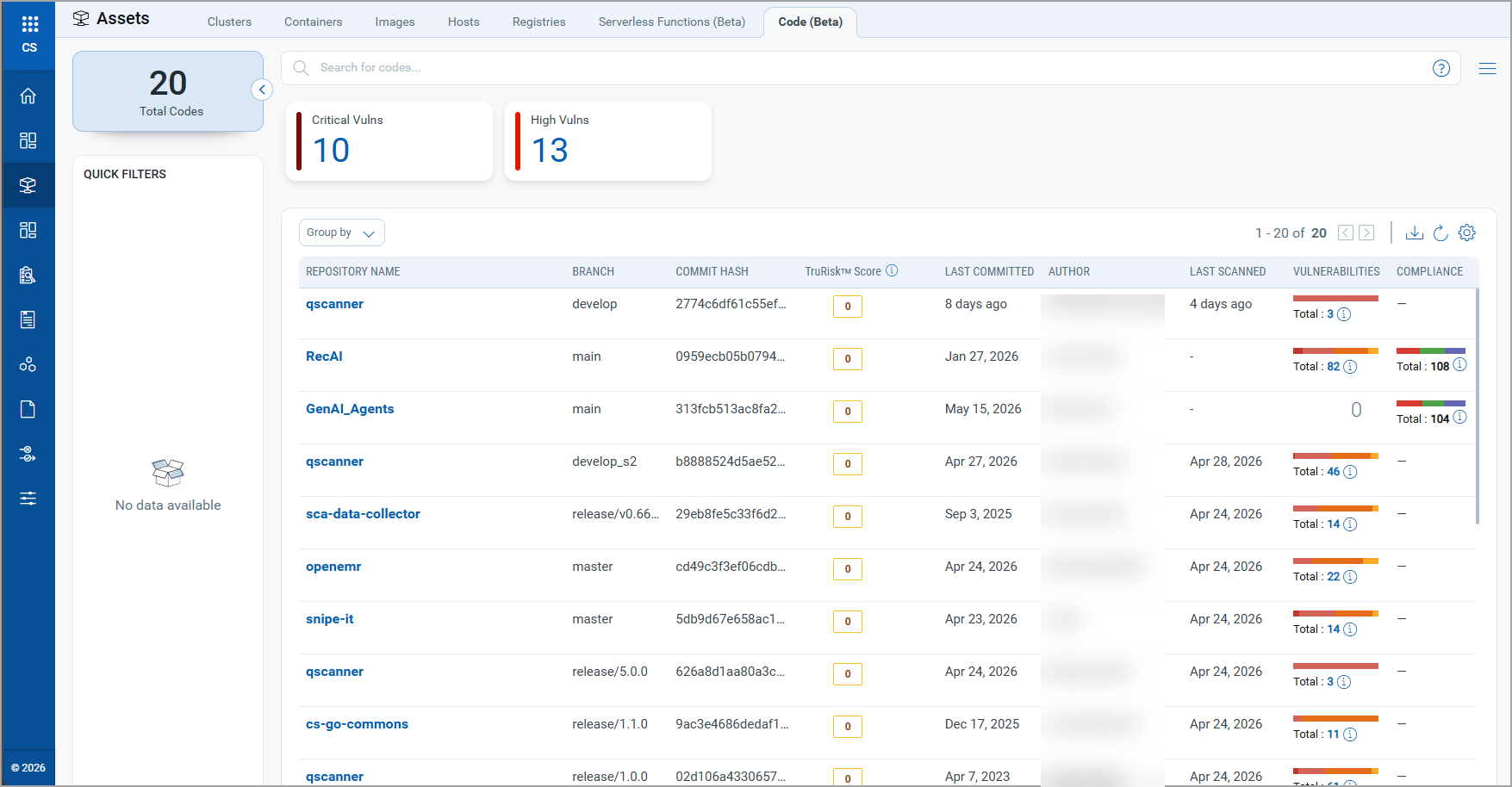
With Container Security 1.44.0, Qualys introduces Code Repository Scanning, enabling customers to view and analyze code scan results directly within the Container Security application. This capability extends visibility beyond containers and images to source code repositories, helping teams identify vulnerabilities, assess risk, review software dependencies, and evaluate compliance earlier in the development lifecycle.
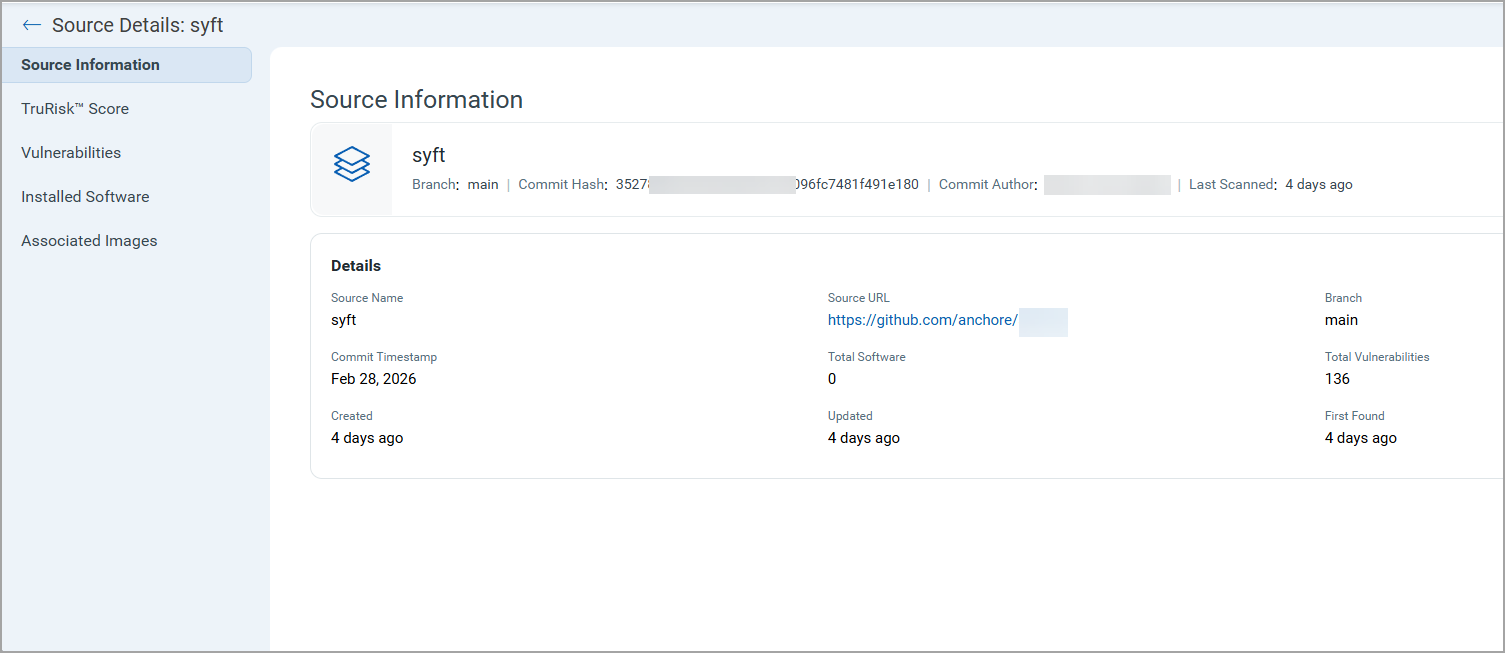
A new Code tab is available under Qualys Enterprise TruRisk™ Platform > Container Security > Assets, providing centralized visibility into scanned repositories. The repository listing page includes:
- Repository name
- Branch and commit details
- Commit author information
- Last committed and last scanned timestamps
- Repository-level TruRisk™ Score
- Vulnerability summary
- Compliance summary
Key Benefits
Code Repository Scanning provides,
- Centralized visibility into repository risk, vulnerabilities, software dependencies, and compliance posture from a single interface
- Identification of security and compliance issues earlier in the development lifecycle
- Prioritization of remediation using TruRisk™ scores
- Investigation of compliance findings with detailed evidence and remediation guidance
- Improved traceability between source code repositories and associated container images
Detailed Repository Insights
You can drill down into repositories to access source information, TruRisk™ scores, vulnerability findings, installed software inventory, associated container images, and compliance results from a single view.
Compliance Investigation and Evidence
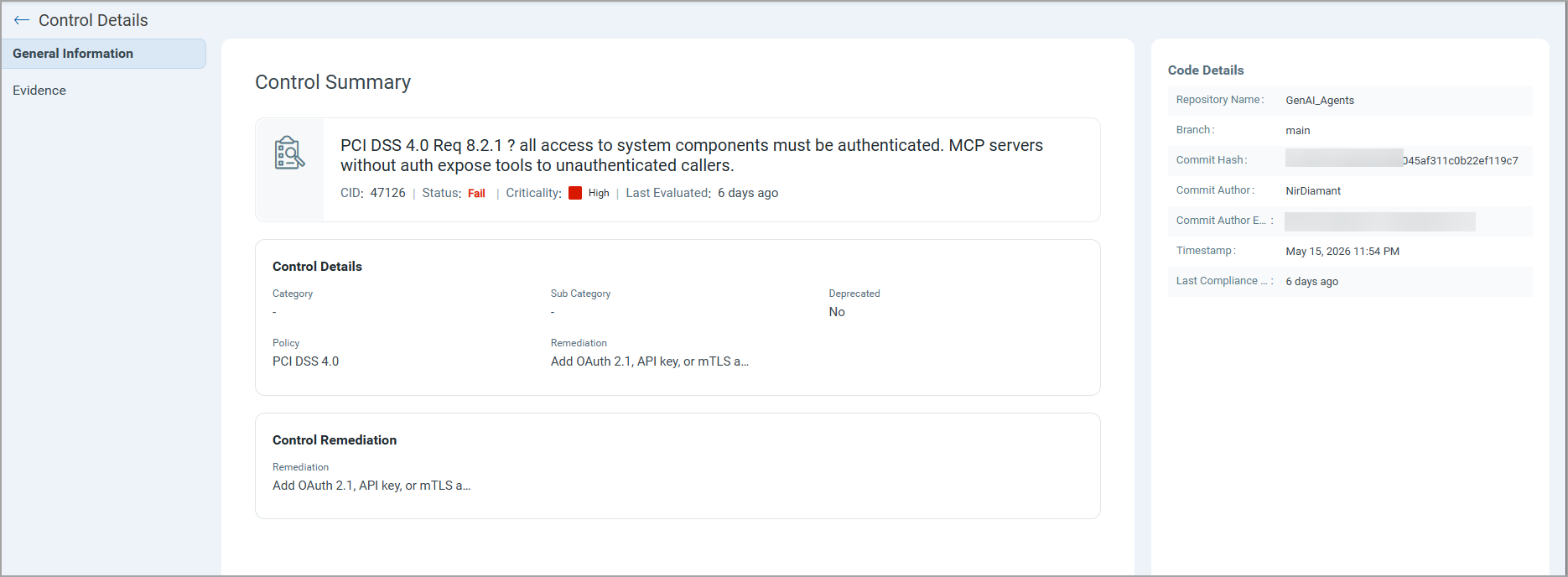
For compliance findings, you can review control details, criticality, remediation guidance, and supporting evidence, including affected files and code references.
Compliance scans currently include the ability to check for non-compliance of code used to build AI Agents. Along with Container Security, this feature requires a Qualys TotalAI license.
Compliance Scanning on Containers
In the past, compliance scanning for running containers (For example, CIS Docker) was only available with dynamic scanning. With this release, Qualys extends its compliance scanning to a static scan of containers, including new compliance checks, updates to the latest CIS for Docker (1.7), enhanced scoring classification, and posture status.
To enable or move to static scan of running containers, please contact Qualys Customer Support.
New Compliance State - SKIPPED
Along with updates to control IDs, a new compliance state - SKIPPED - is now introduced. It indicates controls that cannot be fully evaluated due to limited data availability in the container or image.
This change improves the reporting accuracy by clearly distinguishing failed evaluations from non-evaluable controls.
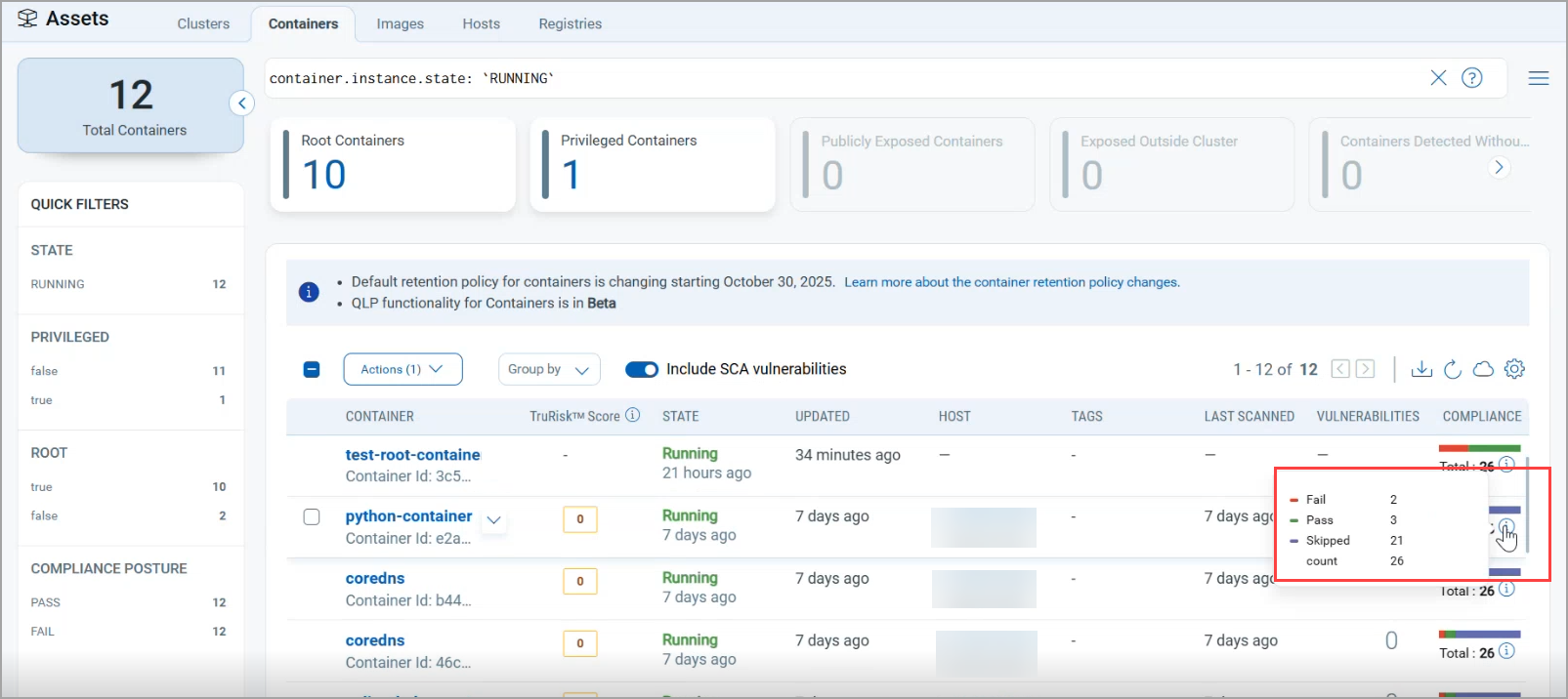
Qualys Enterprise TruRisk™ Platform > Container Security > Assets > Containers
New CIS for Docker Controls
The following compliance controls are introduced to enhance coverage.
- Control ID 10805
- Control ID 19373
- Control ID 19374
- Control ID 19375
- Control ID 19376
- Control ID 19377
The following controls are deprecated and removed.
- Control ID 10810
- Control ID 10715
- Control ID 10808
Updated Criticality Classification
Along with these enhancements, the criticality levels have been simplified and consolidated to improve clarity.
Please ensure any automation/validation scripts are updated appropriately.
| Previous Classification | New Classification |
|---|---|
| MINIMAL | LOW |
| MEDIUM, SERIOUS | MEDIUM |
| CRITICAL, URGENT | HIGH |
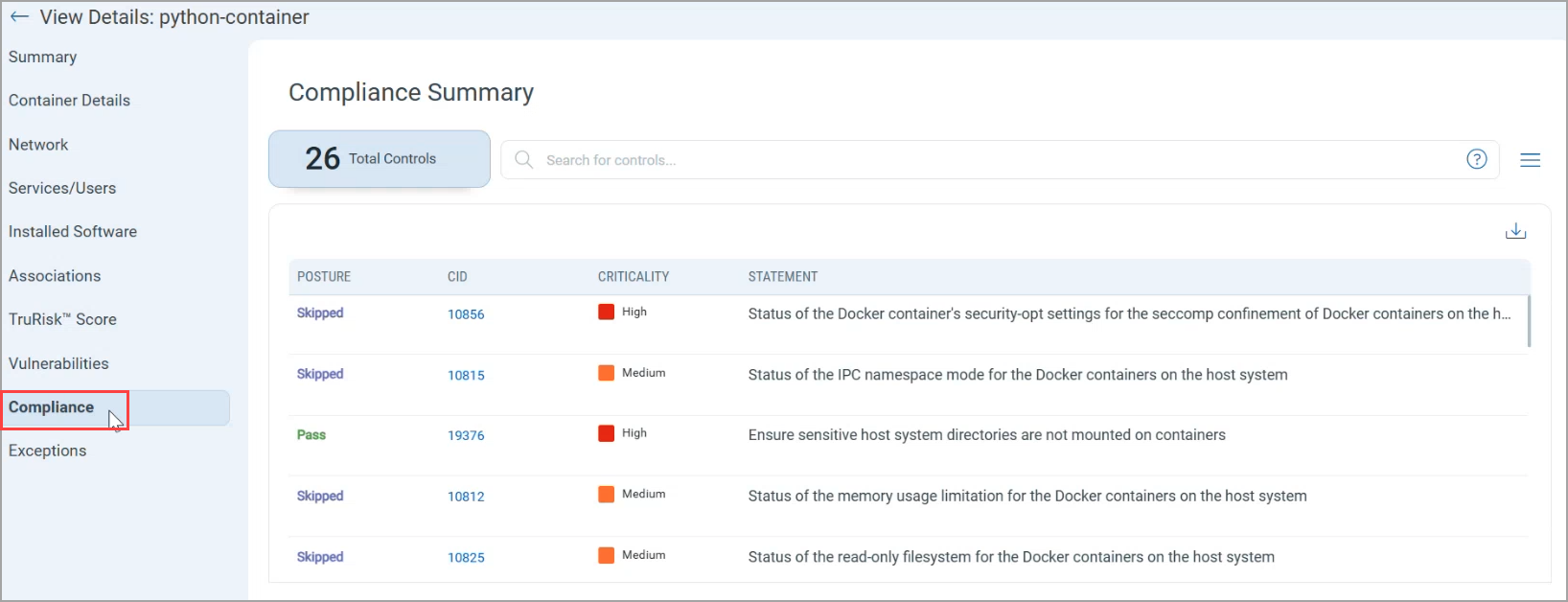
Qualys Enterprise TruRisk™ Platform > Container Security > Assets > Containers > Container Details > Compliance
New Insights for Container Intelligence
With Container Security 1.44.0, Qualys Container Security introduces 16 new Insights and Attack Paths to enhance visibility into the usage of AI, including LLMs and MCP Servers, as well as EOL/EOS Software on container images. These insights are combined to form toxic combinations of risk, including public exposure, excessive privileges, secrets, malware, and more. These insights are available on the Qualys Enterprise TruRisk™ Platform > Container Security > Insights page and help organizations proactively identify outdated components and emerging technologies within their container environment.
The newly added insights cover the following areas.
- End of Life (EOL) Detection
Identify containers running software components that have reached the end of life and no longer receive updates. - End of Support (EOS) Detection
Detect packages and components that are no longer supported by vendors, helping reduce operational and security risks. - AI Models/Packages Identification
Gain visibility into the presence of AI/ML-related packages and models within container images and runtime environments. - MCP Server Detection
Identify containers running Model Context Protocol (MCP) servers to improve tracking of modern AI service components.
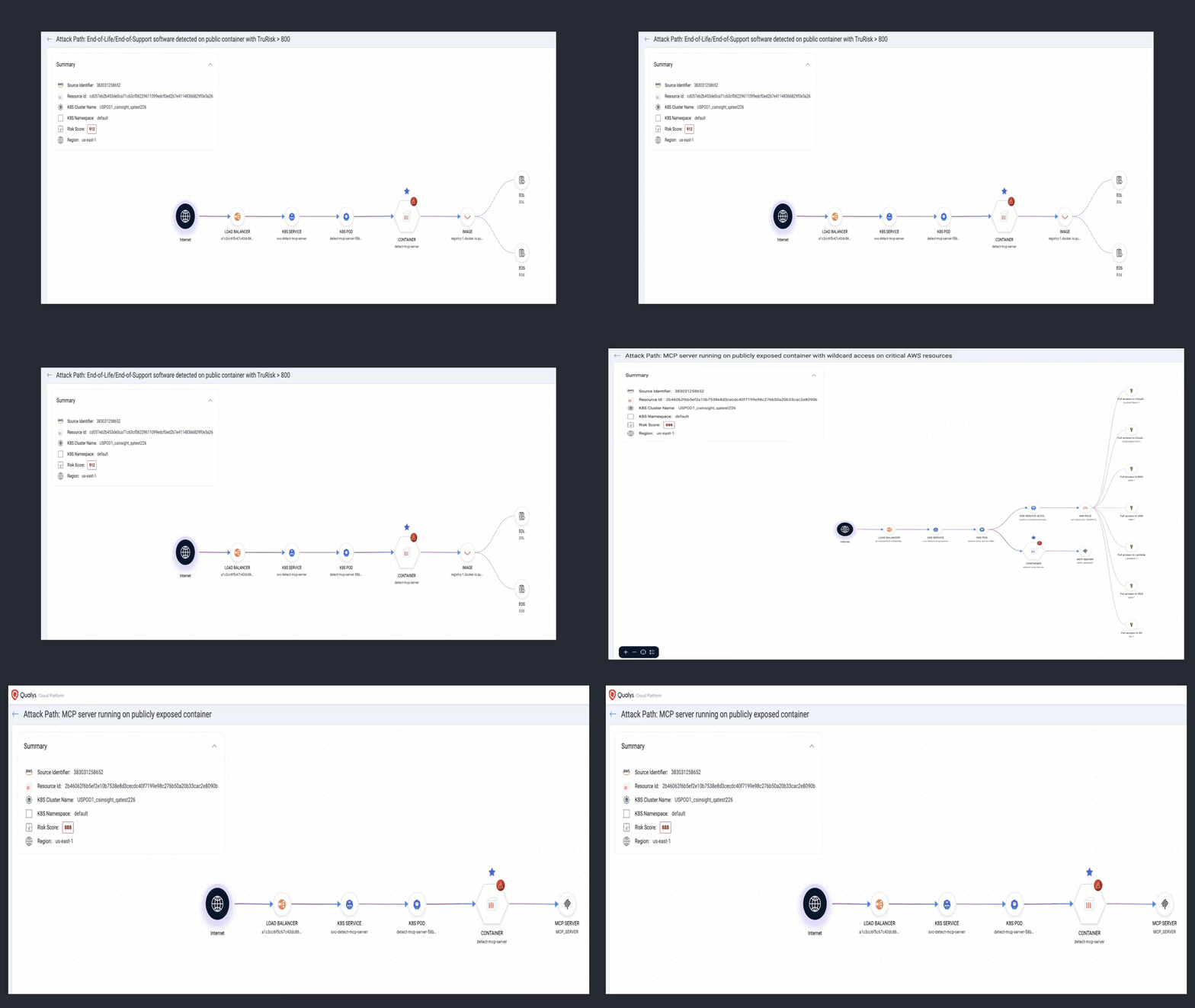
The following 16 controls (CID 5180 to CID 5195) are introduced to support these insights.
| Control ID (CID) | Description | |
|---|---|---|
| 1 | 5180 | End-of-Life/End-of-Support software detected on a public container |
| 2 | 5181 | End-of-Life/End-of-Support software detected on a public container with TruRisk > 800 |
| 3 | 5182 | End-of-Life/End-of-Support software detected in a container image having a critical exploitable vulnerability |
| 4 | 5183 | End-of-Life/End-of-Support software detected in a container image having a critical vulnerability with secrets |
| 5 | 5184 | MCP server running on a publicly exposed container |
| 6 | 5185 | MCP server running on a publicly exposed container with TruRisk > 800 |
| 7 | 5186 | MCP server running on a publicly exposed container having critical exploitable vulnerability |
| 8 | 5187 | MCP server running on a publicly exposed container with excessive cloud permissions |
| 9 | 5188 | MCP server running on a publicly exposed container with wildcard access on critical AWS resources |
| 10 | 5189 | AI software packages detected on a public container |
| 11 | 5190 | AI software packages detected on a public container with TruRisk > 80 |
| 12 | 5191 | AI Models detected on a publicly exposed container |
| 13 | 5192 | AI Models detected on a publicly exposed container with TruRisk > 800 |
| 14 | 5193 | AI Models detected on a publicly exposed container having a critical exploitable vulnerability |
| 15 | 5194 | AI Models detected on a publicly exposed container with excessive cloud permissions |
| 16 | 5195 | AI Models detected on a publicly exposed container with wildcard access on critical AWS resources |
DNS Events for Runtime Monitoring & Threat Detection
With Container Security 1.44.0, Qualys Container Security expands runtime visibility by introducing the ability to collect DNS Events using the Container Runtime eBPF Sensor. Security teams can view DNS Events under Events > Runtime.
The DNS Events tab provides visibility into domain name resolution activity initiated by running containers, allowing customers to monitor and analyze runtime network behavior and external communication patterns.
DNS events capture essential runtime details, including the event timestamp, DNS activity type, source and destination IPs and ports, the queried hostname, request status, the initiating process with command-line details, and the Kubernetes namespace associated with the container or pod.
Key Benefits
This enhancement offers the following benefits.
- Correlated runtime visibility across DNS activity, container, process, and namespace.
- Faster detection and investigation using detailed DNS context, such as hostnames, IPs, ports, and status.
- Clear workload attribution by linking DNS requests to the initiating process and command line.
- Improved understanding of runtime network behavior through visibility into external domain communication.
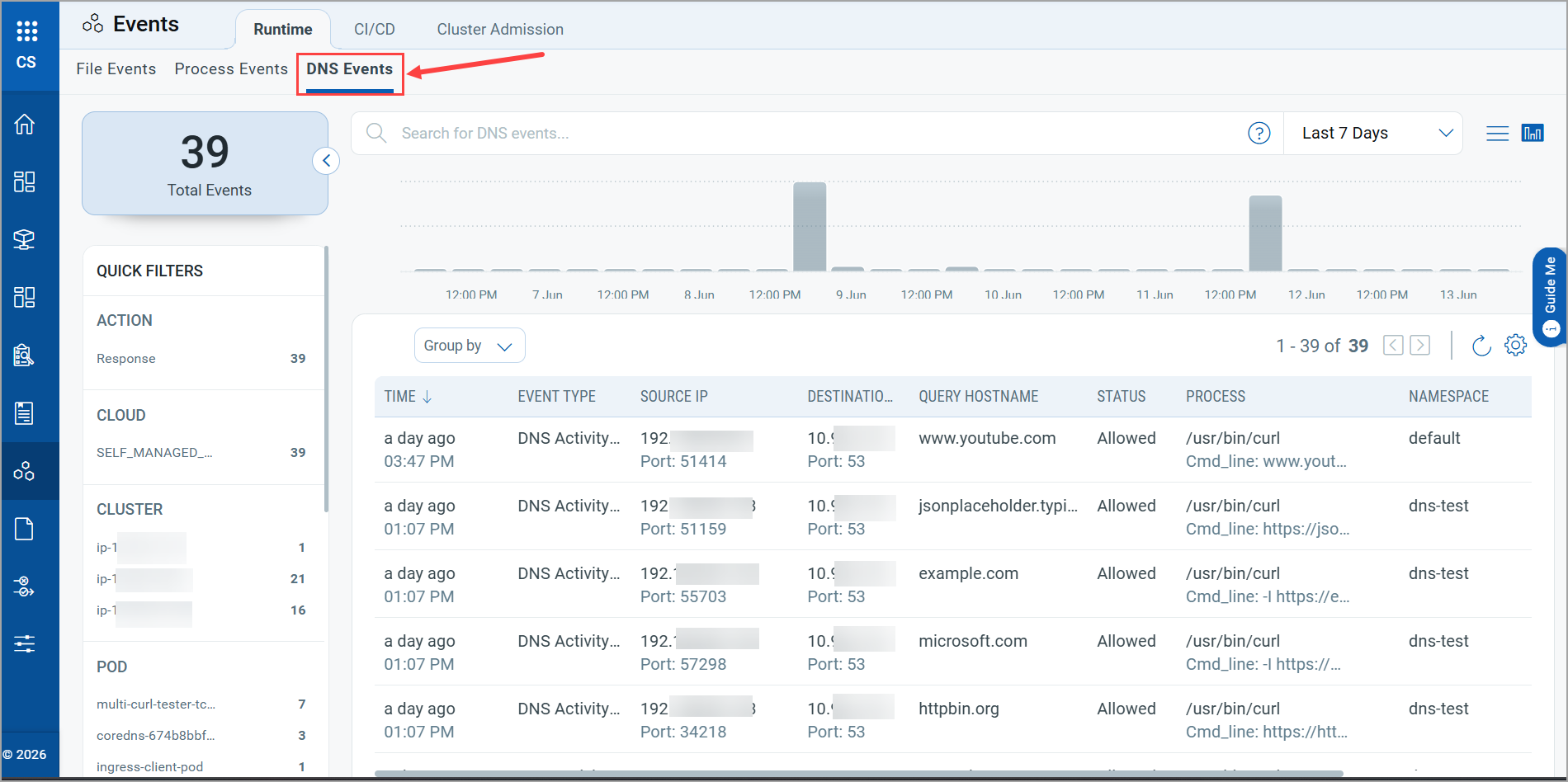
Qualys Enterprise TruRisk™ Platform > Container Security > Events > Runtime > DNS Events
Expanded Label-based Filtering using Cluster Sensor
With Container Security 1.44.0, Qualys enhances container filtering capabilities by improving support for Pod, Namespace, and Cluster labels, enabling more flexible and granular container discovery and analysis.
With this enhancement, the label-based filtering is extended on the Container Listing page.
- Pod labels
- Namespace labels
- Cluster labels
- Node Labels For Red Hat OpenShift Clusters
These labels are sourced from the cluster sensor and mapped to container entities for efficient filtering.
Pod labels are now mapped directly to container entities during container creation using data from the Kubernetes inventory service with the help of the General Sensor, enabling filtering based on pod-level metadata. Additionally, namespace support is enhanced by creating dedicated namespace entities in the Qualys Enterprise TruRisk™ Platform upon receiving namespace and container events, with cross-indexed labels similar to node labels, enabling efficient filtering based on namespace-level metadata.
This enhancement strengthens the container listing experience by enabling label-driven filtering across multiple Kubernetes dimensions, making it easier to identify, organize, and analyze container workloads at scale.
Optimized Image Scanning Based on Configuration Changes
Previously, images were re-scanned only when their content changed. As a result, updates to scan settings, such as vulnerability, compliance, malware, or secret scanning configurations, were not always reflected in scan results. With Container Security 1.44.0, images are now automatically re-scanned whenever either the image changes or relevant scan configurations are updated, ensuring scan results always reflect the latest security and compliance policies.
Enhanced SCA Visibility and Reporting Controls
With Container Security 1.44.0, Qualys introduces new controls and reporting options in Qualys Enterprise TruRisk™ Platform > Container Security that give you greater visibility and control over SCA (Software Composition Analysis) vulnerabilities, both with and without SCA data.
Toggle for SCA Vulnerabilities
A new Include SCA Vulnerabilities toggle is available on the following pages.
- Assets > Images
- Assets > Containers
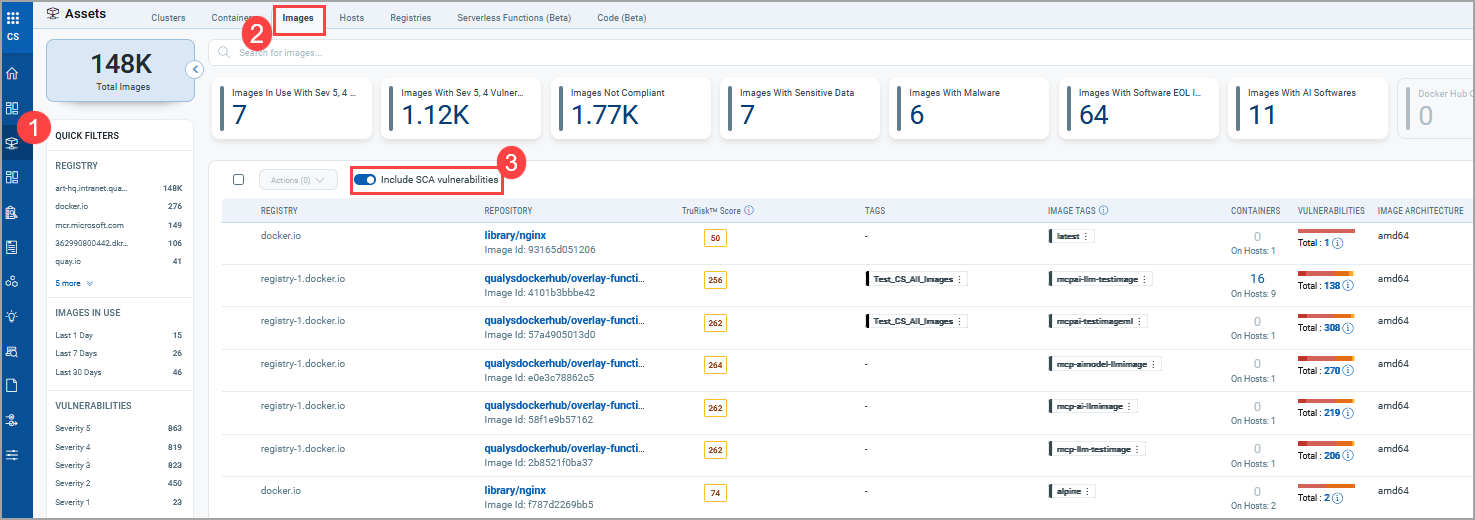
Qualys Enterprise TruRisk™ Platform > Container Security > Assets > Images
You can now easily view total vulnerabilities, including SCA, and compare against vulnerabilities without SCA.
This provides immediate clarity on how SCA contributes to overall vulnerability counts.
Enhanced Reporting Options for SCA
When creating reports, you can now explicitly choose whether to:
- Include SCA vulnerabilities
- Exclude SCA vulnerabilities
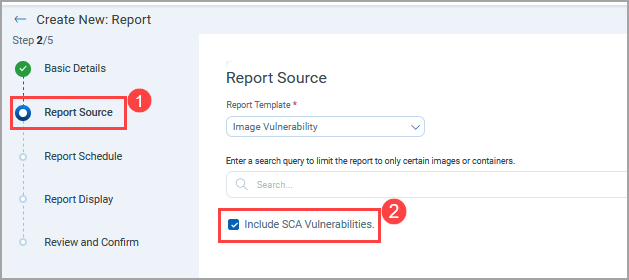
Qualys Enterprise TruRisk™ Platform > Container Security > Reports > Create New Report > Report Source
This enhancement enables more flexible reporting based on audience needs (security, compliance, leadership).
Sensor Profile Control for SCA Data Collection
A new Configure SCA Vulnerabilities option is introduced while creating a new profile. You can control whether SCA data is collected during scans, directly from the Qualys Enterprise TruRisk™ Platform.
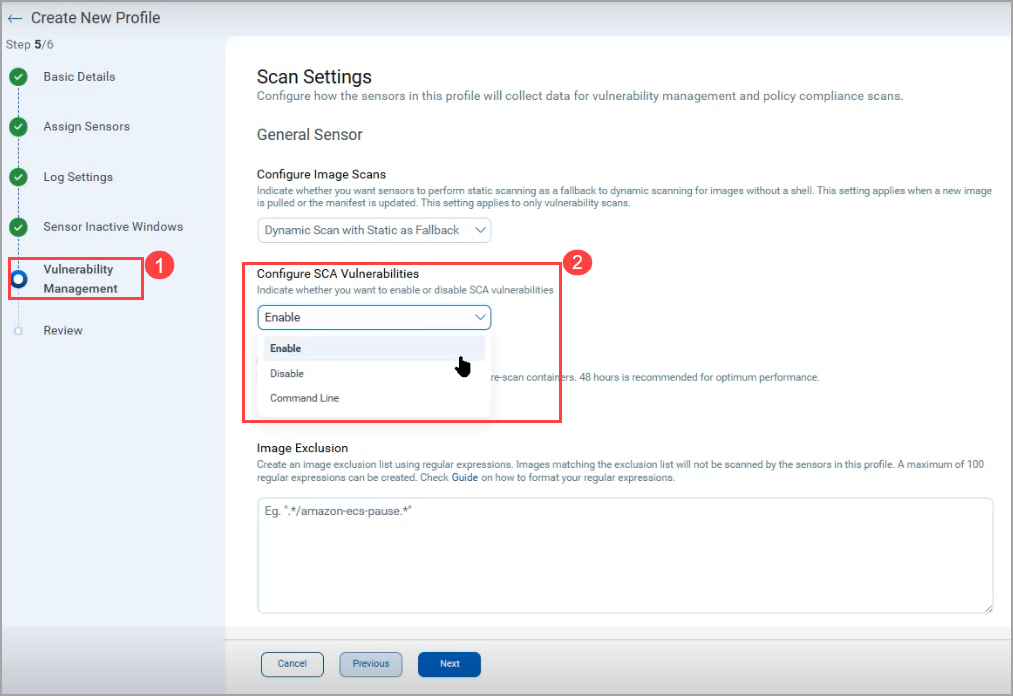
Qualys Enterprise TruRisk™ Platform > Container Security > Configurations > Sensor Profiles > New Sensor Profile > Vulnerability Management > Scan Settings
These enhancements enable a clear comparison of vulnerabilities with and without SCA, give you greater control over what data is collected and reported, improve transparency into SCA’s impact on overall risk posture, and support more flexible, audience-specific vulnerability reporting.
Granular Scan Status for Registry Scanned Images
With Container Security 1.44.0, Qualys improves registry scan transparency by introducing separate status tracking for each scan type, providing clearer visibility into scan progress and results. Earlier, you had limited visibility into individual scan results, making it difficult to identify which scans succeeded or failed and leading to confusion when results appeared incomplete or inconsistent.
With this enhancement,
- Scan status is now tracked separately for:
- Vulnerability
- Compliance
- Secrets (Supported by CS Sensor 1.44 or later. Not applicable with older sensor versions.)
- Malware (Supported by CS Sensor 1.44 or later. Not applicable with older sensor versions.)
- Each scan type includes:
- Its own status
- Its own error details
- Scan types that are not enabled are clearly marked as Not Configured.
The overall scan job status is now derived from the combined outcome of all configured scan types, instead of being overwritten by individual results.
Provides more accurate job states such as: Completed, Failed, Partially Completed, In Progress.
When multiple sensors are configured, having different configurations, and images are listed by one sensor and scanned by the other sensor. This, in turn, showed the Malware and Secret errors as 'Requested Scan type not configured'.
Expanded Coverage
Secrets and Malware scan statuses are now fully tracked and visible. Scan jobs are completed only after all configured scan types reach a final state.
These enhancements,
- provide clear visibility into the status of each scan type
- enable faster troubleshooting with detailed status and error insights
- ensure accurate job tracking without status overwriting
- allow better validation of configured scan types against expected outcomes
- Existing behavior is maintained for environments using older sensors, ensuring no disruption to current workflows.
- For Registry scans performed using CS Sensor version 1.43 or earlier, only Vulnerability and Compliance scans are tracked and displayed as 'Completed'. While Secrets and Malware scans are still executed, but their scan status is displayed as 'Notconfigured' in Image Scan Details under Registry Scan Jobs for these older sensor versions.
Sensitive Data Detection (Previously Secret Detection)
With Container Security 1.44.0, Secret Detection is renamed to Sensitive Data Detection to better reflect its expanded capabilities. This enhancement improves detection accuracy and performance, reduces false positives, and supports the identification of PII, PCI, and PHI data within container images.
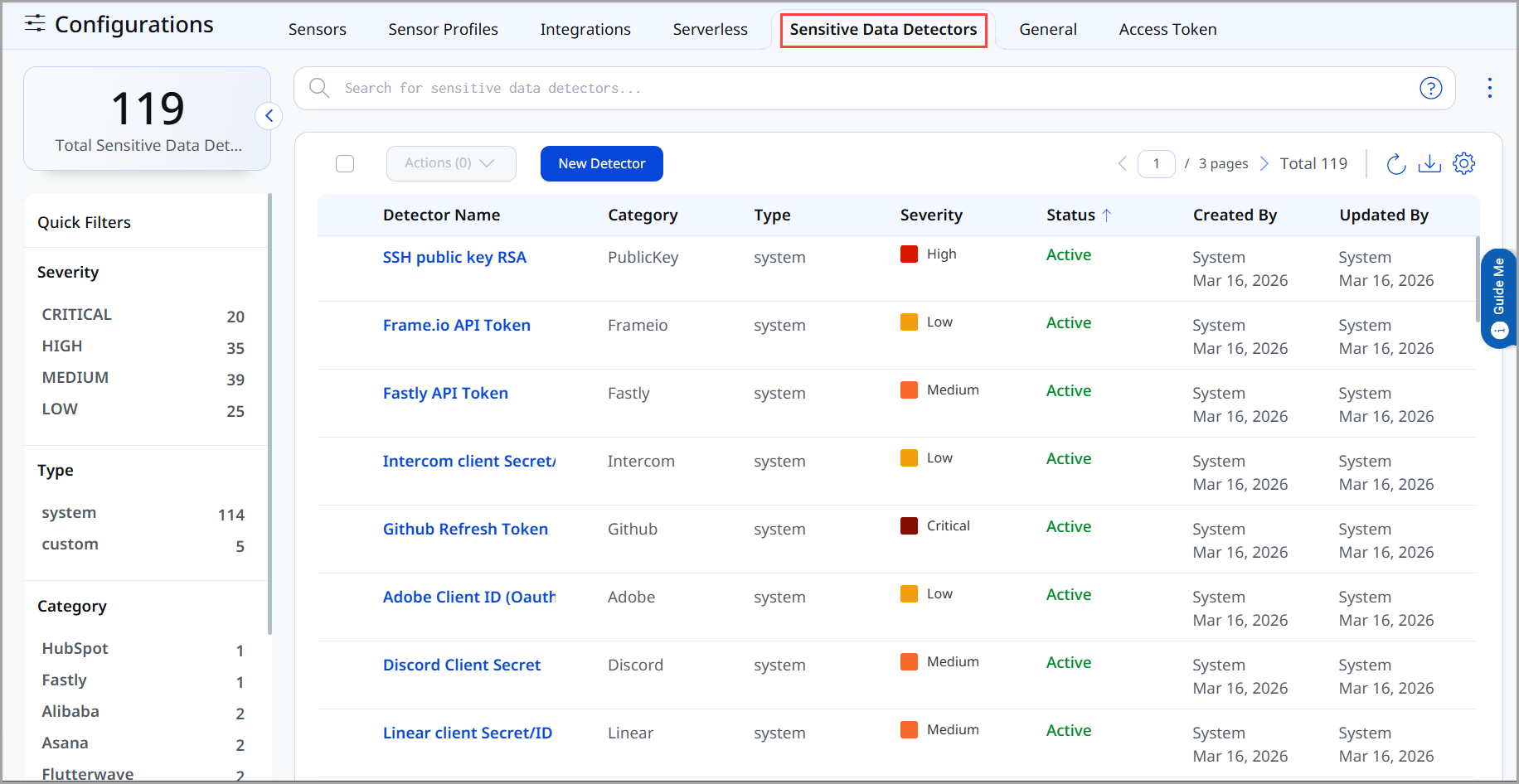
Qualys Enterprise TruRisk™ Platform > Container Security > Configurations > Sensitive Data Detectors
New Rules & Enhanced Detection
New rules are introduced to strengthen the detection of Personally Identifiable Information (PII), Payment Card Industry (PCI) data, and Protected Health Information (PHI).
- Enhanced rule metadata improves detection precision and scanning efficiency.
- Support for exception rules allows approved patterns to be excluded from findings.
- Content exclusion capabilities help filter out irrelevant data, significantly reducing false positives.
- Stronger validation ensures sensitive data rules are configured correctly and provides clearer error handling for misconfigurations.
Reliability and Stability Improvements
Sensitive data findings now remain consistent across re-scans, ensuring accurate tracking and reporting over time. Critical stability issues are also resolved to prevent data loss and ensure reliable detection across container runtimes.
QQL Support for Sensitive Data Category Filtering
You can now filter container images based on the category of detected sensitive data using a new QQL token:
container.image.hasSensitiveDataCategory
Deprecation of Google Container Registry (GCR)
Starting with Container Security 1.44.0, Google Container Registry (GCR) support is deprecated and no longer available as a selectable registry type 'Create New: Registry' workflow in Qualys Enterprise TruRisk™ Platform.
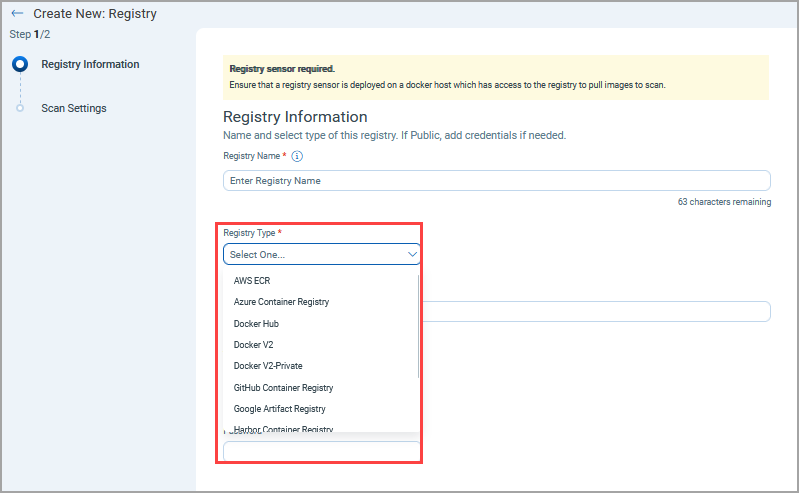
Qualys Enterprise TruRisk™ Platform > Container Security > Assets > Registries > Create New
With this change, you cannot add or configure new GCR registries. Existing GCR integrations remain supported through Qualys Container Security APIs.
Qualys Container Security continues to:
- Scan previously onboarded GCR images
- Allow you to access historical GCR scan data
- This change carries no impact to already ingested or scanned GCR assets.
- You are advised to transition to Google Artifact Registry (GAR) for all new integrations and scanning needs. GAR is fully supported and available in the registry selection options.
This update aligns with Google’s deprecation of GCR in favor of GAR.
Removal of GCR support:
- Avoid user confusion
- Ensure alignment with currently supported registry services
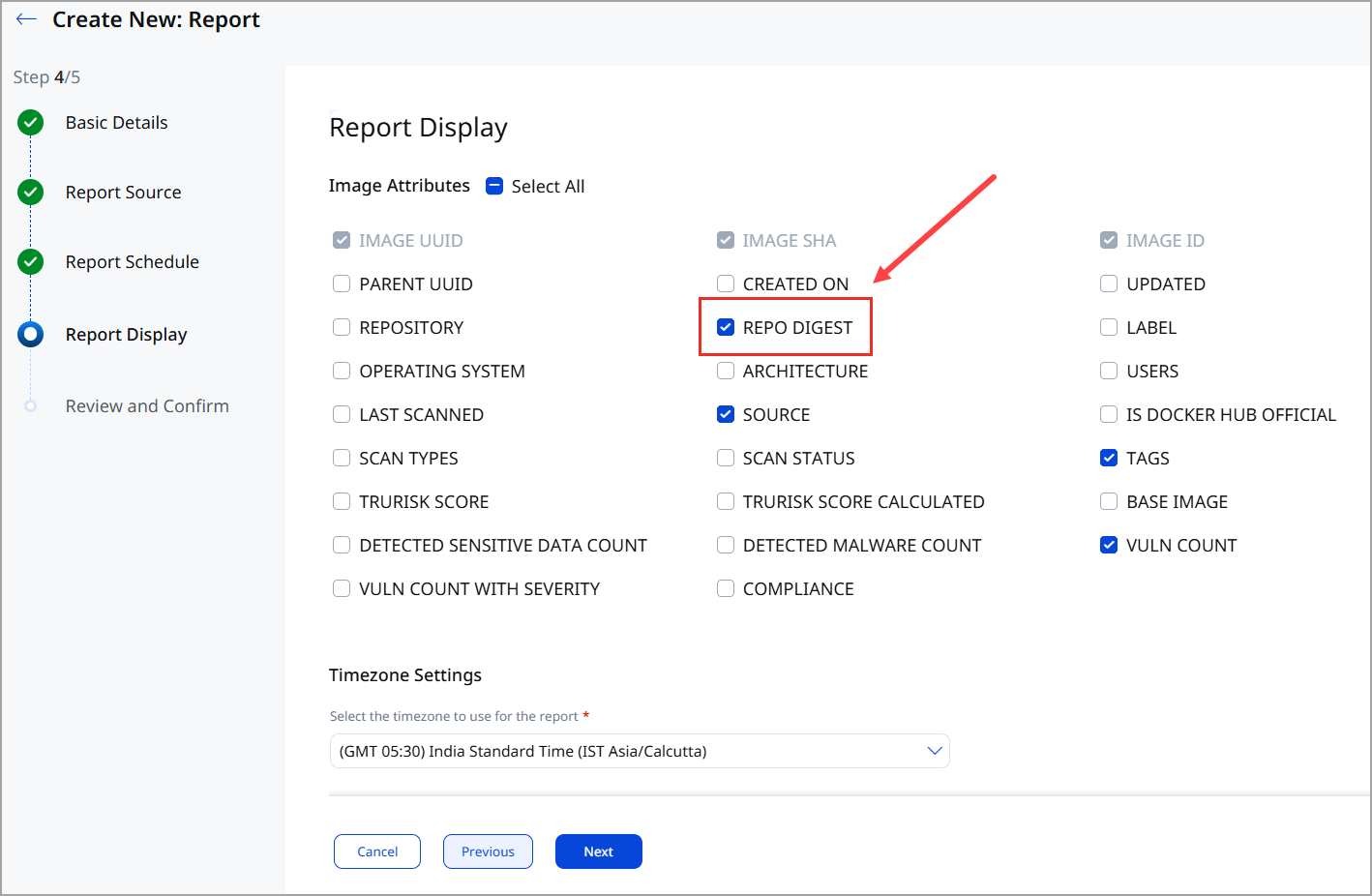
'Repo Digest' Field Support in Images Reports
Container Security now supports the Repo Digest field in report generation for the Images report template. This enhancement enables you to include container image repository digest values directly in reports, providing a scalable and reliable way to identify and track container images across environments.