Container Security Release 1.45
September 08, 2026
(Updated on September 25, 2026)
Container Security 1.45 introduces AWS Fargate workload-level vulnerability tracking using QLP, Azure Function scanning, active package-in-use detection, runtime network event monitoring, subscription-level OAuth for QScanner, and configurable CI/CD policy audit and enforce modes.
New Feature
Introduced AWS Fargate Container QLP: Workload-Level Vulnerability Tracking
What'S NEW For You
You can now track and manage vulnerabilities at the individual container instance level for AWS Fargate workloads using Qualys Locator Path (QLP), giving you a workload-level risk view that maps directly to what is running in your environment.
Container Security now tracks and manages vulnerabilities at the individual container instance level for AWS Fargate workloads using Qualys Locator Path (QLP). Vulnerability findings from image scans propagate to specific Fargate container instances, giving you a workload-level risk view that maps directly to what is running in your environment.
A new Container QLP tab is available under Qualys Enterprise TruRisk™ Platform > Container Security > Assets. Each QLP record is identified by a unique combination of Workload ID, Image Digest, and Container Name. This tab also shows more details about a QLP, such as First Seen, Last Updated, Cloud Tags, and so on.
You can filter and group QLP records using QQL tokens and Group By, and access the data through the API. The QLP path format is: <cloudProvider://source/region/accountId/clusterName/workloadId/taskDef/containerName/imageDigest/arch>
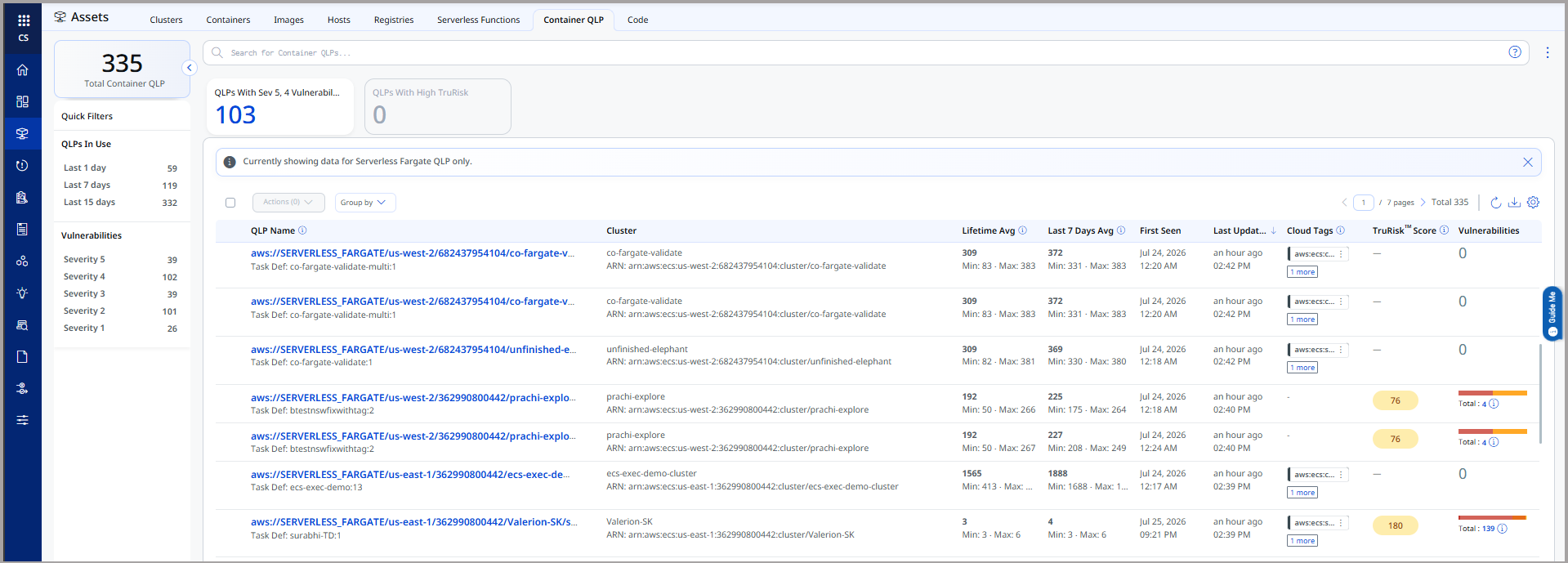
The following are the key benefits of Container QLP:
- Workload-level risk view that maps vulnerability findings directly to running Fargate container instances
- Unique identification of each container workload by image and architecture combination, eliminating ambiguity across tasks
- Automatic inventory upload for existing ECS Fargate tasks and services when the CloudFormation stack is deployed
- QQL tokens, Group By, and API support for flexible querying and integration
New Cloud Operator & Updated CFT
A new Cloud Operator version and updated CloudFormation templates (CFTs) are released alongside this feature. The updated CFT includes additional parameters to enable Fargate inventory collection through the Service Account Scanning stack. You can also enable or disable Lambda scanning from the CFT.
The updated CloudFormation template includes new fields for configuring Fargate inventory collection and Lambda scanning settings.
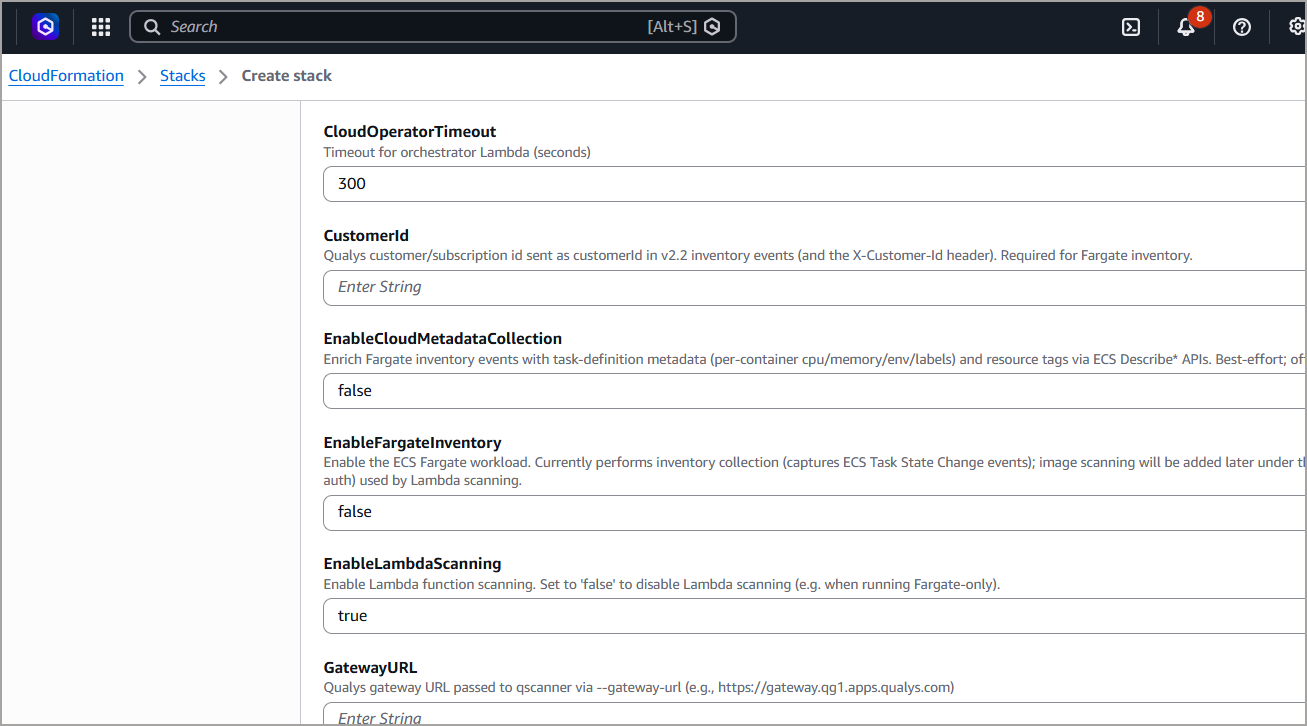
New Feature
Introduced Azure Function Scanning: Vulnerability and SCA Detection for Serverless Functions
What'S NEW For You
You can now scan Microsoft Azure Functions for vulnerabilities and SCA findings from a single platform, extending serverless scanning coverage from AWS Lambda to Azure for both image-based and deployment-based function types.
Qualys now provides the ability to scan Microsoft Azure functions for vulnerabilities and SCA Findings. This extends serverless scanning coverage from AWS Lambda to Azure, giving you a unified security view across cloud providers from a single platform.
Both Azure Function deployment types are supported.
- Image-based Azure Functions
- Deployment (Zip) Azure Functions
Scan results - including vulnerability findings, TruRisk™ Score, and installed software - are available for all OS and non-OS packages detected in the scanned functions. You can download the results from the Qualys Enterprise TruRisk™ Platform > Container Security > Assets > Serverless Functions.
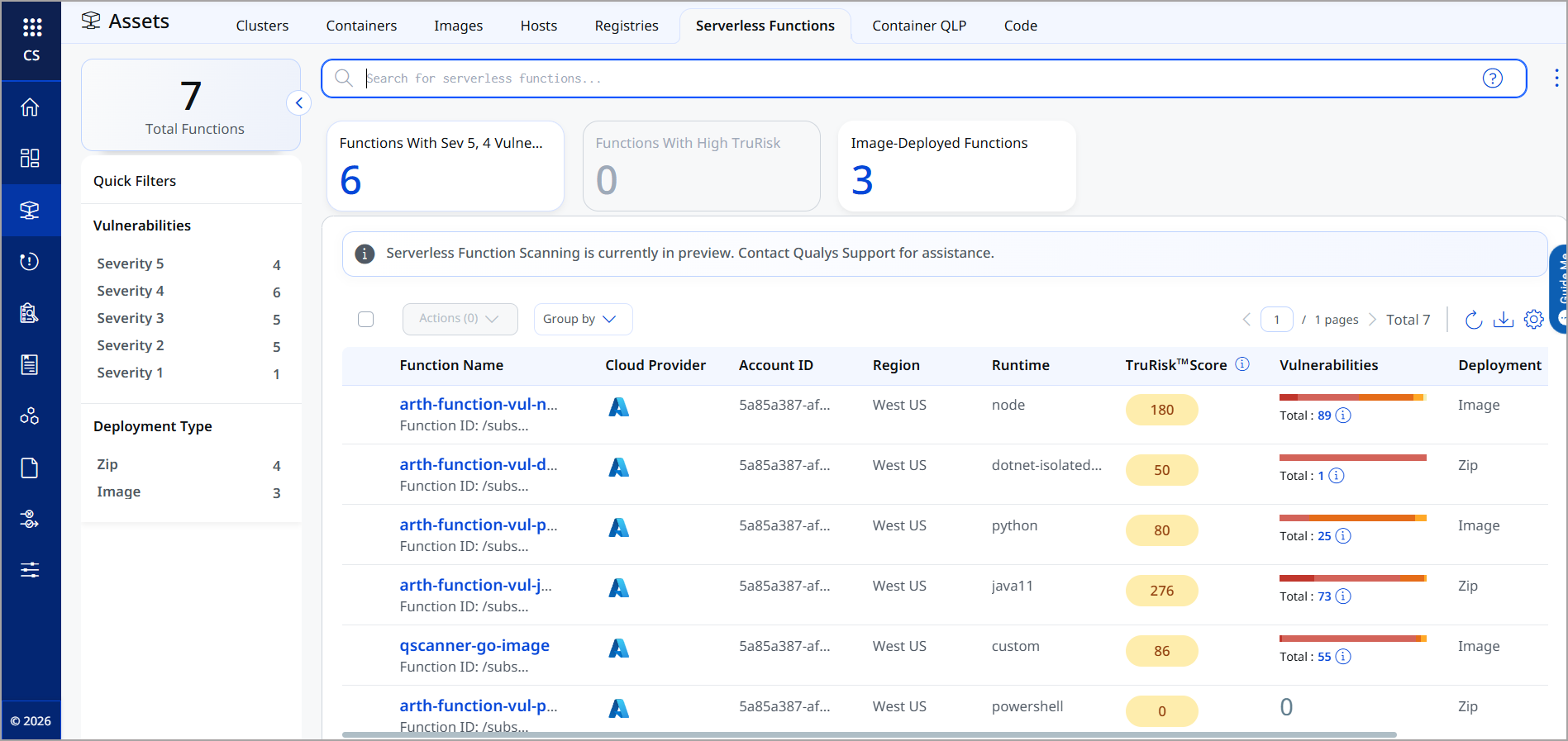
The following are the key benefits of Azure Function Scanning:
- Unified vulnerability visibility across AWS Lambda and Azure Functions from a single platform
- Real-time detection of vulnerabilities in both image-based and deployment-based Azure Functions
- End-to-end scan processing with full vulnerability, TruRisk, and software inventory reporting
- Downloadable scan results for both OS and non-OS packages
To scan Azure Functions, you need the following Azure credentials.
| Subscription ID | The Azure subscription identifier for your environment. |
|---|---|
| Tenant ID | The Azure Active Directory tenant identifier. |
| Client ID | The application (client) identifier for OAuth authentication. |
| Client Secret | The client secret associated with the registered application. |
Enhancement
Enhanced Lambda Function Scanning: Image Association and Scan Data Retention
What Changed For You
AWS Lambda function scans now include image association and historical data retention, giving you improved traceability, reporting, and lifecycle visibility. You can configure the retention period between 7 and 30 days.
AWS Lambda function scans now include image association and historical data retention. Lambda functions scanned by Qualys are associated with their container images, and scan data is retained over time for improved traceability, reporting, and lifecycle visibility.
A new Serverless Functions section is now available under Configurations > General > Data Retention Settings. You can configure how long serverless function records are retained. The retention period is configurable between 7 and 30 days. Serverless functions that are Not Updated within the configured period are automatically deleted.
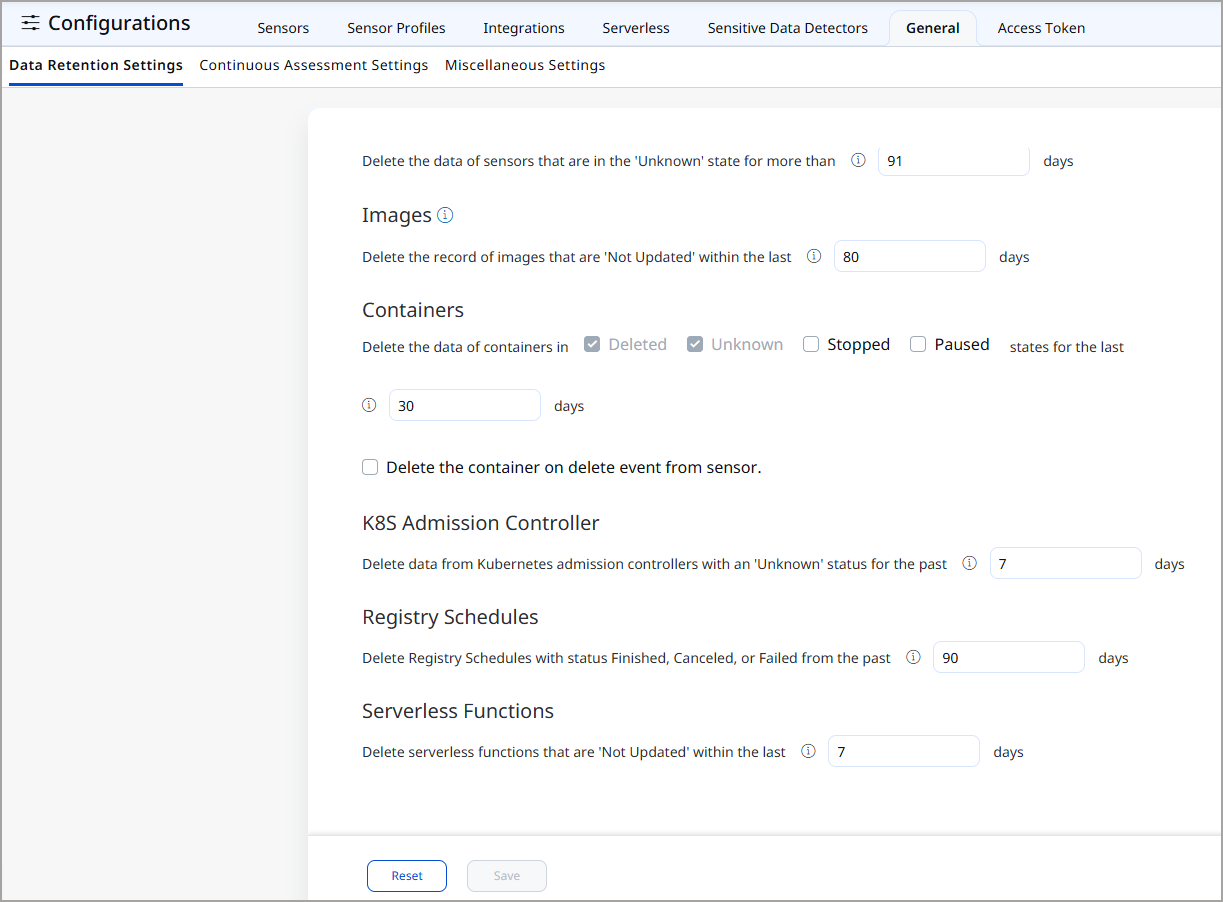
New Feature
Introduced Active Package Detection: Runtime Package-in-Use Visibility
What'S NEW For You
You can now identify which installed packages are actively loaded in memory across running containers, helping you prioritize remediation for packages that present a higher exploitation risk than those that are installed but not running.
You can now identify which installed packages are actively loaded in memory across running containers.
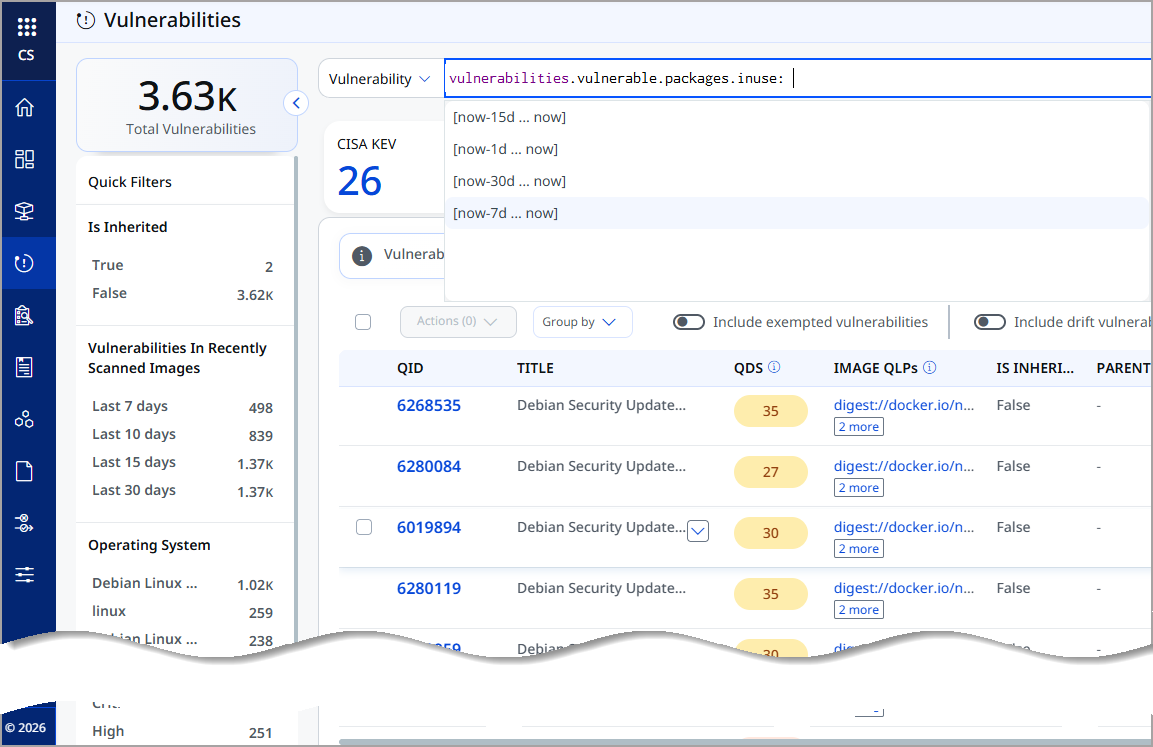
The vulnerability page displays package-in-use context, helping you prioritize remediation for packages that are actively running and therefore present a higher exploitation risk than packages that are installed but not loaded.
You can use vulnerabilities.vulnerable.packages.inuse: QQL to sort the Vulnerabilities.
Package-in-use data uploads every 6 hours when a change is detected from the previous upload.
The following are the ways to enable package-in-use detection:
| Runtime Sensor (CRS) | This is the recommended approach by Qualys. It is enabled by default starting with CRS version 1.8.0. To disable, use --disable-pkg-in-use. |
|---|---|
| General Sensor | Add the --enable-pkg-in-use argument when deploying the sensor. Applicable across all supported runtimes: Docker, Podman, containerd, and CRI-O. |
The following are the key benefits of Active Package Detection:
- More meaningful vulnerability prioritization by distinguishing packages actively loaded in memory from those that are installed but not running
- Reduces false urgency from vulnerabilities in packages that cannot be exploited in their current idle state
- Real-time runtime visibility into actual software usage across containers, not just static inventory
- Supported across all major container runtimes: Docker, Podman, containerd, and CRI-O
Enhancement
Extended JAR SCA in Offline Mode: JAVADB Resolution Without Network Access
What Changed For You
The Java package database for offline static scans is now hosted and delivered by Qualys, improving Java vulnerability coverage in offline and network-restricted environments without requiring a separate proxy configuration.
We have enhanced JAR detection for offline static scans. Previously, the Java package database required for scanning Java packages was downloaded from an external, unauthenticated public source each time a scan required it. Scans running in offline or network-restricted environments could not download this database, resulting in reduced Java vulnerability coverage.
With this release, the Java package database is hosted by Qualys and delivered through the same channel as your other scan content. This improves scan coverage and accuracy for Java packages in offline-scan mode and removes the need to configure a separate proxy allowance for an external Java database URL.
Use canonical Java packages published by the original package maintainers instead of third-party republished forks. Using the original packages helps ensure accurate vulnerability detection and reduces the risk of false positives or false negatives caused by incorrect package identification.
New Feature
Introduced Network Events Monitoring: Bi-Directional Traffic Visibility for Running Containers
What'S NEW For You
You can now monitor inbound and outbound network activity for running containers from the Runtime Events page, giving you bi-directional traffic visibility alongside existing Process and DNS Events.
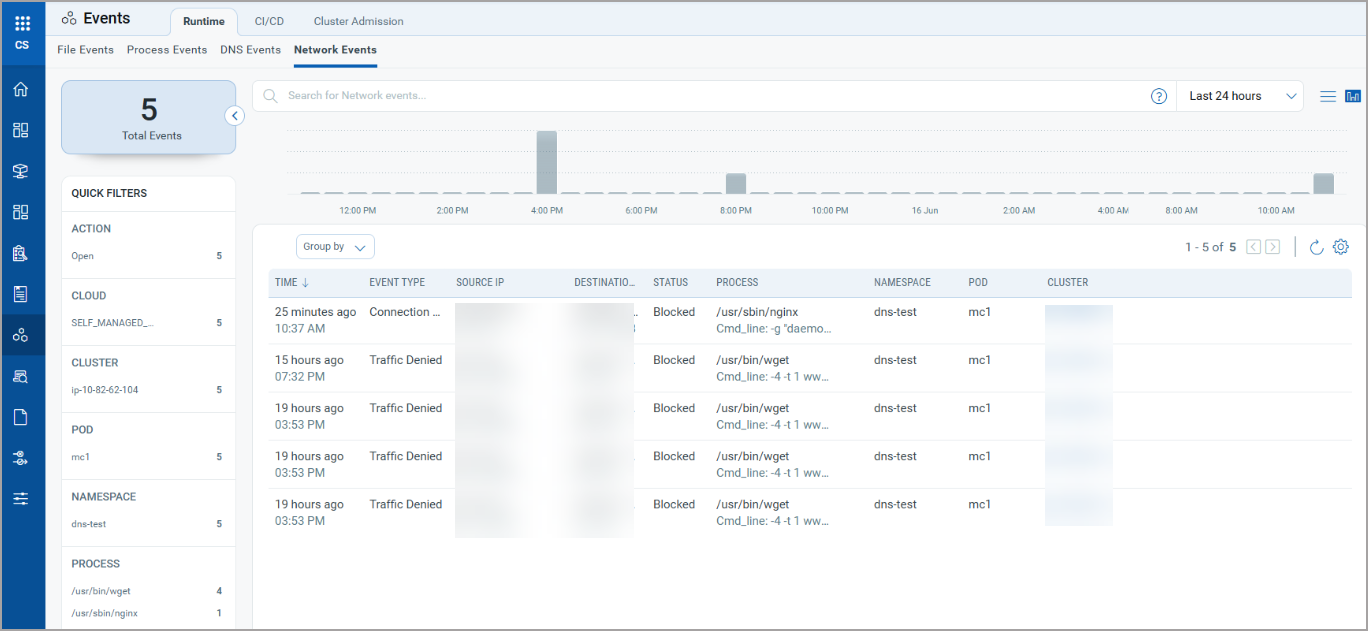
You can now monitor inbound and outbound network activity for running containers from Qualys Enterprise TruRisk™ Platform > Container Security > Events > Runtime. A new Network Events tab displays bi-directional network traffic captured by the Container Runtime eBPF Sensor, extending runtime visibility alongside existing Process and DNS Events.
The Network Events tab organizes events into two categories.
- Egress - outbound network traffic initiated by containers
- Ingress - inbound network traffic received by containers
You can use QQL to filter and search network events for faster investigation.
The following are the key benefits of Network Events Monitoring:
- Expanded runtime coverage with network activity visibility alongside process and DNS events
- Bi-directional monitoring with separate Egress and Ingress categorization for clearer traffic analysis
- Faster threat detection and investigation using QQL-based filtering
- A clearer understanding of container communication patterns at runtime
New Feature
Introduced Subscription-Level OAuth for QScanner: Centralized Token Authentication
What'S NEW For You
You can now generate a subscription-level Client ID and Client Secret to authenticate QScanner, removing the dependency on individual user accounts for centralized credential management.
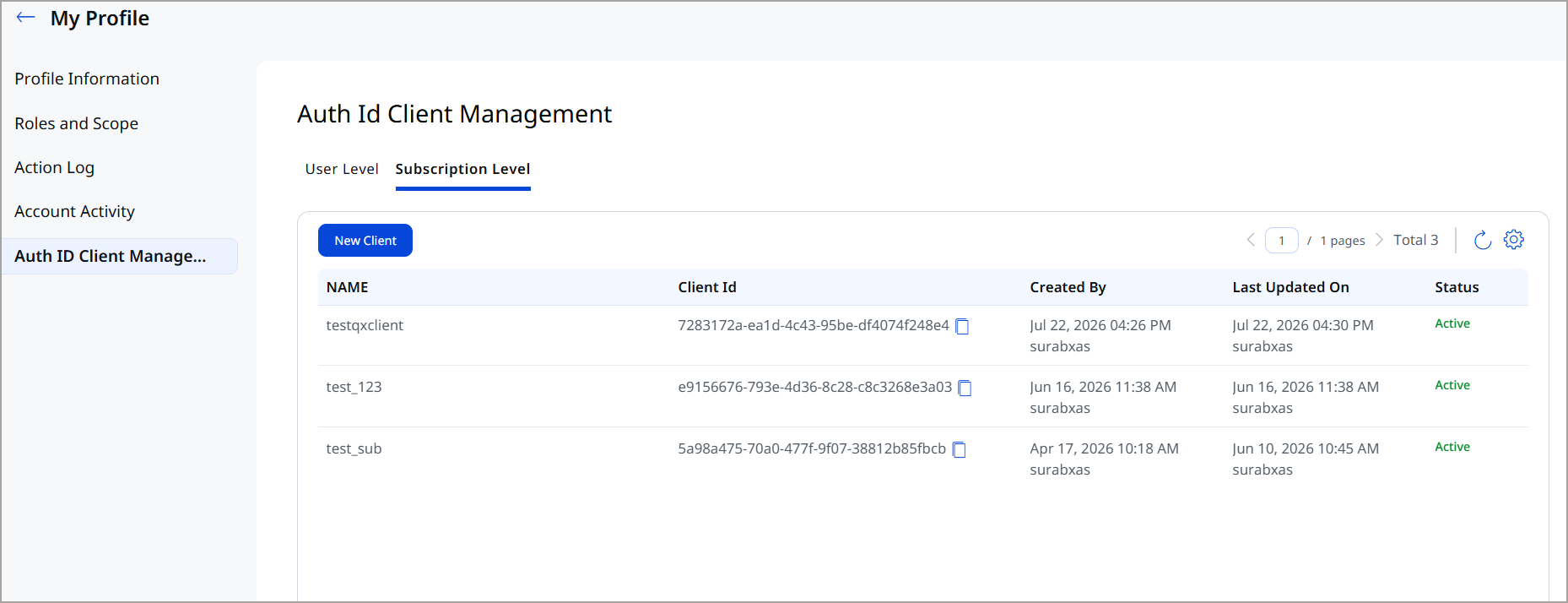
You can now generate a subscription-level Client ID and Client Secret to authenticate QScanner, removing the dependency on individual user accounts. Previously, QScanner authentication required a user-level token tied to a specific account. Subscription-level tokens allow centralized credential management at the subscription level.
- The Subscription Token is highly sensitive and must be treated as a secret credential.
- Subscription-level tokens are supported for QScanner only.
- Container Security APIs cannot be accessed using a subscription-level token.
To use a subscription-level token with QScanner, assign the following permissions when creating the client: Policy Evaluation, QScanner Scan CICD, CS Access, CS API Access, CS UI Access
The following are the key benefits of Subscription-Level OAuth:
- Eliminates dependency on individual user accounts, making QScanner authentication resilient to user account changes or departures
- Centralized credential management at the subscription level simplifies token lifecycle administration
- Supports least-privilege access by scoping permissions specifically to QScanner operations
- Reduces CI/CD pipeline maintenance overhead by decoupling pipeline credentials from personal accounts
Enhancement
Enhancements in Vulnerability and Compliance Reports: New Attributes and Renamed CSV Columns
What Changed For You
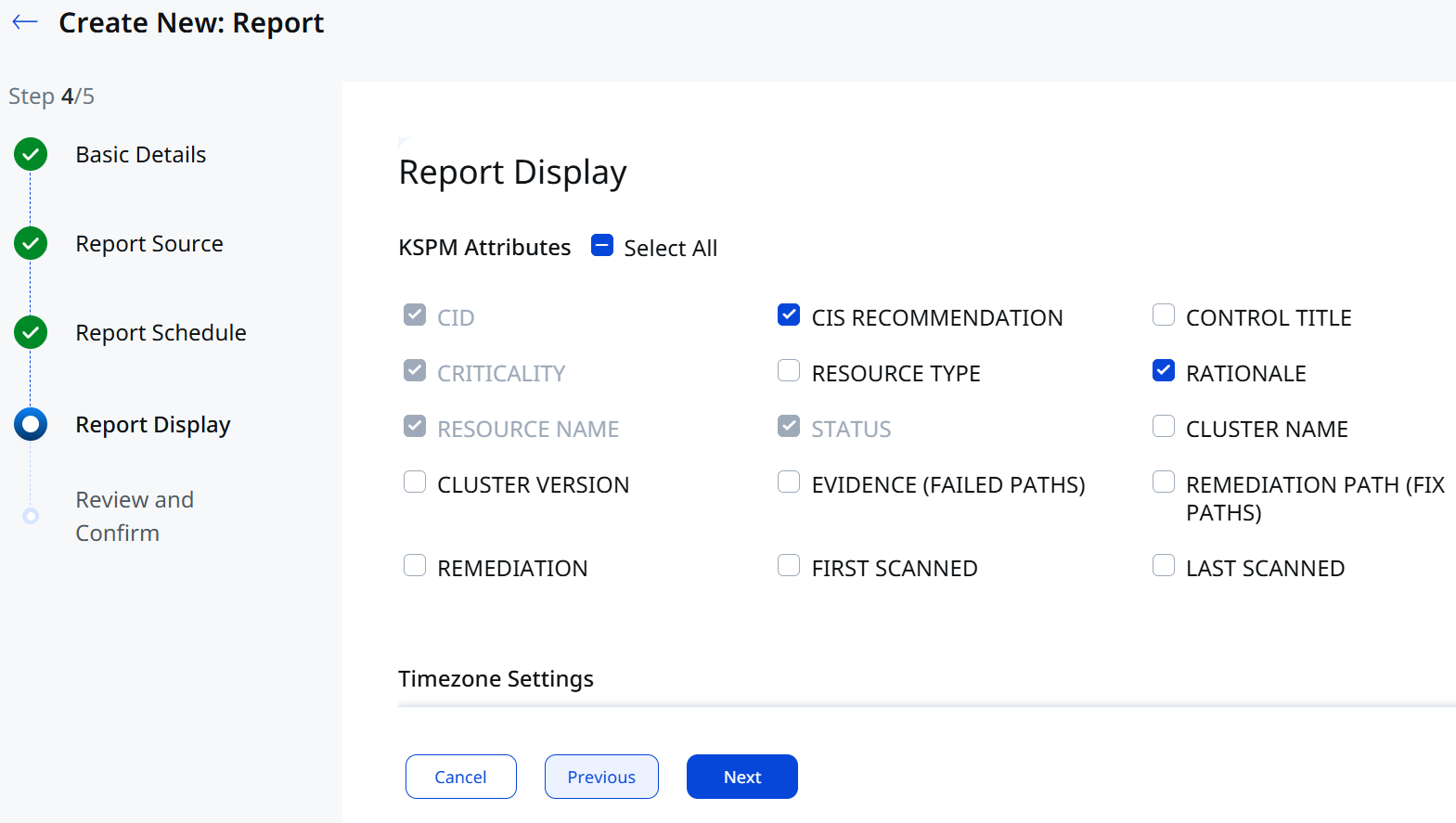
Vulnerability report templates now include a Published Date field for each QID, KSPM compliance reports include CIS Recommendation and Rationale attributes, and two CSV column names are renamed for improved clarity in automated exports.
Container Security report templates now include additional attributes and clearer CSV column names, giving compliance teams richer context during audits and reducing ambiguity in automated data exports. A new Published Date field is added to vulnerability report templates to surface when each QID was first publicly disclosed, and the KSPM compliance report now includes two new attributes — CIS Recommendation and Rationale — for direct alignment with benchmark standards. Two existing CSV column names are also renamed to more precisely describe their content.
A new Published Date attribute is now available in the following report templates, showing when each QID was first published to the Qualys KnowledgeBase. This helps you prioritize older vulnerabilities that have been publicly known for longer and may carry a greater risk of exploitation.
- Image Vulnerability Report
- Container Vulnerability Report
- Vulnerability Report
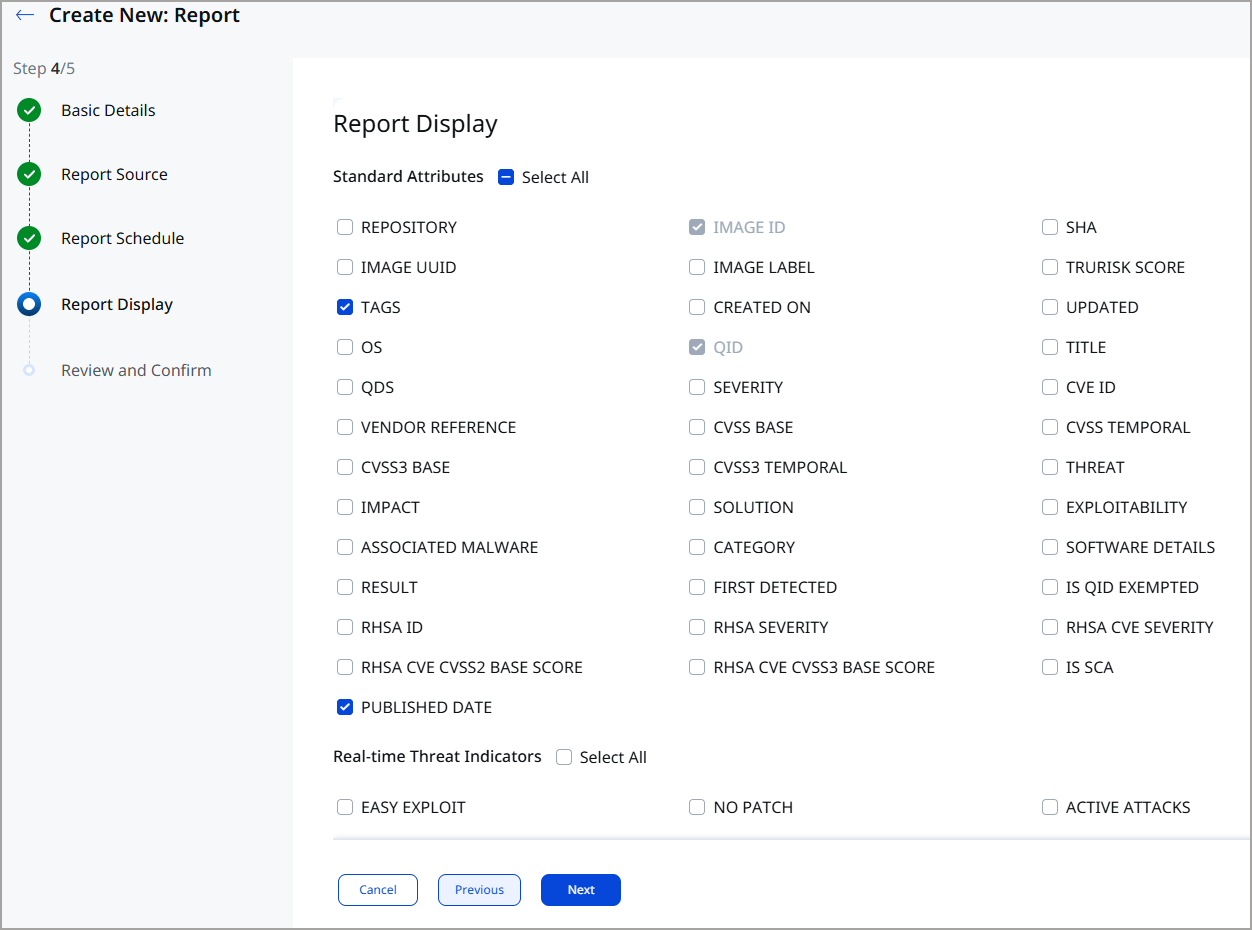
Two new attributes are added to the Compliance (KSPM) Report Template, and two existing CSV column names are updated to improve clarity.
New Report Attributes
- CIS Recommendation
- Rationale
Renamed CSV Columns
| Previous Column Name | New Column Name |
|---|---|
| REMEDIATION PATH | REMEDIATION PATH (FIX PATHS) |
| EVIDENCE | EVIDENCE (FAILED PATHS) |
If you have automation or scripts that reference these CSV column names, update them to use the new column names before running reports with this release.
The following are the key benefits of these report enhancements:
- CIS benchmark references now appear directly in reports, making it easier to align findings with industry standards during audits
- The Rationale column helps teams understand why each control matters, reducing back-and-forth during compliance reviews
- Renaming CSV columns improves clarity for compliance teams processing exported data in spreadsheets or SIEM tools
Enhancement
Enhancements in KSPM Controls: Ability to Filter Controls based on Policy Name
What Changed For You
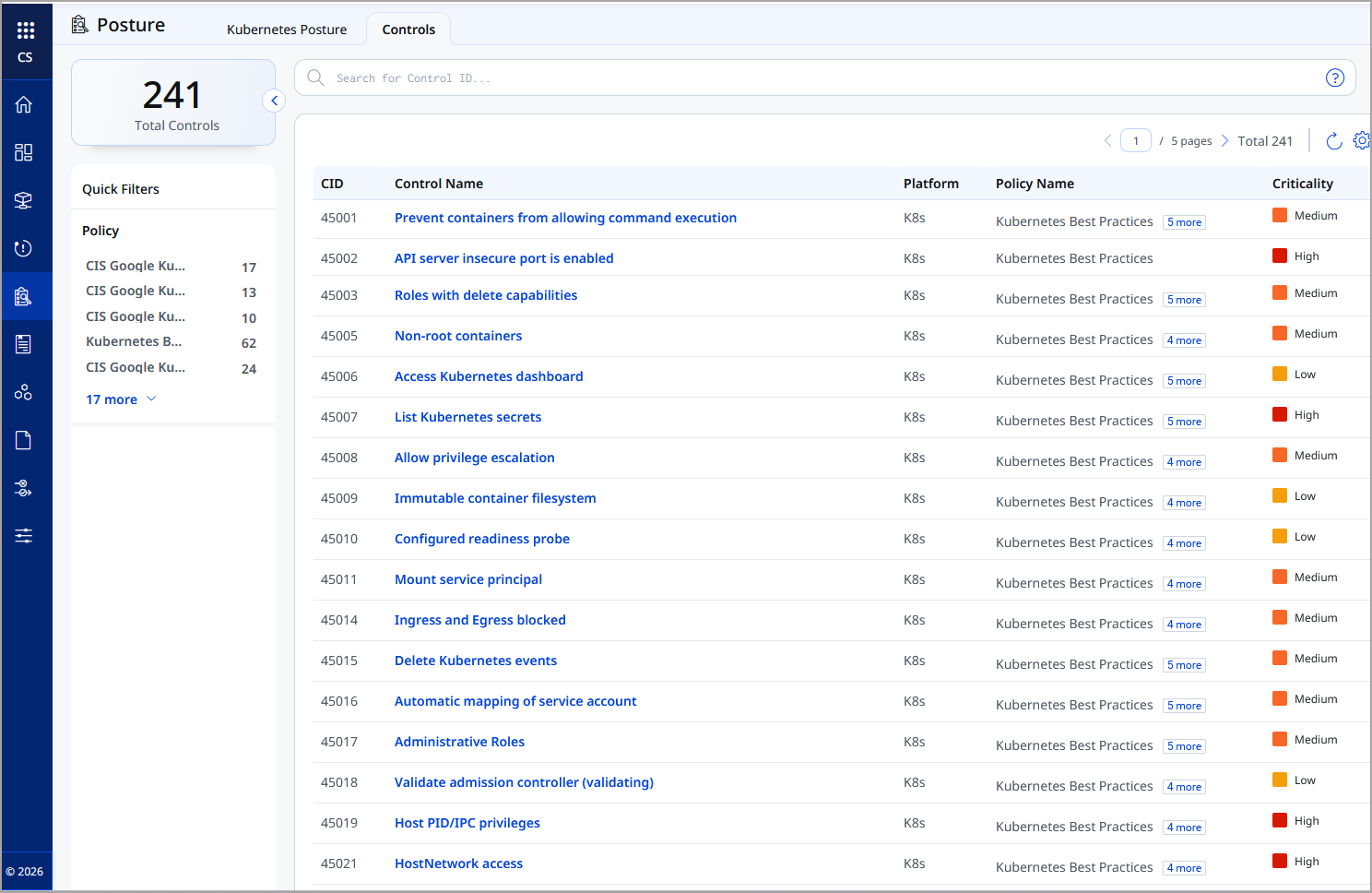
A new Controls reference page now lists all Control IDs (CIDs) supported by KSPM, grouped by policy name, giving you a single consolidated view without opening individual policies.
A new Controls reference page is now available under Container Security > Posture, alongside the existing Kubernetes Posture page. It lists all Control IDs (CIDs) supported by KSPM, grouped by policy name, giving you a single consolidated view of which controls each policy covers — without opening individual policies one by one.
The CID reference page is a read-only reference. No policy evaluation results are displayed on this page.
The following are the key benefits of KSPM Controls:
- Single consolidated view of all supported CIDs and their policy groupings, eliminating the need to navigate individual policies
- Faster policy design by understanding which CIDs are available and how they map across policies before configuring evaluations
- Programmatic access to control data via new APIs enables integration with external GRC tools and custom reporting workflows
Enhancement
Vulnerability Count Filter: Faster Risk Prioritization in Images and Containers
What Changed For You
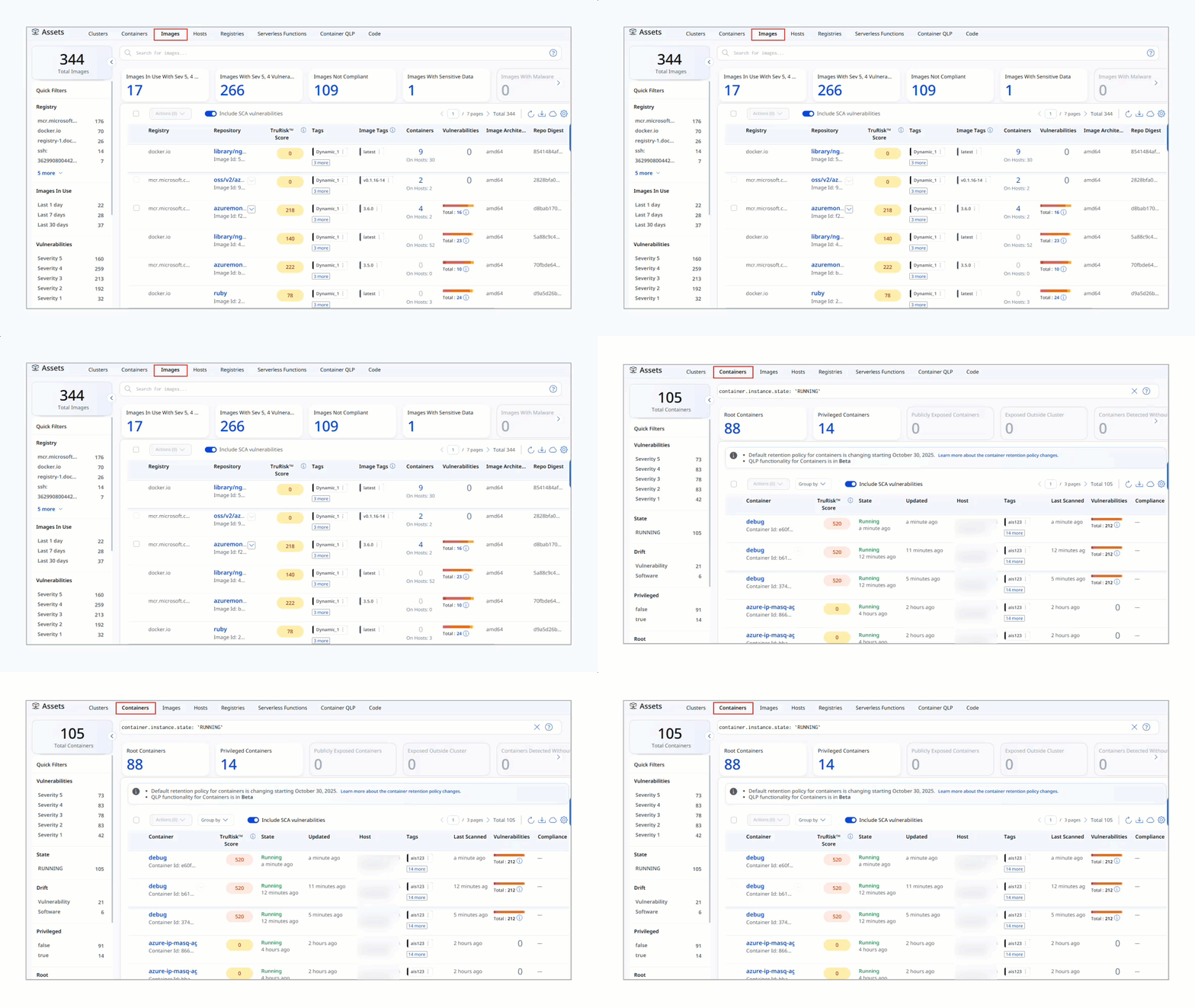
A new filter is introduced to sort the Images and Containers lists by total vulnerability count, making it faster to identify the highest-risk assets in your environment.
You can now quickly sort the images and containers with the help of vulnerability count QQL filter. Click the Vulnerability column header present under Qualys Enterprise TruRisk™ Platform > Container Security > Assets > Images/Containers asset tab to sort assets by vulnerability count, making it faster to identify the highest-risk assets in your environment.
The following are the key benefits of the Vulnerability Count Filter:
- Instantly surfaces the highest-risk images and containers without manual filtering or data export
- Faster remediation prioritization by ranking assets directly in the Qualys Enterprise TruRisk™ Platform by vulnerability exposure
- Consistent sorting experience across both the Images and Containers tabs
New Feature
Introduced On-Demand Repository Refresh: Instant Repository Discovery for Registries
What'S NEW For You
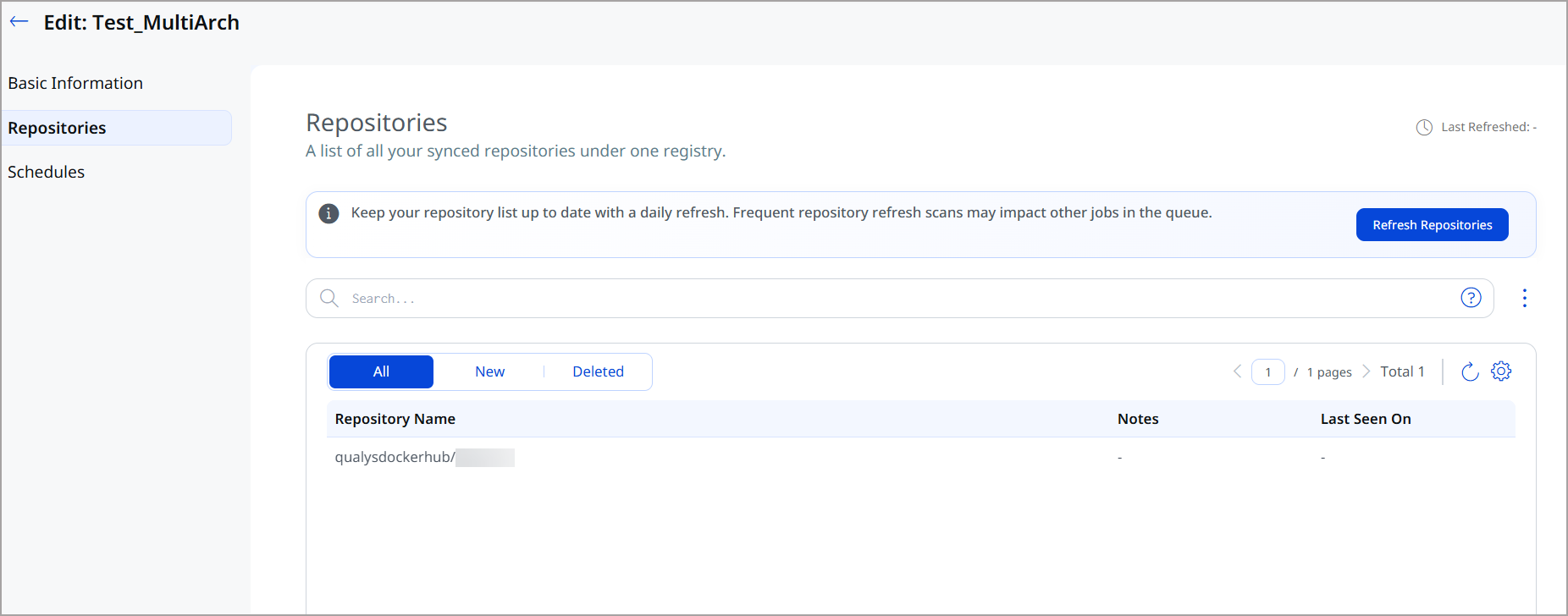
You can now refresh the list of repositories for any configured registry on demand, immediately updating repository records without waiting for the next scheduled sync cycle.
You can now refresh the list of repositories for any configured registry on demand. Triggering a refresh fetches the current repository list from the registry source and immediately updates the records in Container Security. Previously, repository discovery depended on scheduled refresh cycles, making it difficult to onboard newly created repositories without waiting.
This is particularly useful for large registries such as JFrog Artifactory and Amazon ECR, where repositories are created frequently, and you need to discover them before configuring a scan job.
- This feature is available only with CS Sensor 1.45 or above version.
- The CS Sensor 1.45 or above that are only in the Running state are considered for this job.
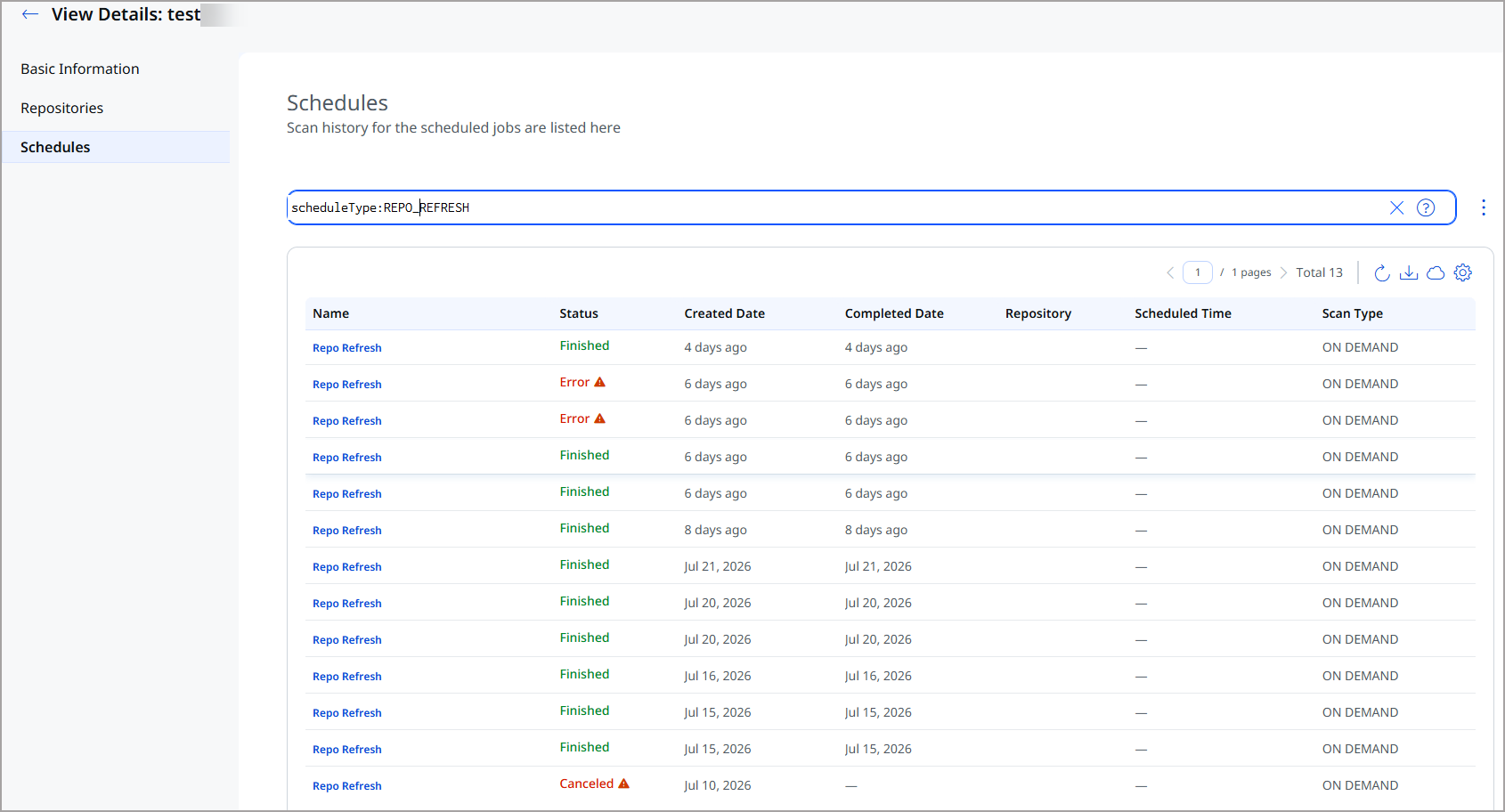
After you refresh a repository, the Schedules page displays all its subsequent scheduled jobs.
The following are the key benefits of On-Demand Repository Refresh:
- Eliminates wait time associated with scheduled discovery cycles when new repositories are added to a registry
- Enables immediate scan job configuration for newly created repositories without waiting for the next scheduled sync
- Simplifies repository onboarding for large registries such as JFrog Artifactory and Amazon ECR, where repositories are created frequently
Enhancement
Extended JFrog Artifactory Scanning: Support for Subdomain-Based Registry URLs
What Changed For You
You can now scan JFrog Artifactory registries that use subdomain-based URLs by entering the subdomain directly in the registry setup UI, with no workarounds or proxy configuration required.
You can now scan JFrog Artifactory registries that use subdomain-based URLs.
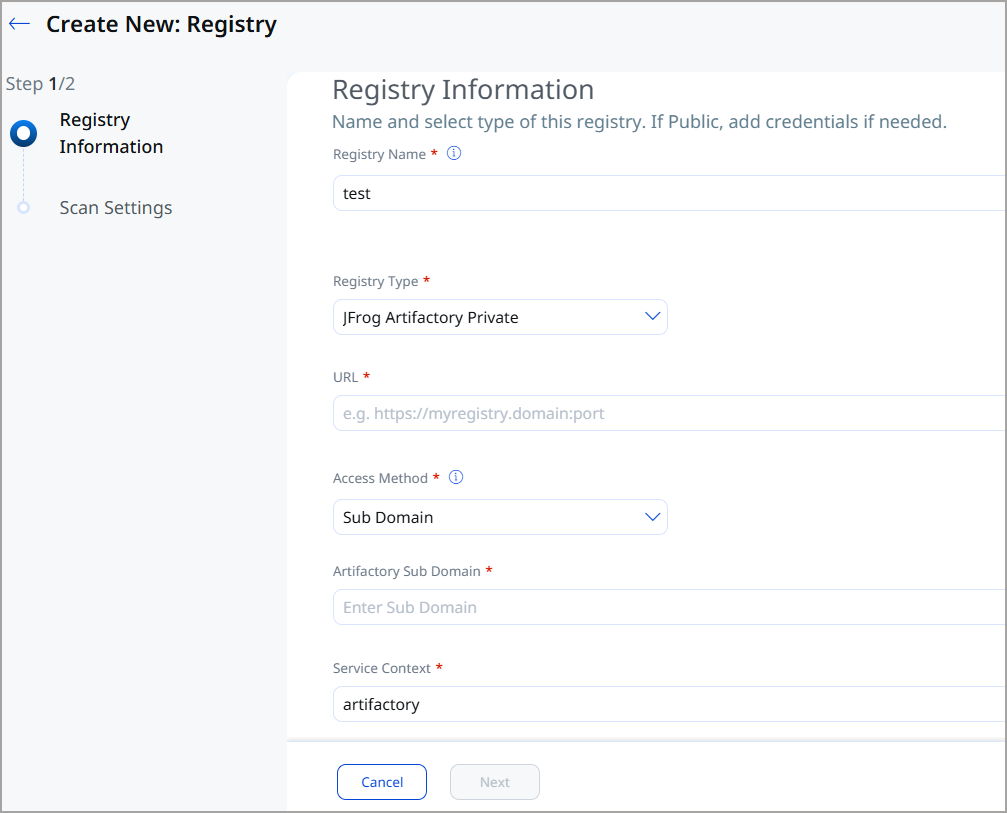
A new Subdomain field is available under Qualys Enterprise TruRisk™ Platform > Container Security >
Assets > Registries > Create New, while creating a Jfrog Artifactory Private registry.
The following are the key benefits of extended JFrog Artifactory scanning:
- Removes a configuration blocker for customers using subdomain-based JFrog Artifactory deployments
- No workarounds or proxy configuration required — the subdomain is entered directly in the registry setup UI
- Consistent registry configuration experience across all JFrog Artifactory deployment models
Enhancement
Enhanced Regex Process Ignore List: Flexible Pattern Matching in Runtime Sensor Profiles
What Changed For You
You can now define regular expressions in the QUALYS_IGNORE_PROCESS_LIST configuration for CRS Runtime Sensor profiles, replacing the previous exact-match-only approach and reducing the maintenance overhead of managing long process name lists.
You can now define regular expressions (regex) in the QUALYS_IGNORE_PROCESS_LIST configuration for CRS Runtime Sensor profiles. Previously, only exact process names were supported. Regex patterns let you create flexible ignore rules that match families of process names, reducing the maintenance overhead of managing long explicit lists.
The following are the key benefits of enhanced Regex Process Ignore List:
- Flexible process filtering — match families of process names with a single regex pattern instead of multiple exact entries
- Reduced maintenance overhead as process names change or new variants are introduced over time
- Cleaner, more expressive sensor profiles with shorter ignore lists
New Feature
Security Insights & Attack Paths on Container Details
What'S NEW For You
You can now view security insights and attack paths directly within the container details page, without navigating to the Insights page separately.
An Insights tab is now available in the container details page, surfacing security insights directly within the context of a specific container. You no longer need to navigate to the Insights page separately to view risk intelligence for a container you are already inspecting.
The following are the key benefits of Security Insights on Container Details:
- Reduces context-switching by bringing security insights directly into the container details view
- Faster investigation — risk intelligence is available in-line without navigating away from the container being inspected
- Unified view of container vulnerability, software, and security insight data from a single details page
Enhancement
Enhanced Cloud Metadata Collection: Richer Host Context from AWS, Azure, and GCP
What Changed For You
Qualys Container Security now collects richer cloud provider metadata from AWS, Azure, and GCP hosts, including multiple IP addresses and cloud-level resource tags, for better correlation of container workloads with their underlying cloud infrastructure.
With the help of General Sensor, Qualys Container Security now collects richer cloud provider metadata from AWS, Azure, and GCP hosts. This release adds support for multiple IP addresses per host and cloud-level resource tags, replacing the previous single-IP model and providing the additional fields needed to correlate container workloads with their underlying cloud infrastructure. You can view these details in the Sensor Details page.
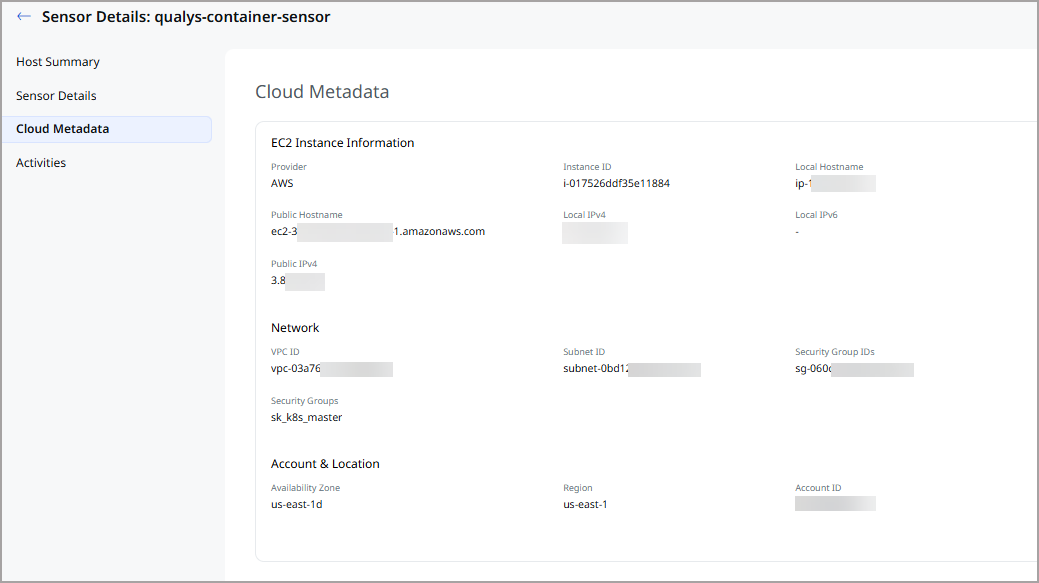
The following new metadata fields are collected by cloud provider:
| Cloud Provider | New Metadata Fields |
|---|---|
| AWS EC2 | local-hostname, public-hostname, vpc-id, subnet-id, availability-zone, region, accountId, security-groups, security-group-ids, tags (key/value pairs), multiple local-ipv4, local-ipv6, public-ipv4, public-ipv6 addresses |
| Azure VM | vmId, name, resource-id, physical-zone, region, subnet-address, tags (key/value pairs), multiple private-ipAddress, public-ipAddress, private-ipv6Address values |
| GCP Compute | instance-id, name, hostname, vpc-network, dns-servers, gateway, subnetMask, region, project-id, accountId, multiple private-ipAddress, public-ipAddress values |
For AWS EC2 instance tags to appear in the metadata, instance metadata tag access must be enabled on the EC2 instance. IMDSv2 is required for AWS metadata collection.
All new metadata fields are available in the sensor details API response under the cloudProvider block.
The following are the key benefits of enhanced cloud metadata collection:
- Richer cloud context makes it easier to correlate container workloads with their underlying cloud infrastructure across AWS, Azure, and GCP
- Multi-IP support accurately reflects real-world multi-homed and dual-stack host configurations
- Cloud resource tags enable label-based filtering and grouping of container assets in the platform
- Standardized metadata field names across all three cloud providers simplify cross-cloud reporting and integrations
Enhancement
Enhanced Policy Scoping and Exclusions
What Changed For You
Policy assignment for CI/CD and Admission Controller policies now uses a unified Custom Policy Scope model with Inclusions and Exclusions. Each CI/CD policy can now independently be set to Audit or Enforce (Block) mode.
Container Security 1.45 introduces a redesigned Policy Assignment workflow for CI/CD (Image Assessment) and Admission Controller policies. While policy assignment at the Cluster, Namespace, and Deployment levels was previously supported, these scope options are now consolidated under a unified Custom Policy Scope model, simplifying policy configuration and management.
The enhanced workflow supports both Inclusions and Exclusions, allowing you to define where a policy should be enforced and optionally exempt specific clusters, namespaces, or deployments within the selected scope. This provides greater flexibility and more precise control over policy enforcement in Kubernetes environments.
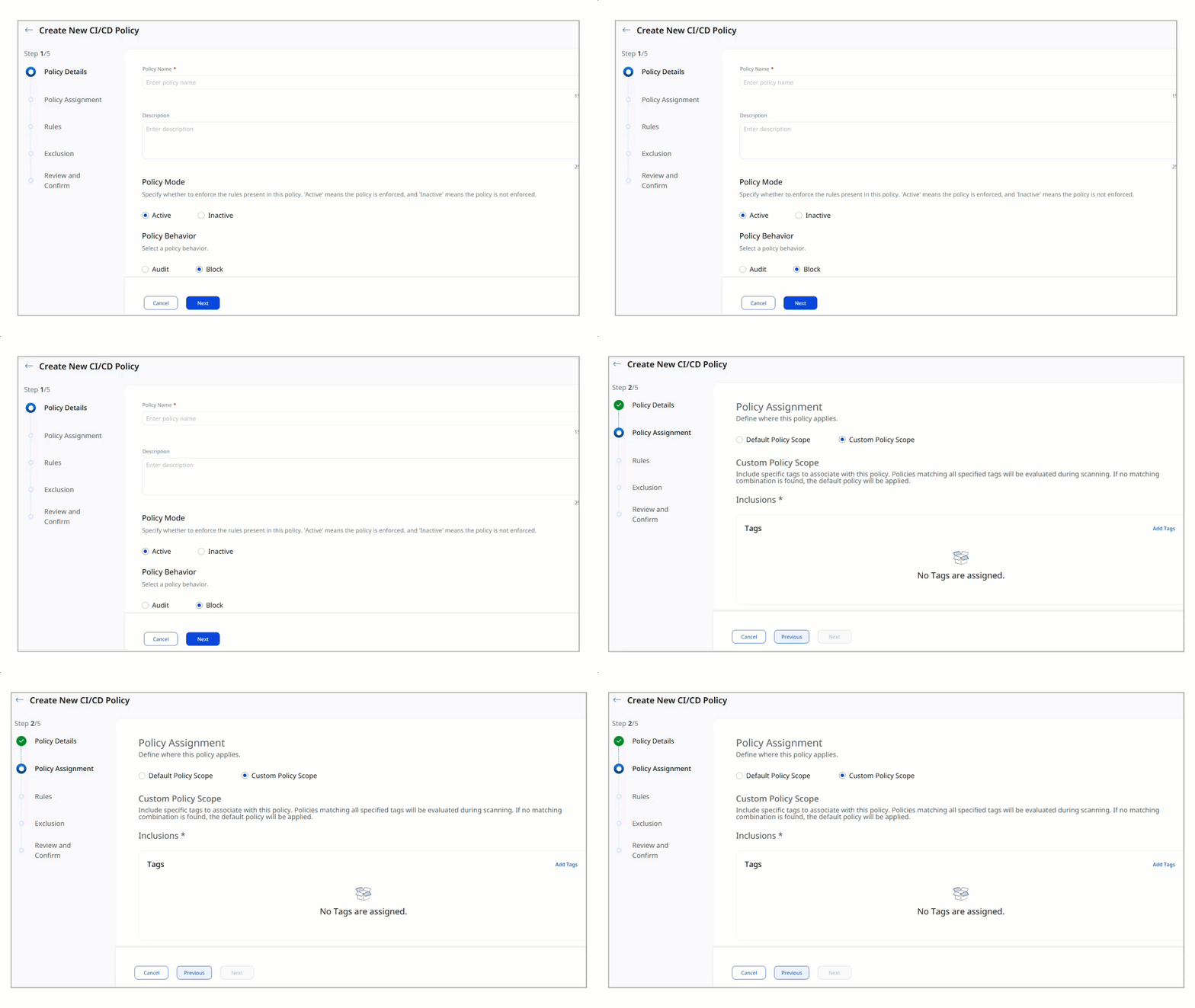
Additionally, each CI/CD policy can now be independently set to Audit or Enforce (Block) mode. Previously, all policies operated in Block mode - evaluation failures always blocked the pipeline. The configurable behavior modes let you roll out new policies in Audit mode first, assess their impact, and switch to enforcement when ready. Audit - evaluation failures are reported, but do not block the pipeline. Use this mode to assess policy impact before enforcement. Enforce (Block) - evaluation failures block the pipeline. Use this mode when the policy is ready to act as a compliance gate. The behavior mode can be configured in the Qualys Enterprise TruRisk™ Platform for new policies. Policies created before this release default to Enforce (Block) to preserve the previous behavior.
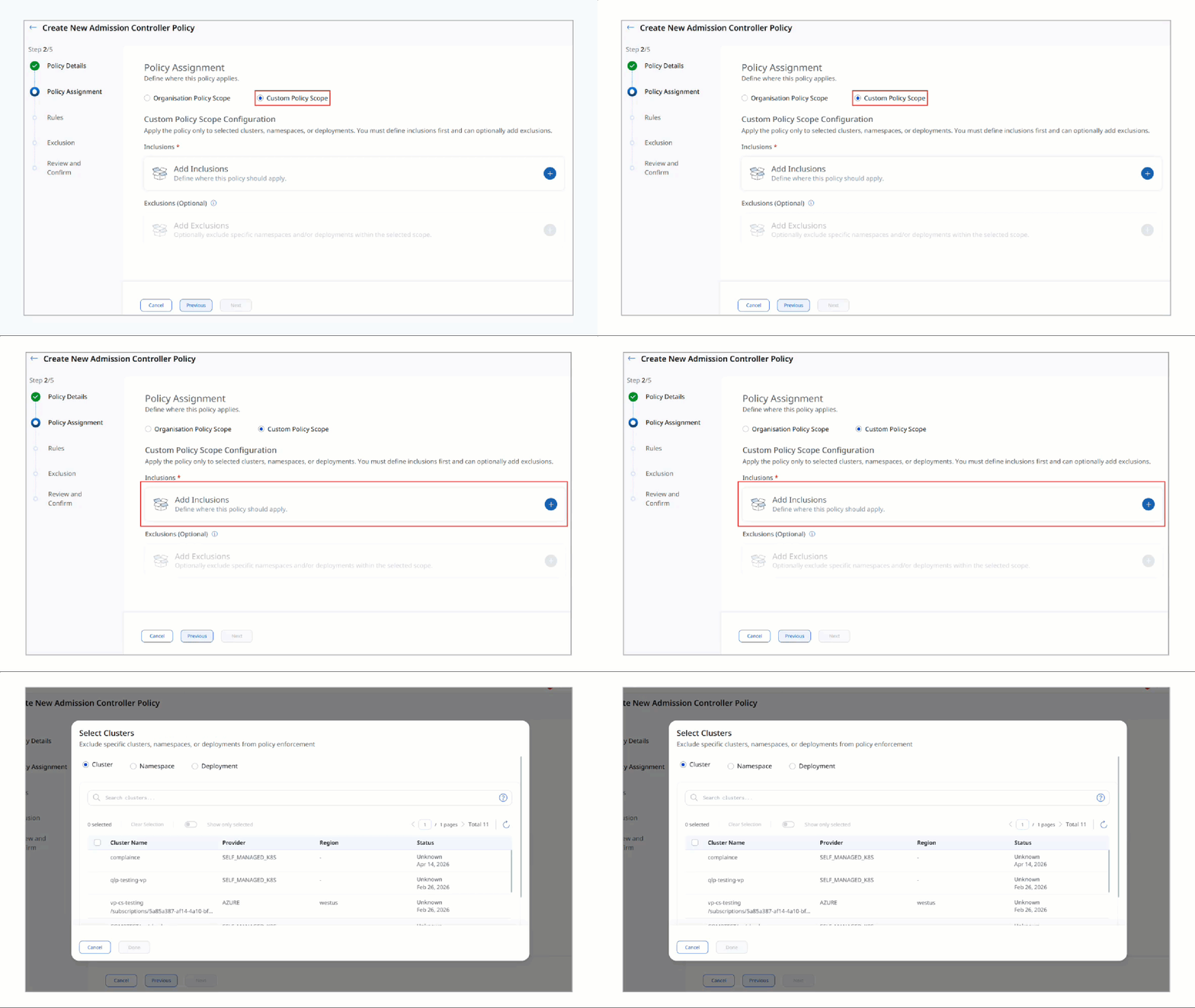
Container Security > Policies > Admission Controller > Create Policy
The following are the key benefits of enhanced policy scoping:
- Simplify policy assignment through a unified Custom Policy Scope workflow.
- Define policy applicability using targeted inclusions across clusters, namespaces, and deployments.
- Configure exceptions through granular exclusions without creating additional policies.
- Enable more precise policy enforcement across complex, multi-cluster Kubernetes environments.
New Feature
Introduced Unpatchable QIDs Excluded: Cleaner Vulnerability Results by Default
What'S NEW For You
Unpatchable QIDs are now excluded from vulnerability results by default, reducing noise in dashboards and reports. A self-serve opt-in option is available if you need to include them.
Unpatchable QIDs are now excluded from vulnerability results by default. A self-serve opt-in option is available if you need to include unpatchable vulnerabilities in your results. This change reduces noise in vulnerability reports and lets you focus on actionable findings. You retain full access to unpatchable vulnerability data through the opt-in.
The following are the key benefits of excluding unpatchable QIDs by default:
- Cleaner vulnerability results focused on actionable, patchable findings by default
- Reduced noise in dashboards and reports, making it easier to prioritize remediation efforts
- Self-serve opt-in preserves full access to unpatchable vulnerability data for teams that need complete coverage