Container Security Release 1.46
November 11, 2026
Container Security 1.46 introduces Image and Container Compliance Reports, CRS Rule and Policy Management via UI and API, policy and events for code assets, remote sensor log collection and flag configuration, SCA vulnerability filtering, tagging and retention for code assets, Attack Path Insights, Count and TruRisk™ Trending widgets, Dashboard and Trending views on the Vulnerabilities page, expanded dynamic exception QQL filters, and several report and sensor improvements. KSPM enhancements include CIS OKE Benchmark v2.0 controls and Kubernetes Posture Report improvements.
New Feature
Introduced Container Runtime Policy: UI and API Support
What'S NEW For You
Container Security now gives you direct control over Container Runtime Security (CRS) rules and policies from the UI and API — enabling instant mitigation, threat blocking, and precise policy scoping across your container environment. Previously, this required CLI access. Now you can respond to new threats and vulnerability exploits in real time, without leaving the platform.
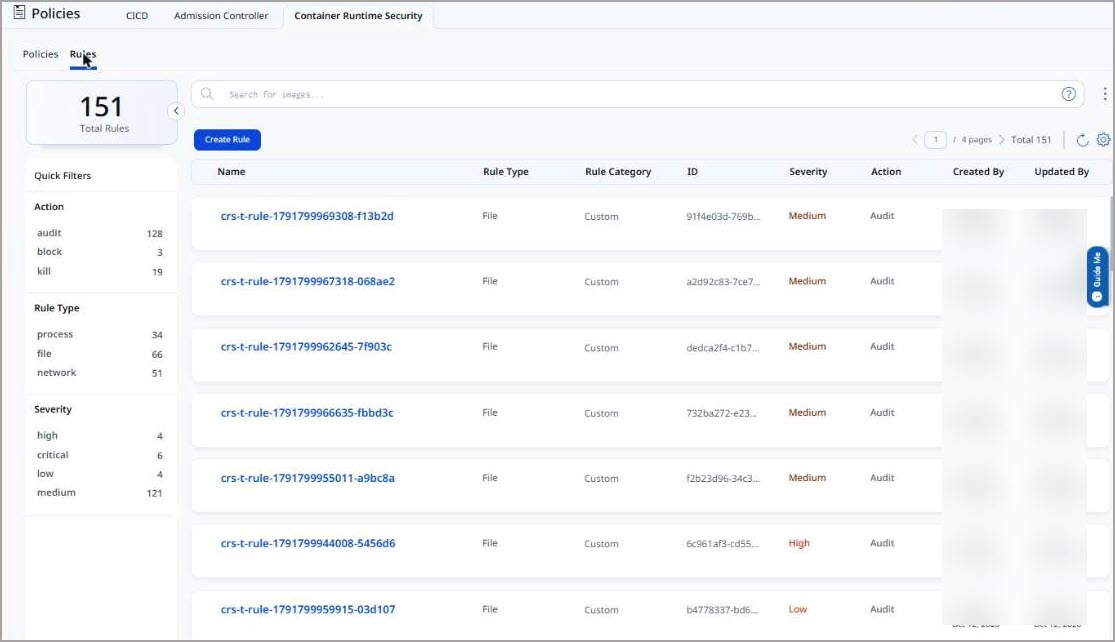
Container Security 1.46 introduces UI and API support for creating and managing Container Runtime Security (CRS) rules and policies. When a new threat or vulnerability exploit emerges, you can now author and deploy a blocking or detection rule immediately — directly from the platform UI or programmatically through the API — without waiting for a CLI-based workflow. This closes the gap between threat discovery and active enforcement, giving security teams a fast path to containment.
Policies support precise scoping so enforcement applies exactly where you intend. You can target rules to specific clusters, namespaces, pod labels, and asset tags, limiting the blast radius of a policy change and ensuring that mitigation actions do not inadvertently affect unrelated workloads.
The following resource types are supported.
- Rules — Define file-based and network-based detection rules with selectors such as file paths, binaries, ports, protocols, DNS, IP addresses, and direction (egress or ingress)
- Policies — Group rules into policies and scope them precisely to clusters, namespaces, pod labels, and asset tags for targeted enforcement
CRS rules and policies can be managed under Qualys Enterprise TruRisk™ Platform > Container Security > Policies > Container Runtime Security.
The base URL for v1.3 API endpoints is: https://<baseurl>/csapi/v1.3
The following CRS Rule and Policy API endpoints are supported.
| Method | Endpoint | Description |
|---|---|---|
| POST | /crsRule | Create a custom rule |
| GET | /crsRule | List all rules (paginated) |
| GET | /crsRule/{ruleId} | Get a rule by ID |
| PUT | /crsRule/{ruleId} | Update a rule |
| DELETE | /crsRule/{ruleId} | Delete a rule |
| POST | /crsPolicy | Create a policy |
| GET | /crsPolicy | List all policies (paginated) |
| GET | /crsPolicy/{policyId} | Get a policy by ID |
| PUT | /crsPolicy/{policyId} | Update a policy |
| DELETE | /crsPolicy/{policyId} | Delete a policy |
The ruleMetadata field is returned as a nested object in list responses and as an escaped JSON string in single-item responses.
The following are the key benefits of CRS Rule and Policy Management:
- Instantly author and deploy blocking or detection rules when a new threat or vulnerability exploit is disclosed — no CLI access required
- Respond to active threats in real time directly from the platform UI, closing the gap between threat discovery and enforcement
- Scope policies precisely to clusters, namespaces, pod labels, and asset tags to limit enforcement to only the affected workloads
- Automate rule and policy lifecycle management through the API for integration with CI/CD pipelines and security response workflows
- Supports both file-based and network-based rule types for comprehensive runtime detection coverage
Enhancement
Enhanced Vulnerabilities Page: Dashboard and Trending Views
What Changed For You
The Vulnerabilities page now includes a Dashboard view and a Trending view, giving you a visual summary of your container vulnerability posture alongside the existing list view.
Container Security 1.46 adds Dashboard and Trending views to the Vulnerabilities page. The Dashboard view provides a visual summary of your vulnerability posture, including severity breakdowns and TruRisk score distribution across images and containers. The Trending view charts how your vulnerability counts and TruRisk scores have changed over time. These views complement the existing list view and can be toggled directly from the Vulnerabilities page, eliminating the need to navigate to the platform dashboard for a vulnerability summary.
The Dashboard and Trending views are available under Qualys Enterprise TruRisk™ Platform > Container Security > Vulnerabilities.
The following are the key benefits of the Dashboard and Trending views on the Vulnerabilities page:
- Switch between list, dashboard, and trending views without leaving the Vulnerabilities page
- Visualize vulnerability severity distribution and TruRisk scores for images and containers at a glance
- Track vulnerability count and TruRisk score trends over time to measure remediation progress
New Feature
Introduced Attack Path Insights and Filtering in Container Security
What'S NEW For You
Attack Path Insights are now available directly within Container Security, enabling you to identify and prioritize vulnerabilities that are part of an exploitable attack path without leaving the Container Security module.
Container Security 1.46 unifies Attack Path Insights into the Container Security module. You can now view attack path context for container vulnerabilities and filter findings based on whether a vulnerability is part of an attack path — all from within the Container Security Vulnerabilities pages. This eliminates the need to cross-reference the separate Attack Path Analysis module to assess whether a container vulnerability is on an exploitable path.
Attack Path filtering is available under Qualys Enterprise TruRisk™ Platform > Container Security > Vulnerabilities.
The following are the key benefits of Attack Path Insights in Container Security:
- Filter container vulnerabilities by attack path presence, focusing remediation on the highest-risk exposures
- View attack path context for a vulnerability without switching to a separate module
- Prioritize container vulnerabilities that are on an active, exploitable attack path over theoretical risks
Enhancement
Enhanced Vulnerability Filtering: Published Date and Patch Availability
What Changed For You
The Vulnerabilities page now supports filtering by Published Date and Patch Available status, giving you finer control to prioritize actionable vulnerabilities based on age and remediation availability.
Container Security 1.46 adds two new filters to the Vulnerabilities page: Published Date (publishedDate) and Patch Available (isPatchAvailable). The Published Date filter lets you scope findings to vulnerabilities published within a specified date range, enabling you to focus on recently disclosed CVEs or long-standing unpatched issues. The Patch Available filter lets you narrow findings to vulnerabilities for which a fix is available, so you can prioritize remediation where action is immediately possible.
The Published Date and Patch Available filters are available under Qualys Enterprise TruRisk™ Platform > Container Security > Vulnerabilities.
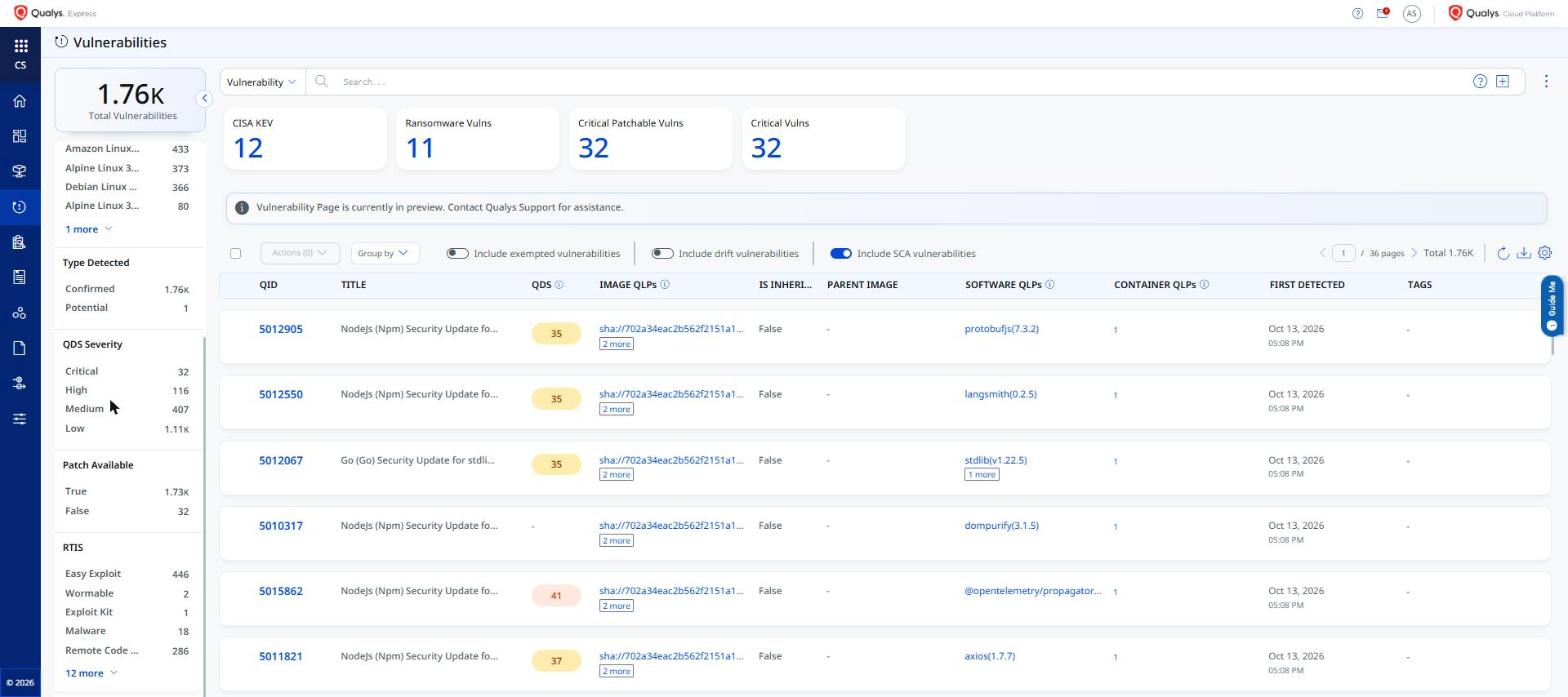
The following are the key benefits of the new vulnerability filters:
- Filter by Published Date to identify newly disclosed CVEs or to surface long-standing unpatched vulnerabilities
- Filter by Patch Available to focus remediation effort on vulnerabilities for which a fix exists
- Combine both filters to create targeted views — for example, recently published CVEs with an available patch — for maximum remediation impact
Enhancement
Enhanced Dynamic Exceptions: New Fields and Expanded Container QQL Filters
What Changed For You
Dynamic vulnerability exceptions now support new fields and expanded QQL filter support for container asset attributes — including AWS, AKS, GCR, and Qualys Private Cloud Platform (QLP) identifiers — giving you finer control when scoping exceptions to specific container environments.
Container Security 1.46 extends dynamic vulnerability exceptions with new fields and expanded QQL support for container asset filtering. You can now scope exceptions using container-specific attributes such as AWS account, AKS cluster, GCR registry, and Qualys Private Cloud Platform (QLP) identifiers alongside existing filters. This makes it possible to create targeted dynamic exceptions that apply only to containers in specific cloud environments or registries, reducing the scope of exception rules and improving exception accuracy.
The new container QQL filters are available when creating or editing exceptions under Qualys Enterprise TruRisk™ Platform > Container Security > Exceptions > Vulnerability Exceptions.
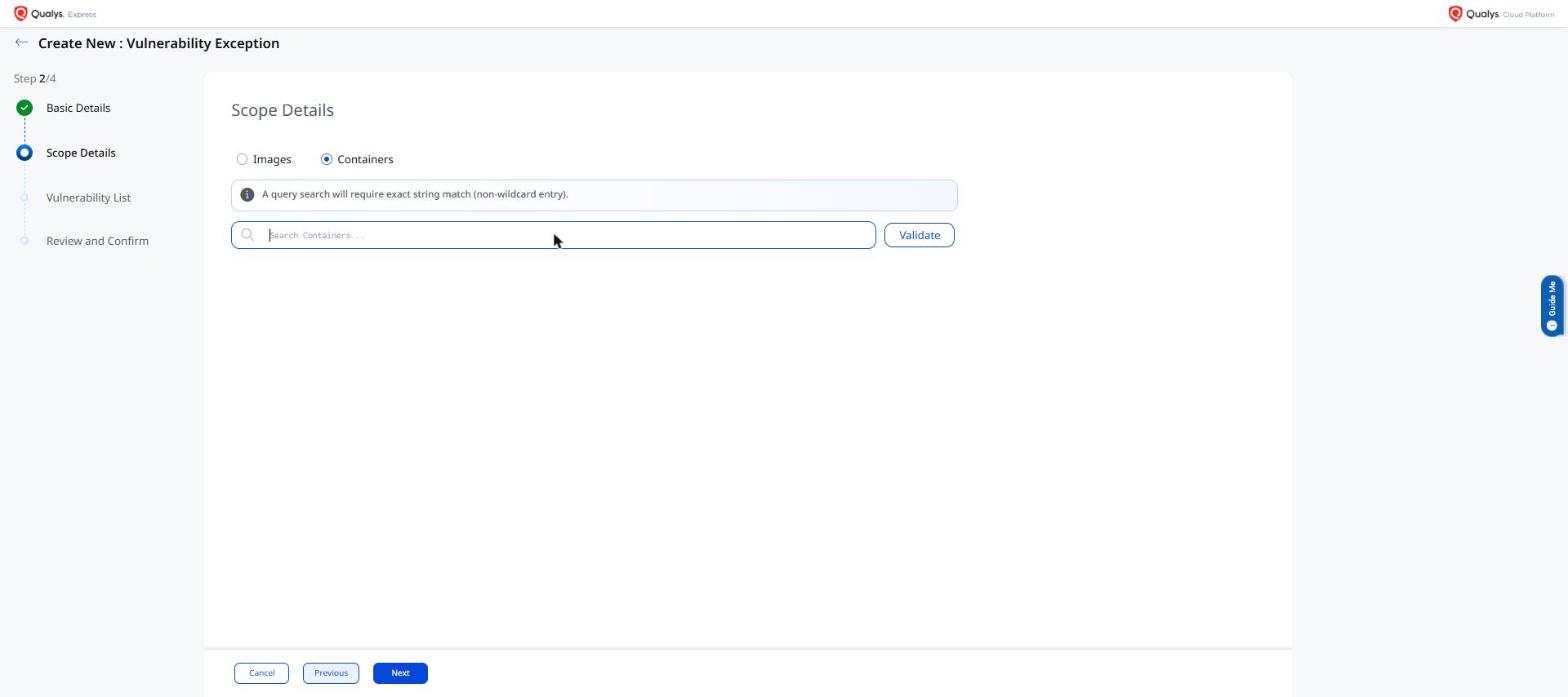
The following are the key benefits of the dynamic exception enhancements:
- Scope dynamic exceptions to specific cloud environments using AWS, AKS, GCR, and QLP container attribute filters
- Reduce exception scope to only the affected environments, avoiding unintended exception application across unrelated containers
- Consistent QQL-based exception authoring across all supported container runtime and registry types
New Feature
Introduced Count and TruRisk™ Trending Widgets for Images and Containers
What'S NEW For You
New Count and TruRisk™ Trending widgets are now available for images and containers in the Container Security dashboard, letting you track vulnerability count and TruRisk™ score trends over time at a glance.
Container Security 1.46 adds Count and TruRisk™ Trending widgets for images and containers to the platform dashboard. You can add these widgets to your dashboard to visualize how vulnerability counts and TruRisk™ scores for your images and containers have changed over time. Widgets can be previewed before adding, allowing you to confirm the data shown before committing to the dashboard layout.
The Count and TruRisk™ Trending widgets are available to add under Qualys Enterprise TruRisk™ Platform > Container Security > Dashboard.
The following are the key benefits of Count and TruRisk™ Trending widgets:
- Track vulnerability count and TruRisk™ score trends for images and containers directly on the dashboard
- Visualize risk trajectory over time to prioritize remediation and measure progress
- Preview widgets before adding them to your dashboard to confirm the data displayed
New Feature
Introduced Image and Container Compliance Reports: CID-Level Pass/Fail Breakdown
What'S NEW For You
Two new compliance report templates - Image Compliance Report and Container Compliance Report - are now available. They include individual Control ID (CID) level pass/fail results for each image and container, enabling granular compliance reporting beyond the overall compliance status.
Container Security now includes two new compliance report templates - Image Compliance Report and Container Compliance Report. While individual CID results and pass/fail status were previously visible on the Image and Container Details pages, compliance reports generated for multiple assets showed only the overall compliance status. These new templates include CID-level pass/fail results for each image or container, giving compliance teams granular visibility across all assets in a single report.
The new report templates are available under Qualys Enterprise TruRisk™ Platform > Container Security > Reports.
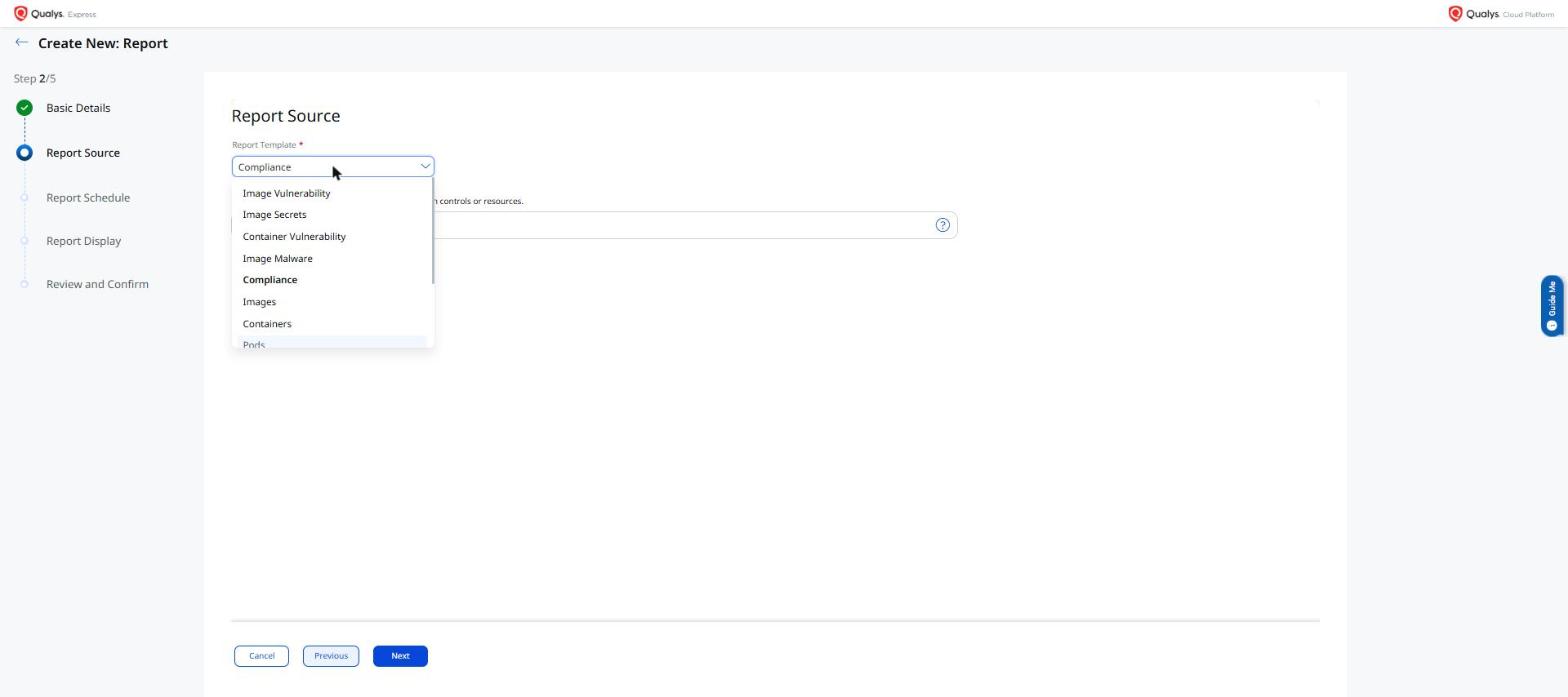
The following are the key benefits of Image and Container Compliance Reports:
- CID-level pass/fail breakdown per image and container in a single report, eliminating the need to review each asset details page individually
- Supports audit-ready compliance documentation with individual control results directly from the Qualys platform
- Consistent reporting experience aligned with existing vulnerability report workflows
Enhancement
Enhanced Image Vulnerability Report: Deleted Registries Hidden and New LastSourceRegistry Field
What Changed For You
The Image Vulnerability Report now hides deleted registries and includes a new LastSourceRegistry field, giving you cleaner report results and improved traceability between vulnerability findings and their source registry.
The Image Vulnerability Report no longer displays entries from registries that have been deleted from Container Security. This prevents stale registry data from appearing in reports after a registry is removed. Additionally, a new LastSourceRegistry field is added to Image Vulnerability Report exports, giving you a clear record of the registry from which each image was last scanned.
These enhancements apply to Image Vulnerability Reports generated under Qualys Enterprise TruRisk™ Platform > Container Security > Reports.
If you have automation or scripts that process Image Vulnerability Report exports, update them to use the new LastSourceRegistry column.
The following are the key benefits of hiding deleted registries in the Image Vulnerability Report:
- Cleaner vulnerability reports — deleted registries no longer appear in Image Vulnerability Report results
- The new LastSourceRegistry field provides traceability between vulnerability findings and their source registry
- Reduces manual effort in filtering out stale registry data from exported reports
Enhancement
Exception Name Now Included in Vulnerability Reports
What Changed For You
Vulnerability reports for images and containers now include the exception name for excepted vulnerabilities, making it easier to identify which exception rule was applied to a finding when reviewing report output.
The Container Security vulnerability reports for images and containers now include an Exception Name column for vulnerabilities that have been excepted. Previously, reports showed only whether a vulnerability was excepted, without indicating which exception rule was responsible. With this change, you can identify the specific exception applied to each finding directly from the report, simplifying audit and exception review workflows.
The Exception Name column is available in vulnerability reports created under Qualys Enterprise TruRisk™ Platform > Container Security > Reports.
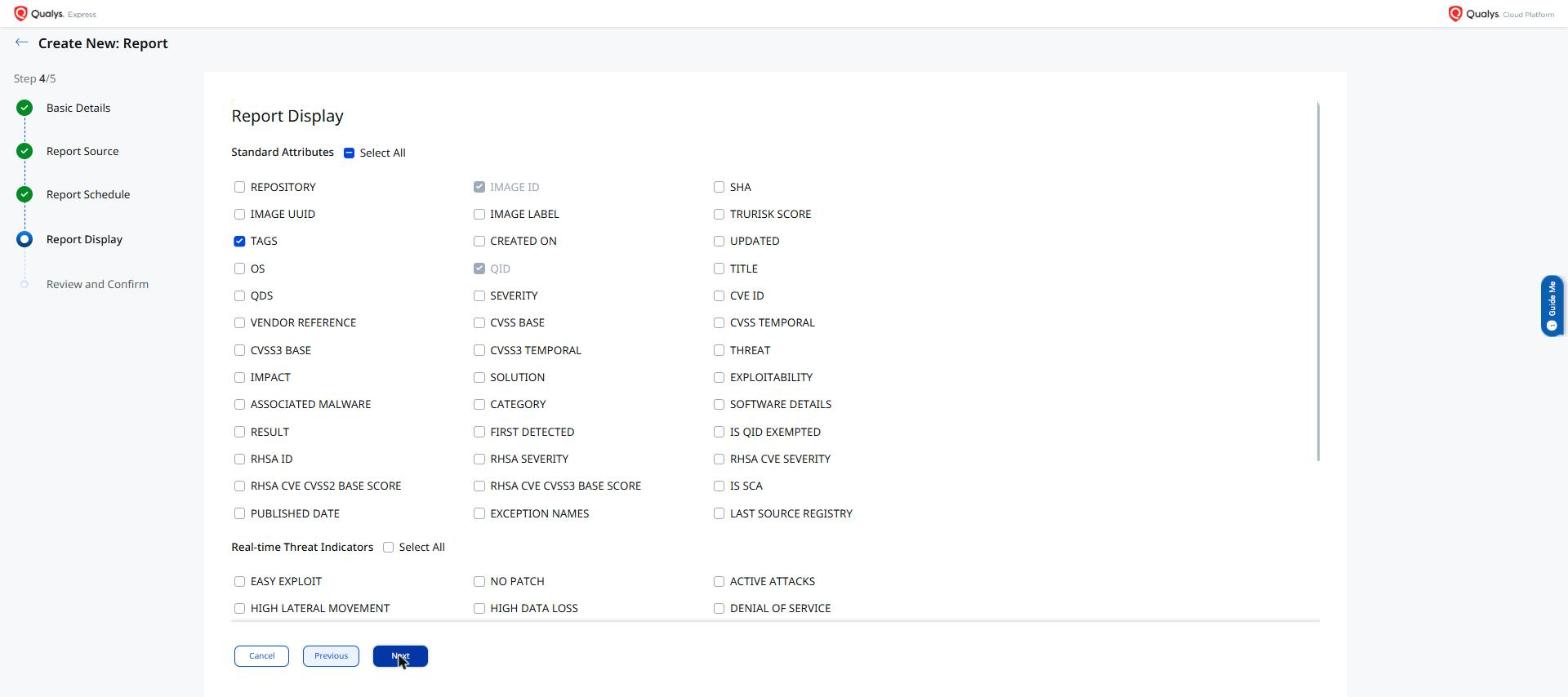
The following are the key benefits of including the exception name in vulnerability reports:
- Quickly identify which exception rule was applied to a vulnerability without cross-referencing the Exceptions page
- Simplifies exception audit reviews by surfacing exception names in the report output
- Consistent exception tracking across report-based and UI-based vulnerability workflows
Enhancement
Enhanced Vulnerability Reports: Image Label and Image UUID Now Included
What Changed For You
Image vulnerability reports now include Image Label and Image UUID columns, making it easier to uniquely identify and cross-reference images in exported report output.
Container Security 1.46 adds Image Label and Image UUID to image vulnerability report output. Previously, these fields were missing from report exports even when they were selected in the report template, making it difficult to uniquely identify images or cross-reference report findings with external systems. Both fields are now correctly included in generated reports, supporting more precise image tracking and audit workflows.
Image Label and Image UUID are included in vulnerability reports created under Qualys Enterprise TruRisk™ Platform > Container Security > Reports.
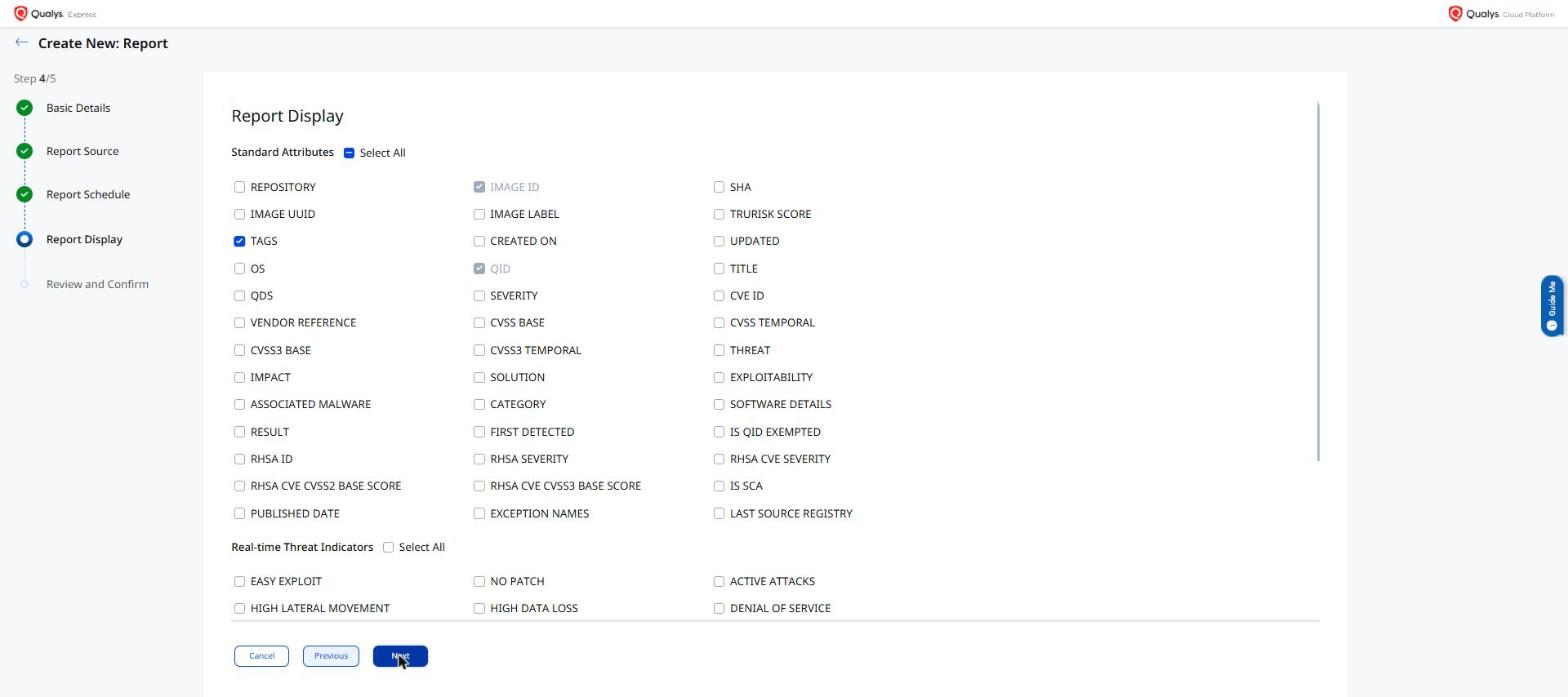
The following are the key benefits of including Image Label and Image UUID in vulnerability reports:
- Uniquely identify images in report output using Image UUID, avoiding ambiguity when multiple images share the same name or tag
- Cross-reference vulnerability report findings with CI/CD pipelines or external asset management systems using image labels and UUIDs
- Report output now matches the column selection in the report template without missing fields
Enhancement
Enhanced Image Secret Report: OS Column Now Available
What Changed For You
The Image Secret Report now includes the OS column, which is correctly populated in report output and CSV exports. This column was previously missing from secret report output even when the OS was known for the scanned image.
Container Security 1.46 adds the OS field to the Image Secret Report template. The OS column — which identifies the operating system of the scanned image — was previously absent from secret report output even when OS information was available. With this fix, the OS column is now correctly included in Image Secret Reports and CSV exports, giving security teams complete image context alongside secret findings without requiring a separate image report.
The OS column is available in Image Secret Reports generated under Qualys Enterprise TruRisk™ Platform > Container Security > Reports.
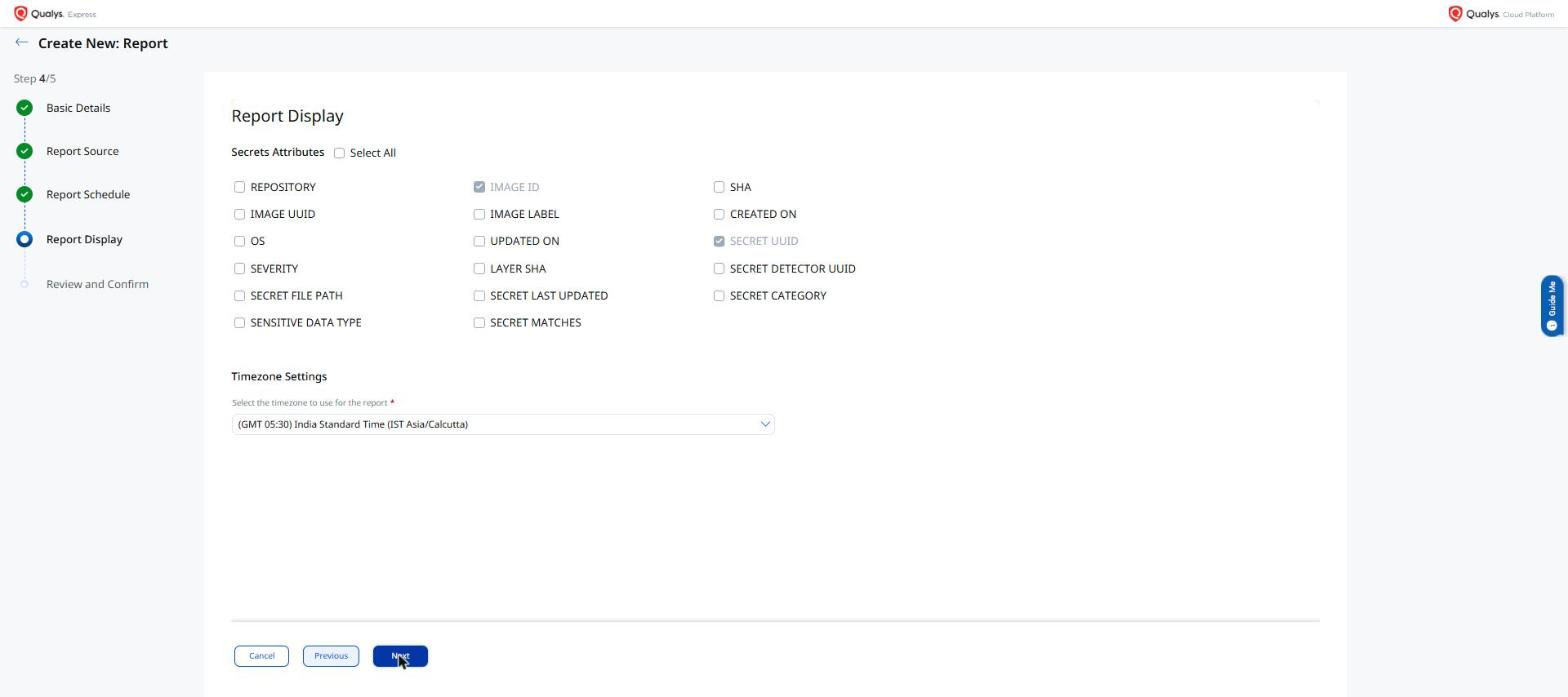
The following are the key benefits of the OS column in the Image Secret Report:
- View the operating system of each scanned image alongside secret findings in a single report
- Prioritize secret remediation by OS type without cross-referencing a separate image vulnerability report
- Complete report output in both the UI and CSV export without missing OS information
New Feature
Introduced Policy, Policy Evaluation, and Events for Code Assets (??Done)
What'S NEW For You
Container Security now extends policy enforcement, policy evaluation, and runtime event visibility to code assets, bringing code asset security in line with the existing experience for containers and images.
Container Security now extends policy enforcement, policy evaluation, and runtime event visibility to code assets. You can define policies that apply to code assets, view evaluation results, and monitor events — bringing code asset security in line with the existing policy and events experience for containers and images. A new rule sub-type, Code Security, is introduced to support policy rules scoped specifically to code assets.
Policy evaluation and events for code assets are accessible under Qualys Enterprise TruRisk™ Platform > Container Security > Policies > CI/CD > Code Assessment, and Container Security > Events > CI/CD > Code Events.
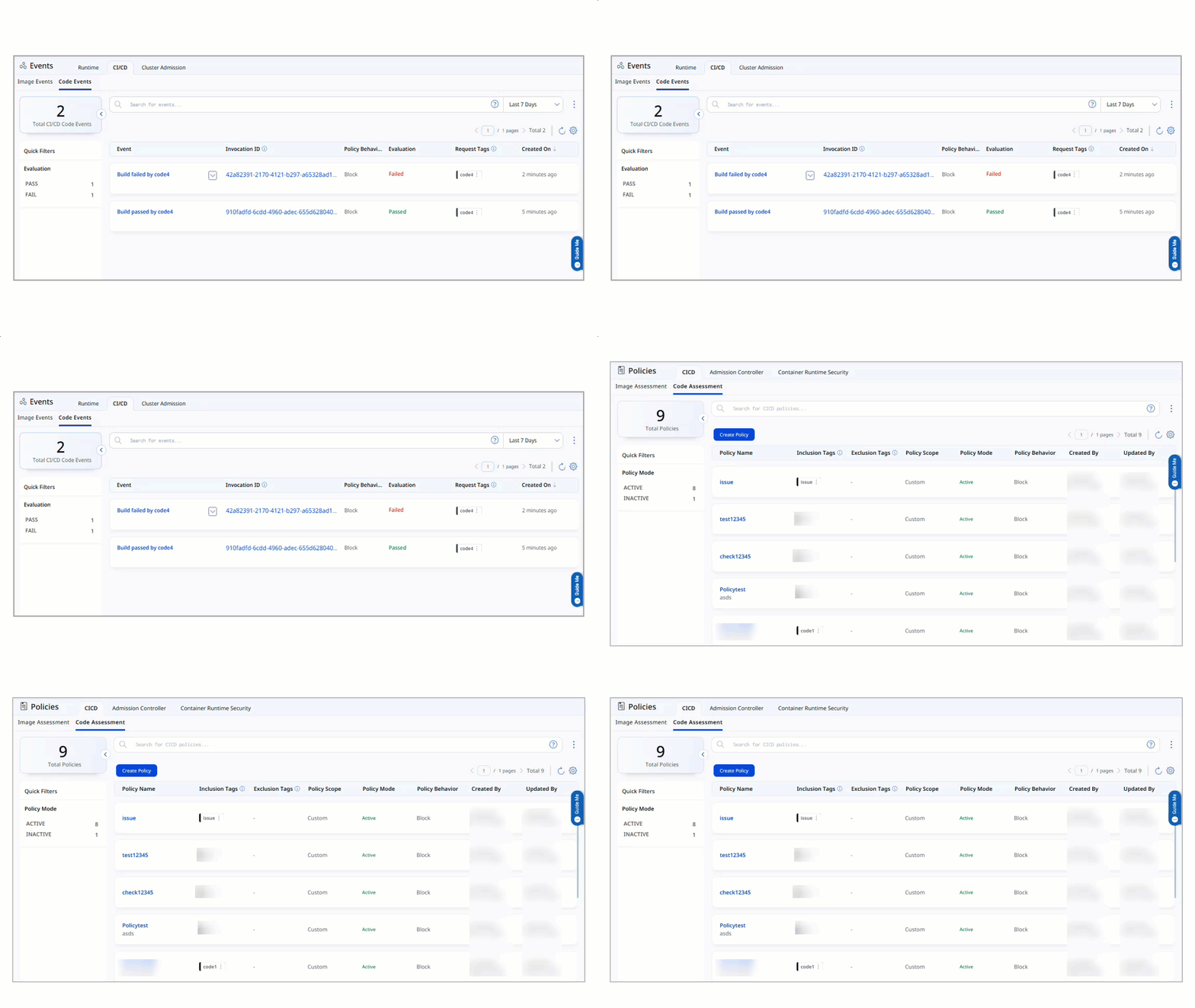
The following are the key benefits of policy, policy evaluation, and events for code assets:
- Unified policy enforcement across container images, running containers, and code assets from a single platform
- Policy evaluation results for code assets provide actionable compliance and security findings
- Event monitoring for code assets gives you visibility into runtime activity alongside containers
Enhancement
Enhanced SCA Vulnerability Filtering on Code and Vulnerabilities Pages
What Changed For You
A new filter on the Code and Vulnerabilities pages lets you include or exclude SCA-sourced findings from your view, giving you more control over what vulnerability data is surfaced during review and prioritization.
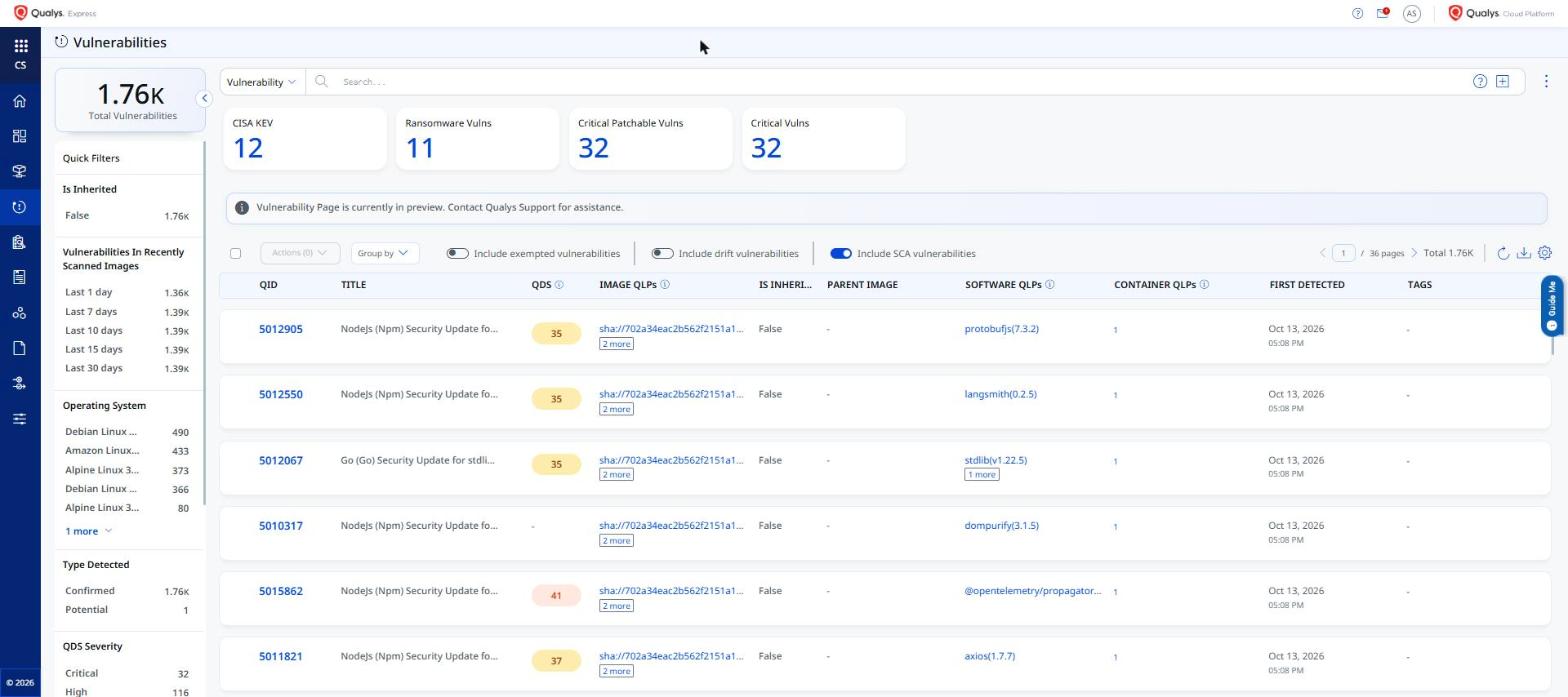
You can now filter SCA (Software Composition Analysis) vulnerabilities on the Code and Vulnerabilities pages in Container Security. The new filter lets you include or exclude SCA-sourced findings in your view, giving you more control over what vulnerability data is surfaced during review and prioritization.
The SCA filter setting is also honored when you download a quick CSV report directly from the Code, Vulnerabilities, Images, or Containers list pages. The exported CSV reflects your current filter selection — if SCA vulnerabilities are excluded in the view, they are excluded from the downloaded report as well.
The SCA vulnerability filter is available under Qualys Enterprise TruRisk™ Platform > Container Security > Vulnerabilities and Container Security > Assets > Code.
The following are the key benefits of SCA vulnerability filtering:
- Quickly isolate SCA-specific vulnerabilities on the Code and Vulnerabilities pages for focused review
- Reduce noise by hiding SCA findings when reviewing OS or non-OS vulnerability data
- Consistent filtering experience across both the Code and Vulnerabilities pages
- CSV quick-report downloads from the Code, Vulnerabilities, Images, and Containers list pages honor the SCA filter — exported data matches exactly what you see on screen
New Feature
Introduced Tagging Support for Code Assets
What'S NEW For You
You can now apply tags to code assets — repositories, branches, and code findings — enabling you to organize, filter, and manage code security posture using the same tag-based workflows used for other asset types in Container Security.
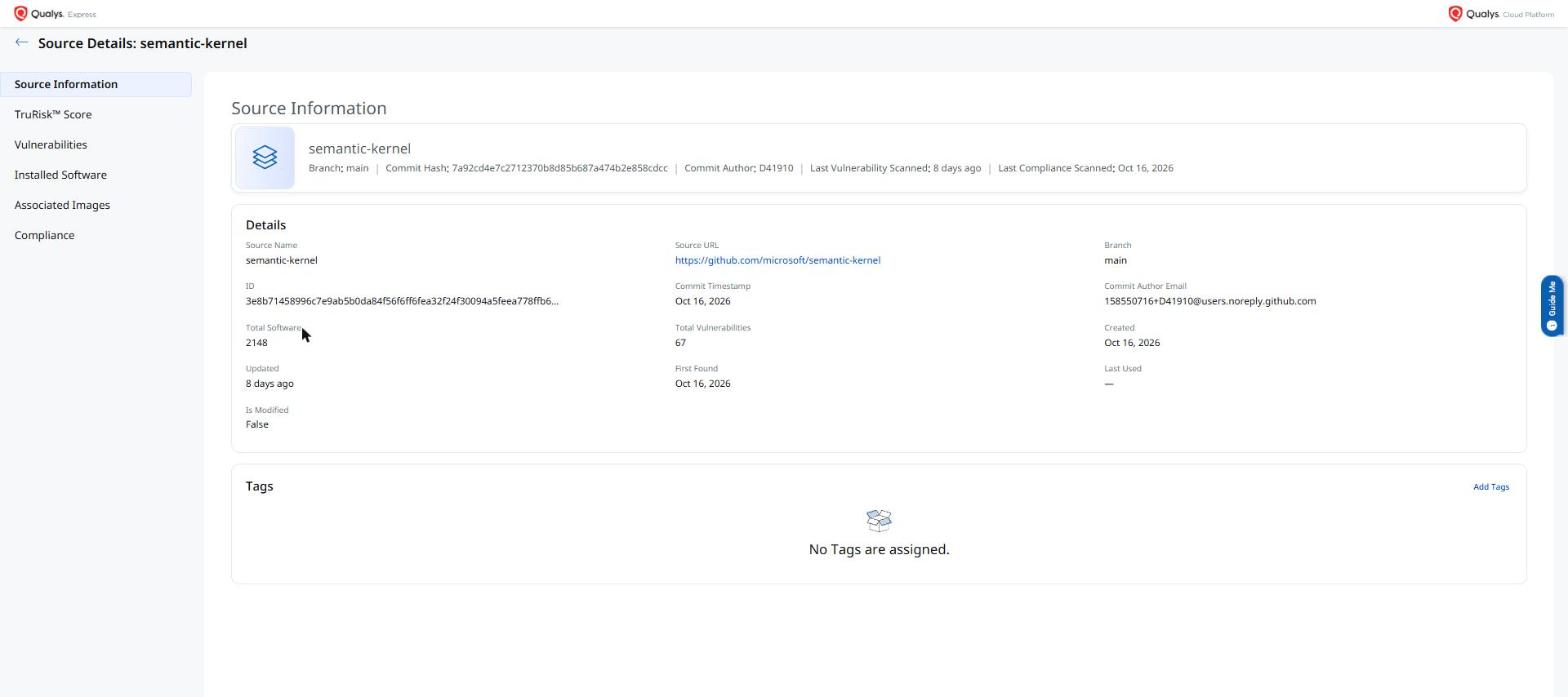
Container Security 1.46 extends tag support to code assets, including repositories and branches. You can now assign tags to code assets and use those tags to filter findings on the Code Security pages. This brings code assets in line with the tagging capabilities already available for images, containers, and sensors, allowing consistent policy and access control across your entire software supply chain.
Tagging for code assets is available under Qualys Enterprise TruRisk™ Platform > Container Security > Assets > Code.
The following are the key benefits of tagging support for code assets:
- Apply tags to repositories and branches to organize code security findings by team, project, or environment
- Filter code security findings by tag, consistent with filtering on other Container Security pages
- Uniform tagging experience across images, containers, sensors, and code assets
New Feature
Introduced Retention Support for Code Assets
What'S NEW For You
You can now configure retention periods for code assets — repositories and branches — in Container Security, ensuring stale or inactive code assets are automatically removed from the platform after a defined period.
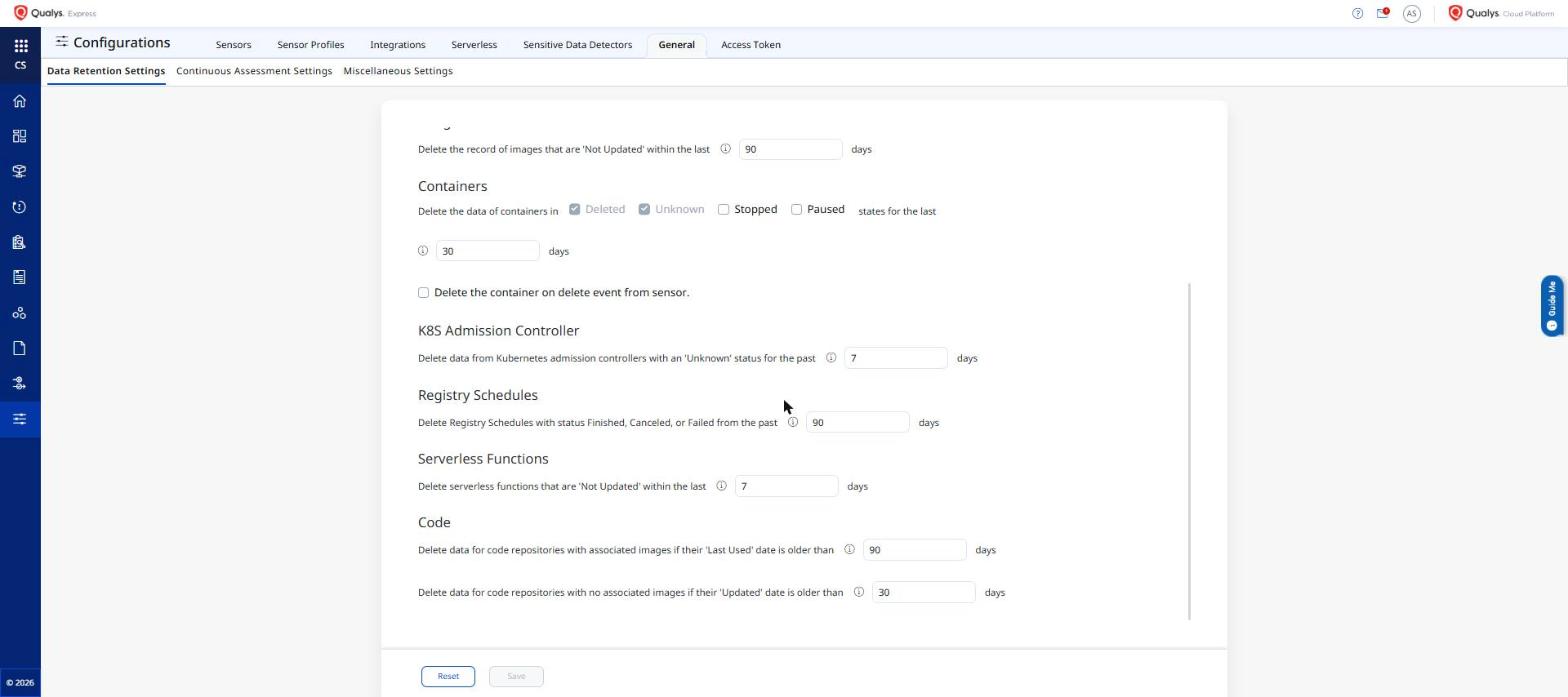
Container Security 1.46 introduces configurable retention periods for code assets. You can now set a retention period for repositories and branches so that code assets that have not been updated or scanned within the defined window are automatically purged from the platform. This keeps your code asset inventory current and prevents stale data from inflating your vulnerability counts or skewing TruRisk scores.
Retention settings for code assets are configurable under Container Security > Configuration > Sensor Settings.
The following are the key benefits of retention support for code assets:
- Automatically remove stale repositories and branches after a configurable retention period
- Prevent inactive code assets from inflating vulnerability counts and TruRisk scores
- Consistent retention policy configuration experience aligned with existing sensor retention settings
Enhancement
Enhanced Code Asset Listing: Last Compliance Scan Date Now Visible
What Changed For You
The Code Asset listing page now shows the Last Compliance Scan date for each code asset, so you can quickly identify assets that have not been recently evaluated for compliance without opening each asset's details page.
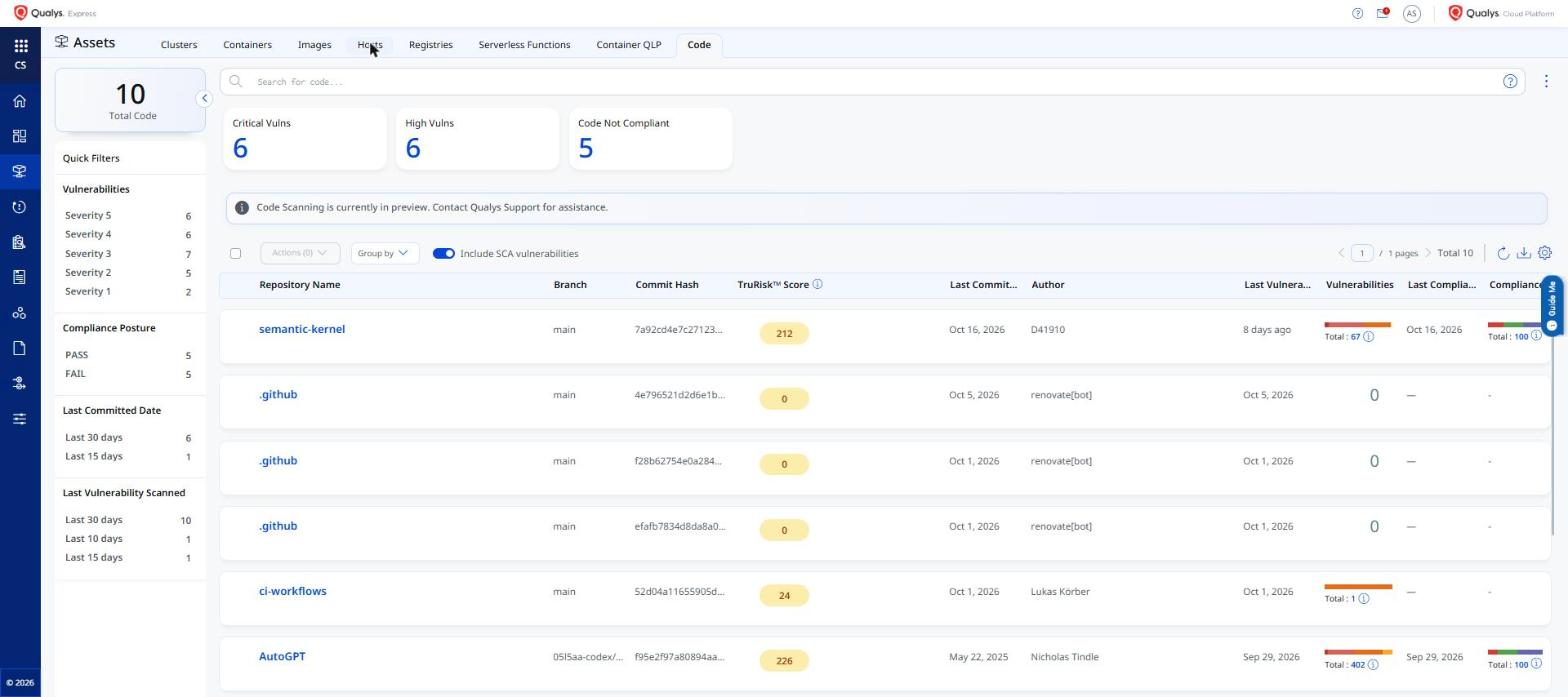
Container Security 1.46 adds a Last Compliance Scan date column to the Code Asset listing page. This field shows the most recent date on which each code asset was evaluated against a compliance policy. Previously, this information was only available on the individual code asset details page, requiring you to navigate into each asset to check its compliance scan recency. The column is now visible directly from the listing, making it easier to identify stale or unscanned code assets at a glance.
The Last Compliance Scan date column is visible on the Code Asset listing page under Qualys Enterprise TruRisk™ Platform > Container Security > Assets > Code.
The following are the key benefits of the Last Compliance Scan date on the Code Asset listing:
- Quickly identify code assets that have not been compliance-scanned recently without opening individual detail pages
- Prioritize compliance remediation efforts by sorting or filtering on scan recency
- Consistent listing experience aligned with the Last Vulnerability Scan date already available for other asset types
Enhancement
KSPM Enhancements: CIS OKE Benchmark v2.0 and Posture Report Improvements
What Changed For You
Kubernetes Security Posture Management (KSPM) in Container Security 1.46 adds compliance controls aligned with the CIS Oracle Kubernetes Engine (OKE) Benchmark v2.0, and improves the Kubernetes Posture Report with policy names, namespace details, and policy-scoped report generation.
CIS OKE Benchmark v2.0 controls
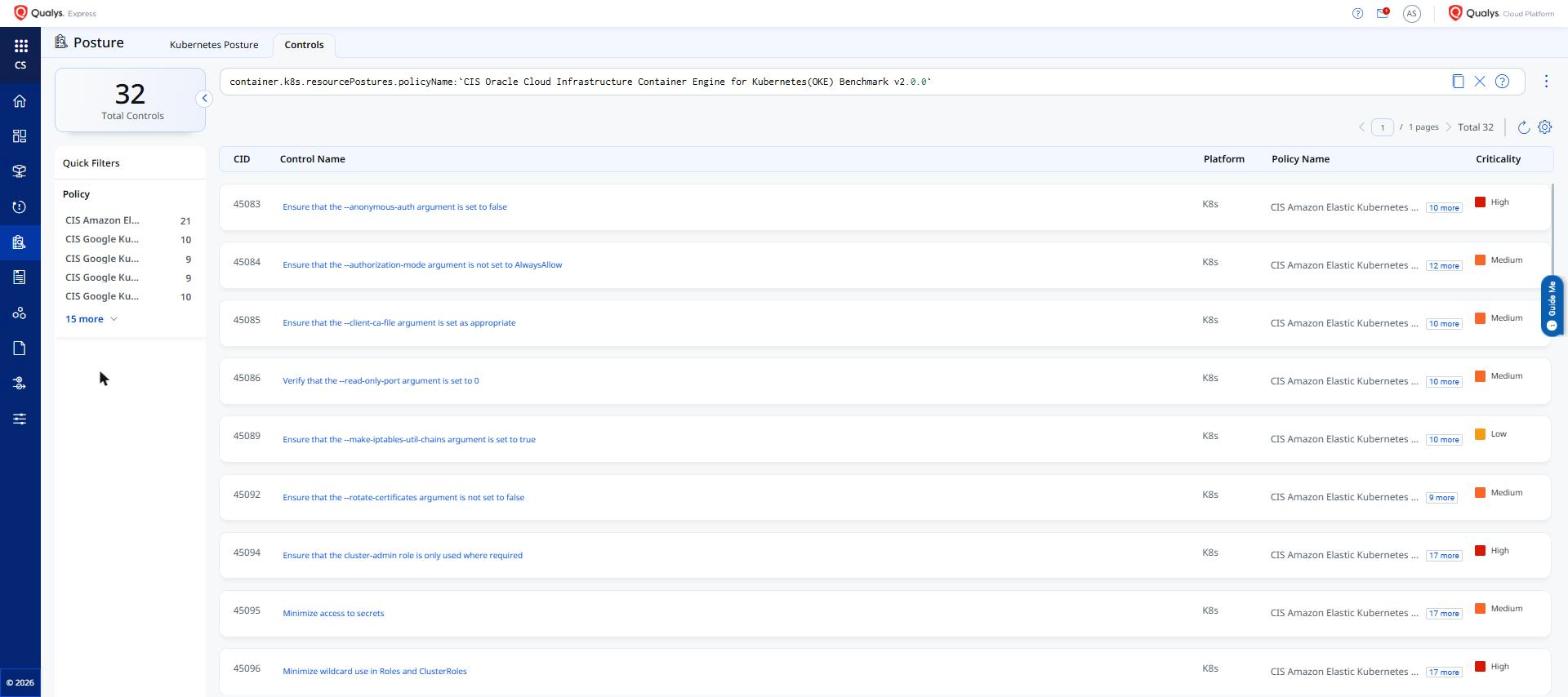
Container Security 1.46 expands KSPM coverage for Oracle Kubernetes Engine by adding the following new controls aligned with CIS OKE Benchmark v2.0:
- Encrypt traffic to HTTPS load balancers with TLS certificates — verifies that load balancer traffic is encrypted in transit using valid TLS certificates
- Ensure that the kubelet.conf file ownership is set to root:root — verifies that the kubelet configuration file on OKE nodes has correct ownership to prevent unauthorized modification
Kubernetes Posture Report improvements
The Kubernetes Posture Report now includes context that was previously missing, making findings easier to understand and act on:
- Policy name — each control result now identifies which policy it belongs to (for example, CIS Kubernetes Benchmark)
- Kubernetes namespace details — resource-level findings now include the namespace of the affected resource, so you can route remediation to the correct team
- Policy-scoped report generation — generate the report for a specific policy (for example, CIS Benchmark only) instead of all policies at once, reducing report volume and focusing output on the relevant framework
These report improvements apply to both the Compliance UI view and CSV exports.
The CIS OKE Benchmark v2.0 controls are available under Qualys Enterprise TruRisk™ Platform > Container Security > Posture > Kubernetes > Controls. The Kubernetes Posture Report is accessible under Container Security > Reports.
The following are the key benefits of KSPM enhancements in Container Security 1.46:
- Assess OKE cluster posture against the latest CIS OKE Benchmark v2.0 controls without manual policy customization
- Identify load balancer TLS encryption gaps and kubelet configuration ownership issues directly from the KSPM posture assessment
- Understand which compliance policy each control finding belongs to without leaving the Kubernetes Posture Report
- Route namespace-level findings to the correct team using namespace context now included in report output
- Scope report generation to a single policy to reduce noise and focus on the framework relevant to your audit
- Consistent additional context across both the Compliance UI and CSV exports
New Feature
Introduced Remote Sensor Log Collection
What'S NEW For You
You can now collect diagnostic logs from a Container Security sensor directly from the platform without requiring host-level access, making it faster to troubleshoot sensor issues and share diagnostic data with Qualys Support.
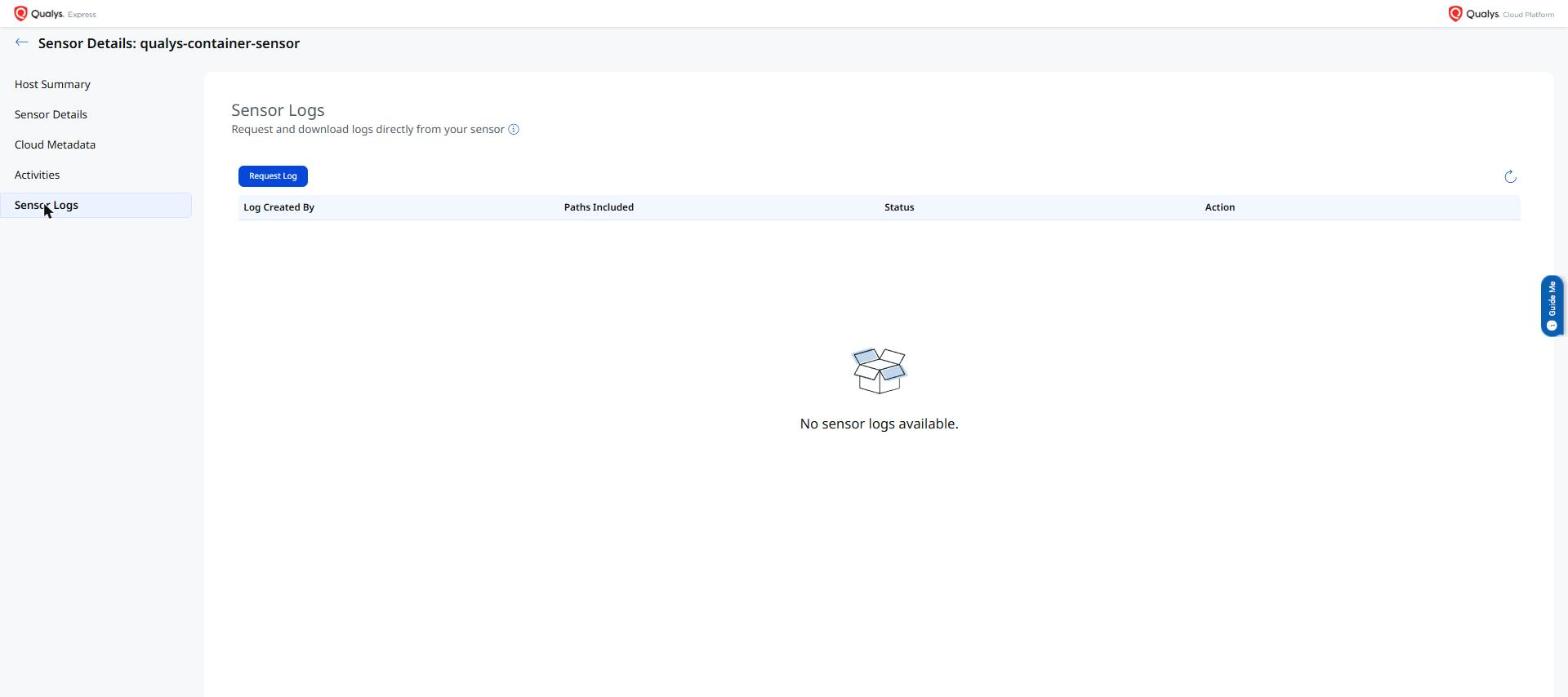
You can now collect diagnostic logs from a Container Security sensor directly from the Qualys Enterprise TruRisk™ Platform without requiring direct access to the host where the sensor is deployed. A new button on the Sensor Details page triggers a remote log collection job, making it easier to troubleshoot sensor issues and share diagnostic data with Qualys Support.
The Collect Logs button is available under Qualys Enterprise TruRisk™ Platform > Container Security > Sensors > Sensor Details.
The following are the key benefits of Remote Sensor Log Collection:
- Eliminates the need for host-level access to retrieve sensor diagnostic logs
- Faster troubleshooting — logs can be collected on demand directly from the platform
- Simplifies support workflows by providing a centralized way to gather sensor diagnostics
Enhancement
Enhanced Sensor Configuration: Remote Flag Support
What Changed For You
Sensor profiles now support remote flag configuration through a JSON-based advanced configuration format, eliminating the need to redeploy sensors when adjusting runtime flags.
Container Security sensor profiles now support remote flag configuration through a JSON-based advanced configuration format. You can configure sensor runtime flags remotely without redeploying the sensor, reducing operational overhead when adjusting sensor behavior across your environment.
Remote flag configuration is available under Qualys Enterprise TruRisk™ Platform > Container Security > Configurations > Sensor Profiles.
The following are the key benefits of remote flag support in sensor configuration:
- Modify sensor runtime flags remotely without redeploying sensors across your environment
- JSON-based advanced configuration provides a structured, flexible format for managing sensor options
- Reduces operational overhead for managing sensor configurations at scale
Enhancement
Enhanced Registry Scan Jobs: Edit Existing On-Demand and Scheduled Scan Jobs
What Changed For You
You can now edit existing on-demand and scheduled automatic scan jobs for registries without deleting and recreating them, reducing the effort required to adjust scan configurations.
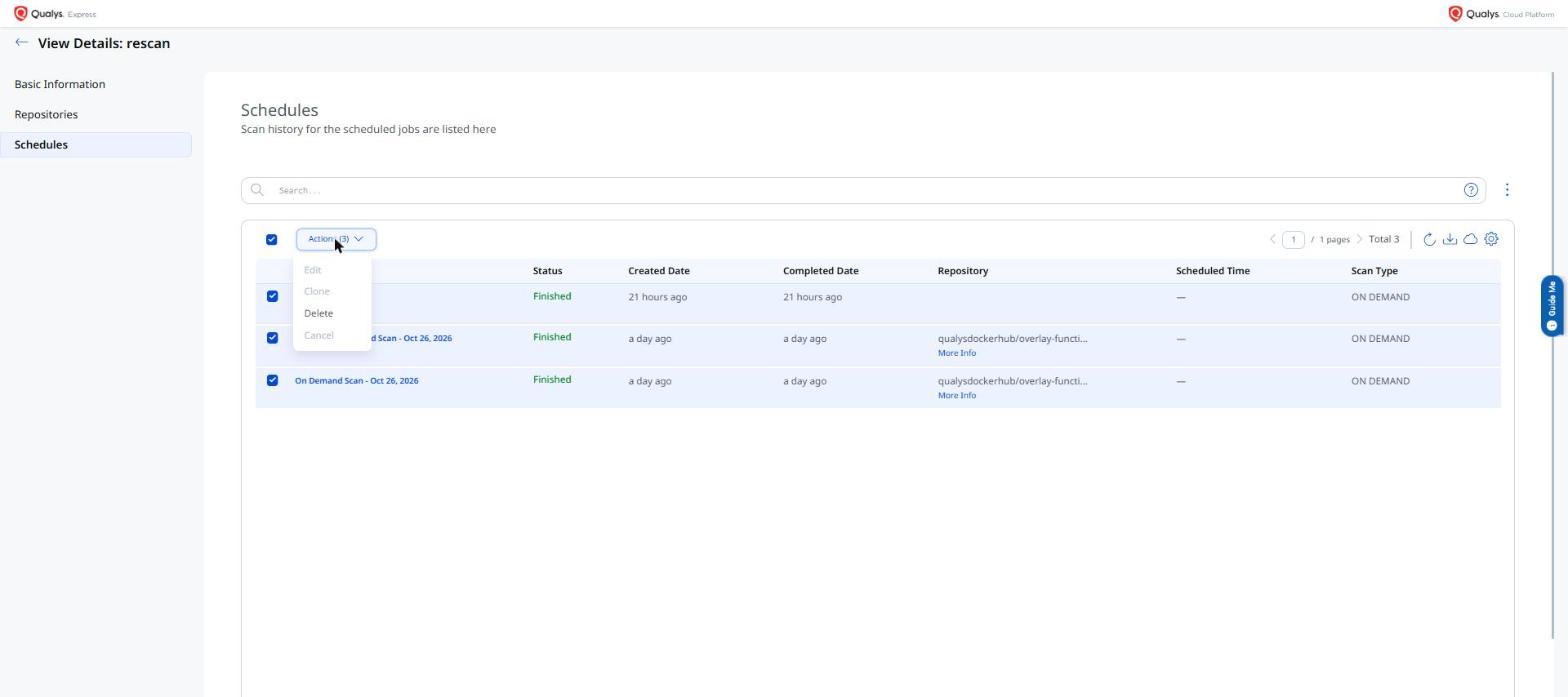
You can now edit existing on-demand and scheduled automatic scan jobs for registries in Container Security. Previously, editing a scan job required deleting and recreating it. This enhancement allows you to modify job parameters directly, reducing the effort required to adjust scan configurations as your registry environments change.
The edit option is available under Qualys Enterprise TruRisk™ Platform > Container Security > Assets > Registries > Schedules.
The following are the key benefits of editing existing registry scan jobs:
- Edit scan job parameters without deleting and recreating jobs, preserving scan history and scheduling context
- Reduces operational overhead when adjusting scan configurations for on-demand or scheduled registry scans
- Consistent edit experience for both on-demand and scheduled scan job types
Enhancement
Enhanced Registry Scan Workflow: Parallel Scanning Based on Sensor Thread Count
What Changed For You
Scan jobs are now assigned based on sensor thread count, enabling parallel listing and scanning of registry repositories for improved throughput and faster scan completion for large registries.
The registry scan workflow now assigns scan jobs based on the available thread count of the scanning sensor. This enhancement enables parallel listing and scanning of registry repositories, improving overall scan throughput for large registries and reducing the time required to complete full registry scans.
Parallel scanning is automatically applied to scan jobs configured under Qualys Enterprise TruRisk™ Platform > Container Security > Assets > Registries.
The following are the key benefits of parallel scanning based on sensor thread count:
- Improved scan throughput for large registries by leveraging available sensor thread capacity
- Parallel listing and scanning reduces total scan time across repositories
- Efficient utilization of sensor resources without manual configuration changes
Enhancement
Enhanced Sensor Retention: Reduced Retention Period for Unknown Sensors
What Changed For You
The retention period for sensors in an Unknown state has been reduced, keeping your sensor inventory accurate by automatically removing stale entries that are no longer reporting.
The retention period for sensors in an Unknown state has been reduced. Sensors that remain in an unknown state beyond the configured retention period are automatically removed from the platform, keeping your sensor inventory accurate and removing stale entries that are no longer reporting.
The retention setting for unknown sensors can be configured under Container Security > Configurations > General > Data Retention Settings.
The following are the key benefits of reduced retention for unknown sensors:
- Cleaner sensor inventory by automatically removing sensors that remain in an unknown state
- Reduces noise in the Sensors list from stale or unresponsive sensors
- Consistent with existing retention behavior for other sensor states
Enhancement
Enhanced Hosts Page: All Container Runtimes Now Displayed
What Changed For You
The Hosts page now correctly displays hosts across all supported container runtimes — Docker, Podman, containerd, and CRI-O — not just Docker-based hosts.
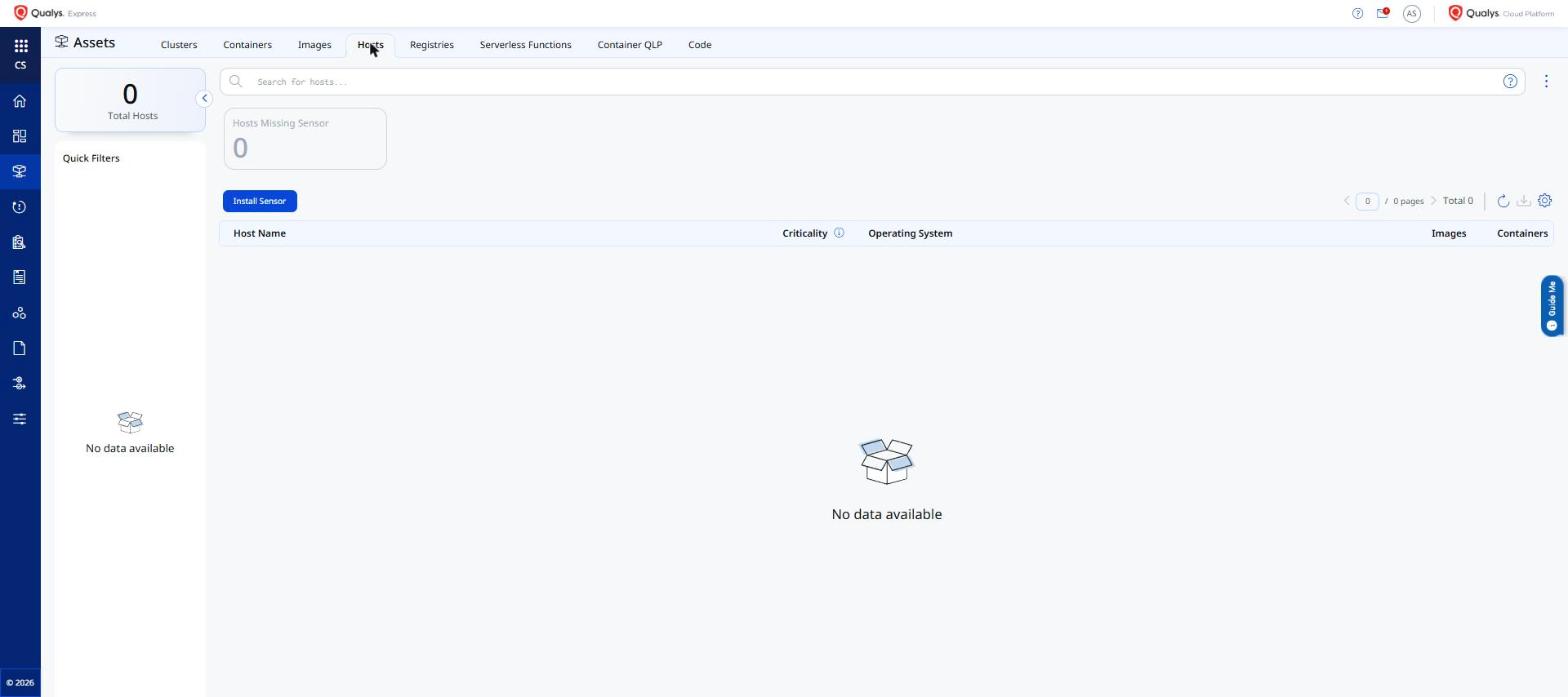
The Hosts page in Container Security now correctly displays hosts across all supported container runtimes — including Docker, Podman, containerd, and CRI-O. Previously, the Hosts page only showed Docker-based hosts, leaving non-Docker environments invisible in the host inventory view.
The Hosts page is accessible under Qualys Enterprise TruRisk™ Platform > Container Security > Assets > Hosts.
The following are the key benefits of displaying all container runtimes on the Hosts page:
- Complete host inventory visibility across all supported container runtimes, not just Docker
- Environments using Podman, containerd, or CRI-O now appear correctly in the Hosts page
- Accurate host count and filtering across multi-runtime Kubernetes and standalone container deployments
Enhancement
Enhanced Sensor Profile Quick Filter: Filter by Assigned Profile Name
What Changed For You
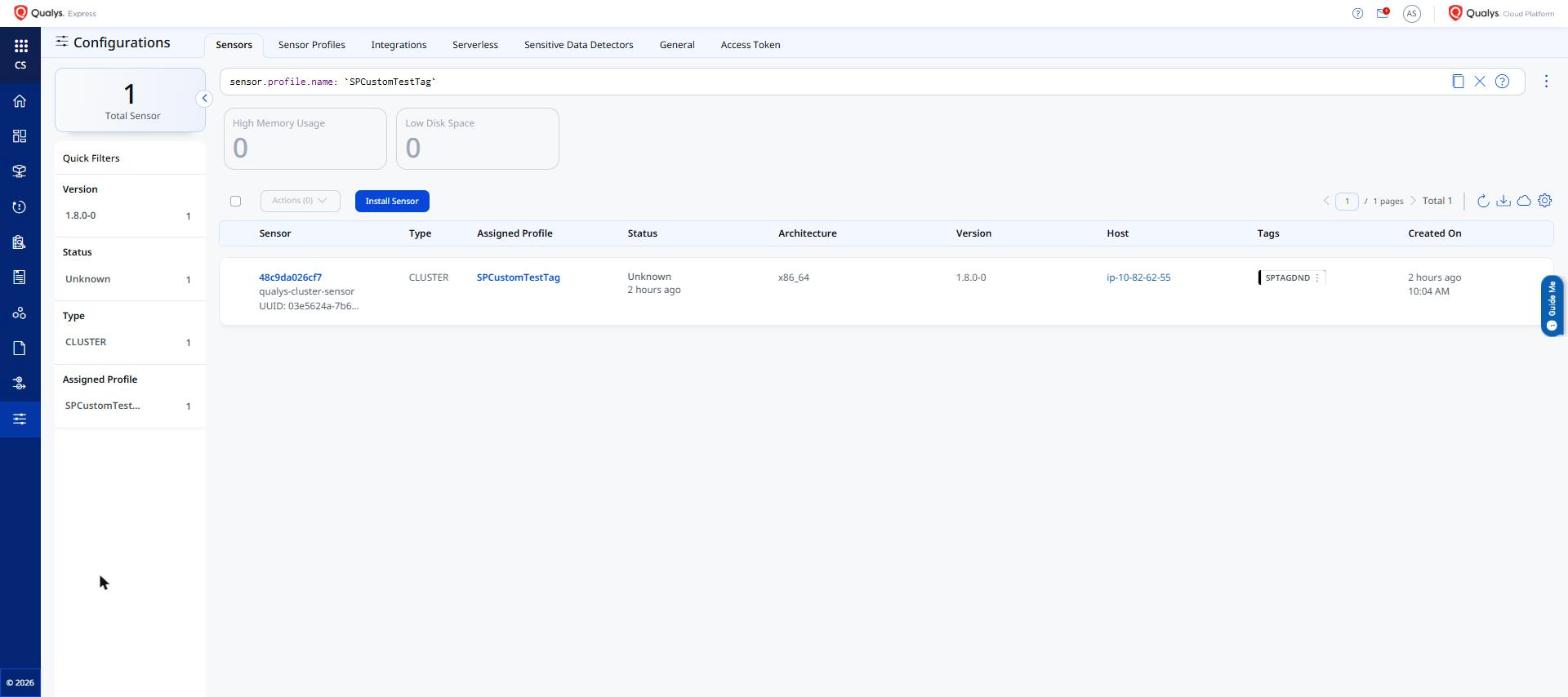
You can now reliably filter containers and sensors by their assigned sensor profile name. The assigned profile name is now persisted correctly and no longer lost during re-indexing.
Container Security 1.46 fixes and enhances the assigned sensor profile quick filter. Previously, a sensor's associated profile name was silently lost during re-index operations, causing the quick filter to return incorrect or missing results. The profile name is now correctly maintained through re-index events, attach and detach operations, and config publish flows — ensuring that filtering by sensor profile name on the Containers and Sensors pages returns accurate results consistently.
The sensor profile name quick filter is available on the Containers and Sensors pages under Qualys Enterprise TruRisk™ Platform > Container Security > Assets.
The following are the key benefits of the sensor profile quick filter enhancement:
- Filter containers and sensors by assigned sensor profile name without missing or incorrect results caused by re-indexing
- Profile name assignments are now preserved correctly through sensor attach, detach, and config update operations
- Accurate profile-based segmentation enables more reliable sensor inventory and compliance views