CyberSecurity Asset Management Frequently Asked Questions
This section provides answers to frequently asked questions to help you better understand and use the features.
Visual Studio Code (VS Code) follows Microsoft’s Modern Lifecycle Policy, which uses continuous monthly releases. Because of this model, VS Code does not provide fixed EOL/EOS dates for individual versions.
Key Points
- Monthly Updates: New versions are released every month.
- No Long-Term Support (LTS): Only the latest version is supported.
- Support Ends Immediately: When a new version is released, the previous version becomes unsupported.
- Stay Updated: Users should always upgrade to the latest version for security and feature updates.
Example
VS Code version 1.100.2 (May 2025) reached EOL on June 11, 2025, as Microsoft released version 1.101.1 on June 12, 2025. Support ended the day before the new release.
Summary
The absence of fixed EOL/EOS dates is intentional in VS Code's support model. Instead, the release of a new version automatically ends support for the prior one.
Recommendations
Monitor official release notes regularly.
Ensure endpoints update automatically or manually to the latest VS Code version.
Plan lifecycle and security processes considering the immediate end of support for older versions.
Qualys provides the ability to display the Last Login User information for assets. This data is available under the Asset Summary section in the CSAM UI and helps identify the most recent user who logged into a system.
The data is collected during scans using QID 105311, which retrieves the relevant value directly from the Windows registry.
Based on the QID’s detection logic, the Cloud Agent reads the last login user from the registry path
HKLM\Software\Microsoft\Windows\CurrentVersion\Authentication\LogonUI. For example, if the registry value is "Qualys", it indicates that Qualys was the most recent logged-in user. This value is then reported after the scan and displayed in the asset’s summary.
When External Attack Surface Management (EASM) discovers an asset with a private IP address, you may notice that it automatically receives a system-generated tag such as DNS_SINKHOLE. This is expected behavior. EASM assigns this tag when it detects public DNS records that resolve to private, loopback, or otherwise non-routable IP addresses. These assets are classified as DNS sinkholes, which are commonly used to block malicious DNS requests by redirecting them to a controlled, non-routable address.
During discovery, EASM scans for private IP ranges. When such addresses appear in public DNS records, EASM automatically applies the DNS_SINKHOLE tag. If you prefer to exclude these private IPs from future discoveries, you can search for them using QQL (for example, tags.name: "DNS_SINKHOLE") and add them to the Exclude Filter in your EASM configuration. This tagging behavior was introduced in an earlier platform update and aligns with industry-standard definitions of DNS sinkholes.
It is expected to see differences in certificate counts between Qualys CertView and Qualys CSAM. CertView reports certificates only from managed assets that are actively tracked through the Qualys Cloud Agent or authenticated scans. Its visibility is limited to SSL/TLS certificates on these known and controlled assets.
Qualys CSAM provides a broader view that includes both managed and unmanaged assets. CSAM may discover certificates through passive discovery, network insights, external sources, or assets without agents or authenticated scans. Because of this expanded scope, CSAM will generally show higher certificate counts than CertView.
To target newly created assets for patch deployment, manual tagging is currently the most reliable method until dynamic tag support for date-based tokens becomes available. You can begin by identifying new assets using the asset.created: filter. For example, the query asset.trackingMethod: \QAGENT` and asset.created:[2025-01-01 ... 2025-04-04]` retrieves assets tracked by the Qualys Agent that were created within the specified date range. You may adjust the dates as needed to match your onboarding window.
Once the assets are filtered, create a new static tag and manually assign it to the identified assets. This static tag can then be used when defining the scope of your patch job, ensuring that patch deployment includes only newly onboarded assets.
The Last Used Date may be missing because Qualys relies on platform-specific detection methods, and certain system conditions can prevent this data from being captured. The reasons vary across Windows, Linux, and macOS:
Windows
Qualys determines the Last Used Date using Windows Prefetch files, which are created only when an application is launched. The date may not appear if:
- Prefetching is disabled through Group Policy or registry settings
- The software has never been executed
- Prefetch files were deleted automatically or by cleanup tools
- The system was booted in Safe Mode
- The Prefetch directory is corrupted
- Virtualized environments do not generate/retain prefetch files
- There is a name mismatch between the registry entry and prefetch file
Linux
Qualys shows the Last Used Date only if:
- The software is installed as a package, and
- The software is running during the scan
It may not appear when:
- Software is installed via binary/manual methods with no package metadata
- The running process name/version does not match the installed package
- QID 45371 (file access time) applies only to limited products and reports one version only
macOS
Qualys uses running processes (QID 45594) and binary access time (QID 45371) to determine usage. The value may be absent if:
- The software was not running during the scan
- Multiple versions exist but only one is detected
- The software is not part of the supported list for access-time tracking
Uninstalled software may continue to appear in GAV or CSAM when residual traces such as leftover files, folders, or registry entries remain on the asset. These remnants are detected during scans and displayed in the UI.
To resolve this, review scan results for keywords related to the uninstalled software, verify any traces directly on the asset, and remove leftover items such as files or registry keys (for example, an entry under HKLM\SOFTWARE\WOW6432Node\...\Uninstall\{DummyKey-1234-ABCD} for an application like ExampleApp 5.2).
After cleanup, perform a new scan to confirm that the software no longer appears. If the issue persists, create a Support ticket with UI screenshots, affected asset IDs, scan reports, and a registry dump for further investigation.
When dynamic tagging is not an option, you can still bulk tag assets using alternative methods. Although Qualys does not support direct host-list import, two effective approaches can help you automate static tag assignment.
First, you can convert your list of hostnames into a QQL query in GAV/CSAM. Using the interfaces:(hostname: token with the OR operator, you can build a query that returns only the hosts you want to tag. Spreadsheet tools like Excel can help automate this process—for example, the TEXTJOIN function can turn a column of hostnames into a usable QQL string. Once your query runs in the UI, you can Select All and apply the static tag to the returned assets. Be mindful of the 4096-character limit for QQL queries; if needed, break large lists into multiple smaller queries.
Alternatively, you can automate the process using the Qualys API. A script can loop through your hostname list, use the Host Asset Search API to retrieve each asset’s ID, and then call the Update Asset API to apply the tag. This method allows full automation, provided you pass the correct hostname, extract the returned Asset ID, and apply the desired Tag ID in the update request.
Both approaches enable consistent bulk tagging without relying on dynamic rules.
No, it is not possible to convert an existing CSAM AD appliance into a QGS appliance. Once an appliance is registered with the Qualys Platform, its type and purpose are fixed.
Why does not Time-based dynamic tagging work?Why does not Time-based dynamic tagging work?
Time-based dynamic tagging does not work in Qualys because tags are evaluated only at the time of a scan. This means the system applies or updates tags when an asset is scanned, using data collected during that scan. As a result, any logic based on Last Scan or Last Seen time cannot update correctly—because the moment an asset is scanned, its “last scan time” becomes “now,” making conditions like “last scanned more than 3 days ago” impossible to satisfy during tag evaluation.
For example, a tag rule such as "last scan > 3 days" will never be applied. To meet this condition, the asset would need not to be scanned for three days—yet without a scan, Qualys cannot evaluate or update the tag. This creates a logical loop that prevents time-based dynamic tags from functioning. While you could manually evaluate such logic to produce a one-time “snapshot tag,” this is rarely useful and not recommended.
If your goal is to identify and remove stale assets, use Asset Purge Rules, which fully support time-based criteria for last-seen or last-scanned logic. If you simply want to view older or inactive assets without purging them, Qualys provides better tools: QQL queries, dashboard widgets, and CSAM reports. These methods offer accurate snapshots of asset age and activity without relying on dynamic tagging.
No. Creating dynamic tags based on other tag names (for example, tags.name) is not supported and will not work as expected.
When defining tag rules, only tokens that appear in the context-sensitive help dropdown are valid for use.
When you search using the tags.name QQL token on the Inventory tab, the asset count depends on whether you use a parent tag or a child tag. If you search using a parent tag, the asset count includes all assets associated with the parent tag as well as assets associated with its child tags. Because assets from both the parent and its child tags are included, the total asset count may appear higher.
If you search using a child tag, the asset count includes only the assets associated with that specific child tag.
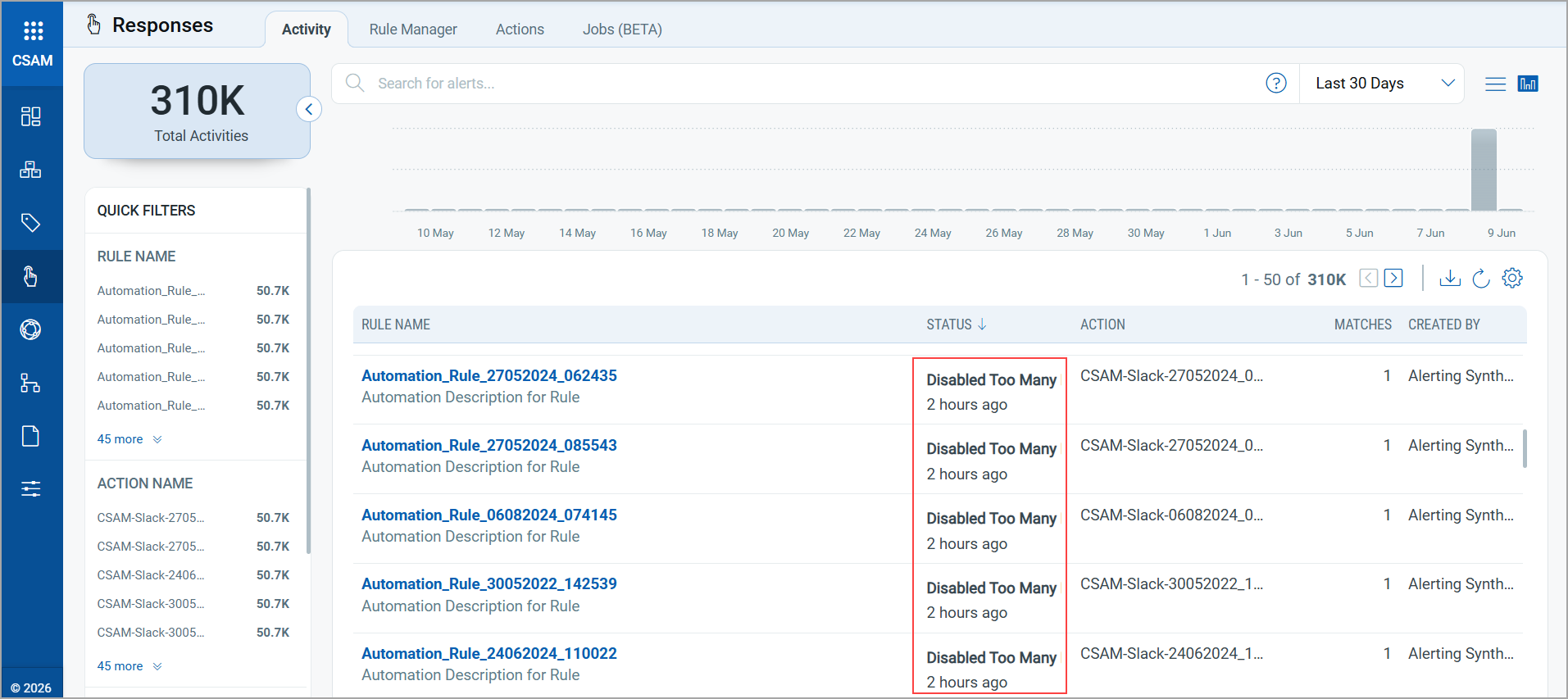
The Disabled Too Many Requests status indicates that the rule has exceeded the configured match threshold. In the production environment, if a rule matches more than 30 times within a 10-minute period, the system automatically suppresses alert notifications to prevent excessive email traffic and alert flooding.
To prevent this scenario, we recommend refining the QQL query by adding more filters to reduce the number of matches.