Asset Merging using Machine Learning
The system automatically evaluates third-party asset data from connector sources (such as Webhook, EASM, or Passive Sensor) and determines whether it belongs to an existing asset or a new asset. To determine this, the attributes of assets are matched and validated using a Machine Learning (ML) model to ensure accurate and reliable asset identification.
As the system automatically identifies and merges or creates assets, you do not need to create Asset Identification rules. All asset attributes are evaluated before assets are merged or created. Hence, on the Rules > Asset Identification > Rules tab, only system-defined rules are available to view.
With the enhanced asset identification and merging capabilities, the system:
- Prevents false merges by leveraging ML validation.
- Prioritizes merging of assets from trusted sources (such as Qualys Agent, IP, DNS, and NetBIOS) over third-party sources (such as EASM and Passive Sensor).
- Provides detailed visibility into evaluated rules, ML confidence scores, attribute comparisons, and merge reasoning.
How Asset Identification and Merging Work with ML
The identification and merging using ML follows the following flow:
- Asset Data from Connector Sources
When asset data is received from a third-party connector, the system extracts all available attributes such as Serial Number, Instance ID, Hostname, MAC address, IP address, and others.
- Asset Data Filter
Unreliable or duplicated values are automatically filtered out. These may include:
This ensures that poor-quality data does not affect attribute-matching decisions.
- Virtual MAC addresses (such as VMware, Docker)
- IP-encoded hostnames
- Reserved or non-routable IP ranges
- Placeholder or default serial numbers
- Auto-generated FQDNs
- Attribute Match
The system evaluates the incoming asset against existing assets using a fixed sequence of attributes:
All attributes are evaluated in sequence. If a strong match is found, the system proceeds to validation. If not, it continues evaluating the remaining attributes.
- Strong attributes: Serial Number, Instance UUID, Hostname, FQDN, Hardware UUID
- Medium attributes: Netbios, MAC Address
- Weak attribute: IP Address
- ML Validation
Every potential match identified through rules is validated using our ML model to determine how closely the external asset matches an existing asset.
- ML Confidence Score
The ML model assigns a confidence score based on the matching attributes. Based on the confidence score, the system merges or creates an asset. For more information, refer to Machine Learning (ML) Confidence Score.
- Merge Reason
Based on the confidence score and attribute comparison, a summary of the decision is provided.
Machine Learning (ML) Confidence Score
The ML confidence score (0-100%) allows the system to decide whether to merge the third-party asset with an existing asset or create a new one. This score is calculated in both merge and create scenarios.
Merge Confidence Score
The Merge Confidence Score determines how confidently the system believes an incoming third-party asset matches an existing asset in the inventory.
The following table provides the merge confidence scores and the action it takes:
| Merge Confidence Score | Merge Confidence Level | Description | Action |
|---|---|---|---|
| 75–100% | High ML Confidence | Multiple reliable attributes strongly match an existing asset. | Merge assets immediately. |
| 60–74% | Medium ML Confidence | Some matching attributes are found, but additional validation is required. | Perform additional evaluation. If sufficient matching attributes are found, the assets are merged. If not, a new asset is created. |
| 0–59% | Low ML Confidence | Similarity is weak or unreliable. | Create a new asset |
Create Confidence Score
The Create Confidence Score indicates how confidently the system believes the incoming asset is a completely new asset and should not be merged with any existing asset. This score is calculated after the merge evaluation fails.
The following table provides the create confidence scores and the action it takes:
| Merge Confidence Result | Create Confidence Score | Create Confidence Level | Description | Action |
|---|---|---|---|---|
| No similar assets found | 100% | High ML Confidence | No resemblance to any existing asset | Create new asset. |
| 0-30% merge confidence | 100% | High ML Confidence | The matching attributes are too weak or unreliable | Create new asset. |
| 31–50% merge confidence | 95–99% | Medium ML Confidence | A few attributes look similar, but there is not enough evidence to merge the assets. | Create new asset. |
| 51–59% merge confidence | 90–93% | Low ML Confidence | The asset looks somewhat similar to an existing asset, but the match is still not strong enough to safely merge. | Create new asset. |
View Asset Merge Details
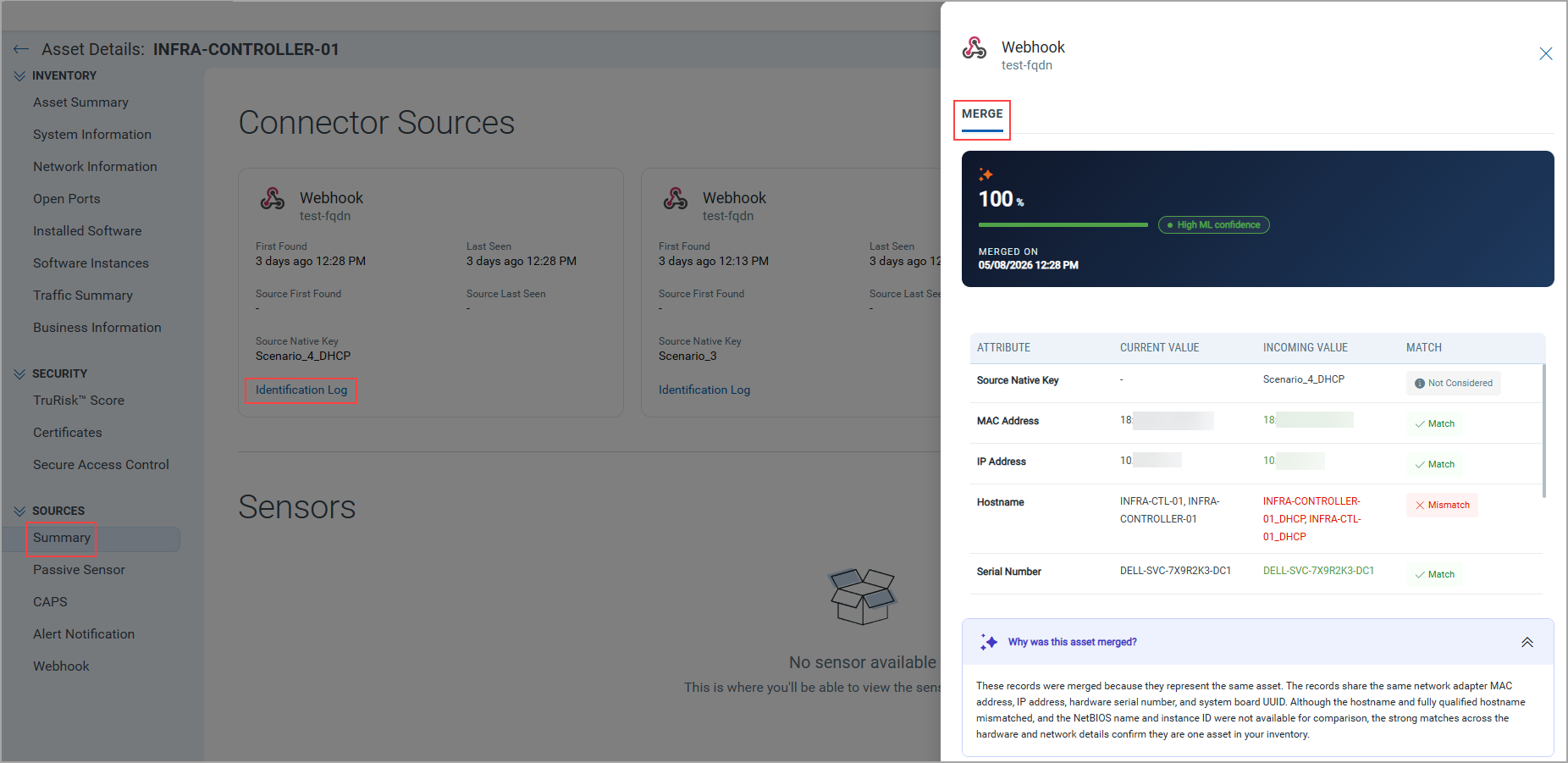
You can view the asset identification details on the Asset Details > SOURCES > Summary > Identification Log. The right pane displays the overall ML-based evaluation of the asset, including attributes, confidence score, and the asset merge or create summary.
Refer to the following image for the merged asset scenario:
Refer to the following image for the create assets scenario:
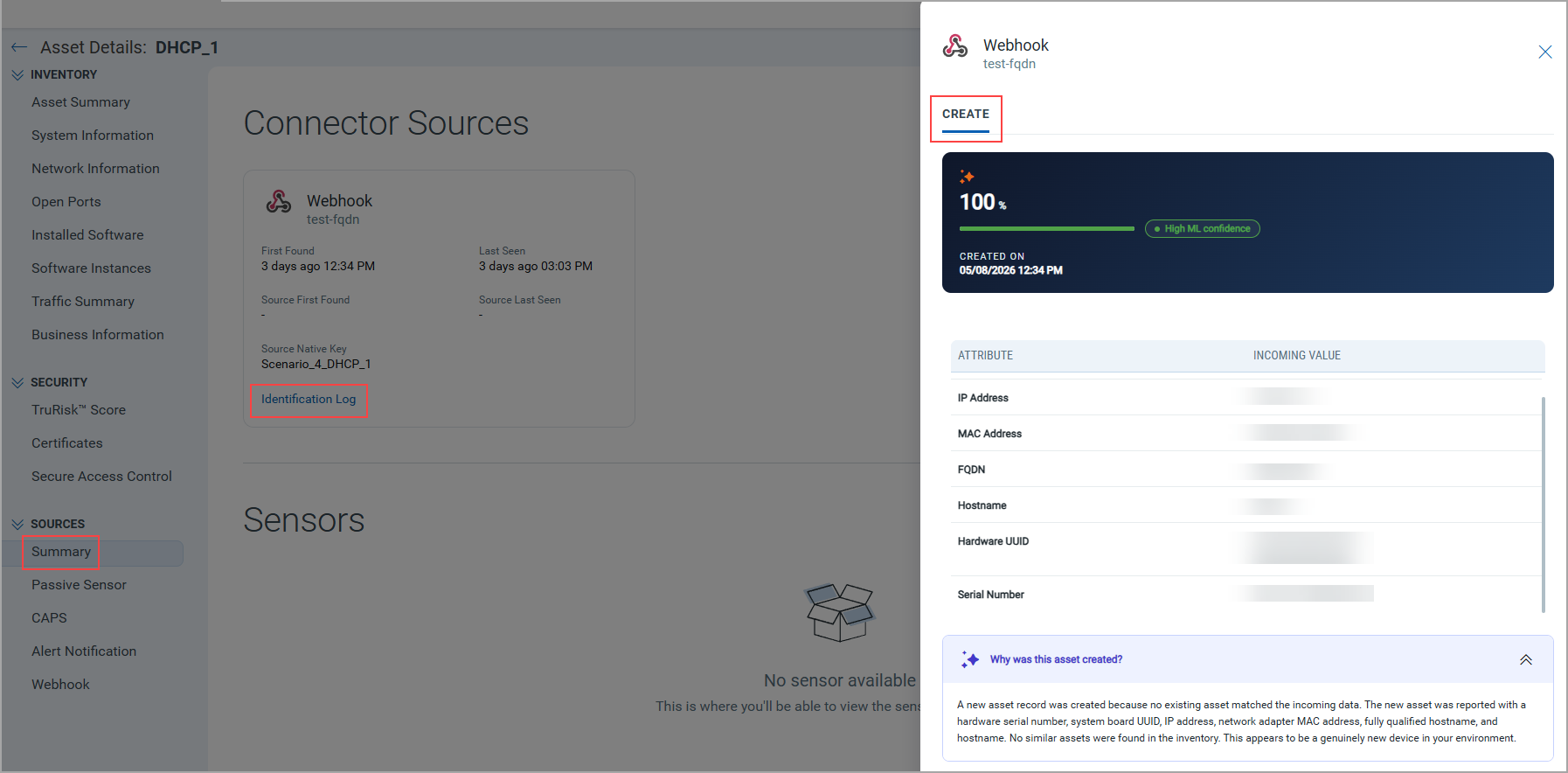
The identification log displays the following details:
| Section | Description |
|---|---|
| MERGE/CREATE | Displays the overall ML-based evaluation of creating or merging an asset. |
| ML Confidence Score | Displays the confidence score assigned by the ML model, along with its merge or creation date. For more information, refer to Machine Learning (ML) Confidence Score. |
| Attributes Comparison View | Displays a side-by-side comparison of attribute values between the existing asset and the third-party asset during asset merge operations. For newly created assets, the attributes of the new asset are displayed. For more information, refer to Attributes Comparison View. |
| Summary | Provides a summary of the merge or create decision, including the key attributes used in the decision-making process. The summary is displayed under a dropdown with one of the following questions:
|
Attributes Comparison View
The attributes comparison view includes the following details:
| Column | Description |
|---|---|
| Attribute | Lists the identifiers evaluated. |
| Current Value | Displays the attribute values of the existing asset in inventory. |
| Incoming Value | Displays the attribute values received from the connector source. |
| Match | Displays whether the values match, mismatch, or are not considered. |
Configure Create New Asset Settings
You can control whether new assets are created during the ML evaluation process. Navigate to Rules > Asset Identification > Settings to configure this behavior using the Create New Asset toggle. This setting helps you configure whether the system should create a new asset or only merge with existing assets.
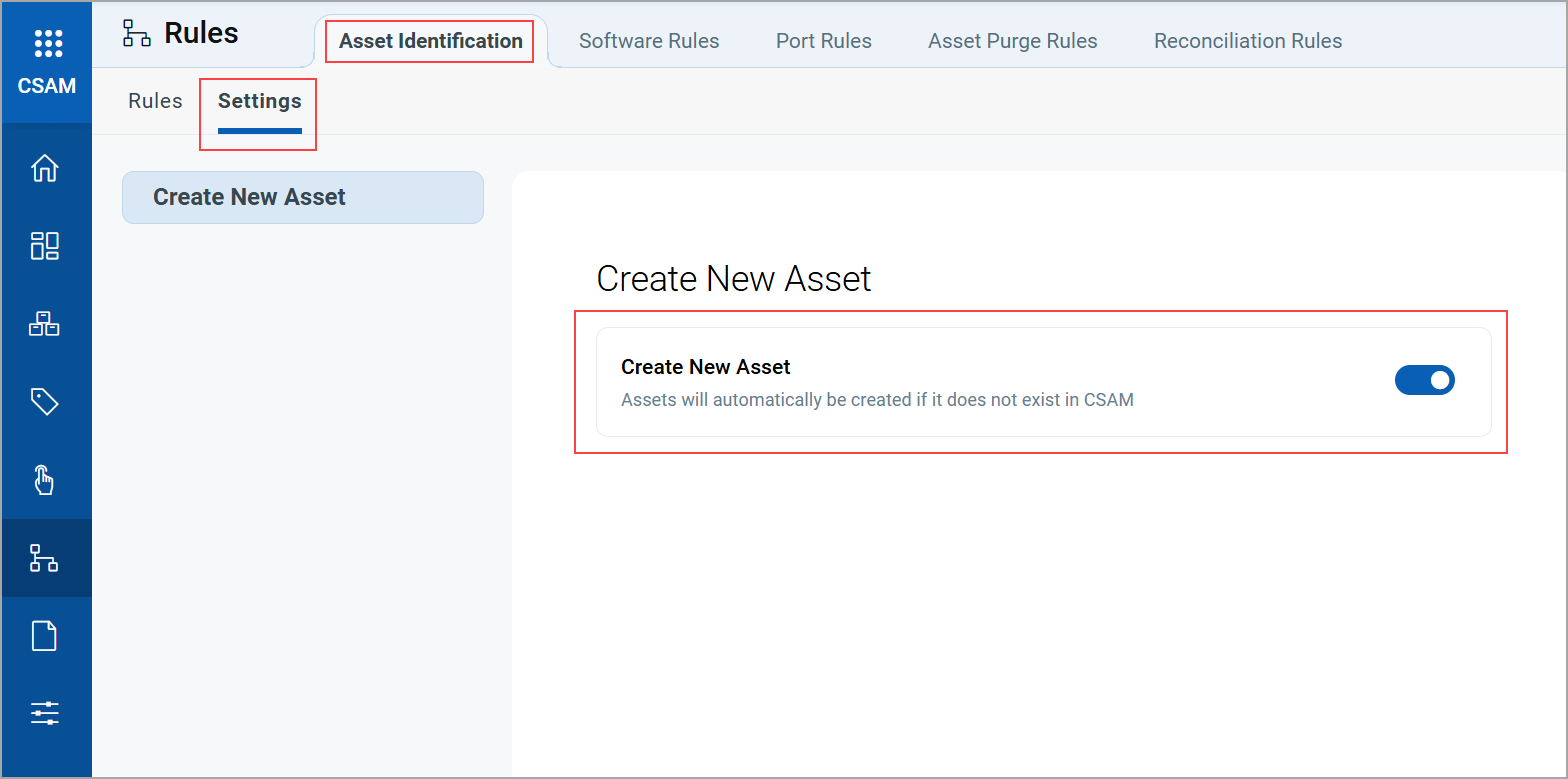
The system creates assets based on the toggle status:
| Toggle Status | Behavior |
|---|---|
| Enabled | The system creates a new asset based on the ML evaluation. |
| Disabled | The system does not create a new asset, even if the incoming asset attributes do not match any existing assets in the inventory. |