Domain Trust Map
A Domain Trust Map is a visual representation or graph illustrating the trust relationships between different Active Directory (AD) domains and forests to identify network paths for lateral movement. These maps display how one domain allows users and resources in another to authenticate and access data.
It visualizes Active Directory domain relationships to help identify:
- Domain hierarchy (root, child, unknown)
- Trust relationships (secure, suspicious, unknown)
- Expose paths and risks within forest environments
Key Functional Capabilities of Domain Trust Map
|
Feature Area |
Explanation |
|---|---|
|
Forest and Domain Visualization |
Up to 5 forests can be selected at a time for trust mapping |
|
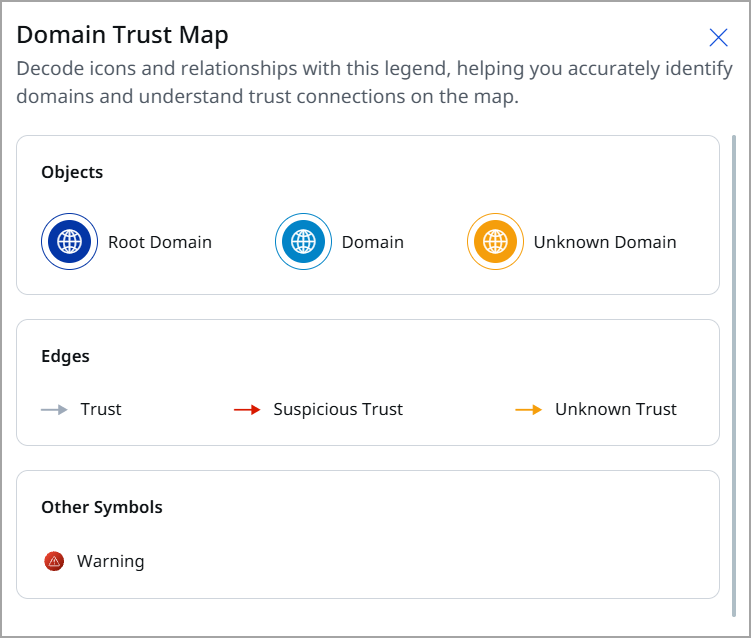
Legends |
|
|
Trust Types |
There are two types of forest trusts: Inter-Forest Trusts (which include both forest trust and external trust) and Intra-Forest Trusts (which encompass parent-child trust, tree-root trust, and shortcut trust). |
|
Risk Insights Panel |
It provides more information about the misconfigurations related to a specific trust and domain, the recommended actions to correct these misconfigurations, and the various attributes associated with a trust and domain. |
|
Rule Types |
|
Data Visualization Behavior
|
UI Element |
What It Shows |
|---|---|
|
Domain Boundary |
Virtual boundary representing each forest structure |
|
Relationship Lines |
Trust direction and type between domains |
|
Warning Alerts |
Suspicious trust or misconfiguration indicators |
|
Selectable Elements |
|
Risk Insights on Nodes and Relationships
Risk analytics includes Node-based and Edge-based rules:
|
Target |
Rules Executed |
Risk Details |
|---|---|---|
|
Domain (Clickable) |
Node rules |
Password policy, lockout policies, security configs, etc. |
|
Trust Relationship (Clickable) |
Edge rules |
Misconfigurations on trust attributes |
Rule violations show:
- Rule name
- Description
- Remediation guidance
- Criticality
The Attack Paths window helps you understand how attackers could move through your Active Directory (AD) environment by abusing relationships, permissions, and excessive privileges. It visually maps potential paths an attacker can take from an initial access point to a high-value target.
This view is designed to support proactive risk analysis and privilege hygiene by showing how individual AD objects are connected from an attacker’s perspective.
With the help of Domain Trust Map, you can:
- Identify possible attack paths between two AD objects.
- Understand privilege escalation and lateral movement risks.
- Discover hidden or unintended access relationships.
- Prioritize remediation based on real attack feasibility, not just isolated misconfigurations.
Initiate Domain Trust Map
For visualizing the Domain Trust Map, follow the given steps:
- Go to ETM Identity> Risk Management tab > Attack Path Analysis > Domain Trust Map tab.
- Use the drop-down to select the Domain you want to analyze.
Enter the domain(s) for which you want to plot the trust map. If you want to display all domains in your environment, leave this field blank.
Details on the Domain Trust Map
Environment Summary
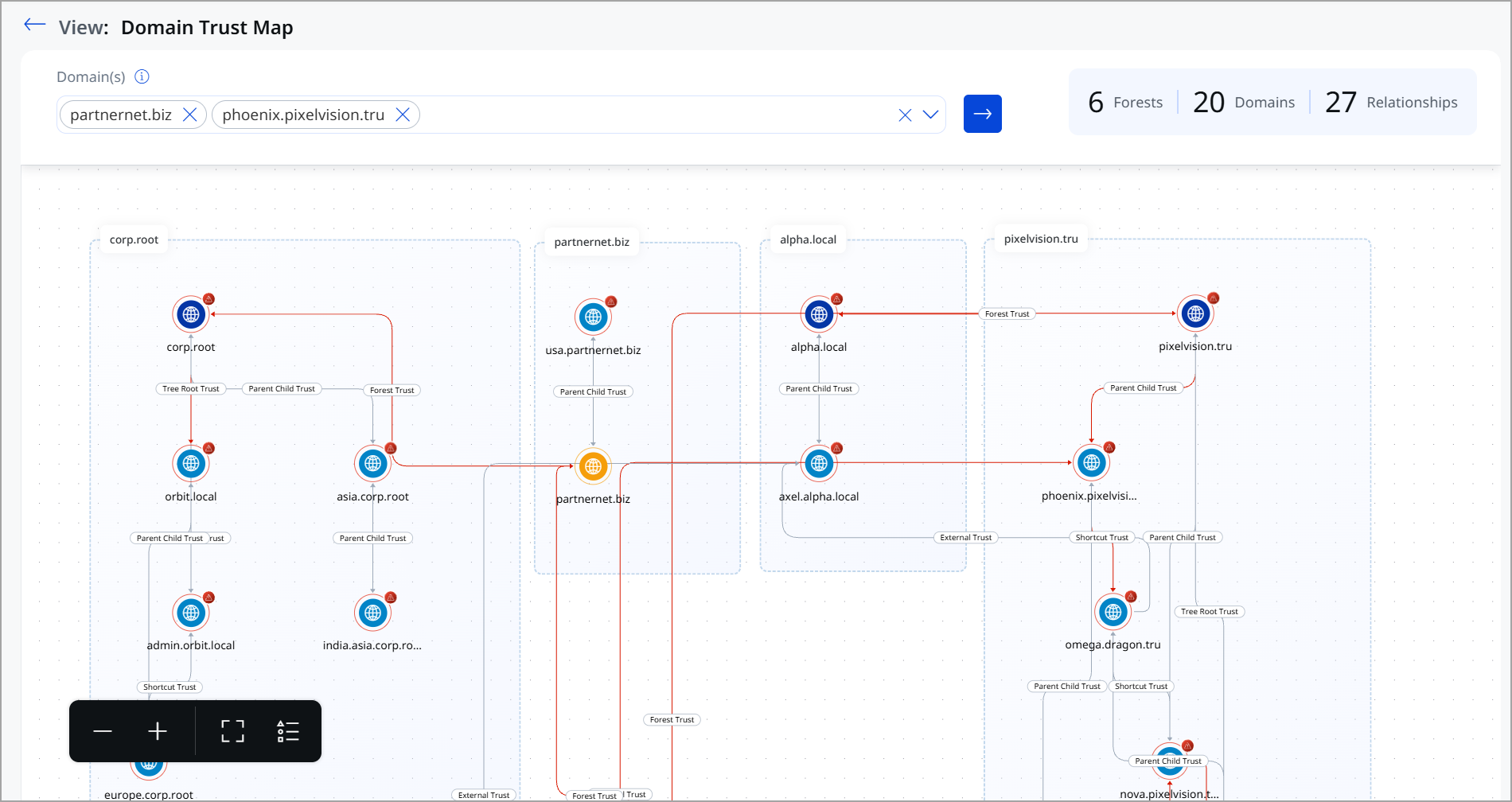
This summary gives a quick snapshot of the size and complexity of your AD trust environment. It is displayed on the top-right of the window
- Forests – Total number of forests detected
- Domains – Total number of domains in scope
- Relationships – Total trust relationships identified
Main Visualization Area
Forest and Domain Grouping
- Dotted boundary boxes represent Active Directory forests.
- Each forest contains one or more domains.
- Domain labels appear at the top of each grouped section.
Domain Nodes represent
- Each node (globe icon) represents an individual AD domain.
- Warning or alert indicators highlight domains that may have risk-relevant trust relationships.
Trust Relationships
Lines between domains indicate trust relationships. Labels on the lines specify the trust type, such as:
- Parent-Child Trust
- Tree Root Trust
- Forest Trust
- External Trust
- Shortcut Trust
These labels help you understand how authentication flows between domains.
Directional Flow
- Arrowed lines show the direction of trust.
- Red-highlighted paths emphasize high-risk or exploitable trust relationships that could be abused for lateral movement.
Graph Options
Graph options include functionalities for zooming in and out, as well as a full-screen view for enhanced data visualization.
These controls help you navigate large or complex environments. Located in the bottom-left corner of the visualization:
- Zoom In (+) – Magnify the map for detailed inspection
- Zoom Out (–) – Reduce the zoom level
- Fit to Screen – Automatically adjusts the map to fit the available view
- Layout Controls – Adjust how the trust map is displayed for better readability
Maximizing the Benefits of This View
- Review cross-forest trusts carefully, as they can enable attackers to move between environments.
- Look for unnecessary external or shortcut trusts.
- Use this view alongside Attack Paths to understand how trust relationships contribute to real attack scenarios.
- Prioritize remediation for trusts connected to privileged or critical domains.
The Domain Trust Map transforms complex Active Directory trust relationships into a clear, visual security map, helping you quickly assess cross-domain exposure and reduce attack surface caused by excessive or misconfigured trusts.
Use Cases
The following scenario demonstrates how inter-domain and inter-forest trust relationships can unintentionally expand the attack surface, allowing a compromise in one domain to impact multiple trusted environments.
Use Case 1: Weak Password Policy Across Domain Trust
Domain Trust Map Overview
Domain: corp.root
Rule Type: Password Policy Misconfiguration
Severity: High
For demonstration purposes, we have selected the root domains beta.corp and corp.root. DTM flagged misconfigurations in the forest trust relationship between these domains. These misconfigurations could affect the integrity of trust and access control.
What Was Detected?
- Minimum password length configured: 7 characters
- Required minimum password length (as per security standards): 12 characters
- Misconfiguration flag: Weak Password Policy Across Trust
Why is this a Risk?
A short password length significantly weakens the overall security posture of the domain. Attackers can exploit this misconfiguration using various attack techniques to gain unauthorized access.
Potential Attack Scenarios
- Brute Force Attack: With a minimum password length of only 7 characters, an attacker can systematically attempt all possible combinations much faster than with a 12-character password.
- Credential Stuffing: Weak passwords are easier to guess using commonly leaked password lists from data breaches.
- Privilege Escalation: Once an attacker gains access to even a low-privileged account in the domain, they can escalate privileges and move laterally across the trust.
- Domain Takeover: If a privileged or administrative account uses a weak password, an attacker can gain full control of the domain, accessing all users, resources, and configurations.
Overall Systemic Impact
Since this misconfiguration exists at the domain trust level, the risk is not limited to a single account. A compromised domain can have cascading effects:
- All accounts within the domain that share this policy are equally at risk.
- Trusted domains connected via the trust relationship can also be impacted if an attacker pivots from the compromised domain.
- Sensitive data, intellectual property, and user credentials across the enterprise may be exposed.
Recommended Fix
Update the domain password policy to enforce a minimum password length of at least 12 characters. Additionally, enforce complexity requirements (uppercase, lowercase, numbers, and special characters) and enable account lockout policies to prevent brute-force attacks.
How It Appears in DTM
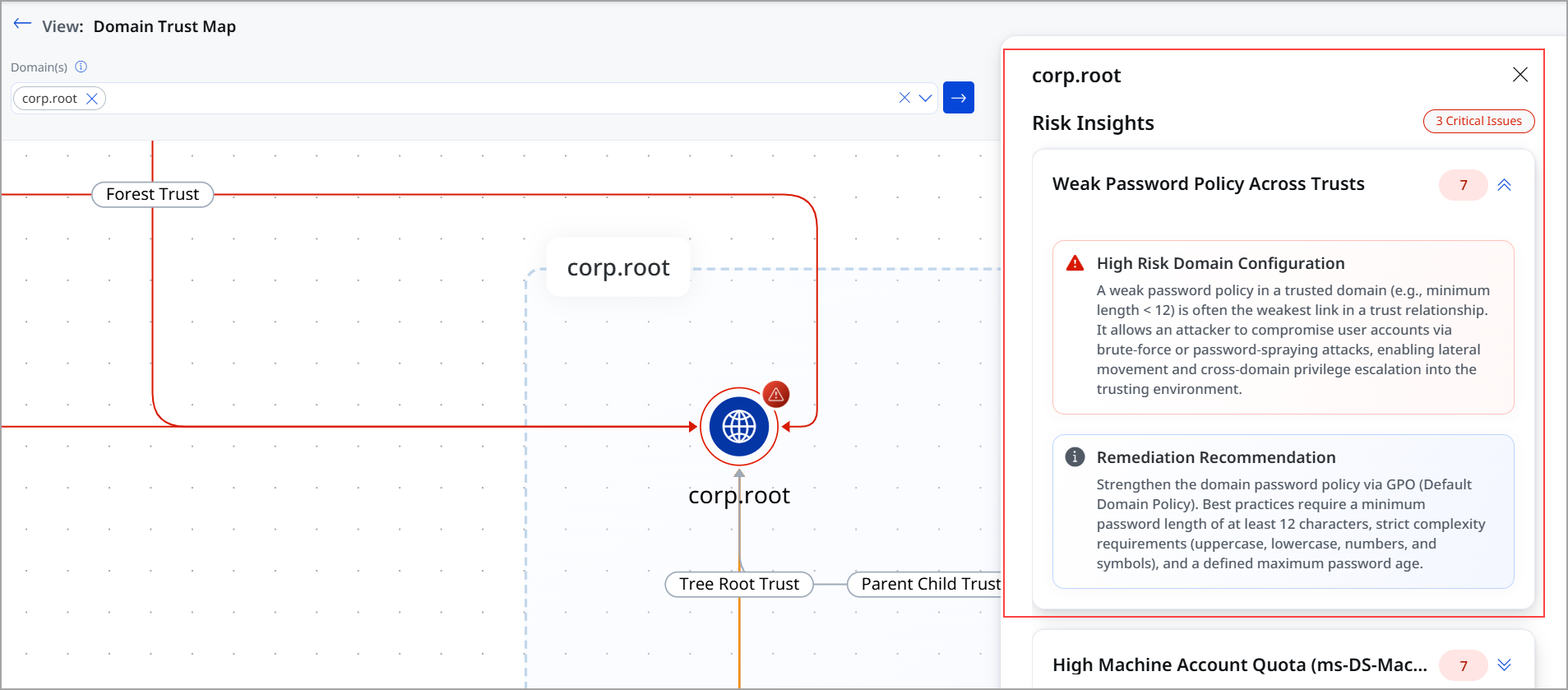
In the DTM side panel for the corp.root domain, the following details are visible:
- Risk Reason: Weak password policy across trust
- Misconfiguration Detail: Password minimum length set to 7
- Remediation Guidance: Available under the Security & Password Policy control on the right-hand panel
Use Case 2: Trust Relationship
Domain: corp.root
Rule Type: Trust type (Forest trust)
Severity: Critical
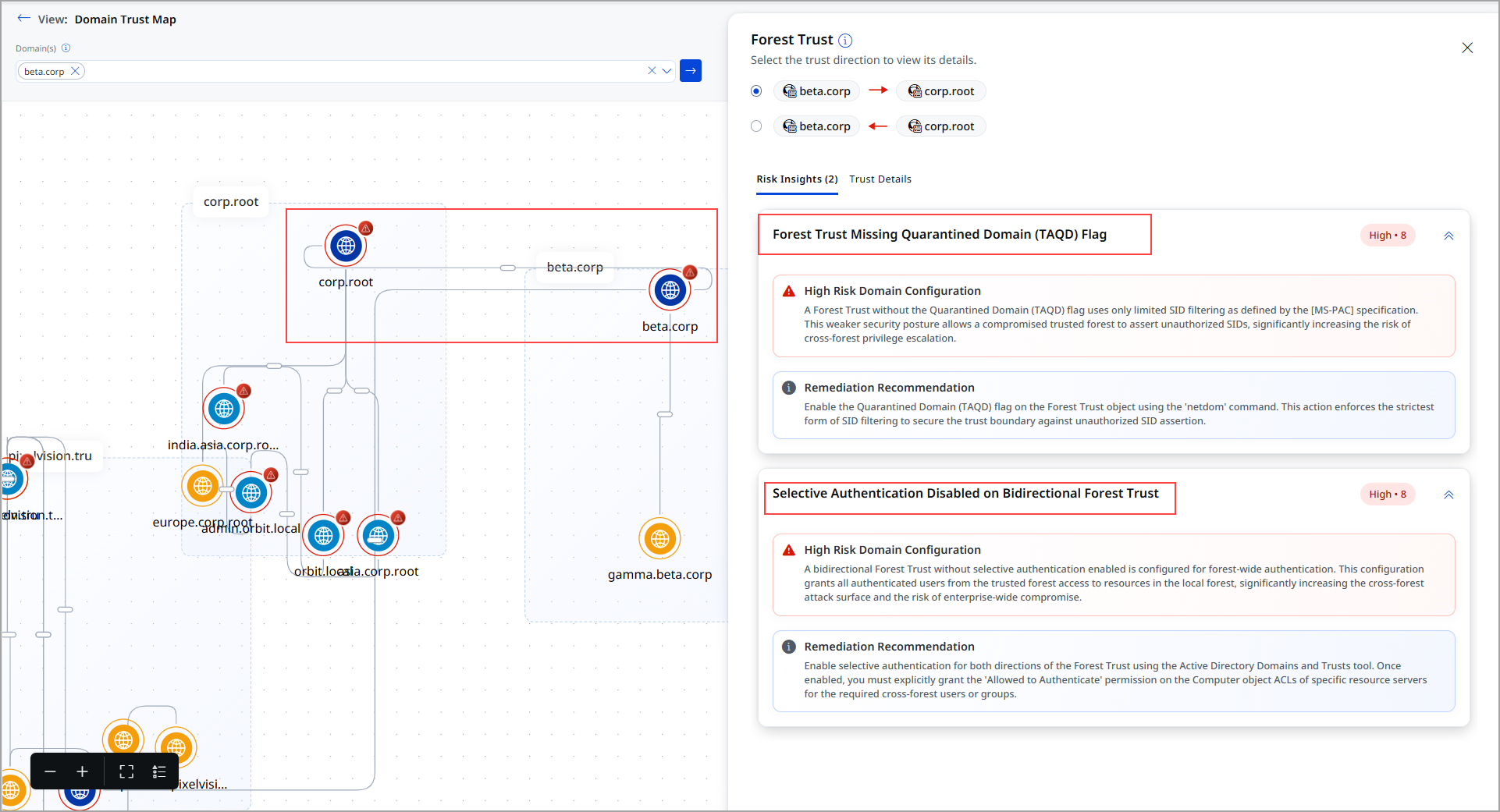
For demonstration purposes, we have selected the root domains beta.corp and corp.root. DTM flagged misconfigurations in the trust relationship between the beta.corp and corp.root. These misconfigurations could affect the integrity of trust and access control.
What Was Detected?
The following misconfiguration rules were identified for the trust between the two root domain:
- Forest Trust Missing Quarantined Domain (TAQD) Flag
- Selective Authentication Disabled on Bidirectional Forest Trust
Risk Involved
These misconfigurations collectively weaken the domain's security posture and its trust relationships, making it easier for attackers to exploit vulnerabilities and move laterally across environments.
- Lack of auditing prevents detection of failed or suspicious activities
- High machine account quota allows unauthorized machine account creation
- Weak trust configurations enable cross-domain or cross-forest attacks
Attack Scenario: Trust-Based Attack Scenarios (Forest Trust between beta.corp and corp.root)
- SID Spoofing Attack
Without the TAQD flag, attackers from a compromised trusted forest can inject unauthorized SIDs. - Cross-Forest Privilege Escalation
Weak SID filtering enables attackers to gain elevated privileges across forest boundaries. - Lateral Movement Across Trusts
Attackers can pivot between trusted domains, expanding the scope of compromise.
Overall Systemic Impact
Since these issues exist at both domain and trust levels, the impact is widespread:
- All users and systems within the affected domain are at risk
- Trust relationships extend the risk to connected domains and forests
- Attackers can move laterally across environments undetected
- Sensitive enterprise data and credentials may be exposed
- A full domain or forest compromise becomes possible
Recommended Fix
The following actions are recommended:
- Enable the quarantined domain (TAQD) flag on forest trusts
- Strengthen SID filtering mechanisms
- Review and harden trust configurations according to security best practices
How it is displayed in DTM
In the DTM visualization:
- The forest trust between the two root domains is shown
- The side panel highlights that Risk Insights
- The remediation guidance recommendation