Viewing Vulnerabilities
This section provides details to identifying, assessing, and remediating known vulnerabilities in your identity infrastructure.
The Vulnerabilities tab provides visibility into known security vulnerabilities that affect your identity systems. This application identifies publicly disclosed vulnerabilities that may impact your infrastructure and provides detailed assessment information to help you prioritize remediation efforts.
What is a Vulnerability?
A vulnerability is a known security weakness in software, systems, or configurations that attackers can exploit. Each vulnerability in this module is:
- Publicly disclosed with an assigned CVE identifier
- Assessed for severity using CVSS (Common Vulnerability Scoring System) metrics
- Mapped to threats, including MITRE ATT&CK techniques
- Tracked for impact on your specific identity infrastructure
Unlike misconfigurations, which are configuration errors made by users, vulnerabilities are security flaws in products themselves.
For example, CVE-2024-1234 might be a flaw in Active Directory authentication that affects all organizations using that version.
CVSS Score Assessment
Each vulnerability is assigned a Common Vulnerability Scoring System (CVSS) Base Score ranging from 0.0 to 10.0, categorized by severity:
| Severity Level | CVSS Score Range | Recommendation |
|---|---|---|
| Critical | 9.0 - 10.0 | Immediate remediation required - may indicate active exploitation risk |
| High | 7.0 - 8.9 | Urgent - prioritize remediation within days |
| Medium | 4.0 - 6.9 | Important - plan remediation within weeks |
| Low | 0.1 - 3.9 | Monitor - address in regular maintenance cycles |
Risk Factors
Beyond CVSS scores, vulnerabilities are assessed using additional context:
- Exploitability: How easy is it for attackers to exploit this vulnerability?
- Impact Scope: How many systems or users could be affected?
- Privileges Required: What level of access is needed to exploit the vulnerability?
- Attack Complexity: How complex is the attack required to exploit this vulnerability?
Vulnerabilities Findings
To view the vulnerabilities detected on your assets, navigate to the Risk Management > Findings page and select Vulnerability. You can also use various metadata filters, group-by options, and custom query capabilities.
The following is the Vulnerabilities data listed on the Findings page:
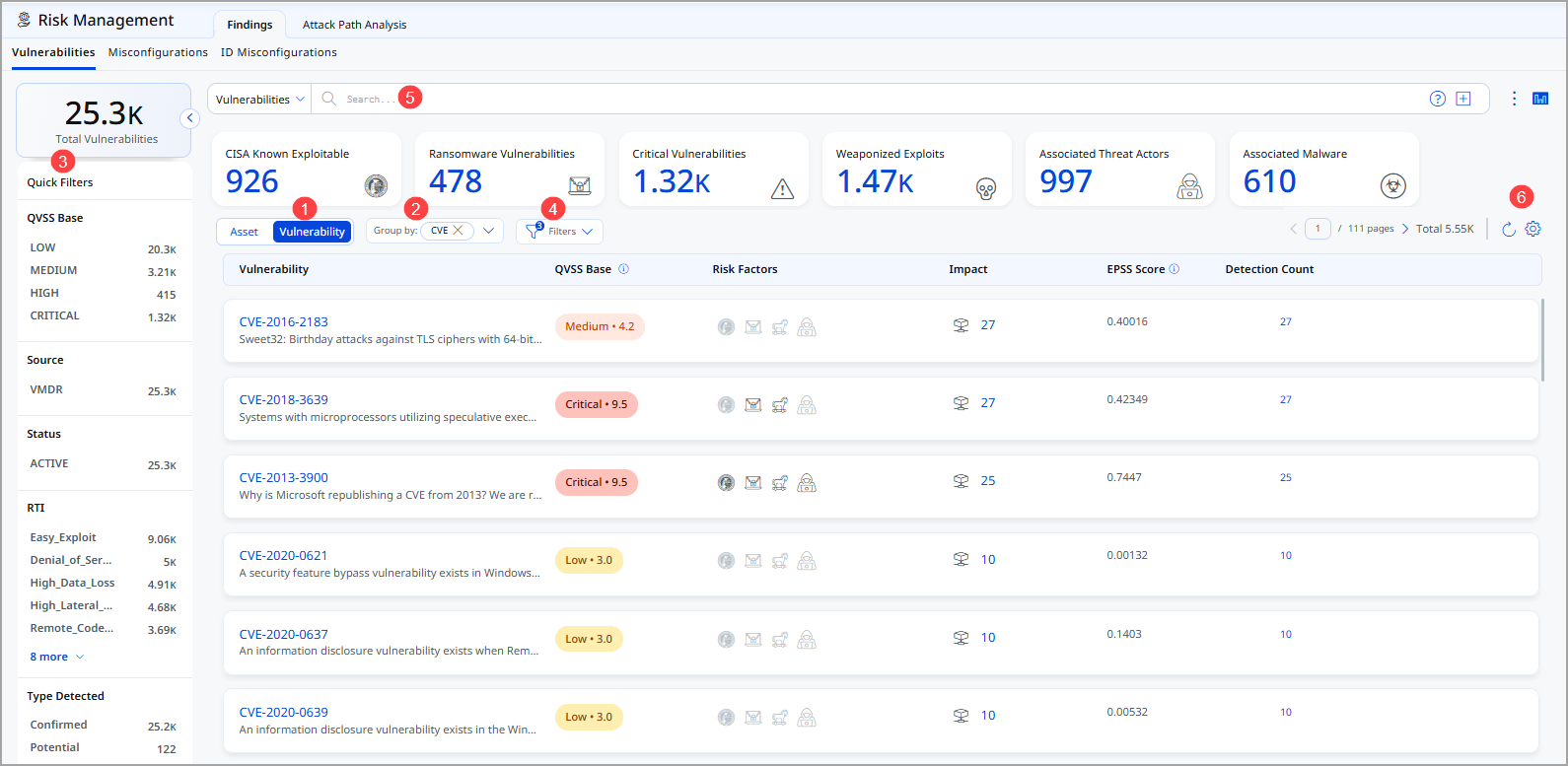
- Choose Vulnerability to display vulnerability data or Asset for asset data. You can easily browse the data list and explore details. For example, click the CVE 2021-40438 to view details for that vulnerability.
- The Group By option helps you organize your data. For example, you can select Group By Severity and then click any value listed in the Detection Count column to view the list of assets with the assigned severity.
- Use a filter. The filter option lets you choose the type of vulnerabilities to exclude from the data list.
- Use Quick Filters located in the left navigation. The Quick Filters option lets you choose the type of vulnerabilities to further filter them.
- Use search tokens to filter vulnerabilities further.
- Customize the display of rows and columns as per your needs. You can choose which columns to show or hide based on their preferences
The following Vulnerabilities page under the Risk Management > Findings tab highlights its columns:
- Vulnerability: Lists the unique identifier assigned to the vulnerability or exposure. Clicking it will redirect you to the National Vulnerability Database (NVD) webpage.
- QVSS Base: This column lists the Qualys Vulnerability Scoring System score assigned to the Qualys detection, ranging from 1 to 10, and is categorized into four severity levels.
- Risk Factor: Indicates the conditions or attributes that increase the likelihood or severity of a vulnerability being exploited.
- Impact: Shows the potential damage or business effect if the vulnerability is successfully exploited.
- EPSS Score: Displays the Exploit Prediction Scoring System value that estimates the probability of the vulnerability being exploited in the near term.
- Detection Count: Represents the number of times this vulnerability has been identified across your monitored assets or environment.
View Vulnerability Finding Details
- From the Vulnerability column, click the CVE to view the complete CVE information.
- Click View Details from the Quick Actions menu to view the following vulnerability details relating to the specific vulnerability:
- This CVE Details page provides a complete risk, impact, and remediation view of a selected vulnerability (CVE).
Refer to the following table for details on the fields.
| Field | Information |
|
Header This section displays the CVE ID, severity level (Medium), and Patch Available status. |
|
| CVSS vs QVSS Risk Comparison
This section compares technical severity with threat intelligence–based risk. |
Use this section to understand whether the vulnerability is technically severe and whether it is actively exploited.
|
| Vulnerability Details
Provides classification and mapping information. |
Use this section to understand technical root cause and affected systems.
|
| Remediation & Actions |
Use this section to identify how to fix the vulnerability.
|
|
Your Impact Provides environment-specific exposure details: |
Use this to prioritize remediation based on exposure and external risk.
|
| Peer Benchmarking |
|
| Vulnerability Lifecycle |
Use this to understand how long the vulnerability has been active and exploited. Timeline view showing:
|
| External References |
Use these for official technical documentation and compliance validation. Direct links to:
|
Search Vulnerabilities
Let us explore how you can search for vulnerabilities
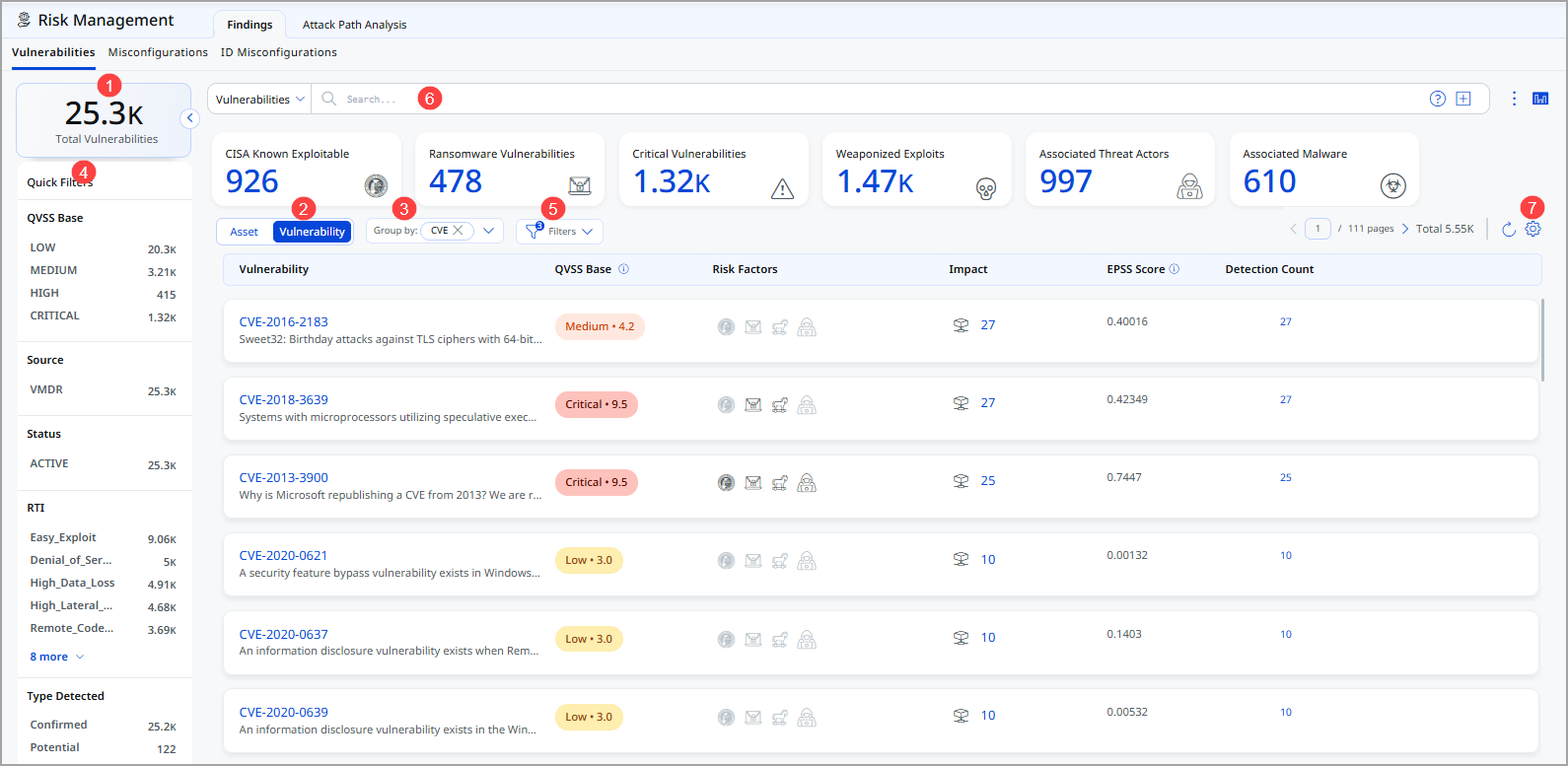
Refer to the following table for details.
- Total Vulnerabilities: This represents the total number of vulnerabilities currently available.
- Choose Vulnerability to display vulnerability data or Asset for asset data. You can easily browse the data list and explore details. For example, click the CVE 2021-40438 to view details for that vulnerability.
- The Group By option helps you organize your data. For example, you can select Group By Severity and then click any value listed in the Detection Count column to view the list of assets with the assigned severity.
- Use Quick Filters located in the left navigation. The Quick Filters option lets you choose the type of vulnerabilities to filter the vulnerabilities further.
- Use filter. The filter option lets you choose the type of vulnerabilities to exclude from the data list.
- Use search tokens to filter vulnerabilities further.
- Customize the display of rows and columns as per your needs. You can choose which columns to show or hide based on their preferences
Additional Information
Recommended Remediation Steps
- Assess Impact - Review CVSS score, affected systems, and business criticality
- Verify Applicability - Confirm your version/configuration is actually affected by this CVE
- Obtain Patch Information - Check vendor advisories for available fixes or workarounds
- Plan Remediation - Determine patch deployment timeline based on severity and business needs
- Test in Non-Production - Validate patches in lab environments before production deployment
- Deploy and Verify - Apply patches and re-scan to confirm vulnerability is resolved
- Document and Close - Record remediation details for compliance audit trails
Important Consideration Not all vulnerabilities have available patches immediately. In such cases, implement compensating controls such as network segmentation, access restrictions, or monitoring for exploitation attempts.
Vulnerability Intelligence Sources
This module aggregates vulnerability data from:
- NVD (National Vulnerability Database): Official CVE and CVSS information
- Vendor Security Advisories: Direct vulnerability disclosures from software vendors
- Third-party Threat Intelligence: Security research and vulnerability analysis feeds
Detection and Tracking
Vulnerabilities are continuously monitored with these key dates:
- First Detected: When the vulnerability was first identified in your environment (never changes)
- Last Detected: Most recent confirmation of the vulnerability
- Disclosure Date: When the vulnerability was publicly disclosed by the vendor
- Last Update: When threat intelligence data was last refreshed
Best Practices
- Regular Scanning
Conduct vulnerability scans at least monthly, weekly for critical systems - Severity-Based Prioritization
Always remediate critical vulnerabilities first, regardless of scan timing - Patch Management Process
Establish formal change control for vulnerability remediation - Threat Intelligence Review
Correlate detected vulnerabilities with known exploitation activity - Compensating Controls
Implement temporary security measures while patches are being deployed - Stakeholder Communication
Keep business stakeholders informed of critical vulnerabilities and remediation timelines