ETM Identity Release 1.4.0
August 04, 2026
AI-Powered Attack Path Overview
We have introduced AI-Powered Attack Path Overview to provide contextual and actionable insights for attack paths identified within ETM Identity.
This feature uses Amazon Bedrock to summarize attack paths automatically. Security teams can quickly understand risks and investigate suspicious activity.
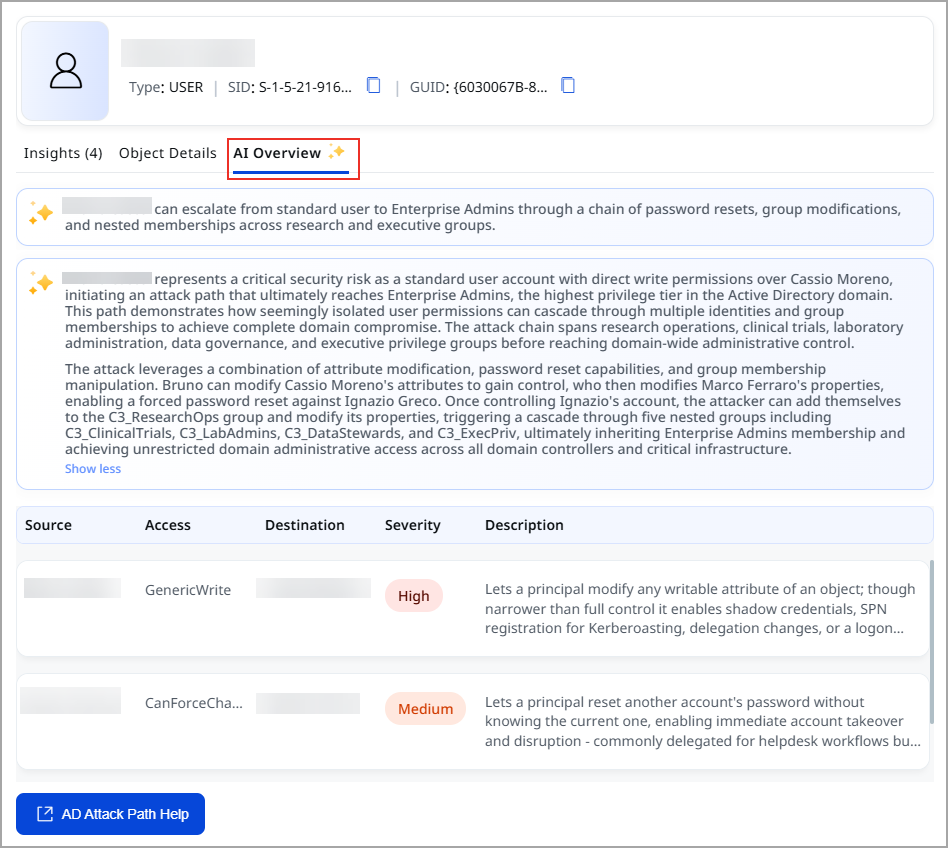
Key benefits are:
- Faster understanding of complex attack paths
- Simplified investigation of suspicious identities and relationships
- Reduced analyst effort through automated AI-generated explanations
- Contextual visibility into attack progression from source identity to privileged target assets
How It Works
When viewing an attack path, users can select AI Overview to generate an attack path summary.
The AI Overview provides:
- A concise summary of the selected attack path
- Detailed information about suspicious hops and relationships
- Descriptions of attack path transitions and privilege escalation opportunities
- A direct link to the attack path for additional investigation
Attack Path Context
The AI summary is generated specifically for the selected source-to-destination attack path.
The analysis includes:
- Source identity context
- Intermediate suspicious users, groups, and permissions
- Target privileged asset or account
- Attack path progression and risk explanation
Dynamic AI-Based Analysis
The attack path summary is generated in real time whenever the AI Overview is requested. This ensures the latest attack path information is always reflected in the generated analysis.
Domain Trust Findings
We have introduced Domain Trust Findings to help identify misconfigurations in the Domain Trust Map (DTM).
Previously, suspicious nodes and edges identified within DTM were visible only within the domain trust map visualization. With this enhancement, suspicious relationships now appear as findings, making them easier to investigate and track.
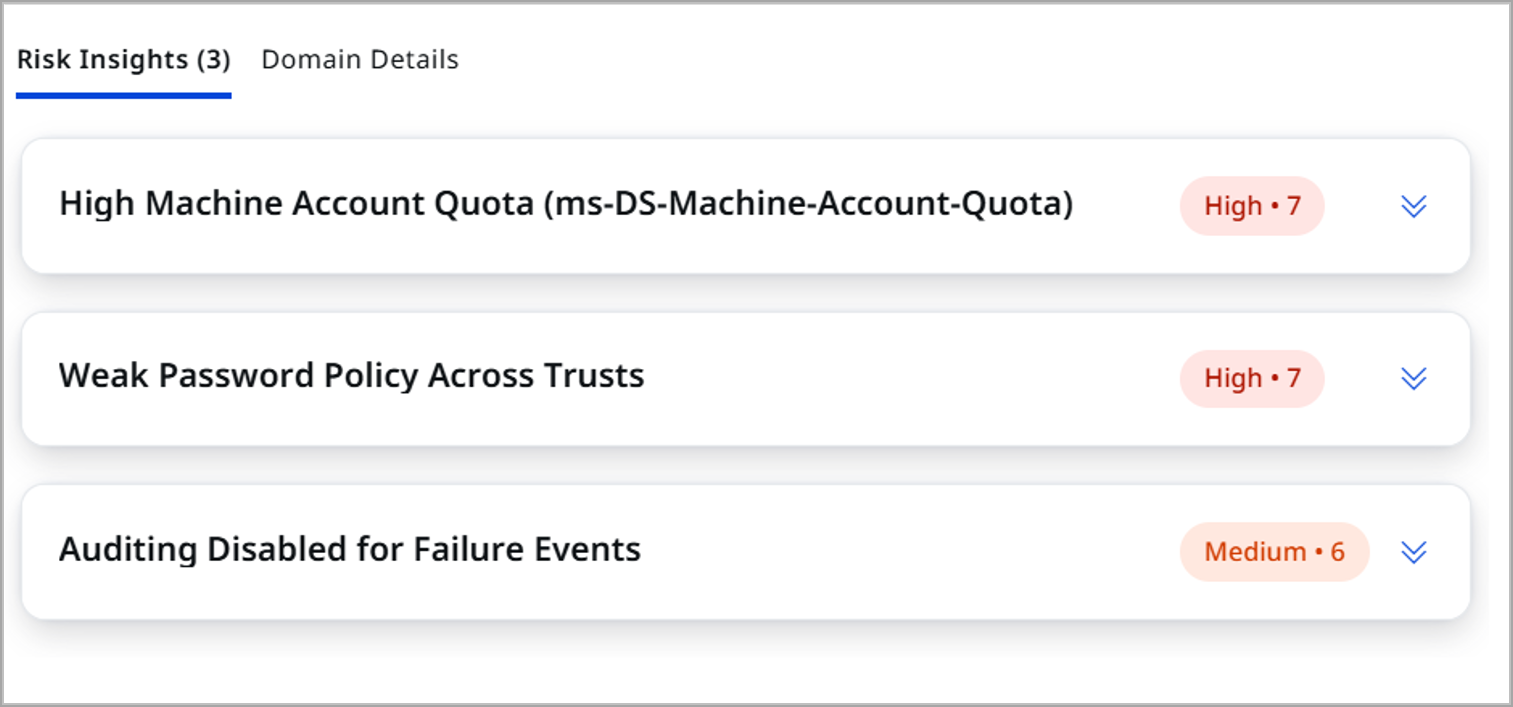
Key benefits are:
- Centralized visibility of DTM-related risks
- Consistent findings experience across ETM Identity
- Easier prioritization of domain trust misconfigurations
- Improved tracking of suspicious trust relationships
Finding Generation
Domain Trust Findings are generated for:
- Suspicious domain trust relationships
- Suspicious nodes identified during DTM analysis
- Suspicious edges associated with DTM attack paths
- Rule-based detections associated with domain trust configurations
Automated Evaluation
Domain Trust Findings are automatically generated through:
- Scheduled rule evaluation
- End-of-scan processing
- Domain trust map updates
Rule-Based Detection Framework
This enhancement uses the existing DTM rule framework and adds support for findings generation without changing the current workflow.
Risk Factor Insights for Identity Weaknesses
We have extended support for Risk Factor Insights to help organizations measure and prioritize identity risks with ETM risk scoring.
Risk Factors allow security teams to identify the impact of multiple identity weaknesses and misconfigurations on TruRisk™ scores. This provides a more accurate view of the business risks.
To view this widget, navigate to Dashboard > TruRisk of Identities.
TruRisk of Identities widget with Top Risk Factors (UAI-Enabled Accounts):
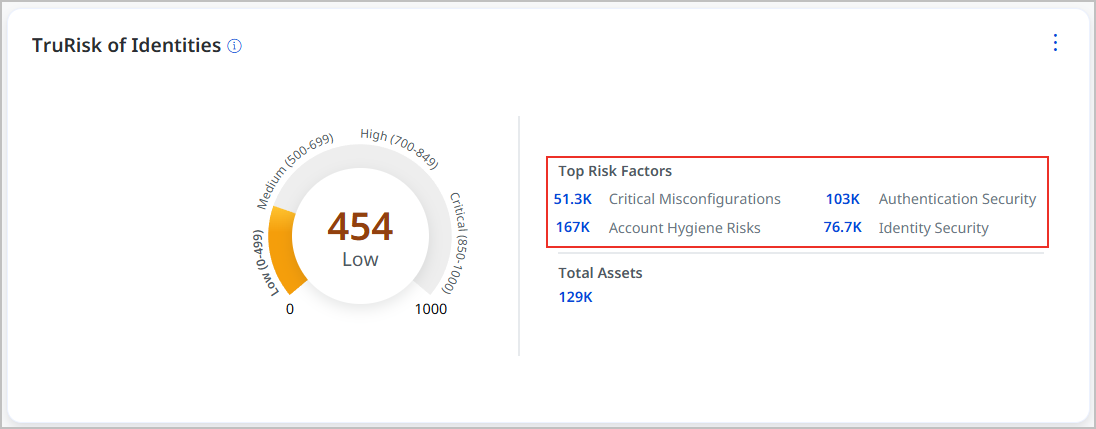
For UAI-enabled accounts, the widget shows the top risk factors that affect the TruRisk score. It also links directly to related findings.
TruRisk of Identities widget for accounts where UAI is not enabled:
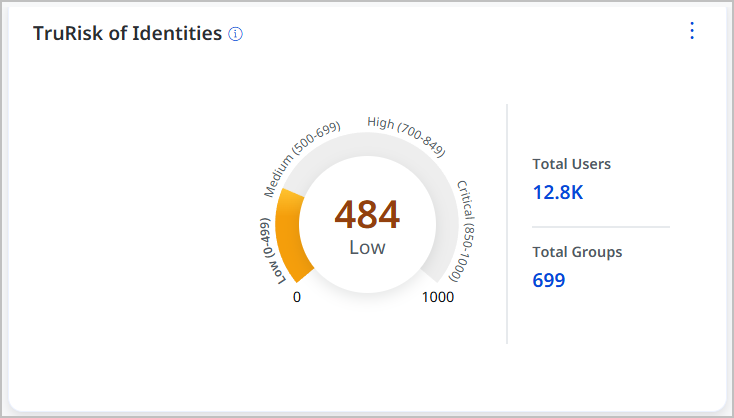
Risk Factor Insights are not displayed for accounts without UAI enabled.
Key benefits of Risk Factor Insights are:
- View identity risk across your Active Directory assets through a single TruRisk™ score
- See how misconfigurations, authentication gaps, and account hygiene issues affect risk
- Quickly identify the highest risk factors and prioritize remediation
- Apply risk scoring to specific assets, asset groups, or business entities
Key capabilities of Risk Factor Insights include:
- Define risk factors for specific assets or asset groups
- Include identity misconfigurations, authentication gaps, and account management risks in risk calculations
- Incorporate existing findings into TruRisk™ scoring
- Customize risk views using business entities and organizational requirements
- Configure risk using point, percentage, or severity-based scoring
Introduced Tag-Based Scoping in Role-Based Access Control
We enhanced ETM Identity Role-Based Access Control (RBAC) with tag-based scoping. You can control access to identity assets and findings based on assigned tags. This allows users to view only the data that falls within their authorized scope.
How Tag-Based Scoping Works
Example: If a user is assigned the tag Department = Finance, they can view only assets associated with the Finance tag.
- Users can access assets that match their assigned tags
- Assets outside the assigned scope are not visible
- Supports both static and dynamic tagging approaches
- Helps organizations implement business-unit-specific access controls
Key benefits of tag-based scoping are:
- Limit visibility to authorized identity assets and findings
- Segregate access across teams, departments, and business units
-
Apply more granular access controls within ETM Identity
-
Simplify access management in large and distributed environments
With tag-based scoping, administrators can define access boundaries using tags. This ensures that users can access only the assets and data associated with their assigned scope.
Tenant Attributes
Tenant-related attributes can be used as part of RBAC implementations and tag-based scoping workflows.
Supported tenant attributes include:
- Tenant ID
- Tenant Name
Integration Behavior
| Integration | Behavior |
| Active Directory (AD) | Each Active Directory domain belongs to a single tenant and can contain multiple users and groups. Tenant information can be used in dynamic tagging workflows.
|
| Microsoft Entra ID | Tenant Name and Tenant Domain may contain different values. |
| AD Agent | Tenant Name and Tenant Domain are generally identical. |
| Okta | Tenant-level support is currently unavailable. |