Getting Started with Agent Sara
Let us get started with Agent Sara to work on your behalf.
Access Requirements
To use Agent Sara, you need:
- Active Qualys ETM account with appropriate permissions
- Agent feature is enabled on your account
- Access to Vulnerability Management application
- Access to Patch Management
Don't have access?
Contact Qualys Support or your Technical Account Manager (TAM).
First Time Setup
To start using the ETM agent, you need to add it to your account.
Follow the steps given here:
- Navigate to ETM application > Cyber Risk Agent > Marketplace.
- From the agent menu, select Hire Agent to enable it.
Now that the agent is added to your account, you can view them in the My Agents tab. you can assign a task to the agent.
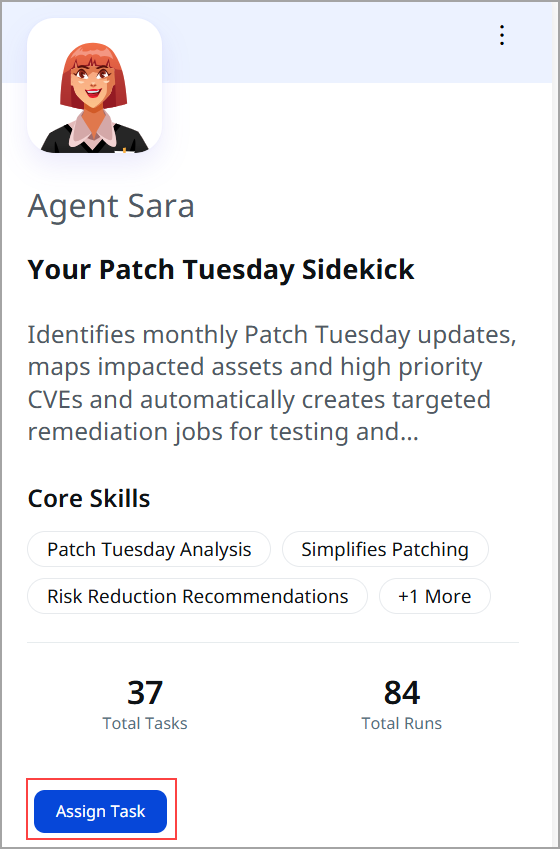
Agent Sara automatically identifies and analyzes the current month's Patch Tuesday CVEs.
Assign Task to Agent
To assign a task to the agent, follow the steps given here:
- Click Assign Task from the Agent tile.
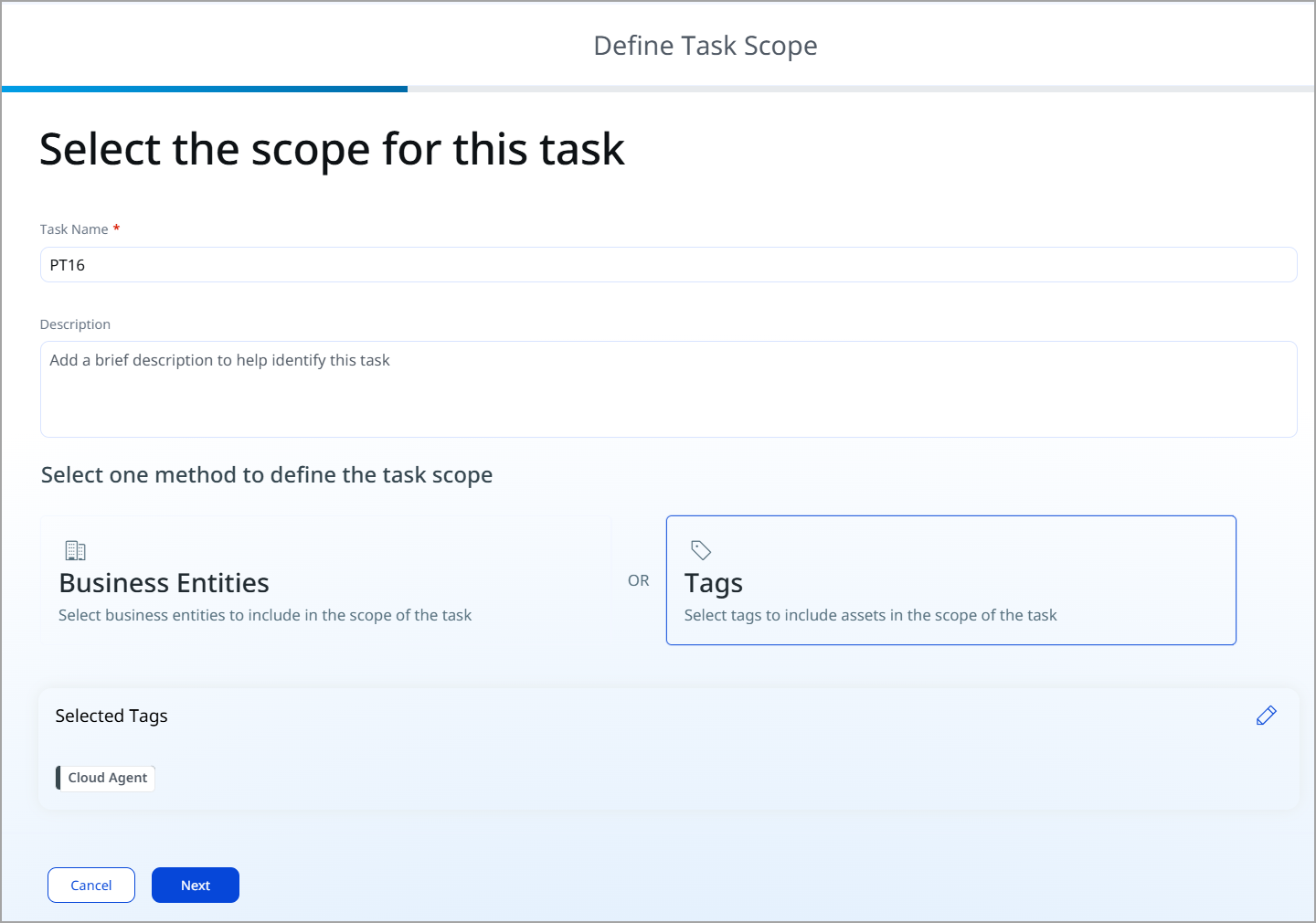
- Complete the details like Task Name and Description.
- Select Business Entities or Tags to define task scope.
Refer to Configuration Options for details of the main configuration settings.
-
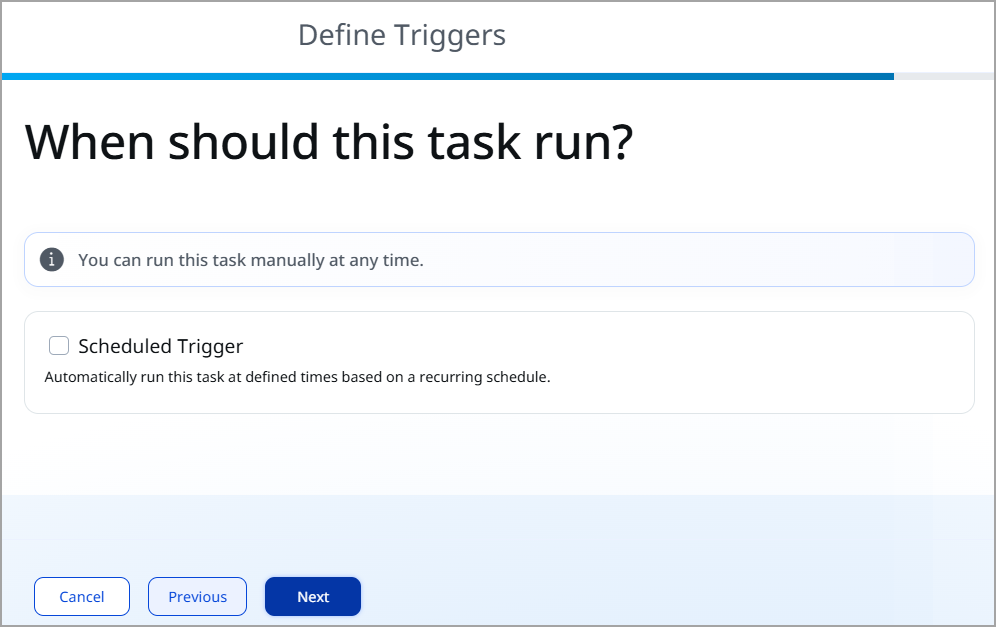
Define Triggers to run the task.
-
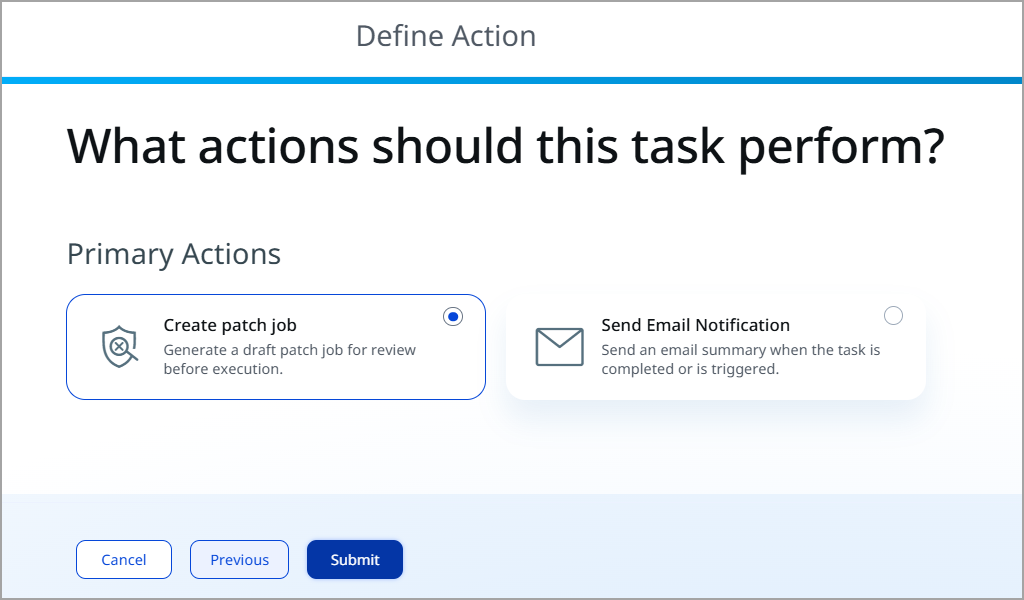
Specify the action the task should perform when triggered, then click Submit.
For example, you can create a prioritization plan or get an email notification once the task is completed.
-
You can view the details of the agent and the list of your tasks as demonstrated in the following screenshot.
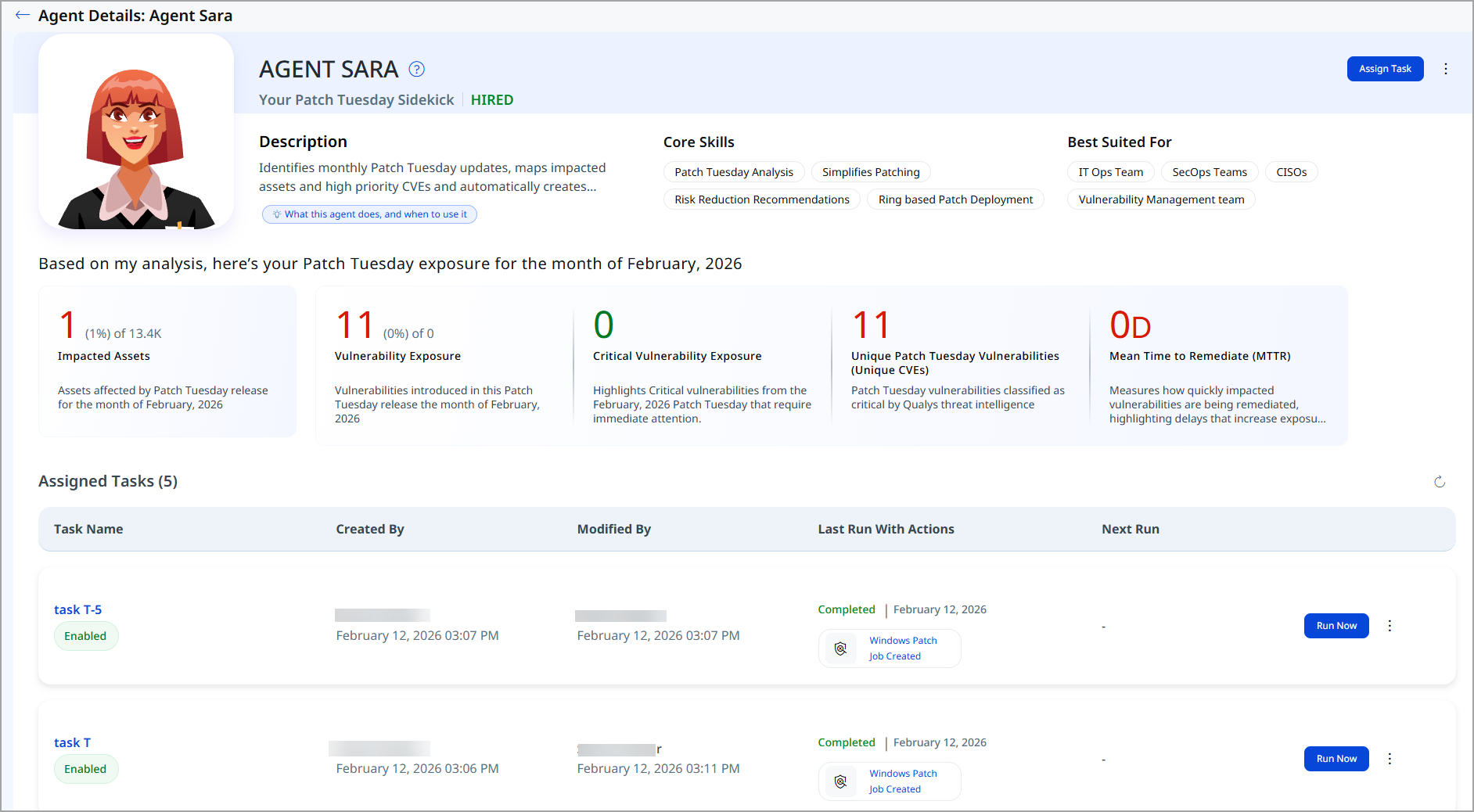
Refer to the following table to know the details of the page.
Sections Information Agent Overview Shows the agent’s name, role (Patch Tuesday Sidekick), activation status, description, core skills, and best-suited user groups. Patch Tuesday Exposure Summary Provides an overview of your organization’s exposure for the selected Patch Tuesday cycle based on the agent’s latest analysis. Impacted Assets Displays the number of assets affected by one or more Patch Tuesday vulnerabilities in the selected cycle. Total Vulnerabilities Shows the total count of Patch Tuesday CVE occurrences identified for the month. Critical Vulnerabilities Highlights vulnerabilities classified as critical by Qualys threat intelligence. Unique Patch Tuesday Vulnerabilities (Unique CVEs) Shows the number of distinct Patch Tuesday vulnerabilities identified, excluding duplicates. Mean Time to Remediate (MTTR) Indicates the average time taken to remediate Patch Tuesday vulnerabilities. Assigned Tasks Lists all tasks assigned to Agent Sara along with their status, last run results, and available actions. Task Status and Execution Displays whether tasks are enabled, failed/succeeded, last execution time, and quick actions like Run Now. Task Management Actions Provides options to assign new tasks, run tasks manually, or manage task settings for this agent.
Build a Plan with Chat Now
You can also build a remediation plan step by step, without creating a task. Select a template, select a business entity, review the remediation waves, and create the plans for your remediation owner. To start, use one of these options:
- Click Chat Now next to Assign Task on the agent tile.
- Click Explore with Sara on the Agent Details page.
- Click Explore with Agent Sara in the Patch Tuesday pop-up on the ETM Home page.
Chat Now is available on request and needs a TruRisk Eliminate subscription. To turn it on, contact Qualys Support or your Technical Account Manager (TAM).
For details, refer to Build a Remediation Plan with Agent Sara Chat Now.
Configuration Options
Agent Sara offers three main configuration settings:
Scope: Which Assets to Analyze
Define which assets Agent Sara should evaluate for Patch Tuesday exposure:
- Tags (By asset tags)
- Business Entities( By department, location, or business unit)
- Asset Types ( Servers, workstations, containers, cloud workloads)
- Locations (By data center, region, or network segment)
- Cloud Providers such as AWS, Azure, GCP
Actions: What Agent Sara Should Produce
Choose the types of outputs you want:
- Exposure summary
Narrative summary of Patch Tuesday impact and recommendations - Prioritization plan
Focused remediation strategy for this month's Patch Tuesday - Patch job draft
Prepared patch jobs for human review and execution
-
Email Notification
Automatic updates to keep teams informed
Schedule: How Often Agent Sara Runs
Choose your analysis frequency:
- On-Demand
Run analysis whenever you need it. Good for immediate post-Patch Tuesday analysis or emergency assessments.
- Weekly
RECOMMENDED: Run every Tuesday or Wednesday during the Patch Tuesday remediation week to track progress and update findings.
- Monthly
Run once per month for post-Patch Tuesday review and comprehensive impact analysis.
Recommended Configuration by Role
Refer to the following role-based recommendations to configure the agent in a way that aligns with your team’s responsibilities and workflow.
- Patch Manager / IT Operations
Scope: All production assets
Actions: All four
Schedule: Weekly during remediation cycle - Vulnerability Manager
Scope: All assets
Actions: Exposure summary + prioritization plan
Schedule: On-demand + weekly - CISO / Security Leader
Scope: Critical assets
Actions: Exposure summary (email) Schedule: Weekly - Change Advisory Board Chair / Change Manager
Scope: All production assets
Actions: Exposure summary + prioritization plan
Schedule: Weekly for Change Advisory Board reviews
Creating Multiple Tasks
For comprehensive coverage, consider creating separate Agent Sara tasks:
- Critical business assets requiring fast-track remediation
- Production Servers ( Core infrastructure)
- Workstations (End-user computing devices)
- Cloud Workloads (Azure, AWS, GCP instances)
- Development/Test (Non-production systems with potentially different remediation cadence)
Recommended Workflow
Here is how to integrate Agent Sara into your monthly cycle.
Day 1 (Patch Tuesday)
Action: Run Agent Sara on all production assets immediately after the Patch Tuesday release.
Output: Exposure summary, prioritization plan, draft patch jobs
Outcome: Immediate understanding of scope, impact, and recommended remediation sequence
Day 1-2 (Patch Tuesday Evening)
Action: Review Agent Sara outputs. Create tickets/tasks for remediation teams. Schedule change windows.
Owner: Patch manager / Change Advisory Board chair
Outcome: Remediation plan in motion
Day 3-4 (Wednesday/Thursday)
Action: Run Agent Sara again to see what's been patched. Update the Change Advisory Board on progress.
Output: Updated exposure summary showing progress
Outcome: Early confirmation of remediation progress
Day 7 (Following Tuesday)
Action: Run Agent Sara for weekly Change Advisory Board review. Identify any remaining critical items.
Output: Updated metrics and prioritization plan for remaining items
Outcome: Clear view of week-one progress
Days 8-30 (Remainder of Month)
Action: Weekly Agent Sara runs to track progress. Reallocate resources as needed.
Output: Updated prioritization and remediation status
Outcome: Continuous progress tracking toward full remediation
Sharing Results
Share results in formats tailored to each audience to ensure insights are actionable and aligned with their responsibilities.
- Leadership
Use exposure summaries showing asset count, critical findings, and remediation progress.
- Remediation Teams
Use prioritization plans and draft patch jobs. Include business impact and deadline information.
- Change Advisory Board Reviews
Use the exposure summary and the prioritization plan. Include impact on critical assets and business justification.
- IT Operations
Use patch job drafts and detailed remediation plans. Include change windows and dependency information.