Quick-Start Options
Quick Start Options offer a collection of ready-to-use queries that help you tackle common tasks efficiently, and the Prompt Library serves as a centralized resource with pre-built queries organized by topic.
Ready-to-use Queries
The chatbot provides several ready-to-use queries that cover the most common requests.
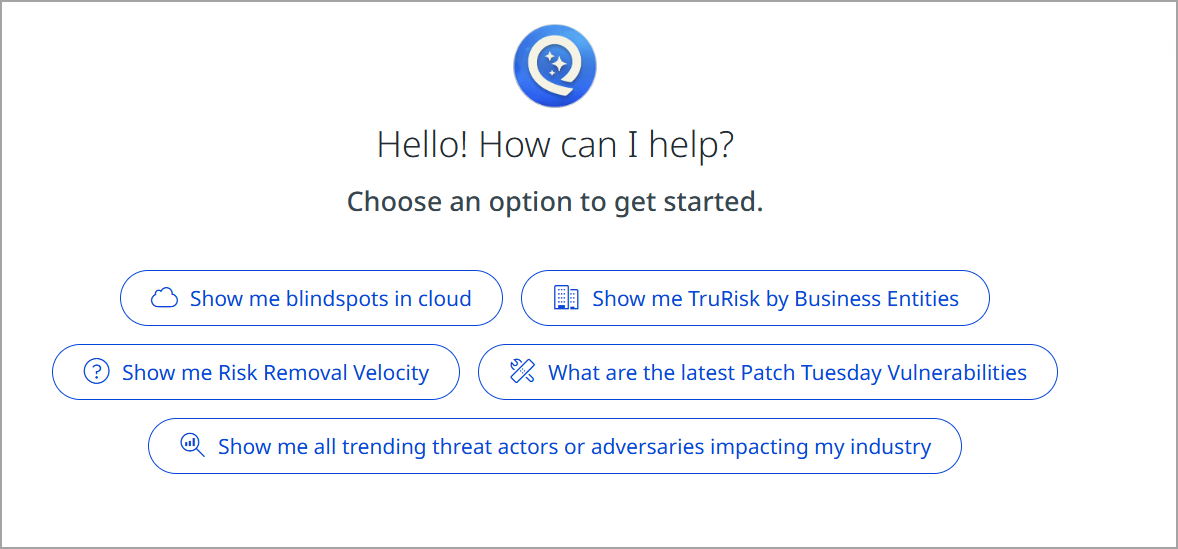
Click any to retrieve relevant information instantly:
Show me blindspots in cloud
This option displays security vulnerabilities and blind spots within your cloud infrastructure. Use this to identify potential exposure areas and unmonitored assets in your cloud environment.
Show me TruRisk™ by Business Entities
Retrieves a comprehensive risk assessment broken down by individual business entities or departments. This helps you understand which business units face the highest security risks and need immediate attention.
Show me Risk Removal Velocity
Displays the speed at which your organization is remediating and removing identified risks. This metric helps track your security improvement rate and remediation efficiency over time.
What are the latest Patch Tuesday Vulnerabilitie s
Provides up-to-date information about the latest Microsoft Patch Tuesday vulnerability releases. This keeps you informed about critical security patches and their impact on your systems.
Show me all trending threat actors or adversaries impacting my industry
Displays current threat intelligence focused on threat actors and adversaries specifically targeting your industry sector. Use this to understand emerging threats relevant to your business.
Prompt Library
The Prompt Library is a centralized repository of pre-built, categorized queries organized by topic area. It helps you quickly find and execute common analyses without typing custom queries from scratch.
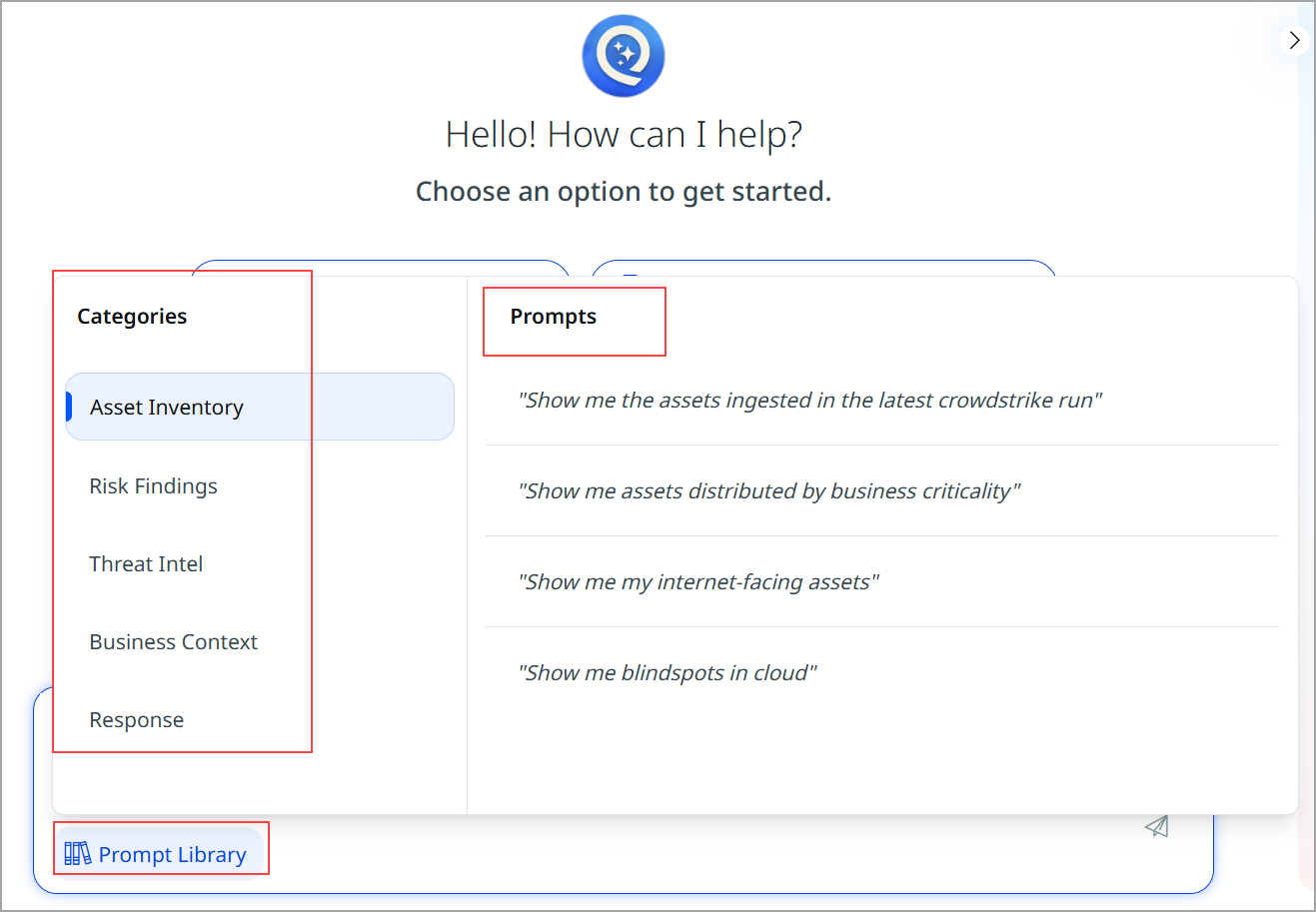
Access the Prompt Library by clicking the Prompt Library at the bottom of the chat interface, and select Prompt from the Categories.
Prompt Library Categories
The Prompt Library is organized into five main categories, each containing curated prompts for specific analysis needs:
Asset Inventory
Contains prompts for querying and analyzing your organization's asset inventory and infrastructure. Use these prompts to understand your complete technology landscape.
| Prompts | Description |
|---|---|
| Show me the assets ingested in the latest crowdstrike run | Displays assets recently scanned by CrowdStrike endpoint detection and response system |
| Show me assets distributed by business criticality | Categorizes your assets based on their criticality level to business operations |
| Show me my internet-facing assets | Identifies all assets exposed to the internet that may be vulnerable to external attacks |
| Show me blindspots in cloud | Reveals unmonitored or unmanaged resources in your cloud environments |
Risk Findings
Provides prompts for examining and analyzing identified security risks and vulnerabilities within your environment.
| Prompts | Description |
|---|---|
| Show me a summary of all findings | Provides a comprehensive overview of all discovered security findings |
| Show me fixed vs open in last 180d | Compares resolved versus unresolved findings over the past 6 months |
Threat Intel
Contains prompts for threat intelligence and adversary information relevant to your industry and organization.
| Prompts | Description |
|---|---|
| Show me all trending threat actors or adversaries impacting my industry | Lists the most active threat actors and adversaries currently targeting your sector |
| What are the latest Patch Tuesday Vulnerabilities | Shows the most recent Microsoft Patch Tuesday vulnerability releases |
| I want to detect and get recommended solutions adversary techniques linked to MITRE TTPs | Maps detected adversary tactics and techniques to the MITRE ATT&CK framework with recommended defenses |
| Show me the top 10 apt groups in my industry | Identifies the most significant Advanced Persistent Threat groups targeting your industry sector |
Business Context
Offers prompts for analyzing risk and security posture by business entity or department, enabling targeted remediation efforts.
| Prompts | Description |
|---|---|
| Show me TruRisk by Business Entities | Displays risk assessments broken down by individual business units or departments |
| Show me top 3 failing Business Entities | Identifies the business entities with the worst security posture or highest risk levels |
| Show me top Risky Business Entities | Lists business entities ranked by their overall risk assessment scores |
| Show me best performing Business Entities | Highlights the business entities with the strongest security programs and lowest risk |
| Show me Business Entities which have risk above risk appetite | Identifies entities exceeding your organization's defined risk tolerance thresholds |
| Show me $ value at risk by Business Entities | Calculates the estimated dollar value of risk for each business entity based on exposure, severity, and impact factors. |
Response
Contains general prompts and queries that don't fit into other categories but provide valuable insights and analysis.
This category serves as a catch-all for miscellaneous queries and custom analysis requests that support your security investigations and decision-making.
| Prompts | Description |
|---|---|
| Analyze my remediation strategies | Evaluates your organization's approach to fixing identified security issues |
| Analyze my VM Program | Reviews your vulnerability management program implementation and effectiveness |
| Show me Risk Removal Velocity | Displays the rate at which your organization is remediating security risks over time |
| Show me patchable findings | Lists vulnerabilities that can be resolved through software patching |
| Show me findings without an available patch | Identifies vulnerabilities where patches are not yet available (zero-day and unpatched issues) |