Plan Your ETM Implementation
Enterprise TruRisk Management (ETM) combines asset inventory, vulnerability, misconfiguration, and business context data to provide a unified view of your organization's cyber risk posture.
Before you configure ETM, plan your implementation and prepare the prerequisites described in this topic. These foundations help ETM calculate accurate TruRisk scores, generate meaningful risk insights, and prioritize risk effectively from the start.
Planning helps you make the decisions that ETM uses to calculate and present risk. Before you prepare the technical prerequisites, complete the following planning activities. Involve the stakeholders who own security, IT operations, and the business areas that ETM measures.
Define Your Objectives
Objectives describe the outcomes that you want to achieve with ETM. Clear objectives help you decide which data sources to connect first, how to structure business entities, and how to measure success.
The following table lists common objectives and the ETM capabilities that support them:
| Objective | Supporting ETM Capability | Example Measure of Success |
|---|---|---|
| Gain unified visibility of assets and findings | Unified asset inventory and consolidated findings from Qualys and third-party sources | All business-critical assets appear in the asset inventory. |
| Prioritize remediation based on risk | TruRisk scores, threat intelligence, and the Risk Workbench | Remediation effort focuses on findings with a QDS of 70 or higher on critical assets. |
| Keep risk within acceptable limits | Company and business entity risk appetite | Fewer business entities have a TruRisk score above their risk appetite. |
| Communicate risk in business terms | Risk quantification for business entities | Leadership reports express cyber risk as potential financial impact. |
| Measure risk reduction over time | TruRisk score trends and risk reduction tracking | The organization TruRisk score decreases over each reporting period. |
Start with a small number of objectives, and add more as your risk program matures.
Identify and Review Data Sources
ETM calculates risk only for the assets and findings that it receives from connected data sources. Identify every source that provides asset or finding data, and review how each source connects to ETM.
For each data source, record the following information:
- Data type: The data that the source provides, such as assets, vulnerabilities, or misconfigurations.
- Connection method: How the data reaches ETM. Qualys applications share the Qualys platform with ETM. Third-party tools connect through an API connector or a CSV upload.
- Owner and credentials: The team that owns the source, and the API credentials or export files that the connection requires.
- Coverage: The part of your environment that the source covers, such as on-premises servers, endpoints, cloud accounts, or web applications.
Review the following points before you connect sources:
- For CSAM, Policy Audit, and EASM, a baseline is required to ingest existing data into ETM. For WAS, you create a CSV connector and run a scan.
- If several sources report the same asset, ETM correlates the records into a single asset by using asset identification rules. For more information, refer to Asset Identification Rules.
- Start with a few key sources. After data begins to flow into ETM, add other sources to extend coverage.
Define Risk Strategy
A risk strategy defines how your organization measures, prioritizes, and accepts risk. ETM applies these decisions when it calculates TruRisk scores and compares them with your thresholds.
Decide the following before you configure ETM:
| Decision | Description |
|---|---|
| Company risk appetite | The TruRisk score threshold that your organization accepts overall. You set it in the company profile. |
| Business entity risk appetite | The threshold for each business entity. You can set a lower threshold for business entities that support critical operations. |
| Asset criticality scheme | The criteria for assigning criticality scores from 1 to 5 to asset tags. If an asset has several tags, ETM uses the highest score. |
| Prioritization threshold | The level at which findings require action. Qualys recommends prioritizing vulnerabilities with a Qualys Detection Score (QDS) of 70 or higher. |
| Risk acceptance policy | The conditions under which your organization accepts a risk instead of remediating it, and who approves the exception. For more information, refer to Exceptions and Risk Acceptance. |
Begin with an initial threshold, and refine it over time as your risk program matures.
Review Business Context
Business context connects assets to the business areas that they support. With business context, ETM can prioritize risk based on business impact, not technical severity alone.
Review the following information with business owners:
- Business entities: The business units, applications, services, or regions that you want to monitor. You can create up to 50 business entities.
- Asset tags: The tags that identify the assets of each business entity. If your organization already uses Qualys asset tags, review whether you can reuse them.
- Ownership: The team that is responsible for the risk and remediation of each business entity.
- Business value and potential loss: The business value of each business entity and the estimated financial impact of loss types, such as Data Breach or Business Interruption.
Example: An organization provides an online banking application. The organization defines Online Banking as a business entity, assigns the Digital Banking team as the owner, and applies an Online-Banking tag to the servers and databases that support the application. ETM then calculates the risk of Online Banking from the assets that carry the tag.
For more information, refer to Business Context.
After you complete the planning activities, prepare the following four areas:
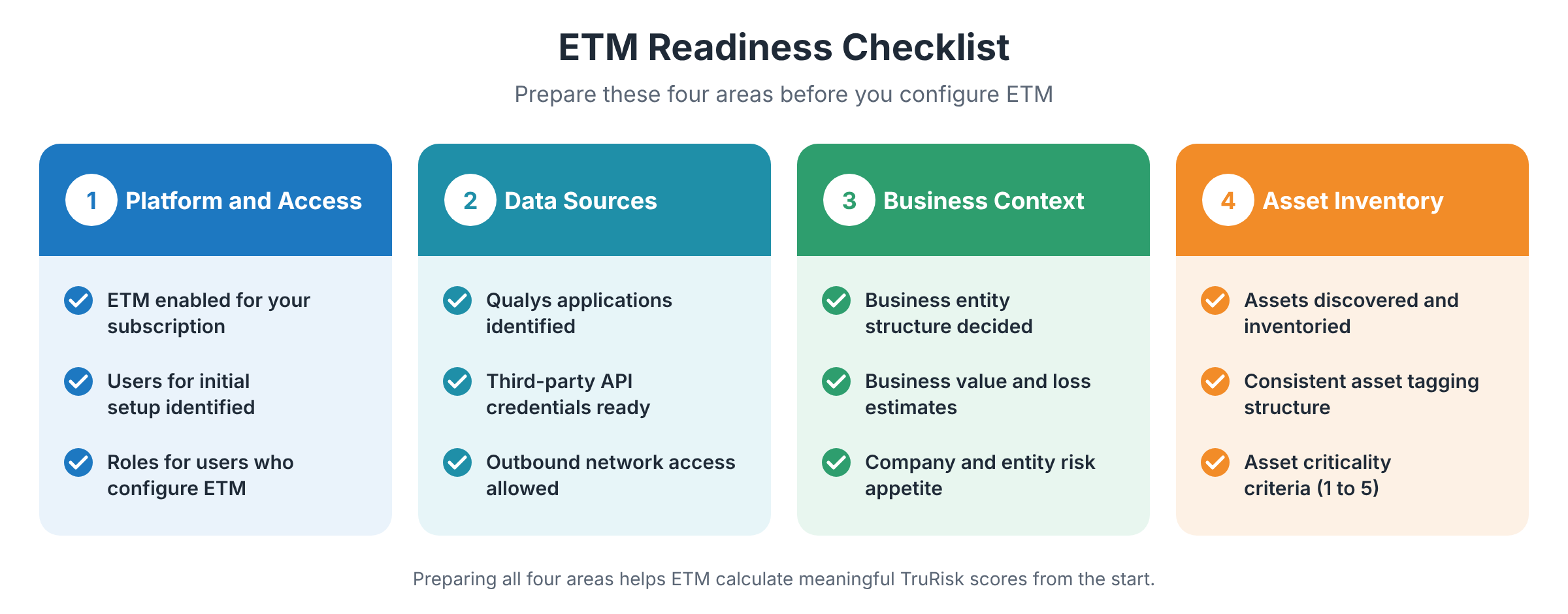
Platform and Access Requirements
ETM is available through the Qualys Enterprise TruRisk Platform. Before you begin, confirm that ETM is provisioned for your subscription and identify the users who perform the initial configuration.
| Prerequisite | Why It Matters |
|---|---|
| Qualys Enterprise TruRisk Platform account | ETM is available only through the Qualys platform and requires an active Qualys subscription. |
| ETM application activation | ETM must be provisioned and enabled for your subscription. To enable ETM, contact your Technical Account Manager (TAM) or Qualys Support. |
| User role permissions | Users who configure profiles, connectors, and dashboards need the ETM Manager role or a role with equivalent permissions. |
| Optional capabilities | Capabilities such as TruLens, Agentic AI, and the ROCky Cyber Risk Assistant require separate enablement. If you plan to use them, contact your TAM or Qualys Support. |
Data Source and Integration Setup
ETM derives risk insights from the data that it collects from Qualys applications and third-party sources. Prepare the following before you connect data sources.
| Prerequisite | Why It Matters |
|---|---|
| Qualys applications | Qualys applications, such as VMDR, CSAM, Policy Audit, and Web Application Scanning (WAS), supply the asset, vulnerability, and misconfiguration data that TruRisk scores are based on. Each application must be enabled for your subscription. |
| Application versions | Some integrations require minimum versions. For example, the Policy Audit and Security Configuration Assessment (SCA) integration requires PCAS 1.2.3 or later and Enterprise TruRisk Platform 10.32.1.0 or later. |
| Third-party tool access (optional) | If you plan to integrate a third-party tool, such as ServiceNow, Wiz, or Microsoft Defender, keep the required API credentials ready. Alternatively, you can upload data that you export from the tool by using a CSV connector. |
| Network access | Connectors and data sources require outbound API or file upload access to exchange data with the Qualys platform. |
For more information, refer to ETM Data Sources.
Business Context Preparation
Business context helps ETM prioritize risk based on organizational impact, not technical severity alone. Decide the following before you configure the company profile and business entities.
| Prerequisite | Why It Matters |
|---|---|
| Company information | The onboarding wizard asks for company details, such as the registered company name, website URL, industrial sector, employee count, and headquarters location. ETM uses this information to provide organizational context for risk analysis. |
| Business entities | Business entities are the logical groups that ETM uses to aggregate and track TruRisk scores, such as Finance or Cloud Platform. Choose a structure that reflects how your organization assigns ownership and remediation responsibilities. You can create up to 50 business entities. |
| Business value and loss estimates | The business value of each entity and the estimated financial impact for each loss type, such as Data Breach or Business Interruption, let ETM express cyber risk in monetary terms. |
| Risk appetite | Risk appetite is the TruRisk score threshold that your organization accepts. You can set it for the company and for each business entity. For example, you might define a threshold of 450 and refine it over time as your risk program matures. |
For more information, refer to Business Context and Risk Appetite.
Asset and Inventory Readiness
ETM scores the assets that appear in your asset inventory. Assets that are not discovered and inventoried are not included in TruRisk calculations. Make sure that your asset inventory is complete before you rely on ETM risk insights.
| Prerequisite | Why It Matters |
|---|---|
| Asset discovery | Make sure that every asset, whether on-premises, in the cloud, or in a hybrid environment, is scanned and listed in the asset inventory. Complete visibility helps ETM calculate risk for your entire environment. |
| Tagging structure | Use consistent tagging logic, such as tags based on departments, applications, or IP ranges, to group assets. ETM uses asset tags to associate assets with business entities. A business entity can include one or more tags. |
| Asset criticality criteria | Define importance levels from 1 to 5 to indicate the business value of assets. ETM derives the asset criticality score (ACS) from the criticality of the tags that are assigned to an asset, or, for untagged assets, from an AI-predicted score (AI ACS). ETM uses the ACS in the TruRisk calculation. AI ACS requires a CSAM subscription and is available on request. |
For more information, refer to Asset Tags.
Additional Considerations for Existing Qualys Customers
If your organization already uses Qualys applications, ETM uses your existing assets, findings, and asset tags as a starting point. When you enable ETM, the following changes occur automatically:
- CVE-based findings: ETM organizes findings by CVE. The QID-based view in VMDR does not change, so your existing VMDR workflows and reports continue to work.
- TruRisk 2.0: TruRisk scores use the TruRisk 2.0 model across all Qualys applications.
- Score updates: TruRisk scores are recalculated automatically as new findings are ingested and as you remediate existing findings.
Before you begin, review your existing asset tags. You can reuse them to define business entities and asset criticality.
For more information, refer to Things to Change After ETM Enablement.
Next Steps
After you prepare the prerequisites, configure the foundation of ETM. For more information, refer to Configure the Foundation.