View Asset Inventory
The Assets tab gives you host information for every asset: identity, running services, installed software, open ports, users, and more.
Navigate to: Inventory > Assets
ETM builds a detailed, multidimensional view of each asset that combines IT and security data. Use that profile to spot configuration problems, security risks, IT policy violations, and regulatory non-compliance.
Use this to
- Find assets with a QQL query over a specific time frame.
- Group assets by hardware, operating system, or other categories.
- Check the criticality and TruRisk™ scores of an asset.
- Add tags to assets or purge them from your inventory.
Key features of the Assets tab
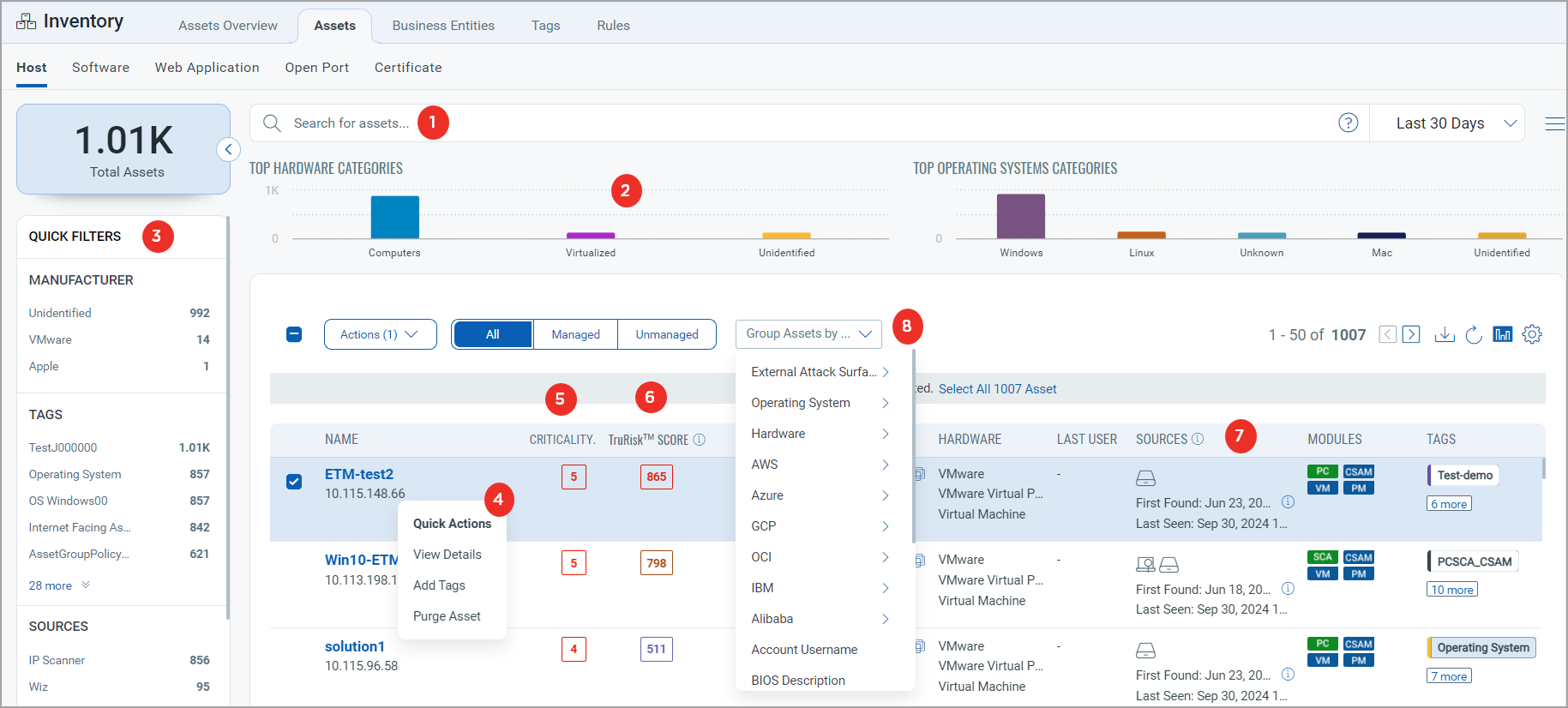
The Assets Overview tab gives you an overview of the assets in your organization. This screenshot highlights the key features of the Assets tab under Inventory, and the numbers match the rows in the table below it.
Before you begin: An asset appears on this tab after it is discovered and has reported data to ETM. If an asset you expect is missing, confirm that it has been discovered.
| # | Feature | What it does |
|---|---|---|
| 1 | Search for assets | Finds assets with a Qualys Query Language (QQL) query for a specific time frame. For more information, see Search Tokens.
The date search evaluates only UTC format for all date-related tokens. The actual search results might show the date according to your time zone. |
| 2 | Bar chart representation | Shows bar charts for the top hardware and operating system categories. Click a bar to list the assets for that criterion. |
| 3 | Search criteria in the left pane | Shows the total assets matching your search criteria, plus the asset manufacturer and asset tags with their asset counts. Click a count to list those assets. |
| 4 | Quick Actions menu | Runs actions on an asset, such as viewing asset details, adding tags, and purging the asset.
You can not purge GCP assets using the on-demand method (from Inventory > Assets) tab. In a single operation, you can add tags to a maximum of 10,000 assets. For more information, see Manage Asset Tags. |
| 5 | Asset Criticality Score | Shows the asset criticality score for each asset. For more information, see Asset Criticality Score. |
| 6 | TruRisk™ Score | Shows the TruRisk™ Score of the asset, so you can prioritize vulnerabilities, assets, and groups of assets by the risk they actually pose to the organization. For more information, see TruRisk™ Score.
Assets that have not been scanned recently have no TruRisk™ Score calculated, and display '–' in the UI. Assets that have been scanned but have no active vulnerabilities display a TruRisk™ Score of 0. |
| 7 | Asset discovery Sources | Shows the sources the asset was discovered from. For more information, see Sources Column Details. |
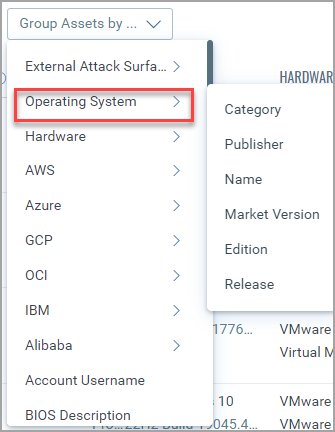
| 8 | Group assets | Groups assets by criteria or categories, such as external attack surface, operating system, hardware, and AWS. Some categories have further subcategories, as in this example.
|
Start with a broad QQL query, then use the left pane counts and the grouping categories to narrow the list before you act on assets from the Quick Actions menu.