Component Software
Component software refers to the individual building blocks or dependencies that make up a software application. These are typically libraries, packages, frameworks, or modules that applications rely on to function, such as language-specific libraries (for example, Java JARs, Python packages, or Node.js modules), runtime components, or shared dependencies.
Unlike generic software, which represents a complete application or product, component software provides a more granular view into what an application is composed of, where those components are installed, and how widely they are used across the environment.
The Component Software tab provides visibility into individual software components across your environment.
Navigate to Inventory > Software > Component Software to view the software details.
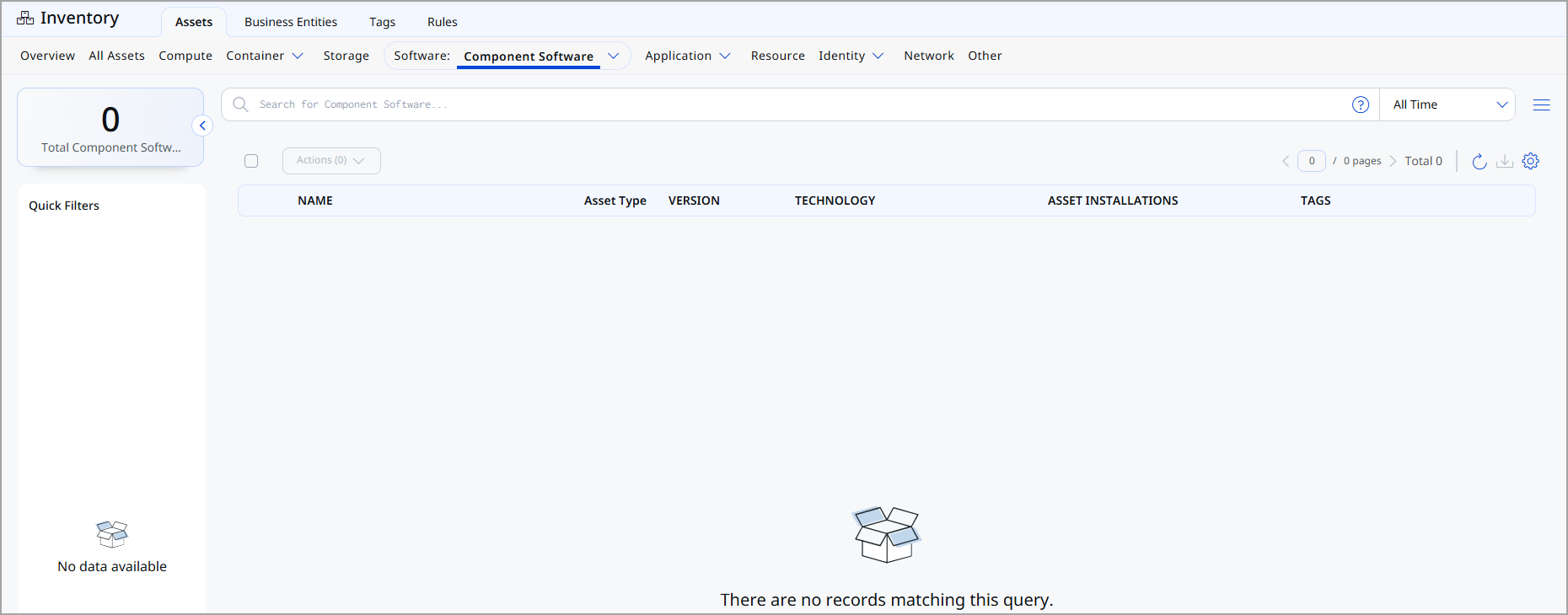
For each component, the following information is displayed:
| Column | Description |
|---|---|
| Name | Name of the component software or library. |
| Asset Type | Asset classification of the component software. |
| Version | Version of the component software discovered. |
| Technology | Technology associated with the component (for example, Java, Python, Node.js). |
| Asset Installations | Number of assets where the component software is installed. |
| Tags | Tags associated with the component software for organization and filtering. |
Add or Remove Tags
You can manage software component tags from the Quick Actions or Actions menu. For more information on managing tags, refer to Manage Asset Tags.
Download Software List
You can download the list of software components in a report from the Software > Component Software tab in the following formats:
- Comma-Separated Value (CSV)
- Hypertext Markup Language (HTML)
- Extensible Markup Language (XML)
- Portable Document Format (PDF)
If you want to download the report in PDF format, you can select a maximum of 5 columns. If you select the Tags column, the report for up to 5,000 assets is downloaded.
To download, follow these steps:
- Click
 .
. - Select the download format and the columns you want in the report.
-
Select the timezone.
-
Click Download.