Manage Lifecycle State of Important Vulnerabilities Ingested via CSV
You can manage the lifecycle state (Open/Closed) of urgent vulnerabilities ingested via CSV.
These capabilities address the need to act on high-priority vulnerabilities while ensuring accuracy, accountability, and compliance.
This feature lets you to directly close vulnerabilities or misconfigurations directly in the UI, eliminating the need to upload updated CSV files or coordinate lifecycle changes via connectors. This speeds up and improves the remediation lifecycle for findings sourced from Generic CSV imports.
Earlier, closing a vulnerability required updating data through connectors or uploading a CSV file. With this enhancement, you can simply select findings on the UI and request closure instantly.
Key Features
|
Feature |
Description |
|---|---|
|
Faster remediation lifecycle |
No dependency on connector sync for closure |
|
Better operational efficiency |
Reduces CSV upload overhead |
|
Improved accuracy |
Findings are marked closed immediately at user's intention |
|
Flexible bulk actions |
Close dozens or hundreds of issues with a few clicks |
Support Available
This feature is available on:
- All Findings
- Vulnerabilities
- Misconfigurations
Key Capabilities
|
Capability |
Description |
|---|---|
|
Bulk Close |
Close up to 200 findings per page at once |
|
Single Close |
Close an individual finding |
|
Source Control |
Supported only for Generic CSV-based findings |
|
Status Handling |
Findings enter an In-progress state until backend processing completes |
|
Role-Based Access |
Only users with visibility to the asset can close related findings |
Eligibility Rules
A finding can be closed only if:
- Its source is Generic CSV
- It is not currently being processed for closure
- It is not associated with multiple sources
If findings are part of multiple source feeds (for example, CSV and VMDR), closure from the UI is not permitted.
Close the Findings
Follow these steps to close the findings:
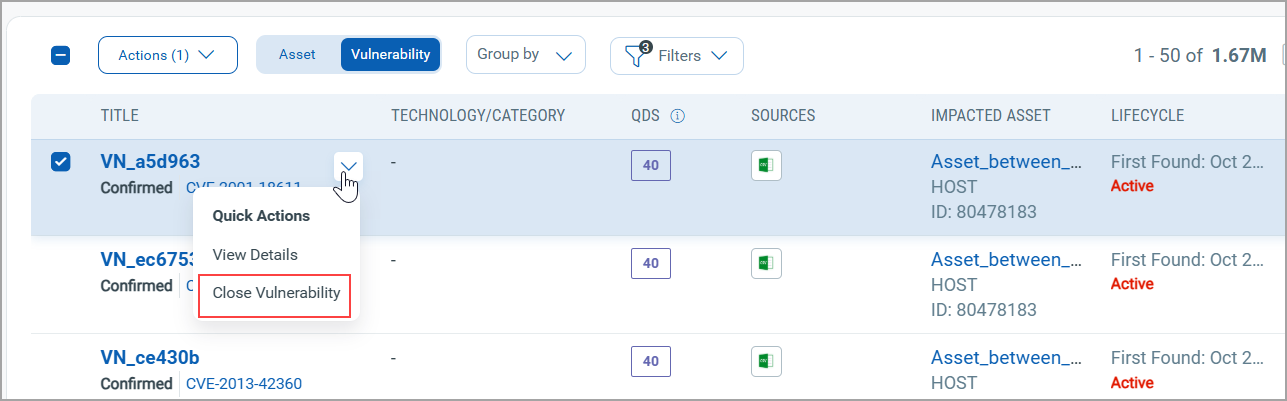
- Navigate to Risk Management tab > Findings tab > Vulnerabilities tab.
- Select one or more findings from the listing page.
- From the Quick Actions menu, select Close Vulnerability.
For demonstration, we have selected one vulnerability. You can select multiple vulnerabilities and close them from the Action menu.
A confirmation dialog displays:
- Total selected
- How many are eligible for closure
- How many are already in progress
- Confirms and click Mark as Closed.
Findings transition into a pending closure state until they are processed.
Once fully closed, findings are no longer available in the active list. The Close Findings feature enables you to manage the status of CSV-based findings directly within the interface, making it easier to resolve issues and enhance oversight.