View Threat Actors
The Threat Actors Listing page provides a comprehensive view of threat actors relevant to your organization, tailored to your industry and environment. It helps you identify which threat groups are most active, understand their attack patterns, and assess their potential impact on your assets.
This page serves as a centralized intelligence hub, allowing you to explore threat actors by targeted industries, attack types, and impacted assets, enabling better prioritization and informed security decisions.
Threat Actors Listing
To view the threat actors relevant to your organization, navigate to the TruLens > KnowledgeBase > Threat Actors page. You can also use various Quick Filters, Filters
Trending and All Tabs
The Threat Actors page has two tabs:
- Trending: Lists only the threat actors that are trending in at least one industry.
- All: Lists every threat actor.
The counts and links on the page follow the tab you select, so the numbers always match the list you see.
When you click View All on the TruLens home page, this page opens with your industry filter already applied. When you open this page directly from the KnowledgeBase, the All tab opens.
If no threat actor is trending in any industry, the Trending tab shows an empty list.
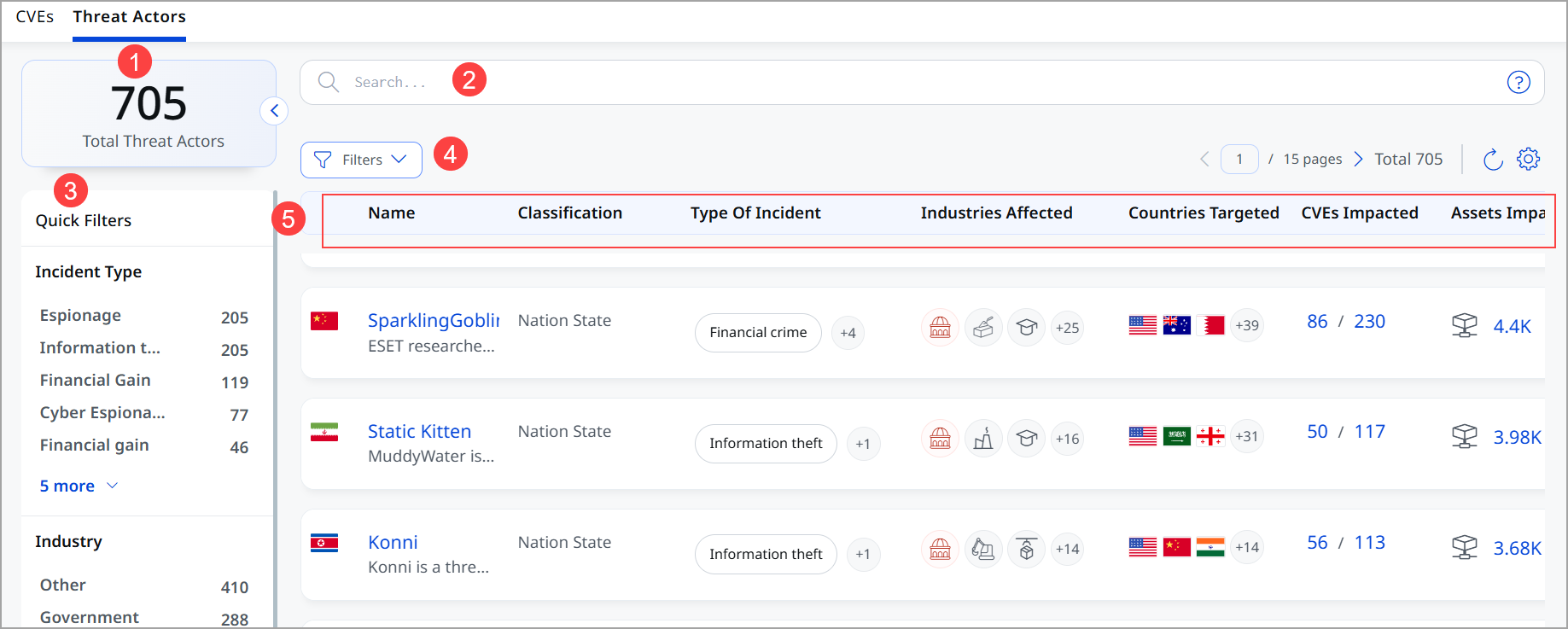
The following is the list of threat actors on the Threat Actors page.
- Total Threat Actors
Displays the total number of threat actors relevant to your selected scope. - QQL Search bar
Allows you to search threat actors using keywords with advanced query support.
You can search threat actors by trending industry, targeted industry, or status. The search suggests the supported values as you type, so you do not need to know the exact spelling. - Quick Filters
Use Quick Filters located in the left navigation. The Quick Filters option lets you choose the type of threat actor to further filter threat actors. - Filters
Use the Filters menu to narrow the threat actor list. Select IMPACTED to show only the threat actors linked to CVEs that affect your assets. The filter appears as a tag next to Filters, and the funnel icon shows how many filters are applied. To remove the filter, click X on the tag, or clear the checkbox.
- List of threat actors includes
- Threat actor name
Displays the name or identifier of the threat actor group. - Status
Shows whether the threat actor is Active, Dormant, or Disbanded. Use it to focus on the groups that are still operating. If no status is available, this column is blank. - Classification
Displays classification of Threat actors based on their motives and objectives. For example, individuals or groups such as organized criminals, nation-states, hacktivists, and insiders, based on their motivations, techniques, and objectives - Type of Incident
Displays the types of attacks or activities associated with the threat actor. - Industries Affected
Shows the industries most frequently targeted by the threat actor. - Countries Targeted
Highlights the countries where the threat actor conducts attacks. - CVEs Impacted
Represents the number of vulnerabilities associated with the threat actor. - Assets Impacted
Number of your assets currently affected by those vulnerabilities
- Threat actor name
View Threat Actors Details
To view the details of the threat actor, click the specific threat actor. The Threat Actors details page is displayed.
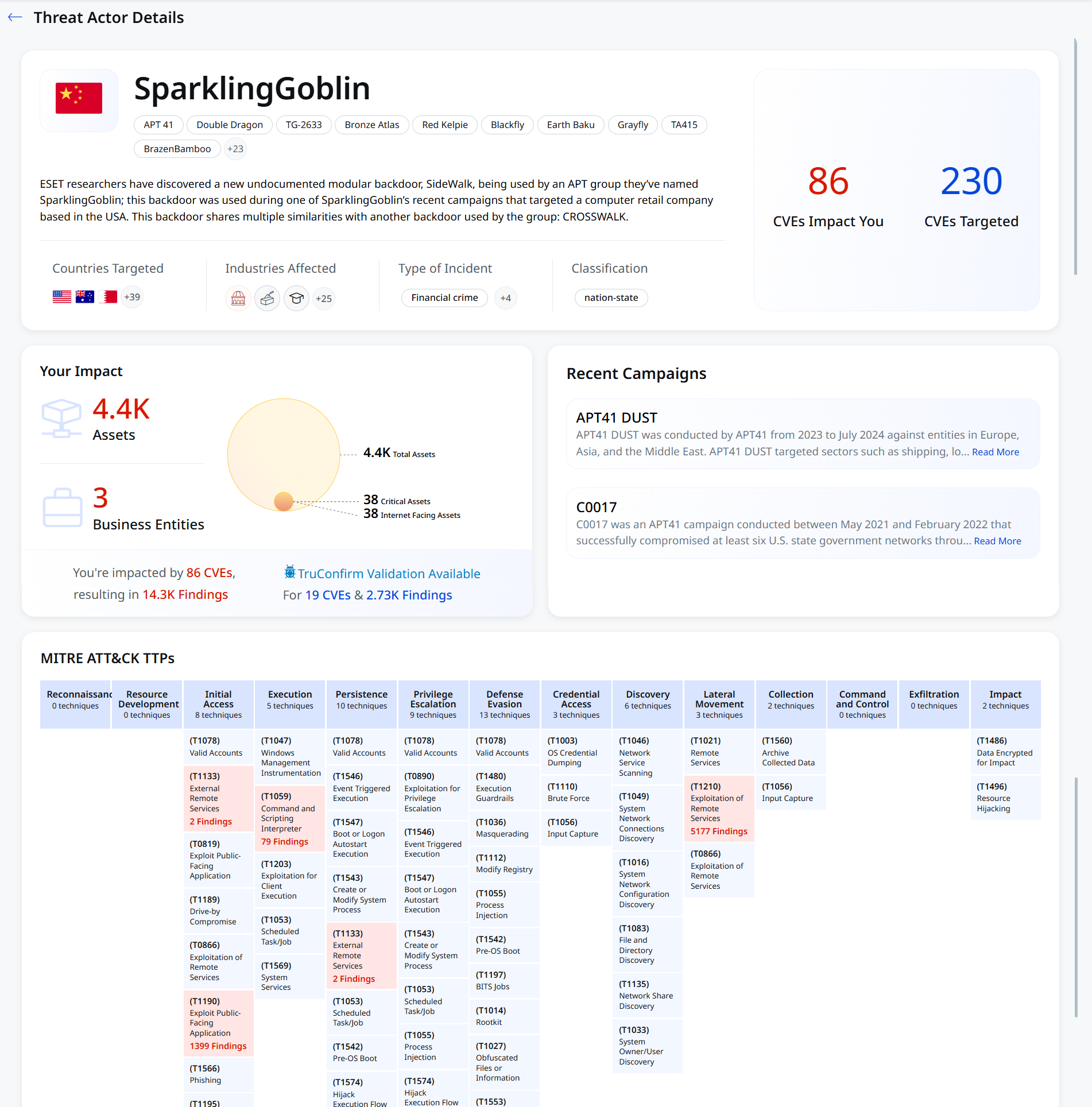
Header Section
This section displays the unique identifier for a threat actor group, a description of the group, and the total number of CVEs targeted by the group. Key Information is available in the form of quick details, such as:
| Heading | What It Shows |
|---|---|
| Country of Origin | Displays where the threat actor is believed to originate |
| Countries Targeted | Displays the nations attacked |
| Industries Affected | Displays sectors impacted (for example, Government, Education, and so on) |
| Type of Incident | Information theft is the primary attack method |
| Also Known As | Alternative name for this threat group (indicates other aliases) |
| Classification | Displays state-sponsored/government-backed activity |
| Status | Shows whether the threat actor is Active, Dormant, or Disbanded. This field is displayed only when a status is available. |
Your Impact
This section displays how this threat affects your organization.
Metrics:
- Assets: Total number of devices/systems in your environment
- Business Entities: Number of your business entities affected
- Pie Chart: Visual breakdown showing total assets distributed as:
- Total Assets
- Critical Assets (highest priority)
- Internet-Facing Assets (exposed to the internet)
- Total CVEs (Common Vulnerabilities and Exposures) affected and the number of CVEs for which TruConfirm validation is available
- Total Findings and number of findings. These are detected suspicious activities or vulnerabilities in your systems, and the number of CVEs for which TruConfirm validation is available
- Overall Summary, which tells you the total risk scope at a glance. For example, from the given screenshot, we can see that Larva-24005 impacts over 11.4K assets in your environment through 60 CVEs, resulting in 26.8K vulnerable findings
MITRE ATT&CK TTPs
MITRE ATT&CK framework is a publicly accessible knowledge base that documents adversarial behaviours across the cyber-attack lifecycle. This is a threat tactics and techniques matrix that maps how the threat actor conducts cyber attacks. It follows the MITRE ATT&CK framework, the industry standard for classifying attacker behavior.
What are TTPs?
The details of TTPs are
- TTP: Tactics, Techniques, and Procedures
- Tactics: Goals attackers try to achieve (the why)
- Techniques: Methods they use (the how)
- Procedures: Specific implementations (the what specifically)
Why This Matters
This screen shows exactly how this threat actor attacks organizations like yours, allowing your security team to:
- Focus defenses on the most-used attack techniques
- Prioritize patching and hardening
- Build detection rules for their specific tactics
- Understand the full attack chain from entry to data theft
| Tactic | Purpose (Why the attacker is in that phase) |
What Attacker Does |
|---|---|---|
| Reconnaissance | Information gathering | Scans targets, collects emails, domains, and organization structure |
| Resource Development | Prepare infrastructure for the attack | Registers domains, sets up servers, creates malware, buys credentials |
| Initial Access | Get into the target environment | Phishing, exploiting vulnerabilities, and using stolen credentials |
| Execution | Run malicious code | Executes scripts, malware, or commands on a system |
| Persistence | Maintain long-term access | Installs backdoors, modifies startup processes, creates accounts |
| Privilege Escalation | Gain higher-level permissions | Exploits bugs, abuses misconfigurations to become admin/root |
| Defense Evasion | Avoid detection | Disables security tools, obfuscates code, and clears logs |
| Credential Access | Steal account credentials | Dumps passwords, captures keystrokes, extracts hashes |
| Discovery | Understand the internal environment | Maps network, lists users, identifies systems and services |
| Lateral Movement | Move across systems | Uses stolen creds or exploits to access other machines |
| Collection | Gather sensitive data | Finds and aggregates files, databases, and emails |
| Command and Control | Maintain remote control of compromised systems | Connects to external servers to send/receive commands |
| Exfiltration | Steal data out of the network | Transfers data to attacker-controlled locations |
| Impact | Achieve final objective (damage/disruption) | Encrypts data (ransomware), deletes systems, disrupts operations |
Understanding the Techniques
Let us understand how the Techniques and Tactics matrix helps you.
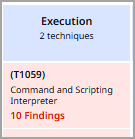 |
|
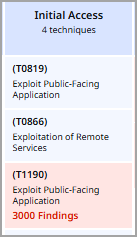 |
|
Attack Priorities (by Findings)
- Lateral Movement (6,278 findings) — Attacker actively spreading through the network
- Initial Access (3,000 findings) — Getting in easily through exposed apps
- Privilege Escalation (3,186 findings) — Gaining admin access
- Execution (909 findings) — Running commands on compromised systems
What This Tells You
- Larva-24005 exploits public-facing applications as entry points
- They escalate privileges to the admin level quickly
- They move laterally aggressively through your network
- They execute commands to install malware/backdoors
What You Should Do
Immediate actions that can be taken are:
- Patch all public-facing applications (T1190 technique)
- Review and restrict lateral movement between systems
- Monitor for privilege escalation attempts
- Review access logs for the 6,278 lateral movement instances
Long-term actions that can be taken are:
- Implement network segmentation (limit lateral movement)
- Use multi-factor authentication (block credential theft)
- Monitor command execution (detect T1059)
- Enable audit logging on all systems
Download Threat Actors
You can download the threat actor list as a CSV file.
- On the Threat Actors page, click the Download icon above the list, next to the Refresh and Settings icons.
The Download Formats window opens. - Under Select Available Format, select Comma-Separated Value (CSV).
- Under Select columns to download, select the columns you want in the file. By default, all columns are selected. To select or clear all columns at once, use Select All.
- Click Download.
The download starts shortly. The time it takes depends on how much data you download.