Unified Asset Inventory
The Unified Asset Inventory (UAI) provides a single, comprehensive view of all assets across your organization’s hybrid IT environment. It consolidates asset data across Identity, Applications, Compute, Containers, Storage, Software, Network, Resources, and Certificates into one inventory.
UAI unifies asset discovery, classification, and context across different company modules and external integrations. This approach eliminates isolated views. As a result, every asset is visible, whether it is cloud-based, on-premises, or externally integrated. Additionally, all assets can be searched easily and assessed consistently.
Prerequisite
This feature is available on request; contact Qualys support or your Technical Account Manager (TAM) to activate it for your account.
Unified Asset Inventory Features
- Introduced a centralized asset inventory serving as the single source of truth for all asset types.
- Unified asset visibility across company-managed and externally discovered or integrated assets.
- Enabled cross-asset tagging to associate business services with infrastructure, applications, and identities.
- Added global search across all asset classes using hostnames, tags, domains, and service names.
- Laid the foundation for asset relationship mapping to support dependency and impact analysis.
Unified Asset Tagging
You can now apply the same tag across multiple asset types, enabling a business-centric view of your infrastructure.
Example:
Apply the tag “Banking Service” to on-prem hosts, cloud storage (S3), containers, web applications, and certificates. A single dashboard or report can then show all assets supporting the Banking Service along with their associated security findings.
Unified Search Across All Asset Types
UAI enables a single search experience across the entire asset landscape. You can search using:
- Hostnames or IPs
- Tag names (business services, environments, owners)
- Domains or application names
- Service or resource identifiers
Search results return all related assets across compute, containers, storage, applications, identities, and certificates, along with their corresponding security assessments.
Supported Asset Classes and Subclasses
Unified Asset Inventory includes the following asset classes and key subclasses:
- Compute
- Virtual Machines
- Hosts
- Other Compute
- Container
- Container Instances (Docker containers, Kubernetes pods, ECS tasks)
- Container Images (registry images)
- Storage
- Disk volumes, object storage (S3), databases, file shares, blob storage
- Software
- Generic Software (applications, runtimes)
- Component Software (libraries, packages, dependencies)
- Application
- Web Applications
- Code Repositories
- Resource
- Cloud resources such as load balancers, DNS records, API gateways
- Certificate Resources (SSL/TLS and code-signing certificates)
- Identity
- User Identities
- Group Identities
- Role Identities
- Network
- Routers, switches, firewalls, VPNs, network interfaces, security groups
Asset Sources
UAI maintains visibility into assets regardless of how they enter the platform:
- Company-discovered and managed assets from native modules.
- Externally discovered or managed assets integrated via connectors, CMDBs, APIs, or third-party platforms.
For example, cloud assets may appear both as:
- Assets managed and visible in Total Cloud
- Assets discovered and managed via Wiz and surfaced through company/Wiz connectors
Asset Relationships and Context
UAI is designed to support asset relationship modeling, enabling you to understand how different asset types are connected. These relationships help with dependency mapping, blast-radius analysis, and risk prioritization.
Example Relationship Chain:
Web Application > Load Balancer > Virtual Machine > Container Instance > Software Component > Object Storage > IAM Role > User/Group
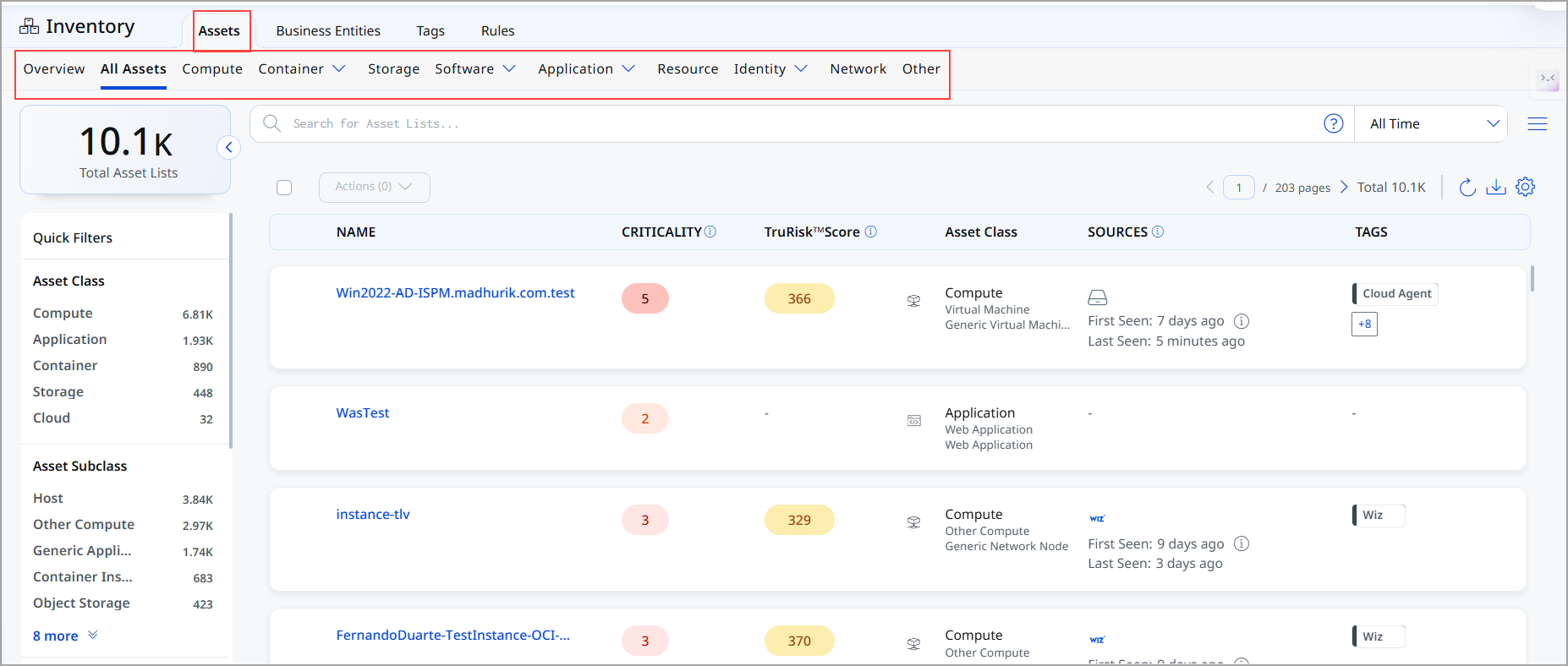
The Inventory tab provides a consolidated and unified view of all assets and software in your organization. It enables you to discover, classify, search, and manage assets across multiple asset types from a single interface.
From this page, you can quickly assess asset coverage, apply filters, and drill down into detailed asset information for security and risk analysis.
Inventory Views
You can navigate to the following inventory views from the Inventory tab:
| Inventory View | Description |
|---|---|
| All Assets | Displays a combined list of all asset types across your environment, giving you a single-pane view of your entire asset inventory. |
| Compute | Lists compute-related assets such as hosts, virtual machines, and cloud compute instances. |
| Container | Displays container-related assets, including containers, container images, and orchestration components. |
| Storage | Shows storage-related assets such as volumes, buckets, and storage services. |
| Software | Lists software assets discovered across your environment, including installed and detected software. |
| Application | Displays application assets such as web applications and business applications. |
| Resource | Lists cloud and infrastructure resources discovered in your environment. |
| Identity | Displays identity-related assets such as users, roles, and groups. |
| Network | Shows network-related assets such as domains, IPs, and network services. |
| Other | Displays assets that do not fall into the standard asset categories. |