Enterprise TruRisk Management Release 1.3.1
June 23, 2025
Enhanced User Experience for Vulnerability and Misconfigurations Tabs
We have refined the data presentation in the columns to deliver more compact and meaningful information. The following sections outline the details in the Findings sub tabs.
Common updates in all of the tabs:
- Merged columns like ID and Title, such as displaying ID and Title together in the Title column, help to recognize and reference findings, making it easier to search and track issues.
- Columns are reordered to provide a more logical and consistent view, enhancing readability and allowing users to scan data more efficiently.
- The LifeCycle column is added to contain the first found and status. It gives a comprehensive view of each finding's timeline at a glance.
- A tooltip - first found, last found, fixed date, and reopened date. This supports better decision-making and prioritization.
Updates in the All Tab
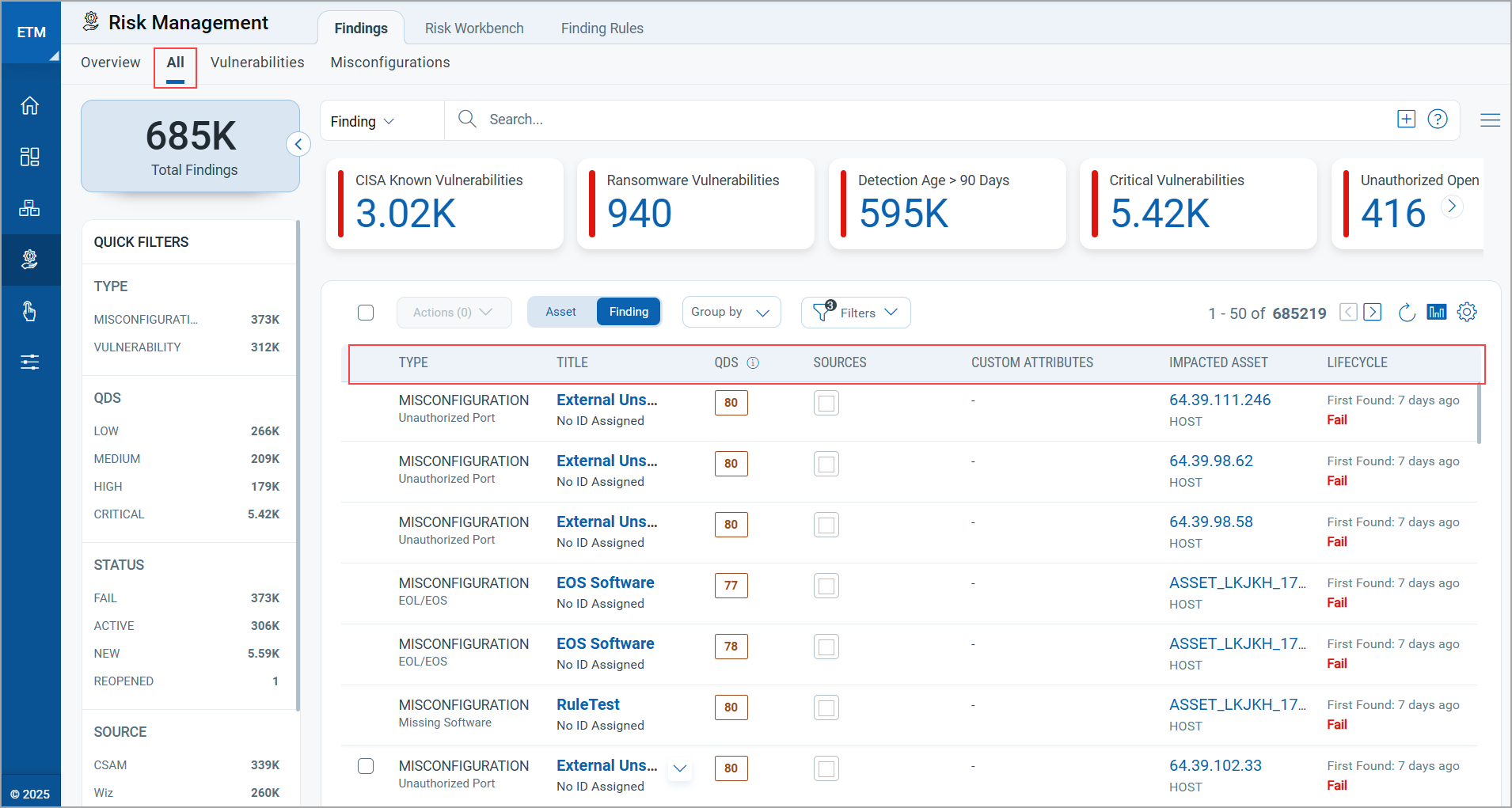
The following are the notable updates in the All tab:
- ID and Title are available in the Title column.
- Columns are now in the order - Type, Title, QDS, Sources, Custom Attributes, Impacted Asset, LifeCycle. A Tool tip is added.
Updates in the Vulnerabilities Tab
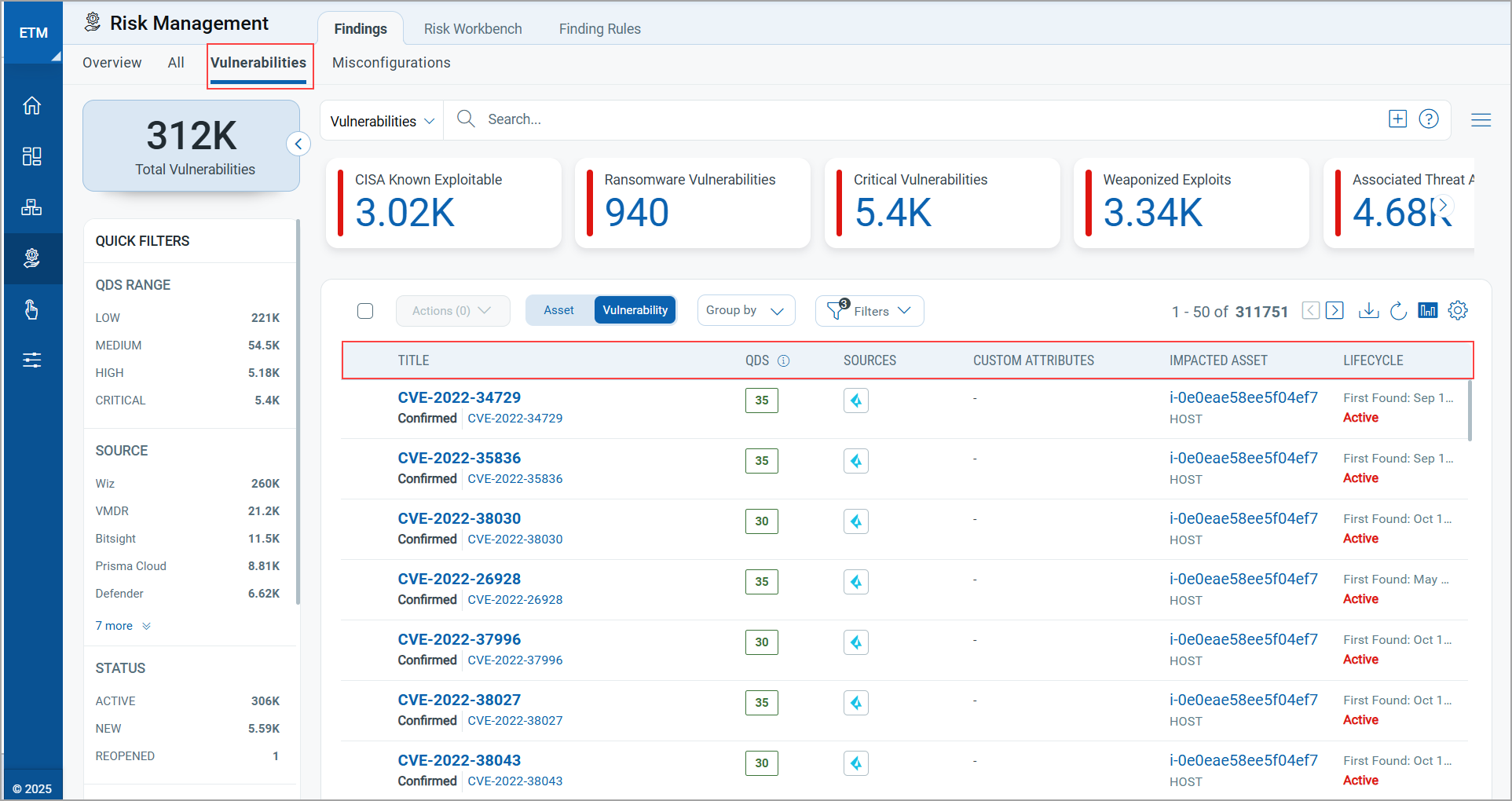
Following are the notable updates in the Vulnerabilities tab:
- ID and Title are available in the Title column.
- Columns are now in the order - Title, QDS, Sources, Custom Attributes, Impacted Asset, LifeCycle.
The Custom Attributes column is applicable for Findings only.
Updates in Misconfigurations Tab
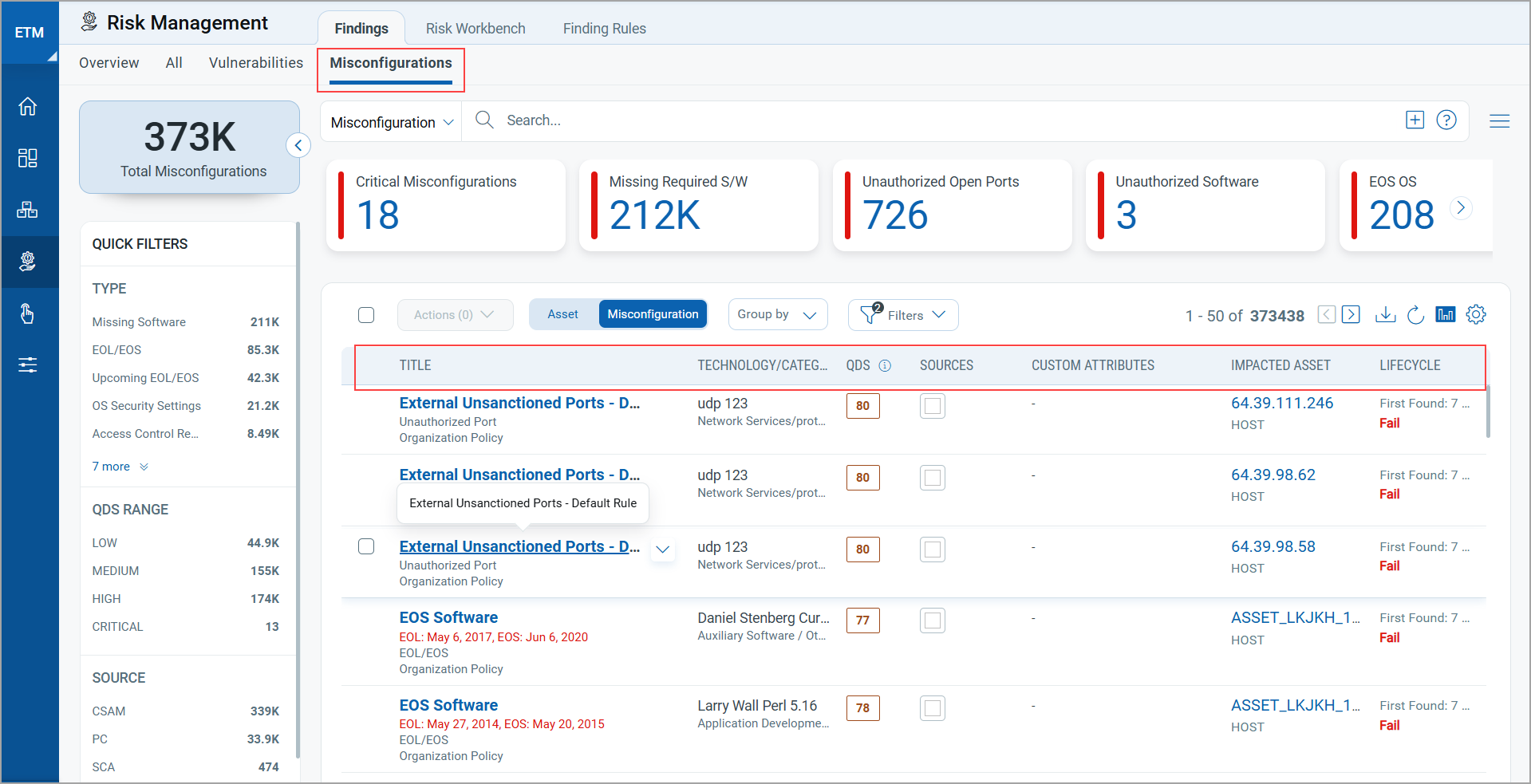
The following are the notable updates in the Misconfigurations tab:
- Title, Policy Name, and Type are available in the Title column. EOL/EOS dates are also added to the Title.
Including EOL (End of Life) / EOS (End of Support) dates directly in the Title column provides critical life cycle information,
- Columns are now in the order - Title, Technology/Category QDS, Source, Custom Attributes, Impacted Asset, LifeCycle. Prioritization, License type, and description are added in the Technology tooltip. This supports better decision-making and prioritization.
The Custom Attributes column is applicable only to Findings.
Enhanced Vulnerabilities Tab for TruRisk™ Score
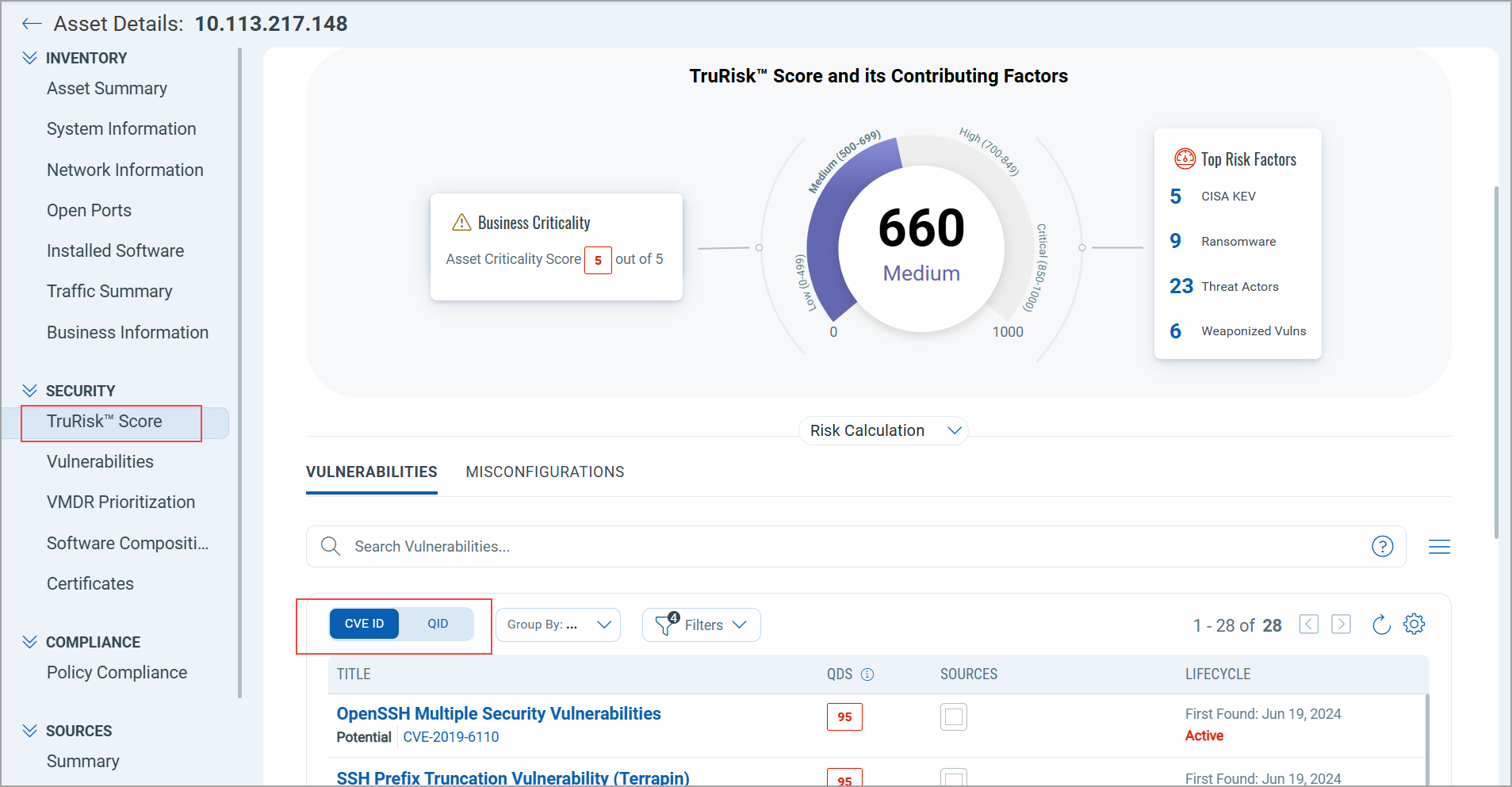
We have added a new CVE ID / QID toggle to the Vulnerabilities tab, giving you a more transparent and flexible way to analyze vulnerability data in TruRisk™ Score. You can switch the vulnerability list between CVE identifiers and Qualys QIDs. When a QDS lacks an associated CVE, the interface automatically hides the CVE Details tab.
The TruRisk™ Score is derived from the CVE ID. The vulnerability information shown in the QID view reflects findings from other Qualys applications, while results from third-party sources are excluded.
Introduced CVE Details Tab in Findings
We have improved our user interface to enhance the user experience. On the QDS Details page, you can now view the total count of CVEs. By clicking CVE, you are navigated to the QDS details, where you can find the corresponding CVE ID list. You can view all the details of CVE, such as CVE ID, QVS, Technical Attributes, Temporal Attributes, Trending, and Remediation.
If no CVE is detected for a particular QDS, the CVE Details tab is not available.
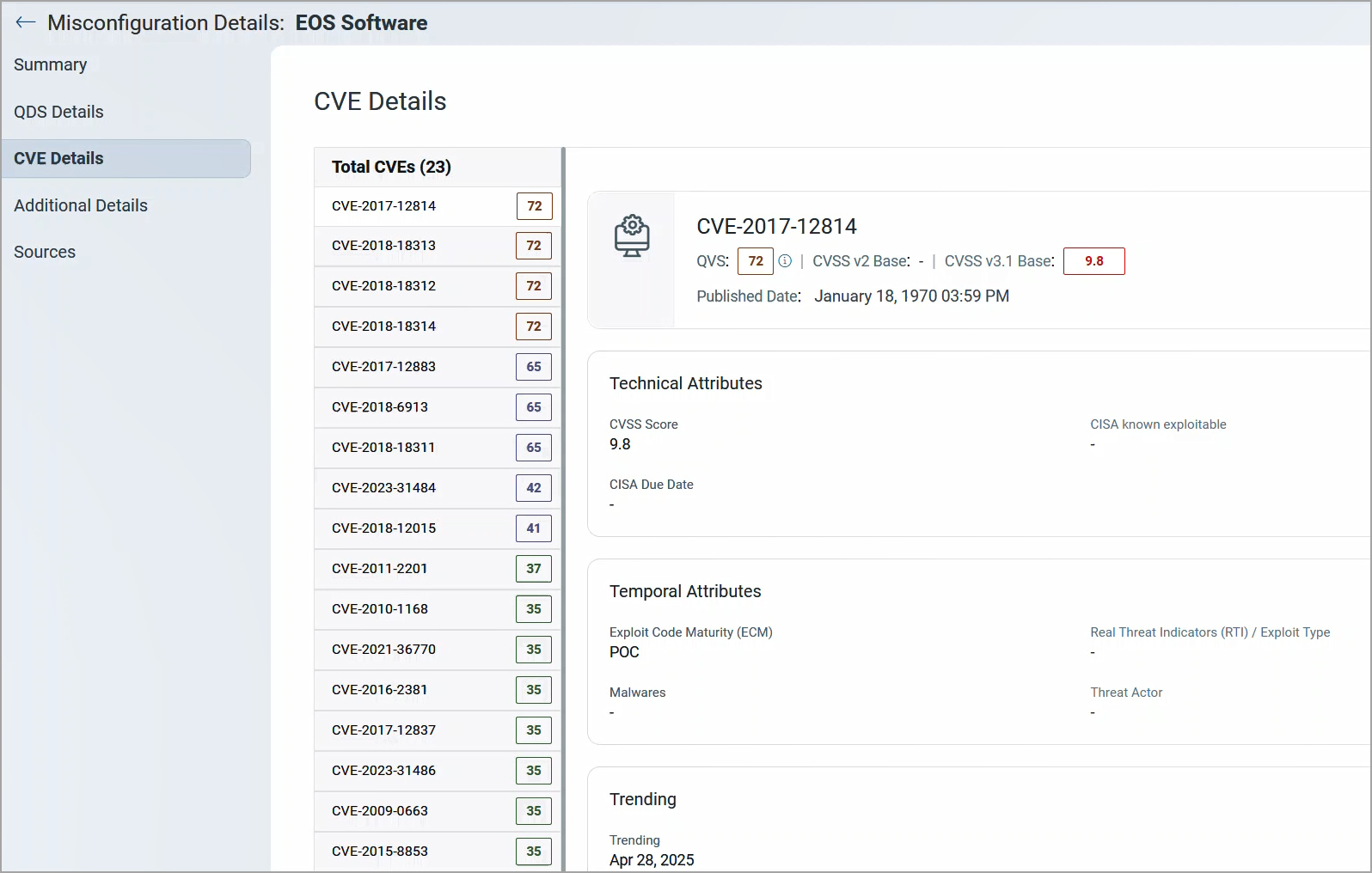
Now, you can easily access the total number of CVEs at a glance, making it more efficient to track and manage vulnerabilities.
To view the details, navigate to Risk Management > Findings > Misconfigurations. From Quick Filters > EOL/EOS > Select a Misconfiguration > QDS Details > CVE.
Improved Projected Risk Score Calculation in Risk Workbench Tab
To improve the user experience in the Risk Workbench, we have implemented enhancements related to how the Potential TruRisk Reduction Score is calculated for on-demand plans. Previously, users encountered longer loading times without much information while waiting for projected score recalculations.
This update introduces helpful, informative status messages and a smoother interaction flow. It enhances user experience by providing clear, timely messages during plan recalculations, reducing uncertainty, improving transparency, and eliminating the need for manual refresh.
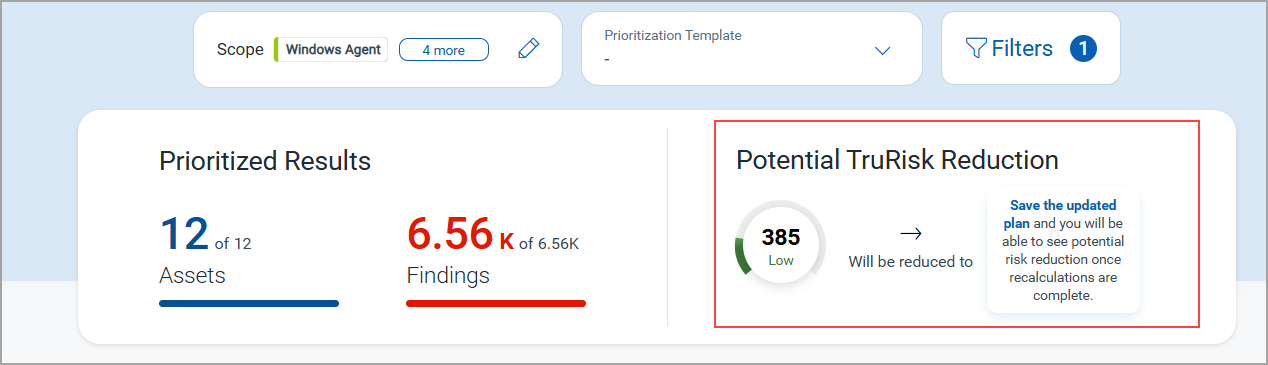
Following are the important updates regarding changes made in UI.
Removed Continuous Loader
When a user clicks the refresh icon to generate a projected score for an on-demand plan with a large data set, the loader previously persisted with no additional feedback. This has now been replaced with clear, actionable messages.
User Guidance Messages
The following messages assist you during various stages of the on-demand plan workflow:
While creating an On-Demand Plan:
'Save the updated plan and you will be able to see potential risk reduction once recalculations are complete.'
After Saving the On-Demand Plan:
'Your plan has been saved. Recalculation is in progress, and your updated TruRisk™ Score will appear shortly.'
In the Risk Workbench listing page (during recalculation):
An informational message is displayed for plans where the projected score calculation is still in progress.
While opening a saved plan (pending score calculation):
'Your saved plan is being recalculated. The updated TruRisk™ Score will be available soon.'
API Features and Enhancements
With this update, we have improved coverage in reporting columns. The output response of the Download report using resource name API now, has the title, description, impact, solution and detectionResultalong with other existing details. For detailed information on APIs, refer to the ETM API Release Notes.
Issue Addressed
The following reported issue is fixed in this release.
| Component | Description |
|---|---|
|
ETM Findings |
When users filtered results with the query |