Enterprise TruRisk Management Release 1.5.1
November 24, 2025
Enhanced Risk Acceptance Feature
With this release, the Risk Acceptance workflow is enhanced to strengthen governance, accountability, and ease of justification during exception handling.
The enhancements include improved Reason Management, an approval workflow for sub users, and enhancements to permissions.
Enhanced Reason Management
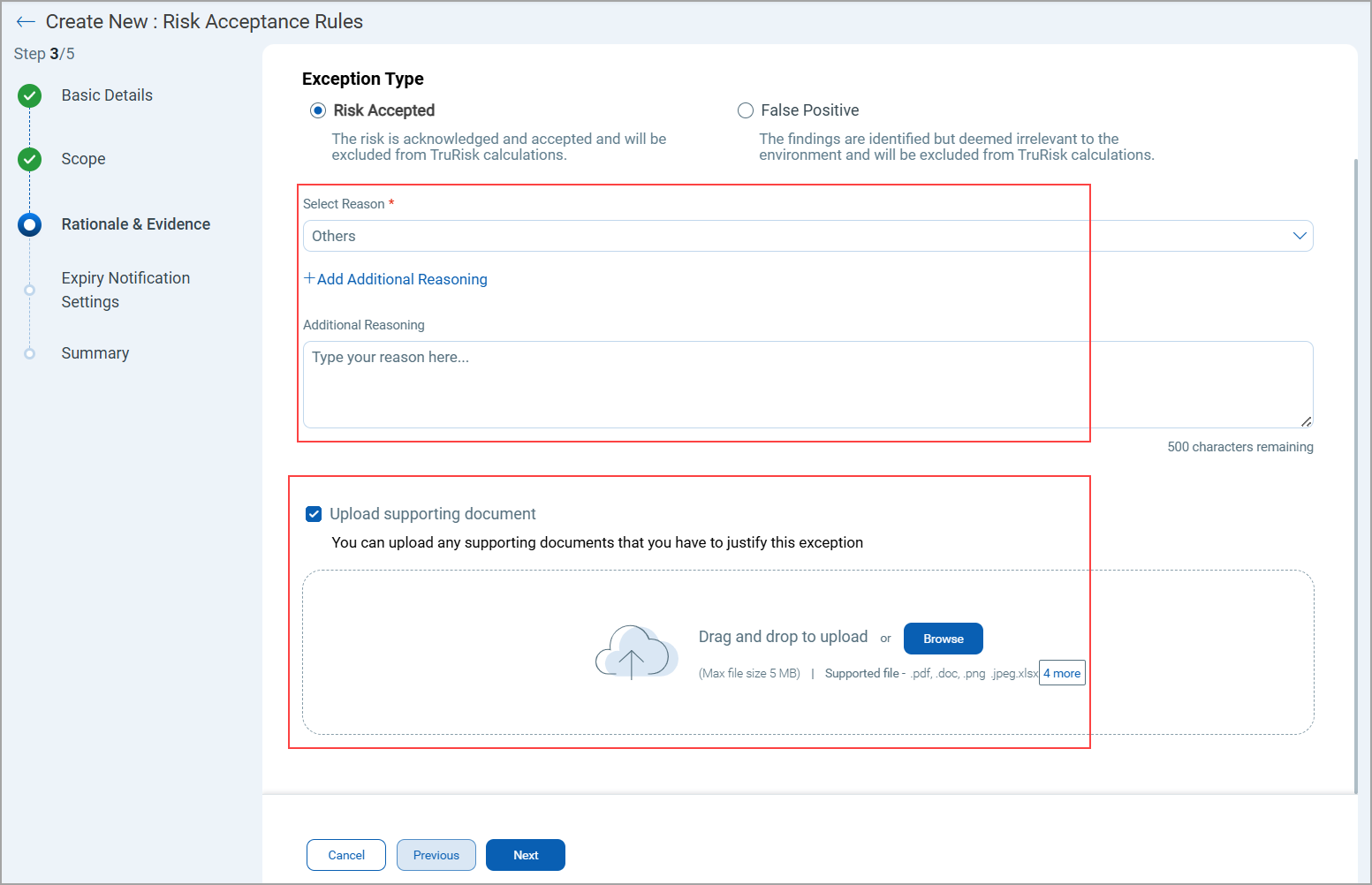
While creating a Risk Acceptance Rule, users can now provide structured and consistent reasoning instead of relying solely on free-text input.
New Options in the Reasoning Section
There are now two options available:
- System-Defined Reasons
Select from a predefined list of system-generated reasons for accepting a risk.
Examples: Legacy system dependency, Patch not available, and so on.
- Additional Custom Reason
Optionally, provide your own detailed explanation in addition to the predefined reason.
Supporting Documents
You can now upload supporting evidence to justify their risk acceptance decisions.
- Supported file types: PDF, TXT, xlsx, or image formats (jpeg)
- Maximum file size: 5 MB
Approval Workflow for Sub-Users
A new approval flow is introduced to manage rules created by Sub-Users.
How It Works
- When a sub-user creates a new rule, it does not activate immediately.
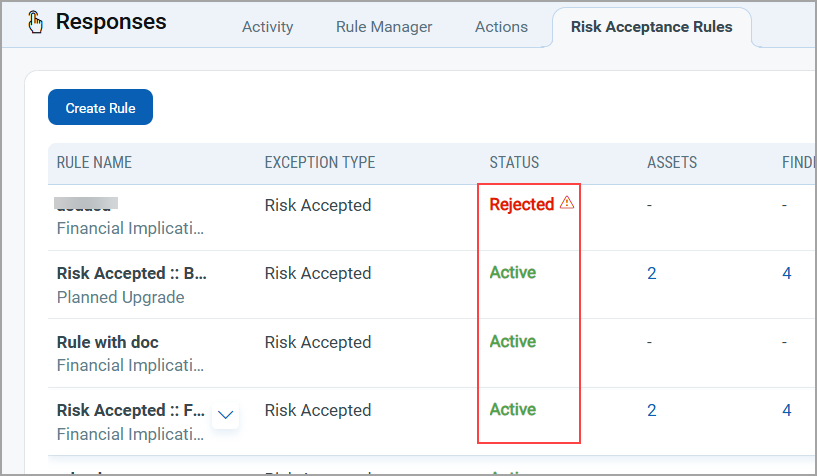
- The rule first moves to a Pending Approval state.
- The Manager receives a notification to approve or reject the request.
Approval Actions
- Approve
The manager can approve a rule directly. Once approved, the rule automatically moves to the Active state.
- Reject
When rejecting, the manager must provide a reason for the rejection.
- The rejection reason is displayed as a tooltip or message in the rule list.
Permission Enhancements
The following permissions are updated for Manager users and Sub users.
-
Manager users can:
- Create and activate rules directly.
- Update, or delete exception rules
- Review, approve, or reject rules submitted by sub-users.
- Sub-users must have the following specific Risk Acceptance permissions in VM application:
- Allow Exception Create/Update/Delete.
- If this permission is not assigned, the Risk Acceptance tab remains inaccessible.
Enhanced Search with New Tokens Support (Aligned with VMDR Capabilities)
To improve threat visibility and risk-based vulnerability management, we have launched a new set of search tokens that are compatible with VMDR capabilities. This release includes support for Real-Time Threat Indicator (RTI) tokens, along with additional tokens for the Findings tab.
Support for Real-Time Threat Indicator (RTI)
Real-Time Threat Indicators provide live intelligence about vulnerabilities that are actively exploited, weaponized, or associated with ongoing attack campaigns. With these new tokens, you can now search, analyze, and prioritize vulnerabilities based on real-time threat context, enabling faster remediation and stronger proactive defense.
RTIs enrich your vulnerability data with real-world threat context. Each indicator represents an active, emerging, or predicted threat that increases the risk associated with a vulnerability.
Integrating RTIs into your system helps you:
- Prioritize effectively: Focus on vulnerabilities that are currently being exploited in the wild.
- Reduce attack exposure: Address actively targeted vulnerabilities before they are used against your environment.
- Enhance threat awareness: Understand the type and intensity of real-world threats associated with your assets.
- Align with risk-based remediation: Combine CVSS severity with real-time threat context for more thoughtful prioritization.
This enhancement enables you to combine vulnerability detection with real-time threat intelligence, giving you a powerful, threat-driven approach to managing and mitigating risks.
New Tokens for Risk Management's Findings Tab
These tokens help you identify vulnerabilities that pose active, high-impact risks and take immediate remediation action. These Tokens are available for all subtabs of Findings, including Overview, All, Vulnerabilities, and Misconfigurations.
| Token | Description |
|---|---|
|
finding.threatIntel.is |
Use the search token to view findings related to real-time threats due to active attacks.
|
|
finding.threatIntel.is |
Use the search token to view findings related to real-time threats due to CISA exploits.
|
|
finding.threatIntel.is |
Use the search token to view findings related to real-time threats due to denial of service (DoS).
|
|
finding.threatIntel.is |
Use the search token to view findings related to real-time threats that are easy to exploit.
|
|
finding.threatIntel.is |
Use the search token to view findings related to real-time threats associated with an exploit kit.
|
|
finding.threatIntel.is |
Use the search token to view findings related to real-time threats involving high data loss.
|
|
finding.threatIntel.is |
Use the search token to view findings related to real-time threats with high lateral movement potential.
|
|
finding.threatIntel.is |
Use the search token to view findings related to real-time threats involving malware. |
|
finding.threatIntel. |
Use the search token to find real-time threats due to no patch available.
|
|
finding.threatIntel.is |
Use the search token to view findings related to real-time threats that are predicted to be of high risk.
|
|
finding.threatIntel.is |
Use the search token to view findings related to real-time threats due to privilege escalation risk.
|
|
finding.threatIntel.is |
Use the search token to view findings related to real-time threats associated with a public exploit.
|
|
finding.threatIntel.is |
Use the search token to view findings related to real-time threats involving ransomware vulnerabilities.
|
|
finding.threatIntel.is |
Use the search token to view findings related to real-time threats due to remote code execution risk.
|
|
finding.threatIntel.is |
Use the search token to view findings related to real-time threats due to unauthenticated exploitation risk.
|
|
finding.threatIntel.is |
Use the search token to view findings related to real-time wormable threats.
|
|
finding.threatIntel.is |
Use the search token to view findings related to real-time threats involving a zero-day exploit.
|
| finding.criticality |
Use the search token value as CRITICAL, HIGH, MEDIUM, LOW, or NONE to find assets with vulnerabilities of this type.
|
|
finding.lastFixedDate |
Use the search token value as a specific date or select a time range from the drop-down to find findings based on when they were last fixed.
|
|
finding.isFound |
Use the token to view findings related to vulnerabilities are detected or not on the assets.
|
|
finding.riskFactor. |
Use this token to retrieve the list of QIDs that are trending within a specified time range.
|
|
finding.connectionId |
Show assets sourced from a specific connector created by the user.
|
|
finding.qid |
Use an integer value to define the QID.
|
|
finding.requiredPrivilege |
Use the search token to find vulnerabilities based on the level of access or privileges required by an attacker to exploit them.
|
Enhanced Default GroupBy View Updated to CVE for Vulnerabilities Tab
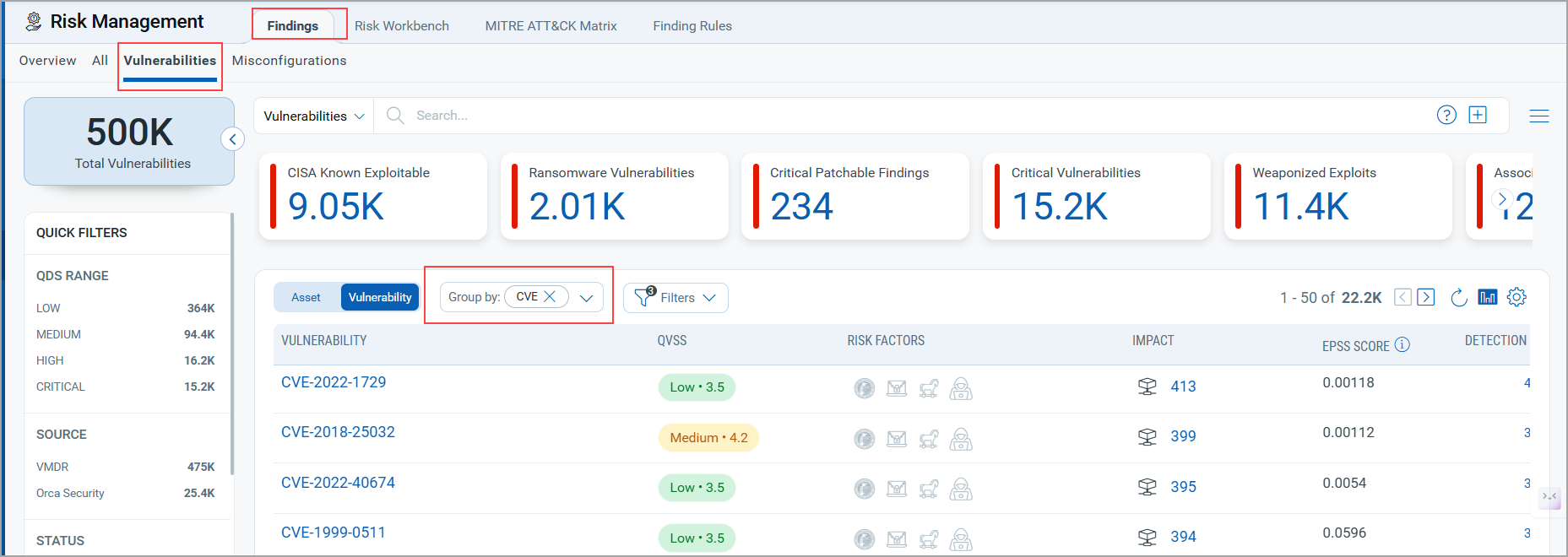
With this release, the default view of the Vulnerabilities Listing page has been enhanced. The vulnerabilities are now grouped by CVE (Common Vulnerabilities and Exposures) by default, providing a standardized and more informative way to analyze vulnerability data.
A CVE (Common Vulnerabilities and Exposures) is a globally recognized identifier assigned to publicly known cybersecurity vulnerabilities. Each CVE ID (for example, CVE-2025-12345) represents a unique vulnerability record that includes a summary, impact details, and references to related advisories or patches. CVE identifiers are maintained to ensure consistent tracking and communication of security issues across platforms.
This change enables you to view and manage vulnerabilities using the industry-standard CVE identifiers, making it easier to correlate, compare, and prioritize issues. Grouping by CVE automatically consolidates all related detection under a single vulnerability ID, proving a cleaner, more organized view.
Enhanced GroupBy Options for Vulnerabilities Findings
We have introduced new options for GroupBy to enhance vulnerability filtering and visualization. You can use GroupBy as a filter to view vulnerabilities grouped by specific attributes.
These GroupBy options correspond to specific tokens. While tokens require a defined token value, GroupBy dynamically filters and displays findings based on the selected attribute.
Newly added GroupBy options and their corresponding tokens are:
- Recently Trending (
finding.riskFactor.trending) - CVSS Rating (
finding.criticality) - Title (
finding.title) - CVSS 3 Base Score (
finding.cvss3BaseScore) - CVSS 2 Base Score (
finding.cvss2BaseScore) - Last Found (
finding.lastFoundDate) - Published (
finding.cvePublishedDate)
You can access the new GroupBy options in the following UI sections:
- Dashboard Widgets (Query Settings > Findings > All and Vulnerabilities )
- Findings tab (All tab and Vulnerabilities tab)
- Inventory tab (Asset Details > Security > TruRisk Score > Vulnerabilities tab)
- Risk Workbench tab ( Start Prioritizing > Define Scope > Select Prioritization Approach > Prioritize Now > Risk Workbench Page > Findings > Vulnerabilities tab)
Extended GroupBy CVE Support and Multi Grouped Capability for Dashboard
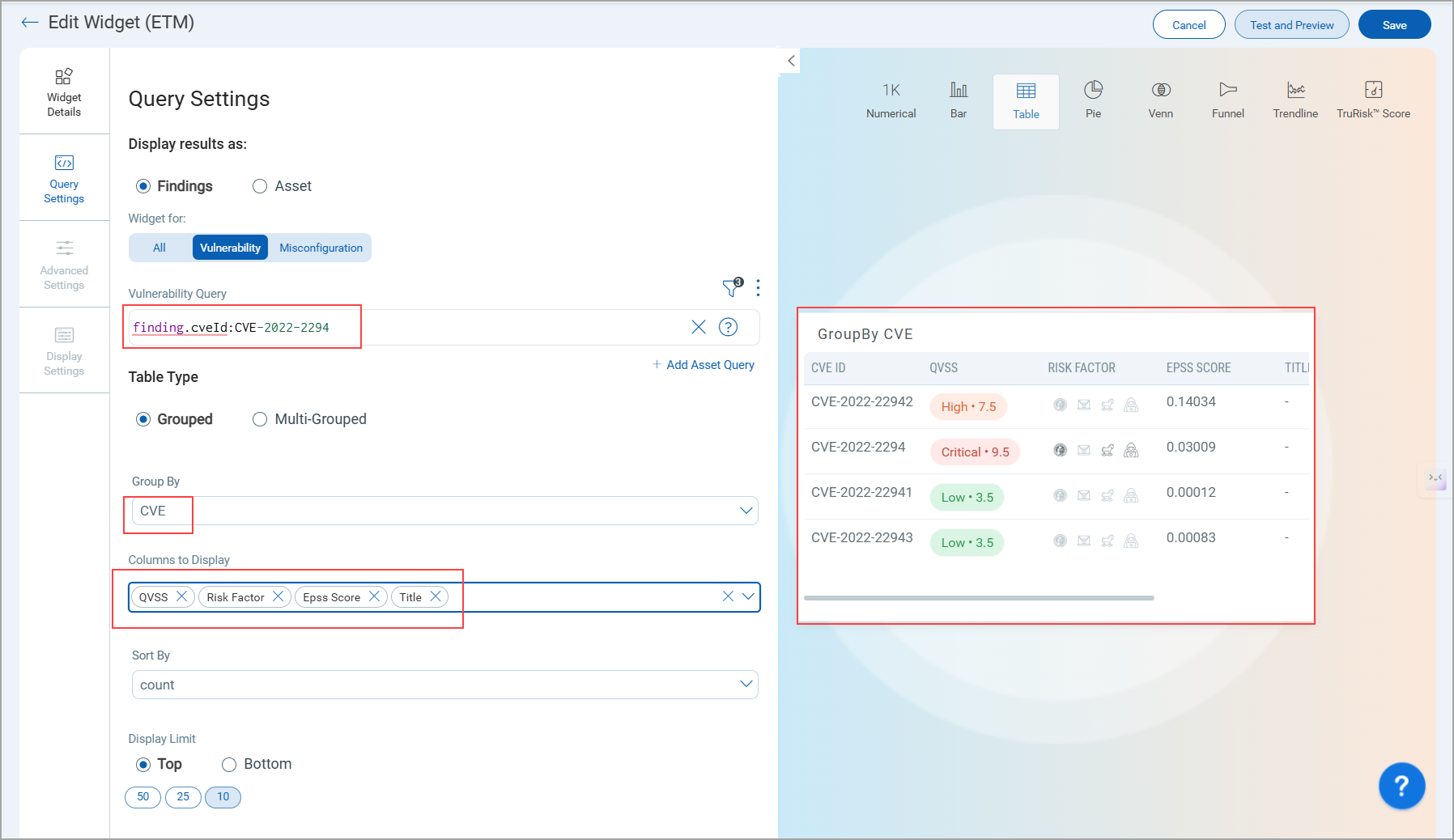
We have enhanced the GroupBy CVE functionality to provide more detailed data visualization within tables. You can now view multiple columns when using GroupBy CVE, providing insights into each CVE record. Along with these columns, a Detection Count column is also displayed for better visibility into occurrence trends.
The columns GroupBy CVE are:
- Title
- QVSS
- Risk Factor
- EPSS Score
We have also introduced Multi Grouped support for MITRE ATT&CK–related tokens, allowing you to group and analyze vulnerabilities across multiple MITRE attributes simultaneously.
finding.mitre.attack.tactic.idfinding.mitre.attack.tactic.namefinding.mitre.attack.technique.idfinding.mitre.attack.technique.namefinding.mitre.attack.subTechnique.idfinding.mitre.attack.subTechnique.name
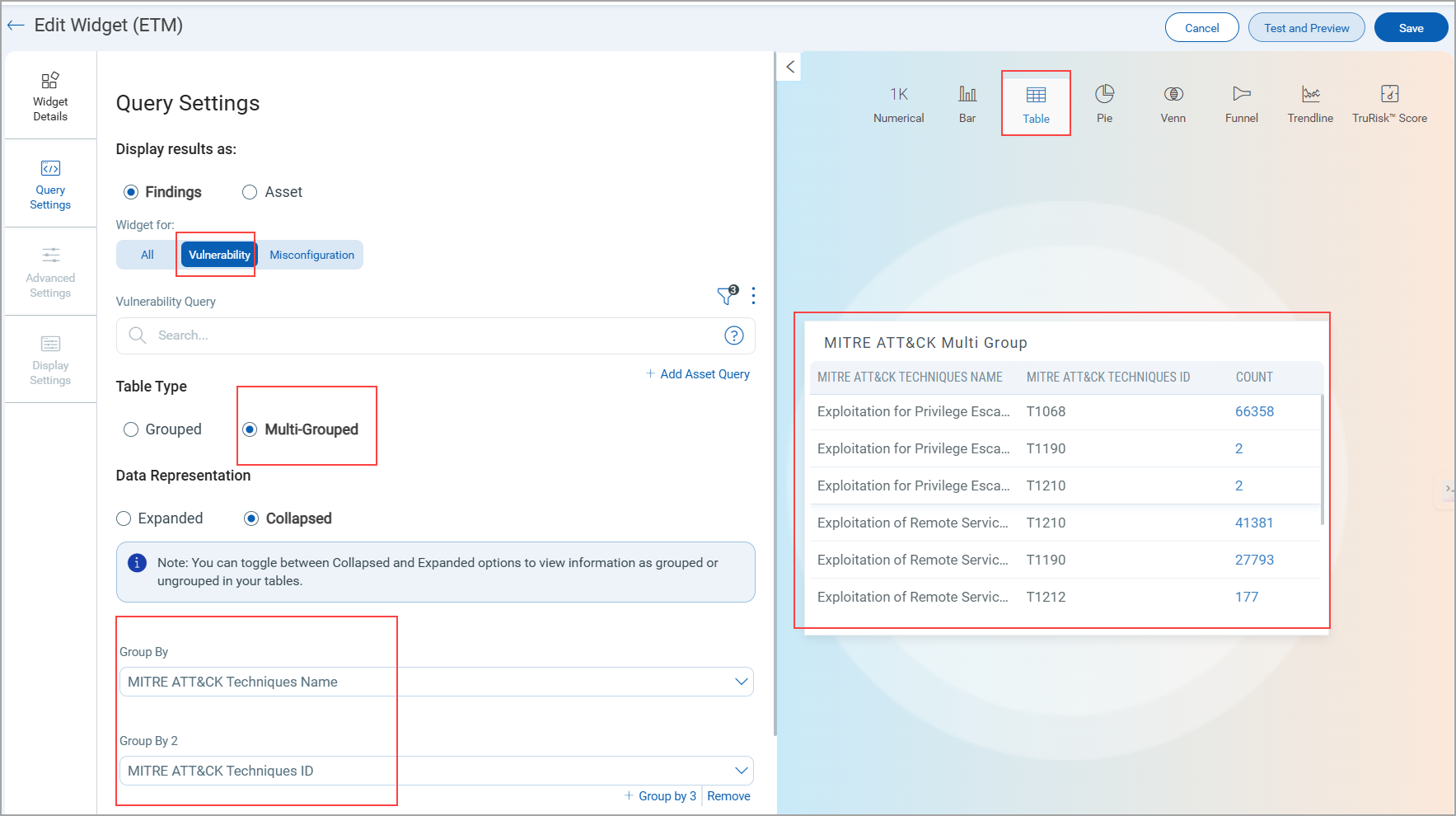
To know more about these token, refer to ETM Online Help.
Enhanced Asset Search with New Tokens Support (Aligned with CSAM Capabilities)
We have introduced a new set of search tokens for viewing asset details. These tokens help to retrieve detailed asset, software, hardware, and connector data, providing deeper insights into operational, performance, and security parameters. By aligning ETM search capabilities with CSAM, you can now execute refined queries, monitor asset activity, and perform targeted investigations with greater accuracy.
|
Token |
Description |
|---|---|
|
gpu.chip |
Use the search token to find assets based on their GPU chip.
|
|
gpu.manufacturer |
Use the search find assets based on their GPU manufacturer.
|
|
gpu.model |
Use the search token to find assets based on their GPU model.
|
|
gpu.name |
Use the search token to find assets based on their GPU name.
|
|
gpu.tensorCores |
Use the search token to find assets based on a specific tensor core count.
|
|
volume.free |
Use the search token to find assets with a specific free space (GB)
|
|
volume.name |
Use the search token to find assets with a specific size (GB).
|
|
volume.size |
Use the search token to find assets with a specific size (GB).
|
|
agent.scanType |
Use the search token to find assets from a certain scan type. (API Based Scan, Azure VM Scan, Cloud Agent Deep Scan, coresCloud Agent PC Scan, Cloud Agent SwCA Scan, Cloud Agent VM Scan, Cloud Perimeter Scan, EC2 VM Scan, GCP VM Scan, ML Authentication VM Scan, ML VM Scan, Snapshot Based Scan, Snapshot Based SwCA Scan, and Unknown Scan.)
|
|
asset.url |
Use the search token filter web assets based on the IP, domain, subdomain, or URL used during web application creation.
|
|
asset.lparID |
Use the search token to find assets based on their LPAR ID.
|
|
asset.isolated |
Use the search token to find assets that are isolated.
|
|
asset.lastInventoryDate |
Use the search token value as a specific date or select a time range from the drop-down to search assets with the last inventory date within that range.
|
|
agent.lastCheckedInDate |
Use the search token value as a specific date or select a time range from the drop-down to find assets based on when the agent last checked in to the platform.
|
|
agent.firstScanDate |
Use the search token value as a specific date or time range to find assets based on their first scan date.
|
|
agent.lastScanDate |
Use the search token value as a specific date or time range to find assets based on their first scan date.
|
Enhanced GroupBy Options for Assets
We have introduced new options for GroupBy to enhance assets filtering and visualization. You can use GroupBy as a filter to view vulnerabilities grouped by specific attributes.
These GroupBy options correspond to specific tokens. While tokens require a defined token value, GroupBy dynamically filters and displays findings based on the selected attribute.
You can access the new GroupBy options in the following areas:
- Dashboard Widgets (Query Settings > Assets )
- Findings tab (Assets Pivote from All tab / Vulnerabilities tab/ Misconfigurations tab)
Newly added GroupBy options include categories, subcategories. Refer to the following table to view all categories, subcategories, and their corresponding tokens.
| Category | Subcategory | Options |
|---|---|---|
BIOS Description (asset.biosDescription) |
||
Processor (asset.cpuCount) |
||
Timezone (asset.timezone) |
||
Total Memory (asset.totalMemory) |
||
| External Attack Surface | Organization/Subsidiary (asset.org.name) |
|
ISP (asset.isp) |
||
asn (asset.asn) |
||
Domain (asset.domain) |
||
Subdomain (asset.subdomain asset.org.name) |
||
Registrar (whoIs.registrar ) |
||
Registrant Org (whoIs.registrantOrg ) |
||
Registrant Email ID (whoIs.registrantEmailId ) |
||
| Hardware | Category (hardware.category) |
|
Manufacturer (hardware.manufacturer) |
||
Model (hardware.model) |
||
Product (hardware.product) |
||
DNS Address (asset.interfaces.dnsAddress) |
||
Cloud Provider (cloud.provider ) |
||
Service Name (service.name ) |
||
| Software | Product | Edition (operatingSystem.edition) |
Market Version (operatingSystem.marketVersion ) |
||
Name (operatingSystem.name) |
||
Category (operatingSystem.category) |
||
Publisher (operatingSystem.publisher) |
||
| AWS | Account ID (aws.ec2.accountId) |
|
Image ID (aws.ec2.imageId) |
||
Instance Type (aws.ec2.instanceType) |
||
Region Name (aws.ec2.region.name) |
||
Subnet ID (aws.ec2.subnetId) |
||
VPC (aws.ec2.vpcId) |
||
| Tags | Tags Name (aws.tag.key) |
|
Tags Value (aws.tag.value) |
||
| Azure | Location (azure.vm.location) |
|
Virtual Network (azure.vm.virtualNetwork) |
||
Resource Group Name (azure.vm.resourceGroupName) |
||
VM Size (azure.vm.size) |
||
Subscription ID (azure.vm.subscriptionId) |
||
| GCP | Machine Type (gcp.compute.machineType) |
|
VPC Network (gcp.compute.network ) |
||
Project ID (gcp.compute.projectId ) |
||
Project Number (gcp.compute.projectNumber ) |
||
Zone (gcp.compute.zone ) |
||
| OCI | Compartment ID (oci.compute.compartmentId ) |
|
Compartment Name (oci.compute.compartmentName ) |
||
Region (oci.compute.region ) |
||
Tenant ID (oci.compute.tenantId ) |
||
Tenant Name (oci.compute.tenantName ) |
||
| IBM | Datacenter ID (ibm.virtualServer.datacenterId ) |
|
Domain (ibm.virtualServer.domain ) |
||
Location (ibm.virtualServer.location ) |
||
Private Vlan (ibm.virtualServer.privateVlan ) |
||
| Alibaba | Account ID (alibaba.instance.accountId ) |
|
Image ID (alibaba.instance.imageId ) |
||
Instance Type (alibaba.instance.instanceType ) |
||
Instance State (alibaba.instance.instanceState ) |
||
Region Code (alibaba.instance.region.code ) |
||
Region Name (alibaba.instance.region.name ) |
||
VPC (alibaba.instance.vpcId) |
||
VPC Switch ID (alibaba.instance.vswitchId) |
||
Zone ID (alibaba.instance.zoneId) |
||
Tags (asset.tag.name) |
||
Issues Addressed
The following reported issues are fixed in this release.
| Component | Description |
|---|---|
|
Documentation |
Corrected the token name discrepancy on the Risk Acceptance page. The documentation now displays the correct token name to asset.tag.name |
| Dashboard | Resolved a UI issue where Business Entities chart labels in the TruRisk Summary were not visible on smaller screens. The labels now display correctly across all screen sizes. |
| Dashboard |
Resolved an issue where ETM dashboard widgets displayed incorrect TruRisk™ Scores (showing “-1” or abnormal negative percentages). The score calculation logic has been corrected, and widgets now show accurate values. |
| Dashboard | In the ETM Dashboard, users observed that when creating a widget using only an asset-based query (for example, operatingSystem.category:'windows client' and tags.name:'Child Tag'), the trend graph was not displayed. The dashboard logic for data retrieval and trend visualization has been updated to ensure that widgets created with only asset queries now correctly display the trend graph. Users can now view accurate trend data for all asset-based widgets. |