Enterprise TruRisk Management Release 1.8
March 27, 2026
Introduced TruConfirm
TruConfirm is a new automated exposure validation capability integrated directly into Qualys Enterprise TruRisk Management (ETM). It introduces a proof‑based approach to vulnerability risk. It confirms whether a detected vulnerability is truly exploitable in your environment, under your current controls and configurations.
TruConfirm delivers evidence‑driven validation that helps security, IT, and compliance teams focus on exposures that present real, immediate risk. TruConfirm is available as part of Enterprise TruRisk Management and requires no separate deployment.
Prerequisite
TruConfirm is available as a separate tab within the ETM user interface. To access it, connect with your Technical Account Manager (TAM) or Qualys support.
TruConfirm: Key Highlights
Following are the key highlights of TruConfirm:
Real Exploitability Validation
TruConfirm employs Modified Benign Payloads and safe, purpose‑built interactions to verify whether the vulnerable code path on an asset is reachable and executable. These payloads are not exploits and do not perform any harmful actions. Validation results classify each finding as:
- Confirmed Exploitable: The vulnerable path is reachable.
- Blocked by Control: Existing controls prevented execution.
- Not Validated: No validation payload available or inconclusive results.
Fully Integrated with Enterprise TruRisk Management
TruConfirm is built natively into the Enterprise TruRisk Management platform and uses the existing Qualys collection framework. It does not require any separate infrastructure, agents, or standalone tools. Validation outcomes seamlessly feed into dashboards and Enterprise TruRisk Management workflows. This ensures consistent prioritization from detection through remediation.
Multi‑Source Validation Support
TruConfirm can validate exposure data from:
- Qualys VMDR
- Tenable.io and Tenable.sc
- Rapid7 Insight VM
- Microsoft Defender for Endpoint
The platform treats all findings imported into Enterprise TruRisk Management (ETM) as unvalidated until TruConfirm provides confirmation or evidence of blocking controls.
Safe for Production Environments
TruConfirm is designed with a safety‑first approach that ensures:
- No exploit kits
- No data extraction
- No configuration changes
- No bypassing of controls
- Zero persistent footprint
All validations are performed using non‑intrusive interactions that are engineered to operate safely on live assets.
Coverage for High‑Impact CVEs
TruConfirm supports validation for thousands of vulnerabilities. Coverage expands continuously through the Qualys research engine.
Enhanced TruLens
This release introduces comprehensive threat intelligence and vulnerability management capabilities. These capabilities provide security teams with actionable insights into threats affecting their organizations.
Release highlights are:
- Advanced threat actor profiling and intelligence
- Comprehensive vulnerability management and tracking
- Performance benchmarking against peer organizations
- Geographic threat mapping: See where threats come from and how they affect your systems
- Query Query Language support for advanced threat analysis
- Industry-specific threat filtering and recommendations
TruLens is available as a separate tab within the Enterprise TruRisk Management (ETM) user interface. To access this tab, connect with your Technical Account Manager (TAM) or Qualys support.
Enhancements in User Interface
- Streamlined navigation
Navigation is now easier, with a consistent design across all pages to make the platform simpler to use. - Optimized query processing
Query processing is now faster for both free-text and Query Language searches, so you get results more quickly and with less delay. - Enhanced geographic mapping
Geographic mapping and asset impact visuals now include interactive features, allowing for deeper analysis. - Filtering Capabilities
You can now use advanced filters, including Boolean operators and field-specific queries, for more precise threat analysis. - Logical organization
Threat actor details, vulnerabilities, and remediation information are now organized more logically, making them easier to find. - Accessibility
All pages now have better color contrast, easier keyboard navigation, and improved support for screen readers.
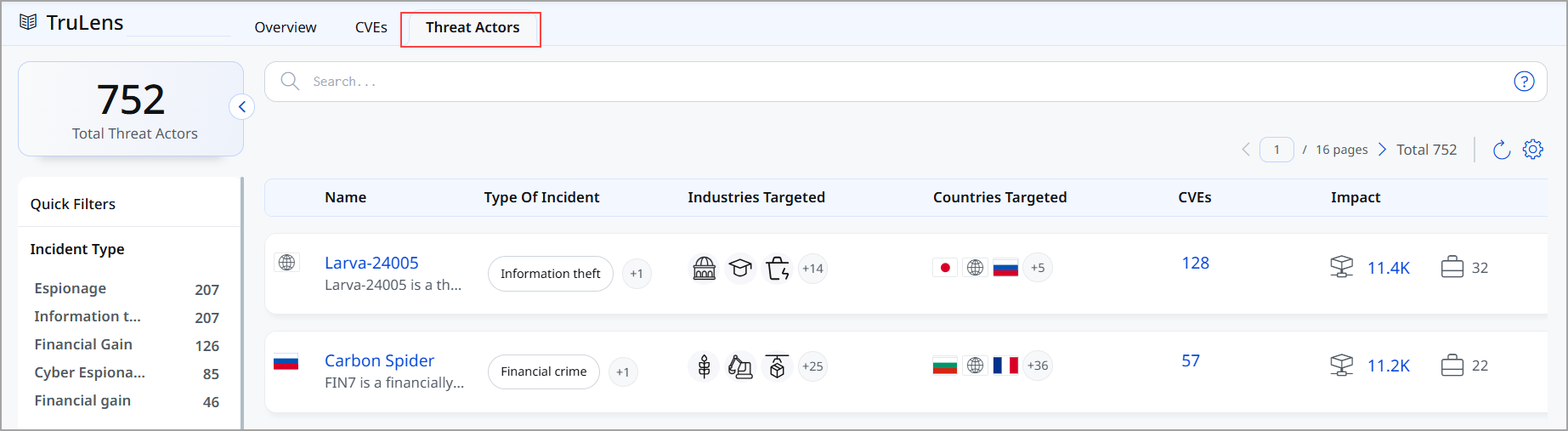
New Threat Actor Tab
We introduced a new Threat Actors tab. The Threat Actors tab provides a comprehensive view of threat actors relevant to your organization, tailored to your industry and environment. It helps you to identify which threat groups are most active, understand their attack patterns, and assess their potential impact on your assets. The threat actor system includes:
- Threat actor identification and classification
- Known aliases and alternate names
- Geographic origin and targeting patterns
- Industry sector specialization
- Incident type classification (nation-state, criminal, espionage)
- Recent campaign tracking and analysis
To access the Threat actors, go to TruLens > Threat Actors.
Threat Actor Detail Page
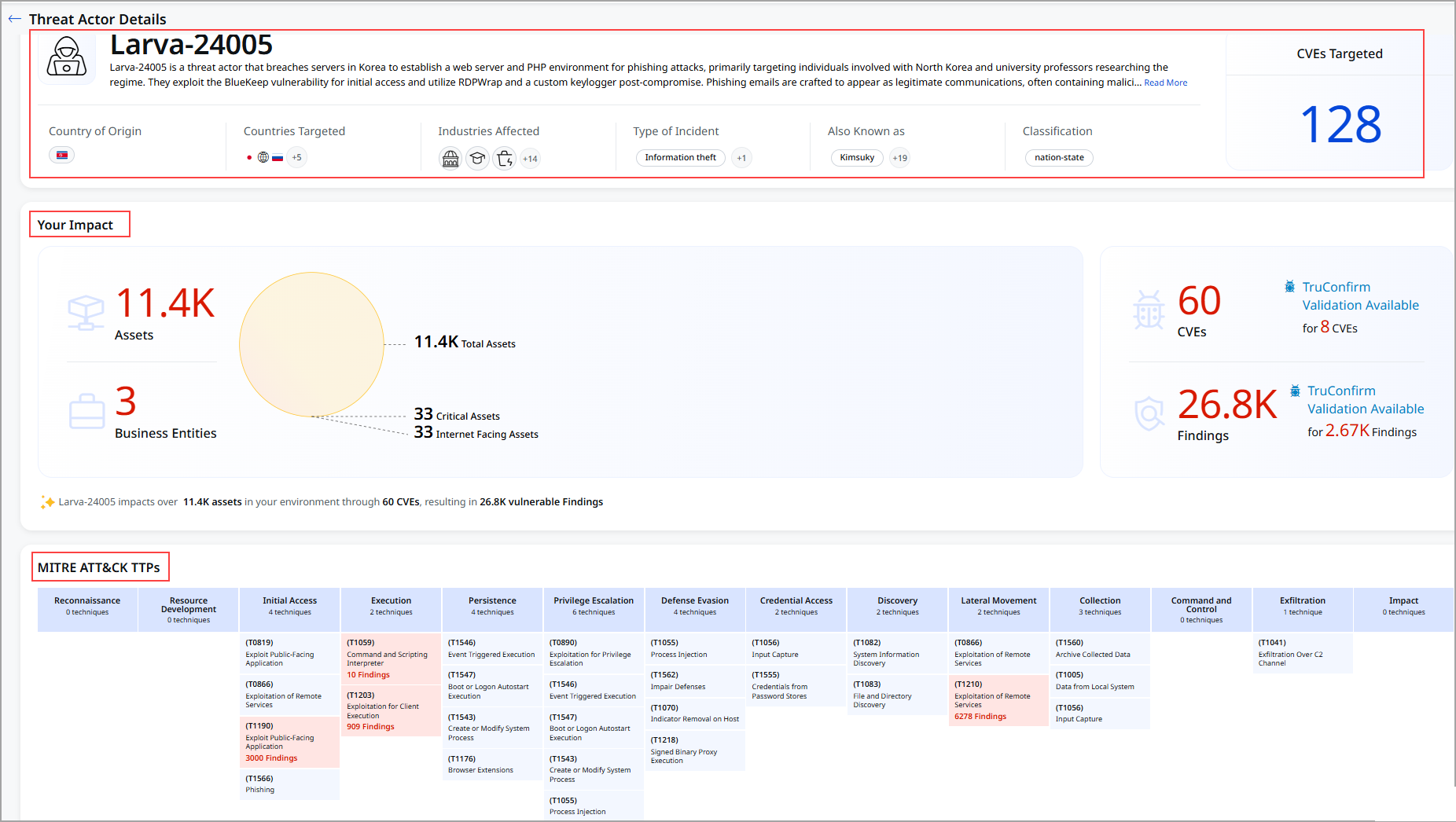
You can view the threat actors' details by clicking the name from Threat Actors. The details for each threat actor feature:
- Comprehensive threat actor profiles
- Associated vulnerabilities and exploits
- MITRE ATT&CK Framework integration
- Attack tactics and techniques
- Known asset impact assessment
- Recent Campaigns information
To view the Threat actor's details, go to TruLens > Threat Actors > select the threat.
Performance Benchmarking Metrics on TruLens Home page
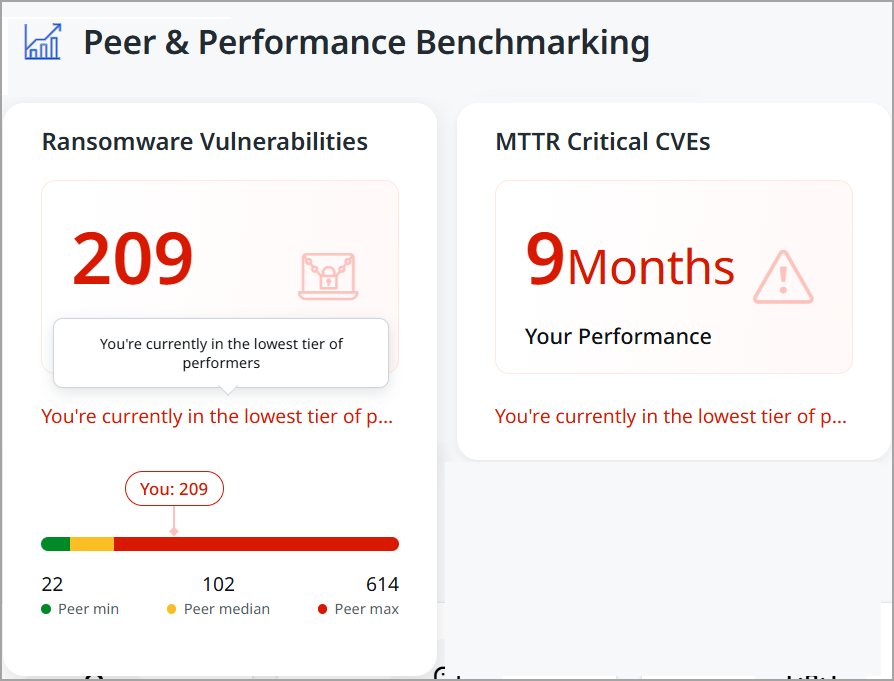
We enhanced the Performance & Benchmarking section. To view Performance & Benchmarking, go to TruLens > Overview. The following table explains the enhanced comparison:
| Metric | Updates include | Benefit |
|---|---|---|
| Peer Comparison | Peer Min, Median, Max | Three-tier comparative analysis |
| Performance Status | Color-coded classification | Visual performance indicator |
| MTTR Display | Color scale and message | Contextual performance meaning |
| Benchmark Data | Dynamic industry updates | Current peer comparison data |
The following screenshot displays the Peer & Performance Benchmarking section.
Introduced Tokens for TruLens Tab
We have introduced the following tokens:
|
Token |
Tab |
Description |
|---|---|---|
|
finding.accessVector |
TruLens > CVEs |
Search for vulnerabilities based on how they can be exploited, as defined in the CVSS vector string.
|
|
finding.cveDescription |
TruLens > CVEs |
Search for the finding with a matching CVE description.
|
|
finding.cveId |
TruLens > CVEs |
Search for findings based on the CVE ID of the vulnerability.
|
|
finding.cvePublishedDate |
TruLens > CVEs |
Search for findings by specifying a date or date range that matches when the CVE ID was published.
|
|
finding.cveStatus |
TruLens > CVEs |
Search for findings with current lifecycle CVE statuses such as Analyzed, Awaiting Analysis, Deferred, Modified, Received, Rejected, or Undergoing Analysis.
|
|
finding.cveTitle |
TruLens > CVEs |
Search the CVE details using the title. |
|
finding.cvss3BaseScore |
TruLens > CVEs |
Search for vulnerabilities with a specific CVSS 3.0 Base score.
|
|
finding.cvss4BaseScore |
TruLens > CVEs |
Search for vulnerabilities with a specific CVSS 4.0 Base score.
|
|
finding.isPatchAvailable |
TruLens > CVEs |
Search for vulnerabilities with available patches.
|
|
finding.isQualysPatchable |
TruLens > CVEs |
Search for vulnerabilities that are patchable via Qualys.
|
|
finding.qvss |
TruLens > CVEs |
Search for vulnerabilities based on a specific detection score.
|
|
finding.riskFactor.exploitCodeMaturity |
TruLens > CVEs |
Search for vulnerabilities based on the maturity level of their exploit code.
|
|
finding.riskFactor.isActivelyExploited |
TruLens > CVEs |
Search for vulnerabilities that are currently being exploited in the wild.
|
|
finding.riskFactor.isCisaKnownExploit |
TruLens > CVEs |
Search for vulnerabilities that are listed in CISA's Known Exploited Vulnerabilities Catalog.
|
|
finding.riskFactor.rti |
TruLens > CVEs |
Search vulnerabilities based on Real-time Threat Indicators.
|
|
finding.truConfirm.isApplicable |
TruLens > CVEs |
Search whether a TruConfirm assessment can be launched for the given CVE ID.
|
|
finding.mitre.attack.technique.id |
TruLens > CVEs TruLens > Threat Actors |
Search for findings associated with MITRE ATT&CK using the MITRE ATT&CK technique ID.
|
|
finding.mitre.attack.technique.name |
TruLens > CVEs TruLens > Threat Actors |
Search for findings associated with MITRE ATT&CK using the MITRE ATT&CK technique name.
|
|
finding.riskFactor.threatActorName |
TruLens > CVEs TruLens > Threat Actors |
Search for a threat actor by its primary, canonical name.
|
|
finding.mitre.attack.tactic.name |
TruLens > Threat Actors |
Search for findings associated with MITRE ATT&CK using the MITRE ATT&CK tactic name.
|
|
finding.riskFactor.threatActorAlias |
TruLens > Threat Actors |
Search for a threat actor using any of its alternate names.
|
|
finding.riskFactor.threatActorDescription |
TruLens > Threat Actors |
Search for details about the threat actor’s background, behavior, and known campaigns.
|
|
finding.riskFactor.threatActorIncidentType |
TruLens > Threat Actors |
Search for a threat actor by primary motivation or incident type.
|
|
finding.riskFactor.threatActorIndustry |
TruLens > Threat Actors |
Search for threat actors based on the industry sectors they commonly target.
|
Introduced Exploitability and Exposure Metrics in CVE Details
We introduced a new card on the CVE Details page to provide insights into exploitability and exposure metrics. This enhancement helps security teams better understand attacker behavior and assess the effectiveness of their responses.
To view the CVE details, go to TruLens > CVEs > Select the required CVE.
The following are key benefits of explore matrics:
- Understand attacker timelines with real-world exploit data
- Measure remediation performance across assets
- Identify exposure gaps and prioritize patching efforts
- Improve risk posture with actionable metrics
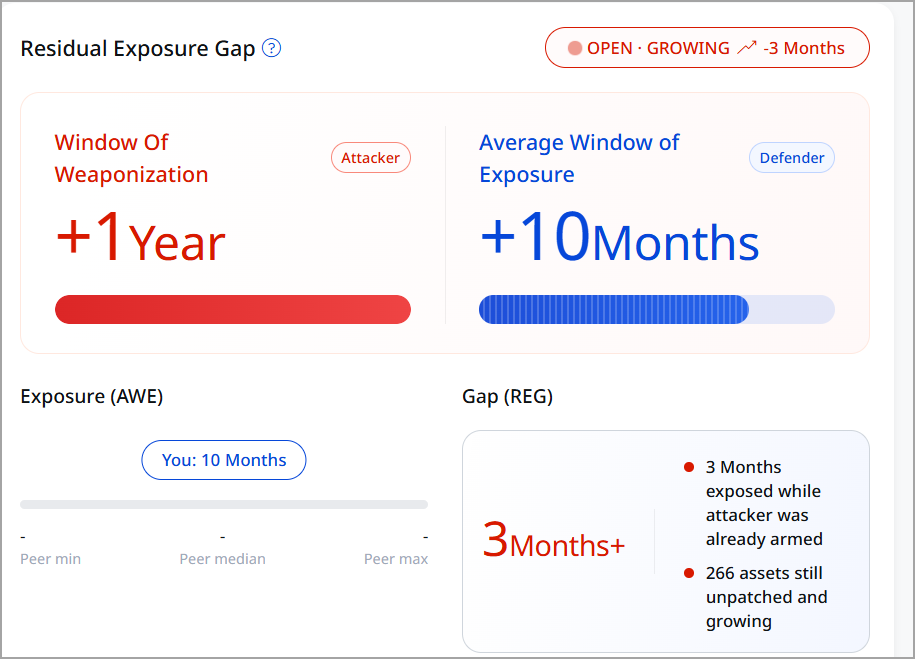
The CVE Details page now includes a new section Remediation Efficiency Gap, which includes new metrics such as Window of Weaponization, Average Window of Exposure, Exposure, and Gap.
Window of Weaponization (WOW)
The time taken by attackers to develop an exploit after a CVE is publicly disclosed. This is calculated as the number of days between CVE publication and the first known exploit availability.
The WOW can be:
- Positive: Exploit created after disclosure
- Negative: Exploit existed before public disclosure (indicating early attacker awareness)
The following is exmple of calculating WOW:
If a CVE was published on May 12 and an exploit appeared on May 14, WOW is 2 days. And if an exploit occurred before publication, WOW is positive, as the exploit was created after disclosure.
Average Window of Exposure (AWE)
AWE is the average time taken to remediate (patch) affected assets in your environment. AWE is calculated across all impacted assets for a given CVE. It reflects how long systems remained vulnerable before being patched. If remediation is still in progress, the value is marked as OPEN, GROWING.
If multiple assets are patched over different durations, AWE represents the average remediation time.
Remediation Efficiency Gap (REG)
REG is a comparative metric showing how your remediation speed aligns with attacker activity.
REG Calculation:
REG = AWE − WOW
- Positive REG indicates that attackers are faster, indicating a higher exposure risk
- Negative REG indicates you are mitigating vulnerabilities faster than attackers can weaponize them
Gap (REG)
Gap (REG – Residual Exposure Gap) represents the time difference between when attackers are ready to exploit a vulnerability and when it is remediated in your environment, highlighting the period during which you are at active risk.
Exposure (AWE)
The Exposure represents the average duration your assets remain vulnerable before being remediated. For example, the following image displayed that your organization is taking approximately 10 months on average to fix vulnerabilities after they are disclosed. It reflects the time window during which your systems are exposed to potential exploitation.
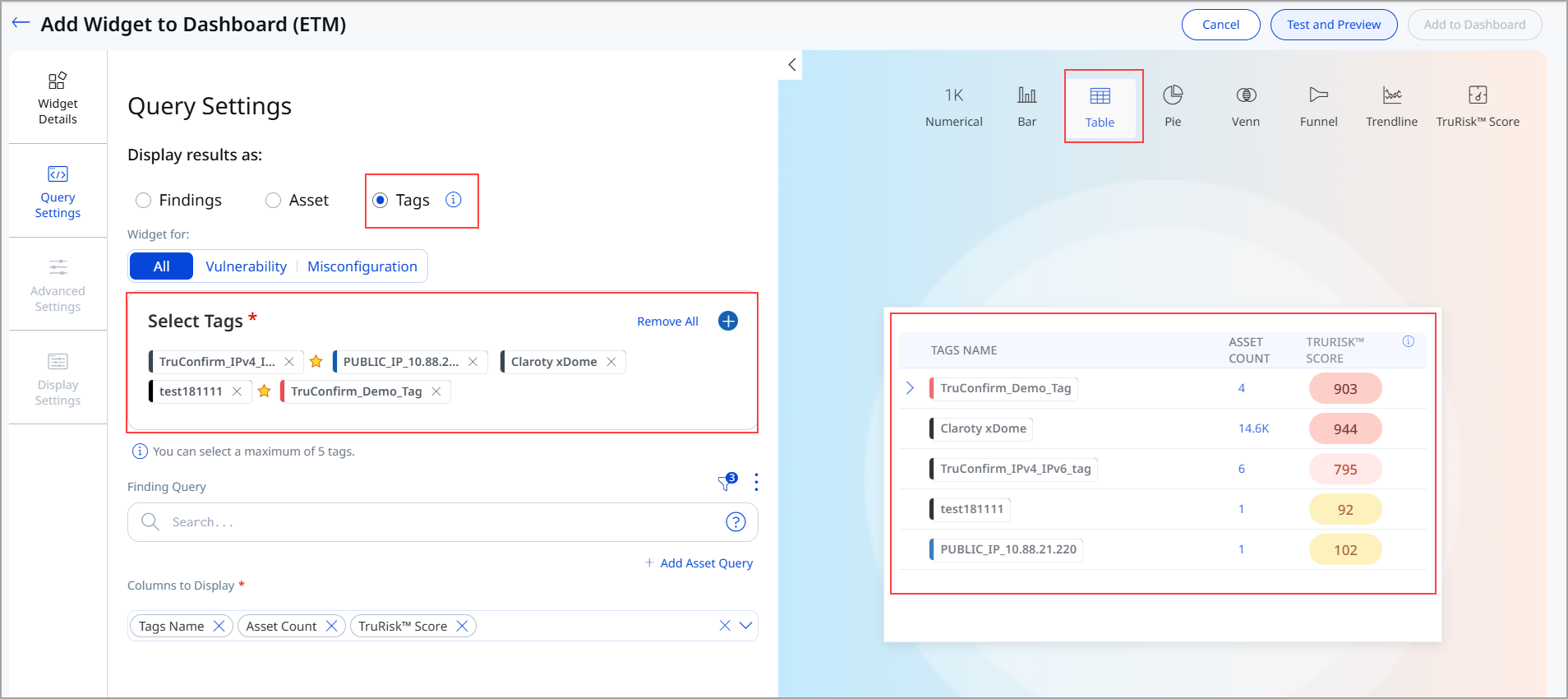
Introduced Tag-based Widget
This release introduces the Tag-based Widget, a new visualization component that enables you to view and analyze security findings organized by tags.
Release highlights include:
- Tag-based widget for dashboard analytics and reporting
- Support parent-child tag relationships
- Flexible column configuration for customized data display
- Integration with access control to restrict data based on user permissions
To add the widget to your dashboard, navigate to Dashboard, click Add Widget, and then add Build your Widget.
Tags are now available as a new way to display results in the Table Widget. This lets you generate query results based on tags, including data for Asset Count, TruRisk™ Score, and Vulnerability Count. To create this widget, you must have Add Tag or Remove Tag permissions enabled from the Administration application.
Enhanced Sorting for Bar, Table, and Pie Widgets
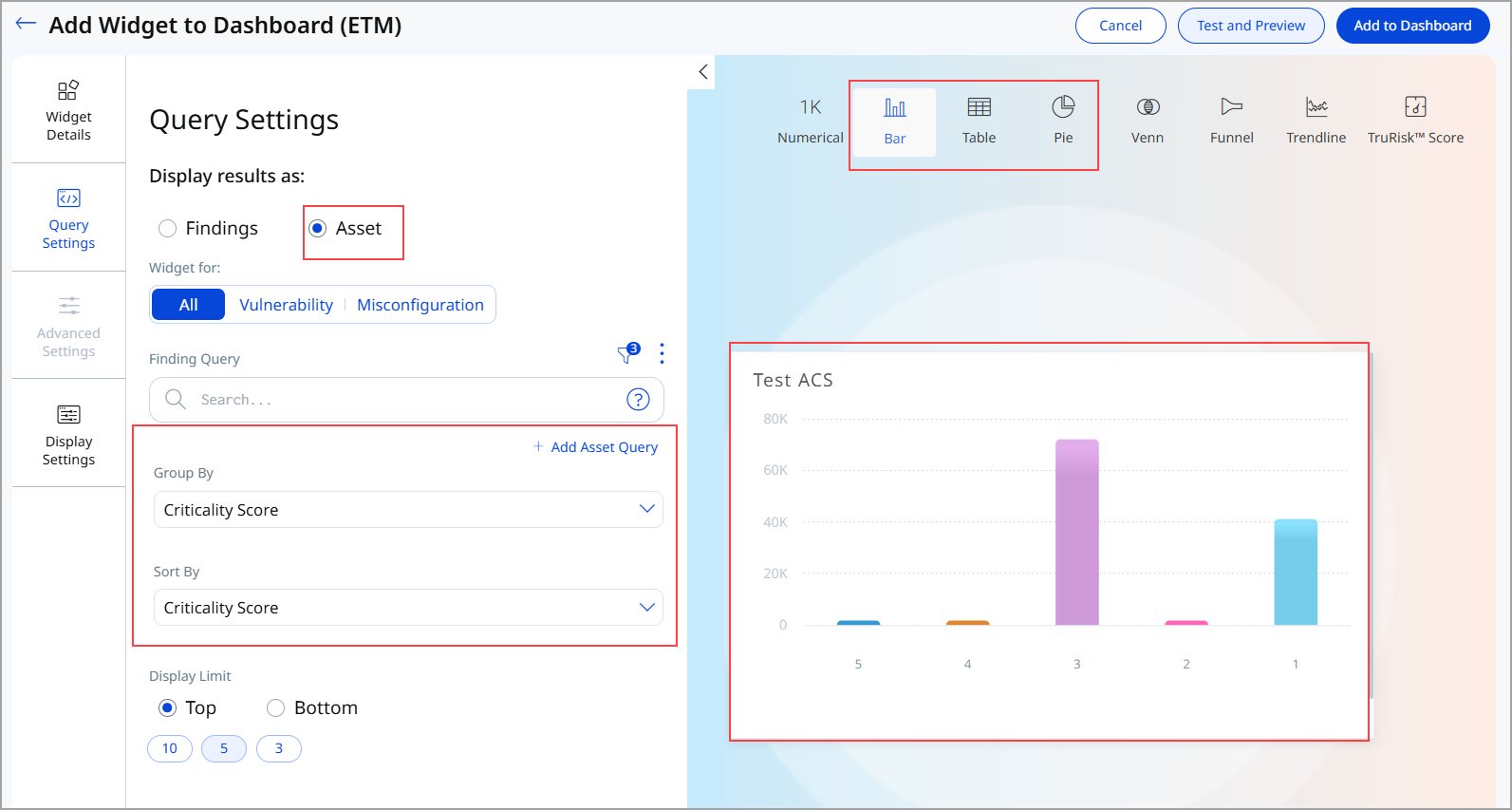
We introduced improved sorting capabilities for widgets that support grouping by Criticality Score (ACS). This sorting is available for Bar, Table, and Pie widgets.
The following enhancements have been made:
- Widgets of type Bar, Table, and Pie that use Group By: CriticalityScore now support sorting directly by Criticality Score.
- A new Sort By Criticality Score (Descending) option has been added for these configurations.
Previously, Bar widgets were limited to sorting by count. This enhancement introduces criticality-based sorting for bar widgets, enabling more intuitive and security-focused data visualization. This enhancement enables:
- Clearer prioritization of high-risk items
- Improved readability of bar charts
- Strengthened data analysis aligned with security criticality
You can edit your existing widget or select the Sort By option while creating a new Bar, Table, or Pie Widget.
To add the widget to your dashboard, navigate to Dashboard, click Add Widget, and then add Build your Widget. You can view the option in Query Settings.
Introduced AI-Generated Title Indicator for CVE Details
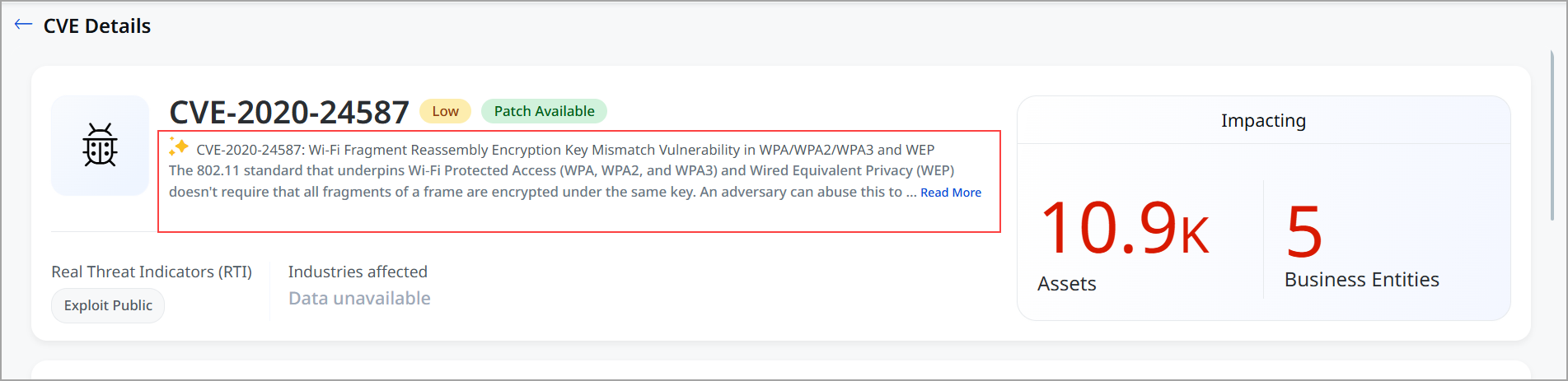
We introduced a visual indicator to highlight when a CVE title is generated using AI. The  icon is now displayed alongside the title on the CVE Details page. This icon signifies that the displayed title is generated using AI.
This enhancement improves transparency by clearly indicating the origin of the CVE title. You can quickly identify when AI-generated content is being used, helping them better assess and interpret the information.
Now you have greater clarity and trust in the displayed data, along with improved awareness of AI-assisted content within CVE analysis.
Introduced Tokens for Risk Management Tab
|
Token |
Tab |
Description |
|---|---|---|
|
finding.truConfirm.isApplicable |
Risk Management > All Risk Management > Vulnerabilities |
Search whether a TruConfirm assessment can be launched for the given CVE ID.
|
|
finding.truConfirm.status |
Risk Management > All Risk Management > Vulnerabilities |
Select a TruConfirm status (for example, Exploitation Validated, Exploitation Ruled Out, Exploit Inconclusive, or Validation Available) to filter findings based on their TruConfirm assessment results.
|
|
finding.truConfirm.statusDate |
Risk Management > All Risk Management > Vulnerabilities |
Search when the TruConfirm status was last updated for a finding. This timestamp reflects the completion of a TruConfirm scan and the subsequent pipeline update for the associated CVE ID.
|
Introduced a New Token for Assets
|
Token |
Tab |
Description |
|---|---|---|
|
asset.uid |
|
Search for assets by their unique identifier. asset.uid |
Issues Addressed
There are no notable customer issues in this release.