File Integrity Monitoring Release 4.9.1
April 20, 2026
Extended Support for Agentless FIM on Additional Network Devices
We have extended support for Agentless File Integrity Monitoring (FIM) to additional network device technologies. This enhancement enables you to monitor configuration or file changes on these devices without installing an agent.
Refer to the following table for the newly-supported technologies, along with their corresponding QIDs:
| Supported Technologies | Supported QIDs |
|---|---|
| Cisco IOS 15 | 45634 |
| Cisco IOS 17 | 45661 |
For more details, refer to Platform Availability Matrix for Agentless FIM
Download FIM Network Devices Report with Technology and Last Scanned Date Information
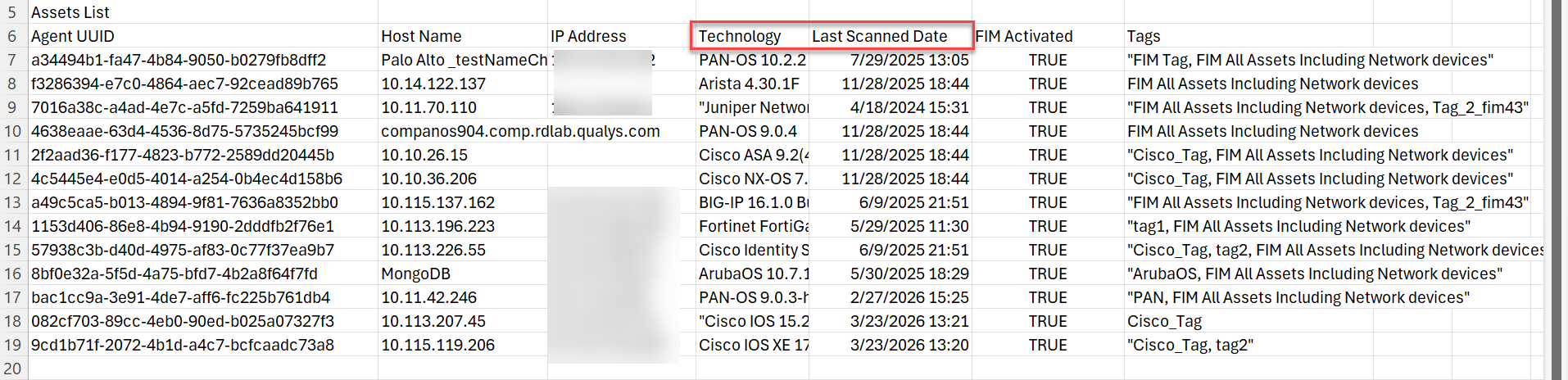
The File Integrity Monitoring Network Devices report (FIM Assets > Downloading Network Devices) now includes two new columns: Technology and Last Scanned Date in the downloaded CSV file. The enhanced report provides you with clearer operational insights by maintaining consistent monitoring across all network devices.
Refer to the image below, which shows the new columns displaying details about network devices, including Technology and Last Scanned Date with a timestamp.
For more details, refer to Downloading Network Devices.
Updated QQL Tokens
We have now updated the following QQL token names for Event Tokens and Asset Tokens to align with the Token Standardization available in the Old and New Search Token Mappings topic.
Event Tokens
| Old Token Name | New Token Name |
|---|---|
| asset.agentId | qualys.agent.id |
| agent.id |
Asset Tokens
| Old Token Name | New Token Name |
|---|---|
| agentService.httpStatus | qualys.agent.httpStatus |
| agent.httpStatus | |
| agentService.osStatus | qualys.agent.osStatus |
| agent.osStatus | |
| agentService.status | qualys.agent.status |
| agent.status | |
| agentService.statusCode | qualys.agent.statusCode |
| agent.statusCode | |
| agentUuid | qualys.agent.uuid |
| agent.uuid | |
| agentService.updatedDate | qualys.agent.updatedDate |
| agent.updatedDate |
Issues Addressed
The following reported and notable issues are fixed in this release:
| Category/Component | Description |
|---|---|
| FIM Roles and Permissions | The super admin can now perform all actions on any incident, regardless of the reviewer’s status. |
| FIM Reports > Report Rules | We fixed an issue where report generation for File Path (under Event Source Type) was failing due to spaces and special characters. Now, report generation works correctly for the File Path without fail. |
| FIM Reports > Report Rules | We fixed an issue when users used to select the Report Query profile.name, it was incorrectly replaced with profile.file.name on the View page upon rule creation. It did not retain the string profile.name as is.
Now, the View page accurately displays the query string-profile.name. The system retains the string as is. |
| FIM Prerequisite script |
We fixed an issue where the FIM prerequisite script was running automatically on assets even when the FIM module was not enabled. Now, the script does not run for FIM-disabled assets. |
| FIM Report > Report Rules | We fixed an issue where the system generated the scheduled report notification emails with incorrect recipient information. The system replaced the intended recipient in the To field with the report creator’s email address, moved the intended recipient to CC, and added the creator’s name in the email body.
We have now improved the scheduled report email workflow to ensure notification emails are sent to the correct recipients as configured. The system now sends the report directly to the email address entered in the To field, preserves the configured recipient fields, and no longer inserts the report creator’s name. This update ensures accurate delivery and better control over email settings. |