Create Workspace for V2 Integrations
You need to create a workspace on Azure Sentinel console for Azure Sentinel integration. After creating a workspace, you can use the workspace details such as workspace ID and primary key during integration.
Register an Application in Entra ID
- Navigate to Azure Active Directory > App registrations.
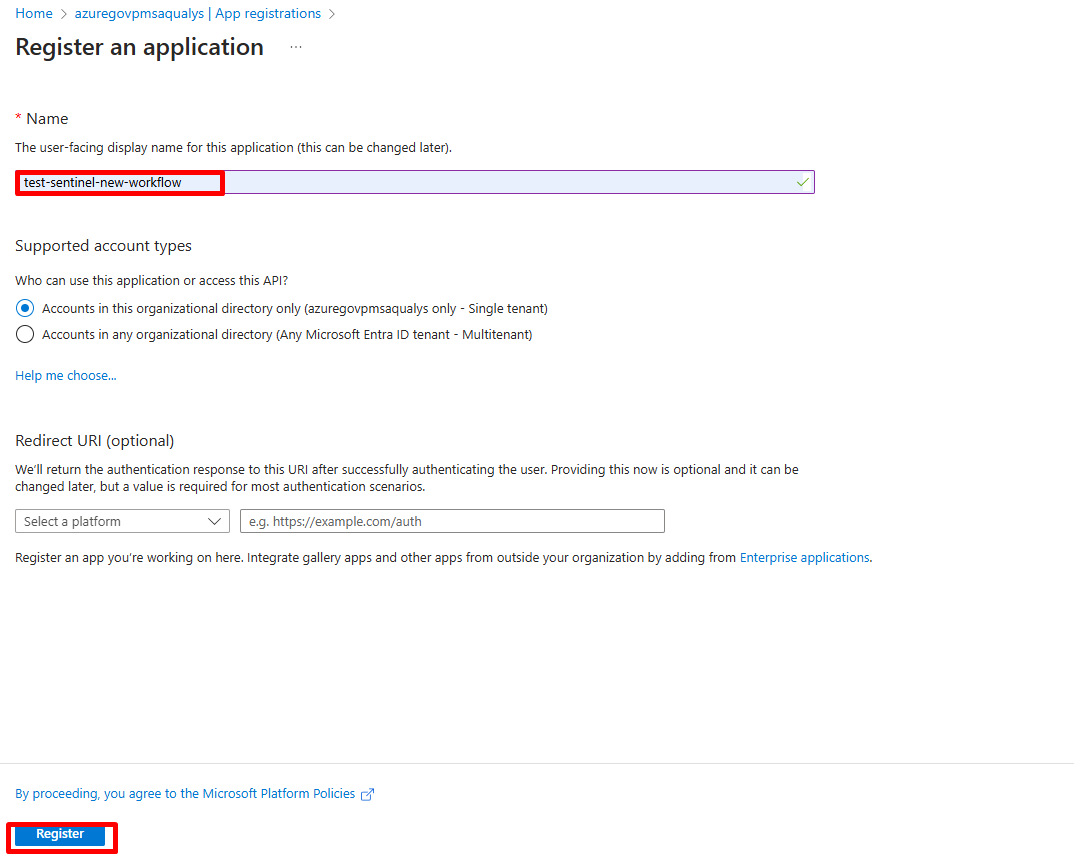
- Create a new App Registration.
- Record the following values (to be used in later steps):
- Application (Client) ID
- Directory (Tenant) ID
- Assign required API permissions by navigating to API Permission > Add a Permission > APIs my organization uses
- Microsoft Graph > ConfigurationMonitoring.ReadWrite.All
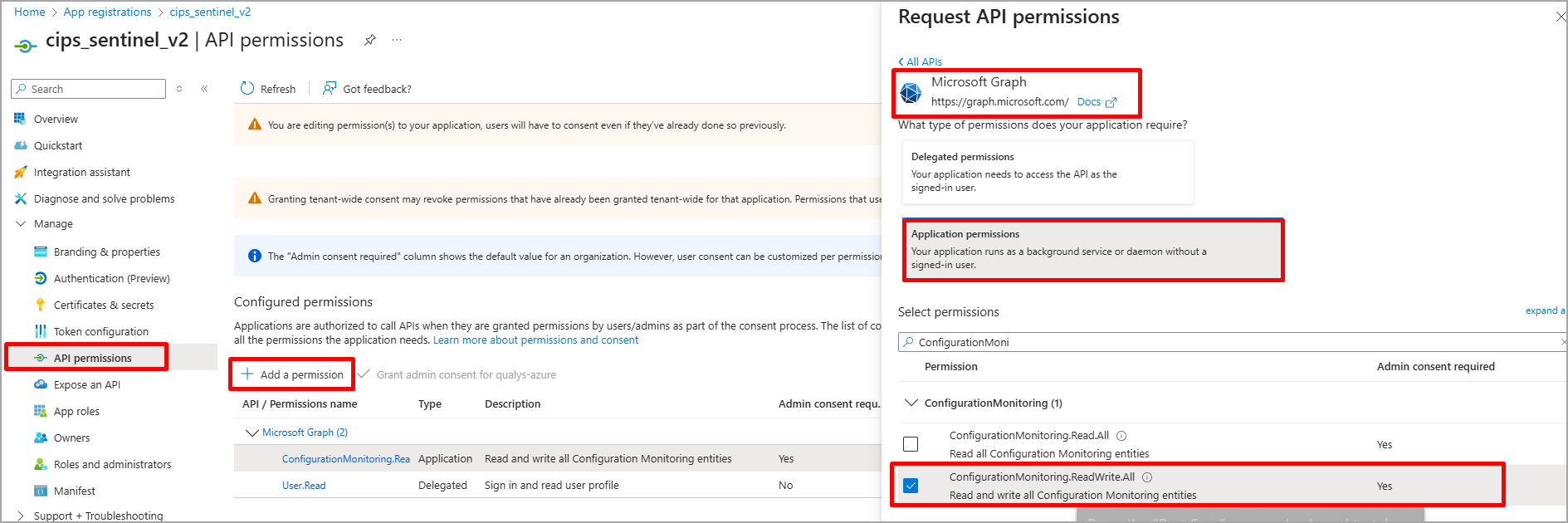
- Microsoft Graph > ConfigurationMonitoring.ReadWrite.All
-
Generate a Client Secret

Note the following values: Client Secret Value.
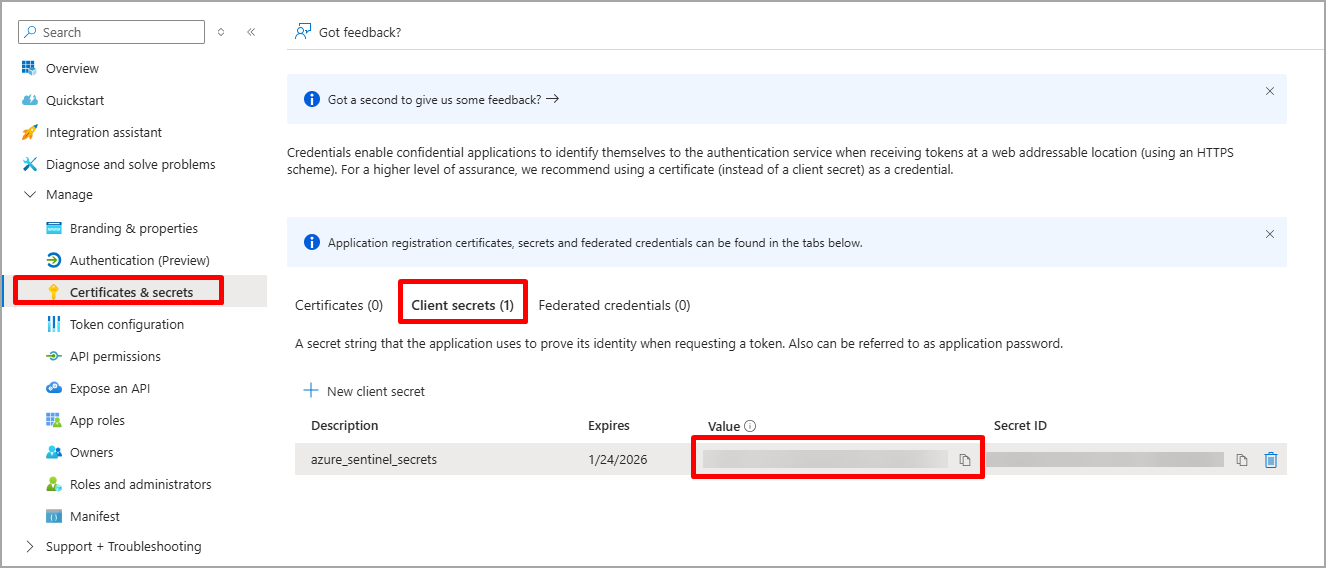
Create a Data Collection Endpoint (DCE)
- Navigate to Azure Monitor > Data Collection Endpoints (DCE).
- Create a new DCE.
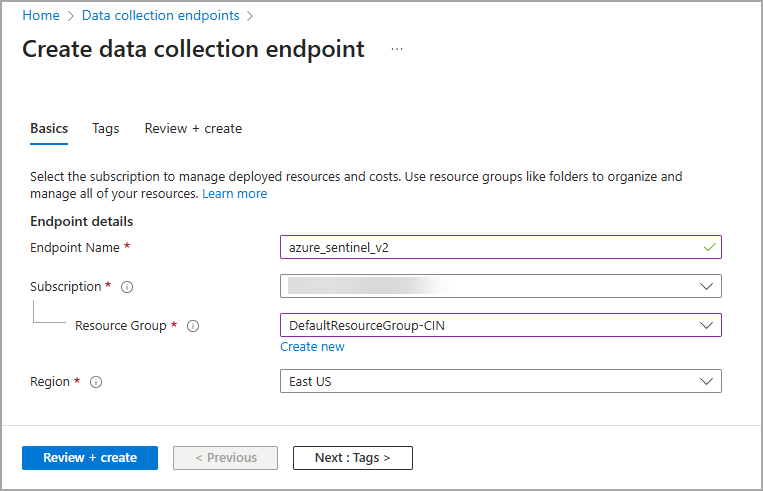
- Record the Log Ingestion API URL associated with this endpoint.
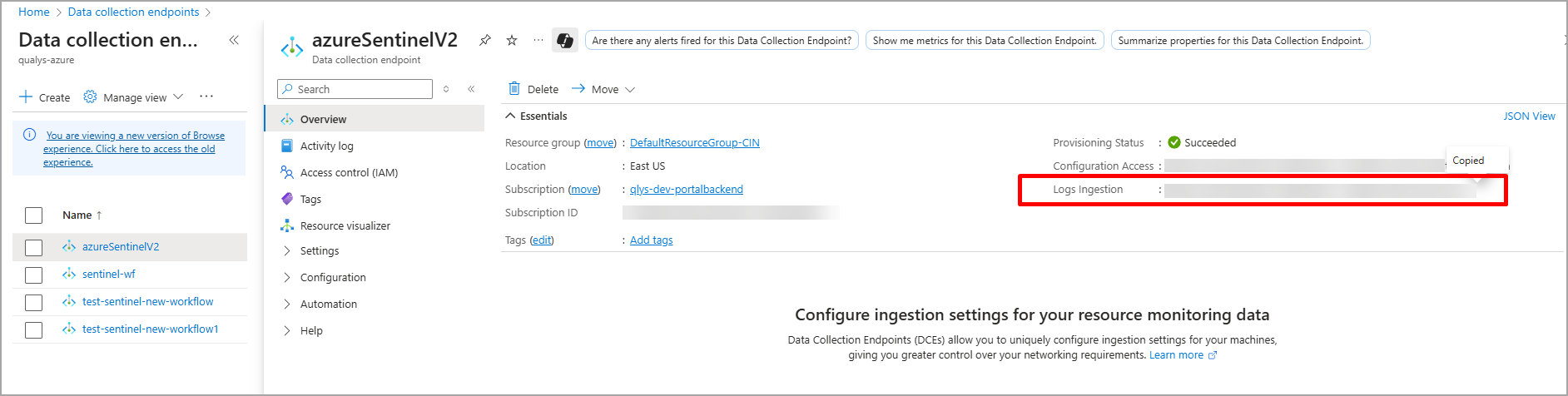
Create a Data Collection Rule (DCR) and Custom Table
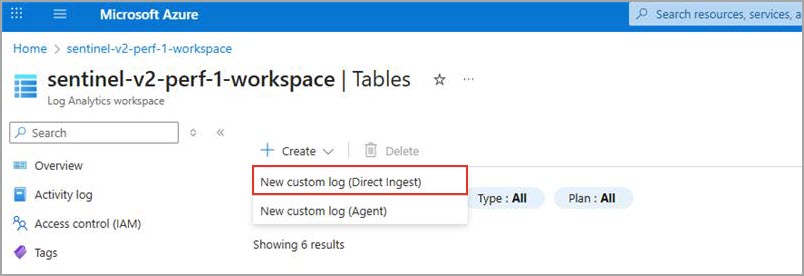
- Navigate to Log Analytics workspaces > Tables.
- Select Create > New custom log (Direct Ingest).
Associate the previously created DCE. - Upload your custom log schema in JSON format.
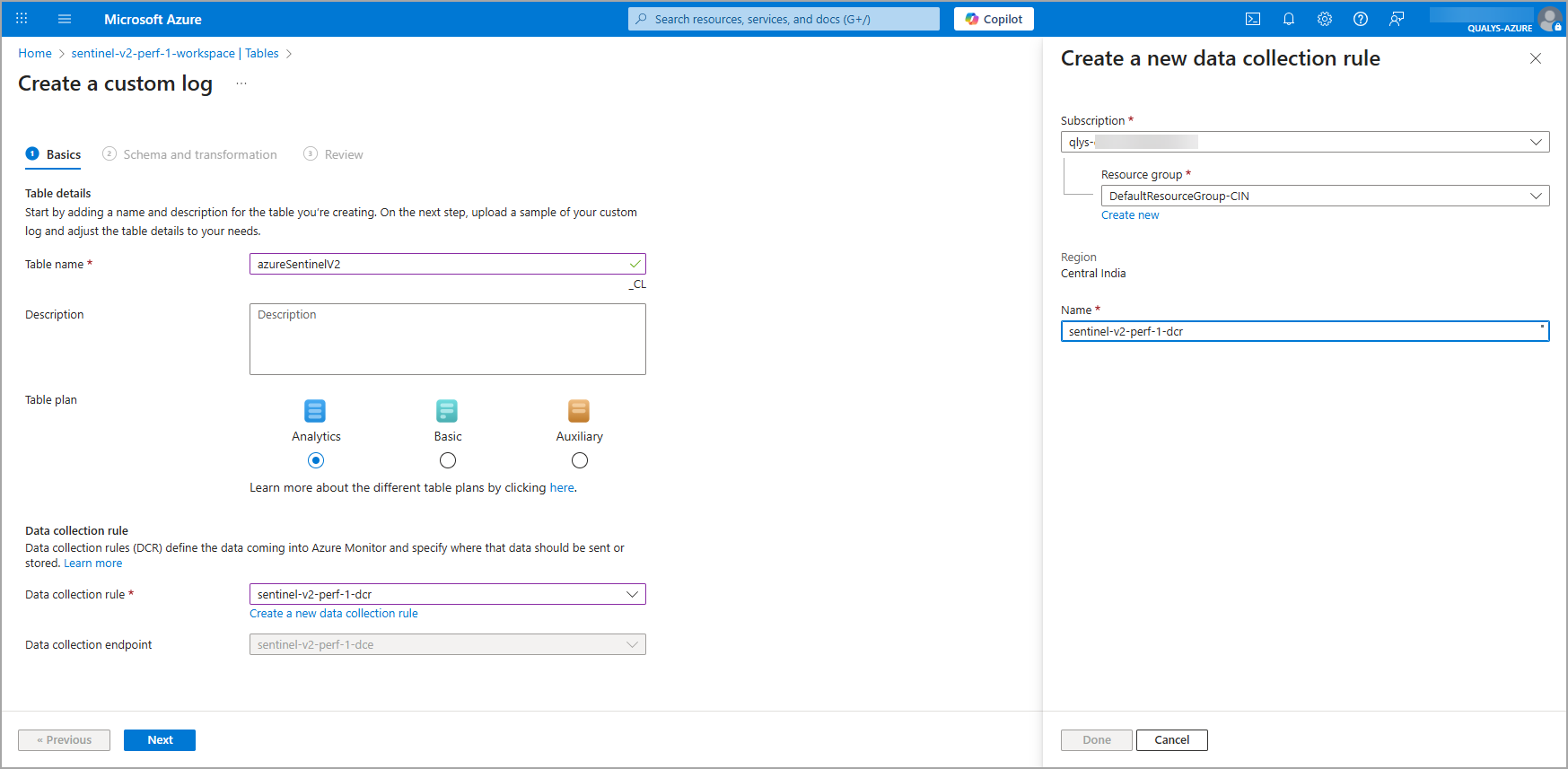
Custom Log SchemaCustom Log Schema
{
"assetCriticalityScore": 75,
"assetId": xxxxx,
"assetRiskScore": 42,
"assetUuid": "abc-xyz-asset-uuid",
"category": "SSL/TLS",
"cveLinks": "https://nvd.nist.gov/vuln/detail/CVE-2024-1234, https://nvd.nist.gov/vuln/detail/CVE-2024-2345",
"cveTitles": "CVE-2024-1234, CVE-2024-2345",
"cvssScoreV2": "6.4",
"cvssScoreV3": "8.1",
"cvssVectorV2": "AV:N/AC:L/Au:N/C:P/I:P/A:N",
"cvssVectorV3": "CVSS:3.1/AV:N/AC:L/PR:N/UI:N/S:U/C:H/I:H/A:N",
"description": "SSL certificate has expired and needs immediate attention",
"detectionId": 54321,
"dns": "host.example.com",
"exploitable": "NO",
"firstFoundDateTime": "2024-06-01T10:00:00Z",
"firstReopenedDateTime": "2024-06-05T14:00:00Z",
"firstVMAuthScanDateTime": "2024-06-01T09:15:00Z",
"firstVmScannedDateTime": "2024-06-01T09:00:00Z",
"fqdn": "myhost.example.com",
"hostId": 101,
"hostname": "myhost.local",
"impact": "Expired certificates may compromise data confidentiality.",
"impactDescription": "May lead to security warnings and potential MITM attacks",
"ip": "192.168.1.1",
"ipv6": "2001:0db8:85a3:0000:0000:8a2e:0370:7334",
"isDisabled": 0,
"isIgnored": 0,
"lastFixedDateTime": "2024-06-15T14:30:00Z",
"lastFoundDateTime": "2024-06-10T10:00:00Z",
"lastProcessedDateTime": "2024-06-12T08:15:00Z",
"lastReopenedDateTime": "2024-06-08T16:20:00Z",
"lastTestDateTime": "2024-06-11T16:45:00Z",
"lastUpdateDateTime": "2024-06-12T08:00:00Z",
"lastVMAuthScanDateTime": "2024-06-10T11:30:00Z",
"lastVMAuthScanDuration": 900000,
"lastVMScanDuration": 1800000,
"lastVmScannedDateTime": "2024-06-10T12:45:00Z",
"mitigation": "Replace expired SSL certificate with valid one",
"netBios": "MYHOST",
"networkId": 67890,
"networkName": "Production Network",
"os": "Windows 10",
"patchable": "YES",
"port": 443,
"product": "CIPS_VM",
"protocol": "TCP",
"publishedDateTime": "2024-01-15T00:00:00Z",
"qdsScore": 85,
"qgHostId": 98765,
"qId": 45001,
"result": "Scan detected expired certificate on port 443.",
"resultTruncated": false,
"schemaVersion": "1.0",
"severity": 5,
"solution": "Update the SSL certificate with a valid and trusted CA-signed certificate.",
"ssl": "true",
"status": "Active",
"threat": "The SSL certificate on the server has expired and may allow attackers to impersonate the site.",
"timesFound": 3,
"timesReopened": 2,
"qidTitle": "SSL Certificate Expired",
"trackingMethod": "IP",
"qidType": "VULNERABILITY",
"vendorLinks": "https://msrc.microsoft.com/update-guide/vulnerability/CVE-2024-1234, https://access.redhat.com/security/cve/CVE-2024-1234",
"vendorTitles": "Microsoft, Red Hat",
"port": 8080,
"TimeGenerated": "2024-01-15T00:00:00Z"
}
Record the DCR Rule ID.
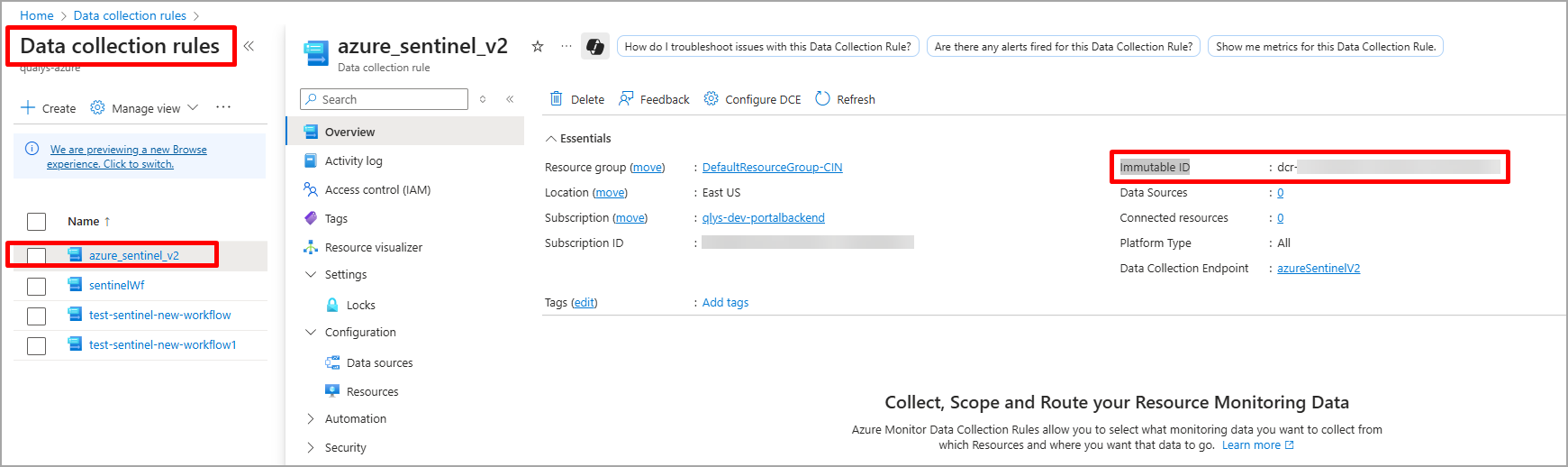
Verify that the Custom Table (e.g., Custom-azureSentinelV2_CL) is properly configured in the DCR.
Assign IAM Permissions
Navigate to the created DCR > Access Control (IAM).
Assign required roles (for example, Monitoring Metrics Publisher) to the application or managed identity.
Update Data Stream Configuration
Launch the Azure CLI Console.
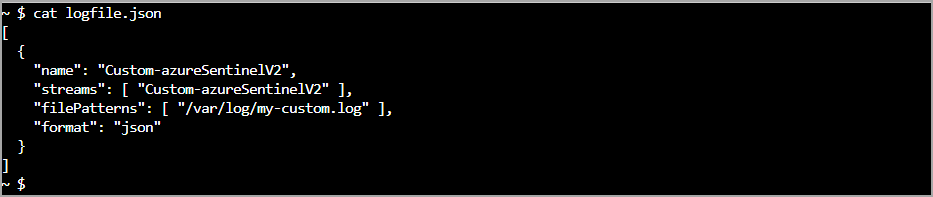
Run the following command to create a file logfile.json with stream details:
$ cat logfile.json
[

  {

    "name": "Custom-azureSentinelV2",

    "streams": [ "Custom-azureSentinelV2" ],

    "filePatterns": [ "/var/log/my-custom.log" ],

    "format": "json"

  }

]
Update the DCR with the following command:
az monitor data-collection rule update \

  --name <data_collector_rule_name> \

  --resource-group <resource_group_name> \

  --set [email protected]
