Subscription Info API Overview
Welcome to the Qualys Subscription Info API!
With the Qualys Subscription Info API, you can retrieve details about your Qualys subscription and its associated metadata, such as product details, license information, and service entitlements.
Benefits of Qualys Subscription Info API
- Automating Subscription Management: You can automate tracking your subscription and licensing information.
- Integrations: You can integrate Qualys Subscription Info API into custom workflows and third-party applications for monitoring the status of Qualys products.
- Reporting: You can use the Qualys Subscription Info API to generate reports or alerts for your subscription usage, available services, and future license expiration.
Using Qualys Subscription Info API
Qualys API Server URL — We will give you the basics of making API requests. The base URL depends on the platform where your Qualys account is located.
Authentication — We will explain the authentication method. API requests must authenticate using Qualys credentials.
Using Curl — Get tips on using the Curl command-line tool to make API requests. Every curl request must have -u parameter with a Qualys login and password. Keep in mind this API does not support JSON calls at this time.
The Subscription Info API does not support JSON requests and responses at this time.
Qualys API Server URL
The Qualys API URL you should use for API requests depends on the Qualys platform where your account is located.
Click here to identify your Qualys platform and get the API URL.
This documentation uses the API server URL for Qualys US Platform 1 (https://qualysapi.qualys.com) in sample API requests. If you’re on another platform, please replace this URL with the appropriate server URL for your account.
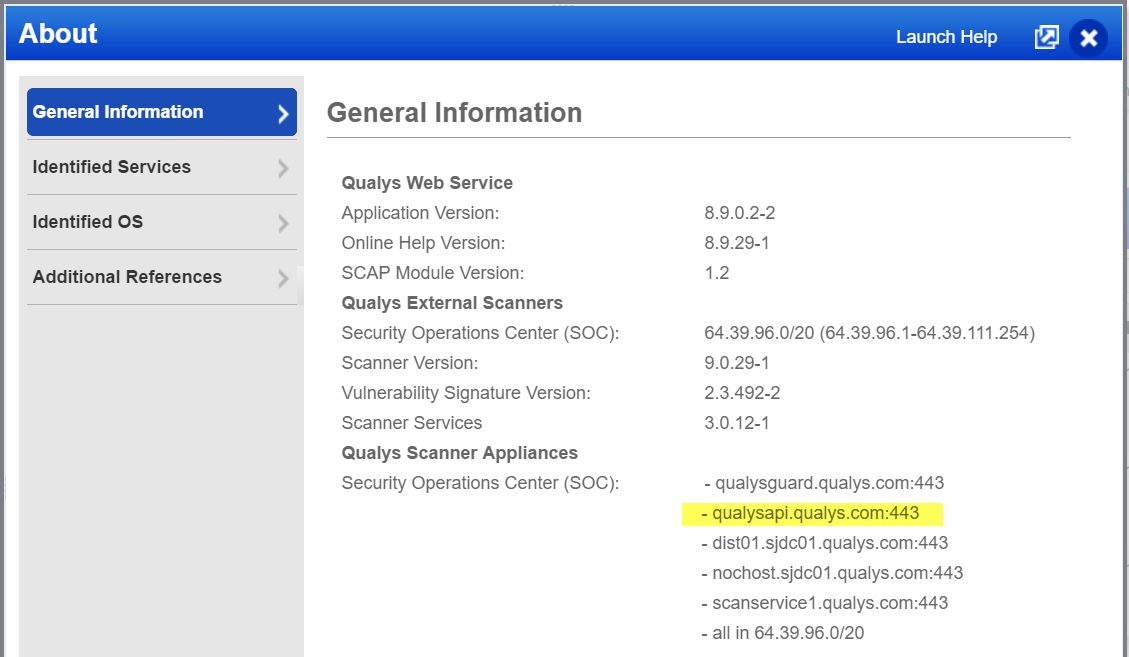
Still have questions? You can easily find the API server URL for your account. Just log in to your Qualys account and go to Help > About. You’ll see this information under the Security Operations Center (SOC).
Authentication
The application must authenticate using Qualys account credentials (user name and password) as part of the HTTP request. The credentials are transmitted using the Basic Authentication Scheme over HTTPS. For more information, see the Basic Authentication Scheme section of RFC#2617:http://www.faqs.org/rfcs/rfc2617.html
The exact method of implementing authentication will vary depending upon the programming language used.
Example
Basic authentication - recommended option:
curl -u "USERNAME:PASSWORD"

"https://qualysapi.qualys.com/api/2.0/fo/subscription/index.php"
Where, qualysapi.qualys.com
Using Curl
Curl is a multi-platform command-line tool for transferring data using multiple protocols. This tool is supported on many systems, including Windows, Unix, Linux and Mac. In this document Curl is used in the examples to build Qualys API requests using the HTTP over SSL (https) protocol, which is required.
Want to learn more? Visit http://curl/haxx/se
The following Curl options are used according to different situations:
| Option | Description |
|---|---|
| -u “LOGIN:PASSWORD” | This option is used for basic authentication. |
| -X “POST” | The POST method is required for some requests. |
| -H “content-type” | This option is used to provide a custom HTTP request header parameter for content type, to specify the MIME type of the curl’s payload. |
| --data-binary | This option is used to specify the POST data. |
The sample below shows a typical Curl request using options mentioned above and how
they interact with each other.
curl -H "content-type: text/xml" -X "POST" --data-binary @-

"https://example.com" < file.xml
Where,
- -X “POST”: Tells Curl to execute the request using the HTTP POST method.
- --data-binary @- : Tells Curl to read the POST data from its standard input (stdin).
- < file.xml: This file is interpreted by the shell to redirect the content of the file to the stdin of the command.
- -H “content-type: text/xml”: Tells Curl the POST data in “file.xml” is XML in text format.
Important Points for using Subscription Info APIs
Check the following important points before using Subscription Information APIs.
- Both export and import APIs need to work together. The import API requires the export API output file as input to ensure complete user information and preference data are included.
- You need to export user data, make the necessary modifications to the existing keys in the XML, and then import the updated file to achieve the desired data updates.
- The entire exported XML file must be used as input, as the import API is not designed for partial updates.
- Importing manually modified or incomplete XML files can lead to issues for that particular user account due to the removal of required user properties in import.
Qualys API Best Practices
The API Best Practices are designed for Qualys users with a general knowledge of programming who want to implement best practices for improving the development, design, and performance of their programs that use the Qualys API.
Refer to Qualys API Best Practices to learn more about how to leverage the best from Qualys APIs in your organization.
Get API Notifications
Subscribe to our API Notifications RSS Feeds for announcements and the latest news.